This is a deep, one-stop study guide for the Salesforce Certified Platform App Builder exam. It covers every section of the official exam outline with explanations, quick-reference tables, diagrams and practice questions with answers and explanations, then walks through a study plan built on spaced repetition, active recall and hands-on practice.
Updated for 2026: this guide now uses the current exam outline and weights, replaces Process Builder advice with Flow (Workflow Rules and Process Builder reached end of support on December 31, 2025), links to the current exam guide on Salesforce Help, and adds practice questions for every section.
| Section | Weight | Approx. questions |
|---|---|---|
| Salesforce Fundamentals | 18% | ~11 |
| Data Modeling and Management | 20% | ~12 |
| Business Logic and Process Automation | 32% | ~19 |
| User Interface | 17% | ~10 |
| App Deployment | 13% | ~8 |
| Exam fact | Detail |
|---|---|
| Format | 60 scored multiple-choice/multiple-select questions, plus up to 5 unscored |
| Time | 105 minutes |
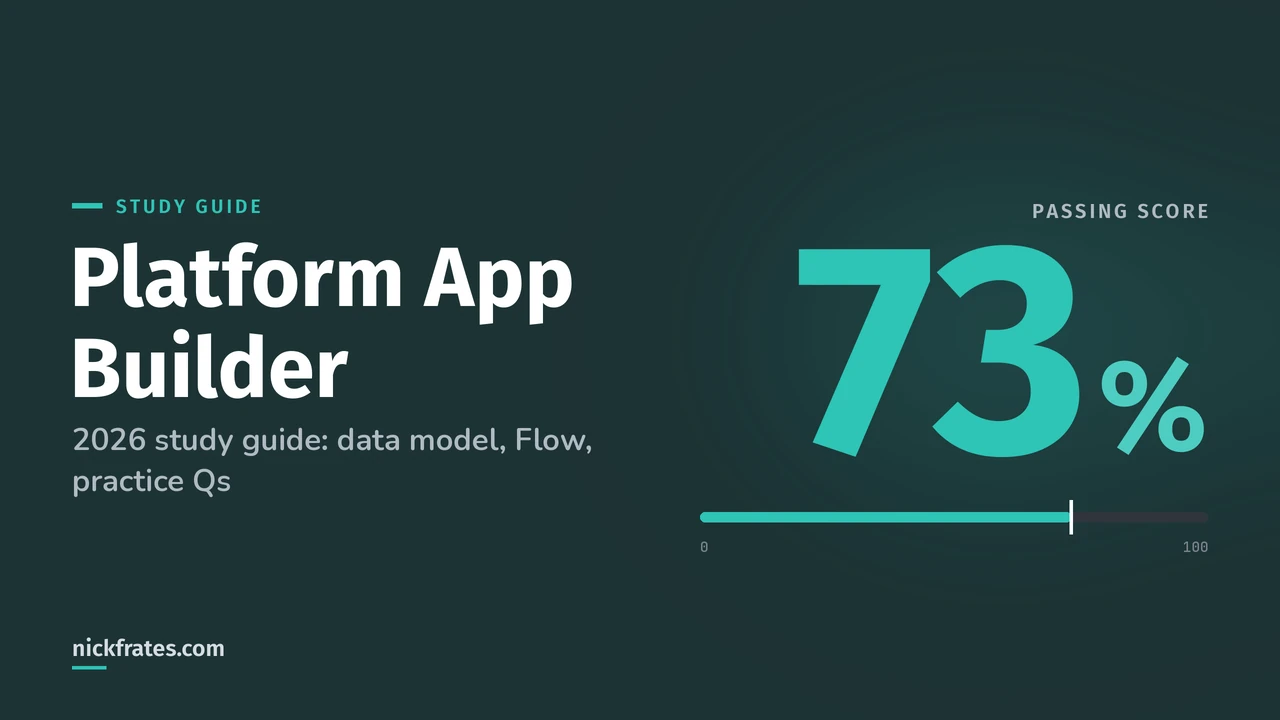
| Passing score | 73% (about 44 of 60 scored questions) |
| Fee | $200, retake $100, plus applicable taxes (see what every Salesforce certification costs) |
| Prerequisites | None |
| Delivery | Onsite or online proctored, registered through Trailhead Academy and delivered by Pearson VUE |
| Official resources | Exam guide, credential page and prep trail |
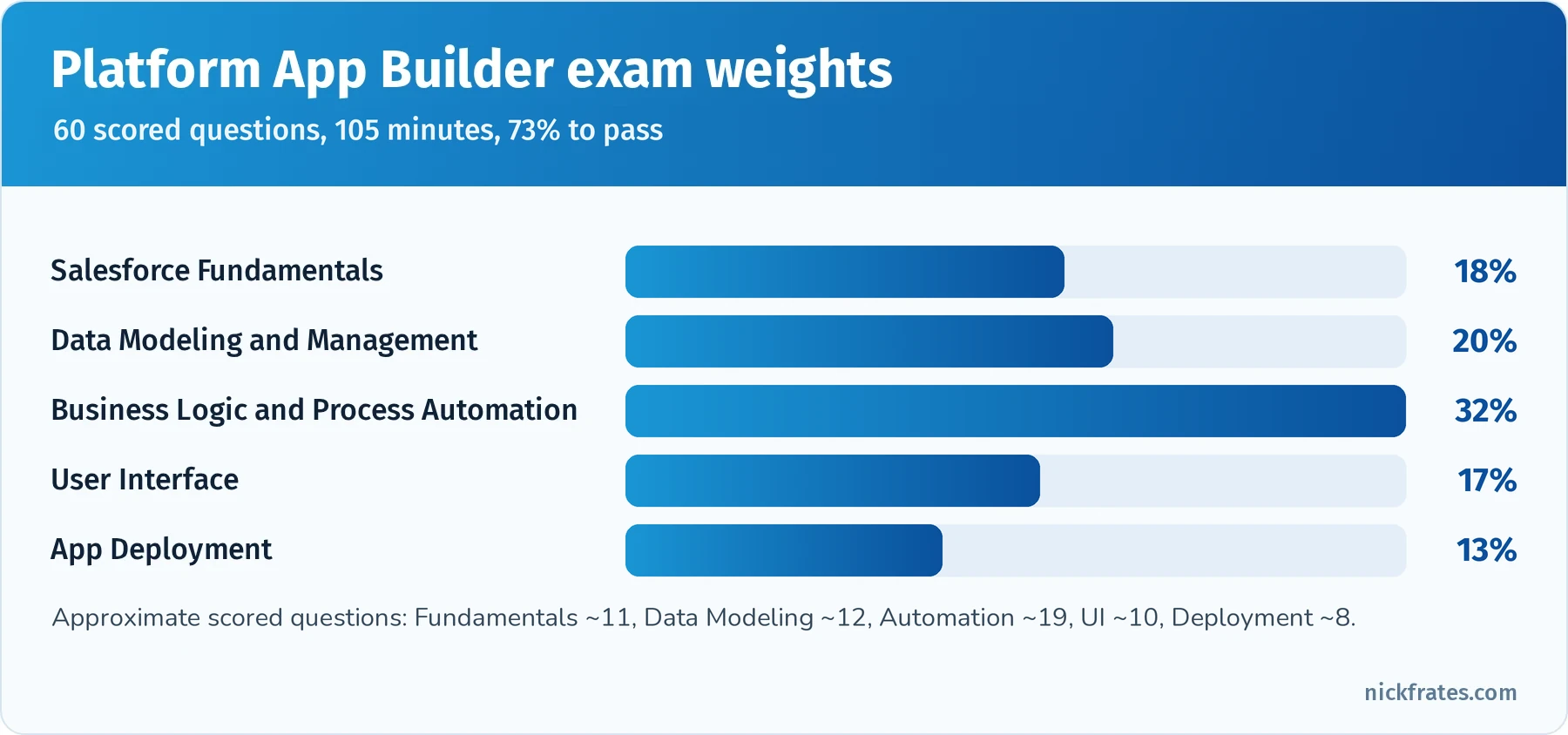
Automation and data modeling are the two largest sections, together 52% of the exam.
Took the exam or a practice test? Enter your section scores in my Salesforce exam score calculator to see your estimated overall score and which sections are costing you the most points.
Cert Lab by Nick Frates
Get the Platform App Builder Cert Lab
Lessons, practice questions and flashcards for all 5 App Builder exam sections, built from the official exam guide.
Start the App Builder Cert Lab, $9.99 →Contents
- What changed for 2026
- Step 1: Understand the exam format and objectives
- Salesforce Fundamentals (18%)
- Data Modeling and Management (20%)
- Business Logic and Process Automation (32%)
- User Interface (17%)
- App Deployment (13%)
- Step 2: Gather official resources and study materials
- Step 3: Use effective study techniques (spaced repetition and active recall)
- Step 4: Get hands-on practice in a Salesforce org
- Step 5: Use practice exams and self-assessment
- Step 6: Ace exam day with confidence and strategy
- Worked example: build a recruiting app end to end
- Common exam traps
- Flashcard terms by section
- Mixed practice exam: 10 more questions
- Quick-reference cheat sheet
- Frequently asked questions
- Related study guides
What changed for 2026
- Flow is the answer for declarative automation. Salesforce ended support for Workflow Rules and Process Builder on December 31, 2025. You may still see them mentioned in older practice questions, but any new automation should be built in Flow, and the Migrate to Flow tool exists to convert old rules.
- Correct weights. Business Logic and Process Automation (32%) is by far the largest section, followed by Data Modeling and Management (20%) and Salesforce Fundamentals (18%). Together, data modeling and automation are 52% of the exam.
- Exam guide location. The official exam guide is now a Salesforce Help article, not a downloadable PDF.
- Registration moved. Exams are registered through Trailhead Academy and delivered by Pearson VUE (the move from Webassessor happened in July 2025).
- Agentforce is everywhere in Salesforce, but not in this outline. The App Builder outline stays focused on declarative app building. If you want an AI credential next, see the Agentforce Specialist path mentioned at the end.
Step 1: Understand the exam format and objectives
Before you start studying, get familiar with what the exam entails. The Platform App Builder exam has 60 scored multiple-choice and multiple-select questions (plus up to 5 unscored questions that don't affect your result), a time limit of 105 minutes and a passing score of 73%. That means you need about 44 of the 60 scored questions correct. Knowing this helps you pace yourself during practice and on the real exam: about one minute and 45 seconds per question. If you're planning which certifications to take, see Salesforce certifications for admins.
The questions are mostly scenario-based. You'll read a short business requirement (a recruiting team needs to track interviews, a sales manager wants a field to update automatically, a user can't see a record) and choose the solution an App Builder should recommend. Salesforce strongly prefers the simplest standard, declarative solution that fully meets the requirement, so "write Apex" is rarely right unless the scenario clearly goes beyond declarative limits.
Action item: open the official exam guide and use it as your master checklist. Skim the objectives for each section and mark the ones you already know, the ones that are fuzzy and the ones that are new. The rest of this guide follows those sections in order.
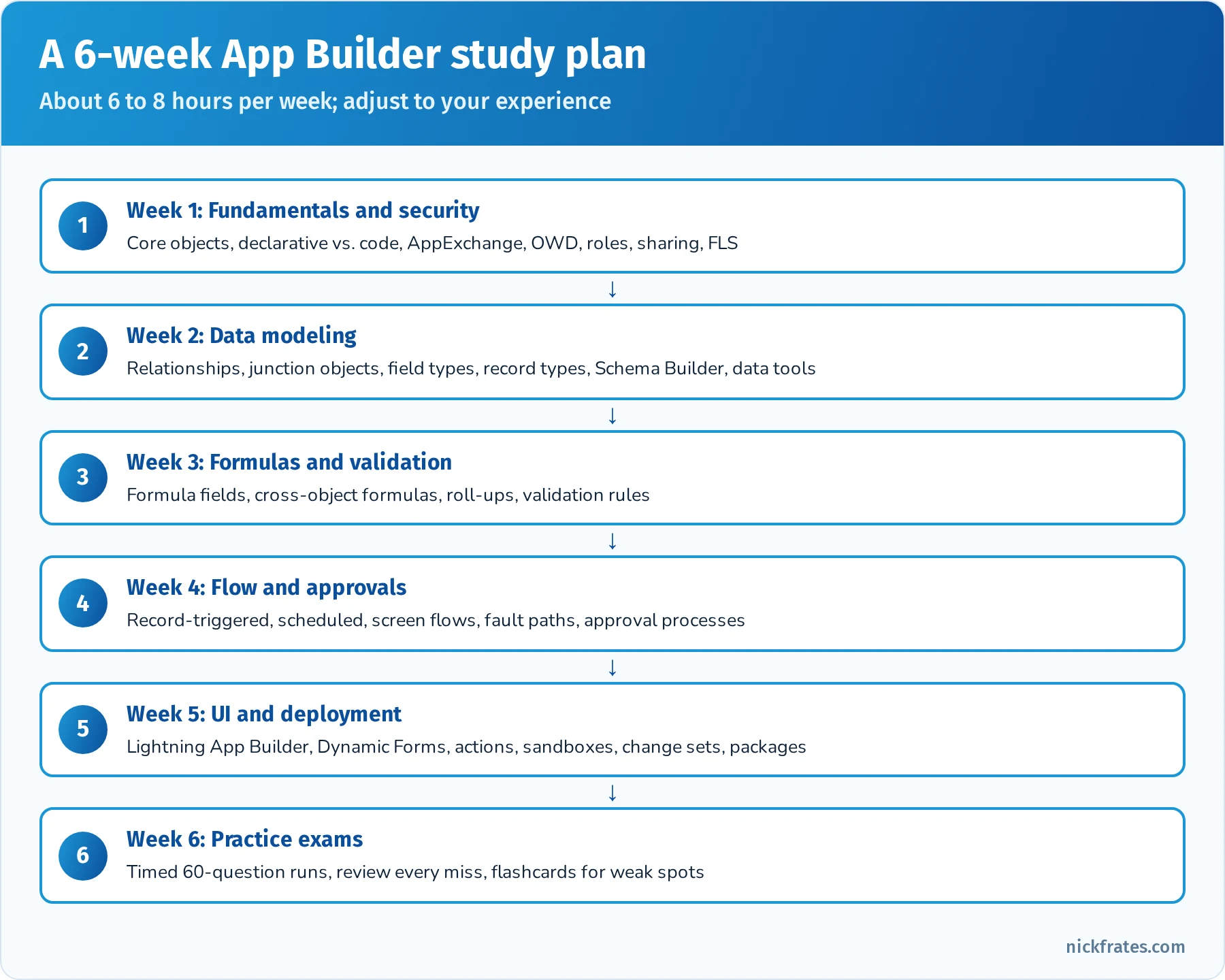
A sample six-week plan. Compress or stretch it to fit your experience. Short on time? Try my 4-week App Builder study plan.
Salesforce Fundamentals (18%)
This section checks whether you understand what Salesforce can do out of the box, where declarative tools stop and code begins, and how the security and sharing model controls access to data. It's the third-largest section, and its concepts show up inside questions from every other section too.
Core CRM objects and their capabilities. Know the standard objects and how they relate: Accounts (companies), Contacts (people at accounts), Leads (unqualified prospects that convert into an Account, Contact and optionally an Opportunity), Opportunities (deals, with stages, amounts and close dates), Products, Price Books and Opportunity Products (line items), Cases (customer issues), Campaigns, Activities (Tasks and Events) and Users. The exam likes questions about which standard object or feature already solves a requirement before you build anything custom. For example, tracking potential revenue by stage is what Opportunities and the sales pipeline are for, and tracking customer issues with queues, assignment rules and escalation is what Cases are for.
Declarative vs. programmatic customization. Declarative ("clicks, not code") tools include custom objects and fields, formula fields, validation rules, roll-up summaries, Flow, approval processes, Lightning App Builder, Dynamic Forms, record types and page layouts. Programmatic tools include Apex, Lightning Web Components, Visualforce and APIs. Choose code when the requirement goes beyond what declarative tools can do: complex transactions that need fine-grained error handling, very high data volumes, a fully custom user interface, or integrations that need custom logic. Remember the general principle: if a standard feature does the job, it beats a custom solution because it's cheaper to maintain and is upgraded by Salesforce.
AppExchange. AppExchange is Salesforce's marketplace for apps, components, Bolt solutions, Flow solutions and consulting partners. Scenario questions often hinge on recognizing when an existing AppExchange app is better than building from scratch, for example e-signature, document generation or advanced data quality tools. Know that you should evaluate reviews, security review status, license costs and whether the app is managed (upgradable) before installing, and that you can install into a sandbox first to test.
The security and sharing model. Expect several questions on who can see and do what. Access is layered:
- Object-level security comes from profiles and permission sets (Create, Read, Edit, Delete, View All, Modify All). Permission set groups bundle several permission sets for a persona. Salesforce recommends a minimal profile plus permission sets for everything else.
- Field-level security (FLS) controls whether a user can see or edit a field, set on profiles and permission sets. Removing a field from a page layout does not secure it; FLS does.
- Record-level security starts with organization-wide defaults (OWD), the most restrictive baseline (Private, Public Read Only, Public Read/Write, Controlled by Parent). You then open access with the role hierarchy, sharing rules (owner-based or criteria-based), teams (account, opportunity, case), manual sharing, and restriction rules when you need to narrow access for specific users.
- Sharing only ever opens up access beyond OWD; it can't restrict it below the baseline (restriction rules are the exception that filters which records certain users can see).
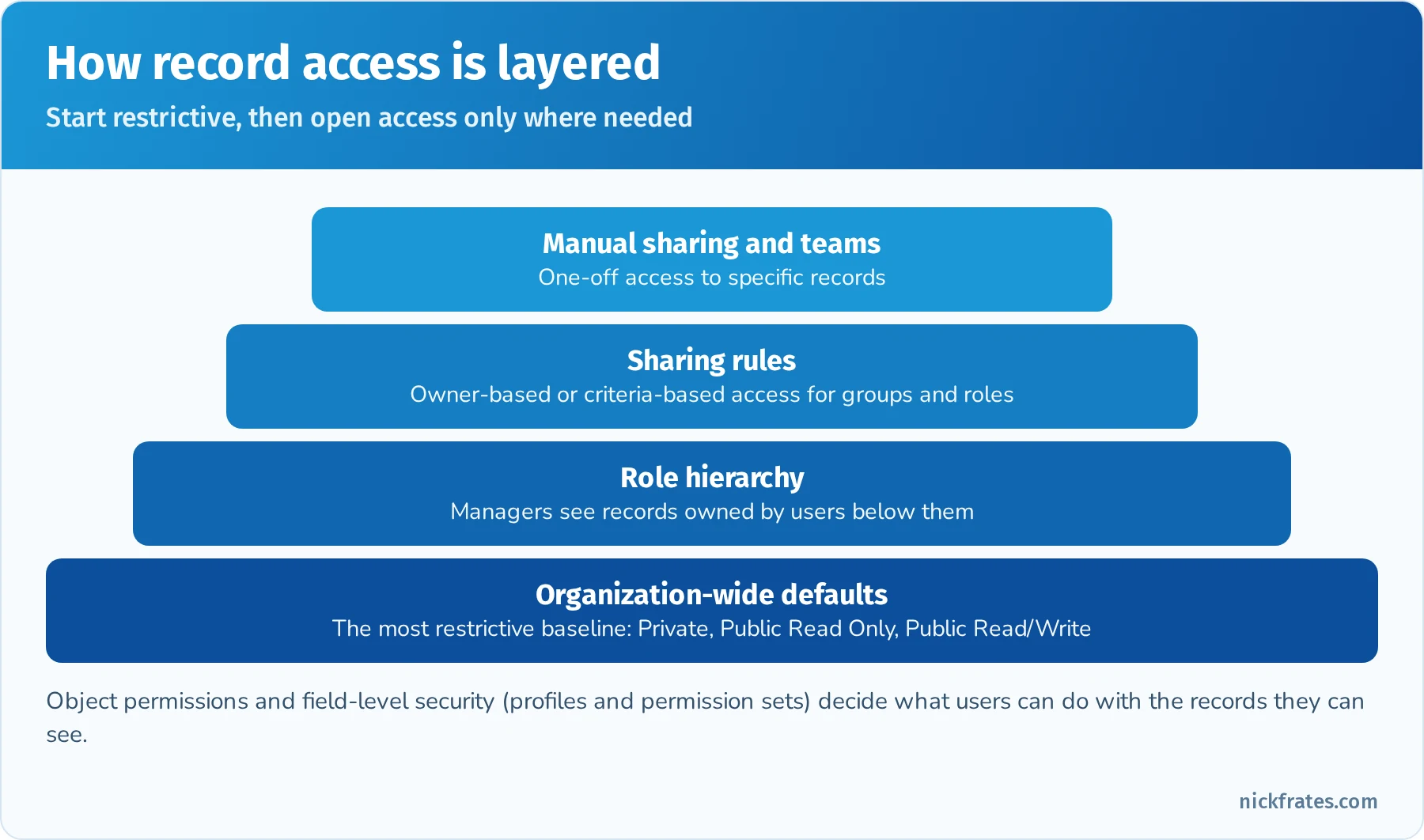
Set the most restrictive baseline with OWD, then open access with the layers above it.
Reports and dashboards basics. Know report formats (tabular, summary, matrix, joined), that report types define which objects and related records a report can include (standard and custom report types, including "with or without" related records), that dashboards display data from source reports and run as a specific user or as the logged-in viewer (dynamic dashboards), and that reporting snapshots can capture data over time. App Builder questions usually tie reporting to the data model: a custom report type is often the answer when a standard report type doesn't show the relationship you need. For calculated columns, see my Salesforce report formulas.
Quick reference: who gets access and how
| Requirement | Feature |
|---|---|
| Users should see only their own records by default | OWD set to Private |
| Managers should see their team's records | Role hierarchy (Grant Access Using Hierarchies) |
| Everyone in the West region should see West accounts | Criteria-based sharing rule |
| One user needs access to one specific record | Manual sharing (or a team) |
| A group of users needs an extra object permission | Permission set (or permission set group) |
| Hide a sensitive field from most users | Field-level security |
| Show different picklist values and layouts by process | Record types plus page layout assignment |
Practice questions: Salesforce Fundamentals
Question 1. Universal Containers' OWD for Opportunity is Private. Sales managers need to see opportunities owned by the reps who report to them. What's the simplest solution?
- A. Change the OWD to Public Read Only
- B. Use the role hierarchy with managers above their reps
- C. Create a manual share for each opportunity
- D. Give managers the Modify All permission
Answer: B. The role hierarchy automatically grants managers access to records owned by users below them. Changing the OWD would expose opportunities to everyone, and Modify All is far too broad.
Question 2. A field containing salary data appears on a page layout, and it must be hidden from all users except HR. What should the App Builder do?
- A. Remove the field from the page layout
- B. Set field-level security so only the HR permission set has read access
- C. Create a validation rule
- D. Use a record type
Answer: B. Only field-level security truly protects the field everywhere (reports, list views, API). Removing it from a layout just hides it on that page.
Question 3. A company needs electronic signatures on contracts within weeks and has no developers. What should the App Builder recommend first?
- A. Build a custom Lightning Web Component
- B. Evaluate an e-signature app on AppExchange and test it in a sandbox
- C. Write an Apex integration
- D. Use a validation rule
Answer: B. AppExchange apps solve common needs quickly and are maintained by the vendor. Building from scratch would take longer and require code.
Question 4. Which requirement most clearly calls for programmatic customization rather than declarative tools?
- A. Show a field only when Stage is Closed Won
- B. Calculate the number of open cases on an account
- C. A highly custom, pixel-specific user interface that combines data from an external system in real time with complex client-side logic
- D. Require a reason when an opportunity is lost
Answer: C. A, B and D are classic declarative use cases (Dynamic Forms, roll-up summary or Flow, validation rule). A fully custom real-time UI with complex logic is where Lightning Web Components and Apex fit.
Question 5. Support agents should see all cases for accounts in their territory, but the Case OWD is Private. Cases are owned by queues. Which feature fits best?
- A. Criteria-based sharing rule on Case using a territory or region field
- B. Change the OWD to Public Read/Write
- C. Give agents View All Data
- D. Remove the role hierarchy
Answer: A. A criteria-based sharing rule opens access to records that meet criteria, regardless of owner. The other options grant far more access than required.
Question 6. A user can see the Accounts tab but can't create an account. Where should the App Builder look first?
- A. Sharing rules
- B. Object permissions on the user's profile and permission sets
- C. Page layouts
- D. Record types
Answer: B. Create access is an object-level permission. Sharing controls which existing records a user can see or edit, not whether they can create records.
Data Modeling and Management (20%)
Data modeling questions ask you to design objects, fields and relationships that fit a business requirement, and to understand the consequences of each choice: sharing, deletion behavior, reporting and roll-ups. Many App Builder candidates lose points here because two relationship types look similar until you remember the details. My Salesforce data modeling guide walks through these decisions.
Relationship types. The core decision is lookup vs. master-detail:
- Lookup relationship: a loose link. The child has its own owner and sharing, the lookup field can be optional, and deleting the parent doesn't delete the child by default (the lookup is cleared, or you can block deletion). Lookups can point to the same object (self-relationship) and work on standard and custom objects.
- Master-detail relationship: a tight link. The detail record has no owner of its own; it inherits ownership and sharing from the master (the detail's OWD is Controlled by Parent). The master field is always required, deleting the master deletes the details, and you can create roll-up summary fields on the master. An object can have up to two master-detail relationships, and standard objects can't be on the detail side.
- Many-to-many: use a junction object with two master-detail relationships (for example, a Job Application object linking Candidate and Position). The first master-detail you create becomes the primary relationship, which controls the junction record's look and feel and ownership behavior.
- Hierarchical: a special lookup available only on the User object (for example, a Manager field on User).
- External and indirect lookups: used with external objects (Salesforce Connect). An external lookup links to an external object's External ID; an indirect lookup links an external object to a Salesforce record by a custom unique External ID field.
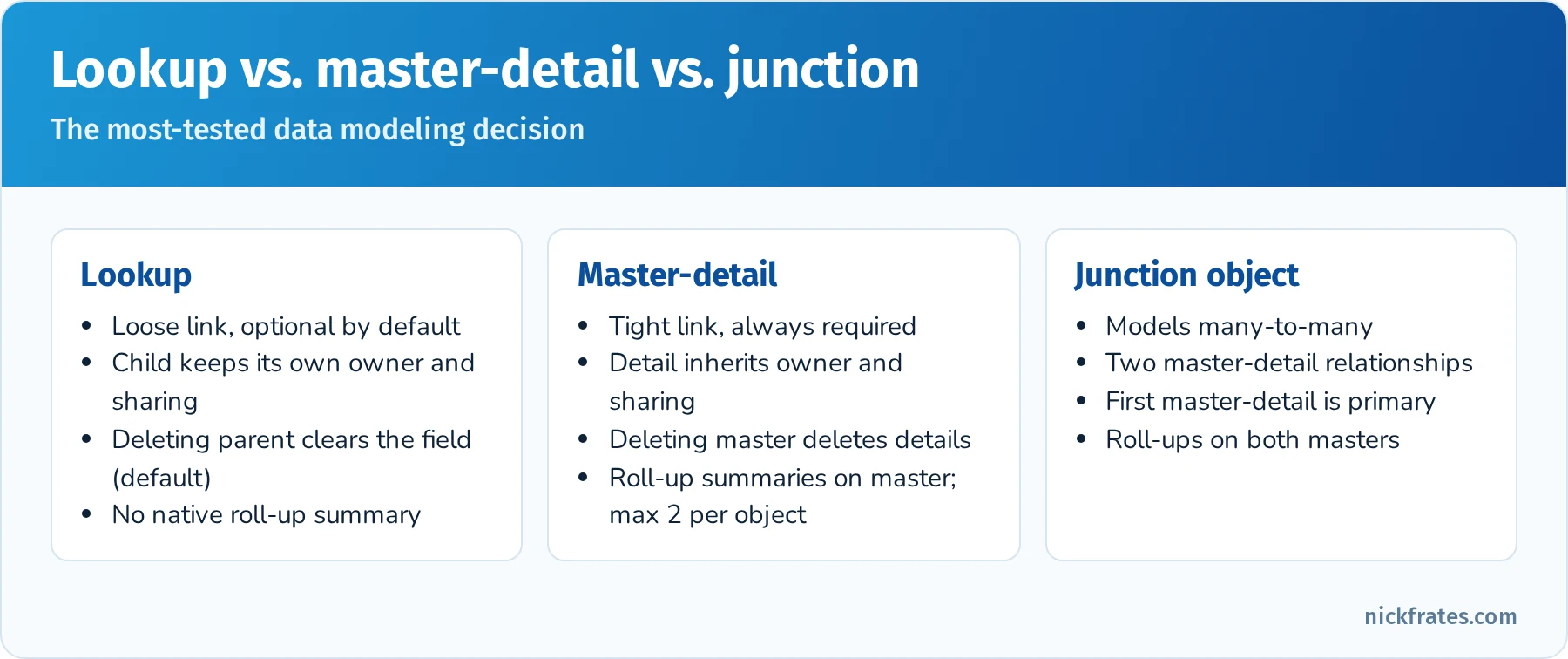
Lookup vs. master-detail vs. junction object, the most-tested data modeling decision.
Converting relationships. You can convert a lookup to a master-detail only when every existing child record has a value in the lookup field. You can convert a master-detail to a lookup only if there are no roll-up summary fields on the master that use it. Expect at least one question built around these rules.
Field types and their impact. Know when to use text, text area (long and rich), number, currency, percent, date, date/time, time, checkbox, picklist, multi-select picklist, email, phone, URL, geolocation, formula, roll-up summary, auto number, lookup and master-detail. Know the consequences of changing a field's type: converting can cause data loss (for example, text to number drops non-numeric values, and changing away from a multi-select picklist can lose selections), some conversions aren't allowed at all (for example, fields used in formulas, roll-ups or certain integrations), and field history can be affected. Multi-select picklists are hard to report on and filter, so prefer a related object or a single-select picklist when the data matters for reporting.
Schema Builder is a visual tool that shows objects, fields and relationships and lets you create objects and fields with drag and drop. It's useful for understanding an unfamiliar data model and for quickly building relationships. Changes made in Schema Builder are saved immediately; there is no undo.
Record types let you offer different business processes, picklist values and page layouts for the same object to different users (for example, "Partner Account" and "Customer Account"). The record types a user can choose come from their profile or permission sets. Don't create a separate custom object when a record type will do.
Importing and exporting data.
| Tool | Records | Highlights |
|---|---|---|
| Data Import Wizard | Up to 50,000 per import | Browser-based, accounts/contacts/leads/solutions/campaign members and custom objects, duplicate matching, can trigger automation optionally |
| Data Loader | Up to 5 million (more with Bulk API) | Desktop or CLI, all objects, insert/update/upsert/delete/hard delete/export, scheduled loads from the command line |
| Data Export Service | Whole org | Weekly or monthly backup export of data as CSV |
| Dataloader.io and AppExchange tools | Varies | Web-based alternatives |
Use External ID fields (unique identifiers from another system, marked as External ID on the field) with upsert to match records without knowing Salesforce Ids. External IDs are also indexed, which helps search and reporting performance.
Data quality. Validation rules, required fields, unique fields, duplicate rules and matching rules, picklists instead of free text, and lookup filters all keep data clean. Lookup filters restrict which records a user can choose in a lookup field, for example only active contacts from the same account. For setup details, see my guide to duplicate and matching rules.
Quick reference: lookup vs. master-detail
| Feature | Lookup | Master-detail |
|---|---|---|
| Child ownership | Child has its own owner | Inherited from master (no owner field on detail) |
| Sharing | Independent | Controlled by parent |
| Required on child | Optional (can be made required) | Always required |
| Delete parent | Clear the field (default), block deletion, or delete child (limited cases) | Cascade deletes details |
| Roll-up summary on parent | Not available (use Flow or third-party tools) | Available: COUNT, SUM, MIN, MAX |
| Limit per object | Up to 40 relationship fields total | Up to 2 master-detail |
| Standard object as child | Yes | No (standard objects can't be the detail) |
Practice questions: Data Modeling and Management
Question 1. A recruiting app must track which candidates applied for which positions. Each candidate can apply to many positions and each position has many candidates. What should the App Builder create?
- A. A lookup from Candidate to Position
- B. A junction object with master-detail relationships to Candidate and Position
- C. A multi-select picklist of positions on Candidate
- D. A text field listing position names
Answer: B. Many-to-many relationships use a junction object with two master-detail relationships. It also enables roll-up summaries (for example, the number of applications per position).
Question 2. The business wants the total value of all Invoice Line Items displayed on the Invoice record. Line items should be deleted when an invoice is deleted. What should be used?
- A. A lookup relationship and a formula field
- B. A master-detail relationship and a roll-up summary field
- C. A cross-object formula on Invoice
- D. A validation rule
Answer: B. Master-detail provides cascade deletion and supports a SUM roll-up summary on the master.
Question 3. An App Builder tries to convert a lookup relationship to master-detail but gets an error. What is the most likely cause?
- A. The child object has a record type
- B. Some existing child records have a blank lookup value
- C. The parent object has a roll-up summary field
- D. Field history tracking is enabled
Answer: B. Every existing child record must have a value in the lookup field before it can become a required master-detail field.
Question 4. A company must load 2 million records into a custom object from a nightly file. Which tool fits?
- A. Data Import Wizard
- B. Data Loader (command line, scheduled)
- C. Manual entry
- D. Schema Builder
Answer: B. The Data Import Wizard tops out at 50,000 records per import. Data Loader handles millions of records and can run on a schedule from the command line.
Question 5. Records from an ERP system must be updated in Salesforce without storing Salesforce Ids in the ERP. What should the App Builder set up?
- A. A unique, External ID field holding the ERP key, used with upsert
- B. An auto number field
- C. A formula field
- D. A record type per ERP system
Answer: A. Upsert with an External ID matches incoming records to existing ones, inserting new records and updating existing ones.
Question 6. Users on the Opportunity should only be able to select Contacts that belong to the opportunity's Account. What's the best solution?
- A. Validation rule only
- B. A lookup filter on the Contact lookup field
- C. Apex trigger
- D. Record type
Answer: B. A lookup filter restricts the records shown in the lookup dialog and can be required or optional. A validation rule could catch bad values after the fact, but the filter prevents the wrong choice in the first place.
Question 7. Which statement about master-detail relationships is true?
- A. The detail record can have a different owner from the master
- B. Standard objects can be on the detail side
- C. The detail record's sharing is controlled by the master
- D. Deleting the master leaves the detail records orphaned
Answer: C. Details inherit sharing and ownership from the master and are deleted with it. Standard objects can't be the detail.
Business Logic and Process Automation (32%)
This is the largest section. It covers formula fields, roll-up summaries, validation rules, approval processes and Flow, and asks you to pick the right tool for each requirement. Since Workflow Rules and Process Builder reached end of support, Flow is Salesforce's declarative automation tool, and the exam focuses on choosing between Flow types and other declarative features.
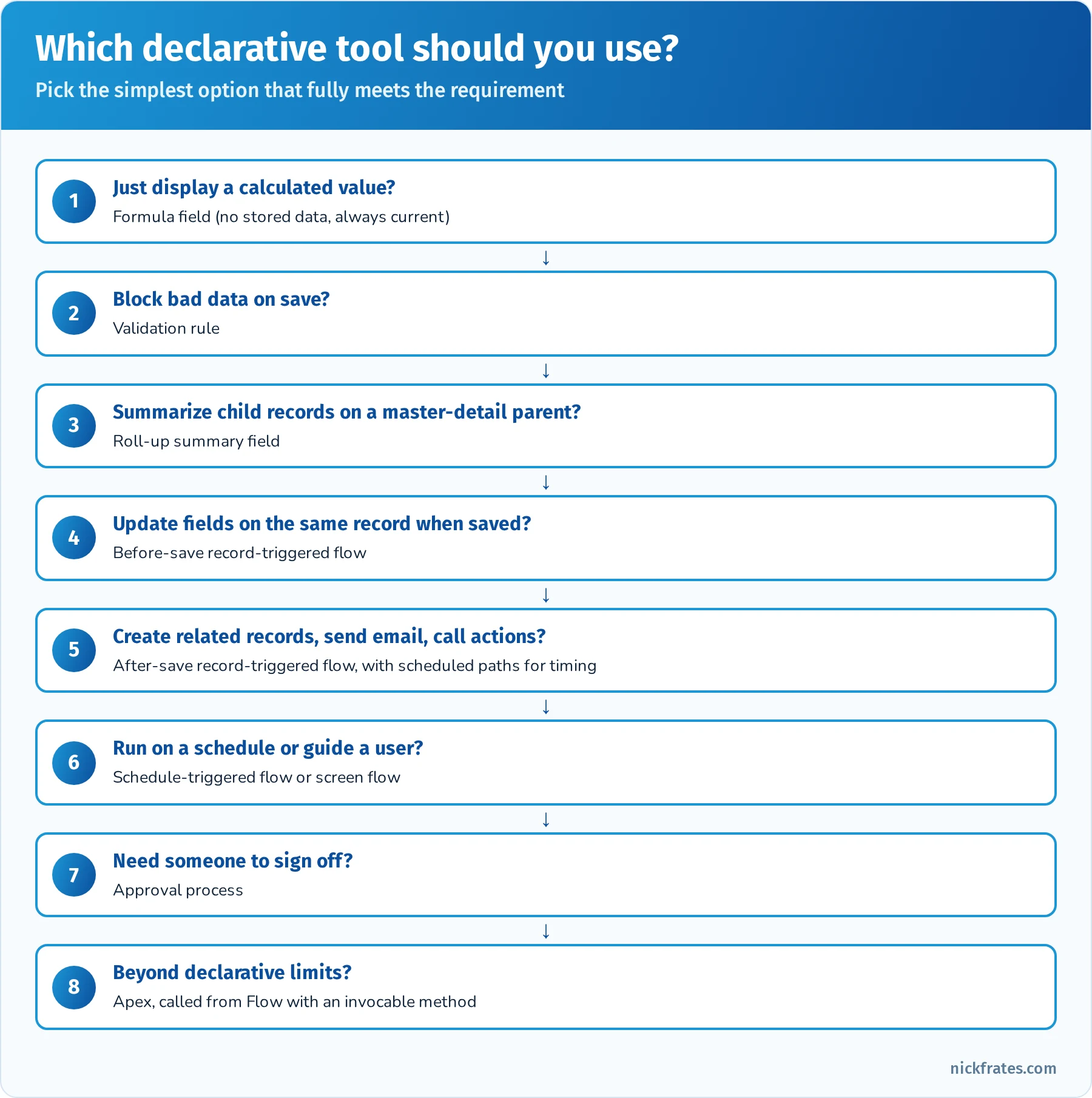
Start with the simplest feature that meets the requirement.
Formula fields. Formulas are read-only fields calculated when a record is viewed or queried, so they don't store data and don't fire automation when their value changes. Return types include text, number, currency, percent, date, date/time, time and checkbox. Cross-object formulas can reference fields on parent records through lookup or master-detail relationships, up to 10 relationships away. Functions to know: IF, CASE, AND, OR, ISBLANK, ISPICKVAL, TEXT, VALUE, TODAY, NOW, DATEVALUE, ADDMONTHS, HYPERLINK, IMAGE and BLANKVALUE. Remember that ISCHANGED, PRIORVALUE and ISNEW can't be used in formula fields; they work in validation rules and flow formulas. Formulas have a character limit (3,900 characters in the editor and a compiled size limit), which is a common reason to rethink a huge formula. For copy-and-paste examples, see my Salesforce formula examples.
Roll-up summary fields calculate COUNT, SUM, MIN or MAX of detail records on a master-detail relationship, optionally with filter criteria. They recalculate automatically. If you need a roll-up across a lookup relationship, use a record-triggered flow (or an AppExchange tool).
Validation rules stop a record from being saved when a formula evaluates to true, and show an error message at the top of the page or next to a field. They run on every save (UI, API, Data Loader and flows), so write them carefully, and include a way to bypass them for data loads when appropriate, for example with a custom permission. See How to Bypass Validation Rules in Salesforce Flow for one pattern. For reusable shapes, see my validation rule patterns.
Approval processes route a record to one or more approvers in steps, lock the record during approval, and run actions on submission, approval, rejection and recall (field updates, email alerts, tasks, outbound messages). Know entry criteria, approver options (manager field, specific user, queue, related user), parallel or unanimous approval, and that approvals can be launched from a flow. Salesforce is also building Flow-based approvals (Approval Orchestration), but classic approval processes are still widely tested.
Flow types.
| Flow type | Starts when | Typical use |
|---|---|---|
| Screen flow | A user launches it (button, action, Lightning page, utility bar) | Guided data entry, wizards, call scripts |
| Record-triggered flow, before save (fast field updates) | A record is created or updated, before it's saved | Update fields on the same record; fastest option |
| Record-triggered flow, after save (actions and related records) | After a record is saved | Create or update related records, send emails, call actions, scheduled paths |
| Schedule-triggered flow | On a schedule (once, daily, weekly) | Batch updates such as reminders or cleanup |
| Platform event-triggered flow | A platform event message is received | React to events from integrations |
| Autolaunched flow (no trigger) | Called from another flow, Apex, an API, a button or an agent | Reusable logic and subflows |
Record-triggered flows can also have scheduled paths (run actions a set time before or after a date, such as three days after Close Date) and an asynchronous path (run actions such as callouts after the transaction commits). Know the core elements: Get Records, Create Records, Update Records, Delete Records, Decision, Assignment, Loop, Collection Sort and Filter, Transform, Action, Subflow, Screen and Fault connectors. My guides on before-save vs. after-save flows, Flow types and fault paths go deeper on each.
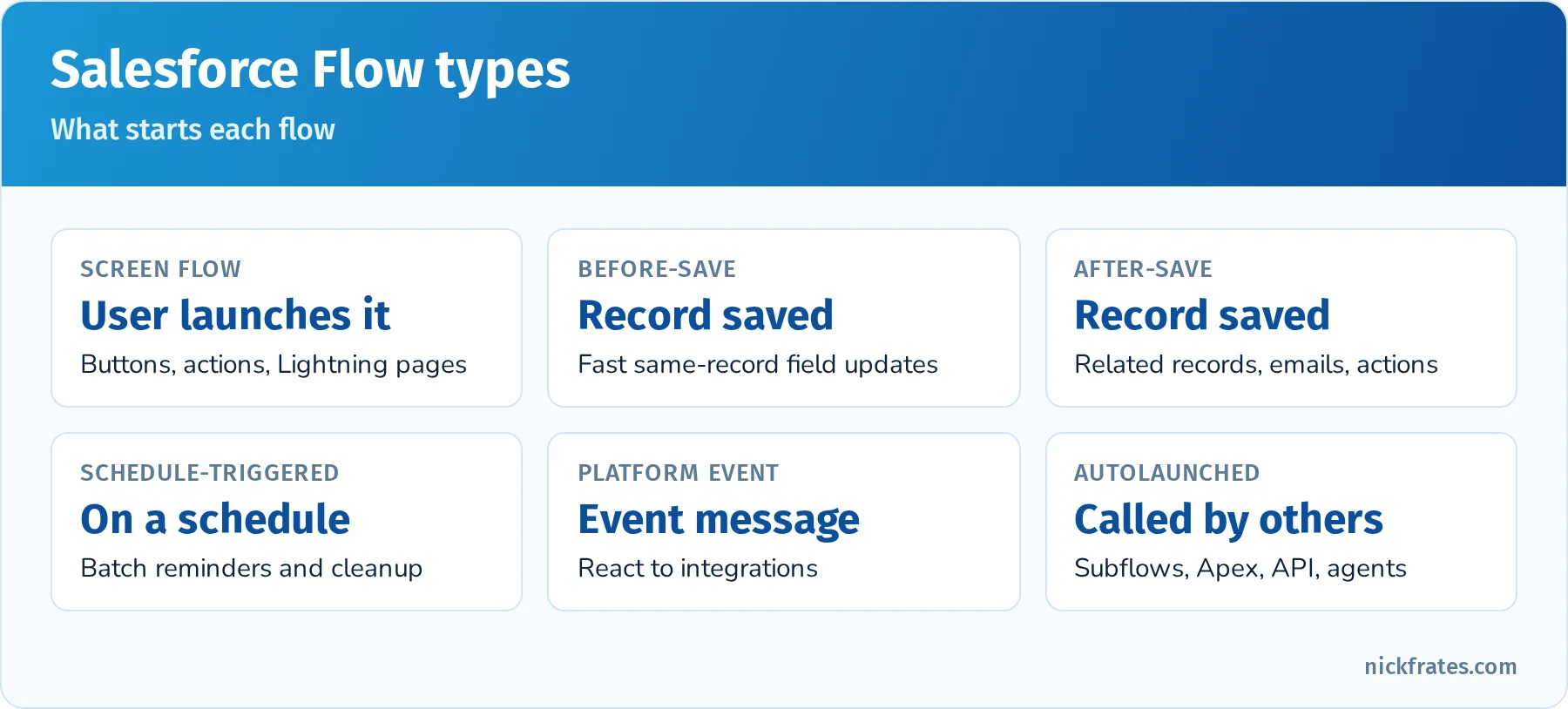
Know which trigger each Flow type uses.
Flow best practices the exam rewards. Avoid Get Records and DML elements inside loops (collect records in a collection variable and update them once after the loop). Use before-save flows for same-record field updates. Add fault paths to handle errors. Use one record-triggered flow per object per context where practical, or set trigger order explicitly. Use entry conditions so a flow only runs when needed, and "only when a record is updated to meet the condition requirements" to avoid re-running every save.
When Flow isn't enough. Use Apex when you need complex logic over large data volumes, sophisticated error handling, or operations Flow doesn't support. An @InvocableMethod lets a flow call Apex for just the hard part.
Quick reference: which tool?
| Requirement | Best fit |
|---|---|
| Show days since a case was opened | Formula field |
| Prevent closing an opportunity without a loss reason | Validation rule |
| Count child records on a master-detail parent | Roll-up summary field |
| Set a field on the same record when it's saved | Before-save record-triggered flow |
| Create a follow-up task when an opportunity is won | After-save record-triggered flow |
| Email the owner 7 days before contract end | Scheduled path on a record-triggered flow |
| Nightly cleanup of stale records | Schedule-triggered flow |
| Guide a user through a multi-step intake | Screen flow |
| Manager must approve discounts over 20% | Approval process |
| Total amounts across a lookup relationship | Record-triggered flow (or AppExchange tool) |
Practice questions: Business Logic and Process Automation
Question 1. When an opportunity's Stage changes to Closed Won, a task must be created for the account owner. Which tool should be used?
- A. Workflow Rule
- B. After-save record-triggered flow
- C. Before-save record-triggered flow
- D. Formula field
Answer: B. Creating a related record requires an after-save flow. Before-save flows can only update the triggering record, and Workflow Rules are past end of support.
Question 2. A field must show the number of days until an opportunity's close date, always current. What should the App Builder use?
- A. A number field updated by a scheduled flow every night
- B. A formula field:
CloseDate - TODAY() - C. A roll-up summary field
- D. A validation rule
Answer: B. A formula recalculates every time the record is viewed, so it's always current without storing data or running automation.
Question 3. Users must enter a Lost Reason when Stage is Closed Lost. What's the simplest solution?
- A. Make the field required on the page layout
- B. A validation rule using
ISPICKVAL(StageName, "Closed Lost") && ISBLANK(Lost_Reason__c) - C. An approval process
- D. A before-save flow that fills in a default reason
Answer: B. A validation rule enforces the condition on every save. Making the field required on the layout would require it for every stage and wouldn't apply to API updates.
Question 4. Which functions can't be used in a formula field?
- A.
IFandCASE - B.
ISCHANGEDandPRIORVALUE - C.
TODAYandNOW - D.
TEXTandVALUE
Answer: B. ISCHANGED, PRIORVALUE and ISNEW depend on a save event, so they're available in validation rules and flows but not in formula fields.
Question 5. A record-triggered flow updates every related contact one at a time inside a loop and fails on accounts with many contacts. What's the best fix?
- A. Add a Pause element
- B. Assign each contact to a collection variable inside the loop and use one Update Records element after the loop
- C. Convert the flow to a Workflow Rule
- D. Increase governor limits
Answer: B. DML inside a loop quickly hits the 150 DML statement limit. Updating a collection once is the bulk-safe pattern. See Looping in Salesforce Flow.
Question 6. A discount above 20% must be approved by the rep's manager, and the record should be locked while waiting. Which feature fits?
- A. Validation rule
- B. Approval process with the manager as approver
- C. Screen flow
- D. Sharing rule
Answer: B. Approval processes route records to approvers, lock them during approval and run actions on the result.
Question 7. A reminder email should go to the contract owner 30 days before the End Date. Which approach is best?
- A. A schedule-triggered flow that runs every minute
- B. A record-triggered flow with a scheduled path set 30 days before End Date
- C. A formula field
- D. A roll-up summary
Answer: B. Scheduled paths run actions relative to a date on the triggering record, without a separate job checking every record every minute.
User Interface (17%)
User Interface questions cover how records and apps look and behave for users: Lightning pages, page layouts, Dynamic Forms, actions, buttons, links and mobile. The theme is "show the right information to the right user at the right time" with declarative tools.
Lightning App Builder builds three kinds of pages: app pages (a home page for an app, also usable in the mobile app), home pages (the Home tab, assignable by app and profile) and record pages (the layout of a record, assignable as the org default, app default, or by app, record type and profile). Pages are made from standard components (Related List, Path, Report Chart, Rich Text, Flow, Tabs, Accordion), custom Lightning Web Components and AppExchange components. Component visibility filters show or hide a component based on field values, the user, device form factor or permissions. For a hands-on walkthrough, see my Lightning App Builder tutorial.
Dynamic Forms let you place individual fields and field sections directly on a Lightning record page and set visibility rules on them, instead of relying on one page layout. Dynamic Actions do the same for buttons in the highlights panel. Together they reduce the number of page layouts and record pages you need. Dynamic Forms are available on custom objects and many standard objects; check the current list in Salesforce Help if a question names a specific object.
Page layouts, compact layouts and record types. Page layouts still control field placement when Dynamic Forms aren't used, related lists, and the actions in the classic publisher. Compact layouts control the fields shown in the highlights panel and in the mobile app record header. Page layouts are assigned by profile and record type.
Actions, buttons and links.
- Object-specific quick actions create or update records in the context of a record (for example, "New Contact" on an Account automatically links the contact). They can also launch flows, Lightning Web Components or send emails.
- Global actions aren't tied to a record (for example, "New Event" from the global actions menu) and can be added to the publisher layout.
- Custom buttons and links open URLs, run JavaScript (Classic only) or launch Visualforce pages. In Lightning, prefer quick actions and flows; JavaScript buttons aren't supported.
- Predefined field values on quick actions pre-fill fields in the new record.
Other UI features. Path guides users through stages of a picklist (such as Opportunity Stage) with key fields and guidance for success. List views filter records and can be shared with groups. Utility bar adds persistent tools (notes, recent items, a flow) to the bottom of a Lightning app. In-app guidance (prompts and walkthroughs) explains new features. Lightning apps group tabs, utility items and branding for a set of users, and can use standard or console navigation.
Mobile. The Salesforce mobile app uses compact layouts, app pages and record pages, supports quick actions and form-factor-based component visibility, and can be customized with mobile navigation menus. A component visibility filter on device form factor is the easy way to show a simpler component on phones.
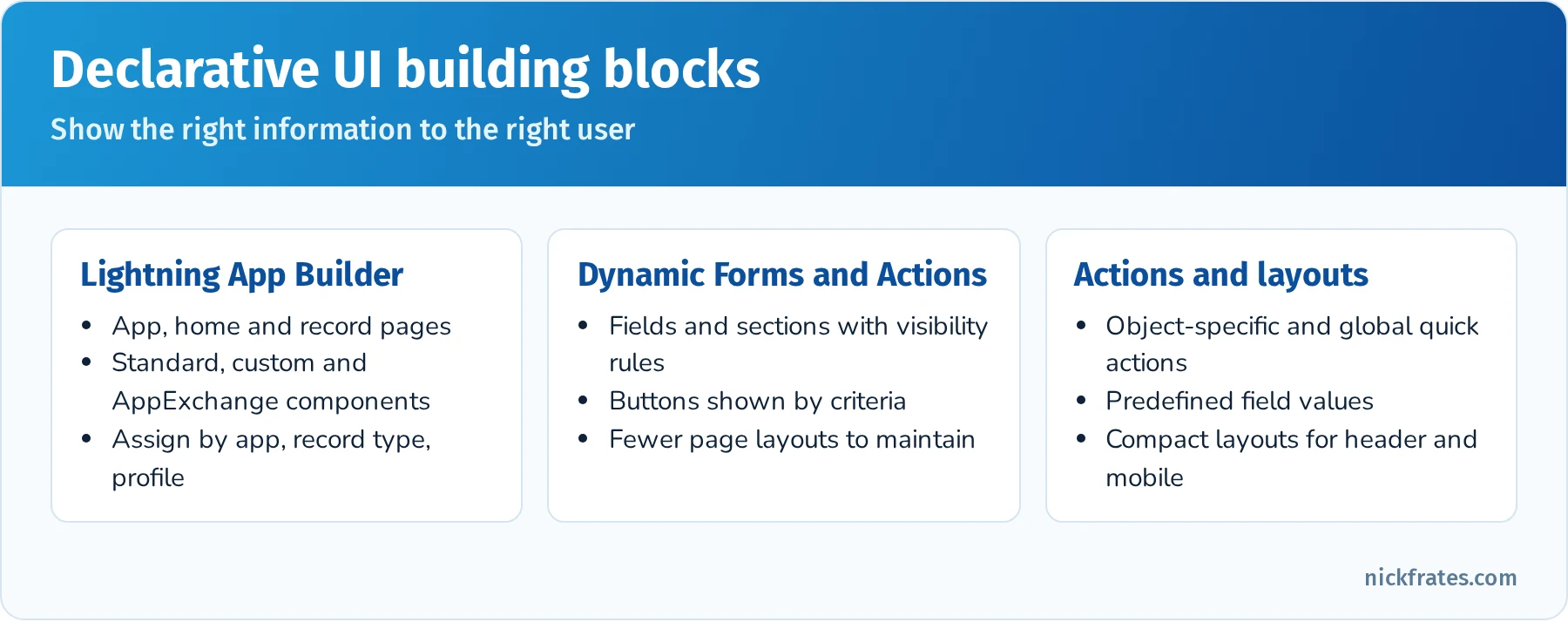
The main declarative tools for shaping the user interface.
Quick reference: UI requirement to feature
| Requirement | Feature |
|---|---|
| Show a field section only when Stage is Negotiation | Dynamic Forms with a visibility rule |
| Show a button only to managers | Dynamic Actions with a visibility filter (or a permission-based filter) |
| Different record page for the Sales app vs. the Service app | Lightning record page assignment by app |
| Change fields shown at the top of a record on mobile | Compact layout |
| Create a related contact from an account with defaults | Object-specific quick action with predefined values |
| Guide reps through opportunity stages with tips | Path |
| Show a report chart on a record page | Report Chart component in Lightning App Builder |
| Hide a heavy component on phones | Component visibility by device form factor |
Practice questions: User Interface
Question 1. Sales users want a section of fields to appear on the Opportunity record page only when the Stage is Proposal. What should the App Builder use?
- A. A new record type
- B. Dynamic Forms with a field section visibility rule
- C. A validation rule
- D. A separate page layout per stage
Answer: B. Dynamic Forms lets you show or hide fields and sections based on record values without creating more layouts.
Question 2. From an Account, users must quickly create a Case with the Origin set to Phone and the Account filled in automatically. What's the best solution?
- A. A custom JavaScript button
- B. An object-specific quick action on Account with a predefined value for Origin
- C. A global action
- D. A screen flow launched from the App Launcher
Answer: B. Object-specific actions automatically relate the new record to the parent and support predefined field values. JavaScript buttons aren't supported in Lightning.
Question 3. The Service team uses the Service Console and needs a different Case record page than the Sales team. How should the App Builder configure this?
- A. Assign Lightning record pages by app (and profile if needed)
- B. Create a new Case object
- C. Use a validation rule
- D. Use a compact layout
Answer: A. Lightning record pages can be assigned per app, per app and record type, and per profile.
Question 4. Which layout controls the fields shown in the highlights panel on a record page and in the mobile app record header?
- A. Page layout
- B. Compact layout
- C. Search layout
- D. List view
Answer: B. Compact layouts define the key fields shown at the top of a record.
Question 5. A large dashboard component slows down a record page on phones. What should the App Builder do?
- A. Remove the component for all users
- B. Set component visibility so the component only shows on desktop
- C. Write Apex to detect the device
- D. Create a mobile-only object
Answer: B. Component visibility filters can use device form factor, so desktop users keep the component and phone users get a lighter page.
Question 6. Reps want guidance and key fields for each opportunity stage displayed at the top of the record. Which feature fits?
- A. Path
- B. Approval process
- C. List view
- D. Utility bar
Answer: A. Path shows stages with key fields and guidance for success for each stage.
App Deployment (13%)
The smallest section, but easy points if you know your environments and deployment tools. Questions ask which sandbox fits a need, how change sets work, and when packages make sense.
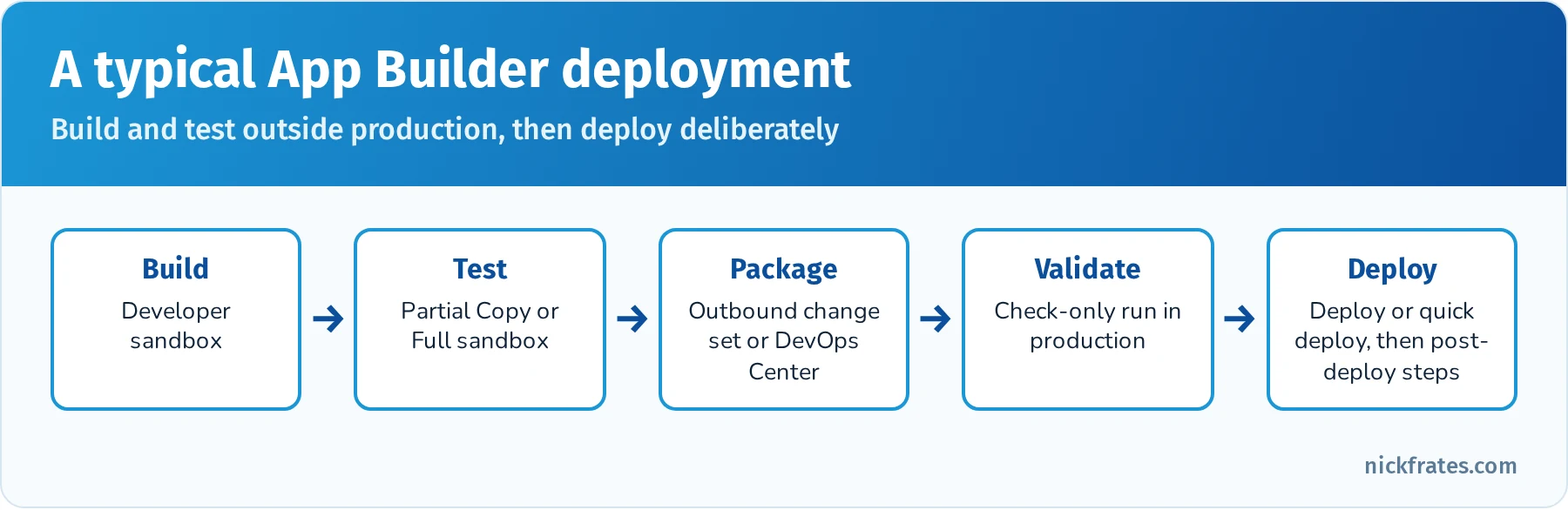
A typical App Builder deployment path.
Sandboxes.
| Sandbox | Copies | Refresh interval | Typical use |
|---|---|---|---|
| Developer | Metadata only (200 MB data) | 1 day | Building and unit testing |
| Developer Pro | Metadata only (1 GB data) | 1 day | Bigger dev and test data |
| Partial Copy | Metadata plus sample data (5 GB) via a sandbox template | 5 days | QA, integration testing, training |
| Full | Metadata and all data | 29 days | UAT, staging, performance testing |
Change sets move metadata between orgs connected to the same production org. You create an outbound change set in the source org, add components (with "View/Add Dependencies" to catch missing pieces), and upload it to a target org that has a deployment connection allowing inbound changes. In the target org, the inbound change set can be validated (a test run without committing) and then deployed. A validated change set can be quick deployed within 10 days. Change sets can't delete components, can't move every metadata type, and can't be used between unrelated orgs. Profiles are included only for the components in the change set, and user assignments and data never move with a change set. While a validation or deployment runs, Setup's Deployment Status page shows its progress (with the fish-shaped progress icon admins call the "deployment fish"), test results and errors.
Packages. Unmanaged packages distribute a one-time copy of components (templates, samples); they can't be upgraded. Managed packages are used by AppExchange partners, with a namespace, IP protection and upgrades. Unlocked packages are versioned packages for organizing your own org's metadata. DevOps Center gives admins and developers a point-and-click pipeline backed by GitHub. For App Builder, know which option fits a scenario rather than how to build packages.
Release considerations. Test in a sandbox before production, communicate changes, train users, plan around Salesforce's three seasonal releases (sandbox preview lets you test early), and deploy during low-usage hours. Remember that Apex in a production deployment needs 75% test coverage, which matters if your change set includes any code.
Practice questions: App Deployment
Question 1. A team needs to test a new process with a realistic sample of production data, refreshed weekly. Which sandbox?
- A. Developer
- B. Developer Pro
- C. Partial Copy
- D. Full
Answer: C. Partial Copy includes a sample of data defined by a sandbox template and can refresh every 5 days.
Question 2. An outbound change set is uploaded but doesn't appear in production. What's the most likely cause?
- A. Production has no deployment connection allowing inbound changes from that sandbox
- B. Change sets only work between Developer Edition orgs
- C. The change set includes a custom field
- D. The sandbox was refreshed
Answer: A. The target org must have a deployment connection that accepts inbound changes from the source org.
Question 3. Which statement about change sets is true?
- A. They can delete components in the target org
- B. They can deploy between any two orgs
- C. They move metadata, not data, between connected orgs
- D. They include user assignments to permission sets
Answer: C. Change sets move metadata only, between orgs connected to the same production org, and can't delete components.
Question 4. A consultant wants to give several unrelated customers a starter set of custom objects that they'll customize freely afterward. Which option fits?
- A. Change set
- B. Unmanaged package
- C. Managed package with push upgrades
- D. Data Loader
Answer: B. Unmanaged packages distribute a one-time, editable copy of metadata to any org.
Question 5. A change set fails because a field it references isn't in the target org. What should the App Builder have done?
- A. Use "View/Add Dependencies" to include required components
- B. Deploy the field with Data Loader
- C. Refresh production
- D. Remove validation from the target org
Answer: A. The dependencies view finds related components so the change set is complete.
Step 2: Gather official resources and study materials
With the exam outline in mind, assemble your study materials. Many of the best ones are free:
- Official prep trail: Salesforce publishes Prepare for Your Salesforce Platform App Builder Certification on Trailhead, a curated collection of modules and projects covering the exam topics. Work through it at your own pace; the hands-on challenges in a Trailhead Playground are some of the best practice you can get.
- Official exam guide: use the exam guide on Salesforce Help as your syllabus. It lists every objective that could be tested. Check off topics once you can explain them without notes.
- Salesforce Help and documentation: for tricky topics such as master-detail vs. lookup or how record types and page layouts work together, the official docs often have diagrams and examples.
- Community: the Trailblazer Community has certification groups where you can ask questions and read about others' experiences. Discussing a concept with someone else often makes it stick.
- Practice exams: Salesforce Ben's free practice exam and paid options like Focus on Force give you a feel for the question format. Make sure any question bank you use is current, since older ones still recommend Process Builder.
Pro tip: take notes as you go, especially on facts like "roll-up summary fields work only on master-detail relationships" or "a lookup can only be converted to master-detail when every child has a value." Those notes become your flashcards.
Step 3: Use effective study techniques (spaced repetition and active recall)
Studying hard is good, but studying smart is better. These techniques have strong research behind them:
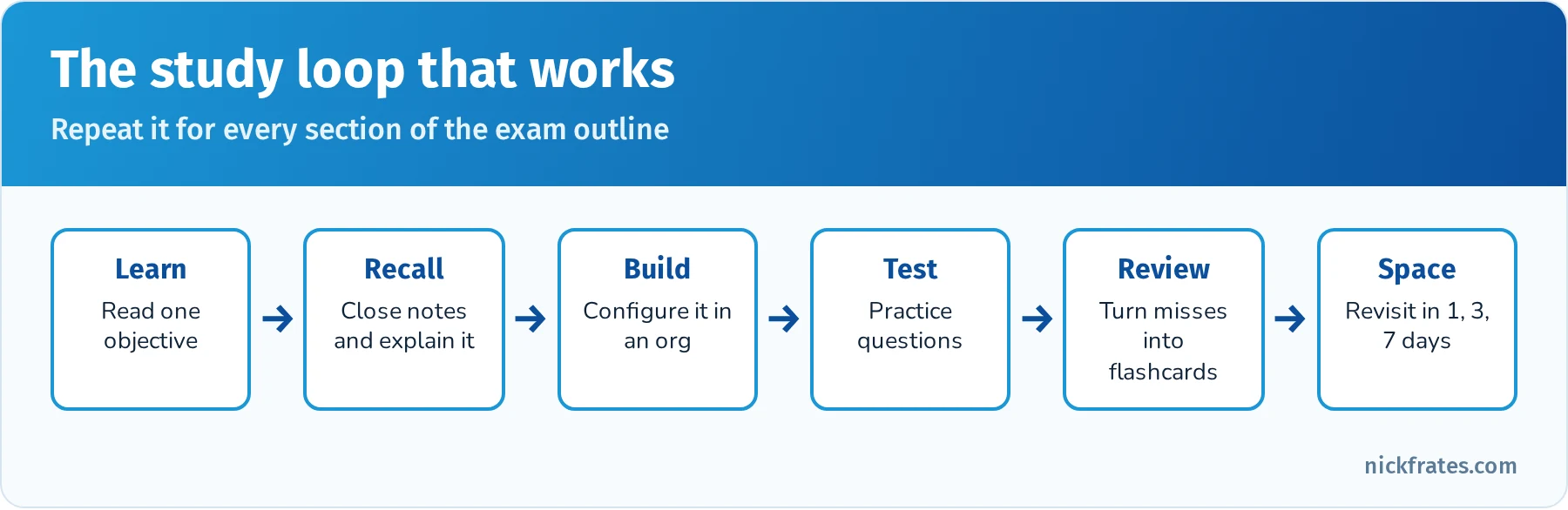
Active recall plus spaced repetition beats rereading.
- Spaced repetition: spread your study sessions out and revisit topics at increasing intervals instead of cramming. Spacing review sessions improves long-term retention. Review a concept one day after learning it, then three days later, then a week later. Tools like Anki or Quizlet can schedule the reviews for you. Create flashcards for Salesforce terms and features (for example, "What are the three types of object relationships?" or "What can a record type control?").
- Active recall: don't just reread or highlight. Quiz yourself by retrieving information from memory without looking. Research on the testing effect shows that self-testing is far more effective than rereading. After studying validation rules, close your notes and explain the concept out loud as if teaching someone, or write down the steps to create one. If you can't, review it again.
- Mnemonics and chunking: for rote facts (like the order of operations when a record saves, or the components of a Lightning page), use acronyms or silly phrases. Group related facts into small chunks.
- Interleaving: mix topics in one session instead of studying one topic for hours. Spend 30 minutes on security, then 30 on flows, then 30 on reports. It feels harder, but it improves retention and trains you to tell similar concepts apart, which is exactly what scenario questions require.
And take breaks. Use the Pomodoro technique (for example, 25 minutes of study and a 5-minute break) or any schedule that keeps you fresh. Consistent, reasonable sessions beat marathon cramming.
Step 4: Get hands-on practice in a Salesforce org
Reading and memorizing only take you so far. Many questions describe a business requirement and ask which solution fits best, and if you've built those things, the right answer is much easier to spot.
- Get a free org: sign up for a free Developer Edition org or use a Trailhead Playground as your personal sandbox.
- Build a sample app: create a small project from scratch, such as a project tracker or event registration app. Set up custom objects with appropriate field types, create relationships (master-detail and lookup), add validation rules, build a roll-up summary, and design a Lightning record page with Dynamic Forms.
- Experiment with Flow: automation is 32% of the exam. Build a before-save flow that sets a field, an after-save flow that creates a related record, a scheduled path, a schedule-triggered flow and a screen flow. Add a fault path to one of them. If you're not confident with Flow yet, this is the best place to invest extra time.
- Try approvals and security: build a simple approval process, then log in as a test user to see how OWD, roles, sharing rules and permission sets change what they can see.
- Do Trailhead hands-on challenges: they're mini simulations of real tasks and give you immediate feedback.
- Take screenshots: capture your Schema Builder view or flow canvas. Reviewing them later refreshes your memory of how you configured things.
Step 5: Use practice exams and self-assessment
As your knowledge grows, test yourself under exam conditions: Start with my App Builder practice questions, then:
- Take a timed practice test: set aside about 105 minutes, use no notes, and take a full 60-question practice exam. Review every question afterward, especially the ones you got wrong. Understanding why an answer is right or wrong exposes misconceptions.
- Keep adding flashcards: turn every missed question into a flashcard about the underlying concept, not the question itself.
- Find weak areas: look for patterns. If security or roll-ups keep tripping you up, go back to the relevant section of this guide and your org.
- Practice pacing: aim for about 1 minute 45 seconds per question. If a question takes too long, mark it for review and move on.
- Avoid braindumps: stick to reputable sources and discuss concepts, not real exam questions. Salesforce's certification agreement prohibits sharing exam content, and braindumps are often wrong anyway.
Step 6: Ace exam day with confidence and strategy
- Prepare the night before: sleep well. If your exam is online proctored, test your computer, webcam and internet connection in advance and clear your desk. If it's at a test center, plan your route and bring the required ID.
- Read each question carefully: look for keywords like must, cannot, best and most efficient. Many questions have two plausible answers, and the keyword decides which is better.
- Eliminate wrong answers first: one or two options are often clearly off-topic or use retired features (Workflow Rules, Process Builder, JavaScript buttons in Lightning).
- Prefer standard, declarative best practices: if a standard feature solves the problem, it's usually the right answer.
- Mark for review: flag uncertain questions and return to them at the end. A later question sometimes jogs your memory.
- Manage your time: try to finish your first pass with 10 to 15 minutes left for review. Answer every question; there's no penalty for guessing.
- Change answers only with a clear reason: a second read can catch a misread detail, but don't switch on a whim.
Worked example: build a recruiting app end to end
The fastest way to connect all five sections is to build one small app that touches each of them. This exercise mirrors the classic Trailhead recruiting scenario and takes a few evenings in a Developer Edition org.
1. Data model (Data Modeling and Management). Create three custom objects: Position, Candidate and Job Application. Add fields to Position (Status picklist, Department picklist, Min Pay and Max Pay currency, Open Date and Close Date), and to Candidate (Email, Phone, Current Employer, Years of Experience). Make Job Application a junction object with master-detail relationships to Position (primary) and Candidate. Open Schema Builder and confirm the shape: Position and Candidate are masters, Job Application sits between them.
2. Roll-ups and formulas (Business Logic). On Position, create a roll-up summary that counts Job Applications, and another that counts applications where Status equals Offer Extended. Add a formula field "Days Open" (TODAY() - Open_Date__c) and a checkbox formula "Pay Range Valid" that checks Max Pay is greater than Min Pay.
3. Validation (Business Logic). Add a validation rule on Position that blocks saving when Close Date is before Open Date, and another that requires a Close Date when Status is Closed. Then try to break the rules with Data Import Wizard to see that validation applies to imports too.
4. Automation (Business Logic). Build a before-save flow on Job Application that stamps a "Last Status Change" date when Status changes. Build an after-save flow that creates a Task for the hiring manager when Status becomes Interview Scheduled. Add a scheduled path that emails the recruiter 14 days after a Position opens if it has fewer than three applications. Add a fault path that sends you an email if the flow fails. Finally, build a screen flow that lets a recruiter log a phone screen in three steps.
5. Security (Fundamentals). Set Position OWD to Public Read Only and Candidate OWD to Private. Create a "Recruiter" permission set with full access to all three objects and an "Interviewer" permission set with read-only access to Candidate and no access to the Max Pay field (field-level security). Create a criteria-based sharing rule that shares Engineering positions with an Engineering public group. Log in as each test user and check what they see.
6. User interface. Build a Lightning record page for Position with Dynamic Forms: show the Close Date section only when Status is Closed, add a Path on Status with guidance for each stage, and add a Report Chart component showing applications by status. Create an object-specific quick action "New Job Application" on Position with a predefined Status of New. Set the compact layout to show Status, Department and Days Open. Assign the page to the Recruiting app.
7. Deployment. Create a Developer sandbox (or a second Developer Edition org for practice with packages), build one more field there, and move it with a change set (or an unmanaged package if you're using two separate orgs). Use View/Add Dependencies, validate first, then deploy, and watch the Deployment Status page.
When you're done, you will have touched almost every objective in the exam outline. Write down the three things that surprised you most; those are usually the facts that show up on the exam.
Common exam traps
- Page layout vs. field-level security. Hiding a field on a layout is not security. If the question says "must not be able to see," the answer involves FLS.
- Sharing can't restrict below OWD. If users see too much, the fix is a more restrictive OWD (then open access selectively), not a sharing rule.
- Roll-ups need master-detail. If the relationship is a lookup, the answer is a record-triggered flow or a conversion to master-detail (only if every child has a parent).
- Before-save flows only update the triggering record. Creating related records, sending emails and calling actions require after-save flows.
- Formula fields don't fire automation. A formula changing value isn't a record update, so a record-triggered flow won't run because of it.
- Data Import Wizard limits. More than 50,000 records, or objects the wizard doesn't support, means Data Loader.
- Change sets need a deployment connection and only work between orgs connected to the same production org. They can't delete components.
- Retired features as distractors. Workflow Rules, Process Builder and JavaScript buttons in Lightning are usually wrong answers in 2026.
- "Simplest" and "with the least effort." These phrases point to standard, declarative features over custom builds, and to existing AppExchange apps over building from scratch.
Flashcard terms by section
Salesforce Fundamentals
- Organization-wide defaults: the baseline record access for each object.
- Role hierarchy: grants users access to records owned by users below them.
- Sharing rule: opens record access to groups or roles based on owner or criteria.
- Restriction rule: limits which records specific users can see, even if sharing would allow more.
- Permission set group: a bundle of permission sets assigned as one unit.
- AppExchange: Salesforce's marketplace for apps, components and consultants.
Data Modeling and Management
- Junction object: a custom object with two master-detail relationships that models many-to-many.
- External ID: a unique identifier from another system, used with upsert.
- Schema Builder: visual editor for objects, fields and relationships.
- Lookup filter: limits which records can be selected in a lookup field.
- Record type: offers different picklist values, page layouts and business processes for the same object.
Business Logic and Process Automation
- Cross-object formula: a formula that references fields on parent records.
- Roll-up summary: COUNT, SUM, MIN or MAX of detail records on a master.
- Scheduled path: runs flow actions at a time relative to a date on the record.
- Fault path: a connector that handles errors in a flow element.
- Approval process: routes a record for approval, locks it and runs actions on the outcome.
User Interface
- Dynamic Forms: fields and sections placed on a Lightning record page with visibility rules.
- Dynamic Actions: buttons in the highlights panel with visibility rules.
- Compact layout: fields shown in the highlights panel and the mobile record header.
- Object-specific action: a quick action that works in the context of a record.
App Deployment
- Outbound and inbound change sets: sent from the source org, received and deployed in the target org.
- Deployment connection: authorizes inbound change sets between connected orgs.
- Unmanaged package: a one-time, editable copy of components.
- Sandbox template: defines which objects' data a Partial Copy or Full sandbox copies.
Mixed practice exam: 10 more questions
Try these under time pressure: about 18 minutes for all ten.
Question 1. A company wants to track a hierarchy of parent and child accounts and see rolled-up opportunity totals at the parent level. What should the App Builder use first?
- A. A new custom object for parent accounts
- B. The standard Parent Account field (account hierarchy), with a record-triggered flow or reporting for totals
- C. A master-detail from Account to Account
- D. A multi-select picklist
Answer: B. Accounts already support hierarchies through the standard Parent Account lookup. Master-detail on Account isn't possible because standard objects can't be the detail.
Question 2. Users report they can't find the new Region field in a report. The field exists and is on the page layout. What's the likely cause?
- A. The report type doesn't include the field, or the users lack field-level security
- B. Region is a formula field
- C. The org has too many reports
- D. The field is required
Answer: A. Report visibility depends on the report type's field layout and on FLS.
Question 3. An after-save flow on Case must send an email to an external system's address using a template. Which element should it use?
- A. Assignment
- B. Send Email action or an email alert action
- C. Get Records
- D. Decision
Answer: B. Flow actions include Send Email and email alerts. Assignment only sets variables.
Question 4. Managers should be able to view, but not edit, all opportunities in the org, while reps see only their own. Which combination works?
- A. OWD Private for Opportunity plus a permission set with View All on Opportunity for managers
- B. OWD Public Read/Write
- C. Delete the role hierarchy
- D. Give managers System Administrator profiles
Answer: A. View All on the object grants read access to all records of that object without opening access for everyone.
Question 5. What happens to Job Application records when their master Position is deleted?
- A. Nothing
- B. They're deleted too (and restored if the Position is undeleted)
- C. Their lookup is cleared
- D. Deletion is blocked
Answer: B. Master-detail cascade-deletes details. Undeleting the master from the Recycle Bin restores them.
Question 6. A screen flow should appear on the Account record page and know which account it's running on. What should the App Builder do?
- A. Hardcode the Account Id in the flow
- B. Create a text input variable named recordId, available for input, and add the flow to the page with the Flow component
- C. Use a global action
- D. Use a formula field
Answer: B. The Flow component passes the current record Id to a variable named recordId. See How to Get the Current Record ID in a Salesforce Screen Flow.
Question 7. Partner accounts and customer accounts need different picklist values for Type and different page layouts. What should be used?
- A. Two custom objects
- B. Two record types with different page layout assignments
- C. A validation rule
- D. Two apps
Answer: B. Record types control picklist values and page layout assignment per business process.
Question 8. An admin needs to delete 30 obsolete custom fields across orgs, and the team only uses change sets. What should they know?
- A. Change sets can delete fields
- B. Change sets can't delete components; fields must be deleted manually or with a Metadata API destructive deployment
- C. Unmanaged packages delete fields
- D. Data Loader deletes fields
Answer: B. Deletions need manual steps or destructive changes through the Metadata API.
Question 9. Which tool lets a recruiter fill out a three-step guided form that creates a Candidate and a Job Application at once?
- A. Validation rule
- B. Screen flow
- C. Roll-up summary
- D. Compact layout
Answer: B. Screen flows provide guided, multi-step UIs and can create several related records.
Question 10. A record-triggered flow should only run when the Status field changes to Closed, not on every save. How should the entry criteria be set?
- A. Run every time the record is updated
- B. Set the condition Status equals Closed and choose "Only when a record is updated to meet the condition requirements"
- C. Use a scheduled flow instead
- D. Add a validation rule
Answer: B. That option runs the flow only when the record changes from not meeting the conditions to meeting them, which avoids repeat runs.
Quick-reference cheat sheet
| Topic | Remember |
|---|---|
| Passing score | 73% of 60 scored questions (about 44 correct) |
| Largest sections | Business Logic and Process Automation 32%, Data Modeling and Management 20% |
| Record access | OWD baseline, then role hierarchy, sharing rules, teams, manual sharing |
| Field security | Field-level security, not page layouts |
| Master-detail | Required, cascade delete, sharing from master, roll-ups, max 2 per object |
| Lookup to master-detail | Every child must have a value |
| Many-to-many | Junction object with two master-detail relationships |
| Data Import Wizard vs. Data Loader | 50,000 records vs. up to 5 million |
| Not allowed in formula fields | ISCHANGED, PRIORVALUE, ISNEW |
| Same-record field update on save | Before-save record-triggered flow |
| Related records, emails, actions | After-save record-triggered flow |
| Legacy automation | Workflow Rules and Process Builder, end of support Dec 31, 2025 |
| Conditional fields on a page | Dynamic Forms |
| Mobile record header fields | Compact layout |
| Change sets | Connected orgs, metadata only, no deletions, validate then quick deploy within 10 days |
Frequently asked questions
How hard is the App Builder exam? It's considered moderately difficult. Admins with hands-on experience in data modeling and Flow usually need four to eight weeks of study. The biggest challenge is scenario questions where two answers seem right.
Do I need the Administrator certification first? No. There are no prerequisites, although many people take Administrator first because the topics overlap heavily.
Is there code on the App Builder exam? Very little. You need to know when code is appropriate, and you'll read formulas, but you won't write Apex.
Will Process Builder appear on the exam? Older questions might mention it, but the correct answer for new automation is Flow. Workflow Rules and Process Builder are past end of support.
What should I study after App Builder? Platform Developer I if you want to code, Advanced Administrator if you want to go deeper on configuration, or the Agentforce Specialist certification if you're interested in AI agents. If you're weighing the developer route, see App Builder vs Platform Developer I.
Related study guides
- Salesforce Platform Developer I study guide for the programmatic side of the platform.
- Development Lifecycle and Deployment Architect study guide for a deeper look at sandboxes, change sets, packaging and release management.
- The AI Associate retirement guide explains what replaced Salesforce's entry-level AI credential.
- If you want to practice the way athletes do, read Steph Curry's 500 Shots and Salesforce Practice Rituals.
- Salesforce Administrator study guide for the admin side of the platform.
- Advanced Administrator study guide for the next step after App Builder.
- Agentforce Specialist study guide for AI agents built on the same platform skills.
- Business Analyst study guide for requirements, user stories and process mapping.
- All Salesforce certification study guides and the 2026 roadmap.
- The science of studying for Salesforce certifications for active recall, spaced repetition and an Anki workflow.
Want to go deeper on automation? Automation is the biggest section of this exam, and Flow is the only supported declarative automation tool now that Workflow Rules and Process Builder are past end of support. My Salesforce Flows course walks through record-triggered, screen, scheduled and platform event flows with real-world challenges.
Hope this helps!
Best,
Nick