Hey friends,
You can prepare for the Platform App Builder exam in about four weeks if you already know basic Salesforce admin. Spend week 1 on data modeling and fundamentals, weeks 2 and 3 on business logic and Flow (32% of the exam on its own), and week 4 on user interface and deployment, building something hands-on every week and finishing each week with a timed practice set.
The plan below is weighted by the official exam guide: 60 scored questions plus up to five unscored, 105 minutes, 73% to pass, and no prerequisite. For format, fees and the full outline, see my App Builder exam guide.
Start with the weights
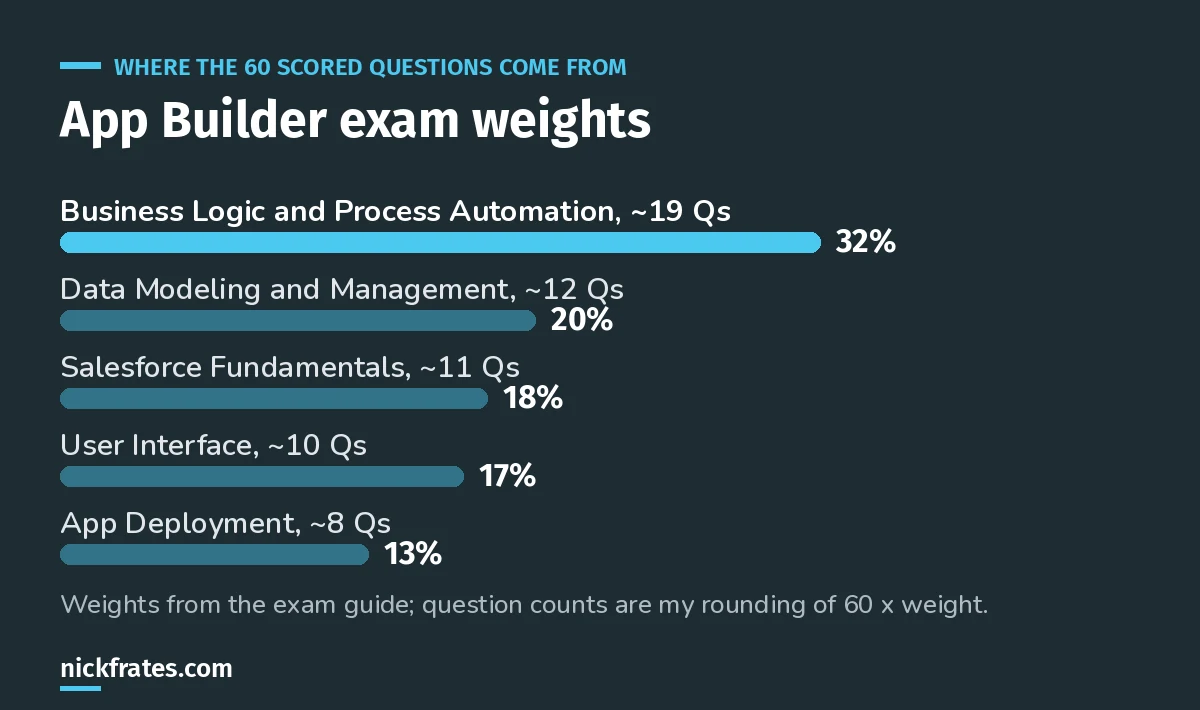
Business Logic is almost a third of the exam. Plan around it.
At 73%, you can miss about 16 of 60 scored questions. That sounds generous until you notice that one weak section, like Business Logic, could eat most of that budget by itself.
The 4-week plan
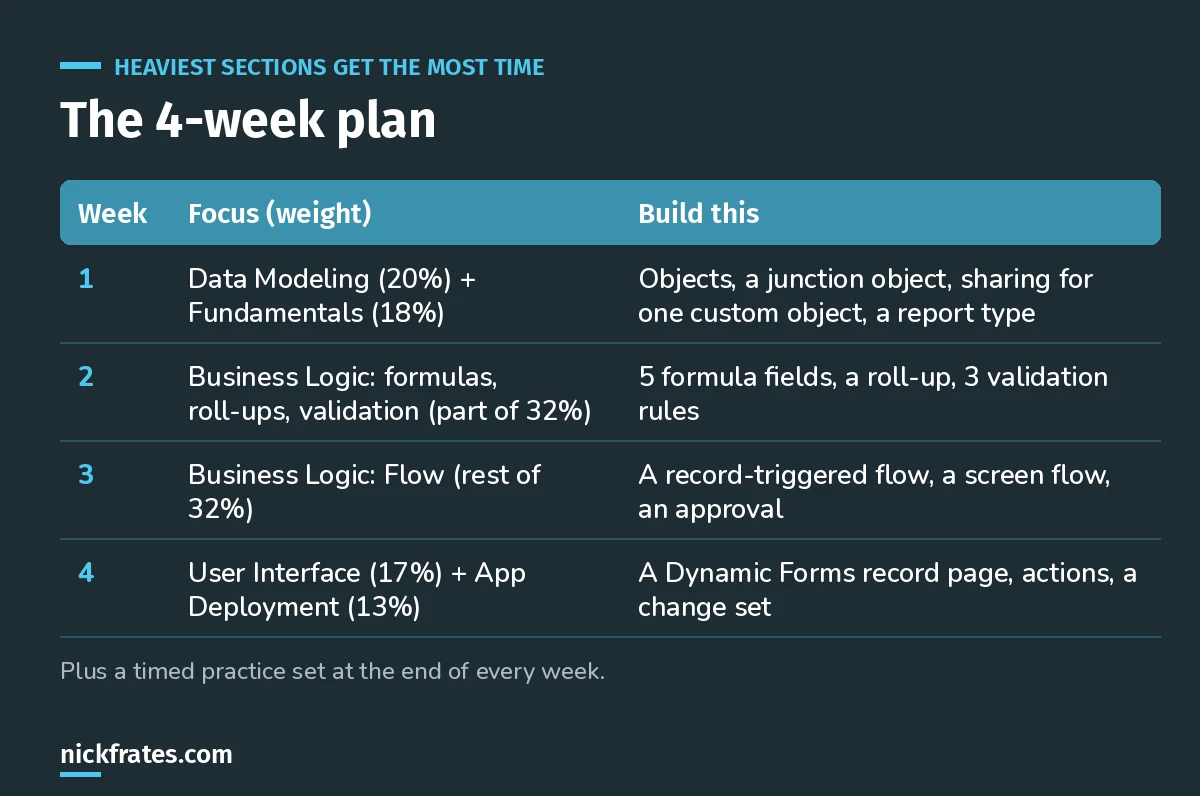
About an hour a day on weekdays, two to three on weekends.
Week 1: Data modeling and fundamentals
The guide asks you to pick the right data model for a scenario, explain how each relationship type affects record access, UI and reporting, know the impact of changing a field's type, and choose import and export options. Fundamentals adds sharing, object and field access, AgentExchange, and reports and dashboards.
- Read: Salesforce data modeling, lookup vs master-detail, the security model, Data Import Wizard vs Data Loader.
- Build: two custom objects, a master-detail, a lookup, a junction object, and a custom report type that spans them.
Week 2: Formulas, roll-ups and validation rules
- Read: formula examples, validation rule examples.
- Build: five formula fields (one cross-object, one date, one CASE), a roll-up summary, and three validation rules, including one that only fires when a field changes.
Week 3: Flow
The guide lists building flows in Flow Builder, choosing the right flow type, Flow Approval processes, and maintaining and troubleshooting flows. It also mentions using Agentforce to automate business processes.
- Read: Flow types explained, before-save vs after-save flows, how to debug flows.
- Build: a before-save flow that sets a field, an after-save flow with a scheduled path, a screen flow, and an approval.
Cert Lab by Nick Frates
Want the plan done for you?
The App Builder Cert Lab follows these five sections with lessons, practice questions and flashcards. Use it for the weekly practice sets.
Start the App Builder Cert Lab, $9.99 →Week 4: User interface and deployment
- Read: Lightning App Builder tutorial, plus the guide's deployment topics: sandbox types, change sets, and managed vs unmanaged packages.
- Build: a Dynamic Forms record page with two visibility rules, a quick action and a global action, then move something between orgs with a change set if you have a sandbox.
The free Trailhead trailmix
Salesforce's own Prepare for Your Salesforce Platform App Builder Credential trailmix is a good companion: do the modules for each week's sections as you go, rather than all at once at the start. Hands-on challenges stick better when you're building the same things for the plan.
How to use practice questions
- End every week with a timed set on that week's sections, not the whole exam.
- For every miss, write one line on why the right answer is right. That's the habit that moves scores.
- In week 4, take full timed sets. When you're clearing 80% consistently, book it. My App Builder practice questions and the score calculator help here.
Only have two weeks?
Keep the order, compress each week to three or four days, and drop the reading for any area you use at work daily. Don't skip Flow. ItIt's the section people most often underestimate.#39;s the section I see people underestimate most.
Keep going
- App Builder exam guide: format, fees and the outline.
- Admin vs Platform Developer I: if you're choosing between certs.
- Salesforce certification cost: what you'll pay to sit and retake.
Cert Lab by Nick Frates
Get the Platform App Builder Cert Lab
Lessons, practice questions and flashcards for all 5 App Builder exam sections, built from the official exam guide.
Start the App Builder Cert Lab, $9.99 →Hope this helps!
Best,
Nick


