Pass JavaScript Developer and prove your JavaScript holds up.

Walk into the exam ready for the code questions: coercion, this, closures, classes, the DOM, promises and the event loop, Node.js and Jest. Learn, practice and review every section until predicting output feels routine.

$9.99for 12 months of access ✓ 30-day refund

Checked against official docs Oct 23, 2026 · Enrolled right after checkout

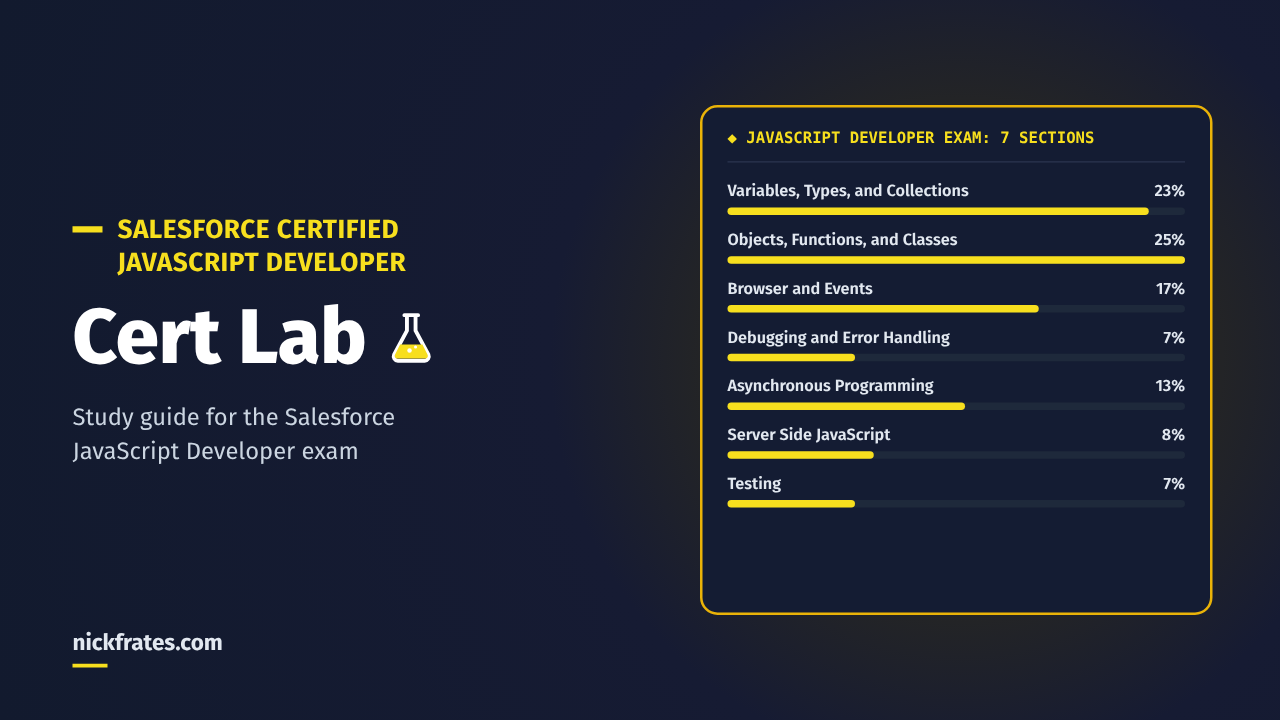
JavaScript Developer Cert Lab: 7 exam sections and their weights
25lessons weighted like the exam, so your hours go where the points are
647practice questions that explain every answer
4timed practice exams that show you're ready before you book
$9.99for 12 months, with a 30-day refund

What the JavaScript Developer cert can do for you

Salesforce Certified JavaScript Developer says you know the language itself, in the browser and on the server, not just one framework. Here's what people usually want from it, and how this course helps you get there.

Proof your JavaScript is solid

It's a credential anyone can verify with Salesforce, covering the language, the browser, Node.js and testing. That's something concrete for your next review, résumé or rate conversation.

A bridge into Salesforce development

Lightning Web Components are standard JavaScript. The exam has no prerequisite, so web developers can use it to show they're ready for Salesforce front-end work.

The person who fixes the weird bug

When a value is undefined, this points at the wrong object or logs come out in the wrong order, you'll know why and what to change.

Walking into the exam calm

By exam day you'll have taken 4 full practice exams on a 105-minute timer, so you'll know where you stand against the 65% pass mark before you pay the $200 fee.

Every feature, and what it does for you

Lessons weighted like the exam

25 lessons follow the official exam guide's 7 sections and weights. Objects, Functions, and Classes is the biggest at 25%, so it gets the most lessons.

10 questions after every lesson

You find out right away whether a lesson stuck, while it's still fresh, instead of finding the gap on exam day.

Every answer explained

Each question explains why the right answer is right and why the other options are wrong, so a snippet you've never seen before still makes sense.

Code you read like you do at work

Editor-style code blocks and short Try it tasks you run in your browser console or Node.js. No paid tools needed.

A section check, flashcards and a practice quiz per section

Short, self-contained study sessions. Ten minutes of flashcards on a lunch break still moves you forward when your week is full.

4 full practice exams

60 questions, a 105-minute timer and the real 65% pass mark. Your results show which sections need work, so you book with evidence instead of hope.

What you'll be able to do

The exam tests whether you can predict what JavaScript code does. Here's what you'll know when you finish, and why it matters at work.

  • Predict coercion, equality, truthiness and array results without running the code.
  • Know what this, closures, prototypes and classes do in any call site.
  • Handle events, the DOM, storage and fetch the way the browser actually behaves.
  • Order promise callbacks, async/await and timers correctly in the event loop.
  • Find bugs fast with DevTools breakpoints, the console and proper error handling.
  • Run Node.js and npm with confidence and write Jest tests that catch real bugs.

Try one before you buy

This is the kind of snippet the exam uses, and the kind you'll practice. In what order do the letters print?

order.js
1console.log('A');
2setTimeout(() => console.log('B'), 0);
3Promise.resolve().then(() => console.log('C'));
4(async () => {
5  console.log('D');
6  await null;
7  console.log('E');
8})();
9console.log('F');
Show the answer

A, D, F, C, E, B. Synchronous code runs first, including the async function up to its await. Then the microtasks run in the order they were queued: the promise callback (C), then the code after await (E). The timer (B) is a task, so it runs last even with a 0 ms delay. In the course, every question explains each option like this and links to the docs behind it.

Your 6-week plan

A suggested schedule of about 5 hours a week, then a week of practice exams. Go faster or slower, you have 12 months. Each section ends with a section check, flashcards and a practice quiz, so you know it stuck before you move on.

Week 1

Variables, Types, and Collections

var, let and const, strings, numbers and dates, coercion and equality, truthy and nullish values, arrays and JSON.

Week 2

Objects, Functions, and Classes

The biggest section. Functions and parameters, this and bind, prototypes, classes, modules, scope and closures.

Week 3

Browser and Events

Events and propagation, the DOM, DevTools panels, and browser APIs like storage, fetch, timers and history.

Week 4

Asynchronous Programming, Debugging and Error Handling

Promises and combinators, async/await and the event loop, then try/catch, the console and breakpoints.

Week 5

Server Side JavaScript and Testing

Node.js, its core modules and CLI, npm and package.json, then effective Jest unit tests.

Week 6

Practice exams and review

Take the timed practice exams. Your results point to your weak sections, so your last hours go exactly where you need them.

Start week 1 today

You're enrolled right after checkout. Or try a free lesson and see if the format fits you.

$9.9912 months

Why a plan built on practice works

Pulling an answer out of memory strengthens it more than rereading does. Researchers call it retrieval practice. In a 2006 study by Roediger and Karpicke, students who practiced recall remembered about 61% a week later, against about 40% for students who reread. Read more in The Science of Studying for Salesforce Certifications.

That's why every part of this course asks you to answer, not just read: lessons, section checks, flashcards, quizzes and practice exams.

See exactly what you'll study

7 sections · 25 lessons · 647 practice questions · 4 practice exams. Try a free lesson before you decide.

Start here · study guide
  • JavaScript Developer study guide🔒 Locked
Variables, Types, and Collections · 23% · 6 lessons
  • VT1: Declaring variables with var, let and const🔒 Locked
  • VT2: Strings, numbers and dates🔒 Locked
  • VT3: Type coercion and equality🔒 Locked
  • VT4: Truthy, falsy, nullish and optional chaining🔒 Locked
  • VT5: Working with arrays🔒 Locked
  • VT6: Working with JSON🔒 Locked
  • Section check, flashcards and a 14-question practice quiz🔒 Locked
Objects, Functions, and Classes · 25% · 6 lessons
  • OF1: Functions: declarations, expressions, arrows and parameters🔒 Locked
  • OF2: this, call, apply and bind🔒 Locked
  • OF3: Objects, properties and the prototype chain🔒 Locked
  • OF4: Classes, inheritance, getters and private fields🔒 Locked
  • OF5: Modules: import and export🔒 Locked
  • OF6: Scope and closures🔒 Locked
  • Section check, flashcards and a 15-question practice quiz🔒 Locked
Browser and Events · 17% · 4 lessons
  • BE1: Events: listeners, propagation and custom events🔒 Locked
  • BE2: Working with the DOM🔒 Locked
  • BE3: Browser DevTools: Elements, Network, Performance and Memory🔒 Locked
  • BE4: Browser APIs: storage, fetch, timers, location and history🔒 Locked
  • Section check, flashcards and a 10-question practice quiz🔒 Locked
Debugging and Error Handling · 7% · 2 lessons
  • DE1: Handling errors with try, catch, finally and throw🔒 Locked
  • DE2: Debugging with the console and breakpoints🔒 Locked
  • Section check, flashcards and a 8-question practice quiz🔒 Locked
Asynchronous Programming · 13% · 3 lessons
  • AP1: Promises, chaining and the combinators🔒 Locked
  • AP2: async and await🔒 Locked
  • AP3: The event loop, tasks and microtasksTry a free lesson
  • Section check, flashcards and a 10-question practice quiz🔒 Locked
Server Side JavaScript · 8% · 2 lessons
  • SS1: Node.js: the runtime, the CLI and core modules🔒 Locked
  • SS2: npm, package.json and choosing a framework🔒 Locked
  • Section check, flashcards and a 8-question practice quiz🔒 Locked
Testing · 7% · 2 lessons
  • TS1: Writing effective unit tests with Jest🔒 Locked
  • TS2: Mocks, hook scope and async error tests🔒 Locked
  • Section check, flashcards and a 8-question practice quiz🔒 Locked
Practice exams · 4 full exams · 60 questions each
  • Practice Exam 1: 60 questions, 105-minute timer🔒 Locked
  • Practice Exam 2: 60 questions, 105-minute timer🔒 Locked
  • Practice Exam 3: 60 questions, 105-minute timer🔒 Locked
  • Practice Exam 4: 60 questions, 105-minute timer🔒 Locked

How it's built

The lessons start where developers lose points on this exam: coercion, this, closures and the order of async callbacks. It's not a syntax drill.

Every fact and code sample in the course is checked against MDN Web Docs, Node.js, npm, Jest, Chrome DevTools docs or Trailhead, and each lesson lists its sources. If a fact can't be sourced, it isn't in the course.

Is it right for you?

You build Lightning Web Components

You write JavaScript every day. This fills in the language details the exam asks about and LWC work rarely shows you.

You're a web developer new to Salesforce

There's no prerequisite. Your JavaScript experience counts, and the course shows you exactly how the exam asks about it.

You've done Trailhead and want exam-style practice

Badges teach the topics. This adds hundreds of exam-style questions with the reasoning behind each answer, and timed practice exams that tell you when you're ready.

You're retaking after a miss

Timed, exam-weighted practice exams show which sections cost you points, so you can fix those before you pay the $100 retake fee.

Who it's not for

Anyone looking for real exam questions. There are none here. It also isn't a first course in programming. It assumes you've written some JavaScript before.

Everything you get

25 lessons across all 7 exam sections, plus a study guide
Every section covered, in proportion to its weight on the exam
✓
647 practice questions with explanations: 250 in lessons, 84 in section checks, 73 in 7 practice quizzes, 240 in practice exams
Enough repetition that the right answer comes quickly under time pressure
✓
4 full practice exams of 60 questions each, timed at 105 minutes
Know your score before you book the exam
✓
A section check and flashcards for every section
Quick reviews that fit into a short break
✓
Code samples and Try it tasks for your browser console or Node.js
See the behavior yourself with free tools
✓
Every answer explained, with links to the official docs
Learn the reason, then check the source yourself
✓
12 months of access
Study at your own pace and come back to review later
✓
30-day refund
If it isn't for you, email us and get your money back
✓
Your price
The exam itself is $200
$9.99
12 months

For comparison, the exam costs $200 and a retake costs $100, according to the official Salesforce exam guide.

✓ 30-day refund

Questions

How much does the JavaScript Developer Cert Lab cost?

$9.99 for 12 months of access to every lesson, quiz and practice exam.

How long does it take to study for the JavaScript Developer exam with Cert Lab?

About 28 hours, or roughly 6 weeks at 5 hours a week, based on the lessons, section quizzes and 4 practice exams in the course.

What's in the practice exams?

4 full practice exams of 60 questions each, 105 minutes each, weighted by section like the official exam guide. After you submit, you see the correct answers and an explanation for every question.

Do I need Salesforce experience for the JavaScript Developer exam?

No. The exam has no prerequisite and tests JavaScript itself: the language, the browser, Node.js and testing.

Is this the same exam as JavaScript Developer I?

Yes. Trailhead's prep modules still use the name Salesforce JavaScript Developer I for the exam now listed as Salesforce Certified JavaScript Developer.

Why do practice tests help?

Retrieving an answer from memory makes it stick better than rereading. This is called retrieval practice, or the testing effect.

Do I need a Salesforce certification first?

No. The JavaScript Developer exam has no prerequisite.

What is the passing score for the JavaScript Developer exam?

65% on 60 scored questions in 105 minutes, according to the official Salesforce exam guide.

Is this the same as JavaScript Developer I?

Yes. Trailhead's prep modules still use the name Salesforce JavaScript Developer I for this exam.

Do I need any paid software?

No. Every Try it task runs in your browser console or in Node.js, which is free.

How soon can I start?

Right after checkout. You're enrolled as soon as your payment goes through.

How long do I have access?

12 months from the day you buy.

What if it's not for me?

Email refunds@nickfrates.com within 30 days for a full refund. See the refund policy.

Are these real exam questions?

No. Every snippet and question is written from the public exam objectives and the official docs. Using real exam questions breaks Salesforce's certification agreement.

Earn the cert, and write JavaScript you can explain.

Pass the exam, bring sharper debugging to your next project and give yourself a credential you can point to.

$9.9912 months of access ✓ 30-day refund

Not ready to buy? Try a free lesson and judge it for yourself.

$9.99 · 12 months
JavaScript Developer Cert Lab · 30-day refund
Get access, $9.99

JavaScript Developer Cert Lab

Categories: Salesforce Developer
Wishlist Share

About Course

Study course for the Salesforce Certified JavaScript Developer exam: lessons for all 7 exam sections (Variables, Types, and Collections; Objects, Functions, and Classes; Browser and Events; Debugging and Error Handling; Asynchronous Programming; Server Side JavaScript; and Testing), each with a section check, flashcards and a practice quiz, plus a study guide.

Who it's for

  • Lightning Web Components developers who want their JavaScript skills certified.
  • Front-end and Node.js developers moving into the Salesforce ecosystem.
  • Anyone who missed a pass and wants timed, exam-weighted practice on their weak sections.

What it costs

$9.99 for 12 months of access to every lesson, quiz and practice exam.

How long it takes

About 28 hours, or roughly 6 weeks at 5 hours a week. That's based on what's in the course: 25 lessons at about 30 minutes each, a section check and flashcards for each of the 7 sections, 73 section-quiz questions, and 4 practice exams of 60 questions, each with time to review the explanations.

What you get out of it

  • Lessons follow the official exam guide sections and weights, so your time goes where the points are.
  • Every quiz question explains why each option is right or wrong and links to the official documentation: MDN Web Docs, Node.js, npm, Jest and Chrome DevTools.
  • Code examples you can run in your browser console or Node.js, plus a section check and flashcards at the end of every section.
  • 4 full practice exams of 60 questions each, weighted like the real exam, show your weak sections before you book.

Why practice tests work

Drilling practice tests works because of retrieval practice: pulling an answer out of memory strengthens it more than rereading does. In a 2006 study by Roediger and Karpicke, students who practiced recall remembered about 61% a week later, against about 40% for students who reread. A 2013 review led by John Dunlosky rated practice testing as one of only two high-utility study techniques. Read more in The Science of Studying for Salesforce Certifications.

Pass mark and exam format

60 scored multiple-choice/multiple-select questions plus up to 5 unscored ones, 105 minutes, and a passing score of 65%. The fee is US$200, with a US$100 retake. There's no prerequisite, and no hard-copy or online materials may be referenced during the exam.

Former names

Trailhead's prep modules still call this exam Salesforce JavaScript Developer I. It's the same exam as Salesforce Certified JavaScript Developer.

FAQ

How much does the JavaScript Developer Cert Lab cost?

$9.99 for 12 months of access to every lesson, quiz and practice exam.

How long does it take to study for the JavaScript Developer exam with Cert Lab?

About 28 hours, or roughly 6 weeks at 5 hours a week, based on the lessons, section quizzes and 4 practice exams in the course.

What's in the practice exams?

4 full practice exams of 60 questions each, 105 minutes each, weighted by section like the official exam guide. After you submit, you see the correct answers and an explanation for every question.

Do I need Salesforce experience for the JavaScript Developer exam?

No. The exam has no prerequisite and tests JavaScript itself: the language, the browser, Node.js and testing.

Is this the same exam as JavaScript Developer I?

Yes. Trailhead's prep modules still use the name Salesforce JavaScript Developer I for the exam now listed as Salesforce Certified JavaScript Developer.

Why do practice tests help?

Retrieving an answer from memory makes it stick better than rereading. This is called retrieval practice, or the testing effect.

Show More

Course Content

Start here: Study guide

  • JavaScript Developer study guide

Variables, Types, and Collections (23%)

Objects, Functions, and Classes (25%)

Browser and Events (17%)

Debugging and Error Handling (7%)

Asynchronous Programming (13%)

Server Side JavaScript (8%)

Testing (7%)

Practice Exams
Your first attempt is your real score. Each practice exam has a fixed set of 60 questions, so later attempts measure memory, not readiness. Take each exam once under the 105-minute timer, aim for 65% or higher, then review the sections you missed.

Student Ratings & Reviews

No Review Yet
No Review Yet