
Pass Platform App Builder the first time.

Learn to spot the one answer that fits the requirement when two seem to work. Practice every section until you're scoring above the 73% pass mark, so you pay the $200 exam fee once.

$9.99for 12 months of access ✓ 30-day refund

Checked against Salesforce Help and Trailhead Oct 11, 2026 · Enrolled right after checkout

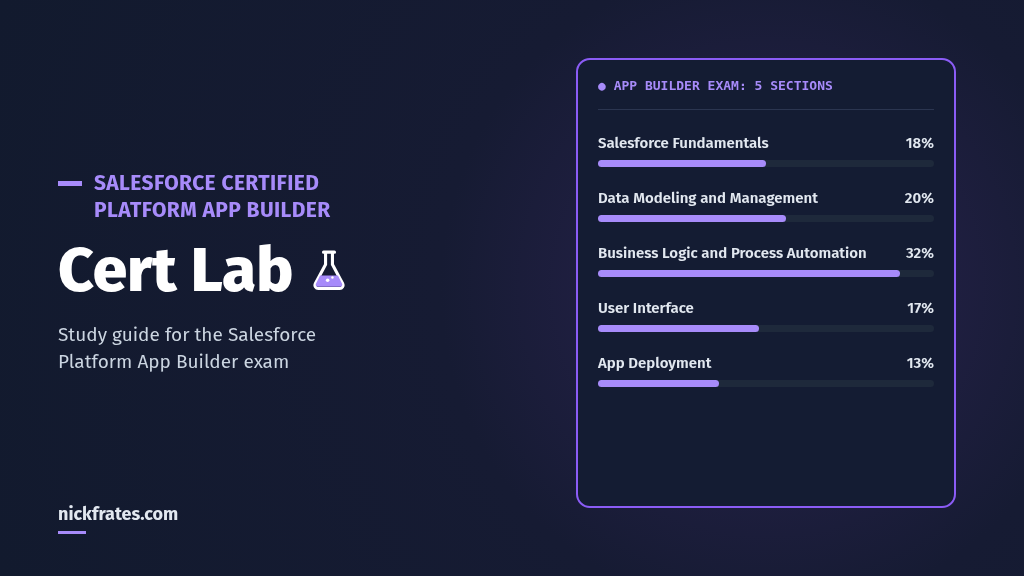
Platform App Builder Cert Lab: 5 exam sections and their weights
24lessons sized to the exam weights, so your hours go where the points are
605practice questions that explain every answer
4full practice exams that show you're ready before you book
$9.99for 12 months, with a 30-day refund

What Platform App Builder can do for you

Most admins start by configuring what someone else designed. App Builder is the certification that says you can design it yourself: the data model, the automation, the pages and the release plan. Here's what people usually want from it, and how this course helps you get there.

More interesting work, and the title to match

Go from taking tickets to building the apps your team uses every day. The cert is something anyone can verify with Salesforce, so it backs you up in your next review, on your résumé and on LinkedIn.

The person the team asks

Flow or validation rule? Master-detail or lookup? Change set or package? When you know why one fits and the other doesn't, you can explain your design to a developer, a lead or a client, and they'll trust it.

A clear next step on your path

App Builder has no prerequisite, so it's a natural next cert after Admin. It's also one of the 4 certifications that together earn you Application Architect, according to Salesforce's prerequisites list.

Exam day without the dread

By exam day you'll have taken 4 full practice exams weighted like the real one, so you'll know where you stand against the 73% pass mark before you pay the $200 exam fee.

Where builders lose the points

The misses are rarely about knowing where a setting lives. They come from scenario questions where two answers both work, and only one fits the requirement. Those are also the calls you make at work, where a wrong one means rework.

1. Pick the right automation

Which flow type, before-save or after-save, validation rule or flow, and when an approval fits. Get these right and your automation is fast and doesn't break other things.

2. Model the data right

Master-detail or lookup decides sharing, deletion and roll-ups. Get it right first and you avoid a painful conversion later.

3. Ship it safely

Sandbox types, change sets and packages. Know the rules and release day is quiet instead of stressful.

Every question in the course explains why the right answer fits and why each other option loses, so you build the judgment, not just a memory of the answer.

Every part of the course, and what it does for you

Lessons sized to the exam

24 lessons follow the official guide's 5 sections and weights. Business Logic and Process Automation is 32% of the exam, so it gets 8 lessons. You stop guessing what to study.

10 questions after every lesson

You find out right away whether a lesson stuck, while it's fresh, instead of finding the gap on exam day.

Every option explained

Each answer explains why the right option fits the requirement and why the others lose. That's the reasoning the exam tests, and the reasoning you'll use in your next design meeting.

Hands-on tasks and diagrams

Build it yourself in a free Developer Edition org, with an original diagram for each lesson. What you've built once is far easier to remember, and it's a skill you keep after the exam.

Section checks, flashcards and quizzes

Each section ends with a 10-question check, a flashcard set and a practice quiz. Short sessions that still move you forward on a busy week.

Every fact linked to the source

Each lesson lists its Salesforce Help and Trailhead sources, checked Oct 11, 2026. You won't lose a point to something that changed two releases ago.

Your 6-week plan

A suggested schedule of about 5 hours a week. Go faster or slower, you have 12 months. Each section ends with a section check, flashcards and a practice quiz, so you know it stuck before you move on.

Week 1

Formulas, roll-ups, validation and Flow Builder

Business Logic, part 1 · 4 lessons

The biggest section is 32% of the exam, so you start there. Write formula fields, roll-up summaries and validation rules, then build your first flows in a free Developer Edition org.

Week 2

Approvals, flow types and troubleshooting

Business Logic, part 2 · 4 lessons

Pick the right flow type, know before-save from after-save, build flow approvals, fix broken flows and see how Agentforce agents use them. Then take the 24-question section quiz.

Week 3

Data Modeling and Management

20% of the exam · 5 lessons

Choose the right data model, master-detail or lookup, junction objects, field type changes and data import. The decisions that are hardest to undo in a real org.

Week 4

Salesforce Fundamentals

18% of the exam · 4 lessons

Declarative or code, AgentExchange, profiles and permission sets, sharing, and reports. You'll know who can see what, and why.

Week 5

User Interface and App Deployment

30% of the exam together · 7 lessons

Lightning pages, Dynamic Forms, actions and mobile layouts, then sandboxes, change sets and packages, so your work reaches production cleanly.

Week 6

Practice exams and review

4 full exams · 60 questions each

Take the practice exams, weighted like the real one. Your results point to your weak sections, so your last hours go exactly where you need them. Book the exam when you're clear of 73%.

Start week 1 today

You're enrolled right after checkout. Or try a free lesson and see if the format fits you.

$9.9912 months

What you'll be able to do

The exam tests the work an app builder does every day. Here's what you'll know when you finish, and why it matters at work.

  • Choose the right data model and relationship type, so reports, sharing and deletion behave the way the business expects.
  • Write formula fields, roll-up summaries and validation rules that keep data clean without a developer.
  • Pick the right flow type for a requirement and know before-save from after-save, so your automation is fast and doesn't break other things.
  • Build flow approval processes and troubleshoot flows with debug, error emails and fault paths, so you can fix problems yourself.
  • Explain how Agentforce agents use flows, so you're part of the AI conversation at work.
  • Give people the right access with profiles, permission sets, org-wide defaults and sharing rules.
  • Design Lightning pages, Dynamic Forms, actions and compact layouts that make the app quick to use on desktop and phone.
  • Move changes from sandbox to production with change sets or packages, without surprises on release day.

Why practice beats rereading

Pulling an answer out of memory strengthens it more than rereading does. Researchers call it retrieval practice. In a 2006 study by Roediger and Karpicke, students who practiced recall remembered about 61% a week later, against about 40% for students who reread. A 2013 review led by John Dunlosky rated practice testing as one of only two high-utility study techniques. Read more in The Science of Studying for Salesforce Certifications.

For you, that means more of what you study is still there on exam day, and fewer evenings spent rereading notes that don't stick. That's why every part of this course asks you to answer, not just read.

See exactly what you'll study

5 sections · 24 lessons · 605 practice questions · 4 practice exams. Try a free lesson before you decide.

Business Logic and Process Automation · 32% · 8 lessons
  • BL1: Formula fields: data types, limits and cross-object formulasTry a free lesson
  • BL2: Roll-up summary fields: where they work and what they can't do🔒 Locked
  • BL3: Validation rules: write them, place the error and know when they run🔒 Locked
  • BL4: Create and configure flows in Flow Builder🔒 Locked
  • BL5: Flow approval processes🔒 Locked
  • BL6: Choose the right flow type🔒 Locked
  • BL7: Maintain, monitor and troubleshoot flows🔒 Locked
  • BL8: Agentforce and flows: automating with agent actions🔒 Locked
  • Section check, flashcards and a 24-question practice quiz🔒 Locked
Salesforce Fundamentals · 18% · 4 lessons
  • SF1: Declarative or programmatic, and when to use AgentExchange🔒 Locked
  • SF2: Object and field access: profiles, permission sets and field-level security🔒 Locked
  • SF3: Record access: org-wide defaults, role hierarchy and sharing rules🔒 Locked
  • SF4: Reports, custom report types and dashboards🔒 Locked
  • Section check, flashcards and a 12-question practice quiz🔒 Locked
Data Modeling and Management · 20% · 5 lessons
  • DM1: Choose the right data model and relationship type🔒 Locked
  • DM2: Master-detail and lookup: record access, deletion, limits and conversion🔒 Locked
  • DM3: Many-to-many relationships and junction objects🔒 Locked
  • DM4: Field data types and the risks of changing them🔒 Locked
  • DM5: Import, export and external data sources🔒 Locked
  • Section check, flashcards and a 15-question practice quiz🔒 Locked
User Interface · 17% · 4 lessons
  • UI1: Lightning pages, Dynamic Forms and visibility rules🔒 Locked
  • UI2: Custom buttons, links and actions🔒 Locked
  • UI3: Lightning components: declarative and programmatic options🔒 Locked
  • UI4: Mobile: global and object-specific actions and compact layouts🔒 Locked
  • Section check, flashcards and a 12-question practice quiz🔒 Locked
App Deployment · 13% · 3 lessons
  • AD1: Sandbox types and the application lifecycle🔒 Locked
  • AD2: Change sets: rules, permissions and troubleshooting🔒 Locked
  • AD3: Packages and planning a deployment🔒 Locked
  • Section check, flashcards and a 12-question practice quiz🔒 Locked
Practice exams · 4 full exams · 60 questions each
  • Practice Exam 1: 60 questions weighted like the official exam guide🔒 Locked
  • Practice Exam 2: 60 questions weighted like the official exam guide🔒 Locked
  • Practice Exam 3: 60 questions weighted like the official exam guide🔒 Locked
  • Practice Exam 4: 60 questions weighted like the official exam guide🔒 Locked

Your instructor

Nick Frates

Nick Frates, senior Salesforce developer

Nick teaches declarative automation every day: his 27-hour Salesforce Flows course on Udemy covers record-triggered, before-save, scheduled and screen flows, the same decisions App Builder tests.

This course is for builders who click before they code. Every fact comes from a fully loaded Salesforce Help or Trailhead page, and each lesson lists its sources and the date it was checked.

Nick loved Focus on Force and used it constantly on his way to 17 Salesforce certifications. He learned fastest by taking practice tests rapid-fire, over and over, so he built Cert Lab around that: fast testing with up-to-date links and screenshots, designed to test you to success.

Is it right for you?

You're an admin ready for the next step

You know the platform. This adds the design judgment that moves you from building what you're asked to deciding how it gets built.

You build without code

Business analysts, consultants and power users who click before they code. The course shows where code fits, so you can recognize it, without asking you to write any.

You're moving into Salesforce work

If you've done Trailhead and want a cert that shows you can build, this gives you a recognized credential to point to. The free Platform Administrator Cert Lab is included to fill platform gaps.

You're short on time

About 26 hours in total, or roughly 6 weeks at 5 hours a week. Everything splits into short sessions, and you have 12 months to finish.

You're retaking after a miss

Exam-weighted practice exams show which sections cost you points, so you can fix those before you pay the $100 retake fee.

Who it's not for

Anyone looking for real exam questions (there are none here) or people brand new to Salesforce. Start with the free Admin course instead. It costs nothing and gives you the platform basics first.

Everything you get

24 lessons across all 5 exam sections
Every section covered, in proportion to its weight on the exam
✓
605 practice questions with explanations: 240 in lessons, 50 in section checks, 75 in 5 practice quizzes and 240 in the practice exams
Enough repetition that the right call comes quickly in 105 minutes
✓
4 full practice exams of 60 questions each, weighted like the real exam
Know your score before you book the exam
✓
A section check and flashcards for every section
Quick reviews that fit into a short break
✓
Original diagrams and hands-on tasks for a free Developer Edition org
Build it once and it sticks, no paid org needed
✓
Every answer explained, with a link to the official Salesforce documentation
Learn the reason, then check the source yourself
✓
Bonus: Platform Administrator Cert Lab (all 8 sections)
Fill platform gaps now, or use it for your next cert
Free
12 months of access
Study at your own pace and come back to review later
✓
30-day refund
If it isn't for you, email us and get your money back
✓
Your price
The exam itself is US$200
$9.99
12 months
✓ 30-day refund

Questions

What's the Platform App Builder exam like?

60 scored multiple-choice questions plus up to 5 unscored ones, in 105 minutes. You need 73% to pass. The exam costs US$200 and a retake costs US$100, according to the official exam guide.

Do I have to follow the 6-week plan?

No. It's a suggested pace. You have 12 months of access, so you can go faster, slower, or skip straight to the practice exams.

How much does the Platform App Builder Cert Lab cost?

$9.99 for 12 months of access to every lesson, quiz and practice exam.

How long does it take to study for the Platform App Builder exam with Cert Lab?

About 26 hours, or roughly 6 weeks at 5 hours a week, based on the lessons, section quizzes and 4 practice exams in the course.

What's in the practice exams?

4 full practice exams of 60 questions each, weighted by section like the official exam guide. After you submit, you see the correct answers and an explanation for every question.

Do I need the Admin certification first?

No. Platform App Builder has no prerequisite, according to Salesforce's prerequisites list. Admin-level platform knowledge helps, which is why the Platform Administrator Cert Lab is included free.

Do I need to code?

No. App Builder is mostly declarative. The course explains where code fits, such as Lightning web components, so you can recognize it on the exam.

Do I need a paid Salesforce org?

No. A free Developer Edition org covers the hands-on tasks.

Is it current?

Yes. It follows the current official exam guide, which aligns questions to the SU '26 release, and all 5 sections were checked against Salesforce Help and Trailhead on Oct 11, 2026.

How soon can I start?

Right after checkout. You're enrolled as soon as your payment goes through.

How long do I have access?

12 months from the day you buy.

What if it's not for me?

Email refunds@nickfrates.com within 30 days for a full refund. See the refund policy.

Are these real exam questions?

No. Every scenario is written from the public exam objectives and Salesforce Help. Using real exam questions breaks Salesforce's certification rules, and it can cost you the certification.

Earn the cert, and become the one who builds the apps.

Pass the exam, bring sharper design skills to your next project and give yourself a credential you can point to.

$9.9912 months of access ✓ 30-day refund

Not ready to buy? Try a free lesson and see how fast you learn.

Comparing prep options? See Focus on Force vs Cert Lab for Platform App Builder.

$9.99 · 12 months
Platform App Builder Cert Lab · 30-day refund
Get the Cert Lab, $9.99

Platform App Builder Cert Lab

Categories: Salesforce Admin
Wishlist Share
Cert Lab study guide for the Salesforce Certified Platform App Builder exam: 5 exam sections, Salesforce Fundamentals 18%, Data Modeling and Management 20%, Business Logic and Process Automation 32%, User Interface 17%, App Deployment 13%

About Course

Study course for the Salesforce Certified Platform App Builder exam: exam-weighted lessons, practice questions with explanations, flashcards and a quiz for each section. Every fact links to official Salesforce Help or Trailhead.

All 5 sections are live: Business Logic and Process Automation (32%, 8 lessons), Data Modeling and Management (20%, 5 lessons), Salesforce Fundamentals (18%, 4 lessons), User Interface (17%, 4 lessons) and App Deployment (13%, 3 lessons), each with a section check, flashcards and a practice quiz.

Who it’s for

  • Admins who want the next certification on the declarative path.
  • Builders who design data models, automation and Lightning apps without code.
  • Anyone who missed a pass and wants timed, exam-weighted practice on their weak sections.

What it costs

$9.99 for 12 months of access to every lesson, quiz and practice exam.

How long it takes

About 26 hours, or roughly 6 weeks at 5 hours a week. That's based on what's in the course: 24 lessons at about 30 minutes each, a section check and flashcards for each of the 5 sections, 75 section-quiz questions, and 4 practice exams of 60 questions, each with time to review the explanations.

What you get out of it

  • Lessons follow the official exam guide sections and weights, so your time goes where the points are.
  • Every quiz question explains why each option is right or wrong and links to the official Salesforce documentation.
  • A section check and flashcards close every section, so you review before you move on.
  • 4 full practice exams of 60 questions each, weighted like the real exam, show your weak sections before you book.

Why practice tests work

Drilling practice tests works because of retrieval practice: pulling an answer out of memory strengthens it more than rereading does. In a 2006 study by Roediger and Karpicke, students who practiced recall remembered about 61% a week later, against about 40% for students who reread. A 2013 review led by John Dunlosky rated practice testing as one of only two high-utility study techniques. Read more in The Science of Studying for Salesforce Certifications.

FAQ

How much does the Platform App Builder Cert Lab cost?

$9.99 for 12 months of access to every lesson, quiz and practice exam.

How long does it take to study for the Platform App Builder exam with Cert Lab?

About 26 hours, or roughly 6 weeks at 5 hours a week, based on the lessons, section quizzes and 4 practice exams in the course.

What's in the practice exams?

4 full practice exams of 60 questions each, weighted by section like the official exam guide. After you submit, you see the correct answers and an explanation for every question.

Why do practice tests help?

Retrieving an answer from memory makes it stick better than rereading. This is called retrieval practice, or the testing effect.

Show More

Course Content

Business Logic and Process Automation (32%)

  • BL1: Formula fields: data types, limits and cross-object formulas
  • BL2: Roll-up summary fields: where they work and what they can’t do
  • BL3: Validation rules: write them, place the error and know when they run
  • BL4: Create and configure flows in Flow Builder
  • BL5: Flow approval processes
  • BL6: Choose the right flow type
  • BL7: Maintain, monitor and troubleshoot flows
  • BL8: Agentforce and flows: automating with agent actions
  • Business Logic and Process Automation: Section check
  • Business Logic and Process Automation: Flashcards
  • Business Logic and Process Automation: Practice Quiz

Data Modeling and Management (20%)

Salesforce Fundamentals (18%)

User Interface (17%)

App Deployment (13%)

Practice Exams
Four full 60-question practice exams, weighted like the official exam guide.

Student Ratings & Reviews

No Review Yet
No Review Yet