Free sample lesson from the Platform App Builder Cert Lab. The full course has 24 lessons and 365 practice questions.
Get the Cert Lab, $9.99BL1: Formula fields: data types, limits and cross-object formulas
You’ll be able to: pick the right formula return type, stay inside formula limits, and decide when a cross-object formula meets a requirement.
Formula field or something else?
| Requirement | Best fit | Why |
|---|---|---|
| Show a value calculated from fields on the same record | Formula field | Calculated automatically and read-only |
| Show a field from a parent record on the child | Cross-object formula | Spans up to 10 relationships |
| Total or count child records on the parent | Roll-up summary field (BL2) | Formulas can’t directly reference parent aggregate fields like Quote GrandTotal |
| Block a save when data is wrong | Validation rule (BL3) | Formula fields display values; they don’t stop saves |
| Set a starting value users can change | Default value formula | Formula fields are read-only on record pages |
Building a formula field, step by step
You start a formula field the same way as any custom field, then pick its data type based on what the calculation returns: Checkbox (true or false), Currency, Date, Date/Time, Number, Percent, Text (up to 3,900 characters) or Time. Text area isn’t a supported formula data type. For Currency, Number and Percent you also choose decimal places. Salesforce rounds half up: 12.345 becomes 12.35 and -12.345 becomes -12.35.
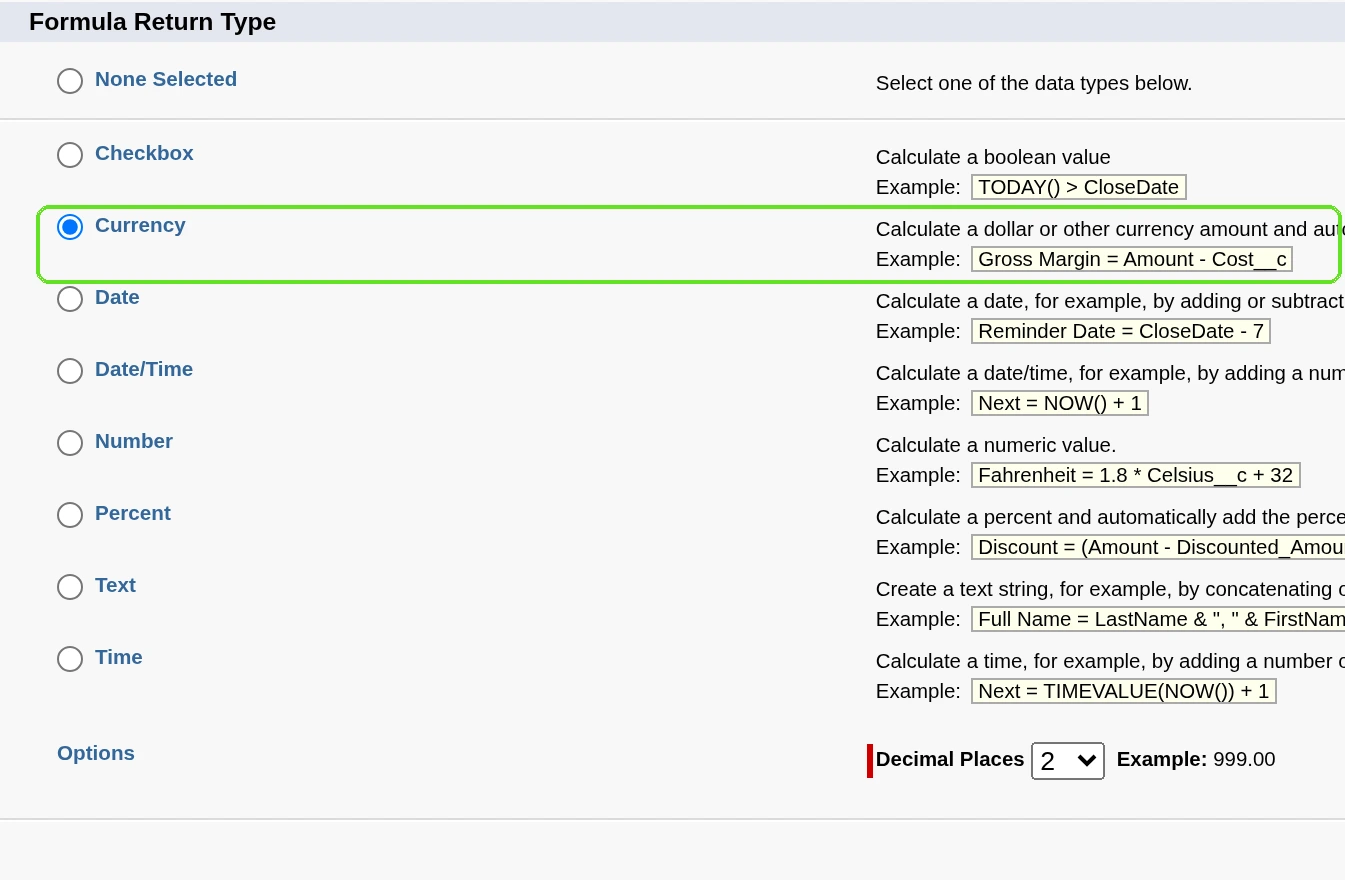
If the formula uses number, currency or percent fields, choose how blanks behave: Treat blank fields as zeros or Treat blank fields as blanks. Add comments between /* and */, then click Check Syntax.
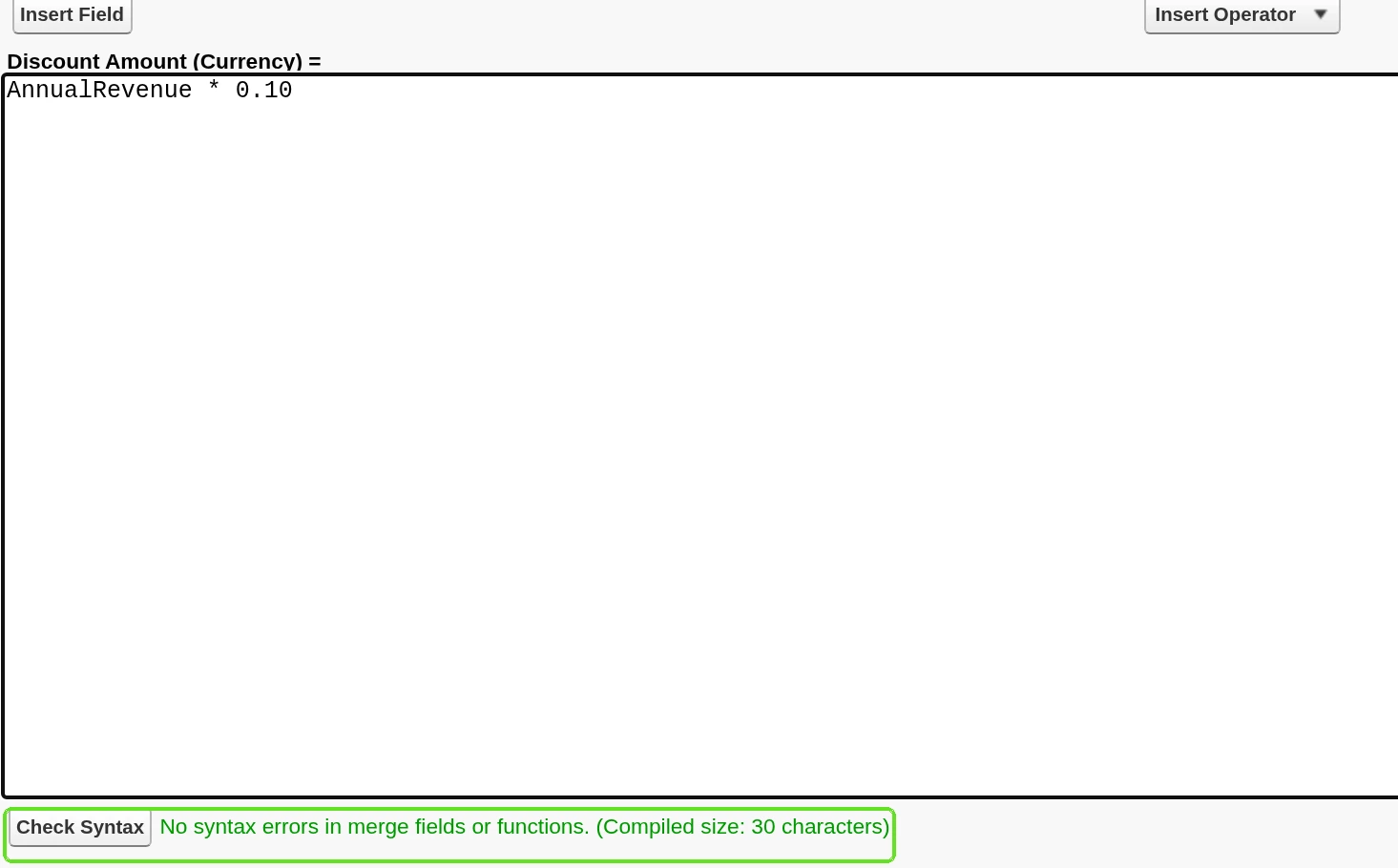
IF( Amount > 100000, "Large deal", "Standard deal" ) /* Text return type */Formula fields are calculated automatically, so they’re read-only on detail pages, don’t show on edit pages, and don’t update last modified date fields.
Cross-object formulas
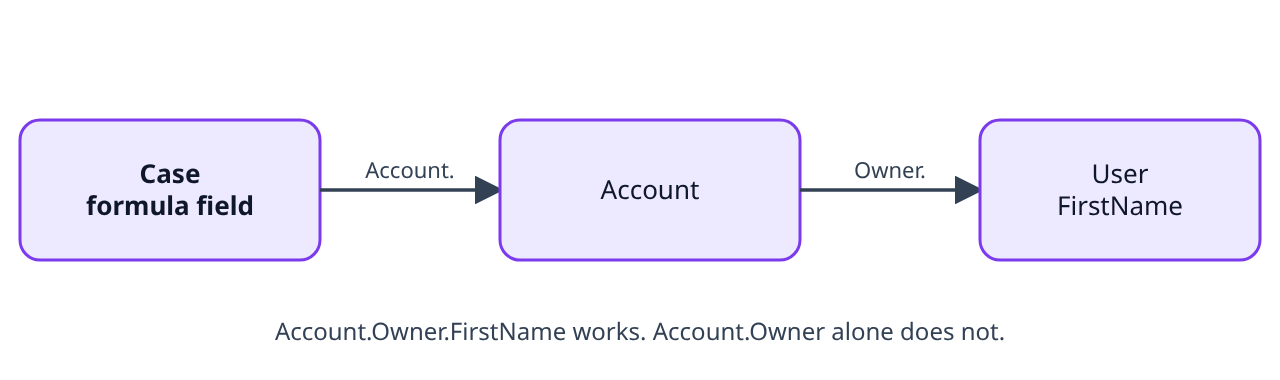
A cross-object formula spans related objects and references their merge fields. It works with master-detail (from the detail side up to the master) and with lookup relationships, and can reach fields on objects up to 10 relationships away. You can use one anywhere formulas are used except when creating default values.
Exam trap
Visibility: if a formula on Case shows an Account field and it’s on the case page layout, users can see that value even without access to the account record. And you can’t reference an object itself: Account.Owner is invalid; Account.Owner.FirstName or Account.OwnerId is valid.
Limits the exam likes
| Limit | Value |
|---|---|
| Characters in a formula (spaces, returns and comments count) | 3,900 |
| Characters displayed after evaluation | 1,300 |
| Save size and compile size | 15,000 bytes each |
If a formula needs more than 3,900 characters, split it into separate formula fields and reference them from another formula field. Functions such as TEXT, DATEVALUE, DATETIMEVALUE and DATE add a lot to compile size.
Exam trap
Fields you can’t use in formulas: long text area, encrypted and Description fields. You can’t delete a field that a formula references until you remove it from the formula. NULL isn’t supported as an expression in a Checkbox formula, and HTML tags are escaped, so use HYPERLINK or IMAGE instead.
Predict, then reveal
A formula that spans 11 relationships is saved. What happens?
Show the answer
It isn’t allowed: cross-object formulas reach objects up to 10 relationships away.
Try it
- In your Developer Edition org, open Setup, Object Manager, Case, Fields & Relationships, and click New. Choose Formula and the Text return type.
- Name it Account Owner First Name and enter
Account.Owner.FirstName. Click Check Syntax. - Save, add it to the layout, and open a case that has an account. You see the owner’s first name, read-only.
Practice questions
Ten exam-style questions on this lesson. Answer each one before you open it.
Question 1. A sales manager wants each opportunity to show Large deal or Standard deal based on Amount. Which return type should the formula field use?
- A. Text
- B. Currency
- C. Number, because Amount is a currency field and the result must match it
- D. Checkbox
Show the answer and explanation
Answer: A. The result is a word, so the formula returns Text.
Pick the return type from the output, not from the input fields.
Question 2. A support rep needs to see the account owner’s first name on each case. What’s the simplest declarative solution?
- A. A record-triggered flow that copies the name into a text field on every case update
- B. A validation rule on Case
- C. A roll-up summary field on Account
- D. A cross-object formula on Case
Show the answer and explanation
Answer: D. A cross-object formula can reach Account.Owner.FirstName from Case.
A roll-up summarizes children; a validation rule only blocks saves; a flow works but isn’t the simplest and can go stale.
Question 3. Which reference is valid in a cross-object formula on Case?
- A. Account.Owner
- B. Account
- C. Owner, followed by the account record’s ID typed in as a literal value
- D. Account.Owner.FirstName
Show the answer and explanation
Answer: D. You must end on a field (or the ID field), not on an object.
Account.Owner and Account point at objects, which isn’t allowed.
Question 4. An admin’s formula needs about 5,000 characters. What should they do?
- A. Store the formula in a long text area field and reference that field from the formula instead
- B. Split it into separate formula fields and reference them
- C. Ask Salesforce Support to raise the limit
- D. Switch the return type to Text
Show the answer and explanation
Answer: B. The 3,900-character limit is handled by splitting into separate formula fields.
Return type doesn’t change the limit, and long text area fields can’t be used in formulas.
Question 5. Which two are true of formula fields? (Choose 2)
- A. Users can edit them on the edit page
- B. They don’t update last modified date fields
- C. They’re read-only on record detail pages
- D. They recalculate only when a user clicks Save on the record that holds them
Show the answer and explanation
Answer: B, C. Formula fields are calculated automatically, read-only and don’t touch last modified dates.
They aren’t visible on edit pages at all.
Question 6. A formula on Case shows Account.AnnualRevenue, and the field is on the case layout. A user can’t see the related account. What does the user see on the case?
- A. The annual revenue value
- B. An insufficient privileges error
- C. A blank field
- D. The value, but only after an admin grants Read access on the Account object to the user
Show the answer and explanation
Answer: A. Users see cross-object formula values even without access to the related record.
This is a documented visibility consideration, not an error.
Question 7. Where can’t you use a cross-object formula?
- A. In a default value
- B. In an approval or workflow rule formula that runs on the same object
- C. In a validation rule
- D. In a formula field
Show the answer and explanation
Answer: A. Cross-object formulas work anywhere formulas are used except when creating default values.
Validation rules and formula fields can use cross-object references.
Question 8. A Currency formula with 2 decimal places evaluates to -12.345. What’s displayed?
- A. -12.345, because currency formulas always keep the full stored precision
- B. -12.34
- C. -12.35
- D. -12.3
Show the answer and explanation
Answer: C. Salesforce rounds half up: -12.345 becomes -12.35.
The decimal places setting applies, with round half up.
Question 9. Which field can a formula reference?
- A. A long text area field
- B. An encrypted field
- C. A number field
- D. The Description field, as long as it’s on the same object as the formula
Show the answer and explanation
Answer: C. Long text area, encrypted and Description fields can’t be used in formulas.
Only the number field is allowed here.
Question 10. A formula field references Discount__c. An admin tries to delete Discount__c. What happens?
- A. Discount__c is deleted and the formula shows #Error! on every record from then on
- B. It can’t be deleted until it’s removed from the formula
- C. The formula switches to blank values
- D. The formula is deleted too
Show the answer and explanation
Answer: B. You can’t delete fields referenced in formulas.
Remove the reference first, then delete the field.
Before you move on
1. Name the 5 exam sections and the weight of this one.
Show answer
Salesforce Fundamentals 18%, Data Modeling and Management 20%, Business Logic and Process Automation 32%, User Interface 17%, App Deployment 13%.
2. What’s the passing score for the App Builder exam?
Show answer
73%, on 60 scored multiple-choice questions in 105 minutes.
Key takeaways
- Choose the return type from what the formula outputs.
- Formula fields are read-only, hidden on edit pages and don’t change last modified dates.
- Cross-object formulas reach up to 10 relationships away, but not in default values.
- Limits: 3,900 characters, 1,300 displayed, 15,000 bytes to save and compile.
Sources
- Salesforce Help: Build a Formula Field
- Salesforce Help: Formula Data Types
- Salesforce Help: Formula Field Limits and Restrictions
- Salesforce Help: What Is a Cross-Object Formula?
- Salesforce Help: Salesforce Certified Platform App Builder Exam Guide
Checked against Salesforce Help and Trailhead on Oct 11, 2026. Exam questions align to the SU ’26 release.
Liked this lesson?
There are 23 more like it, plus section checks, flashcards and 5 practice quizzes.
Get the Cert Lab, $9.99