Hey friends,
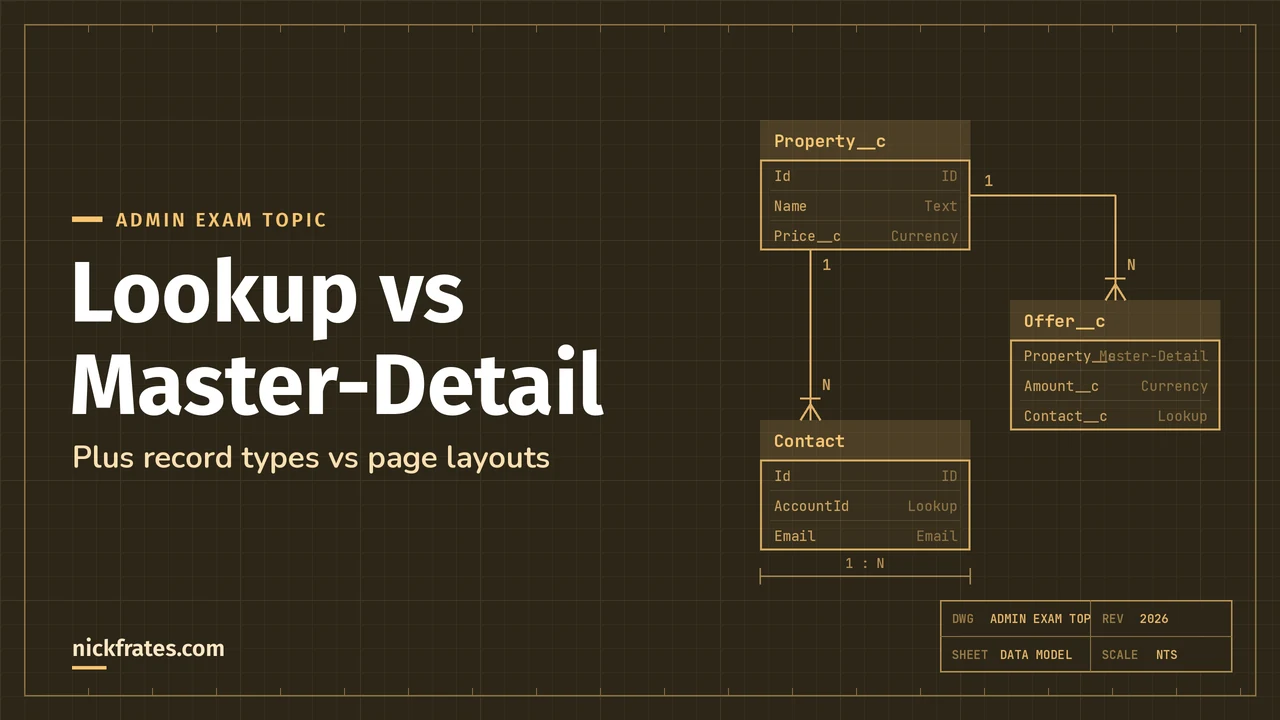
Use a lookup relationship when two objects are only sometimes related and the child should live on its own. Use a master-detail relationship when the child can't exist without the parent: deleting the master deletes the details, and the master controls who can see them. Master-detail also gives you roll-up summary fields on the parent.
This is core Object Manager material for the Admin exam (Object Manager and Lightning App Builder is 15%), and it shows up again on PD1 under "declarative versus programmatic". The definitions here come from Trailhead's Object Relationships unit.
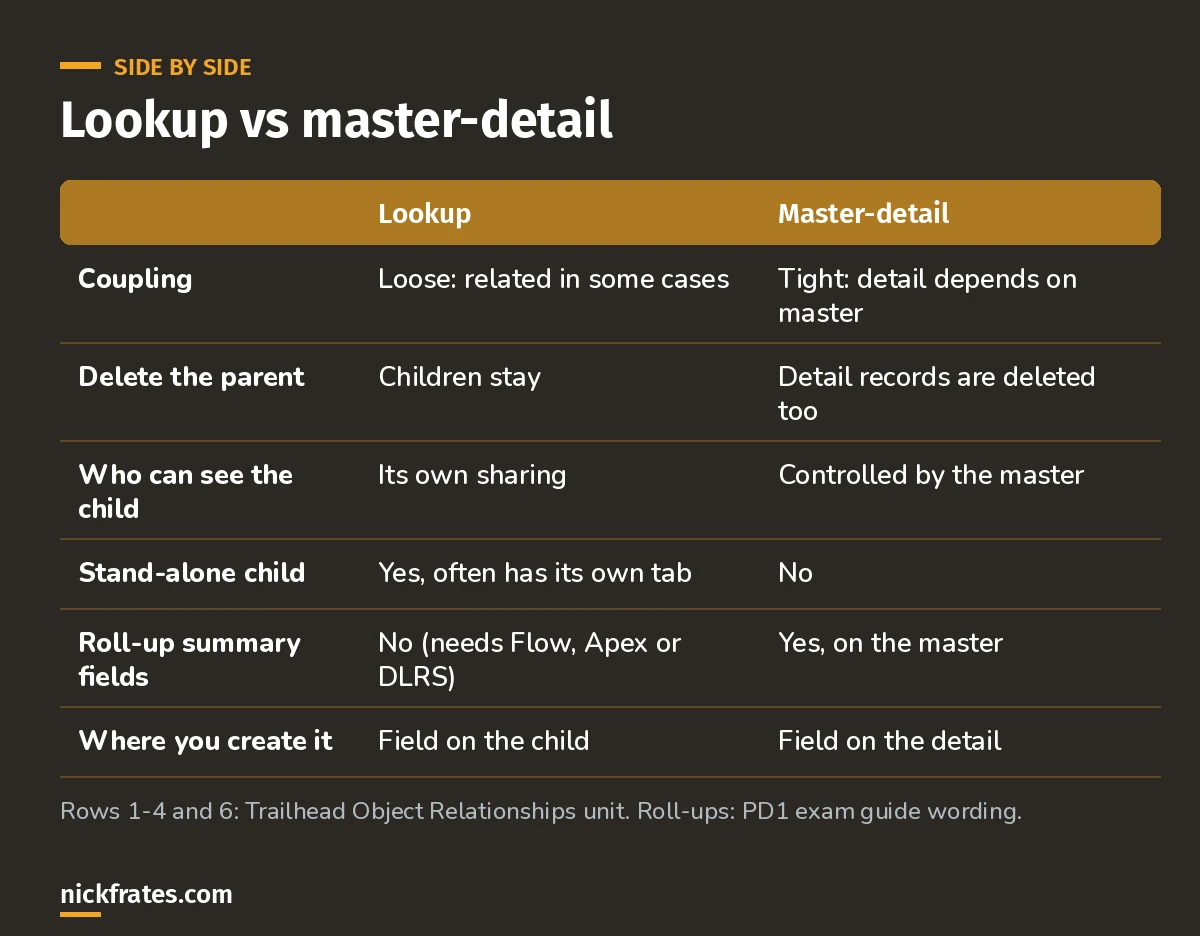
Read across a row to answer most relationship questions.
Lookup relationships
A lookup links two objects so you can look up one from the other. Contact to Account is the classic example: a contact is usually tied to an account, but it can exist on its own. Lookups can be one-to-one or one-to-many, and the related objects usually have their own tabs.
A special kind of lookup, the hierarchical relationship, is only available on the User object. It's how you build management chains between users.
Master-detail relationships
Here the master controls the detail. Trailhead's example is a Property and its Offers: when the owner takes the home off the market, you delete the property and every offer goes with it. The detail record doesn't work on its own, and you always create the relationship field on the detail object.
Roll-up summaries are the big practical reason to pick master-detail. A total or count of child records on the parent is a roll-up summary field with zero code. On a lookup, you need Flow, Apex or a tool like DLRS.
How to pick, with exam-style examples
Example 1. Expense lines should disappear when their expense report is deleted, and finance wants the report total on the parent. Answer: master-detail with a roll-up summary.
Example 2. A Project can optionally reference a Partner account, and partners must stay when a project is deleted. Answer: lookup.
Example 3. Users on an object need different sharing than its parent gives them. Answer: lookup, because a master-detail child's access is controlled by the master.
Be careful changing relationships later. Trailhead warns that every relationship adds complexity, so take extra care when changing or deleting objects, records or fields that are related.
Cert Lab by Nick Frates
Practice Object Manager questions free
The Admin Cert Lab covers relationships, record types, page layouts and Lightning App Builder, with practice questions that explain every option.
Start the free Admin Cert Lab →Record types vs page layouts
The other Object Manager pair the exam loves to mix up:
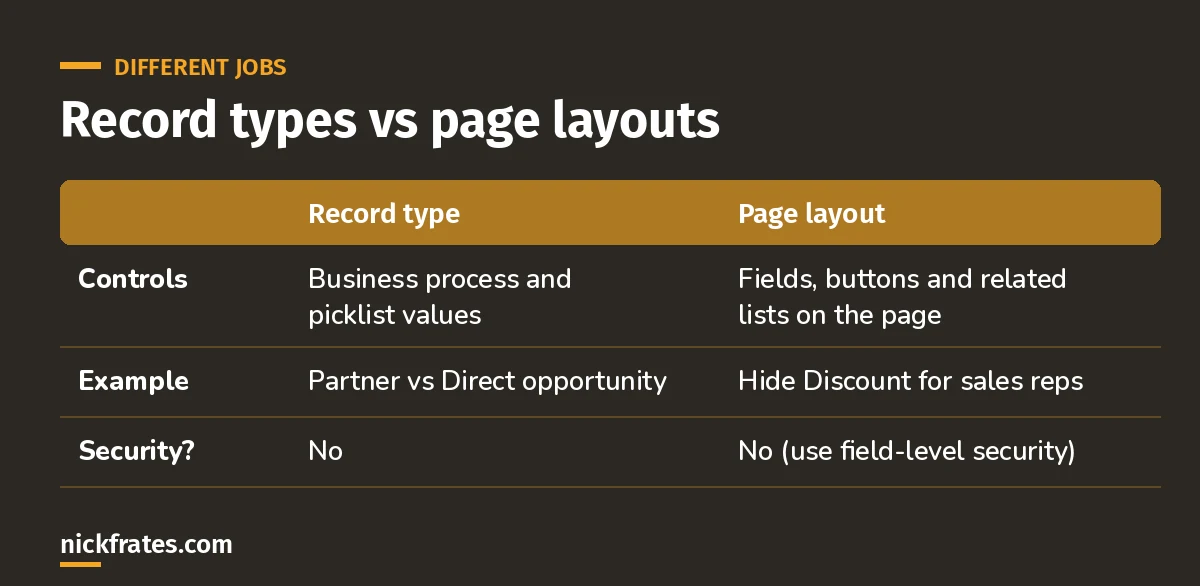
Neither one is security.
- Record types let one object support different business processes, with different picklist values and different page layouts per record type.
- Page layouts decide which fields, buttons and related lists appear and how they're arranged.
- Layouts assign by profile and record type, so a sales rep and a manager can see different layouts for the same record type.
Hiding a field from a layout doesn't secure it; it can still appear in reports and the API. Use field-level security for that, as I explain in the security model guide. And for conditional requirements, see conditionally requiring fields on a page layout.
Tips from building data models
- Sketch the model before you build. The Schema Builder helps, and I use it for bulk field creation. For the bigger picture, see my Salesforce data modeling guide.
- Updating related records automatically? Update child records with Flow.
- If you might need roll-ups later and the child never stands alone, start with master-detail.
Keep studying
- My 6-week Admin study plan covers this in week 2.
- SOQL relationship queries, for querying across these relationships in Apex.
- Salesforce formula examples, including cross-object formulas across these relationships.
- 25 free Admin practice questions.
- App Builder practice questions, which test relationships in more depth.
Hope this helps!
Best,
Nick


