This is a deep study guide for the Salesforce Certified Platform Administrator II exam, better known as the Advanced Administrator certification. It follows the exam outline section by section with explanations, diagrams, quick-reference tables, hands-on exercises and practice questions with answers and explanations.
Updated for 2026: written for the current outline, with Flow-only automation (Workflow Rules and Process Builder reached end of support on December 31, 2025), current sandbox and deployment tooling, and registration through Trailhead Academy with Pearson VUE delivery.
| Section | Weight | Approx. questions |
|---|---|---|
| Security and Access | 20% | ~12 |
| Objects and Applications | 19% | ~11 |
| Auditing and Monitoring | 10% | ~6 |
| Cloud Applications | 11% | ~7 |
| Data and Analytics Management | 13% | ~8 |
| Environment Management and Deployment | 7% | ~4 |
| Process Automation | 20% | ~12 |
| Exam fact | Detail |
|---|---|
| Official name | Salesforce Certified Platform Administrator II (formerly Advanced Administrator) |
| Format | 60 scored multiple-choice/multiple-select questions, plus up to 5 unscored |
| Time | 105 minutes |
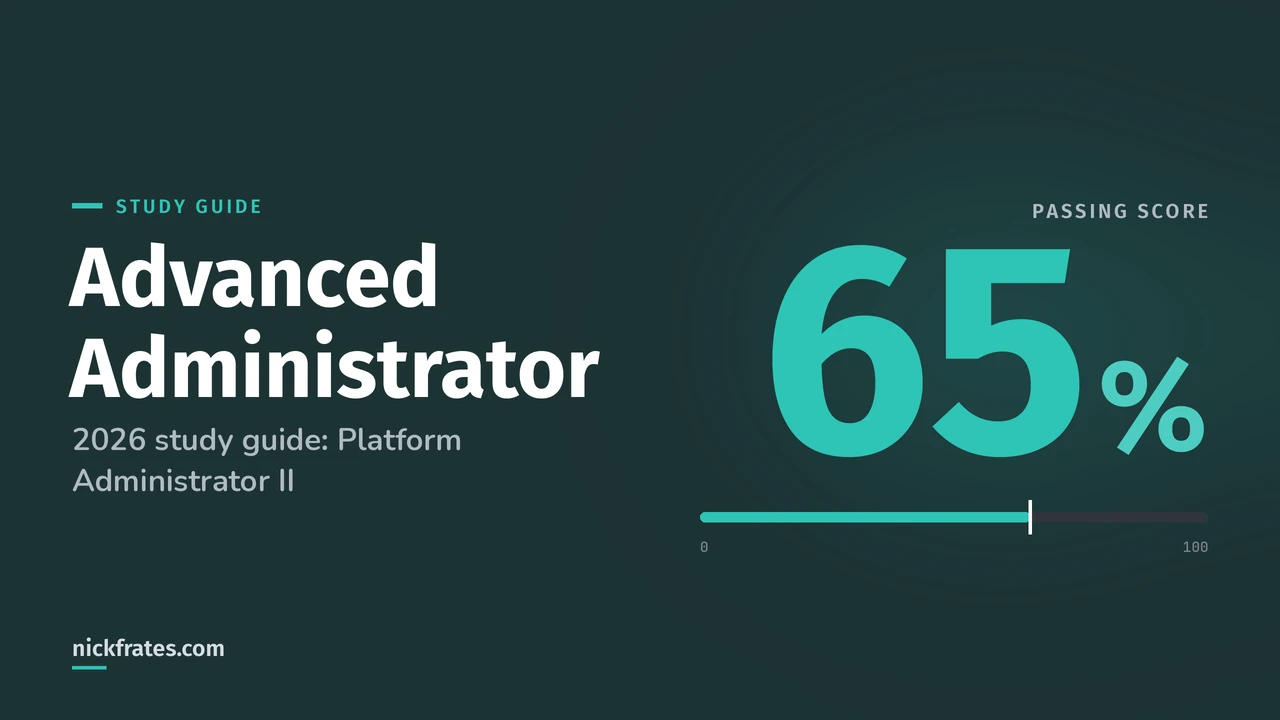
| Passing score | 65% (about 39 of 60) |
| Fee | $200, retake $100, plus applicable taxes |
| Prerequisite | Salesforce Certified Platform Administrator (Administrator) credential |
| Delivery | Onsite or online proctored through Trailhead Academy and Pearson VUE |
| Official resources | Credential page and the exam guide linked from it |
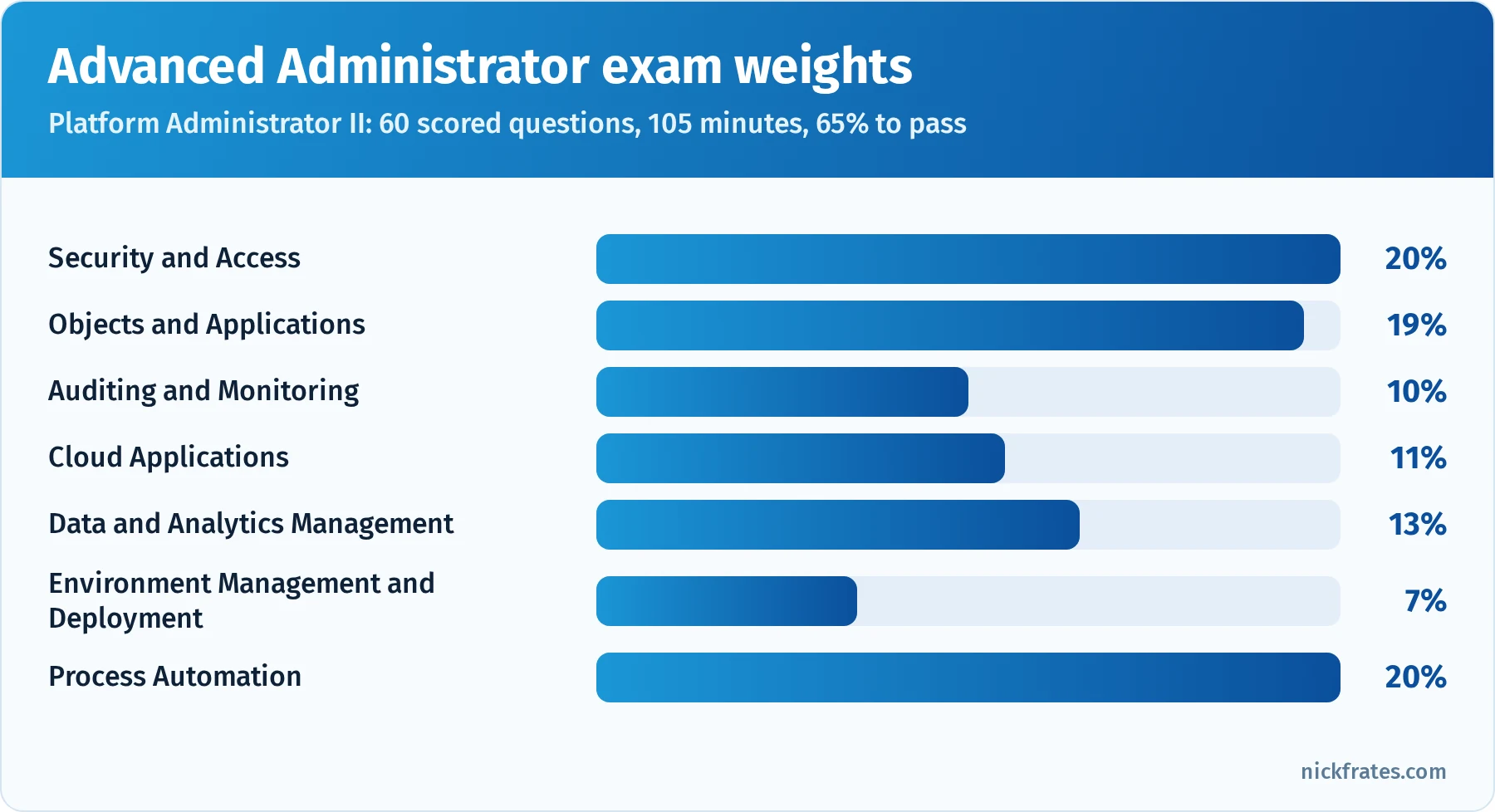
Security, objects and automation make up 59% of the exam.
Took the exam or a practice test? Enter your section scores in my Salesforce exam score calculator to see your estimated overall score and which sections are costing you the most points.
Also preparing for the Admin or Platform Developer exam? Cert Lab has lessons, practice questions and flashcards for both.
Contents
- What changed for 2026
- How to use this guide
- Security and Access (20%)
- Objects and Applications (19%)
- Auditing and Monitoring (10%)
- Cloud Applications (11%)
- Data and Analytics Management (13%)
- Environment Management and Deployment (7%)
- Process Automation (20%)
- Deep dive: designing a sharing model step by step
- Deep dive: Experience Cloud access
- Deep dive: order of execution scenarios
- Deep dive: troubleshooting automation
- Exam-day strategy
- Hands-on project: an advanced admin lab
- Common exam traps
- Flashcard terms
- Mixed practice exam: 10 more questions
- Quick-reference cheat sheet
- Frequently asked questions
- Related study guides
What changed for 2026
- New name. The credential appears as Platform Administrator II in newer Salesforce materials, but it's the same Advanced Administrator certification and prerequisite chain.
- Flow only. Automation questions center on Flow (record-triggered, scheduled, screen and autolaunched flows), approvals and Apex awareness. Workflow Rules and Process Builder are past end of support.
- Modern security model. Expect permission set groups, muting permission sets, restriction rules and user access policies alongside classic sharing.
- Registration and delivery. Exams are registered through Trailhead Academy and delivered by Pearson VUE.
How to use this guide
Advanced Administrator questions are longer and more nuanced than Admin questions. Two or three options are often technically possible, and you need to pick the one that's most scalable, most secure or requires the least maintenance. The best preparation is hands-on: configure each feature in a Developer Edition org, then explain out loud why you'd choose it over the alternatives.
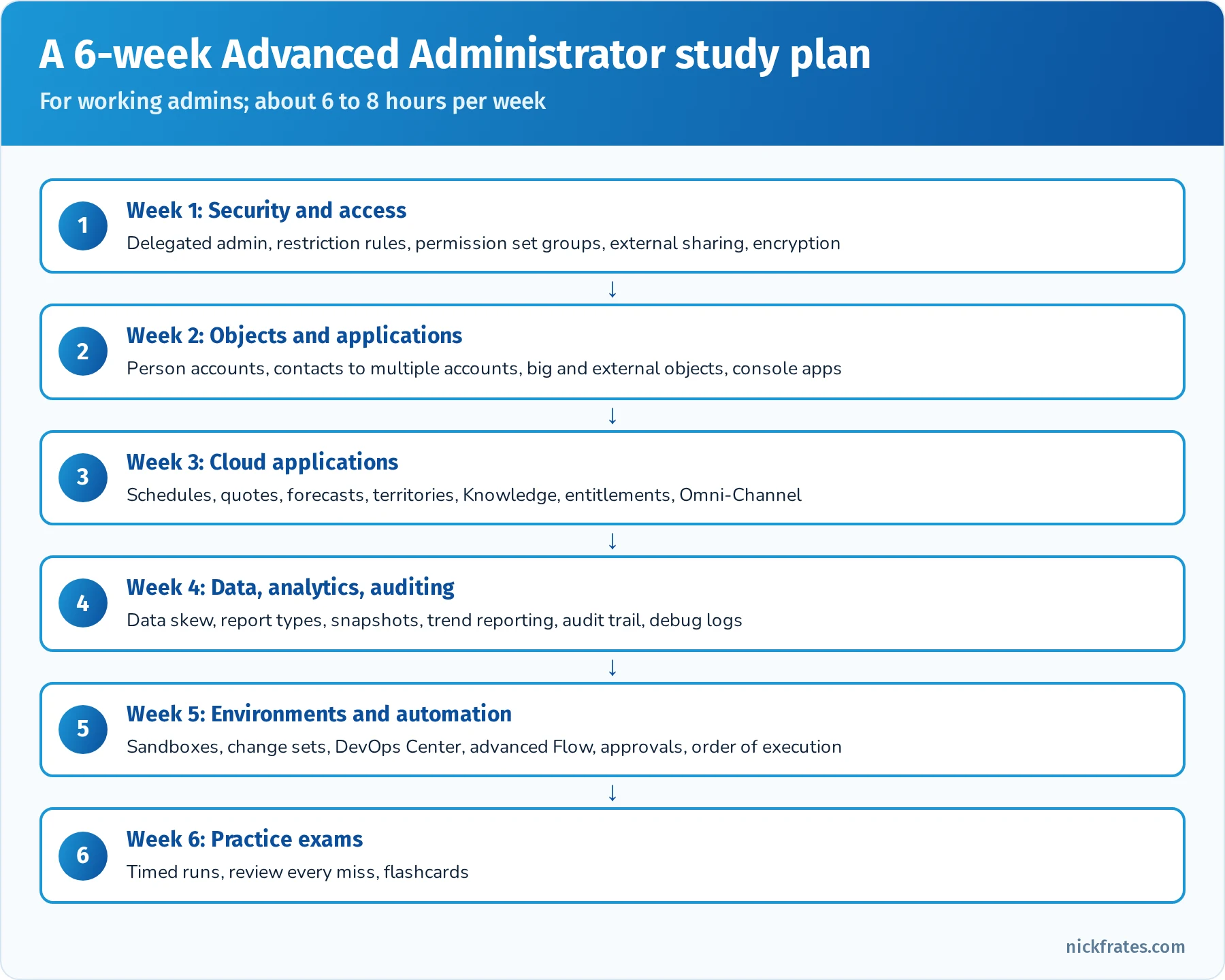
A six-week plan for working admins.
Security and Access (20%)
This section goes beyond the Admin exam's basics into complex sharing, delegated administration, external access and troubleshooting.
Advanced sharing. Know when to use each record access tool: owner-based and criteria-based sharing rules, guest user sharing rules for Experience Cloud sites, account teams, opportunity teams and case teams, manual sharing, enterprise territory management, implicit sharing (for example, access to an account's parent from child records and vice versa), Apex managed sharing (programmatic, for developers), and restriction rules that limit which records specific users can see on supported objects even if sharing would otherwise allow it. Scoping rules set a default scope for what users see without restricting access. If you want a refresher on the fundamentals first, start with my Salesforce security model guide.
Delegated administration. Delegated administrators can manage users in specified roles and their subordinates, assign specified profiles and permission sets, reset passwords, unlock users, and manage custom objects you designate, without full admin rights. It's the standard answer when regional managers need to handle their own users.
Permission design. Use minimum-access profiles, permission sets for capabilities, and permission set groups for personas. Muting permission sets inside a group remove specific permissions from that group. Permission set assignment expiration grants temporary access. User access policies can automate assignments of permission sets, groups and other access based on user criteria. Custom permissions let you check access in validation rules, flows and Apex.
External access. Experience Cloud sites use external OWDs (which must be as restrictive as or more restrictive than internal defaults), sharing sets (grant access to records related to the user's account or contact), share groups (for high-volume users), and guest user sharing rules (guest users get read-only access to what you explicitly share). Know the difference between customer licenses (high-volume, no roles, use sharing sets) and partner licenses (roles and sharing rules).
Org-level security. Login IP ranges and login hours on profiles, trusted IP ranges, session security levels, high-assurance sessions for sensitive operations, multi-factor authentication, single sign-on with SAML, connected apps and their policies, and Shield Platform Encryption (deterministic vs. probabilistic encryption) versus classic encrypted text fields.
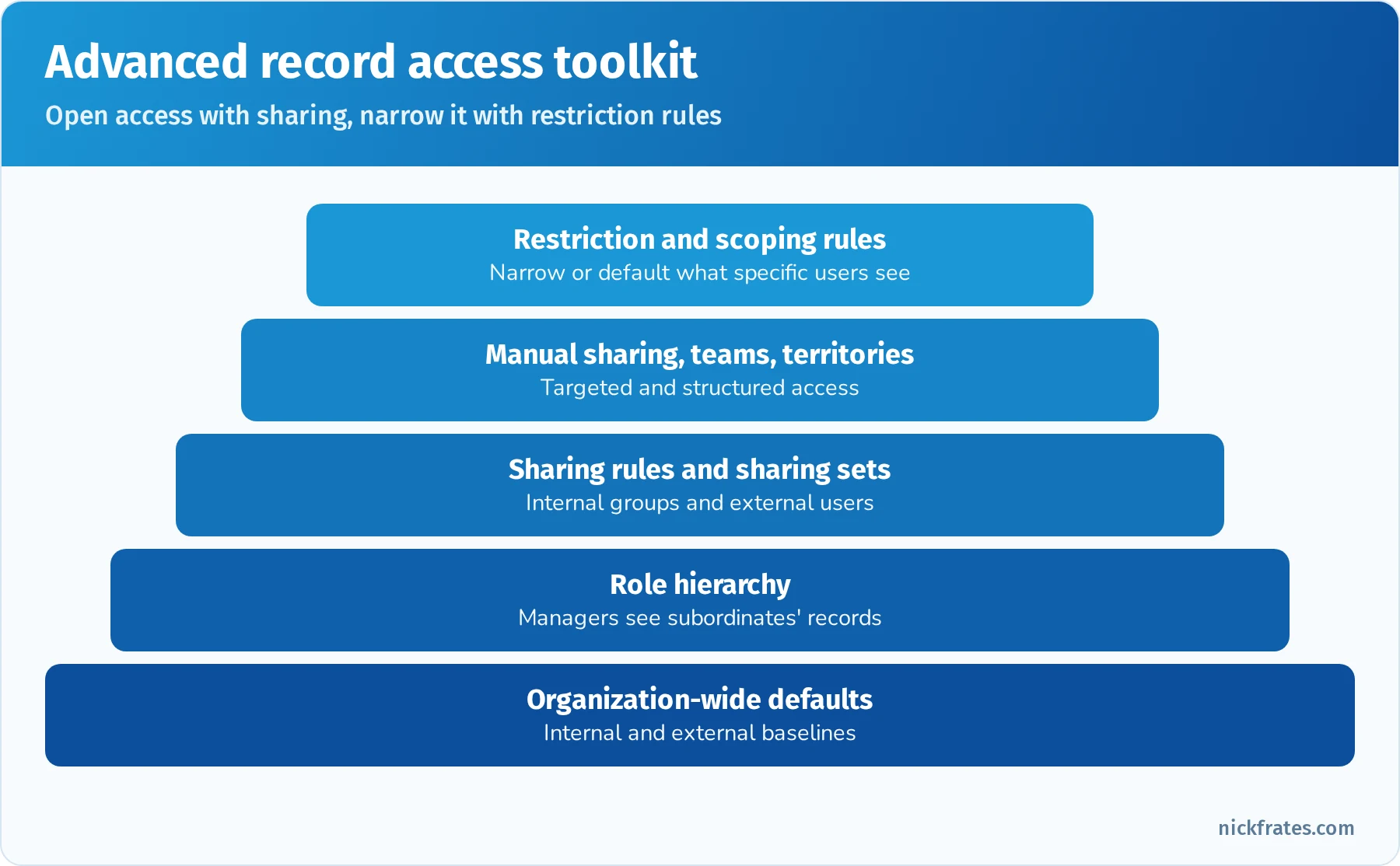
Opening access with sharing, narrowing it with restriction rules.
Quick reference: access scenarios
| Scenario | Best tool |
|---|---|
| Regional managers create and reset passwords for their own users | Delegated administration |
| Customer community users see cases for their own account | Sharing sets |
| Contractors shouldn't see opportunities over $1M, despite sharing | Restriction rule |
| Grant a persona a bundle of permissions minus one | Permission set group with a muting permission set |
| Give temporary access for a two-week project | Permission set assignment with an expiration date |
| Users should see their territory's accounts by default without losing access to others | Scoping rule (default scope) |
| Encrypt a field but still filter on it | Shield Platform Encryption with deterministic encryption |
| Require extra verification to view reports with sensitive data | High-assurance session security |
Practice questions: Security and Access
Question 1. Regional sales managers need to create users, reset passwords and assign a limited set of permission sets for people in their region, but nothing else. What should the admin configure?
- A. Give them System Administrator profiles
- B. Delegated administration groups scoped to their roles and assignable permission sets
- C. A sharing rule
- D. A permission set with Manage Users
Answer: B. Delegated administration grants specific user management rights limited to roles and permission sets you choose. Manage Users would grant far more.
Question 2. Customer users on an Experience Cloud site must see only cases related to their own account. They use a high-volume customer license. What should the admin use?
- A. Role hierarchy
- B. Sharing set based on the user's account
- C. Owner-based sharing rule
- D. Manual sharing
Answer: B. High-volume customer licenses don't have roles; sharing sets grant access based on account or contact relationships.
Question 3. Sharing rules give a group of contractors access to many accounts, but they must never see accounts marked Confidential. What's the best solution?
- A. Remove the contractors from the sharing rule
- B. A restriction rule that limits contractors to non-confidential accounts
- C. Field-level security on the Confidential field
- D. A validation rule
Answer: B. Restriction rules narrow visible records for specific users even when sharing grants access.
Question 4. A persona needs everything in three permission sets except the Export Reports permission. What's the cleanest approach?
- A. Clone and edit all three permission sets
- B. Put the three sets in a permission set group and add a muting permission set that mutes Export Reports
- C. Change the users' profile
- D. Use a sharing rule
Answer: B. Muting permission sets remove permissions within a group without changing the underlying sets.
Question 5. Compliance requires that a Social Security Number field be encrypted, but users must still be able to filter reports by exact value. What should be used?
- A. Classic encrypted text field
- B. Shield Platform Encryption with deterministic encryption
- C. Field-level security only
- D. A formula field
Answer: B. Deterministic encryption supports exact-match filtering. Classic encrypted fields can't be used in filters this way.
Question 6. A user can see an account's opportunities but not the account itself, and wonders how they can see the related opportunity's account name. What explains limited access to the parent?
- A. Implicit sharing gives read access to the parent account when a user has access to its child opportunity, case or contact
- B. The OWD is Public Read/Write
- C. Delegated administration
- D. Restriction rules
Answer: A. Implicit sharing grants read-only access to the parent account for users with access to child records.
Objects and Applications (19%)
This section covers advanced data model and UI choices: person accounts, contacts to multiple accounts, relationships, Dynamic Forms, console apps and record types.
Person accounts and contacts to multiple accounts. Person accounts combine account and contact fields for B2C business. Once enabled, they can't be disabled, and they require at least one record type for business accounts and one for person accounts. Contacts to multiple accounts lets one contact relate to more than one account through the Account Contact Relationship object, with a primary (direct) account and indirect relationships.
Relationship design. Lookup vs. master-detail vs. junction objects, hierarchical relationships on User, external lookup and indirect lookup for external objects, and the impact on sharing, roll-ups, reporting and deletion. Know the limits: up to 40 relationship fields per object and up to 2 master-detail relationships.
Field and object choices. Picklists vs. global value sets, dependent picklists, formula vs. roll-up vs. flow-calculated fields, record types vs. separate objects, and the consequences of changing field types. Big objects store massive volumes of historical data with limited features. External objects (Salesforce Connect) display external data without storing it.
User interface. Dynamic Forms and Dynamic Actions, component visibility, record page assignment by app, record type and profile, Lightning console apps with split view, pinned regions, utility bar and macros, Path, in-app guidance, and custom and global actions with predefined values. Know which features work on mobile and which require console navigation.
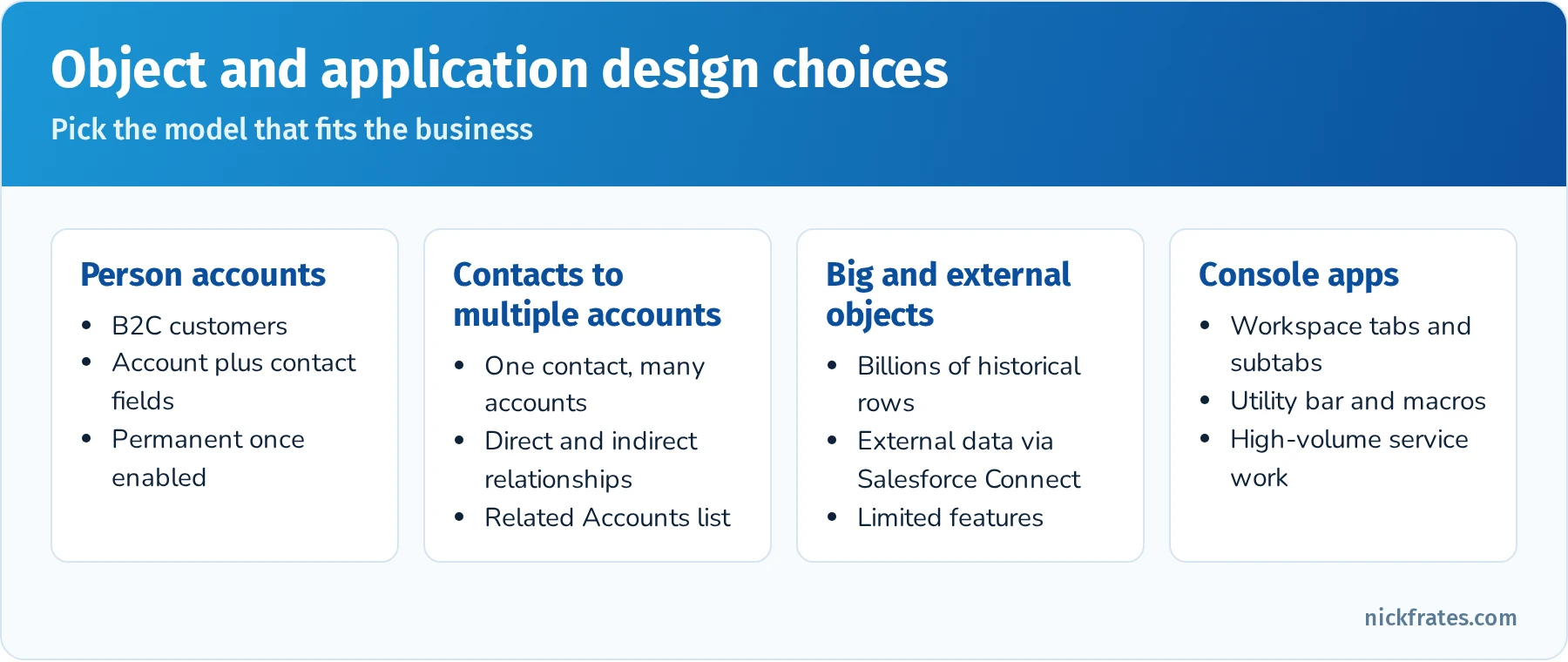
Common object and application design choices.
Quick reference: data model choices
| Requirement | Choice |
|---|---|
| Sell to individual consumers as well as businesses | Person accounts (irreversible) |
| A consultant works with several client companies | Contacts to multiple accounts |
| Store 2 billion IoT readings for compliance | Big object |
| Show ERP invoices in Salesforce without copying them | External objects with Salesforce Connect |
| Service agents handle many cases at once with tabs | Lightning console app |
| Show different fields by stage without new layouts | Dynamic Forms |
Practice questions: Objects and Applications
Question 1. A company sells directly to consumers and also to businesses. What should the admin know before enabling person accounts?
- A. They can be disabled at any time
- B. Enabling is permanent, and record types for business and person accounts are required
- C. They replace contacts entirely
- D. They don't support reports
Answer: B. Person accounts can't be disabled once enabled and need record types.
Question 2. A contact sits on the boards of three customer companies and must appear on all three accounts. Which feature supports this?
- A. Duplicate contacts
- B. Contacts to multiple accounts
- C. Account teams
- D. Person accounts
Answer: B. The Account Contact Relationship links one contact to many accounts.
Question 3. Invoices live in an ERP system and must be visible in Salesforce in real time without copying data. What should be used?
- A. A nightly Data Loader job
- B. Salesforce Connect with external objects
- C. A big object
- D. A custom object updated by email
Answer: B. External objects display external data on demand without storing it in Salesforce.
Question 4. Service agents work several cases at once and need related records side by side. What should the admin build?
- A. A standard navigation app
- B. A Lightning console app with workspace tabs, subtabs and a utility bar
- C. A dashboard
- D. A Visualforce page
Answer: B. Console apps are designed for high-volume, multi-record work.
Question 5. The business needs to retain years of field-level change history beyond standard limits for audit. What should the admin consider?
- A. Field Audit Trail (part of Salesforce Shield)
- B. More page layouts
- C. Reporting snapshots only
- D. Formula fields
Answer: A. Field Audit Trail extends field history retention and the number of tracked fields beyond standard field history tracking.
Auditing and Monitoring (10%)
This section asks how you'd find out what happened in an org, and how you'd stay ahead of problems.
Tools to know.
- Setup Audit Trail: configuration changes in Setup for the last 180 days (downloadable).
- Field history tracking: value changes on up to 20 fields per object, retained up to 18 months in the UI (24 months via API); Field Audit Trail extends this.
- Login History: login attempts, status, IP and method for the last six months.
- Debug logs: detailed logs for a user, Apex class or automated process, set with trace flags and debug levels. Use them to troubleshoot flows, Apex and validation rules.
- Event Monitoring (part of Shield or an add-on) and Event Log Files: detailed usage events such as report exports, API calls and logins, plus Transaction Security policies to block or notify on risky actions.
- Health Check: compares security settings to a baseline and gives a score.
- Optimizer and the Security Center (for multiple orgs) help find configuration risks.
- Pending and Release Updates: Salesforce's release updates page lists required changes with enforcement dates, so admins can test and enable them before they're enforced.
- Apex Jobs, Scheduled Jobs, Bulk Data Load Jobs and Paused Flow Interviews: monitor background work.
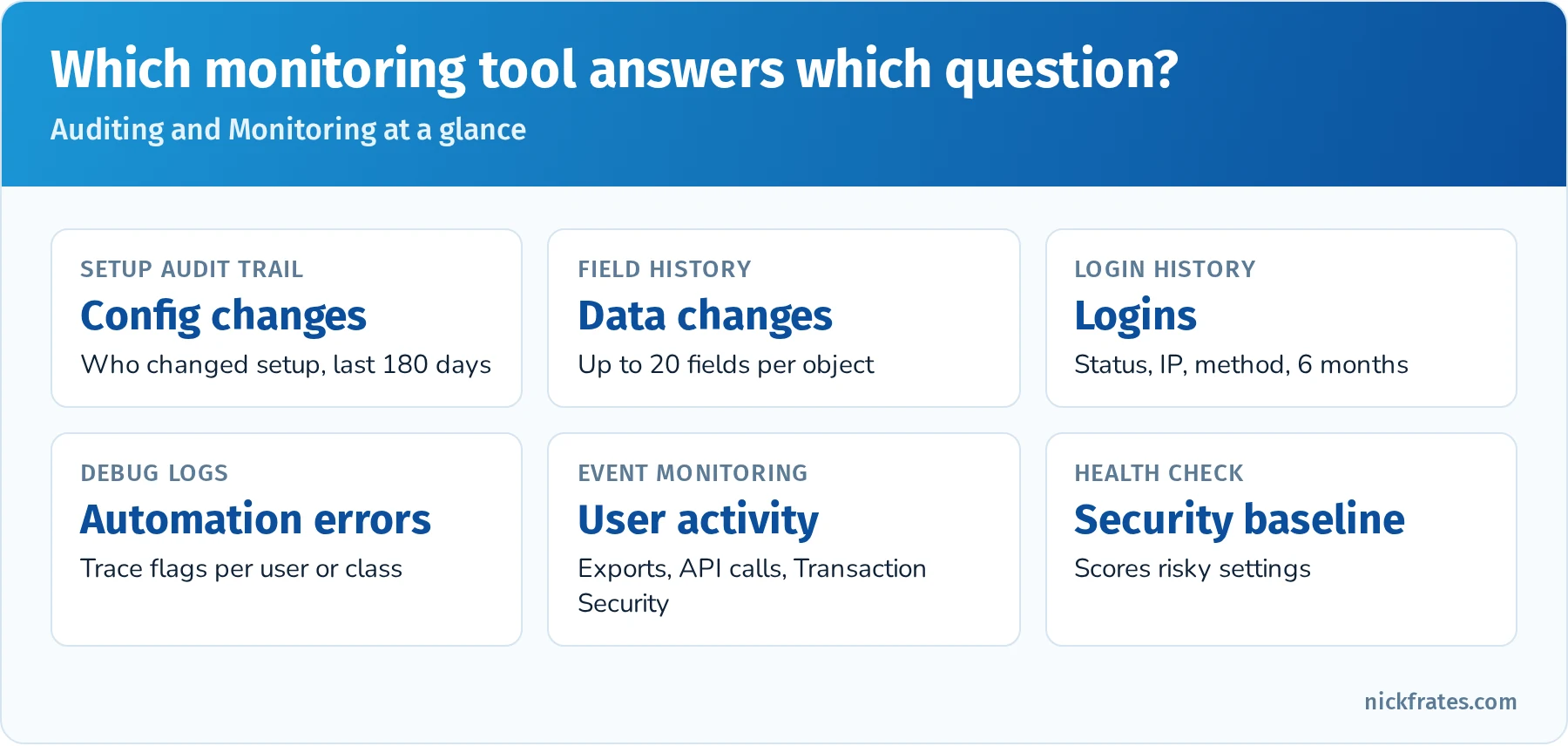
Match the question you're asking to the tool that answers it.
Quick reference: which tool answers which question?
| Question | Tool |
|---|---|
| Who changed this validation rule? | Setup Audit Trail |
| Who changed this account's Owner last month? | Field history tracking |
| Why did this user's login fail? | Login History |
| Why did this flow fail for this user? | Debug logs and the flow error email |
| Who exported large reports last week? | Event Monitoring |
| How do our security settings compare to Salesforce's baseline? | Health Check |
| Which platform changes will be enforced next release? | Release Updates |
| Why are emails not sending from a scheduled flow? | Paused and failed flow interviews, deliverability |
Practice questions: Auditing and Monitoring
Question 1. A page layout was changed yesterday and now a field is missing. How can the admin find who changed it?
- A. Field history tracking
- B. Setup Audit Trail
- C. Login History
- D. Health Check
Answer: B. Setup Audit Trail logs configuration changes.
Question 2. Security wants to block users from exporting reports with more than 10,000 rows. What should be used?
- A. Field-level security
- B. Transaction Security policies with Event Monitoring
- C. Setup Audit Trail
- D. Validation rules
Answer: B. Transaction Security policies can block or alert on report exports and other events.
Question 3. A record-triggered flow fails for one user but not others. What's the best first troubleshooting step?
- A. Set a debug log trace flag for that user and reproduce the issue
- B. Delete the flow
- C. Run Health Check
- D. Check Login History
Answer: A. Debug logs show what happened in that user's transaction.
Question 4. Salesforce has announced a release update that will be enforced next season. What should the admin do?
- A. Ignore it until enforcement
- B. Review it in Release Updates, test it in a sandbox, then enable it in production before enforcement
- C. Open a case to delay it
- D. Refresh production
Answer: B. Testing early avoids surprises when Salesforce enforces the update.
Question 5. Which tool gives a score comparing org security settings to a baseline?
- A. Optimizer
- B. Health Check
- C. Event Monitoring
- D. Setup Audit Trail
Answer: B. Health Check scores your security settings against a baseline standard.
Cloud Applications (11%)
This section covers advanced Sales Cloud and Service Cloud features.
Sales Cloud. Products, price books and product schedules (quantity and revenue schedules for installments or recurring revenue), quotes (quote templates, syncing one quote with the opportunity), orders and contracts, Collaborative Forecasts (forecast types, categories, adjustments, quotas, cumulative forecast rollups), opportunity splits and teams, Enterprise Territory Management (territory models, types, hierarchy, assignment rules, opportunity territory assignment), lead management (assignment, web-to-lead, lead scoring), and Big Deal Alerts and Path.
Service Cloud. Knowledge (article types via record types, data categories, article versioning and approval), entitlements and entitlement processes with milestones (warnings, violations and success actions), service contracts, Omni-Channel routing (queue-based, skills-based, attribute-based routing, capacity models, presence statuses), Email-to-Case, Web-to-Case, escalation rules, case teams, macros and the Service Console, and Experience Cloud self-service.
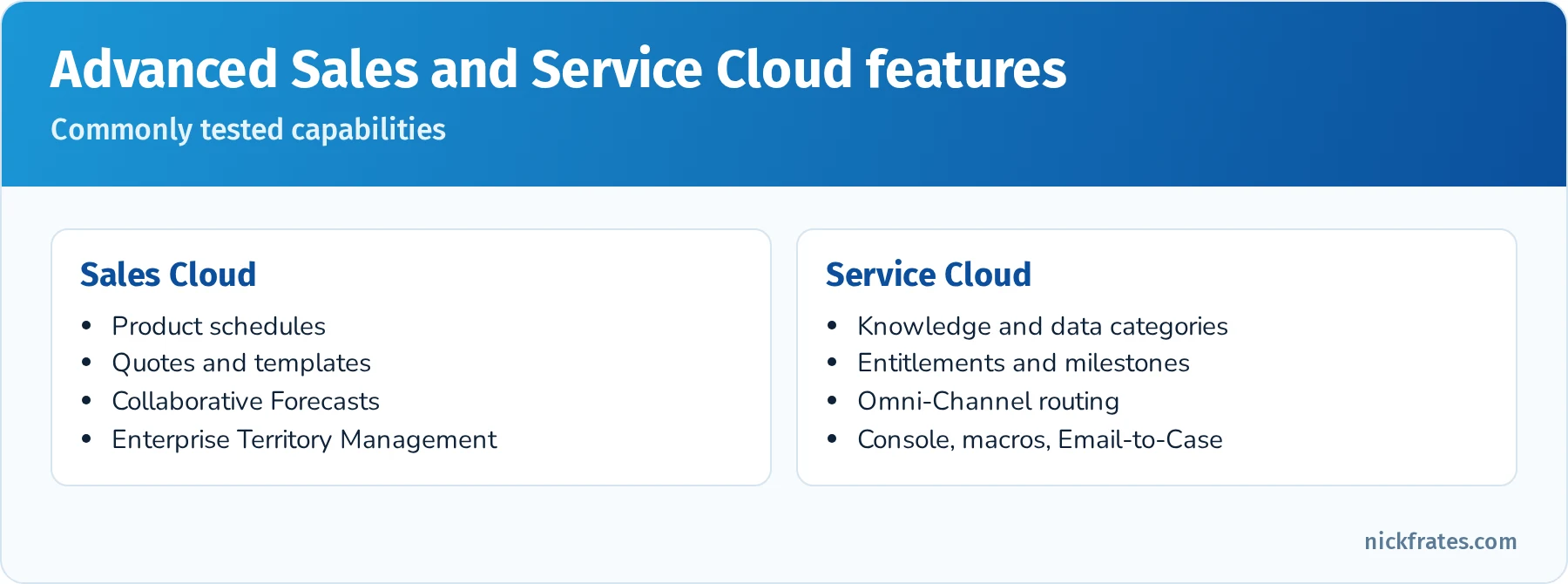
The cloud application features most likely to appear.
Quick reference: cloud application features
| Requirement | Feature |
|---|---|
| Spread a $120,000 sale across 12 monthly installments | Revenue schedule on the product |
| Generate a branded PDF proposal from an opportunity | Quote with a quote template |
| Managers adjust their team's forecast | Collaborative Forecasts with adjustments enabled |
| Assign accounts to territories by state and industry | Enterprise Territory Management assignment rules |
| Track first response within 1 hour for premium customers | Entitlement process milestone |
| Route chats to agents who speak French | Omni-Channel skills-based routing |
| Internal articles need review before publishing | Knowledge with an approval process |
Practice questions: Cloud Applications
Question 1. A subscription product is billed monthly for a year, and finance wants opportunity revenue spread across those months. What should the admin configure?
- A. Twelve opportunities
- B. Revenue schedules on the product
- C. Opportunity splits
- D. A roll-up summary
Answer: B. Product schedules split revenue or quantity over time.
Question 2. Accounts must be assigned to sales territories automatically based on billing state and industry, and one account can belong to several territories. Which feature fits?
- A. Role hierarchy
- B. Enterprise Territory Management with assignment rules
- C. Account teams
- D. Sharing sets
Answer: B. Territory management supports rule-based assignment and multiple territories per account. My Enterprise Territory Management guide covers model states, assignment rules and the data model.
Question 3. Premium support contracts promise a response within two hours, with a warning to the manager after 90 minutes. How should this be built?
- A. Escalation rules only
- B. An entitlement process with a milestone that has warning and violation actions
- C. A validation rule
- D. A dashboard
Answer: B. Milestones track time-based commitments with warning, violation and success actions.
Question 4. Chats should be routed to available agents who have the right product skill and spare capacity. What should be configured?
- A. Queues only
- B. Omni-Channel skills-based routing with capacity
- C. Case assignment rules
- D. Case teams
Answer: B. Skills-based routing matches work to qualified, available agents.
Question 5. The sales team sends several quotes for one opportunity but only one should update the opportunity's products. What feature handles this?
- A. Quote syncing
- B. Opportunity splits
- C. Big Deal Alerts
- D. Forecast adjustments
Answer: A. Only one quote can sync with the opportunity at a time.
Data and Analytics Management (13%)
Data quality and management. Duplicate and matching rules, validation rules, data import strategy (load order: parents before children, users and owners first), upserts with external IDs, Bulk API, and handling large data volumes (skinny tables, indexes, data skew such as more than 10,000 child records on one account, ownership skew). Know that big objects and archiving help with very large historical data.
Advanced reporting. Custom report types with up to four related objects and "with or without" relationships, joined reports, summary and row-level formulas, bucket fields, cross filters, historical trend reporting, reporting snapshots (store report results in a custom object on a schedule), dashboard filters, dynamic dashboards and CRM Analytics awareness. Report folders and sharing control access.
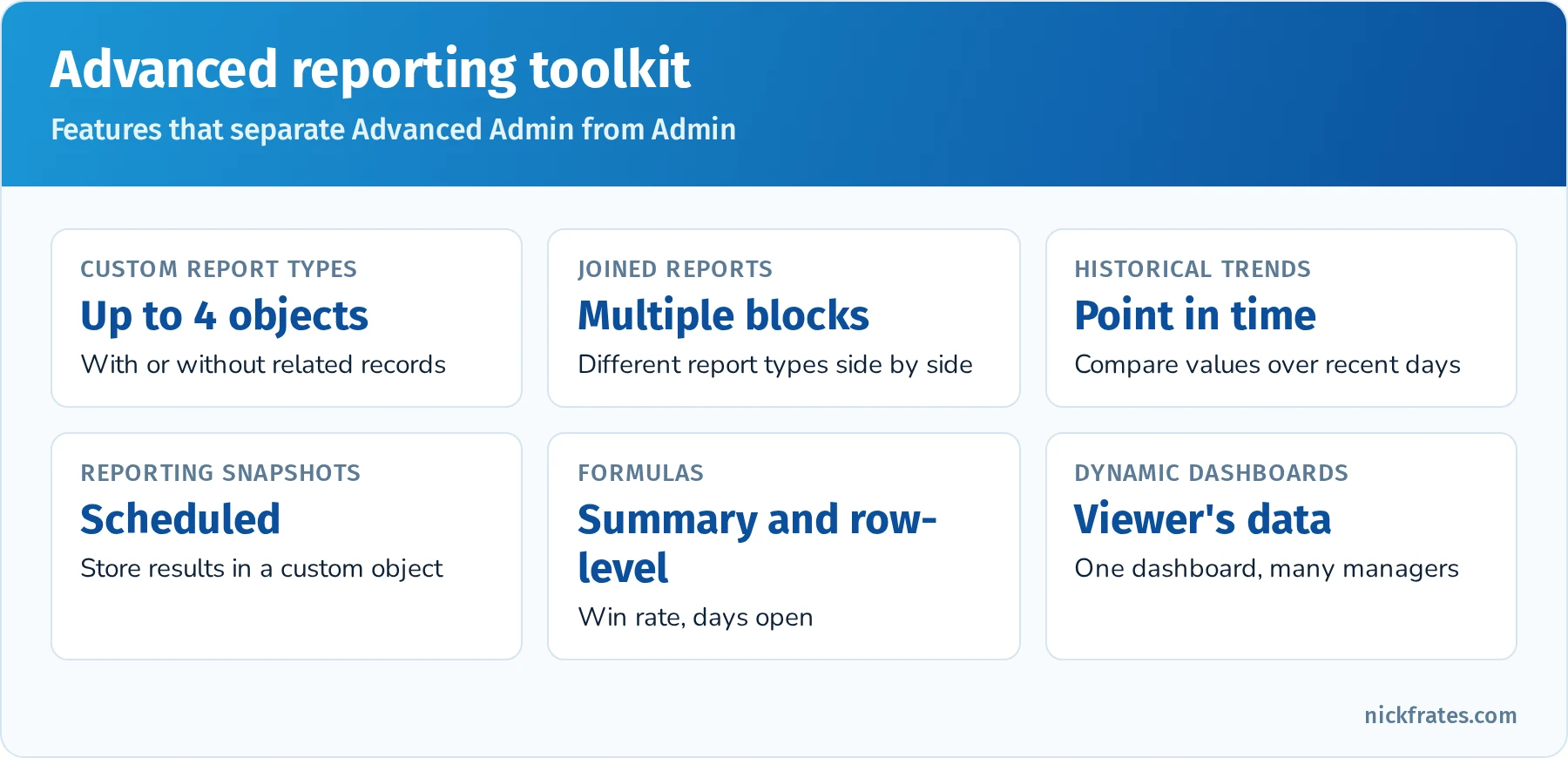
The reporting features that separate Advanced Admin from Admin questions.
Quick reference: analytics scenarios
| Requirement | Feature |
|---|---|
| Opportunities with or without products in one report | Custom report type with "with or without" |
| Compare pipeline changes between last week and today | Historical trend reporting |
| Store monthly case counts for multi-year trends | Reporting snapshot |
| Win rate by owner | Summary formula |
| Days open per case in each row | Row-level formula |
| Group industries into three segments | Bucket field |
| One dashboard showing each manager's own team | Dynamic dashboard |
Practice questions: Data and Analytics Management
Question 1. An admin needs a report of all accounts, including those with no contacts, showing contact names where they exist. What should they create?
- A. A standard Accounts with Contacts report
- B. A custom report type: Accounts with or without Contacts
- C. A joined report
- D. A bucket field
Answer: B. "With or without" includes primary records without related records.
Question 2. Leadership wants to compare opportunity amounts and close dates as of several dates over the past 90 days. Which feature fits best?
- A. Historical trend reporting
- B. Cross filters
- C. Joined reports
- D. Field history only
Answer: A. Historical trend reporting compares values at points in time for supported objects.
Question 3. One account has 50,000 child contacts and updates are slow and lock frequently. What is this called?
- A. Ownership skew
- B. Account data skew
- C. Implicit sharing
- D. Field history overflow
Answer: B. Too many child records under one parent (generally more than 10,000) causes locking and performance issues.
Question 4. In what order should an admin load accounts, contacts and opportunities with Data Loader?
- A. Opportunities, contacts, accounts
- B. Accounts first, then contacts and opportunities referencing them
- C. Any order
- D. Contacts, then accounts
Answer: B. Parent records must exist before children can reference them.
Question 5. The business wants to track how many open cases existed at the end of each month for three years. What should be set up going forward?
- A. A reporting snapshot that runs monthly
- B. A bucket field
- C. A dashboard filter
- D. A cross filter
Answer: A. Reporting snapshots store point-in-time data for long-term trends.
Environment Management and Deployment (7%)
Sandboxes. Developer (1-day refresh, metadata only), Developer Pro (1-day, larger storage), Partial Copy (5-day, sample data from a sandbox template), Full (29-day, all data). Know sandbox templates, post-copy steps (email deliverability defaults to system email only, user emails get a suffix), and data masking for compliance in copies of production data.
Deployment tools. Change sets (connected orgs, no deletions, View/Add Dependencies, validate and quick deploy within 10 days), DevOps Center for admin-friendly source control, the Salesforce CLI and Metadata API for scripted deployments and deletions, and packages (unmanaged for one-time copies, managed for AppExchange, unlocked for internal modular releases). Some setup items aren't supported by change sets and need manual steps; keep a deployment runbook.
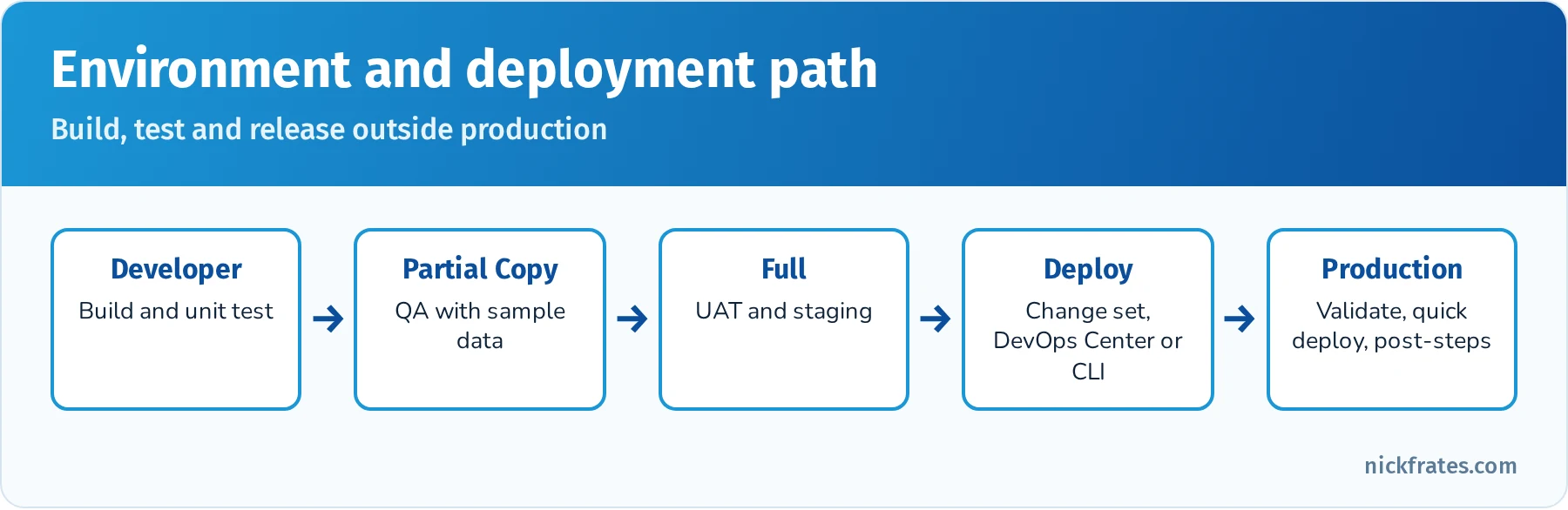
A typical environment path for an Advanced Admin team.
Practice questions: Environment Management and Deployment
Question 1. UAT requires a complete copy of production data. Which sandbox fits?
- A. Developer
- B. Developer Pro
- C. Partial Copy
- D. Full
Answer: D. Full sandboxes copy all data and metadata.
Question 2. After a sandbox refresh, testers report flows aren't sending emails. What's the most likely cause?
- A. Email deliverability is set to System email only
- B. The flows were deleted
- C. Sandboxes can't send email
- D. Profiles were reset
Answer: A. New and refreshed sandboxes default to system email only.
Question 3. An admin team wants source control and a promotion pipeline without learning the command line. What should they use?
- A. DevOps Center
- B. Ant Migration Tool
- C. Data Loader
- D. Workbench
Answer: A. DevOps Center provides a point-and-click pipeline backed by GitHub.
Question 4. A change set fails because it references a custom field not included. What should the admin use next time?
- A. View/Add Dependencies
- B. A different sandbox
- C. Data Loader
- D. A validation rule
Answer: A. The dependency view finds components the change set needs. When dependencies still go missing, my change set missing dependencies guide walks through the fixes.
Question 5. A Partial Copy sandbox should include specific objects' data for QA. What controls which data is copied?
- A. A sandbox template
- B. Page layouts
- C. Sharing rules
- D. A report
Answer: A. Sandbox templates define which objects' records are copied to Partial Copy and Full sandboxes.
Process Automation (20%)
Tied with Security and Access for the largest section. Expect complex scenarios about choosing between flows, approvals, formulas and Apex, and about order of execution.
Flow in depth. Record-triggered flows (before save for same-record updates, after save for related records and actions, run asynchronously paths, scheduled paths), schedule-triggered flows, screen flows (with reactive components, choice sets and Lightning components), autolaunched flows and subflows, platform event-triggered flows, and orchestration for multi-step, multi-user processes. Know entry conditions, "only when a record is updated to meet the condition requirements," $Record and $Record__Prior, collection processing, fault paths, and flow trigger ordering when an object has multiple record-triggered flows.
Approvals. Multi-step approval processes, parallel (unanimous or first response) approvals, delegated approvers, dynamic approval routing based on fields, approval actions, and launching approvals from flows. Salesforce's newer Flow-based approvals exist, but classic approval processes remain common in scenarios.
Order of execution. On save: system validation, before-save flows, before triggers, custom validation rules and duplicate rules, save (not committed), after triggers, assignment and auto-response rules, legacy workflow rules (still in the order if they exist), escalation rules, after-save flows, entitlement rules, roll-up summary recalculation on parents (which can re-run parent automation), and finally commit and post-commit logic such as emails and async paths. Knowing that before-save flows run before validation rules explains many scenario answers.
Declarative vs. programmatic. Recommend Apex (or invocable Apex called from Flow) for complex logic, very high volumes, complex error handling or callouts that Flow can't handle well. Recognize when an AppExchange solution fits.
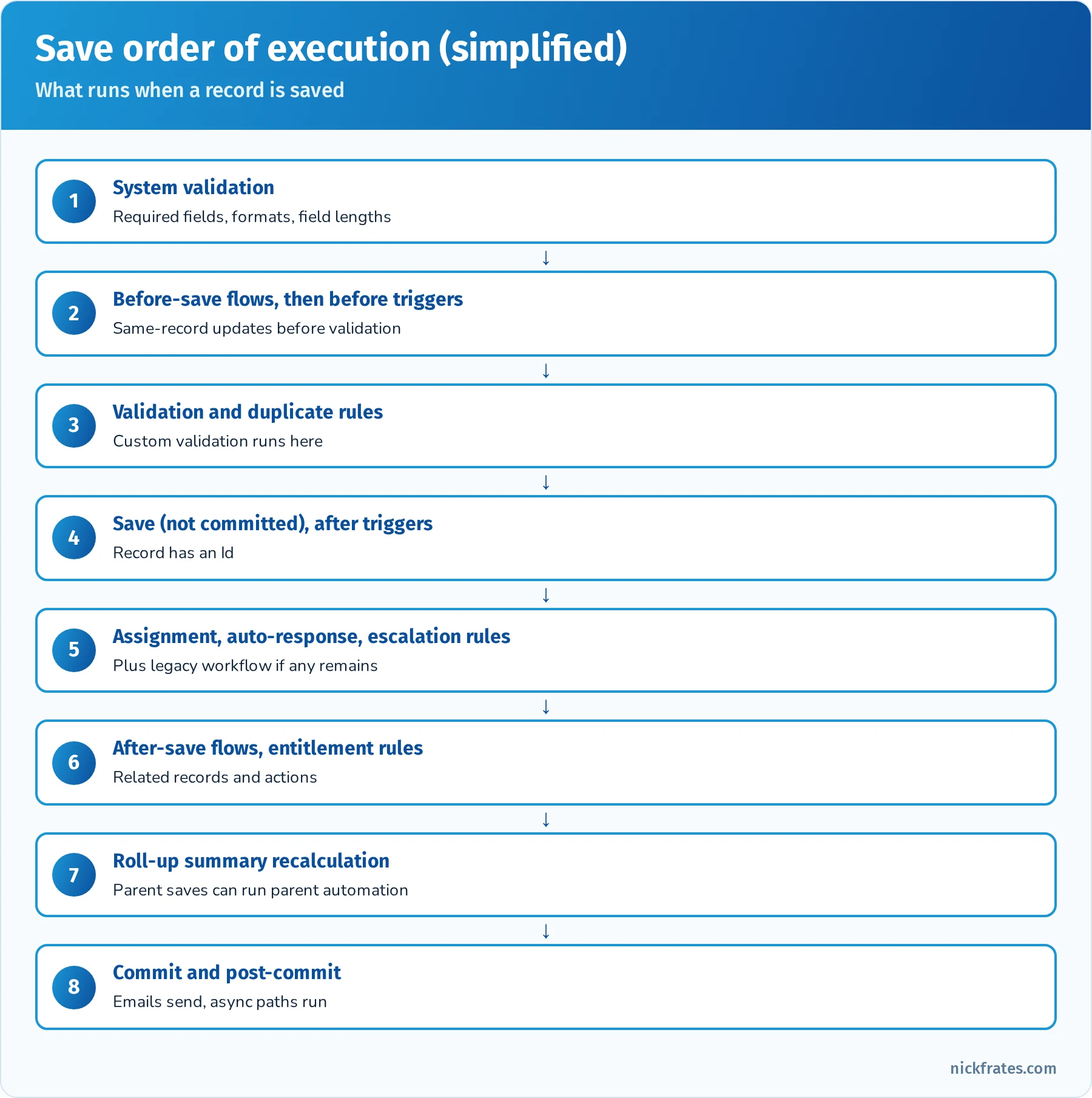
Before-save flows run before validation rules; after-save flows run after triggers.
Quick reference: automation scenarios
| Requirement | Best fit |
|---|---|
| Set a field on the same record on save | Before-save flow |
| Compare old and new values | $Record__Prior in a record-triggered flow |
| Notify 7 days before contract end | Scheduled path on a record-triggered flow |
| Multi-step process across several users and teams | Flow Orchestration |
| Two approvers must both approve | Approval step with unanimous parallel approval |
| Several flows on Opportunity must run in a specific order | Flow trigger order settings |
| Complex callout with retry logic | Apex (Queueable) invoked from Flow |
Practice questions: Process Automation
Question 1. A record-triggered flow should only send a notification when Stage changes to Closed Won, not every time a closed-won opportunity is edited. What should the admin configure?
- A. Run the flow every time a record is updated
- B. Entry condition Stage equals Closed Won with "Only when a record is updated to meet the condition requirements"
- C. A scheduled flow
- D. A validation rule
Answer: B. That option fires only on the change into the condition.
Question 2. A flow must compare the old and new values of Amount. What should it reference?
- A.
$Recordonly - B.
$Record__Prior - C. A custom setting
- D.
$User
Answer: B. $Record__Prior holds the values before the update.
Question 3. A validation rule blocks a value that a before-save flow is supposed to correct. Users still see the validation error. Why might that be?
- A. Before-save flows run after validation rules
- B. The flow's entry conditions don't match, because before-save flows run before validation rules and would otherwise correct the value first
- C. Validation rules don't apply to flows
- D. The flow is a screen flow
Answer: B. Before-save flows run before custom validation, so a correctly configured flow fixes values first. Check its entry conditions.
Question 4. A discount approval needs both the regional director and the finance controller to approve. What should be configured?
- A. Two separate approval processes
- B. An approval step with parallel approvers requiring unanimous approval
- C. A validation rule
- D. A sharing rule
Answer: B. Parallel approval with unanimous response requires all approvers.
Question 5. An onboarding process involves HR, IT and the hiring manager completing steps in sequence and in parallel. What's the best declarative tool?
- A. Flow Orchestration
- B. One screen flow
- C. Validation rules
- D. Escalation rules
Answer: A. Orchestration coordinates multi-step, multi-user work with stages and steps.
Question 6. Three record-triggered flows on Case run in an unpredictable order and conflict. What should the admin do?
- A. Set trigger order values on the flows (or consolidate them)
- B. Convert them to Process Builder
- C. Add validation rules
- D. Deactivate all three
Answer: A. Flow trigger order controls execution order for flows on the same object and timing.
Cert Lab by Nick Frates
Practice each section with the Platform Administrator II Cert Lab
Short lessons, flashcards and a practice quiz for all 7 exam sections, from Security and Access to Process Automation.
Start the Platform Administrator II Cert Lab for $9.99 →Deep dive: designing a sharing model step by step
Many Security and Access questions are really design questions. Here's a repeatable method using a worked scenario.
Scenario. A medical device company has sales reps organized by region, regional managers, a national sales VP, a contracts team that needs read access to every opportunity over $250,000, contractors who help with data cleanup but must not see confidential deals, and distributor partners who log their own deals through a partner site.
Step 1: Set the most restrictive OWDs. Opportunity: Private (reps shouldn't see each other's deals by default). Account: Private or Public Read Only depending on whether account data is sensitive. External OWDs: Private.
Step 2: Build the role hierarchy for reporting lines. VP at the top, regional managers below, reps below them. With Grant Access Using Hierarchies, managers automatically see their reps' records.
Step 3: Open lateral access with sharing rules. A criteria-based sharing rule shares opportunities with Amount greater than $250,000 with the Contracts public group, read-only.
Step 4: Narrow access where needed. A restriction rule limits the Contractors group to opportunities where Confidential is false.
Step 5: External access. Partner users get partner licenses with partner roles, so their managers see their deals. Share relevant accounts with the partner through sharing rules or by ownership.
Step 6: Object and field permissions. Minimum-access profile plus permission set groups for Sales Rep, Sales Manager, Contracts and Contractor personas. Field-level security hides Margin from contractors and partners.
Step 7: Verify. Log in as one user from each persona (or use test users) and confirm access. Use the record's Sharing Hierarchy to explain unexpected access.
| Requirement | Mechanism |
|---|---|
| Reps see only their own deals | OWD Private |
| Managers see team deals | Role hierarchy |
| Contracts team sees large deals | Criteria-based sharing rule |
| Contractors never see confidential deals | Restriction rule |
| Partners see their own and their team's deals | Partner licenses, partner roles |
| Hide margin from some users | Field-level security via permission sets |
Deep dive: Experience Cloud access
External access shows up in several sections, and the rules differ from internal sharing.
- External OWDs apply to external users and can't be more permissive than internal OWDs.
- Customer Community (high-volume) users don't have roles. Give them access with sharing sets (records related to their account or contact) and share groups (to share records they own with internal users).
- Customer Community Plus and Partner users have roles and can use sharing rules, the role hierarchy and manual sharing.
- Guest users (unauthenticated visitors) get access only through guest user sharing rules, read-only, and guest user profiles should be locked down. Salesforce has tightened guest access defaults repeatedly, so assume minimal access.
- Account role optimization and super user access affect how partner and customer users see their colleagues' records.
Deep dive: order of execution scenarios
Order of execution explains many confusing behaviors. Work through these scenarios:
| Scenario | What happens | Why |
|---|---|---|
| A before-save flow sets Region from State, and a validation rule requires Region | Save succeeds if the flow sets Region | Before-save flows run before validation rules |
| An after-save flow updates a field that a validation rule checks | The flow's update can fail validation | The flow's DML is a new save that runs validation again |
| A roll-up summary on Account changes when an Opportunity closes | Account automation can run | Roll-up recalculation saves the parent, which runs its automation |
| A legacy workflow field update still exists | Before and after update triggers can run once more | Workflow field updates re-fire update triggers |
| Two record-triggered after-save flows on Case | Order follows the trigger order setting | Without a setting, order isn't guaranteed |
Deep dive: troubleshooting automation
- Read the error. Flow fault emails and the error shown to users identify the element that failed.
- Reproduce in a sandbox with the same user profile and data.
- Use Flow debug to run the flow with test values, including as another user and with rollback mode.
- Set a debug log trace flag for the user and inspect the log for validation rule failures, flow interviews and governor limit usage.
- Check permissions. Flows run in system context or user context depending on settings; screen flows usually run in user context.
- Check order and recursion. Multiple flows or triggers can update the same field. Consolidate or set trigger order.
- Fix and add a fault path so future errors are handled and reported.
Exam-day strategy
- Expect long scenarios. Read the final sentence first to know what's being asked, then scan the scenario for constraints (license type, volume, "least maintenance," "most secure").
- Choose scalable, declarative, least-privilege answers. Advanced Admin rewards the option that keeps working as the org grows.
- Watch for absolute words. "Always" and "never" in an option often signal a wrong answer unless the platform truly behaves that way.
- Use mark for review. Don't burn five minutes on one question; come back with fresh eyes.
Hands-on project: an advanced admin lab
- Security: create a permission set group for "Sales Ops" with a muting permission set that removes Export Reports. Set up delegated administration for a regional manager. Create a restriction rule on Opportunity that hides opportunities marked Confidential from a Contractors group.
- External access: enable an Experience Cloud site in a Developer Edition org, create a customer user and configure a sharing set so they see only their account's cases.
- Objects: enable contacts to multiple accounts and relate one contact to two accounts. Create a junction object with roll-ups on both masters. Build a console app for cases with a utility bar and macros.
- Auditing: change a validation rule and find it in Setup Audit Trail. Turn on field history for three fields and change them. Set a debug log trace flag for a test user and reproduce a flow error.
- Cloud apps: add a revenue schedule to a product, create a quote with a template, enable Collaborative Forecasts, and set up an entitlement process with a first response milestone.
- Data and analytics: build a custom report type with "with or without," a joined report, a reporting snapshot and a dynamic dashboard.
- Environments: create a Developer sandbox, build a field and a flow there, and deploy with a change set using View/Add Dependencies. Note what didn't deploy automatically.
- Automation: build a record-triggered flow that uses
$Record__Prior, a scheduled path, a multi-step approval with parallel approvers, and a simple Flow Orchestration with two stages.
Common exam traps
- Restriction rules vs. sharing. Sharing opens access; restriction rules narrow it for specific users. If a question says "must never see despite sharing," think restriction rules.
- High-volume customer users don't have roles. Use sharing sets or share groups, not role-based sharing rules.
- Person accounts are permanent. Any answer that "enables person accounts to test and disables them later" is wrong.
- Setup Audit Trail vs. field history. Configuration changes vs. data changes.
- Deterministic vs. probabilistic encryption. Only deterministic supports exact-match filtering.
- Before-save flows run before validation rules. After-save flows run after triggers.
- Change sets can't delete components and only work between connected orgs.
- Data skew. More than about 10,000 child records on one parent or owned by one user causes locking and sharing recalculation issues.
Flashcard terms
- Delegated administration: limited user management for specified roles, profiles and permission sets.
- Restriction rule: narrows record visibility for specific users.
- Scoping rule: sets default record scope without restricting access.
- Muting permission set: removes permissions inside a permission set group.
- Sharing set: grants external users access based on account or contact relationships.
- Implicit sharing: automatic access between parent accounts and child records.
- Deterministic encryption: Shield encryption that supports exact-match filtering.
- Contacts to multiple accounts: Account Contact Relationship for indirect relationships.
- Big object: stores massive historical data with limited features.
- External object: displays external data through Salesforce Connect.
- Field Audit Trail: extended field history retention (Shield).
- Transaction Security: policies that act on real-time events.
- Revenue schedule: spreads product revenue over time.
- Entitlement process milestone: time-based service commitment with warning and violation actions.
- Historical trend reporting: compares field values at points in time.
- Reporting snapshot: stores report results in a custom object on a schedule.
- **
$Record__Prior:** prior values in a record-triggered flow. - Flow Orchestration: coordinates multi-step, multi-user processes.
Mixed practice exam: 10 more questions
Question 1. A support manager needs to see all cases in a queue that their team works, though cases are owned by the queue. What grants access?
- A. Queue membership (members can see and take records owned by the queue) or a sharing rule on queue-owned records
- B. Restriction rules
- C. Delegated administration
- D. Field history
Answer: A. Queue members can access records the queue owns; sharing rules can also share queue-owned records with groups.
Question 2. An admin must ensure new users in the Sales department automatically get the right permission set group. What should they use?
- A. User access policies
- B. Manual assignment forever
- C. Sharing rules
- D. Login flows
Answer: A. User access policies automate access assignments based on user criteria.
Question 3. Which statement about the Health Check is true?
- A. It fixes all security issues automatically
- B. It scores security settings against a baseline and lets admins fix risky settings
- C. It replaces Event Monitoring
- D. It audits data changes
Answer: B. Health Check compares settings to a baseline and offers fixes for many settings.
Question 4. A company needs to record time-based escalation of unresolved cases after 24 business hours. Which features work together?
- A. Escalation rules and business hours
- B. Web-to-Case and queues
- C. Auto-response rules
- D. Knowledge
Answer: A. Escalation rules use business hours to calculate age.
Question 5. Users need to quickly view a contact's relationships across several accounts from the contact page. What should the admin add?
- A. The Related Accounts related list (contacts to multiple accounts)
- B. A joined report
- C. A formula field
- D. A dashboard
Answer: A. The Related Accounts list shows the contact's account relationships.
Question 6. A forecast must show amounts by product family. What should the admin configure?
- A. A forecast type based on opportunity product amounts by product family
- B. A new role hierarchy
- C. A big object
- D. A sharing set
Answer: A. Collaborative Forecasts supports forecast types based on opportunity products and product families.
Question 7. The admin must give auditors read-only access to all records for two weeks. What's the safest option?
- A. A permission set with View All Data assigned with an expiration date (or a dedicated auditor profile with read-only access), then removed
- B. System Administrator profile
- C. Public Read/Write OWDs
- D. Sharing passwords
Answer: A. Temporary, read-only, time-boxed access follows least privilege.
Question 8. Which approach best handles a requirement to update 2 million records nightly with complex logic?
- A. Schedule-triggered flow on all records
- B. Batch Apex (or a developer-built solution), possibly launched on a schedule
- C. Manual updates
- D. A screen flow
Answer: B. Very high volumes with complex logic fit Batch Apex.
Question 9. Partner users need access to opportunities owned by their partner account's users, using roles. Which license type supports this?
- A. Partner community licenses (with partner roles)
- B. High-volume customer licenses
- C. Chatter Free
- D. Guest user
Answer: A. Partner licenses support roles and role-based sharing.
Question 10. Which tool helps find unused fields, large page layouts and other org complexity issues?
- A. Salesforce Optimizer
- B. Setup Audit Trail
- C. Login History
- D. Data Loader
Answer: A. Optimizer reports on org complexity and improvement opportunities.
Quick-reference cheat sheet
| Topic | Remember |
|---|---|
| Passing score | 65% of 60 scored questions (about 39 correct) |
| Prerequisite | Platform Administrator certification |
| Largest sections | Security and Access 20%, Process Automation 20%, Objects and Applications 19% |
| Narrow access despite sharing | Restriction rules |
| External high-volume users | Sharing sets, share groups |
| Limited user admin | Delegated administration |
| Configuration changes | Setup Audit Trail (180 days) |
| Data changes | Field history (20 fields per object; Field Audit Trail for more) |
| Person accounts | Permanent once enabled |
| Spread revenue | Product schedules |
| SLA tracking | Entitlement processes and milestones |
| Point-in-time trends | Reporting snapshots, historical trend reporting |
| Prior values in Flow | $Record__Prior |
| Multi-user processes | Flow Orchestration |
Frequently asked questions
Is Advanced Administrator harder than Administrator? Yes. Questions are longer, options are closer, and the passing score is lower (65%) to reflect that. Most candidates have at least a year of hands-on admin experience.
Do I need the Administrator certification first? Yes. Platform Administrator is a prerequisite.
How long should I study? Six to ten weeks for working admins, with most of that time spent configuring features you don't use in your day job. If you're choosing study materials, I compared the options in best Platform Administrator II courses and training.
Is it called Advanced Administrator or Platform Administrator II? Both names appear. Newer Salesforce materials use Platform Administrator II for the same credential.
What comes after Advanced Administrator? Platform App Builder if you haven't taken it, Agentforce Specialist for AI, or architect-track exams such as Sharing and Visibility Architect. I map out the full sequence in Salesforce certifications for admins.
Related study guides
- Salesforce Administrator (Platform Administrator) study guide, the prerequisite.
- Salesforce Platform App Builder study guide for data modeling and Flow depth.
- Development Lifecycle and Deployment Architect study guide for environments and release management.
- Agentforce Specialist study guide for AI agents.
- All Salesforce certification study guides.
- The science of studying for Salesforce certifications for active recall, spaced repetition and an Anki workflow.
- Agentforce Sales Consultant (formerly Sales Cloud Consultant) study guide for deeper sales design: territories, forecasting and lead-to-cash.
Want to go deeper on automation? Process Automation is tied for the largest section, and Flow is the only supported declarative automation tool now that Workflow Rules and Process Builder are past end of support. My Salesforce Flows course walks through record-triggered, screen, scheduled and platform event flows with real-world challenges.
Hope this helps!
Best,
Nick
Cert Lab by Nick Frates
Ready to test yourself?
The Platform Administrator II Cert Lab ends with 4 full 60-question practice exams weighted like the real exam, and every answer is explained with a link to official Salesforce docs.
Start the Platform Administrator II Cert Lab for $9.99 →