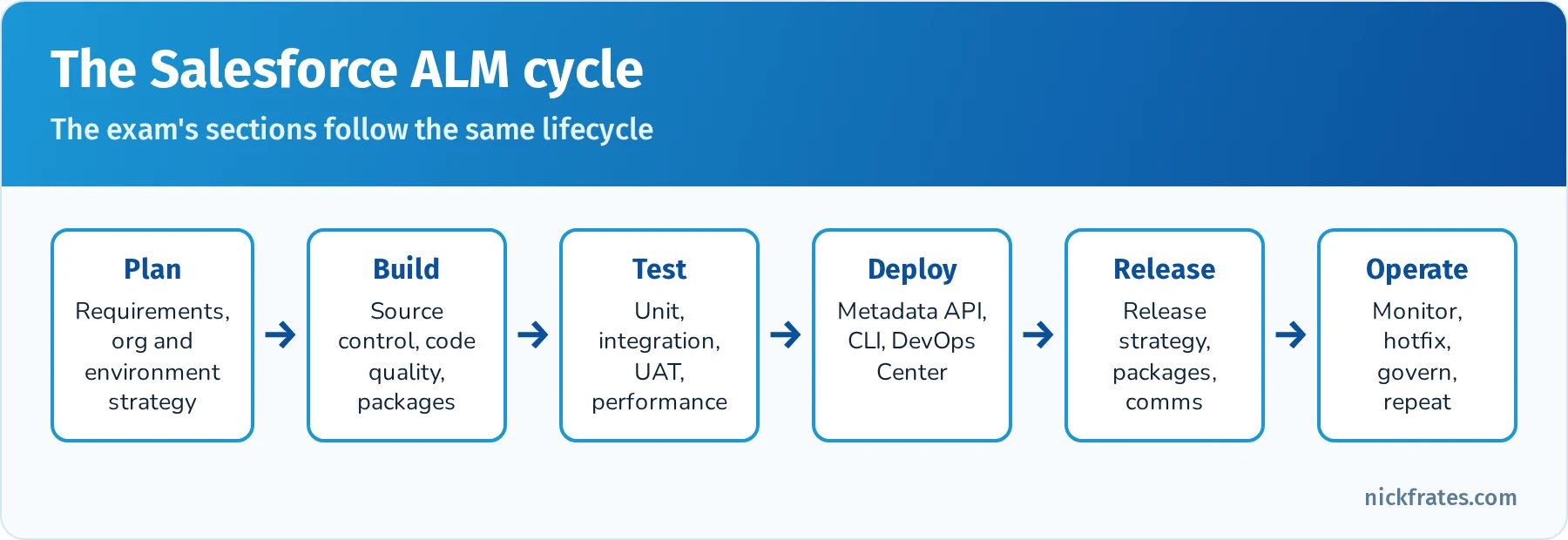
Category: Deep Research

  • Salesforce Platform Developer I (PD1) Study Guide: Exam Outline, Practice Questions and Quick Reference

    Salesforce Platform Developer I (PD1) Study Guide: Exam Outline, Practice Questions and Quick Reference

    This is a deep, one-stop study guide for the Salesforce Certified Platform Developer exam, still widely called Platform Developer I or PD1. It follows the official exam outline section by section, with explanations, hands-on exercises, flashcard terms, quick-reference tables and practice questions with answers and explanations for every section.

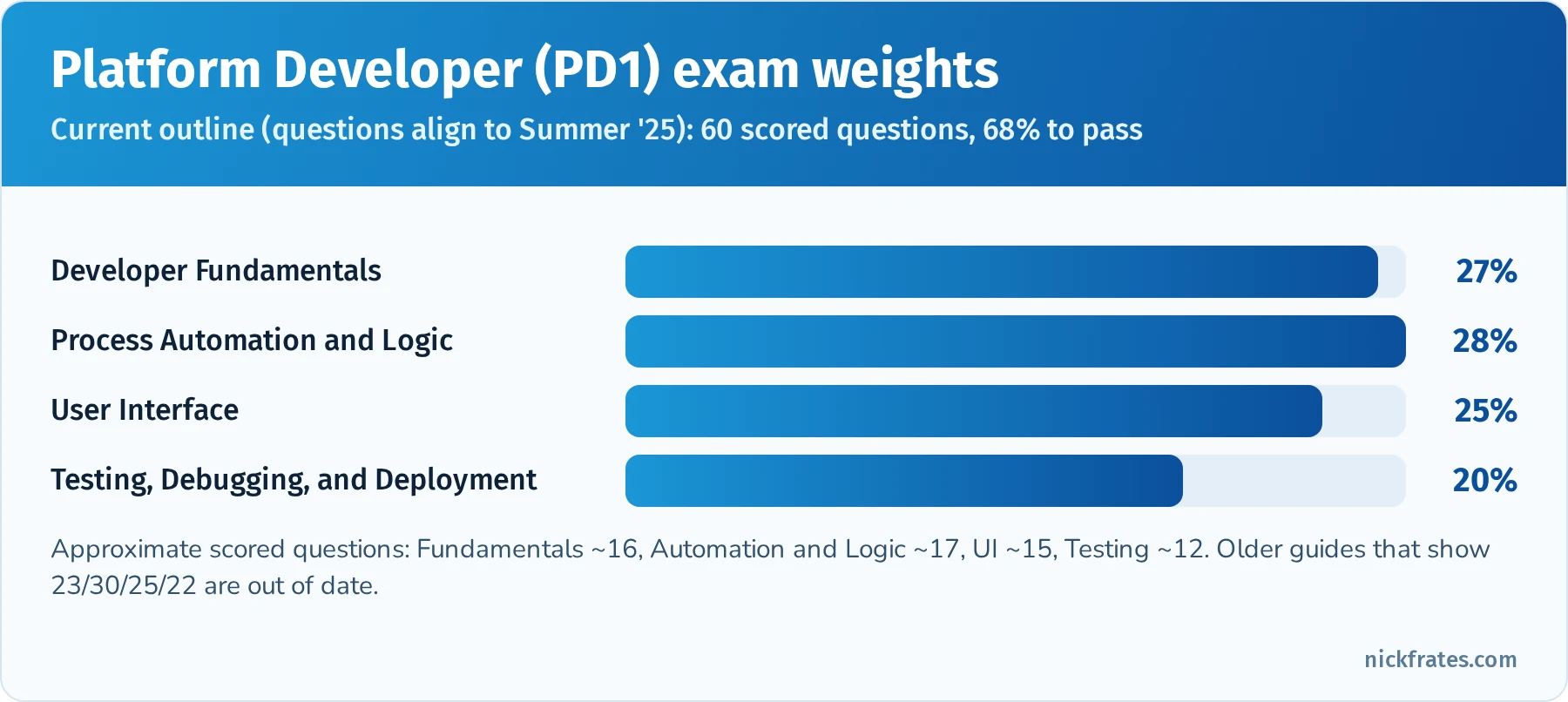
    Updated for 2026: this guide now reflects the current exam outline (Developer Fundamentals 27%, Process Automation and Logic 28%, User Interface 25%, Testing, Debugging, and Deployment 20%), the official name change to "Salesforce Certified Platform Developer", Agentforce for Developers topics, current sf CLI commands, and the end of support for Workflow Rules and Process Builder on December 31, 2025.

    SectionWeightApprox. questions
    Developer Fundamentals27%~16
    Process Automation and Logic28%~17
    User Interface25%~15
    Testing, Debugging, and Deployment20%~12
    Exam factDetail
    Official nameSalesforce Certified Platform Developer (formerly Platform Developer I)
    Questions60 scored multiple-choice/multiple-select, plus up to 5 unscored
    Time105 minutes
    Passing score68% (about 41 of 60)
    FeeUS$200 registration, US$100 retake, plus taxes
    PrerequisiteNone (it is the prerequisite for Platform Developer II)
    DeliveryProctored online or at a test center; registration through Trailhead Academy
    MaintenanceFree annual maintenance module on Trailhead
    Official resourcesExam guide, Trailhead study trail, credential page

    Bar chart of the Salesforce Platform Developer exam weights: Developer Fundamentals 27 percent, Process Automation and Logic 28 percent, User Interface 25 percent, Testing, Debugging, and Deployment 20 percent

    The current PD1 section weights. Spend study time roughly in proportion, then adjust for your weak spots.

    Contents

    1. What changed for 2026
    2. How to use this guide
    3. Developer Fundamentals (27%)
    4. Process Automation and Logic (28%)
    5. User Interface (25%)
    6. Testing, Debugging, and Deployment (20%)
    7. Final preparation strategies
    8. Quick-reference cheat sheet
    9. Frequently asked questions
    10. Related study guides

    What changed for 2026

    If you studied from an older PD1 guide (including the first version of this one), these are the changes that matter:

    • New weights. Developer Fundamentals went up to 27%, Process Automation and Logic went down to 28%, and Testing, Debugging, and Deployment went down to 20%. User Interface stayed at 25%. Process Automation and Logic is still the single heaviest section, but only by one point, so Fundamentals deserves real study time.
    • New name. The exam guide now calls the credential "Salesforce Certified Platform Developer". It is the same certification, and it is still the prerequisite for Platform Developer II.
    • Agentforce for Developers. The outline now expects you to know the use cases and limitations of Agentforce for Developers, the AI coding assistant in VS Code and Code Builder, and how Apex can power Agentforce actions.
    • Workflow Rules and Process Builder are retired from support. Salesforce ended support for both on December 31, 2025. Existing automations still run, but there are no bug fixes or support, and Flow is the only supported declarative automation tool. Older exam questions and old practice tests may still mention them, so know what they did, but design every new solution in Flow or Apex.
    • The CLI changed. The old sfdx force:... commands were replaced by the unified sf CLI. Use sf project deploy start, sf project deploy validate and sf apex run test.
    • New exam delivery. Registration moved to Trailhead Academy and exams are delivered through Pearson VUE. Old posts that mention Webassessor describe the retired process.

    How to use this guide

    Each exam section below follows the same pattern: an overview of what the section tests, the key concepts in depth, hands-on exercises, flashcard terms, exam focus tips, a quick-reference table, and at least five practice questions with answers and explanations. Read a section, do the exercises in a free Developer Edition org or Trailhead Playground, then answer the questions without looking at the explanations.
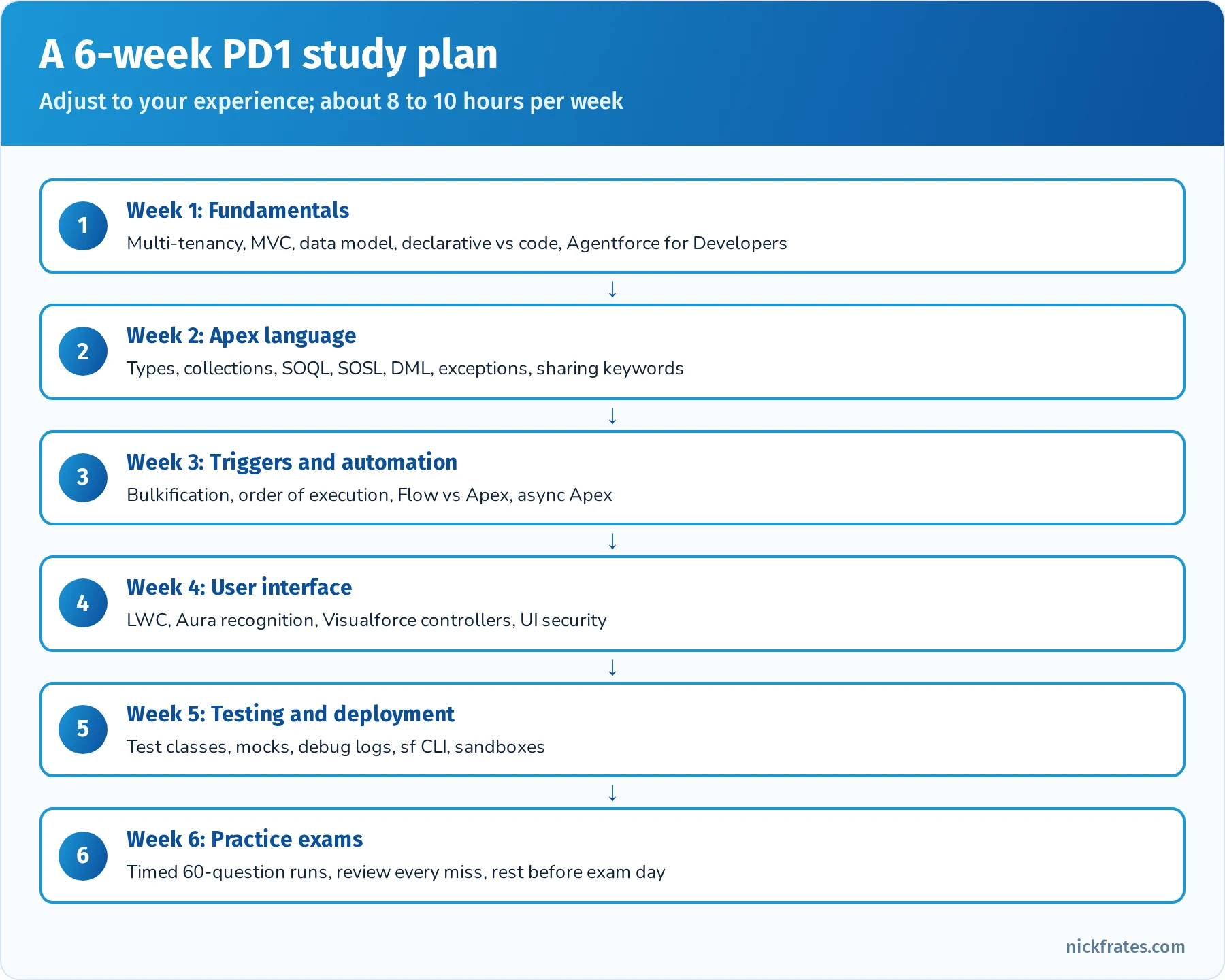
    Six-week Platform Developer study plan: week 1 fundamentals, week 2 Apex language, week 3 triggers and automation, week 4 user interface, week 5 testing and deployment, week 6 practice exams

    A realistic six-week plan for someone with admin experience and some coding exposure.

    If you are new to studying for Salesforce exams, the techniques that work best are active recall (quiz yourself instead of rereading), spaced repetition (review on a schedule that stretches out over time) and interleaving (mix topics in one session). The flashcard lists in each section are written so you can paste them straight into Anki or Quizlet.

    Developer Fundamentals (27%)

    Overview: This section covers core architectural concepts and declarative vs. programmatic fundamentals on the Salesforce platform. Start with Salesforce’s multi-tenant architecture: Salesforce runs on a multi-tenant cloud, meaning many customers share the same infrastructure and application resources. To ensure fairness, Salesforce enforces governor limits (restrictions on CPU, queries, DML, etc.) so that no single tenant can monopolize resources. For example, if a transaction exceeds certain limits (like too many queries or too much CPU time), a runtime exception (e.g. a LimitException) will occur to stop it. Multi-tenancy also means all customers are on the same version of Salesforce; updates are pushed automatically three times a year (Spring, Summer, Winter releases) with no manual upgrades. Trust and security are paramount in this model – even though hardware and code are shared, each org’s data is isolated and secure, and every org benefits from the platform’s reliability, security, and new features with each release.

    Another fundamental is the MVC design pattern and how Salesforce’s platform features map to it. In Salesforce’s interpretation of Model-View-Controller (MVC), the Model represents the data and schema (e.g. standard and custom objects, fields, relationships, and even Apex classes as business logic containers). The View is the user interface – think of page layouts, Lightning pages, Visualforce pages, and Lightning Web Components (all the components and pages that display data to the user). The Controller is the business logic that interacts with the model and dictates what the view displays – this includes Apex code (classes, triggers) and even declarative logic like process automation that responds to user input or data changes. Understanding MVC helps to conceptualize how different pieces of Salesforce (database, UI, logic) work together in a governed, multi-tenant environment.

    Salesforce provides two main approaches for building customizations: declarative (no-code) and programmatic (code). A key skill is knowing when to use declarative tools vs. programmatic solutions in a given scenario. Declarative tools (clicks-not-code) include Formula Fields and Roll-Up Summary Fields (for read-only calculations), validation rules, Flow Builder (record-triggered, screen, scheduled, autolaunched and platform event-triggered flows), and others. These are often faster to build and easier to maintain. Programmatic solutions involve Apex classes and triggers, Lightning Web Components, and Visualforce, used for requirements that declarative tools can't satisfy. Best practice is to use declarative features as much as possible (for example, a roll-up summary field to summarize child data instead of an Apex trigger) and only use code when a requirement can't be met declaratively or when scale, complexity or transaction control demand it. An exam scenario might ask which approach is best for a given requirement: use a formula field for a simple calculation on a record, a roll-up summary field on a master-detail to aggregate child data, a record-triggered flow for routine automation (field updates, related record creation, email alerts), and Apex for complex logic, heavy data volumes, complex integrations, or fine-grained error handling. Workflow Rules and Process Builder reached end of support on December 31, 2025, so they are never the right answer for a new build.

    Data modeling is another critical fundamental. You should be able to design an appropriate data model given a set of requirements – this means deciding what objects are needed (standard or custom), what fields, and especially what types of relationships to use between objects. Salesforce offers relationship types like Lookup and Master-Detail. A Lookup relationship loosely links two objects – the child can exist without the parent and does not inherit parent’s sharing or deletion (if you delete a lookup parent, the child record remains, just with its lookup field cleared). A Master-Detail relationship tightly links objects – the child (detail) record inherits ownership and security from the parent (master), and if you delete the master, all its detail records are also deleted (cascade delete). Master-detail allows additional features like roll-up summary fields on the master to aggregate detail data. You should also understand Many-to-Many relationships, which are implemented in Salesforce by using a third object called a junction object with two master-detail fields (allowing each junction record to link one instance of each of the two objects, enabling many-to-many connectivity). Additionally, be aware of External relationships (External Lookup and Indirect Lookup) which link Salesforce records to external data (for instance, linking a Salesforce object to an external object record via an external ID). An External ID is a flag on a field (often a text/number field) that marks it as a unique record identifier from an outside system – external IDs are used to match and upsert data. They let you load or integrate data by an alternate key instead of the Salesforce record Id. For example, when using the API or Data Loader, you can upsert records using an external ID field to decide insert vs. update. Make sure you grasp the implications of schema design: changing field types or object relationships can have impact on existing Apex code and integrations (e.g. a master-detail conversion might require adding required parents to all child records, or changing a text field to number could break Apex code expecting text).

    Finally, importing and exporting data is part of this section. Know the common tools and considerations for moving data in or out of Salesforce, especially in development and test environments. For small data loads (<50K records), the Data Import Wizard (built-in to Setup) is convenient but limited to certain standard objects and simple mappings. For larger or more complex data loads, Data Loader is a go-to tool; it can import, update, upsert using external IDs, or export records and handles up to 5 million records. Be mindful of how these tools trigger automation: both will fire Apex triggers, workflows, flows, etc. unless those are deliberately disabled in the target org. When exporting data, consider tools like Data Loader (or the SOQL export in Developer Console or Workbench) and understand the format (CSV) and the need to preserve record IDs for relationships. In a development context (like sandboxes or scratch orgs), you might use sandbox refreshes, sandbox seeding, or the Salesforce CLI with source and data commands to migrate sample data. Also, remember that when using Change Sets or metadata deployments, data isn’t moved – only metadata. If an exam scenario asks how to move configuration vs. how to move data sample records, be sure you choose the appropriate mechanism.

    Hands-On Practice (Trailhead & Exercises):

    • Trailhead Module: Understand the Salesforce Architecture – Provides a friendly overview of multitenancy, metadata-driven platform, and API basics. This will reinforce multi-tenant concepts and why governor limits and trust are important.
    • Trailhead Module: Data Modeling – Practice creating custom objects and relationships. Focus on scenarios of when to use lookup vs master-detail. For instance, create a simple app with a Project__c object and Task__c detail records to see how roll-up summaries work.
    • Trailhead Module: Cert Prep: Platform Developer: Salesforce Fundamentals & Data Modeling – This is an official prep module covering multi-tenancy, MVC, data model design, and import/export considerations. Complete the quizzes and hands-on challenges to test your understanding.
    • DIY Exercise: In a Developer Edition org or Trailhead Playground, try designing a mini schema: for example, Library and Book objects with different relationship types. Implement a master-detail (Library–Book) and observe how deleting a library deletes its books. Then change it to a lookup to see the difference in behavior. Also practice using the Data Import Wizard to load some Book records (e.g. from a CSV) and use Data Loader to export them, getting comfortable with each tool.
    • Trailhead Projects/Superbadges: The App Customization Specialist Superbadge (or similar Admin superbadges) can be useful here – they involve building data models, fields, and security, which solidify fundamental platform knowledge.

    Key Concepts for Flashcards: (Use these to drill yourself – define each term and understand its significance.)

    • Multitenant Architecture: A single, shared infrastructure where all customers’ orgs run on the same platform instance, with isolated data. Enforced by governor limits to ensure fair use.
    • Governor Limits: Limits on resource usage in Salesforce (e.g. 100 SOQL queries per transaction, 50,000 records query return limit, 150 DML statements per transaction) that prevent any one process from over-consuming shared resources. Example: You can retrieve at most 50,000 records in total via SOQL in a single transaction – more will throw a LimitException.
    • MVC Pattern – Model: The data layer (sObjects, fields, relationships, metadata). View: The UI layer (pages, components, Lightning pages, Visualforce). Controller: The logic layer (Apex controllers, triggers, or declarative logic like flows and rules). Be able to cite Salesforce examples of each.
    • Lightning Component Framework: Modern UI framework for building single-page apps in SF. Includes Aura Components and Lightning Web Components (LWC). Key benefits: client-side JS for rich interactivity and server-side Apex for data, with an event-driven architecture for communication.
    • Declarative vs. Programmatic: Know examples of declarative tools (Flow, formulas, roll-ups, validation rules) and when they're sufficient, versus when to use Apex code. Flashcard prompt: "When should you prefer a declarative solution over Apex?" (Answer: When out-of-the-box features can meet requirements, since they are easier to maintain and less error-prone. Use Apex only for scenarios that cannot be achieved declaratively or that need code-level control.)
    • Roll-Up Summary Field: A field on a master object that aggregates data from its detail records (count, sum, etc.) – only available for master-detail relationships. No coding needed, but cannot be used on lookup relationships.
    • External ID: A field marked as a unique identifier for external data. Often used for upsert operations and integrations to match records by an external system’s ID. Note: External IDs improve performance when upserting (acts like a key/index) and can be used in SOQL queries ([SELECT ... FROM Account WHERE External_Id__c = 'XYZ']).
    • Data Loader vs. Import Wizard: Data Loader handles up to 5 million records and supports insert, update, upsert, delete, hard delete and export. The Data Import Wizard handles up to 50,000 records, supports a limited set of standard objects plus custom objects, and can add new records, update existing ones, or do both. Typical exam question: "How do you load 100,000 new records with an external ID for matching?" (Data Loader.)
    • AppExchange: (Still useful to know) The marketplace for pre-built apps and components. Common scenario: When to build vs. buy? If a requirement is common (e.g. document generation), you might get an AppExchange package rather than coding from scratch.

    Exam Focus Tips: This section carries 27% of the exam, so roughly 16 out of 60 questions. Many fundamentals concepts tie into other sections (for example, understanding data model and declarative features underpins Process Automation & Logic questions). If you have an Admin/App Builder background, you may find some of these questions straightforward (e.g. identifying a master-detail vs lookup use-case, or knowing what a roll-up summary can do). Don’t skip studying this section, but if you’re strong here, you can prioritize extra time on the heavier coding sections. Focus on memorizing terminology and “why/when” knowledge: Why multi-tenancy imposes limits, when to choose one relationship type or solution over another. These lend themselves well to flashcards and quick concept checks. Aim to be comfortable with Salesforce data modeling scenarios and the basic platform architecture, as this creates a foundation for understanding the deeper development topics.
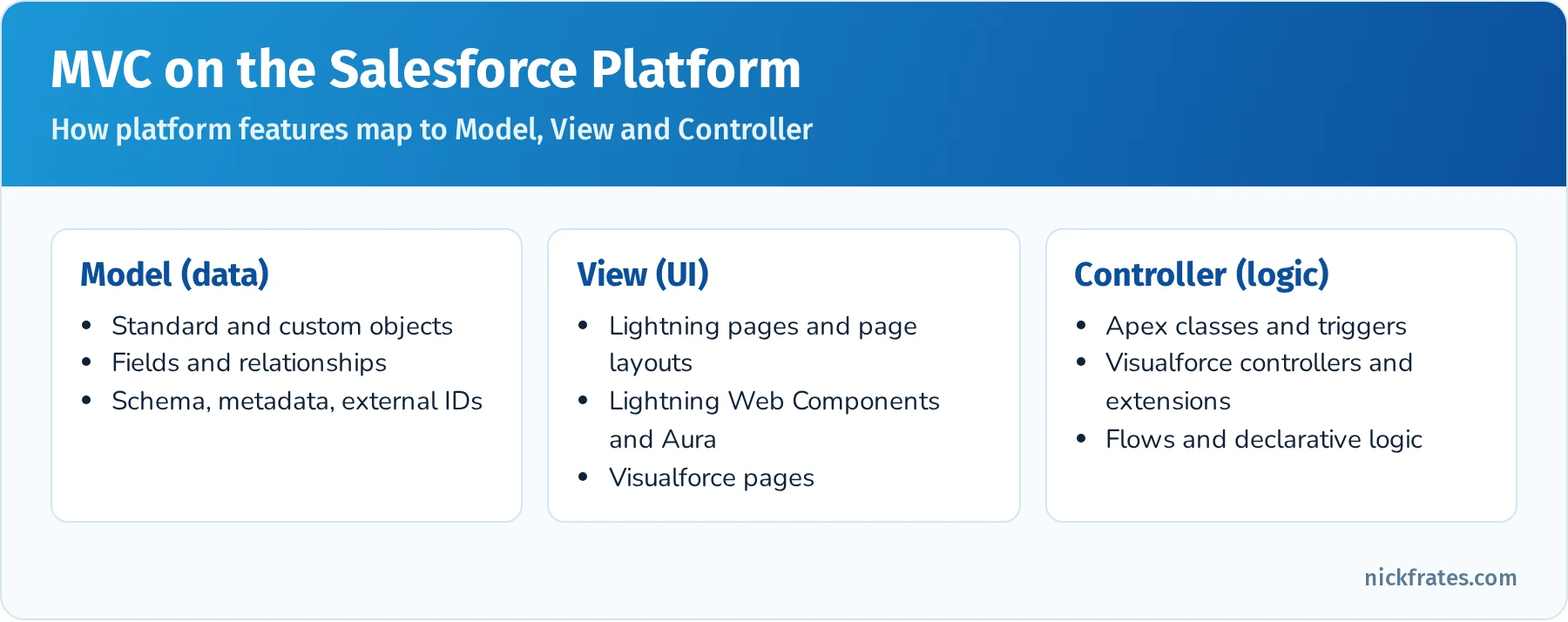
    Diagram mapping Salesforce features to MVC: Model is objects, fields and relationships; View is Lightning pages, LWC, Aura and Visualforce; Controller is Apex, Visualforce controllers and flows

    How the platform maps to Model, View and Controller.

    Agentforce for Developers (new in the outline). Agentforce for Developers is Salesforce's AI coding assistant for VS Code (with the Salesforce Extensions) and Code Builder. It was previously called Einstein for Developers. Know its use cases: inline code completion for Apex and LWC, generating Apex or LWC code from a natural-language prompt, explaining existing code, generating Apex unit test scaffolding, and a chat-style Dev Assistant inside the IDE. Know its limitations just as well: generated code can be wrong, incomplete or not bulk-safe, it may not know your org's specific metadata or business rules, it doesn't replace code review, testing or the 75% coverage requirement, and you're still responsible for security (sharing, CRUD and FLS). The exam favors answers where a developer uses the assistant to speed up work and then reviews, tests and adjusts the output.

    Quick reference: relationship types

    FeatureLookupMaster-detail
    Child can exist without parentYes (field can be optional)No (parent required)
    Delete parentChild kept, lookup cleared (default) or delete blockedChildren cascade-deleted
    Sharing and ownershipChild has its own owner and sharingChild inherits from parent
    Roll-up summary fieldsNo (use Flow or Apex)Yes
    Limit per objectUp to 40 relationship fields totalUp to 2 master-detail

    Practice questions: Developer Fundamentals

    Question 1. A developer needs to show the total Amount of all related Line_Item__c records on a parent Invoice__c record. Line_Item__c has a master-detail relationship to Invoice__c. What is the simplest solution?

    • A. An Apex trigger on Line_Item__c that updates Invoice__c
    • B. A roll-up summary field on Invoice__c
    • C. A formula field on Invoice__c
    • D. A scheduled flow that recalculates totals nightly

    Answer: B. Roll-up summary fields are built for exactly this on master-detail relationships, need no code, and recalculate automatically. A trigger works but adds code to maintain, a formula field can't aggregate child records, and a nightly flow leaves totals stale during the day.

    Question 2. Which two statements about multi-tenancy are true? (Choose two.)

    • A. Governor limits exist so one tenant can't monopolize shared resources
    • B. Each customer can choose when to apply the seasonal release
    • C. All orgs on an instance share infrastructure, but each org's data is isolated
    • D. Exceeding a governor limit throws a catchable exception you can handle in a try-catch

    Answer: A and C. Seasonal releases are applied by Salesforce, not scheduled by each customer (B is false), and LimitException can't be caught (D is false).

    Question 3. An integration sends records with a unique ERP number. The developer must insert new records and update existing ones in one operation without querying Salesforce Ids first. What should they use?

    • A. A text field marked Unique, then insert
    • B. An External ID field and upsert
    • C. A formula field and update
    • D. A lookup field to a custom ERP object

    Answer: B. Marking the ERP number as an External ID lets upsert (in Apex, the API or Data Loader) match on it to decide insert vs. update.

    Question 4. A developer uses Agentforce for Developers to generate an Apex trigger. What should they do before deploying it?

    • A. Deploy it directly, since AI-generated code is pre-validated by Salesforce
    • B. Review it for bulkification and security, write unit tests, and run them
    • C. Skip test classes, because generated code is exempt from coverage rules
    • D. Regenerate it until no warnings appear in the IDE

    Answer: B. Generated code is a starting point. It still needs review (bulk safety, sharing, CRUD/FLS), tests that assert behavior, and the normal 75% coverage requirement.

    Question 5. A business wants a field that shows the number of days since a Case was opened, always current, with no storage of the value. What should the developer use?

    • A. A number field updated by a scheduled flow
    • B. A formula field using TODAY() - DATEVALUE(CreatedDate)
    • C. A roll-up summary field
    • D. An Apex trigger on Case

    Answer: B. Formula fields calculate when read, so the value is always current and nothing is stored. The scheduled flow and trigger approaches store values that go stale or consume DML, and a roll-up summary aggregates children, not dates on the same record.

    Question 6. Which tool should a developer use to load 2 million Contact records with an external ID for matching?

    • A. Data Import Wizard
    • B. Data Loader
    • C. Change Set
    • D. Developer Console Query Editor

    Answer: B. Data Loader supports up to 5 million records and upsert by external ID. The Import Wizard caps at 50,000 records, Change Sets move metadata not data, and the Query Editor only reads data.

    Process Automation and Logic (28%)

    Overview: This is the largest and arguably most important section – 28% of the exam – focusing on Apex programming, declarative automation, and the nuts and bolts of business logic on the platform. A significant portion of questions will test your understanding of Apex code (the Salesforce proprietary programming language similar to Java) and how/when to use it in conjunction with or instead of declarative tools. Expect scenario-based questions about triggers, classes, and automation design.

    Start with declarative process automation. Flow is the go-forward automation tool: record-triggered flows (before-save for fast field updates on the triggering record, after-save for related records and actions), screen flows for guided user input, scheduled flows, autolaunched flows called from Apex or other flows, and platform event-triggered flows. Workflow Rules and Process Builder reached end of support on December 31, 2025; existing ones still run, and Salesforce provides the Migrate to Flow tool to convert them. Old exam questions might mention them, so know that Workflow did single if/then field updates, emails, tasks and outbound messages, and Process Builder added multiple branches, record creation and Apex invocation. Understand the limits of Flow too: very complex looping over thousands of records, complex integrations, or logic needing precise transaction control are where Apex comes in. When to use declarative automation vs. triggers is a common decision point. A scenario like "on update of an Account, do X on related Contacts" can be a record-triggered flow or an Apex trigger. Salesforce encourages low-code solutions, so if a flow can do it cleanly and within limits it's often the correct choice, but weigh maintainability, volume and governor limits.

    Next, dive into Apex language basics. You need to know how to declare variables and constants, use Apex data types, and write simple expressions. Key Apex data types include primitives (Integer, String, Boolean, Decimal, etc.), collections (List, Set, Map), sObjects (standard and custom objects as types), and more complex types like Apex classes and enums. Understand the syntax for loops and control flow: if-else statements, for loops (including the special SOQL-for loop), and while loops. Also know how to write methods and use access modifiers (public, private, global, protected) and keywords like with sharing/without sharing (which control record-level security in Apex code). Apex also supports interfaces and inheritance – for the exam, you should at least grasp what an interface is (a template of methods that a class can implement) and a typical use case (Salesforce has built-in interfaces like Database.Batchable, Schedulable that you implement to run batch or scheduled jobs). The exam may include a question like “given this interface and class, what is the outcome when executed” or a question on the implications of using with sharing.

    A large chunk of this section is about writing and understanding Apex Triggers and Classes. Know how to write a basic trigger, including the context variables (like Trigger.new, Trigger.old, Trigger.isInsert, etc.). Trigger bulkification is paramount: Salesforce triggers fire per batch of 200 records by default, so Apex code must handle collections of records efficiently. This means using for loops and collections instead of singleton operations. Best practice is to avoid SOQL or DML inside loops; instead, query or process data in sets to stay within limits. For example, if updating child records when a parent changes, one would gather all child IDs and do one SOQL query, rather than querying inside a loop for each parent. Expect questions on what a piece of trigger code does, or identifying why a given trigger is failing (often due to not handling bulk updates or recursion). One trigger per object is a recommended design (using logic in helper classes if needed) – while the exam might not explicitly test that pattern, it might implicitly in a scenario about controlling trigger execution order (since if you have multiple triggers on the same object event, their execution order is indeterminate). Also, understand the order of execution in a save transaction (the sequence of events when a record is saved: before triggers, after triggers, workflow rules, processes, escalation rules, etc., and how recursion could happen). Knowing the order of execution is crucial for troubleshooting why a certain outcome is occurring (e.g. a validation rule firing after a before trigger, etc.).

    In Apex, you must also know how to work with SOQL and SOSL queries and DML statements. SOQL (Salesforce Object Query Language) is like SQL: for example SELECT Id, Name FROM Account WHERE Name = 'Acme'. Know how to write SOQL in Apex, use bind variables (WHERE Name = :acctName), query parent fields through relationships (Account.Name from Contact) and child records with subqueries (SELECT Id, (SELECT Id FROM Contacts) FROM Account). SOQL has no JOIN keyword; you filter across objects with semi-joins and anti-joins (WHERE Id IN (SELECT AccountId FROM Contact) or NOT IN). SOSL (Salesforce Object Search Language) is a text search across multiple objects at once (for example, find every record containing "Acme" in a name or phone field). SOQL returns a list of records of one object type (plus related records); SOSL returns a list of lists of sObjects, one list per object searched. DML statements in Apex are insert, update, upsert, delete, undelete and merge, and you should always run DML on lists rather than single records inside loops. The exam often shows a code snippet and asks for the outcome. Two classics: assigning a query that returns no rows to a single sObject variable (Account a = [SELECT Id FROM Account WHERE Name = 'Nope'];) throws a QueryException with the message "List has no rows for assignment to SObject"; and insert records; is all-or-none, while Database.insert(records, false) allows partial success and returns Database.SaveResult objects you inspect for errors.

    Governor limits are frequently tested in this section. You should memorize key limits and understand their impact on design. For instance: 100 SOQL queries per transaction (synchronous) – if you exceed this, you get a runtime exception. 50,000 records retrieved total by SOQL per transaction – exceeding that yields a LimitException. 150 DML statements per transaction (so batch your record changes into at most 150 operations). Other notable limits: 20 SOSL queries per transaction, 100 callouts per transaction, 6 MB synchronous Apex heap size, 10,000 rows processed by DML operations in a transaction, etc. You cannot catch LimitExceptions with try-catch (they will always halt execution when a governor limit is hit). Instead, you must design your code to avoid hitting limits (e.g. bulkify queries, use batch Apex for large data operations). Flashcards on these numbers are useful: a question might simply ask “What is the maximum number of SOQL queries allowed in a single Apex transaction?” or present a scenario and you have to know which limit is violated.

    Another topic is the relationship between Apex transactions and the save order of execution. This includes understanding how before triggers can modify field values before the record is saved, how after triggers can query additional data or make changes that require the record ID, and how one trigger firing can cause other records’ triggers to fire (cascade) or recursively trigger itself (for example, if an after update trigger updates another record of the same object type, it can re-fire triggers on that object). Salesforce has protections to prevent infinite recursion (there’s a limit on trigger depth of 16 and on future calls, etc.), but you are expected to know strategies to avoid unwanted recursion – e.g. using static variables to ensure a trigger only runs once on the same set of records. Also know that each trigger execution is part of a single transaction, and all DML either succeeds or is rolled back if an uncaught exception occurs.

    Exception handling in Apex is another key area. You should know how to use try-catch-finally blocks to handle errors, and when to throw exceptions. Salesforce has a hierarchy of exception types (like DmlException, NullPointerException, QueryException, etc.). Be aware of which exceptions you can catch and which you cannot (for example, you cannot catch LimitException governor limit errors in your code). The exam may ask which exception type would be thrown in a given scenario, or what happens if an exception is not caught (it bubbles up and rolls back the transaction). Also, custom exceptions can be created by extending Exception class – you might see a question about when to use a custom exception (e.g. to create a specific error type for business logic errors and throw it to caller). A typical scenario is using try-catch around a callout or DML and then throwing a custom exception or returning an error.

    Finally, understand how declarative and programmatic automation can work together. A common example is an Invocable Method (an Apex method annotated with @InvocableMethod) called from a Flow, combining code with Flow for advanced logic. The same invocable methods can be exposed as Agentforce actions, where the label and description tell the agent when to use the action, so clear descriptions on the method and its @InvocableVariable inputs and outputs matter. Another pattern is calling an autolaunched flow from Apex with Flow.Interview. If both an after-save flow and an after trigger exist on the same object, both run: triggers run first, and after-save record-triggered flows run later in the order of execution. Use Flow trigger ordering (the trigger order value) to control the order of multiple record-triggered flows on the same object, and keep one Apex trigger per object to keep code ordering predictable.

    Hands-On Practice (Trailhead & Exercises):

    • Trailhead Module: Apex Basics & Variables – This teaches Apex syntax, how to declare variables, data types, and write simple Apex code. Practice writing basic classes and triggers in your dev org, even a “Hello World” trigger on a Contact that sets a field value.
    • Trailhead Module: Apex Triggers – Walks through trigger scenarios and best practices (bulkification, context variables). Make sure to do the exercises, like creating a trigger that updates a parent field when children change.
    • Trailhead Module: SOQL and SOSL – (e.g. “SOQL for Admins” or “Apex Basics & Database” modules) to practice writing queries. In a Playground org, try queries in the Developer Console’s Query Editor to get familiar with syntax. Then try writing equivalent queries in an Apex class and iterating over results.
    • Superbadge: Apex Specialist Superbadge – This is a more involved challenge, but if you have time, it’s extremely useful. It makes you write Apex classes, triggers, and tests for a realistic scenario. Even if you don’t complete it before the exam, attempting parts of it will expose you to typical use cases that often align with exam topics.
    • Practice Apex Problems: Come up with small scenarios, for example: "When an Account's rating is changed to 'Hot', automatically create a Task." Solve it first with a record-triggered flow, then with an Apex trigger, to compare both approaches. Or "Write an Apex method to find all Accounts with no Contacts" (hint: SOQL has no LEFT JOIN, so use an anti-join: SELECT Id FROM Account WHERE Id NOT IN (SELECT AccountId FROM Contact)). Exercises like these build intuition for Apex logic and governor limits.
    • Trailhead Project: Quick Start: Apex – A guided project to set up a developer environment and deploy Apex code. This can help you learn to use Developer Console and see debug logs when running code.
    • Use Developer Console: Write a simple Apex class with a few methods (e.g. math operations or string manipulations) and call them using Anonymous Apex to see results. Practice using System.debug() and checking debug logs – this will also prepare you for debugging scenarios in the Testing/Debugging section.

    Key Concepts for Flashcards:

    • Record-Triggered Flow vs. Apex Trigger: Both can run logic on record changes. Flashcard prompt: “When should you use a Flow instead of an Apex trigger?” (Answer: If the logic can be achieved declaratively without hitting limits – e.g. small-scale or straightforward record manipulations – use Flow for ease of maintenance. Use Apex trigger for complex logic, large data volumes, or when needing transactions spanning multiple objects or custom error handling).
    • Apex Data Types: Know the difference between List, Set, and Map. For example, a Set<String> avoids duplicates, a Map<Id, Account> maps Ids to Account records (useful for bulk operations). Flashcard example: “What collection type would you use to store unique Id values? (Set).”
    • SOQL vs SOSL: SOQL is for structured queries (one object at a time (or with parent-child subqueries)), returns records. SOSL is for free-text search across multiple objects, returns lists of sObject lists.
    • DML Options: All-or-none vs partial (Database class methods). E.g., insert accounts; (all-or-none) vs Database.insert(accounts, false) (continues on errors). Understand that partial allows successful records to commit while others fail.
    • Trigger Context Variables: e.g. Trigger.new (new records in insert/update), Trigger.old (old values for update/delete), Trigger.isExecuting, Trigger.isInsert, Trigger.isAfter, etc. Flashcard: “What does Trigger.new contain in a before insert vs. before delete trigger?” (Answer: In before insert, Trigger.new contains the new records about to be saved; in before delete, Trigger.new is not available (since records are being deleted), but Trigger.old contains the records being deleted).
    • Order of Execution: The simplified sequence when a record is saved: system validation, before-save flows, before triggers, validation rules and duplicate rules, save (not committed), after triggers, assignment and auto-response rules, legacy workflow, escalation rules, after-save flows, roll-up recalculation, commit, then post-commit logic. Common quiz: "At what point is a record assigned an Id?" (When it's saved to the database after before triggers and validation, so the Id exists in after triggers.)
    • Governor Limit Values: Memorize key limits: 100 SOQL queries per transaction (200 async), 50,000 records retrieved by SOQL, 150 DML statements, 10,000 records processed by DML, 20 SOSL queries, 100 callouts with a 120-second cumulative timeout, 6 MB heap (12 MB async), 10 seconds of CPU time (60 seconds async), 50 @future calls per transaction, and 100 scheduled Apex jobs in an org at one time. These make good flashcards (question on one side, number on the other).
    • System Mode vs User Mode: Apex generally runs in system mode, ignoring the running user's object and field permissions. Sharing (record access) depends on the class keyword: with sharing enforces sharing rules, without sharing ignores them, and inherited sharing uses the caller's mode. A class with no keyword inherits the sharing mode of its caller, and runs without sharing when it's the entry point. To enforce object and field permissions too, use user mode: WITH USER_MODE in SOQL, Database.insert(records, AccessLevel.USER_MODE) for DML, or Security.stripInaccessible(). WITH SECURITY_ENFORCED is the older option that throws an exception instead of stripping fields.
    • Exception Handling: Know at least one example of an exception that cannot be caught – e.g. LimitException (governor limits). Also know how to intentionally throw an exception (throw new CustomException('msg');) and that throwing an exception will rollback the transaction unless caught.
    • Best Practices: Bulkify your code (no SOQL inside loops!), use collections. Avoid hardcoding IDs or values (use Custom Settings/Metadata or describe calls). Use “one trigger per object” principle and delegate logic to handler classes. Use test-driven development (which ties into Testing section).

    Exam Focus Tips: This is the highest-weight section (28%), which means roughly 17 questions. A strong performance here is critical to passing. It’s also the section that tends to be most challenging for those new to coding, so allocate significant study time to practicing Apex and automation logic. Prioritize understanding over rote memorization – for example, rather than just memorizing trigger syntax, practice reading small Apex code snippets and predicting what they do. The exam often presents a short code block and asks for the outcome or error, testing your applied knowledge. If you find coding concepts daunting, break your study into subtopics (SOQL, triggers, Apex basics, etc.) and tackle one at a time with hands-on practice; Trailhead and sample problems are your friends. Given the weight, aim for mastery: you should reach a point where you can mentally run through an Apex snippet and catch mistakes (e.g. see a SOQL in a loop and realize it would hit limits on bulk data). Also remember, since this section is broad, don’t neglect the declarative aspects – a few questions will likely cover Flows or formulas vs. code scenarios. By focusing on this section, you build confidence for nearly one-third of the exam. Lastly, leverage flashcards for the limit numbers and terminology, but use a sandbox or Playground to actually write code for real understanding. The combination of memorization and applied practice will yield the best results here.
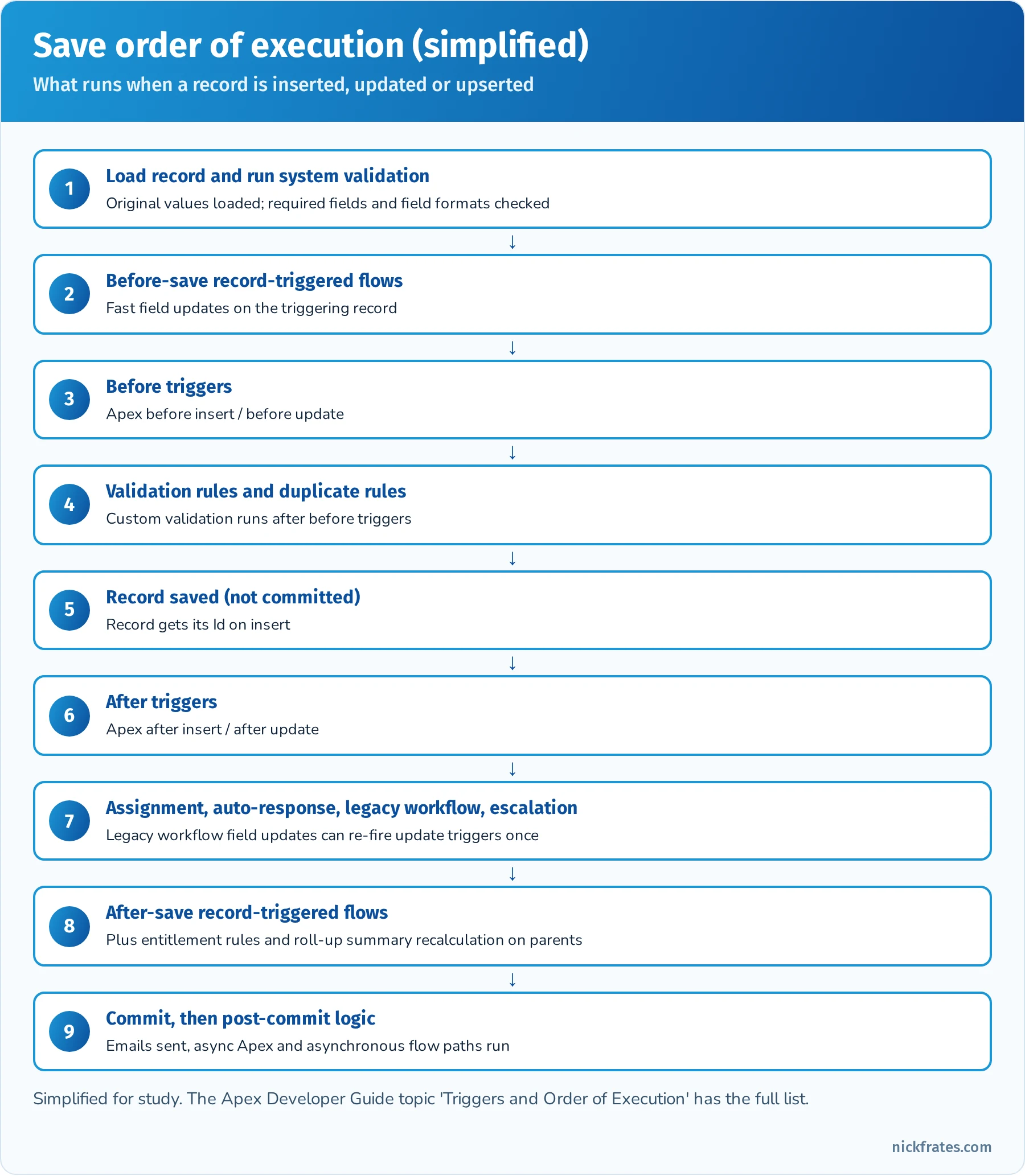
    Simplified Salesforce save order of execution: system validation, before-save flows, before triggers, validation and duplicate rules, save, after triggers, assignment and legacy rules, after-save flows, commit and post-commit logic

    The simplified save order. Before-save flows run before before triggers; after-save flows run after after triggers.
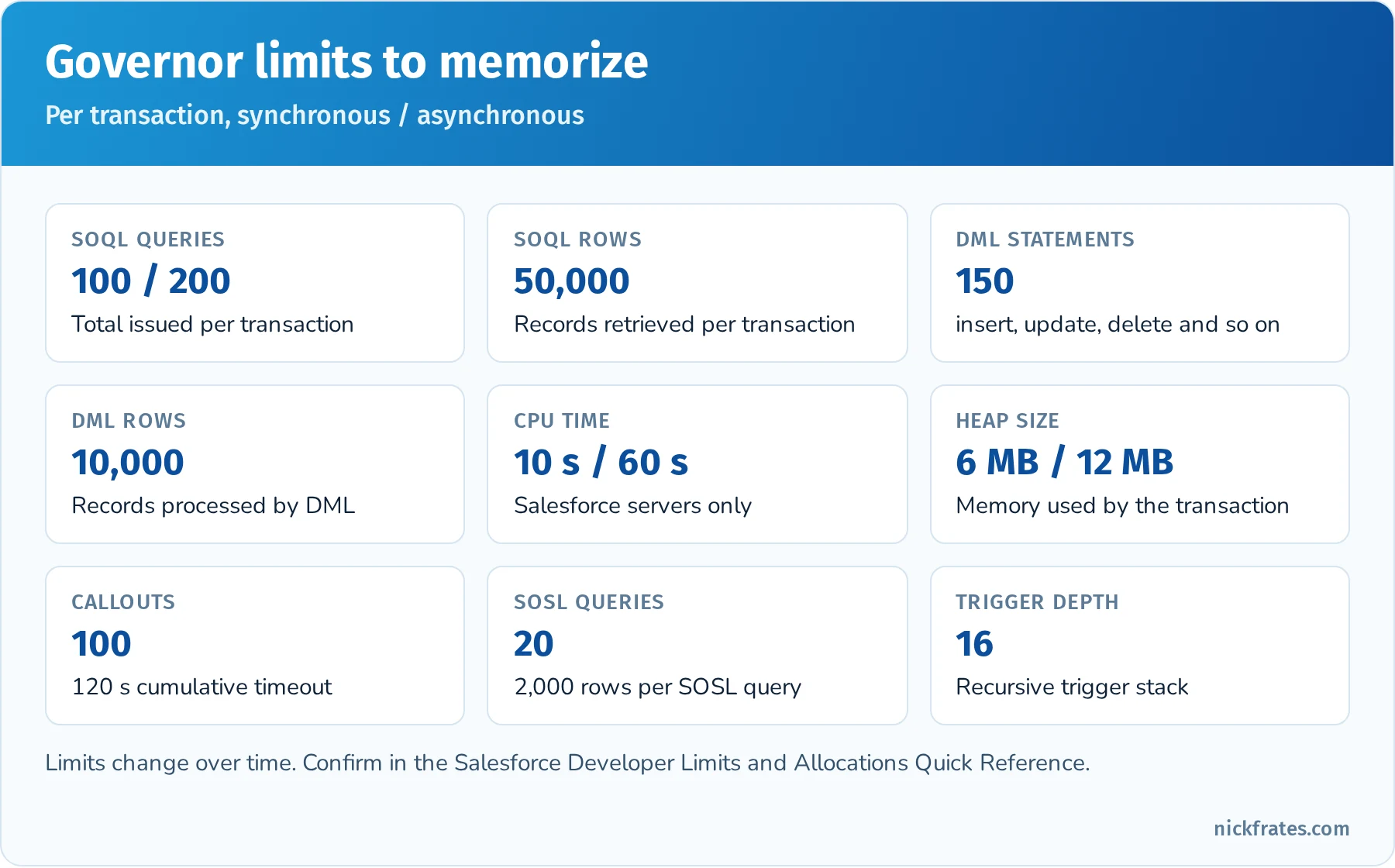
    Governor limits card: 100 SOQL queries sync and 200 async, 50,000 SOQL rows, 150 DML statements, 10,000 DML rows, CPU 10 seconds sync and 60 async, heap 6 MB and 12 MB, 100 callouts, 20 SOSL queries, trigger depth 16

    The governor limits that show up most often in PD1 questions.

    Asynchronous Apex. The outline expects you to know when to use each async option. @future methods are the simplest (static, void, primitive parameters, and the usual way to make a callout after a trigger), but you can't chain them or get a job Id. Queueable Apex accepts complex types, returns a job Id you can monitor, and can chain one job from another. Batch Apex processes very large data sets (up to 50 million records with a QueryLocator) in chunks with fresh governor limits per execute call. Scheduled Apex implements Schedulable and runs on a cron expression, often to kick off a batch. Platform events and Change Data Capture decouple processes and let triggers or flows react asynchronously.
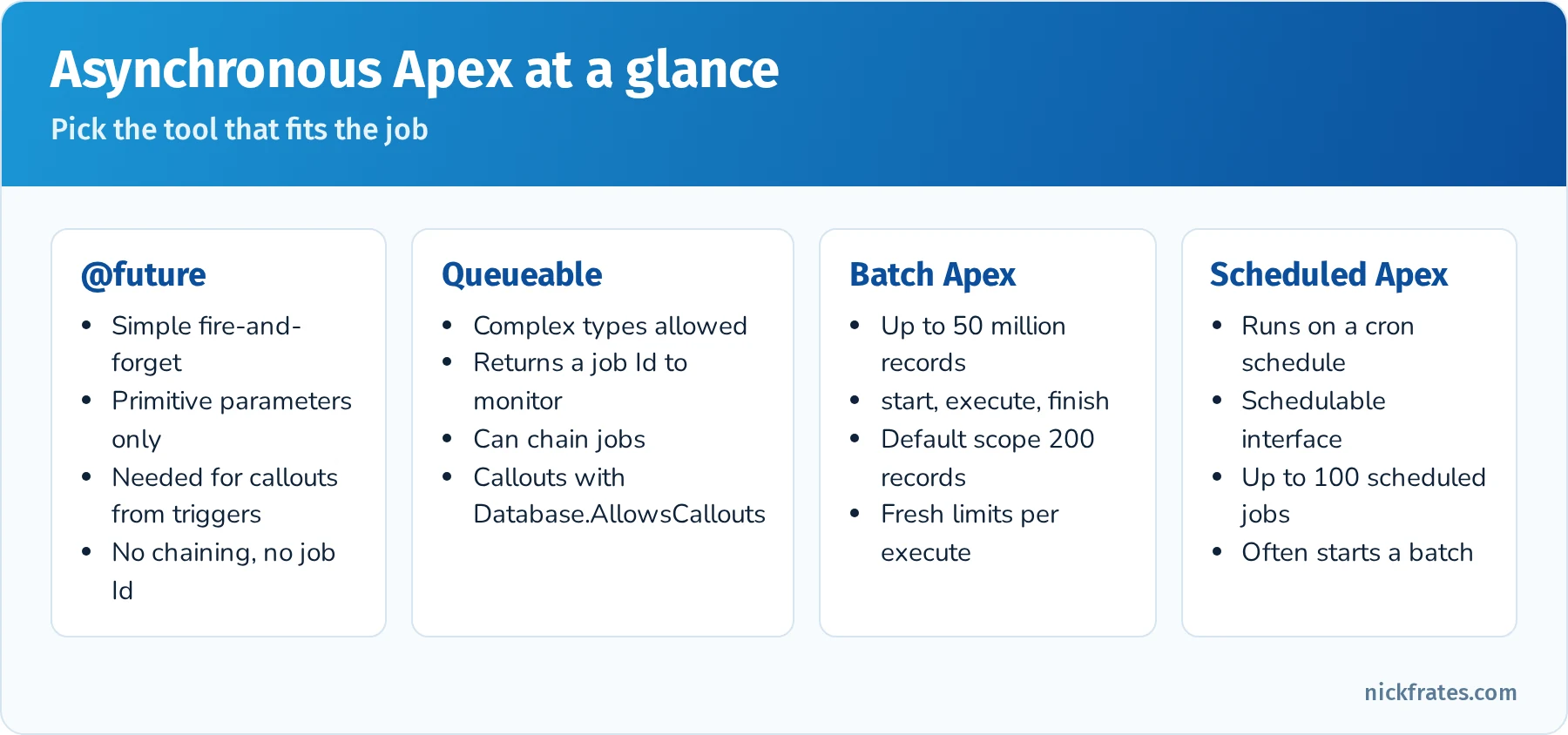
    Comparison of asynchronous Apex options: future methods, Queueable, Batch Apex and Scheduled Apex with key traits of each

    Choose the simplest async tool that meets the requirement.

    Quick reference: Flow or Apex?

    RequirementBetter fitWhy
    Update fields on the same record when it's savedBefore-save record-triggered flowFastest option, no extra DML
    Create related records or send emails after saveAfter-save record-triggered flowDeclarative and maintainable
    Complex logic across many objects with custom error handlingApex trigger with a handler classFull control over transactions and exceptions
    Callout to an external system after a record changeFlow with an asynchronous path, or Queueable/future ApexCallouts can't run synchronously in the save transaction
    Reusable complex calculation used by many flows@InvocableMethod Apex called from FlowCode where needed, Flow everywhere else
    Process millions of records nightlyBatch Apex (scheduled)Fresh limits per chunk of records

    Quick reference: exceptions you should recognize

    ExceptionTypical cause
    QueryExceptionAssigning zero or several rows to a single sObject variable
    DmlExceptionA DML operation fails (validation rule, required field, duplicate)
    NullPointerExceptionUsing a variable or field that is null
    ListExceptionList index out of bounds
    LimitExceptionA governor limit is exceeded (can't be caught)
    CalloutExceptionCallout failure or a callout after uncommitted DML

    Practice questions: Process Automation and Logic

    Question 1. A trigger on Contact contains a SOQL query inside a for (Contact c : Trigger.new) loop. What happens when 201 Contacts are inserted through Data Loader in one batch?

    • A. Nothing, triggers process one record at a time
    • B. The trigger runs in chunks of 200 records, and the query runs once per record, which can exceed 100 SOQL queries
    • C. The query is automatically bulkified by the platform
    • D. Data Loader skips triggers by default

    Answer: B. Triggers receive up to 200 records per chunk. A query per record quickly passes the 100-query limit and throws an uncatchable LimitException. Query once into a Map or Set outside the loop instead.

    Question 2. What does this code do when no Account named 'Nope' exists? Account a = [SELECT Id FROM Account WHERE Name = 'Nope' LIMIT 1];

    • A. Sets a to null
    • B. Throws a QueryException: List has no rows for assignment to SObject
    • C. Throws a NullPointerException
    • D. Returns an empty Account record

    Answer: B. Assigning a SOQL result directly to a single sObject requires exactly one row. Query into a List<Account> and check isEmpty() to avoid the exception.

    Question 3. A developer needs to insert 500 records and keep the successful ones even if some fail validation. Which statement should they use?

    • A. insert records;
    • B. Database.insert(records, false);
    • C. upsert records;
    • D. Database.insert(records, true);

    Answer: B. Passing false for allOrNone allows partial success and returns SaveResult objects to inspect. insert and Database.insert(records, true) roll back everything on the first failure.

    Question 4. A record-triggered flow and an Apex after-update trigger exist on Opportunity. Which statement about order is correct?

    • A. The flow always runs first
    • B. Before-save flows run before before triggers, and after-save flows run after after triggers
    • C. Their order is random every time
    • D. Flows can't run when an Apex trigger exists on the object

    Answer: B. Before-save record-triggered flows run early (before before triggers), and after-save flows run later in the save order, after after triggers and the legacy rules.

    Question 5. Which Apex class declaration enforces the running user's sharing rules for record access?

    • A. public without sharing class Foo
    • B. public with sharing class Foo
    • C. public class Foo called from an Anonymous Apex entry point
    • D. global class Foo implements Schedulable

    Answer: B. with sharing enforces record-level sharing. A class with no keyword inherits its caller's mode and runs without sharing as an entry point. Remember that sharing keywords don't enforce object or field permissions; use WITH USER_MODE or Security.stripInaccessible() for that.

    Question 6. A trigger must call an external REST API when an Account is updated. What is the correct approach?

    • A. Make the callout directly in the trigger
    • B. Call a @future(callout=true) method or enqueue a Queueable that implements Database.AllowsCallouts
    • C. Use a before-save flow
    • D. Use a workflow outbound message

    Answer: B. Synchronous callouts aren't allowed from triggers because the transaction has uncommitted work. Move the callout to async Apex (or a flow's asynchronous path). Workflow outbound messages are legacy automation past end of support.

    Question 7. Which collection type is best for storing unique Account Ids collected in a loop before a single query?

    • A. List<Id>
    • B. Set<Id>
    • C. Map<String, String>
    • D. Id[]

    Answer: B. A Set ignores duplicates automatically and works directly in a SOQL bind: WHERE Id IN :accountIds.

    User Interface (25%)

    Overview: This section tests your knowledge of building custom user interfaces on the Salesforce platform, including older technologies like Visualforce and newer ones like Lightning Web Components (LWC) and Aura components. It makes up about 25% of the exam, so roughly 15 questions. A key theme is knowing how to display and update data via custom UI and ensuring security on those interfaces.

    First, understand Visualforce Page fundamentals. Visualforce (VF) is a framework for building custom pages, primarily for the classic UI (though VF pages can also appear in Lightning Experience). A VF page uses an HTML-like markup with Salesforce-specific tags (e.g. <apex:page>, <apex:form>, <apex:outputField>, etc.) and is served from Salesforce. Know how a Visualforce page can display Salesforce data using a controller. There are three controller types: Standard Controller (binds the page to a standard or custom object, giving you basic CRUD operations and access to a record or list of records), Custom Controller (an Apex class you write from scratch with logic for the page, not using a standard controller at all), and Controller Extension (an Apex class that extends or augments a standard controller). You should know when to use each. For instance, to make a quick page that edits a record, a standard controller might suffice. To override a standard button action with some extra logic, you might use a controller extension. To build something completely custom (say a page that pulls data from multiple objects and external web service), a custom controller is needed. The exam may present a scenario like “You need a page to display a list of related records and allow inline edit, which controller approach do you use?” – understanding the capabilities of each is key.

    Also be aware of the types of content you can embed in Visualforce pages. VF can include static HTML/JavaScript, use CSS for styling, and even embed other web content via iframes or Canvas. It can also host Lightning components via Lightning Out or include an <apex:includeLightning /> tag to apply Lightning Experience styling to a VF page (by setting lightningStylesheets="true" on the <apex:page> tag, the page will use SLDS styles for a more modern look). One common use case is adding a VF page as a custom tab or override, or using VF in places where Lightning Components might not be available (e.g., a quick action in certain contexts). Although Visualforce is considered an older tech now, it is still on the test and widely used in many orgs, so don’t skip studying it. Make sure you know basic Visualforce page syntax, how to reference data ({! record.Field__c } merge expressions), and how to call Apex methods from VF (e.g. using <apex:commandButton action="{!save}" /> that calls a controller’s method).

    Next, Lightning components: Salesforce has the Aura Component Framework (often just referred to as “Lightning Components” historically) and the modern Lightning Web Components (LWC). The exam outline explicitly mentions the “Lightning Component framework, its benefits, and types of content in an LWC”. Key points: The Lightning Component framework is used to build dynamic, single-page style applications for Lightning Experience. Aura components were the original model (with a component bundle containing markup, controller, helper, etc.), and Lightning Web Components are the newer model built on standard web standards (a bundle of HTML, JavaScript, and metadata files). Benefits of Lightning Components include a more interactive UX, better performance (because of client-side rendering and partial page updates), and reusability (components can be dropped into different pages or apps). LWC specifically has benefits of using native browser capabilities, which means less Salesforce-specific framework overhead and easier adoption of web standards.

    Know what content can be in an LWC: since LWC uses standard web tech, you can include HTML for structure, CSS for styles (or use the Salesforce Lightning Design System classes), and JavaScript for client-side logic. You can also import Apex methods to call them imperatively or use wire adapters to get data. LWC can also utilize Pub/Sub modules for communication between components. The outline mentions “use cases and best practices for LWC events” – you should understand how components communicate: an LWC can fire a CustomEvent to send data to a parent component (this is akin to Aura component events but now using DOM events). Best practices include using events for parent-child comms, avoiding overly broad event scope (in Aura, you’d prefer component events to application events; in LWC, you might use a shared messaging service for sibling components rather than abusing the event system). Essentially, know how events propagate in LWC (they bubble up the DOM, can be stopped or composed across shadow DOM boundaries) and that you usually use a CustomEvent with a detail property to pass data. A best practice: keep event payloads small (primitives) to avoid giving child components direct references to parent data (which could be mutated unexpectedly). Also, LWC events can be configured with bubbles and composed flags – generally default events are non-bubbling and non-composed within the shadow DOM (which is safer and encapsulated). The exam might not get too low-level on this, but it could ask something conceptual like “How do two sibling LWCs communicate?” (Answer: via a parent mediator – either the parent handles an event from one and passes data to the other, or use a pub-sub module since siblings can’t directly interact without a common parent or an event bus).

    The UI section also covers security in custom interfaces. This includes understanding user data access and UI security vulnerabilities. For Visualforce and Apex controllers, this means respecting CRUD/FLS (object and field-level security) – Apex running in system mode can violate these unless you enforce them manually (using Schema.sObjectType describes or with sharing for record sharing). Lightning components (Aura/LWC) run in user context for data access (meaning they typically use Apex to get data, and that Apex can be with or without sharing). The exam objective explicitly states “Given a scenario, prevent user interface and data access security vulnerabilities.” This implies you should know about common vulnerabilities like SOQL injection (and how to prevent it by binding variables or using escapeSingleQuote), Cross-Site Scripting (XSS) in Visualforce (for example, outputting user input without escaping can be dangerous; always use <apex:outputText escape="true"> by default), and avoiding exposing sensitive data on the client side. Lightning Locker (now Lightning Web Security) is Salesforce’s mechanism to isolate component namespaces, but you likely just need to know that it exists to protect components from each other. Also know that if you’re using JavaScript in LWC, the framework automatically escapes HTML output to prevent XSS in most cases. A scenario might describe a piece of code vulnerable to SOQL injection (e.g. constructing dynamic SOQL with unchecked user input) and ask what the issue is or how to fix it (by using bind variables or escaping quotes). Another might describe a Visualforce page where a query string parameter is used in the controller SOQL – to secure it, you’d sanitize or type-cast the parameter.

    Finally, be familiar with how custom UI components are surfaced in Salesforce and how Apex works with them. You can put a Lightning Web Component on a record page, home page, app page, utility bar or quick action, embed a screen flow in a Lightning page, and show a Visualforce page through the Visualforce component. The outline asks you to implement Apex that works with page components such as Lightning components, Flow and Agentforce actions. In practice: LWC and Aura call Apex methods annotated with @AuraEnabled (use cacheable=true for read-only methods you want to @wire); Flows call @InvocableMethod Apex; Agentforce actions can be backed by invocable Apex, flows or prompt templates; and Visualforce uses controllers and action methods. A typical question: "How should an Apex method be declared so an LWC can call it with @wire?" (Public or global static, annotated @AuraEnabled(cacheable=true).)

    Hands-On Practice (Trailhead & Exercises):

    • Trailhead Module: Visualforce Basics – Build a simple Visualforce page and controller. For example, create a VF page that shows a list of Accounts and lets you select one to view details. This will reinforce how to use standard list controllers vs. writing SOQL in a custom controller.
    • Trailhead Module: Lightning Web Components Basics – Go through the basics of LWC, create a “Hello World” LWC and deploy it to a record page. Practice passing data via @api properties and firing a simple CustomEvent (perhaps have a child LWC fire an event and a parent LWC handle it to update a message).
    • Trailhead Module: Aura Components Basics – Aura is less emphasized now, but completing a basic Aura component exercise (creating a component with a controller and helper) helps you recognize Aura syntax (aura:id, components, etc.) in case it appears on the exam. Some questions might still reference Aura components or application events.
    • Visualforce Exercise: Try overriding a standard action. For instance, override the “New” button of an object with a Visualforce page that has a custom form. This will teach you how VF interacts with standard controller navigation and saving. Also practice using lightningStylesheets="true" on the VF page to see how it adopts Lightning look.
    • Security Practice: Intentionally introduce a vulnerability in a test Visualforce page (like outputting <script>alert('xss')</script> from a string variable) and see how using <apex:outputText escape="false"> vs escape="true" behaves. Similarly, write an Apex snippet that builds a SOQL string from user input, and then fix it by using a binding variable. This hands-on approach will solidify what not to do in terms of security.
    • Trailhead Module: Lightning Aura and LWC Events – If available, find Trailhead content specifically on communication patterns between components. Otherwise, Salesforce documentation examples for LWC events are great – try to implement a parent-child LWC where the child emits an event and the parent reacts (e.g., child component has a button that when clicked, sends an event to increment a counter in the parent).
    • App Builder Mix: Use the Lightning App Builder to combine components – e.g., place a flow, a visualforce page, and a custom LWC on one Lightning Home Page. This will give you a practical sense of how these pieces coexist. It’s also useful to see how you pass parameters to Visualforce via Lightning pages or how a Flow’s output could be input to a component (though mostly flows and components don’t directly feed each other without custom integration).

    Key Concepts for Flashcards:

    • Visualforce Standard vs Custom Controller: Standard controllers provide out-of-the-box CRUD logic for a single record or list (and come with a save() method, etc.), whereas a custom controller is an Apex class you write to define custom logic and data fetching. Flashcard prompt: “What’s the difference between a Visualforce standard controller and a custom controller?”
    • Controller Extension: An Apex class that extends a standard controller’s functionality (it has a constructor taking ApexPages.StandardController as a parameter). Use this when you need to add logic to a standard controller page (e.g. a custom button that does additional processing before save).
    • Lightning Web Component (LWC): A UI component model using standard web technologies (HTML, JS, CSS). Key traits: Uses the shadow DOM for encapsulation, communicates with Apex via @AuraEnabled methods, and with other components via events.
    • Aura vs LWC: Aura components use a proprietary component model (with .cmp files, controllers, events), while LWC uses modern JavaScript. Both can coexist and both run in Lightning. Aura had the concept of application events vs component events – in LWC, all events are essentially component (DOM) events. Potential question: “How do you ensure two independent LWCs communicate if they are not in the same DOM hierarchy?” (One answer: use a Lightning Message Service or pub-sub pattern, which isn’t deeply covered on PD1 but good to know conceptually).
    • SLDS (Styling): Salesforce Lightning Design System – a CSS framework for styling components/pages with the Lightning Experience look. You might need to know that in Visualforce you enable SLDS by adding lightningStylesheets="true" on the page, or by manually including the SLDS stylesheets.
    • Security: XSS Prevention: In Visualforce, use <apex:outputText> (which escapes HTML by default) instead of outputting raw user input. In Lightning, know that data-binding in LWC is safe by default (it won’t render raw HTML unless you specifically use LWC’s dangerous HTML rendering with innerHTML, which is rare).
    • Security: SOQL Injection Prevention: Never concatenate unchecked user input into dynamic SOQL strings. Instead, use bind variables or the escape methods. E.g., read the parameter into a variable (String name from the page parameters) and query with a bind variable, as in [SELECT Id FROM Account WHERE Name = :name], rather than building a query string.
    • UI API vs Apex in UI: Although not heavily tested, be aware that standard Lightning components often use the Lightning Data Service under the hood (UI API) to fetch and save data without Apex. But custom logic or multi-object operations often require Apex.
    • Lightning Events: In Aura: component event vs application event (component event is narrower scope). In LWC: use CustomEvent. Flashcard: “True or False: In LWC, you should typically use CustomEvent with detail to communicate from child to parent, and avoid global event buses unless necessary. (True).”
    • Navigation: How do you expose a component or VF page? E.g., Visualforce can be a custom tab or override standard actions. LWCs can be made available in the App Builder by specifying targets (like record page, home page). Aura components can also have design files for placement. Not heavily quizzed, but you might get a question like “How can an LWC be used in a quick action?” (By configuring it as a Lightning Component Quick Action target).

    Exam Focus Tips: At 25% weight, the UI section is significant. Many candidates find this section tricky if they haven’t worked with Visualforce or Aura/LWC before, because it involves different technologies. Do not underestimate Visualforce – even though it’s “old,” several exam questions often cover VF page logic or controllers. If you come from a modern LWC-focused background, brush up on Visualforce basics. Conversely, if you’re from a classic background, update yourself on LWC concepts, as the exam is updated to include LWC (e.g. understanding events, @wire, etc.). Pay attention to security best practices, as those are high-yield and often straightforward points if memorized (e.g. knowing that a certain code snippet is vulnerable to SOQL injection is an easy question if you’ve seen it before). For preparation, prioritize Visualforce and Apex controller interactions and LWC basics. Aura components appear less, but a general awareness can’t hurt (maybe 1 question). Because this section has a lot of different pieces (VF, Aura, LWC, security, UI API), consider making a small chart or mind map of UI technologies and their key points to visually organize the info. In terms of study allocation, if you’re not strong in front-end development, spend extra time doing the hands-on exercises to solidify these concepts – seeing how a Visualforce page or LWC actually works will help the knowledge stick much more than just reading. Finally, recall that UI scenarios might tie in with Apex – for instance, a question might span UI and logic: “A Lightning component calls an Apex method to get data – how should that Apex method be declared?” (Answer: @AuraEnabled, maybe cacheable=true if just fetching data). So having integrated understanding is useful. Overall, treat this section as “applied knowledge” – visualizing how users and data interact through custom interfaces – and you’ll be able to work through the scenario-based questions effectively.

    Quick reference: UI technologies

    TechnologyBuilt onCalls Apex withWhere you'll see it on the exam
    Lightning Web ComponentsWeb standards (HTML, JS, CSS)@AuraEnabled methods, imperative or @wireEvents, data binding, targets, security
    Aura componentsSalesforce component framework@AuraEnabled methodsRecognize syntax, component vs. application events
    VisualforceServer-side page markupStandard controllers, custom controllers, extensionsController choice, merge syntax, XSS and SOQL injection
    Screen flowsFlow BuilderInvocable Apex actionsGuided UIs, embedding flows in pages
    Agentforce actionsAgentforce BuilderInvocable Apex, flows, prompt templatesApex that powers agent actions

    Quick reference: LWC communication

    ScenarioPattern
    Parent to childPublic @api property or method on the child
    Child to parentDispatch a CustomEvent with a detail payload
    Unrelated components on the same pageLightning Message Service
    Read a record without ApexLightning Data Service (lightning-record-form, getRecord wire adapter)
    Read data with Apex reactively@wire to an @AuraEnabled(cacheable=true) method

    Practice questions: User Interface

    Question 1. A Visualforce page must override the standard Edit button on Account and add custom logic before save. Which approach is best?

    • A. A custom controller written from scratch
    • B. A controller extension on the standard Account controller
    • C. A static resource
    • D. An Aura application event

    Answer: B. An extension keeps the standard controller's behavior (record loading, save, navigation) and adds custom logic. A full custom controller would make you rebuild what the standard controller already does.

    Question 2. A Lightning Web Component needs read-only Account data that should refresh reactively when a property changes. How should the Apex method be declared?

    • A. public static List<Account> getAccts()
    • B. @AuraEnabled(cacheable=true) public static List<Account> getAccts(String filter)
    • C. @InvocableMethod public static List<Account> getAccts()
    • D. @future public static void getAccts()

    Answer: B. Wired Apex methods must be @AuraEnabled(cacheable=true) and static. @InvocableMethod is for Flow and Agentforce actions, and @future can't return data.

    Question 3. A child LWC must tell its parent that a user selected a record. What should the child do?

    • A. Set a property on the parent directly
    • B. Dispatch a CustomEvent with the record Id in detail
    • C. Call location.reload()
    • D. Use an Aura application event

    Answer: B. Child-to-parent communication uses DOM events. The parent listens with an on<eventname> handler in its template.

    Question 4. A Visualforce controller builds dynamic SOQL from a URL parameter: 'SELECT Id FROM Account WHERE Name = \'' + name + '\''. What's the risk and the fix?

    • A. No risk, Visualforce escapes all input
    • B. SOQL injection; use a bind variable or String.escapeSingleQuotes()
    • C. Cross-site scripting; add escape="false"
    • D. Governor limits; add LIMIT 1

    Answer: B. Concatenating user input into dynamic SOQL allows injection. Prefer static SOQL with a bind variable, or escape the input if dynamic SOQL is unavoidable.

    Question 5. Two LWCs sit side by side on a Lightning record page with no parent-child relationship. How should one notify the other?

    • A. CustomEvent with bubbles: true
    • B. Lightning Message Service
    • C. A Visualforce remote action
    • D. A platform event published from JavaScript

    Answer: B. Lightning Message Service is the supported way to communicate across the DOM between components that don't share a parent in the same hierarchy.

    Question 6. An Apex method should be available as an action that an Agentforce agent can call. What is required?

    • A. @AuraEnabled(cacheable=true)
    • B. @InvocableMethod with a clear label and description, plus @InvocableVariable inputs and outputs
    • C. @RemoteAction
    • D. webservice static

    Answer: B. Agent actions can be built on invocable Apex. The label and descriptions help the agent's reasoning decide when to use the action, so write them clearly.

    Testing, Debugging, and Deployment (20%)

    Overview: This section covers the lifecycle after development: writing and running tests, debugging issues, and deploying code to different environments. It comprises about 20% of the exam (~12 questions). Though it’s the smallest section by weight, it’s still crucial – plus, mastering testing and deployment will improve your ability to deliver working solutions in practice.

    Begin with Apex testing – Salesforce places heavy emphasis on test coverage and best practices. Every candidate should know that you must have at least 75% code coverage from tests to deploy Apex to production, and all triggers must have some coverage. Testing on the platform isn’t just about hitting a percentage; it’s about ensuring logic works as expected and doesn’t break in production. Know how to write an Apex test class: it’s an Apex class annotated with @isTest. Test methods are static, void, take no arguments, and have the @isTest annotation (or you can use the older testMethod keyword). You’ll often create test data within test methods (since tests run in isolation, and by default have no access to org data). Key concept: Use utility test classes or @testSetup methods to create common test records that all tests can use. Understand the testing framework requirements: tests do not commit data and roll back at the end, unless you use Test.startTest() / Test.stopTest() which are for isolating asynchronous calls and resetting governor limits within a test. The exam might include a question on the purpose of Test.startTest() and Test.stopTest() (Answer: to simulate a fresh context and to execute any enqueued async code like future methods or batch executes after stopTest). Also, know how to run tests: via Developer Console, via Salesforce CLI, or in UI (Setup > Apex Test Execution).

    Be familiar with testing specific scenarios: testing triggers (usually by inserting or updating records to fire the trigger), testing future/queueable/batch (you call them like normal methods in a test, but for batch you might need to start and stop test around the Database.executeBatch), and testing callouts. For callouts, remember you must use Mock callouts (implement HttpCalloutMock interface) since tests can’t call external services. Also, know about seeAllData=true – by default it’s false, meaning tests cannot see org data. It’s best practice to leave SeeAllData false (for isolation) and create the data you need in the test. The exam might ask how to test something in a scenario: e.g., “How to test a method that performs a web service callout?” (Answer: set up a mock using Test.setMock and call Test.startTest()/stopTest() to invoke the callout which then uses the mock response).

    For debugging, you should know the tools available: Debug Logs, Developer Console log inspector, and system debug statements. If an exam scenario describes an issue in production, likely the answer involves checking debug logs or using the setup audit tools. Understand log categories and levels (e.g. setting Apex code logging to DEBUG, etc.). Also, know how to debug Flow errors: when a Flow fails, Salesforce can send an email with an error, and you can also debug-run flows in Flow Builder or check the Flow Interview logs (in Setup under Flows, there's a section for Paused and Failed flow interviews). Flow activity also shows up in debug logs (as FLOW_ entries), and Flow Builder's Debug button lets you run a flow, roll back changes and inspect each element. If a question asks “How can a developer find the cause of a process failing after deployment?”, a safe bet is “review debug logs and look for error messages or exceptions in the flow’s context”.

    Also, asynchronous debugging: if dealing with Queueables, Future methods, or Batch jobs, you might use the Async Apex Job monitor and check logs for those specifically. The exam may mention “monitoring asynchronous and batch jobs” – be aware of the Apex Jobs page in Setup (which shows batch jobs, scheduled jobs, etc.), the Scheduled Jobs page for scheduled Apex, and the fact that each batch execution has its own log.

    Know how to use tools like the Salesforce CLI (sf) for deployments and running tests. The outline references developer tools such as Salesforce DX, the CLI, VS Code with the Salesforce Extensions, Code Builder and the Developer Console. Know at a high level what each is for:

    • Developer Console: in-browser tool for writing/debugging Apex and running tests or SOQL queries. Good for quick diagnostics (e.g. checking debug logs, running test classes on the fly).
    • **Salesforce CLI (sf):** a command-line tool for retrieving and deploying metadata, running tests, creating scratch orgs and loading data. The old sfdx force:... command style was replaced by unified sf commands such as sf project deploy start and sf apex run test.
    • Salesforce DX (Developer Experience): not a tool per se but a set of features including scratch orgs, unlocked packaging – likely you won’t be asked deeply about packaging, but maybe know that DX encourages source-driven development in scratch orgs and uses CLI for deployments.
    • Workbench: not explicitly mentioned, but sometimes used for queries or deployments in the web.
    • VS Code with Salesforce Extensions: how many devs write code now, but the exam might not cover IDE specifics.

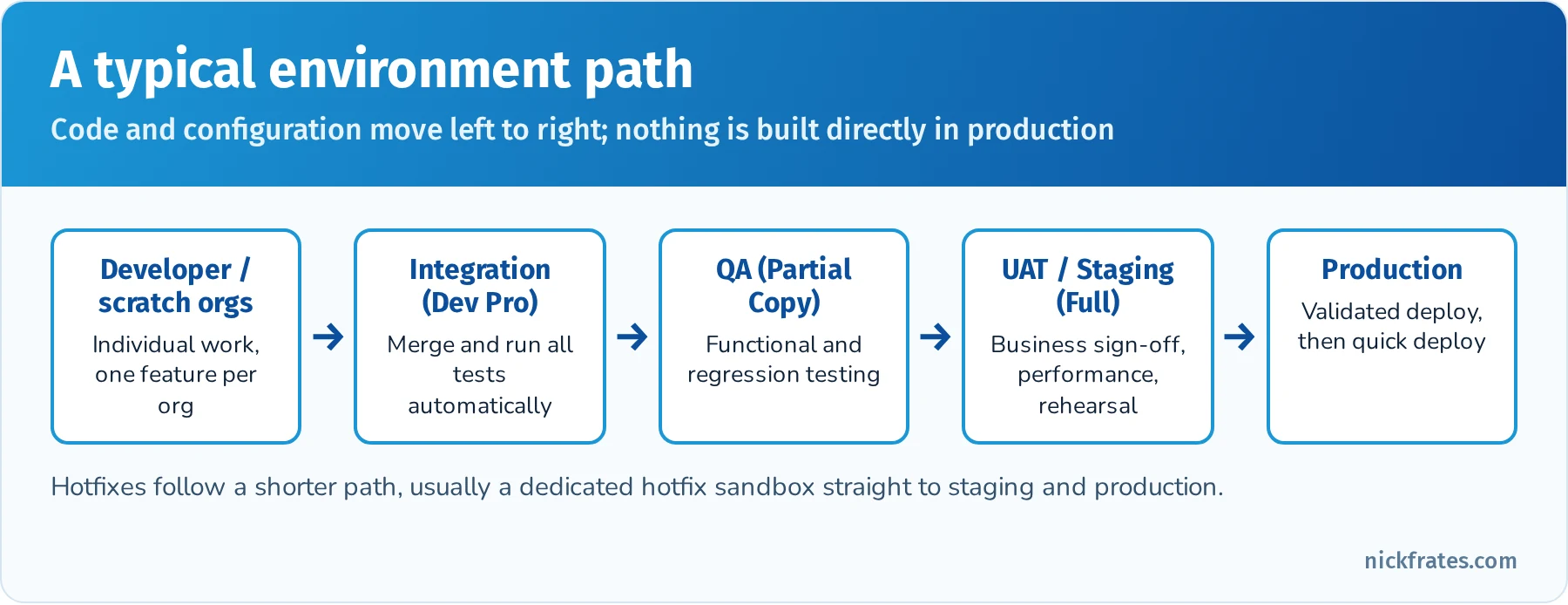
    Moving to deployment: Understand the typical environments and deployment process. Know the various sandbox types (Dev, Test/QA, UAT, Full) and that you develop in sandboxes or scratch orgs and deploy to production. Deployment options include Change Sets (point-and-click, between connected orgs), Metadata API (using tools like ANT or SFDX CLI to push source), and newer options like Unlocked Packages. The exam might ask, for example, “Which deployment tool would you use to deploy metadata to a related org without manual steps?” – answer: Change Set if within same environment, or metadata API (CLI/ANT) for more control. Also remember that Apex code deployment requires all tests to run and pass (with 75% coverage overall). You might get a question about test execution on deploy: by default, all local tests (and any relevant managed package tests) run on production deployment. If a test fails, the deployment is rolled back. For large orgs, you can run a subset of tests with certain tools, but you still need 75% coverage overall.

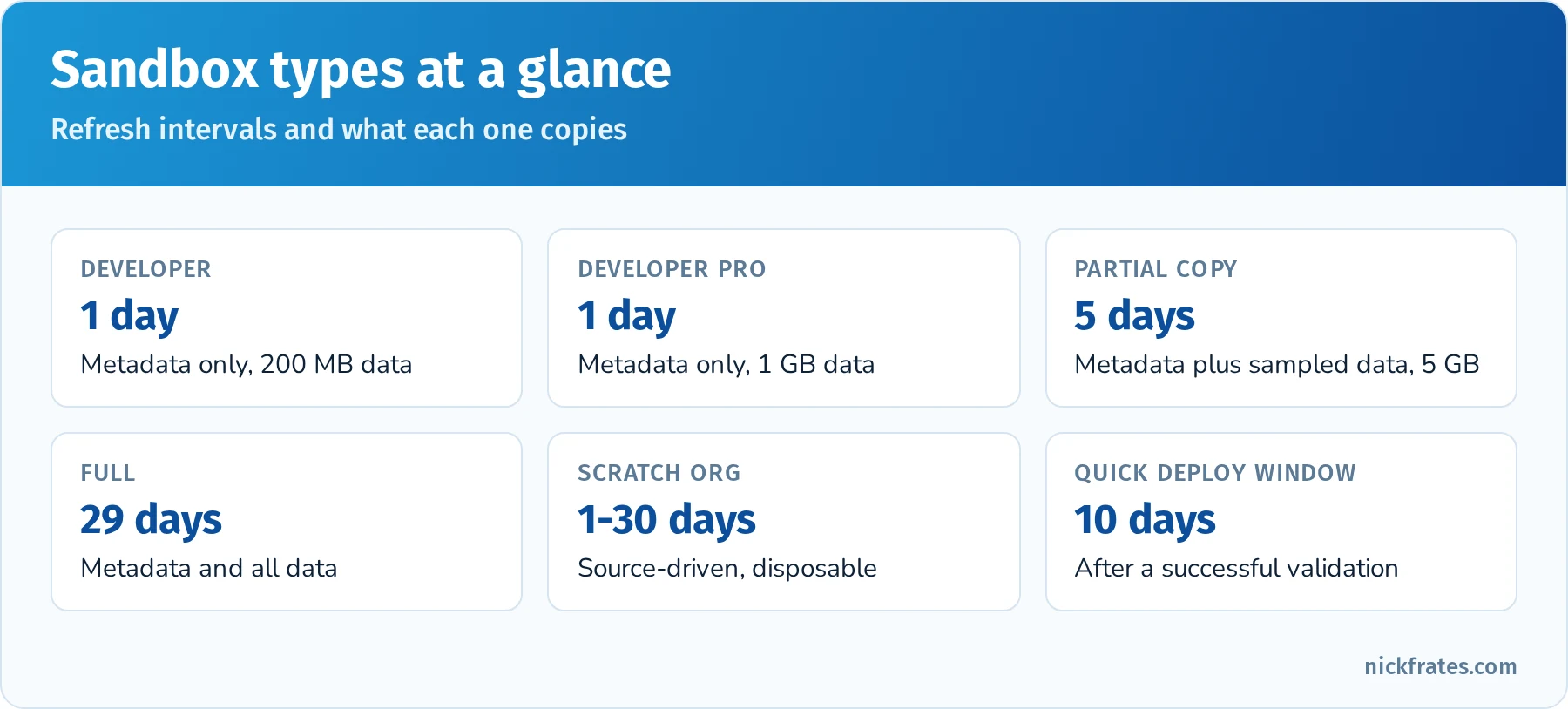
    Release management: be aware of the concept of Continuous Integration (CI) – not deeply tested, but a general knowledge that you can use source control and automated tests to ensure quality. More specific might be sandbox strategy: e.g., develop in a Dev sandbox, test in a QA sandbox, then UAT in a UAT sandbox, then deploy to Prod. Sandbox refresh intervals might come up: Developer sandboxes can refresh daily, Full copy every 29 days – maybe one question on environment choice: “Which sandbox should be used for performance testing with a copy of production data?” (Answer: Full sandbox, because it copies all data and has production-equivalent performance and a 29-day refresh cycle).

    Finally, change management: The outline mentions describing environments and processes for deploying code and config. This means know how things like profiles or picklist values might need to be moved along with code. Some things are metadata (can be deployed), some are data (need to be migrated separately). An exam question might be, “You have a new custom field and Apex code referring to it – how do you deploy to production?” The answer: via a Change Set or Metadata API deployment that includes the field and the Apex, and by running tests to meet coverage. Or “What’s a necessary step to take before deploying Apex?” (Run all tests and ensure 75% coverage).

    Hands-On Practice (Trailhead & Exercises):

    • Trailhead Module: Apex Testing – Write test classes for Apex code you wrote in earlier sections. If you created triggers or classes, now write tests for them. Use System.assert() to verify outcomes. This module will cover key points like test data isolation and best practices.
    • Trailhead Module: Debugging Apex – This will show you how to use debug logs and set debug log levels. A good exercise is to cause a known error (e.g., divide by zero in Apex) and then find it in the debug log. Practice reading a debug log from top to bottom; they can be verbose, but get a feel for locating “EXCEPTION_THROWN” or “FATAL_ERROR” lines.
    • Trailhead Module: Developer Console Basics – Make sure you can navigate the Developer Console: open logs, use the Query Editor, run tests from the UI. The certification might not directly test clicking in Developer Console, but experience here will help understanding.
    • CLI Exercise: Install the Salesforce CLI, authorize a Developer Edition org with sf org login web --alias dev, retrieve metadata with sf project retrieve start --metadata ApexClass, then validate a deployment without saving it using sf project deploy validate --source-dir force-app --test-level RunLocalTests --target-org dev. Seeing a check-only deployment and its test results makes the deployment questions much easier.
    • Trailhead Module: Change Set Development – If new to change sets, follow a trail or help article to create and deploy a change set between a sandbox and another org. This will underscore how profiles/permissions need to be added, etc.
    • Error Scenario Drills: Write a simple Apex class with an intentional bug (like something that queries too many records in a loop). Deploy it to a sandbox and run it with a test to generate a governor limit error, then practice reading the debug log or the error email (if any). This will make you comfortable diagnosing limit errors.
    • Trailhead Module: Cert Prep: Platform Developer: Testing, Debugging, and Deployment – There may be an official prep unit that recaps these topics. Use it to ensure you’ve covered everything, and answer the quizzes to test your knowledge.

    Key Concepts for Flashcards:

    • Test Coverage Requirement: 75% of Apex code must be covered by tests to deploy to production. Also: all tests must pass. Good to remember that test methods themselves don’t count toward the lines of code.
    • @isTest and @testSetup: @isTest class is used to indicate a test class. @testSetup annotated method runs once per class to create test data that each test method can use (improves efficiency and consistency of data setup).
    • System.runAs(): Used to run test code under the context of a different user (to test sharing rules or profile permissions). It doesn’t enforce field level security or permissions by itself, but it does simulate user record sharing. Note that runAs still won’t allow you to break org-wide limits (like user license limits on doing DML).
    • Test.startTest()/stopTest(): Used in test methods to reset governor limits count and execute async code. Everything between start and stop is considered a new context (so you can, for example, enqueue a future method and then at stopTest, that future will run).
    • Debug Log Levels: E.g., NONE, ERROR, WARN, INFO, DEBUG for Apex code logs. Knowing that you can configure what to capture (Apex, Database, Validation, Workflow, etc.) can be useful if an exam question asks “how to obtain more detailed logging for a specific area.”
    • Deployment Tools: Change Sets (point-and-click, only between connected orgs such as a sandbox and its production org), the Metadata API through the sf CLI or CI tools (scriptable, any org you can authenticate to, supports deletions with destructive changes), DevOps Center (Salesforce's source-control-backed release tool), and unlocked packages for modular, versioned delivery. Change Sets can't delete components and can't move data.
    • Profiles/Permission Sets in Deployments: If deploying components that require profile access (like a new field or VF page), ensure the profile settings are included or updated post-deployment. The exam might not dig in here deeply, but an awareness that deployment isn’t just code – you must consider security settings – is good.
    • Continuous Integration (CI): e.g. using tools like Jenkins, GitHub Actions with the CLI to automate tests on every commit. Not likely a direct exam topic, but conceptually useful if a question asks about ensuring code quality before deployment (answer: implement a process to run all tests in a staging environment or use scratch orgs with a CI pipeline).
    • Sandbox Types & Uses: Developer vs Developer Pro vs Partial vs Full – storage and refresh differences (Dev/Dev Pro daily, Partial 5 days, Full 29 days). Know that Full sandbox is needed for performance/load testing as it includes full data, whereas Developer sandbox is for unit testing and development (no data copied by default except setup and maybe template if applied).
    • Error Monitoring: Besides debug logs, know about Apex Trigger Emails (if a trigger throws an uncaught exception in production, SF can send an email to admins), and tools like Lightning Exception Logs for LWC errors (these are in the Browser console rather than server logs). Possibly out of scope, but worth knowing error handling mechanisms.

    Exam Focus Tips: While this section is smaller in percentage, it’s often where you can secure points with straightforward knowledge. Many questions in this domain are direct: e.g., “What must be done to deploy Apex to production?” or “How to identify the cause of a failing test?” If you study the clear-cut rules (75% coverage, seeAllData, etc.) and the purpose of each tool, you can answer confidently. Pay attention to any known Salesforce quirks: for instance, remember that deploying to production runs all tests by default (which might catch you off guard if some old test is failing – though that’s more a real-world tip). Also recall that tests do not count toward storage or leave data – a question might ask what happens after test execution (answer: data is rolled back, so it won’t persist). Time management in study: ensure you devote some time to writing test classes if you haven’t before – the act of writing a test will teach you more than reading about it. And since the exam might include one or two code snippet questions about tests, that practice will pay off. Deployment questions might be scenario-based, like choosing the right tool or sequence for deployment; think from a best-practice standpoint (e.g. deploy to a staging sandbox first, run all tests, then prod). Given the integrated nature of Salesforce, some questions here could also tie back to earlier topics (for example, a question about a piece of code failing only in production might relate to not having SeeAllData in tests or a profile missing permission after deployment). So having a holistic view helps. All in all, this section is about ensuring quality and moving changes reliably – if you prepare with that mindset, you’ll likely cover the necessary ground to pick up these points.

    Quick reference: sf CLI commands for PD1

    sf org login web --alias dev
    sf project retrieve start --metadata ApexClass --target-org dev
    sf project deploy start --source-dir force-app --target-org dev
    sf project deploy validate --source-dir force-app --test-level RunLocalTests --target-org prod
    sf project deploy quick --job-id <validated job id> --target-org prod
    sf apex run test --test-level RunLocalTests --code-coverage --result-format human --target-org dev

    sf project deploy validate runs a check-only deployment with tests. sf project deploy quick deploys a validated deployment without re-running tests, as long as you do it within 10 days of the validation and nothing changed in between. For a step-by-step CLI setup, see Stop Copy-Pasting Flow XML: Set Up Claude Code and the Salesforce CLI.

    Quick reference: sandbox types

    SandboxCopiesStorageRefresh intervalTypical use
    DeveloperMetadata only200 MB data, 200 MB files1 dayIndividual development and unit testing
    Developer ProMetadata only1 GB data, 1 GB files1 dayLarger dev and test data sets
    Partial CopyMetadata plus a sample of data (sandbox template)5 GB data5 daysQA and integration testing
    FullMetadata and all dataSame as production29 daysUAT, staging, performance testing, training

    Quick reference: test annotations and methods

    ItemWhat it does
    @isTestMarks a test class or method; test code doesn't count toward your code size limit
    @testSetupCreates common test data once per class
    Test.startTest() / Test.stopTest()Fresh set of governor limits; async work queued in between runs at stopTest()
    System.runAs(user)Runs code as another user to test record sharing (doesn't enforce FLS on its own)
    Test.setMock()Supplies a fake response for HTTP callouts (HttpCalloutMock)
    @isTest(SeeAllData=true)Lets a test see org data; avoid it except for rare cases
    Assert.areEqual() / System.assertEquals()Verifies behavior; tests without assertions prove nothing

    Practice questions: Testing, Debugging, and Deployment

    Question 1. What is required to deploy Apex to production?

    • A. 100% coverage on every class
    • B. At least 75% overall code coverage, every trigger with some coverage, and all tests passing
    • C. 75% coverage only on new classes
    • D. No tests if the deployment uses a change set

    Answer: B. Production deployments need at least 75% of Apex covered overall, at least some coverage for each trigger, and passing tests. Change Sets follow the same rules.

    Question 2. A test enqueues a Queueable job. How does the developer make sure the job runs before the assertions?

    • A. Call System.enqueueJob() twice
    • B. Wrap the enqueue between Test.startTest() and Test.stopTest(), then assert after stopTest()
    • C. Add @isTest(SeeAllData=true)
    • D. Use Thread.sleep()

    Answer: B. Async work queued between startTest and stopTest runs synchronously when stopTest is called.

    Question 3. How should a developer test a method that makes an HTTP callout?

    • A. Tests can call the real endpoint if Remote Site Settings are configured
    • B. Implement HttpCalloutMock and call Test.setMock() before invoking the method
    • C. Skip testing callout code; it doesn't count toward coverage
    • D. Use System.runAs()

    Answer: B. Tests can't make real callouts. A mock returns a predictable response so you can assert behavior.

    Question 4. A team wants to confirm a production deployment will succeed during the day and deploy it in the evening without waiting for tests again. What should they use?

    • A. Deploy twice
    • B. A validated (check-only) deployment followed by a quick deploy within 10 days
    • C. A Change Set with no tests
    • D. sf project retrieve start

    Answer: B. Validate with sf project deploy validate (or a validated Change Set), then quick deploy with sf project deploy quick within 10 days.

    Question 5. Which sandbox should be used for performance testing with production-sized data?

    • A. Developer
    • B. Developer Pro
    • C. Partial Copy
    • D. Full

    Answer: D. Only a Full sandbox copies all production data, which you need for realistic performance and load testing.

    Question 6. A test passes in a sandbox but fails in production because it expects a specific Account to exist. What is the best fix?

    • A. Add SeeAllData=true
    • B. Create the required test data inside the test (or in a @testSetup method)
    • C. Delete the test
    • D. Deploy the Account record with a Change Set

    Answer: B. Tests should create their own data so they run the same way in every org. SeeAllData=true makes tests fragile and org-dependent.

    Final preparation strategies

    In summary, success on the Platform Developer exam comes from a blend of conceptual understanding, memorization of key facts, and lots of hands-on practice. Here are some closing tips to optimize your study:

    • Focus on High-Weight Sections First: Process Automation and Logic (28%) and Developer Fundamentals (27%) together are more than half the exam, so be very comfortable with Apex basics, triggers, Flow vs. code decisions, data modeling and Agentforce for Developers. User Interface (25%) is close behind, so don't neglect Visualforce and LWC. Testing, Debugging, and Deployment (20%) is the smallest but very memorizable (coverage rules, test annotations, sandbox types). Allocate time roughly in proportion to these weights, then adjust for your weak spots.
    • Leverage Trailhead and Documentation: Salesforce provides official modules and the exam guide (objectives) – use them as a checklist. If you find a topic challenging (say, LWC events or Apex testing), search for specific Trailhead projects or official blog posts on that topic. The Salesforce Developer documentation is also excellent for deep-dives (e.g. the Apex Developer Guide’s chapter on Governor Limits, or Visualforce Developer Guide for VF components).
    • Practice in a Developer Org: Reading and memorizing can only take you so far – make sure to implement mini-examples for each key area in an actual org. Create triggers, run tests, build a Visualforce page, and spin up an LWC. This practical experience will make the exam scenarios much easier to parse because you’ve done it, not just read it.
    • Use Flashcards and Spaced Repetition: The lists of terms and limits in this guide are ideal for flashcards. For example, put “Max SOQL queries per transaction” on one side and “100 (sync), 200 (async)” on the back. Use a spaced repetition system (like Anki) to drill these facts daily. By exam day, you should instantly recall governor limit numbers, what features are declarative vs code, and the key definitions.
    • Join the Community and Discussion: If you get stuck on a concept, chances are someone on the Trailblazer Community or forums (StackExchange, Reddit’s r/salesforce) has asked about it. Sometimes hearing an explanation from a fellow learner or an MVP can make things click. Plus, community threads often highlight which topics recent exam-takers found tricky (e.g., several people emphasize not to ignore Visualforce and roll-up summaries). Just be careful to use community content as a supplement to official info (to avoid any outdated advice).
    • Take Practice Exams (but use them wisely): If you have access to practice exams (like those from Focus on Force or others), use them to gauge your readiness after you’ve studied. They can identify weak areas to revisit. However, don’t just memorize practice Q&As – ensure you understand the reasoning behind each answer. The real exam questions will differ, but the underlying concepts will be the same.
    • Time Management in the Exam: You’ll have roughly 105 minutes for 60 questions, which is plenty if you know your stuff. However, some scenario questions can be long. Practice reading questions carefully and identifying keywords (e.g. “given a scenario… use declarative vs programmatic” hints at the decision of Flow vs Apex). If a question stumps you, remember elimination techniques: rule out obviously wrong answers (e.g., if a limit is clearly exceeded, any answer suggesting that code works is wrong). Mark tough questions for review and move on – sometimes a later question can jog your memory for a previous one.

    By following this guide and approaching your preparation methodically, you will build both the knowledge and the confidence needed to master the Salesforce Platform Developer exam. Good luck on your certification journey – with diligent study and hands-on practice, you’ll be well on your way to achieving the Platform Developer I credential and advancing your Salesforce development expertise!

    Sources: This guide follows the official Salesforce Certified Platform Developer exam guide, the Platform Developer study trail on Trailhead, the Apex Developer Guide, and the Salesforce Developer Limits and Allocations Quick Reference. Limits and exam details change, so confirm numbers against the official sources before exam day.

    Quick-reference cheat sheet

    TopicRemember
    Passing score68% of 60 scored questions (about 41 correct)
    Heaviest sectionsProcess Automation and Logic 28%, Developer Fundamentals 27%
    BulkificationNo SOQL or DML inside loops; triggers get up to 200 records per chunk
    Sharingwith sharing, without sharing, inherited sharing; no keyword inherits the caller
    Object and field securityWITH USER_MODE, AccessLevel.USER_MODE, Security.stripInaccessible()
    Uncatchable exceptionLimitException
    Wired Apex@AuraEnabled(cacheable=true) static method
    Flow and agent actions@InvocableMethod and @InvocableVariable
    Coverage75% overall, every trigger covered, all tests pass
    Validate then deploysf project deploy validate, then sf project deploy quick within 10 days
    Legacy automationWorkflow Rules and Process Builder: end of support Dec 31, 2025

    Frequently asked questions

    Is Platform Developer I the same as "Salesforce Certified Platform Developer"? Yes. The official exam guide dropped the "I" from the name, but it's the same credential and still the prerequisite for Platform Developer II.

    How hard is PD1 compared to Administrator and App Builder? It's harder for people without coding experience, because about half the exam involves reading Apex, triggers, tests and component code. Admins with some coding practice usually need six to ten weeks of focused study.

    Do I need to know Visualforce in 2026? Yes. Lightning Web Components are the modern default, but Visualforce controllers, extensions and security still appear in the User Interface section.

    Will Workflow Rules or Process Builder appear on the exam? They can appear in older-style questions, but Salesforce ended support for both on December 31, 2025, so the correct answer for any new automation is Flow or Apex.

    What should I do the week before the exam? Take two or three timed practice exams, review every question you missed, drill governor limits and test annotations with flashcards, and rest the night before.

    Want to go deeper on automation? Flow shows up on almost every Salesforce exam, and it is the only supported declarative automation tool now that Workflow Rules and Process Builder are past end of support. My Salesforce Flows course walks through record-triggered, screen, scheduled and platform event flows with real-world challenges.

    Hope this helps!

    Best,

    Nick
  • Salesforce Development Lifecycle and Deployment Architect Study Guide (Updated for 2026)

    Salesforce Development Lifecycle and Deployment Architect Study Guide (Updated for 2026)

    This is a deep study guide for the Salesforce Certified Platform Development Lifecycle and Deployment Architect exam, one of the domain credentials on the path to Certified Technical Architect. It walks through all eight exam sections with explanations, scenario guidance, hands-on exercises, flashcard terms, quick-reference tables and practice questions with answers and explanations.

    Updated for 2026: corrected the passing score to 65%, removed a section that isn't in the exam outline, replaced sfdx force: commands with the current sf CLI, fixed how test levels treat managed package tests, updated DevOps Center (generally available since December 2022), and replaced Process Builder references now that Workflow Rules and Process Builder are past end of support (December 31, 2025).

    SectionWeightApprox. questions
    Application Lifecycle Management8%~5
    Planning13%~8
    System Design15%~9
    Building14%~8
    Deploying14%~8
    Testing13%~8
    Releasing13%~8
    Operating10%~6
    Exam factDetail
    Format60 scored multiple-choice/multiple-select questions, plus up to 5 unscored
    Time105 minutes
    Passing score65%
    Fee$400 USD, retake $200 USD, plus applicable taxes
    PrerequisitesNone required; Platform Developer I and real release management experience strongly recommended
    DeliveryOnsite or online proctored, registered through Trailhead Academy and delivered by Pearson VUE
    Official resourcesExam guide and credential page

    Bar chart of Development Lifecycle and Deployment Architect exam weights: ALM 8%, Planning 13%, System Design 15%, Building 14%, Deploying 14%, Testing 13%, Releasing 13%, Operating 10%

    Six of the eight sections are worth 13% to 15%.

    Contents

    1. What changed for 2026
    2. How to use this guide
    3. Application Lifecycle Management (8%)
    4. Planning: environments and governance (13%)
    5. System Design: architecture and deployment design (15%)
    6. Building: development and code quality (14%)
    7. Deploying: execution and Metadata API (14%)
    8. Testing: quality assurance and test planning (13%)
    9. Releasing: release strategy and packages (13%)
    10. Operating: post-release governance and maintenance (10%)
    11. Quick-reference cheat sheet
    12. Frequently asked questions
    13. Related study guides

    What changed for 2026

    • Passing score is 65%. Earlier versions of this guide said about 68%. With 60 scored questions, you need roughly 39 correct.
    • Only eight sections. There is no "Risk and Methodology Tools" section. Risk shows up inside Planning, Testing and Releasing instead.
    • **Use the sf CLI.** Salesforce replaced the old sfdx force:... commands with unified sf commands such as sf project deploy start, sf project deploy validate and sf project deploy quick.
    • DevOps Center is generally available (since December 2022) and is the Salesforce-native, point-and-click alternative to change sets, backed by GitHub source control.
    • Legacy automation is past end of support. Workflow Rules and Process Builder ended support on December 31, 2025. Deployment steps in this guide now talk about flows.
    • Registration moved to Trailhead Academy, with exams delivered by Pearson VUE since July 2025.

    How to use this guide

    The exam is almost entirely scenario-based. You'll read a few sentences about a company (team size, number of orgs, regulatory needs, release frequency) and choose the approach an architect would recommend. Memorizing definitions isn't enough; you need to know why one option beats another in context.

    1. Read one section at a time and do its hands-on exercise in a Developer Edition org, Trailhead Playground or scratch org.
    2. Turn the key terms into flashcards and review them on a spaced schedule.
    3. Answer the practice questions without looking at the answers, then read every explanation, including the ones you got right.
    4. In the final week, use the quick-reference tables and the cheat sheet near the end.

    Six-stage Salesforce application lifecycle: plan, build, test, deploy, release, operate

    The exam sections follow the application lifecycle from planning to operating.

    Application Lifecycle Management (8%)

    Overview: ALM encompasses the processes and methodologies used to plan, build, test, and release Salesforce applications. A core aspect is choosing the right development methodology (such as Agile vs. Waterfall) to manage project risk and meet customer requirements. Agile methodologies (e.g. Scrum) emphasize short, iterative development cycles with continuous feedback, which suits fast-changing or complex Salesforce projects. In contrast, Waterfall is a linear approach with defined phases (requirements → design → build → test → deploy) and works best when requirements are well-understood up front (often in regulated, low-change environments). In practice, many Salesforce implementations blend these approaches (“Water-Scrum-Fall”), using upfront planning but iterative builds. Be prepared to recommend a development approach based on a scenario’s risk profile: Agile for flexibility and rapid innovation, or Waterfall for strict compliance and predictability.

    A successful ALM also requires a release management strategy that coordinates how and when changes move to production. High-performing teams plan regular release windows (for example, biweekly sprints or monthly releases) and ensure robust communication across development, testing, and operations. Key questions include: How will multiple teams coordinate their deployments? How will end-users be trained on updates? An effective strategy might involve release checkpoints, a synchronized calendar, and clear ownership of deployment tasks. Salesforce’s recommended practice is to adopt smaller, frequent releases (continuous delivery) rather than rare “big bang” deployments, as smaller releases reduce risk and allow faster feedback. Equally important is aligning development teams and governance: establish guidelines so that everyone follows the same process. For example, teams should have visibility into each other’s work to avoid redundant or conflicting changes. Strong communication and an agreed-upon governance framework (covered in a later section) ensure that ALM processes run smoothly across the organization.

    Strategic Tip: Even though ALM carries a lower weight, it sets the foundation for all other topics. Focus on understanding the pros and cons of Agile vs. Waterfall in a Salesforce context and be ready to identify which fits a given scenario. Also, study how effective release management ties in with sandbox usage, version control, and team coordination – ALM concepts often appear in scenario-based questions that link to other domains.

    Practical Exercises (Trailhead & Hands-on):

    • Trailhead – Explore Project Management Methodologies: Complete modules like Explore Project Management Methodologies on Trailhead to solidify the differences between Waterfall and Agile in Salesforce projects.
    • Release Calendar Planning: In your Trailhead Playgrounds or dev org, simulate a release cycle. For example, create a change log and “release calendar” for a fictitious project with two-week sprints. Document the steps for code reviews, user acceptance testing (UAT), and deployment for each sprint.
    • Team Collaboration Simulation: If possible, use a tool like Salesforce DevOps Center or a source control repository (GitHub) with a partner. Practice making changes in parallel and merging them, to experience the importance of team alignment and communication in ALM.

    Key Terms and Concepts for Memorization:

    • Agile (Scrum) – Iterative development framework with sprints and frequent feedback loops
    • Waterfall – Sequential project methodology with defined phases and a single final delivery
    • Release Management – Strategy for scheduling and coordinating deployments (who, when, how changes reach prod)
    • Continuous Delivery – Practice of keeping code in a deployable state; frequent releases with manual approval
    • Continuous Deployment – Automated release to production upon passing tests (no manual gate)
    • Change Set Development vs. Package Development – Legacy org-based development (metadata lives in org) versus source-driven package-based development (metadata in VCS)
    • DevOps Center – Salesforce tool to manage ALM with source control and CI, replacing change sets in modern workflows
    • Governance – Oversight processes and roles ensuring ALM standards are followed (see Governance section for CoE details)

    Quick reference: methodologies

    MethodologyBest fitWatch out for
    WaterfallFixed scope, heavy regulation, contractual sign-offsLate feedback; changes are expensive
    Agile (Scrum)Evolving requirements, frequent stakeholder feedbackNeeds an engaged product owner and a groomed backlog
    KanbanSteady flow of small changes, support and admin teamsWork-in-progress limits must be respected
    HybridFixed milestones with iterative build inside themGovernance must be clear about which rules apply when

    Practice questions: Application Lifecycle Management

    Question 1. A company's requirements change every few weeks and business users want to see working features often. Which methodology should the architect recommend?

    • A. Waterfall with a single release at the end
    • B. Agile with short sprints and regular demos
    • C. No methodology, deploy directly to production
    • D. Waterfall with monthly change requests

    Answer: B. Agile delivers small increments and gets stakeholder feedback every sprint, which fits changing requirements. Waterfall pushes feedback to the end of the project.

    Question 2. A government agency needs documented requirements sign-off before any build starts and fixed contract milestones. Which approach fits best?

    • A. Pure Kanban
    • B. Waterfall or a hybrid with formal stage gates
    • C. Continuous deployment
    • D. No-code only development

    Answer: B. Regulated, contract-driven projects often need formal stage gates. A hybrid can keep those gates while building iteratively inside each phase.

    Question 3. Which statement best describes application lifecycle management on Salesforce?

    • A. A tool for deploying change sets
    • B. The process of planning, building, testing, deploying, releasing and operating changes in a controlled, repeatable way
    • C. A Salesforce license type
    • D. The Salesforce seasonal release schedule

    Answer: B. ALM is the end-to-end process. Tools such as change sets, DevOps Center and the CLI support it, but they aren't ALM by themselves.

    Question 4. A small admin team makes a few declarative changes each month and has no Git experience. They want source control without learning the command line. What should they consider?

    • A. Ant Migration Tool scripts
    • B. DevOps Center
    • C. Managed 1GP packages
    • D. Making changes directly in production

    Answer: B. DevOps Center gives a point-and-click UI backed by GitHub, work items and pipelines, so admins get source control and promotion without the CLI.

    Question 5. What is the main benefit of a defined release management process?

    • A. It removes the need for testing
    • B. It coordinates when and how changes reach production, with communication, testing and rollback plans
    • C. It guarantees there will be no bugs
    • D. It replaces sandboxes

    Answer: B. Release management reduces risk and surprises by coordinating timing, quality gates and communication. It doesn't replace testing or environments.

    Planning: environments and governance (13%)

    Overview: The Planning domain focuses on environment strategy, risk management, and governance before and during development. A fundamental decision is defining an org strategy: should the business use a single Salesforce org or multiple orgs? A single-org strategy centralizes all business units on one platform for consistency and easier global reporting, but can become complex and hit limits as the org grows. A multi-org strategy (multiple production orgs) offers autonomy to business units and can avoid scalability issues (e.g., splitting data or customizations by region or product line), but introduces challenges in integration and coordination. Given a customer’s landscape, evaluate criteria like differing processes, regulatory requirements, and org limitations to recommend the right approach. For example, a company with diverse processes and data residency rules might need multiple orgs, whereas one seeking a “360 view” of the customer might strive for a single org. It’s a balancing act to satisfy business needs while keeping the technology landscape manageable. Be ready to weigh pros and cons of multi-org vs. single-org in scenarios (e.g., mergers, regional divisions).

    Equally important is the sandbox environment strategy for development and testing. Salesforce provides sandbox types (Developer, Developer Pro, Partial Copy, Full) each suited for specific uses. When planning, map out which sandbox each phase of the release will use: for example, developers work in Developer sandboxes, integration testing happens in a shared Partial or Full sandbox, UAT in a Full sandbox, and a staging sandbox mimics production for final testing and training. A good plan might allocate multiple Developer sandboxes for parallel project streams, a Full sandbox for performance testing and staging, and perhaps a separate hotfix sandbox reserved for emergency bug fixes. You should be able to apply a sandbox strategy to a release plan, ensuring that concurrent work streams have isolated development orgs and that there is a clear path (e.g., Dev → QA → UAT → Prod). Understand the refresh limitations of each sandbox type and how to schedule them. For example, Developer sandboxes can refresh daily (useful for iterative development), while Full sandboxes refresh ~29 days (used sparingly for final validation with production data). A clever sandbox strategy maximizes parallel development while minimizing integration conflicts.

    Another Planning aspect is risk identification and mitigation for the customer’s environment. Environment risks include things like: collisions between multiple teams’ changes, data or metadata inconsistencies across orgs, hitting Salesforce limits, and the impact of Salesforce’s own platform releases. A key best practice is to use source control (a VCS like Git) as a single source of truth to reduce the risk of overwriting work – branching and merging strategies help multiple developers work simultaneously without stepping on each other. Also, maintaining data quality and representative test data in sandboxes mitigates the risk of bugs only showing up in production. For instance, if your sandboxes have poor or stale test data, you might miss issues; using Partial/Full sandboxes or seeding test data helps catch problems early. Another common risk is deploying large changes all at once – this can be mitigated by feature flagging or phased rollouts. The exam may give a scenario (e.g. tight timeline, multiple teams) and ask how to minimize risk: you might answer with strategies like frequent integration testing, code reviews, automated regression tests, and backup/rollback plans. Always articulate an appropriate mitigation (such as “enable changes in a sandbox preview and run full regression tests before a major Salesforce seasonal release” to mitigate new release risk).

    Governance framework is the final pillar in Planning. Governance ensures all these moving parts (multiple orgs, many sandboxes, many teams) stay aligned with business objectives and compliance. Often implemented via a Center of Excellence (CoE), governance provides structured oversight. A CoE is a cross-functional team (admins, architects, dev leads, business stakeholders) chartered to enforce standards, manage the backlog of changes, and approve designs. For example, a governance framework might require any proposed change to be reviewed by an Architecture Review Board or to follow a change management process with defined steps. In the exam, given a scenario, you should recommend a governance model – perhaps establishing a steering committee for a large enterprise, or adopting a tiered governance (executive sponsor, design authority, working group) for complex multi-project environments. Key elements to mention include executive buy-in, clear roles and responsibilities within the governance team, regular communication, and documentation of standards. Governance also covers release governance – e.g., deciding on a global release calendar if multiple orgs, ensuring security/compliance reviews are done, and having escalation paths for conflicts. A strong governance process helps avoid the “Wild West” of unmanaged changes and ensures long-term org health.

    Strategic Tip: Expect scenario questions that blend these topics – for instance, choosing an org and sandbox strategy for a company (test your reasoning on multi vs single org and environment planning), or recommending how to handle a Salesforce seasonal release. Use elimination: if a choice undermines governance or skips a testing environment, it’s likely incorrect. Emphasize answers that include planning for Salesforce seasonal releases (e.g. use sandbox preview, read release notes, run Apex tests during Salesforce’s pre-release window) to show risk mitigation.

    Practical Exercises:

    • Org Strategy Case Study: Create a two-column list for a hypothetical enterprise: in one column, list indicators for a single-org approach (e.g. centralized processes, need for global data sharing), and in the other, indicators for multi-org (e.g. distinct business units with unique processes, risk of hitting limits). For each indicator, write a one-sentence rationale. This helps internalize how to evaluate org strategy.
    • Sandbox Mapping Exercise: Draw a diagram of a deployment pipeline for a sample project. Label each environment (Dev Sandbox, Integration Sandbox, UAT, Staging, Prod) and write the purpose of each (unit testing, integration testing, user training, etc.). This visual mapping reinforces how sandboxes map to the release plan.
    • Governance Charter Draft: Write a short “Governance Charter” for a Salesforce CoE. Include roles (e.g. Exec Sponsor, Lead Architect, Release Manager), meeting cadence, and a few example policies (e.g. “All production changes must be demoed in UAT to business owners before go-live”). Use Salesforce’s CoE guides for inspiration. This exercise makes governance concrete and memorable.

    Key Terms and Concepts for Memorization:

    • Single Org vs. Multi-Org – Single org = one Salesforce instance for all teams; Multi-org = multiple prod orgs for different units. Know pros/cons: single org offers unified data but can become complex; multi-org offers autonomy and avoids org limits but adds integration overhead.
    • Sandbox Types – Developer, Developer Pro, Partial Copy, Full; differ in data copy and refresh interval.
    • Sandbox Strategy – Plan assigning sandbox environments to dev, QA, UAT, training, hotfix, etc., including parallel development streams and refresh scheduling.
    • Salesforce Release (Seasonal) – thrice-yearly Salesforce upgrades (Spring, Summer, Winter). Mitigation: use sandbox preview to test against the new release, read release notes, and plan change freeze if needed.
    • Source Control & Branching – Using Git or similar to manage metadata changes. Branching strategies (feature branches, dev branch, main branch) isolate work and reduce risk of conflicts.
    • Center of Excellence (CoE) – Governance body establishing Salesforce best practices, standards, and design oversight. Ensures people, process, and technology are aligned (often formalized as a governance framework).
    • Change Management – Formal process for evaluating and approving changes (could involve change advisory board, documented deployment steps, etc.).
    • Risk Mitigation – Actions like code review, automated testing, backup plans, and phased rollouts to minimize deployment risk. For example, use feature flags to turn off new features if issues arise.

    Environment path from developer or scratch orgs to integration, QA partial copy, UAT full sandbox and production

    A typical environment path. The exact number of stages depends on team size and risk.

    Sandbox types: Developer and Developer Pro refresh daily, Partial Copy every 5 days, Full every 29 days, scratch orgs last 1 to 30 days, quick deploy window 10 days

    Refresh intervals and capacity drive which sandbox fits each stage.

    Quick reference: single org or multi-org?

    FactorPoints toward a single orgPoints toward multiple orgs
    Business processesShared processes across business unitsVery different processes per unit
    Data sharingNeed a 360-degree view of customersLittle shared data, strict separation
    Regulation and data residencyOne regulatory regimeDifferent regions or legal entities with separate data requirements
    Org limitsComfortably within limitsRisk of hitting limits (custom objects, code size, API calls)
    Release independenceTeams can share a release calendarUnits need independent release cycles
    Cost and admin overheadLowerHigher (integration, duplicated config)

    Practice questions: Planning

    Question 1. A global company has three business units with similar sales processes that need a shared view of accounts. Which org strategy is most appropriate?

    • A. One org per business unit
    • B. A single org with a shared data model and business-unit-specific configuration
    • C. One org per country
    • D. A separate org for reporting only

    Answer: B. Shared processes and a need for a single customer view point to one org. Multi-org adds integration and governance overhead without a clear benefit here.

    Question 2. The QA team needs to test with a representative subset of production data refreshed weekly. Which sandbox fits?

    • A. Developer
    • B. Developer Pro
    • C. Partial Copy
    • D. Full

    Answer: C. Partial Copy sandboxes include sampled data defined by a sandbox template and can be refreshed every 5 days.

    Question 3. Which sandbox is appropriate for performance testing and final staging before production?

    • A. Developer
    • B. Partial Copy
    • C. Full
    • D. Scratch org

    Answer: C. Only a Full sandbox has all production data and matching storage, which you need for realistic performance tests and release rehearsals. Its refresh interval is 29 days, so plan refreshes around releases.

    Question 4. A Full sandbox contains customer personal data and is used by an offshore testing vendor. What should the architect recommend?

    • A. Nothing, sandboxes are always secure
    • B. Mask or anonymize sensitive data (for example with Data Mask) and restrict sandbox access
    • C. Use production for testing instead
    • D. Delete the Full sandbox

    Answer: B. Sandbox copies of personal data create compliance risk. Masking and access controls reduce exposure while keeping realistic data shapes.

    Question 5. Salesforce's next seasonal release is three weeks away. How should the team reduce risk to an important project release?

    • A. Ignore it, Salesforce releases never affect custom code
    • B. Keep a sandbox on the preview instance, run regression tests there and review release notes before scheduling the project release
    • C. Freeze all development for three months
    • D. Ask Salesforce to skip the upgrade

    Answer: B. Sandbox preview lets you test against the upcoming release before production is upgraded, so you can plan around any changes.

    Question 6. Who should own the decision on which changes go into a release and when?

    • A. Each developer on their own
    • B. A governance body such as a change advisory board or release manager, using agreed criteria
    • C. Salesforce support
    • D. Whoever finishes first

    Answer: B. Governance gives a clear owner and criteria for release decisions, which reduces conflicts between teams.

    System Design: architecture and deployment design (15%)

    Overview: This domain covers the architectural design of the development lifecycle, including tools and techniques to support an agile, scalable process. One focus is on leveraging Agile tools and practices to support development. Using dedicated agile project management tools (like Jira, Trello, or Salesforce’s Agile Accelerator) can greatly enhance team collaboration and transparency. Such tools allow teams to maintain a prioritized backlog of user stories, plan sprints, and track progress visibly. The advantage is better alignment and adaptability: short sprints let teams deliver value quickly and adjust to changing requirements, which aligns with DevOps principles of rapid, high-quality releases. In practice, an agile tool enforces discipline – every change is tied to a story, and the status is known to all – reducing chaos in large Salesforce projects. The exam may not quiz specific software, but you should recognize that “agile tools” improve communication, encourage continuous improvement, and help respond swiftly to new demands (versus managing projects via spreadsheets or email, which is error-prone).

    Next, org strategy considerations appear again here, but from a technical design angle. Given a customer’s requirements, you must evaluate business and technical factors to support the defined org strategy. This means once an org model (single vs multi) is chosen, design the dev processes accordingly. For instance, in a multi-org environment, you may need separate development pipelines for each org and a way to propagate shared components across orgs. A best practice for multi-org is modularizing common functionality into packages that can be deployed to all orgs, to avoid divergence. Recognize challenges like coordinating releases across multiple orgs – if not handled, orgs can get out of sync quickly, with different release windows and inconsistent features. An example scenario: a company has a central CRM org and a separate org for APAC region – how do you manage deployments? You might suggest using a version control system with branches per org or a managed package to roll out common updates. In a single-org scenario, focus on designing an efficient environment strategy within that org (multiple sandboxes, etc., which overlaps with earlier topics). The key is to connect requirements to org architecture: e.g., high complexity or regulatory segregation => multi-org; need for unified customer view => single-org.

    System Design also involves defining an environment strategy (sandbox strategy) in technical detail. This was discussed in Planning, but here think of designing the flow: how code moves from dev to staging. You may be asked, for example, how to set up environments for multiple concurrent projects. A good design might dedicate separate dev sandboxes per project stream, a common integration sandbox where all changes are merged and tested, and a staging sandbox that’s a Full copy for final regression and user testing. Also consider special environments like scratch orgs (ephemeral orgs from Salesforce DX) for development. Scratch orgs enable source-driven development and can be created and destroyed quickly, fitting well into CI pipelines. If the exam scenario mentions Salesforce DX or package-based development, recommending scratch orgs for each feature branch is a likely answer. Know that scratch orgs require a Dev Hub and are often used with unlocked packages.

    Another objective is to compare and recommend deployment tools and components for a successful deployment strategy. Salesforce offers multiple deployment approaches: Change Sets, Metadata API (Salesforce CLI, DevOps Center or CI tools), and packages (managed/unmanaged/unlocked). You should be comfortable contrasting these:

    • Change Sets: Easiest, point-and-click in the Salesforce UI, but they only work between orgs connected to the same production org (for example sandbox to production, with a deployment connection set up), and selecting components one by one gets tedious for large releases. Great for small admin-driven updates, but not scalable for big projects or multi-org setups. Change sets can't delete components and don't support every metadata type.
    • Metadata API (through the Salesforce CLI, CI tools or the legacy Ant Migration Tool): Scriptable deployments from the command line or a pipeline. More efficient for large deployments (you can deploy hundreds of components from a manifest or a source directory at once, rather than selecting each one as in change sets). Supports destructive changes (deletions) and can deploy to any org you can authenticate to. Requires more technical skill and version control, but enables CI/CD and repeatability.
    • Managed Packages: Typically used by ISVs for AppExchange apps (with a namespace, IP protection, upgrade capability). Managed packages are versioned and upgradable in subscriber orgs, but components are locked – customers cannot modify packaged components easily. These are less common for internal deployments unless the business has multiple orgs and decides to “package” its common components.
    • Unlocked Packages: Introduced for enterprise development (second-generation packaging). They allow packaging of metadata into modular, versioned units with the flexibility that admins can still tweak them in the org (unlike managed). Unlocked packages require source-driven development (using Salesforce DX and CLI) and are great for organizing a large org’s metadata into logical components (e.g., Sales app vs. Service app in separate packages). They support dependencies and allow continuous integration builds, making them ideal for internal DevOps.
    • Unmanaged Packages: Simple containers for distributing metadata (e.g., one-time drop of code); not upgradable, essentially just a snapshot. Useful for temporary or sample deployments but not for long-term versioning.

    When recommending a deployment strategy, consider the scenario’s needs: If the customer has a mature DevOps setup, using source control + CI with Metadata API or unlocked packages is best for automation and rollback. If the customer is a small team with minimal DevOps, Change Sets might suffice for simplicity. The exam may give you a deployment scenario – e.g., “200 custom fields to deploy across multiple orgs” – and the correct recommendation would be to use a scripted Metadata API deployment with the Salesforce CLI instead of a change set, due to scale. Or if asked how to deploy consistently to 5 orgs, an unmanaged package or unlocked package could be an answer (since change sets cannot deploy to unrelated orgs).

    Strategic Tip: System Design is the heaviest-weighted section, so expect in-depth scenario questions. Be comfortable explaining why a particular tool or approach fits a scenario. A common pitfall is to rely on change sets for everything – show awareness of better tools for large or multi-org deployments. Also, mention modern best practices (Salesforce DX, scratch orgs, CI) when appropriate, as the exam values up-to-date knowledge. Think like an architect: the goal is repeatable, reliable, and scalable deployments.

    Practical Exercises:

    • Tool Comparison Table: Make a quick reference table listing Change Sets, DevOps Center, Metadata API with the CLI, Unlocked Packages, and Managed Packages. For each, note key features, use cases, and limitations (e.g., “Change Set – easy UI, no external tools; cons: only related orgs, no deletions”). This solidifies your understanding of when to use each.
    • Build an Unlocked Package: If you have Dev Hub access (you can enable it in a Trailhead Playground), try creating an unlocked package containing a few custom fields or a custom object. Follow a Trailhead module like Unlocked Packages for Customers. This hands-on experience will help you remember package concepts (namespaces, versions, flexibility).
    • CI/CD Simulation: Use a free GitHub Actions workflow or even a simple script to simulate continuous integration. For example, use the Salesforce CLI (sf project deploy start --source-dir force-app --target-org qa) to deploy a component from your project to a sandbox and run tests. Observe how you can automate repetitive steps and get fast feedback on every commit.

    Key Terms and Concepts for Memorization:

    • Agile Project Tools – e.g. Jira, Azure Boards. They support sprint planning, story tracking, and team collaboration; their use leads to higher transparency and faster adaptation.
    • Scratch Org – Temporary org created via Salesforce DX, used for development and testing of specific features. Emphasize that scratch orgs enable source-driven workflows and parallel dev.
    • Change Set – Salesforce native deployment container. Limitations: Only between connected orgs, manual component selection, no version control, cannot move all metadata types or do deletions.
    • Metadata API – API for retrieving and deploying metadata as XML. Used by the Salesforce CLI, DevOps Center, third-party DevOps tools and the legacy Ant Migration Tool. Key points: scriptable, supports CI, handles large deployments and deletions (via destructive changes manifests).
    • Managed Package – Package with a namespace (first or second generation), primarily for ISV distribution. Components are locked (no edit in subscriber org), upgradable with version numbers. Often requires Security Review for AppExchange.
    • Unlocked Package – 2nd-gen package for enterprise. Upgradable and supports versioning, but components are not locked (admins can modify in org). Requires source control and CLI. Great for internal modular development.
    • Org-Based vs. Package-Based Development – Org-based (a.k.a. change-set development) means the source of truth is the org’s metadata; package-based means source of truth is version control and you deploy via packages. The latter is more modern and enables true DevOps.
    • Branching Strategy – e.g. Git flow, feature branching, etc. In context, know that branching allows multiple streams of work. Example terms: feature branch, develop branch, master/main, release branch. Ensure you link branching approach to the need (frequent integration to avoid big bang merges).
    • Deployment Artifacts – Reusable build outputs like package .zip files or versioned packages. In an ideal strategy, every release is a versioned artifact that can be rolled back if necessary.
    • “Deployment Fish” – The fish-shaped animated progress icon you see on the Deployment Status page while a change set validation or deployment is in progress. Admins nicknamed it the deployment fish because you watch it "swim" while tests run. It isn't an exam objective, but the page it sits on matters: Deployment Status shows components deployed, Apex tests run, failures and errors, and it's where you'd quick deploy a validated change set.

    Comparison of unmanaged, unlocked, managed second-generation and managed first-generation packages

    Package type depends on who installs it and whether it must be upgraded.

    Quick reference: deployment tools

    ToolStrengthsLimitationsTypical scenario
    Change setsNative UI, no extra toolsConnected orgs only, no deletions, manual selection, no version controlSmall admin changes from sandbox to production
    DevOps CenterPoint-and-click, GitHub-backed, work items and pipelinesFewer options than full CI toolsAdmin-heavy teams adopting source control
    Salesforce CLI (sf) with Metadata APIScriptable, deletions, any org, works in CIRequires technical skillDeveloper teams with Git and pipelines
    Unlocked packagesVersioned, modular, dependencies, upgradableNeeds source-driven development and Dev HubLarge enterprises modularizing metadata
    Managed packagesNamespace, IP protection, upgrades, licensingComponents locked in subscriber orgsISVs and AppExchange apps
    Unmanaged packagesEasy one-time distributionNot upgradableSamples, templates, one-time copies

    Practice questions: System Design

    Question 1. A company must deploy the same set of 200 custom fields and Apex classes to five production orgs that aren't connected. What should the architect recommend?

    • A. Change sets from one org to each of the others
    • B. A source-controlled deployment with the Salesforce CLI or unlocked packages
    • C. Manual configuration in each org
    • D. Data Loader

    Answer: B. Change sets only work between connected orgs. A scripted Metadata API deployment or a versioned unlocked package deploys the same artifact consistently to every org.

    Question 2. An ISV wants to sell an app on AppExchange, protect its Apex code and push upgrades to customers. Which package type fits?

    • A. Unmanaged
    • B. Unlocked
    • C. Managed (preferably second-generation)
    • D. Change set

    Answer: C. Managed packages provide a namespace, IP protection, licensing and upgrades. Salesforce recommends 2GP for new managed packages.

    Question 3. An enterprise wants to split its huge org metadata into modules owned by different teams, with versions and dependencies, while still allowing admins to make emergency tweaks. Which option fits best?

    • A. Managed 1GP packages
    • B. Unlocked packages
    • C. Unmanaged packages
    • D. One giant change set

    Answer: B. Unlocked packages are versioned and modular, support dependencies, and stay editable in the org.

    Question 4. A team wants admins to promote changes through environments with a UI, but also wants every change tracked in Git. Which tool fits?

    • A. Change sets
    • B. DevOps Center
    • C. Workbench
    • D. Data Loader

    Answer: B. DevOps Center combines a UI for work items and pipeline stages with GitHub source control.

    Question 5. Which statement about the source of truth is correct?

    • A. In org-based development, version control is the source of truth
    • B. In package-based (source-driven) development, version control is the source of truth
    • C. Production is always the source of truth in every model
    • D. Sandboxes are the source of truth in package development

    Answer: B. Source-driven development treats the repository as the source of truth and builds orgs and packages from it. Org-based development treats an org's metadata as the truth.

    Building: development and code quality (14%)

    Overview: The Building domain zooms into day-to-day development practices: version control, testing practices, and ensuring code quality. A critical concept is source control management and the use of a proper branching/versioning strategy during development. Modern Salesforce teams treat the version control repository as the “source of truth” for all metadata, moving away from making uncontrolled changes directly in orgs. This allows multiple developers to work concurrently and integrate their code changes continuously. You should understand branching models like feature branching (each work item in its own branch), development/integration branch (for merging features and testing), and main/master branch (production-ready code). For example, a feature branch -> pull request -> merge to integration -> test -> merge to main workflow is common. The exam may ask how branching and merging can be used to support parallel development or hotfixes. In a scenario, you might recommend using branches (and maybe forking strategies) to isolate a hotfix from ongoing development, then merge the hotfix back into the main line once done. The key is to articulate that source control enables trackable, auditable changes and helps avoid the “it works in my org” problem – if something is in the repo and properly merged with others’ work, you reduce surprises. In fact, an org-based dev approach (no VCS) is likened to copying files between random machines and hoping nothing breaks. A source-driven approach yields reliable, consistent deployment artifacts and is considered best practice.

    In the development phase, ensuring code quality is paramount. The exam expects knowledge of methods to deliver quality code: coding standards (naming conventions, avoiding anti-patterns), code reviews (peer reviews or pull request reviews to catch issues), and static code analysis tools. Salesforce developers often use tools like PMD or SonarQube to automatically scan Apex/code for bugs, security issues, or style violations. For example, a static analysis might warn about SOQL inside loops or unused variables. Pull requests combined with automated checks enforce these standards before code is merged. Also remember that Salesforce has built-in guardrails like requiring 75% test coverage for Apex deployments (discussed below), which indirectly forces some level of code testing quality. If a question asks “how to ensure quality in the delivery of code,” an ideal answer touches on code review practices, use of static analysis, enforcing design patterns, and proper testing (unit tests, integration tests). For instance, implementing a rule that every Git pull request must be reviewed by a Tech Lead and pass PMD checks would be a strong answer.

    The testing approach and test data strategy also fall under Building. Good developers create robust Apex unit tests to validate their code and to meet deployment requirements. Remember Salesforce’s rule: at least 75% of Apex code must be covered by tests and all tests must pass to deploy to production. But beyond just coverage, the exam is interested in your understanding of test methodology: you should write tests for positive cases (expected behavior), negative cases (handling bad data or errors), permission-based cases (users with different profiles), and large data volume scenarios. This ensures code works under all conditions. A unified test data strategy means using consistent, representative data sets across different test levels (unit, integration, UAT) without exposing sensitive info. For example, use a sandbox seeding or data masking tool to create realistic test data in UAT that mirrors production (so that tests in UAT truly reflect prod behavior). In Apex unit tests, best practices include not relying on existing org data (create your own test records), using Test.startTest()/Test.stopTest() properly, and testing bulk operations. A likely exam point: Given a scenario of a testing requirement, recommend how to design test classes or test data. You might answer: “Use a test data factory to create required Accounts/Contacts so each test runs with known data, ensuring independence from org data and covering relevant use cases.” Also, if a scenario involves, say, a new Salesforce release coming, you would recommend a full regression test in a preview sandbox to catch any issues (as part of testing methodology over the lifecycle).

    Finally, development models tie into Building: Org-based vs. Package-based development. Org-based (also called change-set development) we described earlier – you build directly in a sandbox and treat that org as source of truth. Package-based (enabled by unlocked packages and scratch orgs) means you build in modular packages with everything tracked in Git. The exam could ask about the appropriate development environment: for example, “Given a customer scenario with an experienced team and need for CI, should they use scratch orgs or developer sandboxes?” The answer would lean towards scratch orgs and unlocked packages for an advanced, source-driven team. In contrast, a less mature team might stick to developer sandboxes and an org-based approach initially. Also, consider developer sandboxes vs. scratch orgs – scratch orgs are great for fully automated workflows and ephemeral testing, but Developer sandboxes persist longer and contain more org configuration (useful for config work by admins). Showing you know the difference will earn points.

    Strategic Tip: When answering questions in this domain, use technical keywords: mention things like “Git,” “pull request,” “code coverage,” “system assert,” “data masking,” etc. This signals familiarity with real-world dev practices. Many options may sound plausible; choose the one aligned with Salesforce best practices (e.g., never propose editing code directly in production, always prefer using a VCS and sandbox). Also remember, this domain overlaps with Testing (next section) – ensure you don’t confuse where to talk about unit vs. UAT. In Building, focus on the developer’s perspective: writing good code and tests, using the right tools to manage code.

    Practical Exercises:

    • Git Practice: If you haven’t already, set up a simple Git repository for a Salesforce project (you can use Salesforce CLI to retrieve some metadata from a dev org into source format). Practice creating a feature branch, making a small change (like editing a validation rule in the metadata files), and merging it back. This hands-on will help you remember branching/merging mechanics.
    • Code Review Simulation: Find an example of a poorly written Apex class (you can intentionally write one with common mistakes, like SOQL inside a loop). Perform a “code review” by listing out issues and suggesting improvements (e.g., bulkify the trigger, add null checks, etc.). This mirrors how you would ensure quality code delivery.
    • Write Apex Tests: In a Developer Sandbox or Trailhead Playground, write a simple Apex class (for example, a class that converts temperatures or calculates discounts) and then write a test class for it. Include at least one positive test, one negative test (e.g., expect an exception), and one bulk test (calling the method on 200 records). Aim for >90% coverage. Running these tests will reinforce concepts like System.assertEquals and test data setup. Compare your code against Salesforce’s best practices (Trailhead module Apex Testing can guide you).

    Key Terms and Concepts for Memorization:

    • Version Control (Git) – System to track changes in code. Enables collaboration and rollback. Key branch types: feature branch, develop/integration branch, master (main) branch. Understand merge vs. rebase at a basic level (not deeply tested, but concept of merging code is).
    • Branching Strategy – e.g., Git Flow, which uses feature branches, a develop branch for integration, and release/hotfix branches. Know that branching strategy should match team size and release cadence (e.g., small team might use a simple trunk-based strategy vs. large team using Git Flow).
    • Pull Request – A mechanism in Git for a developer to notify others about changes they want to merge. This is where code reviews happen. Often integrated with CI (running tests on PR).
    • Static Code Analysis – Tools that analyze code for potential errors or style violations without executing it. In Salesforce context: PMD, CodeScan, Clayton. Example rule: Avoid DML inside loops.
    • 75% Code Coverage – Deployment rule: at least 75% of Apex lines covered by tests, all tests passing. Each trigger must have some coverage. Aim higher (90%+) in practice, but 75% is the minimum.
    • Test Data Factory – A class or pattern to create test records consistently. Ensures each test method has the data it needs and reduces duplicate code in tests.
    • Positive vs. Negative Tests – Positive test = verifies code works with expected inputs; Negative test = ensures code handles errors (e.g., pass invalid data or user without permission and assert it fails gracefully).
    • Bulk Testing – Testing code with large volumes (100+ records) to ensure it’s bulkified (especially triggers and batch classes).
    • Integration Testing – Testing how different modules or systems work together (e.g., test a whole process across objects, or an external integration’s end-to-end behavior). Usually done in an org with more data.
    • Data Masking – Replacing sensitive data (like emails, names) with fake but realistic data in sandboxes, so that testing is done on safe data. Relevant to a “unified test data strategy” – often achieved with tools or Salesforce Data Mask.
    • Org-Based vs. Scratch Org Development – Org-based uses long-lived sandboxes where config and code are manually built, then retrieved; Scratch org (source-driven) development uses ephemeral orgs and the metadata is pulled from VCS. Recognize that scratch orgs + unlocked packages yield a more agile, modular approach.

    Git branching model: feature branches, pull request review, develop branch, release branch, tagged main branch and hotfix branches

    One common branching model. The exam cares more about why you branch than about one exact model.

    Quick reference: code quality controls

    ControlWhat it catchesWhen it runs
    Peer code review (pull requests)Logic errors, design issues, missed requirementsBefore merge
    Static code analysis (Salesforce Code Analyzer, PMD)SOQL or DML in loops, hardcoded Ids, security issuesOn commit or pull request
    Apex unit tests with assertionsRegressions in business logicEvery validation and deployment
    Coding standards and naming conventionsInconsistent, hard-to-maintain codeOngoing, enforced in review
    Definition of doneIncomplete stories (no tests, no docs)Before a story is accepted

    Practice questions: Building

    Question 1. Two developers keep overwriting each other's changes in a shared developer sandbox. What is the best long-term fix?

    • A. Ask them to work on different days
    • B. Give each developer their own environment (scratch org or developer sandbox) and use source control with feature branches
    • C. Use a Full sandbox for development
    • D. Develop directly in production

    Answer: B. Isolated environments plus version control let developers work in parallel and merge changes deliberately.

    Question 2. Which tool helps automatically find SOQL queries inside loops and other anti-patterns before code is merged?

    • A. Data Loader
    • B. Static code analysis such as Salesforce Code Analyzer or PMD
    • C. Setup Audit Trail
    • D. Change sets

    Answer: B. Static analysis scans code without running it and flags rule violations. It can run in CI on every pull request.

    Question 3. What is the main purpose of a scratch org?

    • A. Long-term storage of production data
    • B. A disposable, source-driven org for building and testing a feature, created from a definition file
    • C. A replacement for production
    • D. A sandbox that copies all data

    Answer: B. Scratch orgs are short-lived (up to 30 days) and created from your project's configuration, which makes development repeatable.

    Question 4. A team merges large changes only once per quarter and spends days resolving conflicts. What should the architect recommend?

    • A. Merge even less often
    • B. Integrate frequently through small feature branches merged into a shared branch with automated validation
    • C. Stop using version control
    • D. Assign one developer to make all changes

    Answer: B. Frequent integration keeps conflicts small and surfaces problems early. Automated validation catches broken builds quickly.

    Question 5. Which item belongs in a definition of done for a user story that includes Apex?

    • A. Code exists only in the developer's sandbox
    • B. Code is committed, reviewed, passes static analysis and has meaningful unit tests with assertions
    • C. 100% coverage with no assertions
    • D. The story was demoed once

    Answer: B. A definition of done should guarantee quality and deployability, not just existence of code. Coverage without assertions proves little.

    Deploying: execution and Metadata API (14%)

    Overview: This domain focuses on the technical deployment process, including Salesforce deployment APIs, pre- and post-deployment steps, and handling of configuration data. A key objective is understanding the Metadata API’s capabilities and limitations (and by extension, the Tooling API) for deployments. The Metadata API is Salesforce’s primary mechanism for moving metadata (custom objects, fields, code, etc.) between orgs. It’s robust for migrating full components, but it has some limitations: not all settings are metadata (for example, some org preferences or standard picklist values might not deploy easily), and deployments via Metadata API must run all required tests in the target org (for production deployments). It is asynchronous and can deploy many components at once, with the result being either success or a list of errors if any component fails. The Tooling API, in contrast, is designed for finer-grained operations and for building developer tools (like IDEs). It can retrieve or manipulate individual components (e.g., run a single Apex test, get symbol table of a class) and is used under the hood by Developer Console and IDEs. However, the Tooling API is not typically used to deploy metadata to production – it’s more for editing or debugging during development. For example, you cannot deploy a full metadata package to prod purely with Tooling API calls; you’d use Metadata API for that. The exam may ask to describe when to use one vs the other: you could say “Use Metadata API for migrating configurations or doing CI deployments (supported by tools like the Salesforce CLI and DevOps Center) because it’s tailored to moving whole components. Use Tooling API for specialized tasks like retrieving code coverage, running tests, or building a custom tool that needs Salesforce code intelligence.” Summarily: Metadata API = deployments and migrations; Tooling API = development assistance (IDE features, live debugging). Recognize also that Tooling has some unique objects (like ApexExecutionOverlayAction for debug) and that not every metadata type is exposed in Tooling. If asked about constraints, mention that some metadata (especially newer features) might initially only be available in Tooling API or not at all via metadata until later – but for the exam, focus on the general roles.

    Another aspect is handling pre-deployment and post-deployment steps, especially for items not supported by the APIs. Pre-deployment steps could include manual tasks like “freeze” activities: for example, temporarily pausing scheduled jobs, scheduled flows or integrations that might interfere with the deployment, or exporting reference data. Post-deployment steps are often needed because certain components don’t deploy in an “active” state. Common examples:

    • Flows can deploy as active or inactive depending on settings, so confirm the right flow versions are active after the deploy (and remember that legacy Process Builder processes and Workflow Rules should be migrated to Flow, since both are past end of support). Similarly, if you deploy a new Assignment Rule or Escalation Rule, you might have to set it as active in the org after deployment.
    • If Profiles or Permission Sets are deployed, you might need a post-step to assign them to users (user assignments are not metadata deployable).
    • Compile Apex: In older times, you might run an Apex compilation job (though Salesforce does this automatically on deploy now). However, things like recompiling cross-object formulas might be needed if certain dependencies changed.
    • Deploying Reference Data: This refers to data that drives app logic but isn’t user transactional data – for example, custom metadata types (which are deployable as metadata), or custom settings data, or CPQ product records. If some “configuration data” isn’t captured in metadata, you need a strategy to migrate it. One approach is using a data loading script or a tool like Data Loader or Excel connector as part of the release process. For instance, if you have a Custom Setting that the app logic depends on, you might export those records from UAT and import into production after deployment.
    • Items explicitly not in Metadata API: historically things like Knowledge base articles, Sales Cloud Einstein configurations, or Analytics assets might require manual setup or separate APIs. While the exam won’t dive into each product’s nuance, you should answer generally: use a combination of automation and manual steps to handle components not covered by metadata deployment.

    Expect a scenario like: “You are deploying a large update, which includes a new flow, changes to picklist values, and some data that new functionality needs. What steps would you take pre and post deployment?” A good answer: Before deployment, communicate a freeze to end-users, disable background jobs if necessary, and take a backup of key data. Deploy via Metadata API. After deployment, activate the new flow, verify picklist values in the target org (as picklist value deployments can be tricky), and load any required reference data (perhaps via a CSV import for records needed by the new functionality). Finally, run a post-deployment regression test or smoke test. Use of a continuous integration tool can automate many of these steps except the ones that require manual intervention (like activating a flow, which could also be automated via a metadata deploy of an active version or a Tooling API call). Tools like Gearset or Copado often allow you to specify post-deploy tasks; as an architect, you design the process for these tasks.

    A special mention: deploying and managing reference data (technical configuration data) can also be approached with Salesforce features like Custom Metadata Types. Unlike List Custom Settings data, Custom Metadata records are deployable as part of metadata (and they don’t count against data limits) – so an architect might recommend using Custom Metadata Types to store configurable data whenever possible, to ease deployments (since they can be included in a deployment package and even versioned in unlocked packages). If asked how to manage reference data consistently, an answer might include: “Use Custom Metadata Types for any configuration records so they can be migrated with Metadata API. For other data, consider an automated data load in the pipeline or use a tool that supports data deployment along with metadata.”

    Strategic Tip: Be ready to name specific examples of pre/post steps – this shows you have practical knowledge. For instance, explicitly mentioning “activate newly deployed flows and assign new permission sets to appropriate users as a post-deployment step” adds credibility. If the question is general, structure your answer as Plan – Deploy – Validate: Plan (pre-step, communications), Deploy (via appropriate API/tool), Validate (post-step testing, activations, data loads, and contingency if something fails). Also, emphasize automation where possible: e.g., “Use a CI tool to run a validated deployment (check only) in a staging org to catch errors before production”.

    Practical Exercises:

    • Metadata vs. Tooling Quiz: Write down a list of actions (e.g., “Deploy a new custom object”, “Get code coverage for a class”, “Create a Lightning Web Component”) and self-quiz whether each uses Metadata API, Tooling API, or both. For example: deploying a custom object = Metadata API; retrieving Apex class symbol table = Tooling API. Check your reasoning against Salesforce documentation or developer blogs.
    • Deploy in a Sandbox: Take a component you built (like from the earlier exercises) and deploy it to another sandbox using the Salesforce CLI: sf project deploy start --source-dir force-app --target-org qa. Practice including a Custom Metadata record in the deployment, then try a check-only run with sf project deploy validate and note the job Id for a quick deploy.
    • Post-Deployment Checklist: Create a generic checklist of post-deployment tasks for a Salesforce release. For example: “1. Run all tests in Production to verify no failures. 2. Activate deployed Flows/Processes. 3. Ensure new Communities or features are published/enabled. 4. Load XYZ data via Data Loader. 5. Re-enable scheduled jobs.” This exercise will help you recall common tasks quickly on the exam.

    Key Terms and Concepts for Memorization:

    • Metadata API – SOAP-based API (with REST deploy support) for deployments. Key facts: moves metadata in bulk as a .zip of XML files (change sets use it behind the scenes); used by the Salesforce CLI, DevOps Center and CI tools; requires tests for production deploys that include Apex; supports retrieve, deploy and destructive changes.
    • Tooling API – API for Salesforce dev tooling. Used for: working with smaller pieces (ApexClass, ApexTrigger objects), getting debug logs, running tests synchronously, retrieving Org schema info. Not typically used for full org deployments.
    • Deploy Strategies: Validated Deploy – deploying with test run but not committing (to preview failures); Quick Deploy – Salesforce feature to commit a validated deployment within 10 days without re-running all tests. These might not be directly in the exam, but awareness can help eliminate wrong answers.
    • Pre-Deployment Tasks – Examples: notify users of downtime, freeze changes in source org, disable scheduled jobs or integrations, take backups of data/metadata (e.g., retrieve a metadata backup or export data). Also, if using source control, merge to main and tag the release before deploying.
    • Post-Deployment Tasks – Examples: activate processes/flows, publish Community if applicable, adjust any settings that didn’t migrate (e.g., if Multi-Factor Auth got auto-enabled, etc.), load reference data, run smoke tests, get user acceptance sign-off.
    • Components Not in Metadata API – Know a few examples: User records (and assignments), data records, CRM content, Chatter data, Entitlement templates, etc., often require manual or data deployment steps.
    • Reference Data – Data that configures app logic (e.g., a list of values that drive behavior). Approaches: use Custom Metadata Types (deployable) or include .csv data load as part of release.
    • Custom Settings vs. Custom Metadata – List Custom Settings data is not migrated via metadata (needs data load), whereas Custom Metadata records are treated as metadata and deploy with changesets or packages.
    • Activation – The concept that some components (Flows, Reports, Apps in a profile) need activation or user assignment post deployment. E.g., after deploying a Lightning Page, you might need to activate it for an app and profile combination.
    • Rollback Plan – While Salesforce deployments are not easily “rolled back” automatically, an architect should always consider what to do if deployment fails. Usually this means a back-out strategy (manual or quick fix deployments) or toggling feature visibility off. Knowing that you can back out an installed package by uninstalling (with data loss considerations) or you may have to redeploy the previous metadata to rollback.

    CI/CD pipeline: commit, static analysis, validate deployment, run Apex tests, merge and deploy through environments, quick deploy to production

    Automating validation keeps every release repeatable.

    Quick reference: sf CLI deployment commands

    sf project retrieve start --metadata CustomObject:Invoice__c --target-org dev
    sf project deploy start --source-dir force-app --target-org qa
    sf project deploy start --manifest manifest/package.xml --post-destructive-changes manifest/destructiveChangesPost.xml --target-org qa
    sf project deploy validate --source-dir force-app --test-level RunLocalTests --target-org prod
    sf project deploy quick --job-id <validated job id> --target-org prod
    sf project deploy report --job-id <job id> --target-org prod

    Quick reference: test levels

    Test levelWhat runsWhen to use it
    NoTestRunNo testsDefault for sandboxes and non-Apex production deployments
    RunSpecifiedTestsOnly the tests you list; each class and trigger in the deployment needs 75% coverageFaster targeted production deploys
    RunLocalTestsAll tests in the org except managed package testsDefault for production deployments that include Apex
    RunAllTestsInOrgAll tests, including managed package testsFull regression, rarely needed

    Practice questions: Deploying

    Question 1. A team must remove three obsolete custom fields from production as part of a release. Which approach works?

    • A. A change set that "removes" the fields
    • B. A Metadata API deployment with a destructive changes manifest, for example through the Salesforce CLI
    • C. Data Loader delete
    • D. Uninstalling the org

    Answer: B. Change sets can't delete components. Destructive changes manifests (pre or post) handle deletions in Metadata API deployments.

    Question 2. The release must go out at 10 PM, and running tests takes 90 minutes. How can the team avoid waiting for tests during the release window?

    • A. Skip tests by choosing NoTestRun in production
    • B. Validate the deployment earlier in the day, then quick deploy the validated job within 10 days
    • C. Deploy with a change set without tests
    • D. Disable all triggers

    Answer: B. A successful validation (with tests) can be quick deployed later without re-running tests, as long as it's within 10 days and nothing changed in the target org that would invalidate it.

    Question 3. Which items usually require manual pre- or post-deployment steps?

    • A. Apex classes
    • B. Settings that the Metadata API doesn't support, user assignments to permission sets, and activating certain rules or flow versions
    • C. Custom fields
    • D. Lightning Web Components

    Answer: B. Unsupported metadata, user assignments and some activations need documented manual steps in the runbook.

    Question 4. Reference data stored in a custom object must exist in every environment after deployment. What is a better design that deploys with metadata?

    • A. Hardcode the values in Apex
    • B. Custom metadata types, whose records deploy as metadata
    • C. Email the values to admins
    • D. Custom settings, which deploy their records automatically

    Answer: B. Custom metadata type records are metadata, so they move with deployments and packages. Custom setting records are data and need a separate load.

    Question 5. A production deployment with Apex fails because coverage is 72%. What is required?

    • A. 65% overall coverage
    • B. At least 75% overall coverage, each trigger covered and all tests passing
    • C. 100% coverage for all classes
    • D. Coverage only matters for managed packages

    Answer: B. Production requires 75% overall coverage with every trigger covered. Add meaningful tests rather than tests that only raise the number.

    Question 6. Where do you watch a change set validation or deployment in progress, along with its test results and errors?

    • A. Setup Audit Trail
    • B. The Deployment Status page in Setup (home of the "deployment fish" progress icon)
    • C. The Developer Console only
    • D. Email logs

    Answer: B. Deployment Status shows in-progress, succeeded and failed deployments, component and test results, and the Quick Deploy button for validated change sets.

    Testing: quality assurance and test planning (13%)

    Overview: The Testing domain ensures you can recommend appropriate testing methodologies and coverage approaches across the lifecycle. Testing methodology refers to the overall approach a project takes to verify functionality – this usually includes unit testing, integration testing, user acceptance testing (UAT), and performance testing. Given a scenario, you should identify the right mix of tests. For example, if a customer is in a highly regulated industry, you might recommend a very thorough testing methodology: unit tests for all code (with > 75% coverage), integration tests in a full sandbox, UAT with business users signing off, and perhaps automated regression tests to catch any bug on existing features. On the other hand, a smaller, Agile-focused team might rely heavily on automated unit tests and smaller iterative UAT cycles.

    A likely exam scenario: “Customer X has frequent minor releases. Describe an appropriate testing methodology.” You could answer: Use agile testing practices – write comprehensive Apex unit tests for each change (including positive/negative cases), perform continuous integration tests with each merge (so tests run automatically ensuring nothing breaks), conduct integration testing in a dedicated UAT sandbox every two weeks for business stakeholders to validate, and do exploratory testing on new UX changes. If the scenario involves multiple teams or systems, stress the need for integration testing between Salesforce and external systems (e.g., if Salesforce connects to an ERP, test the end-to-end data flow).

    Test execution methodology includes how tests are run and what coverage is needed. When a production deployment includes Apex, the default test level (RunLocalTests) runs all local tests in the org, meaning every test except those from installed managed packages. The exam might ask about code coverage requirements: Salesforce requires at least 75% of Apex code to be covered by tests for a production deployment, and each trigger must have some coverage (you can’t deploy a trigger with 0% coverage even if overall coverage is above 75%). Beyond the number, think about test execution strategy: RunSpecifiedTests runs only the tests you name and then requires 75% coverage on each class and trigger in the deployment; RunAllTestsInOrg also runs managed package tests; and NoTestRun is only allowed for non-Apex deployments (and is the default in sandboxes). In a continuous integration pipeline, a good practice is to run all local tests on each merge to the integration branch to maintain high quality. The phrase “unified test coverage” could imply making sure that between unit tests and integration tests, all critical requirements are tested (not leaving any functionality unverified).

    The exam blueprint also explicitly mentions a unified test data strategy utilizing representative data in a secure manner. This means throughout dev, test, UAT, you should use data that mirrors real production scenarios but without violating privacy or security. In practice: Developers should create test data in Apex tests that reflect real data shapes (if an Account normally has 100 Contacts and related Orders, your test should mimic that scenario rather than trivial data). For UAT, use a Full sandbox with a copy of prod data or a Partial sandbox with a good template, so that testers see realistic records (ensuring, for example, that picklist dependencies or validation rules behave as in prod). Secure manner refers to masking or anonymizing personal data – e.g., use Salesforce Data Mask or manually scramble sensitive fields (like names, emails) in a Full sandbox, so testers aren’t seeing real customer PII. If a scenario is about a healthcare company, an answer should mention using scrubbed data in sandboxes to stay HIPAA compliant while testing.

    Automated testing beyond Apex: remember that Apex unit tests cover backend logic, but you may also have UI tests (Selenium or Provar or Salesforce’s own UI test frameworks). An architect might recommend an automation suite for UI regression on critical paths, especially if the customer has many custom Lightning components or a complex Salesforce CPQ setup, etc. This goes into DevOps territory a bit, but since testing is key to DevOps, it’s worth mentioning if relevant: “Implement automated testing for key user flows using a tool like Provar or Selenium, so every release can be validated end-to-end without solely relying on manual testers.”

    Consider also performance testing and load testing for Salesforce, if applicable. Full sandboxes can be used for performance/load testing (they contain full data). If the scenario is about a high volume system or perhaps deploying something like Communities or a new Service Cloud implementation expected to have thousands of users, you might mention running performance tests in a Full sandbox (Salesforce even allows requesting performance testing windows).

    User Acceptance Testing (UAT) is a major type: ensure you know that UAT is where business users validate the solution against requirements in a sandbox environment that’s close to prod. A good methodology always includes a UAT phase before production deployment, where end users or key stakeholders sign off. If a question asks for a test execution methodology given a customer testing strategy, include UAT as a step unless the scenario explicitly is more dev-focused.

    Test coverage in broader sense might also refer to functional test coverage: making sure all user stories or requirements have test cases associated. In agile, one might say “definition of done includes tests written and passing for each story.” So, a unified approach could be mapping requirements to tests (traceability).

    Strategic Tip: When recommending a testing approach, always tie it back to risk. High risk or complex changes demand more rigorous testing (full regression, UAT with more users, maybe a pilot in production). Lower risk changes (like text label updates) might just need unit tests and a quick smoke test. So adjust your recommendations to the scenario’s stakes. Also, highlight testing over the Salesforce releases: e.g., “Before each Salesforce seasonal release, run the entire automated test suite in a sandbox on the preview instance to ensure nothing breaks” – this demonstrates proactive risk mitigation and is a best practice for any Salesforce org.

    Practical Exercises:

    • Test Plan Creation: Draft a simple test plan for a fictional Salesforce project (e.g., implementing a custom Case management system). Outline phases: Unit Testing (who does it, what tools), Integration Testing (which teams and what is tested – perhaps integration with an email service), UAT (which business users, what scenarios), and Deployment Validation (smoke test in production). Creating this document helps ingrain the overall flow of testing phases.
    • Data Masking Trial: If you have a developer org with data, try out Salesforce’s Data Mask (if available in a sandbox) or simply practice exporting some data and anonymizing it (e.g., replace names with “Test User”, etc.) to simulate how you’d prepare test data for a privacy-sensitive project.
    • Apex Test Challenge on Trailhead: Complete a Trailhead module like Optimize Apex Testing or any Apex testing challenge. For example, there’s often a challenge to write Apex tests achieving certain coverage. This will reinforce writing good test methods (and you can reuse those techniques in memory for exam questions about testing best practices).

    Key Terms and Concepts for Memorization:

    • Unit Testing – Testing individual units of code (Apex classes, triggers) in isolation. In Salesforce, done with Apex test methods. Should be thorough: test various inputs, utilize System.assert to verify outcomes.
    • Integration Testing – Testing how different components or systems work together. E.g., testing a end-to-end process like Lead to Opportunity conversion including an external credit check system. Often done in a QA or Full sandbox with proper data.
    • User Acceptance Testing (UAT) – Final testing by end users or product owners to ensure the solution meets business requirements. Usually in a Full sandbox or a UAT sandbox that mimics production closely. Successful UAT is usually a gate to deploy.
    • Regression Testing – Re-running broad test suites to ensure new changes didn’t break existing functionality. Can be manual or automated. Ideally triggered every release (or even every build in CI for automated unit tests).
    • Smoke Testing – A quick, high-level test after deployment to ensure basic functions work (e.g., login, create records, etc.). Verifies that the deployment didn’t fundamentally break the system.
    • Test Coverage – Percentage of code lines executed by tests. Salesforce requires 75% minimum. High coverage is good, but ensure meaningful assertions (don’t write dummy tests just to raise coverage).
    • Representative Data – Test data that closely resembles real production data (in structure and volume) so that tests are valid. E.g., if production has accounts with thousands of contacts, a performance test should simulate that.
    • Data Masking/Anonymization – Process of hiding real personal data in sandbox environments. E.g., replace customer emails with dummy emails in a Full sandbox so testing does not expose real PII.
    • Automated Testing Tools – Know examples: Selenium (for UI), JUnit (for non-SF code), Provar or Autotester for Salesforce UI, etc. Even if not deeply tested, a question might mention “automated testing”, so associating it with Selenium or similar is useful.
    • Performance Testing – Using tools or scripts to simulate high usage (like many concurrent users or large data operations) in a Full sandbox to see if there are any performance bottlenecks (SOQL queries, page load times).
    • Test Levels in Deployment – Run All Tests vs. Run Local Tests vs. Run Specified Tests. Know that “Run Local Tests” runs all except managed package tests, which can save time (this is often used in deployments).
    • Apex Hammer Test – Salesforce’s internal process of running all customer tests on new releases. Not likely on exam, but it’s why sometimes Salesforce finds issues and fixes platform bugs – demonstrates the importance of having good tests, since Salesforce will run them in previews.

    Testing layers from Apex unit tests at the base through integration tests, automated regression, performance and load testing up to UAT

    A healthy test strategy has many fast automated tests and fewer slow manual ones.

    Quick reference: test types and environments

    Test typePurposeEnvironment
    Unit (Apex tests)Verify individual methods and triggersDeveloper sandbox or scratch org, and every deployment
    IntegrationVerify systems and components work togetherDeveloper Pro or Partial Copy with connected test endpoints
    RegressionConfirm existing features still workQA (Partial Copy)
    Performance and loadMeasure response times with realistic data volumesFull sandbox (coordinate with Salesforce for large tests)
    UATBusiness confirms the solution meets requirementsFull or Partial Copy (staging)
    Smoke testQuick check of critical paths after a deploymentProduction right after release

    Practice questions: Testing

    Question 1. Which environment is best for user acceptance testing that must mirror production data?

    • A. Developer sandbox
    • B. Full sandbox
    • C. Scratch org
    • D. Developer Edition org

    Answer: B. UAT needs realistic data and configuration, which only a Full sandbox (or a well-designed Partial Copy) provides.

    Question 2. A team wants to catch regressions in a complex Lightning UI on every release without manual clicking. What should they add?

    • A. More Apex unit tests only
    • B. Automated UI regression tests with a tool such as Selenium, Provar or a similar Salesforce-aware tool
    • C. A longer UAT period
    • D. Nothing, Salesforce tests UIs automatically

    Answer: B. Apex tests don't exercise the UI. Automated UI tests catch layout and interaction regressions.

    Question 3. Integration tests call an external payment system. How should Apex tests handle the callout?

    • A. Call the real payment endpoint
    • B. Use HttpCalloutMock (or WebServiceMock) so tests are fast and predictable
    • C. Skip testing the integration class
    • D. Use SeeAllData=true

    Answer: B. Apex tests can't perform real callouts. Mocks return controlled responses, and end-to-end testing with the real system happens in a connected sandbox.

    Question 4. The business plans a large data migration and a new high-volume integration. Which testing should the architect insist on?

    • A. Only unit tests
    • B. Performance and load testing in a Full sandbox with production-like data volumes
    • C. Testing in a Developer sandbox
    • D. Testing in production during business hours

    Answer: B. Performance problems such as slow queries, locking and limits only show up at realistic volumes.

    Question 5. Which statement about test data is correct?

    • A. Apex tests should rely on existing org data
    • B. Apex tests should create their own data, ideally with a test data factory and @testSetup
    • C. Test data must be loaded with Data Loader before every deployment
    • D. Tests can't create data

    Answer: B. Self-contained test data makes tests reliable in every org. SeeAllData=true creates fragile, org-dependent tests.

    Question 6. Why use RunLocalTests rather than RunAllTestsInOrg for a production deployment?

    • A. It runs managed package tests too
    • B. It skips managed package tests, which the customer can't change, saving time while still running all of the org's own tests
    • C. It runs no tests
    • D. It isn't allowed in production

    Answer: B. RunLocalTests runs every local test but excludes tests from installed managed packages. It's the default for production deployments that contain Apex.

    Releasing: release strategy and packages (13%)

    Overview: The Releasing domain is about how to deliver changes to users in a governed, strategic way. A major topic here is managed vs. unmanaged vs. unlocked packages – specifically, analyzing use cases and considerations for each. We covered package types under System Design, but let’s summarize from a release perspective:

    • Unmanaged Packages: Primarily used for one-off distribution of metadata (like sharing sample apps or configurations). They are not upgradable – once installed, the components become independent in the target org. Use case: perhaps a consulting partner hands off an unmanaged package of code to a client as a starting point. Consideration: you cannot push updates; upgrading means reinstalling another package or manual changes. Also, no namespace isolation (components from an unmanaged package can conflict with existing ones). Typically not used for long-term enterprise release management because of these limitations.
    • Managed Packages: Ideal for ISV releases (AppExchange apps) and sometimes for internal multi-org product lines. They have a namespace, allowing code isolation and the ability to push upgrades or publish new versions that subscribers can install. Managed packages allow controlled evolution: certain components can be made editable by the subscriber or not. For internal use, some companies with multiple orgs adopt managed packages to deploy a “core” set of functionality to various orgs with version control. Considerations: managed package code is hidden (IP protection) and once released, some components cannot be changed (e.g., you can’t remove a public Apex method in a managed package easily once released). Also, managed packages have a whole lifecycle (beta, released versions) to manage. They require careful versioning strategy. So for the exam, if the scenario is an ISV or a need for modular, versioned releases with IP protection, managed package is the answer.
    • Unlocked Packages: Designed for enterprise release management. Think of them as the way to modularize and version your org’s metadata in a flexible way. Unlocked packages are upgradable (you can install a new version over an old one) and can be used across orgs, but they don’t enforce IP hiding – admins can still tweak things in the installed org if needed. This is great for internal use because it adds agility without the strict lock-down of managed packages. Use cases: dividing a large org’s metadata into packages (maybe a package per project or per department) so that each can be developed and released independently. Considerations: adopting unlocked packages requires using Salesforce DX and source control. Also, you have to manage package dependencies – e.g., if Package A (core) must be installed before Package B (which extends A). The exam might present a scenario like “multiple teams want to release features on different schedules in the same org” – one answer could be to use unlocked packages so each team’s work is a separate package that can be versioned and tested individually, then installed when ready. Additionally, unlocked packages allow continuous integration; you can attach a version number to a set of metadata and promote it through environments (dev -> test -> prod) with consistency. They also facilitate rollback to a prior version if something goes wrong (by reinstalling the older version), though data changes would need separate handling.

    When comparing package types, also think of org shapes: Managed packages require a Developer Edition org to create (1st gen) or a namespace for 2nd gen; Unlocked use Dev Hub and scratch orgs. The exam may not dive into creation details but focuses on usage and implications. So memorize a few key differences:

    • Upgradability: Managed = yes, Unlocked = yes, Unmanaged = no.
    • Visibility of code: Managed = hidden (some parts), Unlocked/Unmanaged = visible/editable.
    • Namespace: Managed = has namespace, Unlocked = can have none or namespaced (optional), Unmanaged = no namespace.
    • Preferred for: Managed = AppExchange/multiple customer deployments; Unlocked = internal modular development; Unmanaged = simple share or one-time deploy.

    Next, release management strategy in this domain ties back to ALM but specifically on the actual rollout to production. Given a scenario, you must recommend an appropriate strategy to release changes. Consider dimensions like release frequency (e.g. agile continuous releases vs. big scheduled releases), release timing (weekends vs. during hours), and communication. For example, if a customer cannot afford disruption, you might suggest a canary release or phased activation: deploy new features turned off (maybe via a Feature Flag custom setting) and then enable gradually. Or if multiple teams release to one org, consider a Release Manager role to coordinate and bundle changes.

    Often the simplest categorization of release strategies is scheduled batch releases (bundling changes into a scheduled deployment, say monthly or quarterly) versus continuous releases (deploying whenever features are ready, potentially many times a week). The exam scenario might hint at the organization’s appetite: a risk-averse enterprise might do quarterly releases with extensive UAT and training (heavyweight but safe), whereas a startup might do rapid continuous delivery with automated tests (lightweight, needs strong CI/CD). Recognize also that Salesforce’s cloud nature means seasonal platform changes are an implicit part of release management – reading release notes and doing impact assessment is part of the strategy. A good release strategy always includes user training or change management: e.g., “Recommend a release strategy that includes a sandbox training environment for end users prior to go-live, and a communication plan (release notes or webinars) for each new deployment.”

    Another piece: the exam objective mentions “Apply map sandbox strategy to a specific Release Plan, considering multiple project streams, training, staging, hotfixes.” This essentially merges earlier environment planning with release execution. In other words, in a release plan timeline, you should place environment milestones. For instance: Project Stream A and Stream B develop in parallel in separate dev sandboxes; they merge into an integration sandbox by week 4; UAT in a Full sandbox in week 5; Production deployment in week 6. If a hotfix is needed at week 3 for production, you have a hotfix sandbox (or use one of the dev sandboxes temporarily) and you deploy immediately, then retrofit that fix into the integration line. They want to see that you can coordinate multiple parallel workstreams and still have a coherent release to production without conflicts. Possibly, a question could be: “Multiple projects are ongoing and the organization also needs the ability to deploy emergency fixes. How would you structure the sandbox and release strategy?” An ideal answer: Use separate development sandboxes for each project stream, integrate changes in a common test sandbox. Establish a regular release train (e.g., monthly) for planned deployments. Additionally, reserve a dedicated hotfix sandbox (or use a source control branch labeled ‘hotfix’) for emergency fixes; test hotfixes quickly in a staging sandbox and deploy to prod, then merge those changes back into the main development line. This demonstrates you considered both planned and unplanned releases.

    Strategic Tip: Emphasize coordination and documentation in release management. Even though the exam is technical, an architect’s role in release management is to ensure no surprises. That means release notes, backout plans, and proper use of sandbox environments. If a question asks for a release management approach for a scenario, mention things like a Release Calendar, a Change Freeze window before go-live, use of a sandbox preview for training end-users, etc. These practical details can set your answer apart. And always tie the strategy to business needs: e.g., “for a mission-critical system with users worldwide, do deployments on weekends or off-hours and have a rollback strategy (like keeping the previous metadata API deployment package handy to redeploy if needed).”

    Practical Exercises:

    • Release Calendar Draft: Take a quarter (3 months) and map out a hypothetical release calendar for an org. Mark Salesforce’s seasonal releases (Spring around February, Summer around June, Winter around October, with sandbox preview a few weeks earlier) and decide where your project releases should fit, avoiding the weekends Salesforce upgrades your instance.
    • Feature Flag Experiment: Implement a simple feature flag in a dev org: e.g., a Custom Setting or Custom Metadata Type that enables/disables a new piece of functionality (like a Lightning Component visibility). Simulate how you could deploy the component turned “off” and later turn it “on” via data change. This solidifies the concept of deploying without immediate activation.
    • Trailhead – Release Management Module: Salesforce has Trailhead content on release readiness and strategies (e.g., Salesforce Release Readiness Strategies). Go through those to pick up any tips on sandbox preview, etc., which are exam-relevant.

    Key Terms and Concepts for Memorization:

    • Managed Package – Upgradable package with namespace, typically for distribution outside one org (AppExchange). Key points: can push upgrades, can have license management, code is protected.
    • Unlocked Package – Internal use package, upgradable, no strict IP protection. Key points: great for modular development and CI/CD, requires source-driven approach.
    • Unmanaged Package – One-time metadata bundle, not upgradable. Key: easy to create and install, but no version control – avoid if future updates needed.
    • Org-dependent Unlocked Package – (FYI) a variant of unlocked that can depend on org metadata (advanced topic – likely not in depth on exam, but just know it exists for scenarios where you can’t remove some org-specific stuff).
    • Release Train – A concept from Scaled Agile: regular scheduled releases (like a train leaving the station on schedule). Even if features aren’t ready, the release goes out with what is ready. Encourages discipline.
    • Continuous Delivery vs. Batch Releases – Continuous: deploy small increments frequently (could be daily/weekly) with automation; Batch: accumulate changes for a bigger, less frequent deployment.
    • Change Freeze – A period (often just before a release or before a Salesforce seasonal upgrade) where no new changes are allowed, to stabilize testing.
    • Sandbox Preview – Salesforce normally upgrades sandboxes a few weeks before production. A strategy: have at least one sandbox on the preview instance to test the upcoming release features with your org’s config.
    • Post-Release Monitoring – Although not explicitly in exam guide, mention things like monitoring logs or user feedback immediately after release as part of strategy. E.g., “smoke test in production and monitor error logs or automated monitoring (New Relic, etc.) to catch any issue early.”
    • Hotfix Pipeline – A separate path for emergency fixes. Could be a dedicated sandbox/branch that can be deployed out-of-band. Must integrate back to mainline to avoid code divergence.
    • Communication Plan – Release notes, training sessions, knowledge articles that accompany a release so users know what changed. Good release management always includes this.

    Release strategies compared: scheduled batched releases, continuous releases and hybrid approaches

    Most teams end up with a hybrid: scheduled major releases plus a lane for small fixes.

    Quick reference: release toolkit

    ItemWhy it matters
    Release calendarCoordinates project releases with Salesforce seasonal releases and business blackout periods
    RunbookStep-by-step deployment plan, including manual steps, owners and timings
    Rollback planHow to back out (redeploy the previous tagged version, deactivate features, restore data)
    Release notes and trainingUsers know what changed and how to use it
    Feature togglesCustom metadata, custom permissions or permission sets let you deploy dark and switch on later
    Package versionsUnlocked or managed package versions make releases repeatable artifacts

    Practice questions: Releasing

    Question 1. A company wants to deploy features as soon as they're ready while keeping risk low. What capability is most important?

    • A. Manual testing only
    • B. Strong automated testing and the ability to hide unfinished features with feature toggles
    • C. Quarterly change freezes
    • D. A single giant release per year

    Answer: B. Continuous releases rely on automation and toggles so small changes can ship safely and frequently.

    Question 2. After a release, a critical bug is found. The team uses source control with tagged releases. What is the fastest safe rollback approach?

    • A. Rebuild the old version from memory
    • B. Redeploy the previous tagged version (or install the previous package version where supported) and follow the rollback plan
    • C. Refresh production from a sandbox
    • D. Delete the new features manually in production

    Answer: B. Tagged artifacts make rollbacks repeatable. Production can't be refreshed from a sandbox.

    Question 3. Which package type can't be upgraded after installation?

    • A. Unlocked
    • B. Managed 2GP
    • C. Unmanaged
    • D. Managed 1GP

    Answer: C. Unmanaged packages are a one-time copy. To change components later you deploy them separately or reinstall.

    Question 4. When should project releases generally avoid being scheduled?

    • A. Right after successful UAT
    • B. During the weekend Salesforce upgrades your instance and during business blackout periods
    • C. During low-usage hours
    • D. After stakeholder sign-off

    Answer: B. Releasing during a Salesforce upgrade or a business-critical period adds unnecessary risk.

    Question 5. What belongs in a release runbook?

    • A. Only the list of Apex classes
    • B. Every step in order, including pre- and post-deployment manual steps, owners, timings, validation checks and rollback triggers
    • C. Marketing copy for the release
    • D. Developer passwords

    Answer: B. A runbook makes the release repeatable and lets anyone on the team execute it.

    Operating: post-release governance and maintenance (10%)

    Overview: The Operating domain addresses what happens after go-live, including handling changes made directly in production and managing releases in multi-org environments over time. Salesforce admins (especially in smaller orgs) sometimes make urgent changes in the production org – for example, creating a new field or modifying a validation rule on the fly. The exam expects you to understand and explain the implications of making changes directly in production and how to incorporate those back into the formal development lifecycle. Direct prod changes can cause the source of truth to drift – your sandbox or repository no longer matches prod. This can lead to overwritten changes or lost work in the next deployment. It’s generally a bad practice to do significant changes in prod; however, minor tweaks or emergencies do happen.

    If a scenario says, “A system administrator often creates reports and minor fields directly in production,” you should explain that these changes need to be captured and propagated. One way: run a metadata comparison (between prod and dev org or using source control diff) to identify differences, then check those into source control or deploy them to sandboxes so everything stays in sync. Another approach is to discourage this habit via governance (have a policy that all changes go through ALM) – but realistically, emergencies occur. So an architect should set up a process: e.g., use VS Code with the Salesforce Extensions or the Salesforce CLI to retrieve the new field metadata from prod and commit it to the repo, then deploy to relevant sandboxes. Also, any direct change bypasses testing and could introduce issues – highlight that risk: making changes in prod means you skip integration testing, which could impact users unexpectedly. So the implication is increased risk and technical debt until those changes are merged into the development pipeline.

    For the exam, know the steps to integrate a prod hotfix back into ALM: 1) Document the change, 2) Reproduce it in source (e.g., add the same config in a dev branch or retrieve from prod), 3) Redeploy to other orgs (dev/UAT) if they need that config, 4) Include in next release. This prevents the “hotfix gets overwritten by next deployment” scenario.

    Now, multi-org release artifact management is about coordinating deployments across multiple Salesforce orgs (if the company has more than one production org). Imagine a company with separate Sales Cloud and Service Cloud orgs, or separate orgs per region. They might develop some components that are common and should be deployed to all orgs, and some that are org-specific. Approaches:

    • Use a common repository for shared components and perhaps separate repositories for org-specific ones. You might have a core managed package that all orgs install (so you build new features once, then install the package in all orgs).
    • Or maintain multiple branches in version control, one per org, that merge from a common trunk for shared things.
    • Another approach is using a tool like Gearset’s multi-org deployment pipelines to deploy changes to multiple orgs in tandem, ensuring consistency. The challenges include keeping orgs from diverging too much (which complicates future updates) and handling different release schedules if, say, one org wants a feature sooner than another.

    If asked how to manage releases for multiple orgs, you could say: Establish a baseline package of common functionality that is version-controlled. Automate deployments of that baseline to all orgs so they stay consistent (for shared features). For org-specific changes, maintain separate project streams. Ensure a governance process to evaluate if a new feature goes into all orgs or just one. Also mention the complexity: “more orgs means more release windows… will all orgs be updated at once or separately?” If the scenario suggests independent teams per org, you might allow independent release schedules but with an overarching governance to sync up core features periodically.

    In plain terms, release artifact management in multi-org means you have to manage multiple “production versions” of your Salesforce solution. Perhaps you tag releases by org (Release 1.0-NA, 1.0-EU for North America and Europe orgs if they have slight differences). This is an advanced topic, but a safe recommendation is to implement modular packaging: things common to all orgs are developed once (in a package or at least in a central codebase) and deployed everywhere, reducing duplicate effort. Also, highlight the need for tools: using CI/CD to deploy to multiple orgs can reduce manual errors – e.g., a Jenkins pipeline that deploys to Org A, Org B, Org C sequentially.

    Strategic Tip: This being a newer and smaller section (10% weight), answers likely tie together with earlier sections. If a question is specifically about multi-org operations, recall content from Planning and Releasing about multi-org pros/cons and strategies. If it’s about direct prod changes, think of real-world issues that cause (lack of documentation, potential to be overwritten, compliance concerns if untracked). Often the best practice answer is “avoid direct prod changes except for emergencies, and even then, back-port those changes into source control ASAP.” The exam wants you to show you can maintain control and quality even when such changes happen.

    Practical Exercises:

    • Production Change Log: Simulate a scenario: make a small change in a production-like org (for example, edit a validation rule in a Developer Edition “prod” org). Then go to your metadata repository (or another sandbox) and try to identify that change (using a diff tool or retrieving metadata). Document how you would merge it. This will teach you how a seemingly tiny direct change can be tracked and ensure you remember to mention tools like metadata diff.
    • Multi-Org Diagram: If you have multiple Trailhead Playgrounds, imagine one is “Org A” and one is “Org B”. Create a diagram or list showing how you would deploy a new custom object to both: e.g., using a CI job that deploys to Org A and Org B, or using package installation in both. This helps visualize multi-org deployment flows.
    • Policy Draft: Write a brief policy for an organization addressing “Making Changes in Production”. Include why it’s discouraged, what steps must be taken if it occurs (like documentation and retrofitting), and maybe a permission management tip (some companies remove admin perms in prod to prevent sneaky changes). This solidifies your stance and reasoning, useful for exam phrasing.

    Key Terms and Concepts for Memorization:

    • Direct Production Changes – Changes made point-and-click in a live org, outside the normal deployment process. Implications: They bypass testing, can cause inconsistencies with sandboxes, and must be captured to avoid being overwritten.
    • Back-Promotion – The act of taking a production hotfix or change and applying it back to dev environments or source control. Essential to sync environments after a prod-only change.
    • Audit Trail – In Salesforce Setup, the Audit Trail can show config changes (who changed what and when). Useful to identify what was changed directly in prod. Could be part of the solution: regularly review the Audit Trail to catch unauthorized changes.
    • Change Tracking Tools – Salesforce DevOps Center (generally available since December 2022) and third-party DevOps tools can track differences between orgs and source control. Know that tools exist to monitor configuration drift (so you can recommend monitoring prod vs. source differences), and that Setup Audit Trail and source tracking in sandboxes help you find unplanned changes.
    • Multi-Org Coordination – Releasing to multiple orgs might require a central release team coordinating deployments to each org, ensuring one org’s changes don’t negatively affect another if they share integrations.
    • Core vs. Context – A term (from Salesforce multi-org guidance) meaning decide which processes are core (common across orgs) and which are context-specific (unique to one org). Core ones maybe reside in a managed package or common repository.
    • Repository Strategy – Single Repo vs Multiple Repos: single monolithic repo for all orgs vs. separate repos per org with maybe a common library. Understand trade-offs (single repo ensures consistency but can be complex; multiple allows flexibility but harder to sync common stuff).
    • Org Sync Frequency – If orgs diverge, plan periodic “synchronization releases” for common functionality. For instance, quarterly ensure all orgs are brought up to latest common baseline.
    • Post-Release Reviews – After each release (especially in multi-org or after prod hotfixes), do a retrospective: what went well, any unexpected prod changes needed, etc., to improve the process. (Good governance practice to mention.)
    • Compliance – Some industries require documenting all changes, even admin tweaks. A direct prod change might break compliance if not documented. Mention that in regulated scenarios, all changes must be tracked in a system of record (like a ticketing system). This ties back to governance.

    Final Tips: The Development Lifecycle & Deployment Architect exam is testing your ability to design a robust, scalable development process on Salesforce. Focus on the “why” behind best practices: why use version control? why have a sandbox strategy? why avoid direct prod changes? – often because it reduces risk, improves quality, or supports growth. Time management in the exam is crucial; expect long scenario questions. Use this guide to quickly recall key points and ace those scenarios with confidence, citing best practices and Salesforce’s recommended approaches. Good luck on your certification journey!

    Quick reference: operating controls

    ControlPurpose
    Setup Audit TrailShows who changed what in Setup in the last 180 days
    Field history trackingTracks field value changes on records
    Source tracking in sandboxesLets the CLI detect changes made in a sandbox so they can be committed
    Hotfix processDefined path for urgent fixes that still includes testing and source control
    Sandbox refresh cadenceKeeps lower environments aligned with production
    Center of Excellence / governance boardOwns standards, priorities and release decisions across teams

    Practice questions: Operating

    Question 1. Admins keep making small changes directly in production, and sandboxes drift out of sync. What should the architect recommend first?

    • A. Ignore it
    • B. Restrict who can change production, route all changes through the release process, and use Setup Audit Trail to find and back-port changes
    • C. Refresh production from a sandbox
    • D. Disable all admin access permanently

    Answer: B. Governance plus monitoring stops drift. Audit Trail helps capture unplanned changes so they can be added to source control.

    Question 2. A critical production bug needs a fix today. What is the best practice?

    • A. Edit the code directly in production
    • B. Use a defined hotfix path: fix in a hotfix branch and sandbox, run tests, deploy, then merge the fix back to the main development branches
    • C. Wait for the next quarterly release
    • D. Deactivate the entire app

    Answer: B. A hotfix lane is faster than a normal release but still tested and tracked. Merging back prevents the fix from being overwritten.

    Question 3. Multiple orgs share common components. How can the architect reduce duplicated effort?

    • A. Rebuild components separately in each org
    • B. Package shared components (for example as unlocked packages) and install the same versions in each org
    • C. Use change sets between unrelated orgs
    • D. Email metadata files to each team

    Answer: B. Packages turn shared components into versioned artifacts that every org can install and upgrade.

    Question 4. Which tool shows who modified a validation rule last week?

    • A. Field history tracking
    • B. Setup Audit Trail
    • C. Debug logs
    • D. Login history

    Answer: B. Setup Audit Trail records configuration changes made in Setup. Field history tracks record data changes, not metadata.

    Question 5. After every release, what should the team do to keep sandboxes useful?

    • A. Never refresh them
    • B. Plan refreshes (or back-deploy the release) so lower environments match production before the next cycle begins
    • C. Delete all sandboxes
    • D. Copy production data into Developer sandboxes manually

    Answer: B. Aligned environments prevent "works in QA, fails in production" surprises in the next release.

    Quick-reference cheat sheet

    TopicRemember
    Passing score65% of 60 scored questions (about 39 correct)
    Largest sectionSystem Design 15%
    Change setsConnected orgs only, no deletions, no version control
    DeletionsDestructive changes manifest in a Metadata API deployment
    Quick deployWithin 10 days of a successful validation
    Production default test levelRunLocalTests (excludes managed package tests)
    Coverage75% overall, every trigger covered
    Sandbox refreshDeveloper and Developer Pro 1 day, Partial Copy 5 days, Full 29 days
    Scratch orgsUp to 30 days, created from a definition file via Dev Hub
    Enterprise modularityUnlocked packages
    ISV distributionManaged packages (2GP recommended)
    Admin-friendly source controlDevOps Center
    Deployment FishThe fish-shaped progress icon on Deployment Status during change set validation or deployment

    Frequently asked questions

    Is the Development Lifecycle and Deployment Architect exam hard? It's one of the more practical architect exams. People with a few years of real release management experience often find it approachable, while those who only know change sets struggle with packaging and CI/CD scenarios.

    Do I need to write code for this exam? No coding questions, but you need to understand Apex testing, coverage rules, the Metadata API and what CLI commands do.

    What's the best preparation? Set up a small pipeline yourself: a GitHub repo, a scratch org or two, the sf CLI and a simple GitHub Actions workflow that validates deployments. Then answer scenario questions out loud the way you'd explain them to a client.

    Does this exam count toward Certified Technical Architect? Yes. It's one of the Platform domain credentials that make up the Salesforce Certified Platform Development Lifecycle and Deployment Designer path toward CTA.

    Want to go deeper on automation? Flow shows up on almost every Salesforce exam, and it is the only supported declarative automation tool now that Workflow Rules and Process Builder are past end of support. My Salesforce Flows course walks through record-triggered, screen, scheduled and platform event flows with real-world challenges.

    Hope this helps!

    Best,

    Nick
  • Red Light Therapy and Heart Health

    Red Light Therapy and Heart Health

    Overview of Red Light Therapy (RLT)

    Red light therapy (RLT), also known as photobiomodulation, involves exposing body tissues to low-level red or near-infrared light to stimulate cellular activity​. Originally used for skin healing and pain relief, RLT has gained attention for its potential cardiovascular benefits. Research suggests that RLT can enhance energy production in cells, improve blood flow, and reduce inflammation – all of which are critical for heart health. Scientists are now exploring how these effects might translate into better cardiovascular function, improved circulation, lower blood pressure, and even protection against heart disease.

    RLT devices range from full-body panels to small wearables (like the shoulder device shown above) that deliver red/near-infrared light to body tissues. The light penetrates the skin and underlying layers, where it’s absorbed by cellular targets such as mitochondria. This boosts the cells’ energy (ATP) output and triggers the release of signaling molecules like nitric oxide. Together, these effects improve cell function and blood vessel dilation while also reducing oxidative stress and inflammation​. Over time, these changes may benefit various aspects of health – including the cardiovascular system.

    Improved Heart Function and Cardiac Repair

    One of the most promising areas of research is RLT’s effect on the heart muscle itself. Studies in animals have shown that red light can improve cardiac function, especially in compromised hearts. For example, an experiment in mice with heart failure found that applying red LED light (630 nm) significantly enhanced their heart performance and structure​. Treated mice had stronger heart contractions and less evidence of damage: their enlarged hearts shrank toward normal size, fluid buildup in the lungs decreased, and there was less fibrosis (scar tissue) in and around the heart​. These benefits were linked to RLT boosting the heart cells’ calcium handling and ATP energy production, which improved the overall contractile function of the failing heart​.

    RLT may also help the heart recover after acute injuries like heart attacks. In laboratory models, shining red or near-infrared light on heart tissue soon after a heart attack dramatically reduced the amount of damage. A systematic review noted consistent findings across animal studies: red light therapy reduced the size of heart infarcts (areas of dead muscle from a heart attack) by up to 76%, lowered inflammation, decreased scarring, and improved tissue regeneration in the damaged heart​. In one study, applying RLT within a few hours post–heart attack led to significantly less scar formation in the heart muscle​. By limiting scar tissue that would otherwise weaken the heart’s pumping ability, RLT could help preserve cardiac function after such events. While these results are from animal research, they suggest that RLT’s tissue-healing properties might one day be harnessed to aid recovery in heart patients.

    Enhanced Circulation and Blood Pressure Regulation

    Red light therapy has well-documented effects on blood vessels and circulation. When red or near-infrared light is applied to tissues, it can stimulate the release of nitric oxide – a molecule that signals blood vessels to relax and widen​. This vasodilation improves blood flow and oxygen delivery throughout the body. In a controlled study, scientists observed that exposing tissues to 670 nm red light caused significant blood vessel dilation and increased local blood perfusion, an effect that persisted even 30 minutes after the light was turned off​. In mice with restricted blood flow to their limbs (mimicking peripheral artery disease), daily red light treatments over 14 days led to steady and significantly improved circulation in the affected limb​. These findings support that RLT can directly enhance vascular function by releasing nitric oxide and possibly even promoting new collateral blood vessels, thereby improving circulation to ischemic (oxygen-starved) tissues.

    Improving blood vessel function can also influence blood pressure. Wider, more compliant vessels and better microcirculation help reduce vascular resistance, which may translate to lower blood pressure. In healthy individuals, a brief RLT exposure might not immediately change blood pressure​. However, evidence suggests that consistent therapy can have an impact. In one pilot study, 44 patients with hypertension underwent low-level laser light treatments over 90 days, resulting in significant reductions in both systolic and diastolic blood pressure. Another small trial found that exposure to monochromatic blue light for 30 minutes led to decreased systolic blood pressure and arterial stiffness, along with improved endothelial function, likely due to nitric oxide–mediated vasodilation​. These results indicate that light therapy (whether red or certain other wavelengths) can positively affect blood pressure regulation when applied with the appropriate dose and duration. By improving circulation and easing the strain on the heart, RLT shows potential as a supportive approach for managing high blood pressure and promoting healthier blood vessels.

    Anti-Inflammatory Effects and Heart Health

    Chronic inflammation is a known contributor to many cardiovascular problems, including atherosclerosis (plaque build-up in arteries) and heart failure. Red light therapy’s ability to reduce inflammation is one of its most consistently observed benefits​. When cells absorb red/NIR light, it triggers a cascade of biochemical changes: a transient increase in reactive oxygen species and nitric oxide that ultimately leads to activation of cellular antioxidant defenses and anti-inflammatory pathways​. In simple terms, RLT helps shift cells from a pro-inflammatory state to a more balanced or healing state. Notably, one review highlighted that RLT reliably produces an overall reduction in inflammation across various studies​. It has been shown to lower levels of inflammatory cytokines and oxidative stress in tissues under strain, while also promoting the release of growth factors that aid in tissue repair.

    In the context of heart health, these anti-inflammatory actions are very beneficial. Heart disease often involves inflammation of the heart muscle and blood vessels; by dampening this inflammation, RLT could slow down disease progression or alleviate symptoms. Researchers have found, for instance, that photobiomodulation can activate transforming growth factor beta (TGF-β1)​ – a signaling molecule that regulates inflammation, immune function, and stem cell activity. In an aging-heart study, the increase in TGF-β1 from RLT was suggested as a mechanism for the observed improvements, since TGF-β1 helps calm inflammatory responses and facilitates tissue maintenance​. By reducing vascular inflammation, RLT might also make arteries less prone to developing plaques or becoming stiff. While more studies are needed specifically in cardiac patients, the broad anti-inflammatory effect of red light therapy is a promising trait that could contribute to better cardiovascular outcomes (for example, less inflammatory damage after a cardiac event or a slower buildup of arterial plaque over time).

    Potential Role in Heart Disease Prevention

    Perhaps the most exciting implication of RLT is its potential to help prevent or mitigate heart disease before it becomes severe. Though research is still in early stages, some studies suggest that regular exposure to certain wavelengths of light could promote long-term heart health and resilience. A notable example is a University at Buffalo study on middle-aged mice: the mice received a low-dose near-infrared light treatment (via an overhead LED) for just 2 minutes per day, five days a week​. Over an 8-month period, the treated mice showed significant protective effects against age-related cardiovascular deterioration. Their heart function improved, and the thickening of the heart walls (a common aging change that leads to stiffness) was reduced​. Treated mice also performed better on treadmill tests, indicating improved exercise capacity and neuromuscular coordination​. Remarkably, in a group of mice genetically predisposed to severe heart disease, those given the light therapy had no disease progression at all – and 100% survived the study period, compared to only 43% survival in the control group​. In other words, the light treatment effectively stopped the usual decline and deadly outcomes associated with their condition. Such findings, if translatable to humans, suggest that RLT might help delay the onset of heart disease and improve longevity.

    Beyond the heart muscle itself, red light may also reduce risk factors that lead to cardiac events. For example, new research from 2025 linked exposure to long-wavelength red light with a lower incidence of blood clots in both mice and humans​. Blood clots (which can cause heart attacks, strokes, or pulmonary embolisms) are a major preventable cause of death, and anything that safely lowers clot risk could have a huge health impact. The University of Pittsburgh study found that subjects exposed to red light had fewer dangerous clots form in their vessels​. While these results need confirmation through clinical trials, they hint that light therapy might favorably influence blood properties or vascular function in a way that helps fend off thrombosis. Additionally, by improving blood pressure, reducing inflammation, and enhancing overall vascular health, RLT addresses several key risk factors for heart disease. All of these potential benefits position red light therapy as an intriguing non-pharmaceutical tool for cardiovascular prevention. Of course, it must be emphasized that most evidence so far comes from animal studies or small human studies – we are not yet at the point of prescribing light therapy as a proven heart disease prevention in people. However, the early data are encouraging and have spurred plans for larger human trials​ to see if these heart-protective effects hold true in clinical practice.

    Risks and Limitations of Red Light Therapy

    As with any emerging therapy, it’s important to understand the limitations and safety considerations of red light therapy for heart health. RLT is generally regarded as safe, non-invasive, and nontoxic when used appropriately​. Unlike ultraviolet light, red and near-infrared light do not carry the risk of DNA damage or cancer, and they produce little to no heat. This means the risk profile is relatively low. In fact, most people experience no adverse effects at all from standard RLT sessions. However, there are a few caveats and precautions to note:

    • Lack of Standardized Guidelines: There are currently no firm guidelines on the optimal dosage, duration, and wavelength for red light therapy in various conditions​. Treatment protocols can vary widely. This lack of standardization means results can be inconsistent across studies and users​. For heart-related applications, researchers are still determining what intensity and exposure schedule yields the best results. Until more consensus is reached, anyone using RLT should follow evidence-based recommendations from reputable sources or healthcare providers to avoid over- or under-treating​.

    • Proper Use and Device Safety: While RLT itself is safe, improper use of devices can cause issues. Prolonged or high-intensity exposure beyond recommended guidelines may damage the skin – for example, causing redness, burns, or blistering. At-home RLT products, if misused, have led to minor burns or eye strain in some cases. It’s advised to avoid looking directly at the LEDs/lasers and to wear eye protection because very bright light could potentially harm the retina​. Likewise, devices should not be placed on sensitive areas without guidance (one source even recommends caution placing strong red lights directly over the chest/heart area unless the device is intended for that, to avoid any unforeseen effects​). Using an RLT device as instructed by the manufacturer – typically for only a few minutes at a time on each area – and maintaining the proper distance will mitigate these risks.

    • Unknown Long-Term Effects: RLT has not been linked to any serious long-term health issues, and it has been used for decades in physical therapy and dermatology. That said, because it’s a relatively new modality for internal conditions like heart health, the long-term safety profile isn’t completely established. Ongoing studies will monitor if repeated RLT over many years has any unintended consequences. So far, no red flags have emerged, but prudence is warranted, especially if someone plans to use RLT regularly over a lifetime.

    • Evidence Mostly Preclinical: Perhaps the biggest limitation is that much of the compelling evidence for cardiovascular benefits comes from animal studies or small human trials. While results in mice and other models are encouraging, human physiology can respond differently. We do not yet have large-scale clinical trial data to conclusively prove that red light therapy prevents heart attacks or improves heart failure outcomes in people. More research is needed – several teams are now planning controlled trials to test RLT in patients with heart conditions​. Until those results are in, RLT should be considered a complementary, experimental approach for heart health, not a replacement for proven medical treatments. People with serious heart conditions should always follow their cardiologist’s advice and view RLT as a potential adjunct to standard care if they choose to try it.

    In summary, red light therapy is very low risk when basic precautions are followed, with the main drawbacks being uncertainty about optimal treatment parameters and an incomplete evidence base in humans. Selecting a quality device (preferably one cleared by the FDA for safety), using it as directed, and having realistic expectations are key. As interest in this therapy grows, we can expect clearer guidelines to emerge.

    Conclusion

    Red light therapy offers an intriguing new avenue to support heart health. Early scientific studies indicate a range of beneficial effects – from strengthening the heart’s pumping ability and reducing tissue damage, to boosting circulation through nitric oxide–mediated vasodilation, easing inflammation in blood vessels, and even potentially lowering risk factors like high blood pressure and blood clots. These effects, if confirmed in larger human trials, could make photobiomodulation a valuable complementary tool in preventing and managing cardiovascular disease. Importantly, RLT is non-invasive and generally safe, which means it could be integrated into wellness routines with minimal downside when used responsibly.

    However, it’s important to keep in mind that research is still ongoing. While the results so far are promising (especially in animal models), we await more robust clinical evidence in diverse human populations. Red light therapy should not be seen as a cure-all for heart ailments, but rather as a potential adjunct to a heart-healthy lifestyle and conventional medical care. Practices like regular exercise, a balanced diet, blood pressure control, and not smoking remain the cornerstones of cardiovascular health – and RLT might in the future be one more tool to further enhance heart function and resilience. As scientists continue to explore this innovative therapy, we will gain a clearer picture of its true benefits, optimal usage, and any limits. For now, the outlook is cautiously optimistic: with proper use and further study, shining a little light – literally – on the heart could illuminate new paths to better cardiovascular well-being.

    Sources: Scientific findings and data have been drawn from peer-reviewed studies and reputable sources on photobiomodulation and cardiovascular health, including published research on heart function in animal models​ pmc.ncbi.nlm.nih.gov ​rouge.care, studies on vascular effects and blood pressure​ pmc.ncbi.nlm.nih.gov ​pmc.ncbi.nlm.nih.gov, as well as expert reviews on RLT’s mechanisms​ pmc.ncbi.nlm.nih.gov ​pmc.ncbi.nlm.nih.gov  and safety profiles medicalnewstoday.com verywellhealth.com. These citations support the potential benefits and considerations discussed in this report, underscoring both the exciting possibilities and the need for continued research in humans.

  • Mental Effects of Playing Chess Across Adulthood

    Mental Effects of Playing Chess Across Adulthood

    Cognitive Benefits of Chess in Midlife and Older Adulthood

    Playing chess provides a rigorous mental workout that can strengthen various cognitive abilities in adults. Research on older adults shows that regular chess training can improve overall cognitive status, including areas like attention, processing speed, and executive function​. For example, a 12-week intervention (two 1-hour chess sessions per week) led to significant gains on cognitive tests for seniors, along with better quality of life​. Chess is a complex game of planning and pattern recognition that exercises working memory and logical reasoning on every move. Chess experts demonstrate remarkable visuospatial working memory, able to recall complex board positions shown for only fractions of a second​. One study observed that chess masters effectively juggle about eight chunks of information in memory at once by “chunking” pieces into familiar patterns​. In essence, experienced players encode a board configuration as a single meaningful unit (much like recognizing a familiar face) rather than many separate pieces​. This ability to mentally visualize and hold multiple possible moves trains the brain’s working memory and logical thinking skills over time.

    Chess also engages and potentially enhances creative problem-solving. In one set of experiments, chess players outperformed non-players on tasks requiring divergent thinking – for instance, inventing novel uses for common objects​. The chess players produced more original and flexible ideas, suggesting that the game’s demands to devise innovative strategies may boost creativity​. A follow-up study even found that a short chess training (about 15 hours) significantly improved high-school students’ scores on creative thinking tests compared to a control group​. Researchers concluded that chess encourages thinking in unconventional ways, exploring multiple possibilities and mentally “brainstorming” moves, which can translate into greater cognitive flexibility and creativity in general​. Chess also inherently requires continuous critical thinking and problem-solving. A recent large study noted that chess and similar mentally stimulating games involve proactive engagement of many cognitive domains – including episodic memory, visuospatial skills, calculation, logical reasoning, attention, and concentration​. Unlike passive activities, a chess player must actively analyze positions, foresee consequences, and make decisions, thereby sharpening their reasoning and strategic planning abilities​.

    Another cognitive aspect is handling stress and pressure. Competitive chess often involves strict time controls and high stakes, which forces players to make tough decisions under stress. Over time, this may train players to focus and think clearly despite adrenaline and clock pressure. Some scientists hypothesize that learning to cope with such mental stress could even benefit the brain. In animal studies, developing stress-coping skills stimulated new neuron growth in the hippocampus (a brain region critical for memory)​. By extension, chess players who learn to stay calm and manage stress during tense games might be bolstering their brain’s resilience. Although direct research on stress handling in chess is limited, anecdotal evidence from tournaments shows that seasoned players develop steadier nerves and better concentration in chaotic situations. Many top players say they’ve learned to stay composed under pressure – a skill that not only improves game performance but also carries over to real-life stressful scenarios.

    Psychological and Emotional Impacts of Chess

    Beyond raw cognition, playing chess can shape personality traits and emotional skills. One widely cited benefit is increased self-discipline and patience. Chess is a game that punishes impulsivity – a single rash move can cost the match. Thus, players learn to restrain immediate impulses and think long-term. Former world champion Garry Kasparov noted that “Chess teaches logic, imagination, self-discipline, and determination.”. Regular play reinforces habits of careful planning and perseverance in the face of challenges. Over the board, one must often spend hours practicing openings or analyzing endgames; this process builds discipline and focus. Patience is equally crucial – strong players wait for the right opportunity rather than forcing matters. As Kasparov put it, “Chess teaches us patience [and] resilience. It’s a game that requires perseverance and dedication.”. Indeed, enduring a slow, strategic battle on the board can train one’s ability to tolerate frustration and delay gratification in other areas of life.

    Chess also helps develop emotional resilience and the ability to learn from failures. Losses in chess are inevitable, even for masters, and they can be emotionally tough. However, chess culture emphasizes analyzing one’s defeats to improve. As one commentator observed, the key is not the mistake itself but “how we deal with them and learn from them.”. This mindset fosters a growth-oriented attitude: players become more comfortable facing setbacks, reflecting on errors calmly, and bouncing back with improved strategies. Over time, many players report that chess taught them how to handle defeat constructively without losing confidence – a form of emotional fortitude. Competitive matches also teach stress management and composure. The pressure of ticking clocks and strong opponents forces players to control their emotions (like anxiety or over-excitement) to think clearly. Top grandmasters often appear unflappable during games, having trained themselves to maintain focus regardless of tension. As a result, long-term chess players may develop lower emotional reactivity and better coping skills in stressful situations outside of chess.

    Importantly, chess can provide psychological benefits in terms of social fulfillment and mental well-being. For middle-aged and older adults, joining chess clubs or playing with peers can reduce feelings of isolation and loneliness. One advocate noted that chess has not only cognitive benefits but also helps “reduce feelings of social isolation [and] loneliness” by fostering a sense of connection with others​. Seniors who take up chess often enjoy the camaraderie of club play or tournaments, which can support emotional health. Engaging in a purposeful hobby like chess in retirement also gives a sense of achievement and routine, which can ward off depression and boredom.

    Regarding IQ and intelligence, chess players are often perceived as “smart,” but does chess actually raise IQ? The evidence here is mixed. Some studies with schoolchildren have reported modest increases in test scores or academic skills after chess instruction, but large-scale analyses suggest any direct impact on general IQ is limited. A comprehensive meta-analysis on cognitive training found that while chess instruction can yield small improvements in cognitive skills, these effects shrink when compared against active control groups​. In other words, much of the apparent IQ boost from chess may be due to practice or placebo effects rather than a true increase in underlying intelligence. The consensus in current research is that chess strengthens specific cognitive and thinking skills (like problem-solving, memory, etc.) but does not magically make one smarter on standardized IQ tests beyond those trained domains​. However, by keeping the mind active and engaged, chess can help individuals maintain their current cognitive abilities and apply their intelligence more effectively. Many grandmasters believe the game refined their thinking processes even if it didn’t change raw IQ. For instance, players credit chess with teaching them to organize their thoughts and “judge the consequences of an action or inaction”, skills that reflect practical intelligence in everyday decision-making​. Overall, the psychological payoff of chess lies more in shaping mindset and habits – discipline, resilience, concentration – rather than boosting innate intellect.

    Brain Changes and Neural Mechanisms Involved

    Long-term chess practice doesn’t just correlate with better test scores – it can actually shape the brain’s structure and function. Neuroimaging studies have begun to reveal distinct neural patterns in experienced chess players. For example, brain connectivity analyses using fMRI show that chess experts’ brains behave differently at rest compared to non-players. In one study, professional chess players exhibited significantly greater dynamic functional connectivity in their brains – meaning their neural networks shifted between various states more fluidly and frequently than those of novices​. This heightened “brain network fluidity” suggests that extensive chess training may make the brain more flexible in recruiting different regions for complex problem-solving. Other MRI research found differences in specific brain networks: one analysis noted that the salience and ventral attention networks in the brain (systems involved in focusing attention and filtering important information) were functionally and anatomically distinct in chess masters compared to amateurs​. These neural networks are crucial for higher-order cognition, and the findings support the idea that learning chess can induce neuroplastic changes in both brain wiring and gray matter. In essence, the intense combination of memory, planning, and visuospatial analysis in chess appears to strengthen the neural circuits responsible for those functions.

    One well-known cognitive neuroscience finding is that chess experts rely on long-term memory to quickly recognize patterns, reducing the burden on working memory. Psychologists have likened this to how we recognize familiar faces – a largely effortless process once patterns are stored in memory. In chess, experienced players store thousands of board configurations in long-term memory and can retrieve them rapidly. Brain studies support this: when masters evaluate positions, they show less activation in the frontal lobes (associated with slow, effortful reasoning) and more in regions associated with memory and visual processing​. Essentially, years of practice rewire the brain to process chess configurations more like an intuitive pattern-matching task than a novel puzzle each time. One researcher explained that grandmasters have “thoroughly memorized and categorized board configurations” so well that their long-term memory functions like working memory during play​. This accounts for their ability to analyze complex positions quickly – their brains retrieve known patterns and scenarios, allowing them to plan several moves ahead with less mental load per move.

    Playing chess may also contribute to building cognitive reserve – the brain’s resilience against aging and dementia. Cognitive reserve theory suggests that challenging mental activities (education, games, etc.) strengthen neural networks, allowing the brain to better withstand pathology or age-related changes. Chess is often cited as an example of a stimulating activity that could boost this reserve​. While the concept is still under investigation, it aligns with observations that elite older chess players maintain sharp minds. Notably, world champion chess players tend to show only a slow cognitive decline with age​. They remain highly skilled well into their 60s or beyond, whereas many purely physical abilities decline faster. This resilience is thought to reflect both continued mental practice and the robust neural circuits built over a lifetime of chess. There are even anecdotal cases like Grandmaster Yuri Averbakh, who remained mentally active in chess up to age 100, suggesting extraordinary cognitive longevity among veteran players. Neuroprotective effects of chess are plausible: the game engages the hippocampus (memory) and frontal cortex (executive function) regularly, which might help delay atrophy in these regions. Furthermore, chess’s complexity means the brain is often in “learning mode” while playing. Lifelong learning and novelty are known to spur neurogenesis and synaptic growth. As mentioned, coping with the intense concentration and stress of competition could also induce beneficial neural adaptations (e.g., stress resilience pathways in the brain)​.

    In summary, neuroscientific findings indicate that chess can literally change the brain. It strengthens neural connections related to attention, memory and spatial reasoning, and fosters a more efficient brain organization for complex tasks​. These neural enhancements underpin the cognitive benefits observed in players. Importantly, they also illustrate how an engaging hobby in midlife and beyond can help keep the brain active and adaptable at the neural level, potentially contributing to healthier cognitive aging.

    Chess vs. Other Mentally Engaging Activities

    It’s helpful to compare chess with other hobbies known to challenge the mind. Many activities can provide cognitive stimulation – from video games to card games to reading – and each has its own strengths. Below we examine how chess stacks up against some popular alternatives:

    Chess vs. Video Games (e.g. World of Warcraft, Halo)

    Modern video games, especially strategy and action titles, also exercise the brain and have been studied for cognitive benefits. Like chess, complex video games require planning, working memory, and quick decision-making, though the skill sets can differ (e.g. fast reflexes for action games, team coordination in online games). Research on older adults has shown that playing certain video games can improve cognitive functions. For example, a study had seniors (age 60–77) play the online game World of Warcraft (an expansive role-playing game) for about 14 hours over two weeks. Results showed significant improvement in cognitive performance on tests for the gaming group compared to a control group, particularly in spatial ability and attention for those who initially had lower scores​. Interestingly, those who were already high-functioning saw little change, but the seniors who “needed it most” showed measurable gains in focus and visuospatial skills after the gaming regimen​. This suggests that engaging gameplay can sharpen certain mental abilities, much as chess does. Another study from the University of Montreal found that playing 3D video games (like puzzles and platform adventures) led to increases in gray matter in the hippocampus – the brain’s memory center​. When older adults played a new 3D game five days a week for six months, they showed growth in hippocampal volume and improved short-term memory​. These changes are similar to those aimed for with chess: stimulating the brain to maintain memory and spatial navigation capacity.

    That said, chess and video games have some differences. Video games often provide rich audiovisual stimulation and real-time interaction, which can improve multisensory processing and reflexes more than chess. Action games in particular have been linked to enhanced visual attention and faster processing speed in players. Chess, by contrast, is turn-based and more abstract, emphasizing deep concentration and foresight without time-pressured hand-eye coordination. The cognitive benefits of chess might be more focused on strategic thinking and memory, whereas video games can also improve sensorimotor skills. Interestingly, both activities can be social (online games connect players worldwide, while chess can be played in clubs or online communities) and both can be highly motivating and fun, which is key for long-term brain engagement. One potential advantage of chess is that it has no age barriers and low technological requirements – a retired person can play chess puzzles on a board or phone daily to stay mentally sharp, even if they aren’t comfortable with modern gaming systems. On the other hand, video games offer an ever-changing variety of challenges (new levels, different game genres) which can continuously introduce novelty to the brain. In practice, both chess and video games can contribute to maintaining cognitive function, and the best choice may depend on personal preference. In fact, some seniors enjoy casual games like brain-training apps or strategy video games alongside chess, effectively cross-training their cognition. What matters is that the hobby is mentally engaging – whether planning your next chess move or your next move in a digital world, you’re giving your brain a workout.

    Chess vs. Card Games (e.g. Poker, Bridge)

    Classic card games, especially strategy-intensive ones like bridge and poker, share many cognitive demands with chess. These games require memory (remembering which cards have been played), probability assessment, strategy, and in poker’s case, psychological reading of opponents. Bridge, in particular, has been studied for its cognitive benefits in older adults. A study of 100 people aged 55–91 found that regular bridge players significantly outperformed non-players on tests of working memory and reasoning ability​. Notably, they did not differ in vocabulary or reaction time, which suggests that **bridge specifically boosts skills that it trains – memory and logical reasoning – without broad changes to unrelated skills​. This mirrors chess in that playing the game exercises certain mental muscles (like short-term memory for past moves or cards) that then remain stronger in daily life. Both bridge and chess are thought to help keep the mind sharp in aging due to their strategic complexity and social nature.

    Bridge and chess also offer social and emotional benefits: both are often played in clubs or pairs, fostering social interaction, which itself is linked to better cognitive health. Many seniors find bridge appealing because of its collaborative aspect (partners must coordinate, which adds a layer of social cognition). Chess is one-on-one, but chess clubs and tournaments create a community and friendly competitive atmosphere. Poker is another mentally engaging card game, though it involves more luck. Skilled poker play entails mathematics (odds calculation), emotional control, and deception detection (reading “tells”), which can refine one’s emotional intelligence and self-control. Professional poker players often develop strong discipline and stress-management – much like chess masters – because staying calm and making rational decisions under uncertainty is crucial. However, poker’s cognitive benefits haven’t been as systematically studied, and its association with gambling means it’s not always pursued purely for mental exercise. Still, playing poker for fun can engage critical thinking and memory (especially in games like Texas Hold’em where you track community cards and opponents’ betting patterns).

    Overall, strategy card games can provide similar cognitive stimulation to chess. They all involve forming plans, updating tactics based on new information, and often anticipating an opponent’s actions. One difference is the element of hidden information and chance in card games – players must make inferences with incomplete information, which can sharpen probabilistic thinking and adaptability. Chess provides perfect information (both players see the whole board), favoring pure logical analysis and long-term planning. Some cognitive psychologists suggest combining both types of games: chess for honing deterministic strategic thinking, and games like bridge or poker for honing reasoning under uncertainty. From a brain health perspective, what’s clear is that having any regular mentally challenging game – be it cards or chess – is better than none. These hobbies can delay cognitive decline by keeping the brain’s analytic and memory skills engaged into late life.

    Chess vs. Other Strategy Games and Puzzles

    Beyond cards, there are many board games and puzzles that challenge the mind. Games like checkers, Go (an East Asian strategy game), Mahjong, Sudoku, and various strategy board games (e.g. Risk, Stratego) can all confer cognitive benefits. Chess is arguably one of the most complex classic board games, but others have their own merits. For instance, Go (also known as Weiqi or Baduk) involves pattern recognition and strategic depth on par with chess; it has been studied as a potential intervention for cognitive decline. One study in China found that a regimen of playing Go (referred to as “Chinese chess” in that report) had positive impacts on patients with Alzheimer’s disease​. Similarly, traditional games like Mahjong (a four-player tile game requiring memory and strategy) have shown benefits for elderly players; multiple articles indicate Mahjong can improve cognitive function and even mood in seniors​. These games, like chess, stimulate the brain through planning moves, remembering game states, and adapting strategies, thereby engaging executive functions and memory.

    Puzzle-solving activities such as crosswords, Sudoku, and brain teasers also keep the mind active. Reading and observational evidence suggest that people who regularly work on puzzles or play strategic games tend to have better cognitive scores and possibly a lower risk of dementia than those who don’t​. The key element is active engagement: strategy games and puzzles require you to actively figure things out, rather than passively receive information. Chess might be unique in its specific combination of skills (spatial reasoning, foresight, and an adversarial component) but other games each tap into overlapping areas. For example, Scrabble exercises verbal memory and pattern recognition of letter combinations; Sudoku exercises logical sequencing and working memory for numbers. While each activity targets the brain somewhat differently, all contribute to a richer “cognitive reserve.” Experts suggest that one should pursue a variety of cognitive activities. So someone who plays chess might also benefit from occasional puzzle-solving or learning a new strategy game, as this challenges the brain in new ways and can lead to more widespread neural benefits.

    In comparison to many modern brain-training games, chess has the advantage of deep complexity and a centuries-old competitive practice. It continuously presents new scenarios (no two games are the same) and thus avoids becoming a repetitive task – this ongoing novelty is important because learning new skills or patterns is what drives the brain to form new connections. That said, other strategy hobbies can complement chess. The mental agility gained from chess could make it easier to pick up and excel at other games, and vice versa. For instance, a strong chess player might find it stimulating to learn Go or bridge later in life, which could spark new cognitive development on top of their chess-honed skills. The bottom line: chess is one star in a constellation of mentally enriching games. Engaging regularly in any demanding strategy game or puzzle is beneficial for cognitive health, and doing a mix might be ideal to exercise different mental muscles.

    Chess vs. Reading and Passive Hobbies

    Reading is one of the most common leisure activities and is often recommended for maintaining mental acuity. While reading is not a game or competitive, it is a cognitively engaging activity that can improve knowledge, vocabulary, and imagination. Studies have shown that frequent reading is protective for the brain. In a 14-year longitudinal study, older adults who read regularly (at least once a week) had a significantly reduced risk of cognitive decline compared to those who read rarely​. This protective effect of reading was observed across all education levels, suggesting that picking up books consistently in later life helps preserve cognitive function regardless of one’s background​. Reading likely boosts the brain by engaging memory (recalling earlier parts of the story), comprehension, and sometimes inference-making about plots or characters. It’s also relaxing for many, which can lower stress – indirectly benefiting brain health.

    How does chess compare to reading? Both are mental workouts, but in different ways. Chess is an active, problem-solving exercise, whereas reading is often a more passive absorption of information (unless one is reading something like a mystery and actively trying to solve it). The recent JAMA study on dementia risk suggests that chess might have an edge over purely passive mental activities. It found that playing chess and similar “active mental activities” was associated with a 9% lower risk of dementia in older adults (70+), and notably this risk reduction was greater than that from activities like reading books or doing craftwork​. The researchers theorized that chess’s combination of critical thinking, strategizing, and social interaction stimulates the brain more broadly than passive hobbies​. Active engagement (such as calculating moves or competing with an opponent) likely demands more from neural networks than quietly reading words on a page. However, this is not to disparage reading – reading increases knowledge and can build vocabulary and world understanding, which chess does not directly do. Ideally, a person can balance both: enjoy reading for its benefits and play chess (or other games) to actively train problem-solving skills. In fact, reading about chess (studying chess puzzles or game analysis) is a common way players improve, marrying the two activities.

    It’s also worth noting that reading provides emotional and stress-reduction benefits; a gripping novel can reduce anxiety and provide mental escape. Chess, conversely, can sometimes be stressful (competitive play). So depending on one’s mood and mental energy, reading might be more soothing whereas chess is more stimulating. In summary, both chess and reading are valuable for an aging mind. Chess might confer more direct exercise of memory and executive function, potentially translating to stronger dementia prevention effects​. Reading contributes to cognitive reserve in a different way – by enriching the mind and keeping it active through information processing​. A well-rounded mental fitness regimen could include time for chess and time for reading.

    Having No Mentally Engaging Hobbies (The Baseline)

    When considering these activities, the greatest contrast is with doing nothing mentally stimulating in one’s free time. Ample evidence indicates that a lack of cognitive engagement accelerates mental decline with age. In a classic study, researchers found that individuals who developed Alzheimer’s disease in later life had significantly lower levels of intellectual hobbies and activities in midlife compared to those who aged without dementia​. In other words, those who “let their brain idle” in their 40s and 50s were more likely to experience cognitive impairment decades later​. By contrast, people who kept their minds busy with activities like reading, games, or learning were more likely to maintain better cognitive function. A longitudinal project by Wilson et al. tracked older adults over several years and found that those who engaged in frequent mentally challenging activities (including playing chess) had significantly better cognitive outcomes than those who were cognitively inactive​. Over a 5-year span, seniors who regularly played chess or did similarly challenging tasks showed slower memory decline and better thinking abilities than their less active counterparts​. These findings underline the “use it or lose it” principle: the brain, like a muscle, can atrophy if underused.

    Having no engaging hobbies in retirement or midlife not only affects memory and thinking – it can also impact mental health. Boredom and social isolation (common in those without hobbies) are risk factors for depression, which in turn is linked to worse cognitive performance. In contrast, a hobby like chess provides structured mental activity and often social interaction, acting as a buffer against depression and loneliness. Even simple games or regular reading are preferable to passive activities like excessive TV watching, which has been associated with cognitive decline. The worst-case scenario for brain health is a lifestyle lacking mental stimulation – for example, an older adult who does not challenge their mind, rarely socializes, and sticks only to routine, mechanical activities. Such individuals are at higher risk for accelerated memory loss and dementia. By staying mentally inactive, they miss the chance to build up neural resilience. Therefore, relative to this baseline, chess (or any cognitively rich hobby) can play a huge role in slowing mental decline. It continually “exercises” the brain’s neural circuits, much like regular physical exercise maintains bodily fitness. Numerous studies and expert reviews now recommend engaging in leisure activities that are cognitively demanding – whether it’s chess, puzzles, learning a language, or playing a musical instrument – as part of a healthy aging strategy to help maintain cognitive function and delay decline.

    Chess’s Role in Maintaining Cognition and Slowing Mental Decline

    Does playing chess actually help preserve cognition with aging? Based on current evidence, the answer leans toward yes. Chess appears to contribute to maintaining mental sharpness and potentially slowing age-related decline, especially when it’s part of a lifelong habit of mental engagement. Epidemiological studies provide encouraging data. As mentioned, a 2023 study (published in JAMA Network Open) with over 10,000 participants around age 74 found that those who played chess had a notably lower risk of developing dementia over the next decade​. The reduction in risk was quantified at about 9% relative to similar individuals not playing chess​. What’s striking is that this effect held even when accounting for other factors, and it outperformed some more passive activities in the analysis. This suggests that chess, as a form of cognitive enrichment, can be a protective factor for the brain. Likewise, longitudinal research by Wilson et al. and others found that late-life cognitive activities (including chess) correlate with better cognitive health and slower decline​. In Wilson’s 5-year study, seniors engaging in hobbies like chess on a regular basis had higher cognitive scores and maintained more of their function than those who were mentally inactive​. These kinds of long-term observational studies align with the idea that chess can help delay the onset of cognitive impairment or at least slow its progression.

    Interventional studies also support benefits. Although randomized trials on chess are few, one pilot trial provided chess lessons to older adults and observed improvements in memory and executive function compared to controls​. The participants also reported enjoyment and looked forward to the mental challenge, highlighting that chess is a feasible, low-cost intervention for seniors to engage their minds​. Another trial in patients with mild cognitive impairment combined chess and card game activities and found improvements in cognitive function and mood over several weeks​. These interventions suggest that even starting chess in later years can yield measurable cognitive gains – it’s never too late to stimulate your brain. Neurologists have even proposed “prescribing chess” to elderly patients as a way to checkmate the onset of dementia in a non-pharmacological manner​. While implementation at large scale is challenging (not every older person knows how to play or wants to learn), community centers and memory clinics are experimenting with chess groups for seniors. Given that chess is safe, inexpensive, and socially engaging, it stands out as a promising tool in maintaining cognitive fitness.

    It’s important to note that chess alone is not a magic bullet against Alzheimer’s or aging. Maintaining brain health is multi-faceted: physical exercise, healthy diet, social engagement, and managing cardiovascular risk factors all play major roles in cognitive aging. However, chess can be one valuable piece of the puzzle. It specifically targets intellectual stimulation, which is a key pillar of brain health. When combined with the other pillars (exercise, socializing, etc.), chess can help build a robust defense against mental decline. Many chess grandmasters continue playing into their 70s and 80s and remain mentally spry – a testament to how keeping the mind actively challenged may help preserve it. As Harvard researcher David Canning observed, analyses of chess champions show only a slow cognitive decline with age, and chess performance correlates with general cognitive ability (albeit modestly)​. He and others are studying large databases of tournament games as a proxy for cognitive tracking, with early indications that active chess players maintain high-level performance well into older age​. Even though natural age-related decline eventually occurs (chess skill, like many skills, tends to peak in mid-adulthood and slowly decline after about age 45​), staying engaged with chess may flatten that decline curve. Essentially, a lifelong chess player might experience “graceful” cognitive aging, performing above the expected level for their age.

    In practice, chess can also indirectly slow mental decline by providing structure and motivation for mental exercise. An older adult who takes up chess has a reason to practice daily (e.g. solving a puzzle, playing online) which ensures their brain gets regular stimulation. It’s similar to how having a walking buddy keeps one physically active. Chess provides mental “exercise sessions” that are enjoyable. Over years, these add up to a significant amount of cognitive activity, which scientists believe contributes to brain resilience. Additionally, chess often involves social interaction – going to a club or playing with family – and this social component has been independently linked to slower cognitive decline. In summary, while more research (especially randomized studies) would further clarify chess’s preventive power, current findings and anecdotal evidence from chess veterans strongly indicate that chess helps maintain cognitive function with aging. It engages the brain in a comprehensive way – memory, strategy, calculation, and even creativity – making it a potent tool to keep the mind sharp.

    Life Skills and Transferable Lessons from Chess

    Aside from clinical impacts on memory or logic, chess is frequently praised for the life skills it teaches. Many of the mental habits and attitudes cultivated through chess have broad applications in careers and personal life. One obvious skill is strategic planning. Chess requires thinking several moves ahead, anticipating consequences and preparing contingency plans. This directly translates to skills in project management, business strategy, or any endeavor that benefits from forethought. As Kasparov famously said, “Chess is a battle of ideas; it’s about being able to think several moves ahead and anticipate your opponent’s strategies.”. In a workplace, this might equate to anticipating market trends or competitor actions and strategizing accordingly. Chess teaches players to formulate long-term plans but also to be adaptable – since opponents can disrupt your plan, you learn to recalibrate quickly. This fosters flexibility and problem-solving under changing conditions, a valuable skill in fast-paced careers.

    Another transferable skill is decision-making under uncertainty. In chess, although all pieces are visible, one can never be sure what the opponent is planning. Players must make the best decision they can with limited insight – much like business leaders making decisions with imperfect information. Good chess players learn to evaluate trade-offs (sacrifice a piece for positional advantage, etc.) which mirrors evaluating pros and cons in real-life decisions. They also learn accountability for their decisions: on the chessboard, you cannot blame anyone else for a mistake. This instills a sense of responsibility and focus. As one medical professional and former chess player reflected, chess taught him “to refine my thinking when making important decisions, to judge the consequences of an action or inaction, and to consider the big picture” rather than just immediate details​. These are precisely the skills needed for leadership roles – objective analysis, foresight, and holistic thinking.

    Chess also imparts perseverance and grit. Games can be long and grueling, and tournaments often require playing multiple tough matches in a row. Stamina and the ability to keep concentration are developed out of necessity. In a career context, this translates to working through complex, long-term projects without losing focus, or persisting in solving a challenging problem despite setbacks. The concept of continuous learning and improvement is another life lesson from chess. Every game of chess, win or lose, is an opportunity to learn – players review their games to see what went well or where they blundered. This cultivates a growth mindset where one is always trying to get better. In professional life, adopting the same attitude – treating projects or presentations as learning experiences and seeking feedback – can lead to steady improvement. Chess essentially teaches that failure is not final; it’s feedback. As Kasparov emphasized, even mistakes don’t define you, what matters is learning from them. Such resilience and willingness to adapt are crucial traits in any successful career.

    Moreover, chess can improve attention to detail and patience, which are useful in meticulous tasks in engineering, finance, medicine, and many other fields. It trains players to methodically consider each move (i.e., each decision) and not rush in blindly. This careful, analytical approach can improve one’s work quality by reducing careless errors. Time management is yet another skill – competitive chess is played on a clock, so players must allocate their thinking time wisely between easy and hard decisions. Professionals often need to juggle deadlines and decide where to spend more effort; chess players are used to this kind of triage from managing their clock in difficult endgames.

    On the interpersonal side, chess can teach respect for opponents and sportsmanship, as well as psychological insights. In high-level chess, one must try to get into the mind of the opponent: What are they aiming to do? This nurtures a form of empathy or theory of mind – understanding another’s perspective – which can improve teamwork and communication in group settings. Also, while chess itself is a solo competition, the global community of chess introduces players to diverse cultures and thinking styles, potentially broadening one’s worldview.

    In summary, the mental habits from chess – strategic planning, critical analysis, resilience, patience, accountability, and adaptability – are highly applicable beyond the 64-square board. It’s no surprise many ex-chess players excel in fields like mathematics, computer science, law, and finance where these skills are at a premium. Even at an everyday level, chess can help people better organize their thoughts and approach decisions big and small with a more rational, measured mindset. The educational value of chess has long been recognized; as Kasparov put it, beyond intellectual stimulation “the educational value is of great importance” – the game teaches qualities that help individuals in **“various aspects of life beyond the chessboard.”*​. Whether it’s planning a career move, managing personal finances, or simply navigating life’s challenges, the lessons from chess often prove invaluable.

    Conclusion

    Chess stands out as a powerful mental training ground that benefits the mind both cognitively and psychologically across the adult lifespan. For early middle-aged adults juggling careers and decisions, chess sharpens critical thinking, foresight, and problem-solving skills. For elderly adults concerned with staying mentally fit, chess provides a enjoyable way to exercise memory, attention, and logical reasoning on a regular basis. Scientific studies and anecdotal evidence from grandmasters converge on the idea that “brain games” like chess can help maintain and even improve mental functions in adulthood, contributing to slower cognitive decline as we age​. Playing chess engages multiple brain networks – from working memory to executive control – and over time can induce beneficial neural changes that make the brain more efficient and resilient​. Psychologically, chess teaches discipline, patience, and resilience, traits that help people handle stress and bounce back from setbacks in life. While chess is not the only path to a healthy mind, it encapsulates the key ingredients of mental wellness: challenge, novelty, strategy, and often social interaction.

    Compared to other mentally engaging activities, chess offers a unique blend of strategic depth and intellectual challenge. Video games, card games, puzzles, and reading all have their merits – and in fact combining them can provide well-rounded stimulation – but chess provides a structured, time-tested way to train the mind in logical analysis and concentration. Critically, doing something is far better than doing nothing: a life with stimulating hobbies like chess (or similar pursuits) clearly correlates with better cognitive aging outcomes than a life of mental inactivity​. The key takeaway for adults of any age is to keep the brain engaged. Chess happens to be one of the most accessible and rich activities to achieve that. It can be played virtually anywhere with minimal equipment, learned at any age, and scaled to one’s level of ability – providing just the right amount of mental stretch.

    In the words of one enthusiast, chess is “not merely a game of skill and strategy, but a valuable teacher of wisdom and life lessons”. It challenges the brain, connects people, and teaches qualities that extend well beyond the board. For those in midlife and beyond, picking up chess (or continuing it) can be a rewarding way to have fun while future-proofing the mind. And if chess is not one’s cup of tea, the broader lesson remains: find a hobby that makes you think – your aging brain will thank you for it.

    Sources:

    • Cibeira et al., Geriatric Nursing (2021) – Pilot study on chess training improving cognition in older adults​ pubmed.ncbi.nlm.nih.gov
    • Kasparov, quoted in GQ – on educational value of chess (logic, imagination, discipline)​
    •  Basak et al., Memory & Cognition (2021) – Chess experts’ working memory capacity and chunking
    • Smerdon, Chess.com (2023) – Summary of JAMA Network Open study on chess and dementia risk​ chess.com chess.com
    • Clarkson-Smith & Hartley, J. Gerontology (1990) – Bridge players vs non-players on cognitive tests​ pubmed.ncbi.nlm.nih.gov
    • Harvard Gazette (2021) – Interview with D. Canning on chess and cognitive decline​
    • Jack de la Torre, J-Alzheimers Dis. blog (2019) – Commentary on prescribing chess & personal lessons from chess​ j-alz.com j-alz.com
    • Wilson et al., Neurology (2012) – Cognitive activity (incl. chess) linked to better cognitive health in elderly​ j-alz.com
    • McLaughlin et al., NC State News (2012) – Study showing WoW video game boosted cognitive function in older adults​ news.ncsu.edu
    • Bélchior et al., PLOS ONE (2017) – 3D video games increasing hippocampal grey matter and memory in seniors​ careforth.com careforth.com
    • Fernández Vega, J-Alzheimers Dis. blog (2019) – Noting Alzheimer’s patients had less midlife cognitive activity​ j-alz.com
    • Various sources via Chess.com blogs and Wikimedia
  • Visualization and Goal Achievement: Science, Psychology, and Best Practices

    Visualization and Goal Achievement: Science, Psychology, and Best Practices

    Scientific Studies on Visualization and Goal Attainment

    Numerous studies in psychology and neuroscience have investigated whether mental visualization can accelerate or improve goal achievement. Brain imaging research indicates that vividly imagining an experience activates many of the same neural networks as actually experiencing it. For example, a study in Neuron found that simply imagining a threatening scenario triggered almost identical brain responses (in areas like the nucleus accumbens and ventromedial prefrontal cortex) as encountering a real threat​. This principle underlies therapies like guided imagery in cognitive-behavioral treatment of phobias, and it can be flipped to pursue positive goals: visualizing oneself succeeding engages brain regions associated with reward and motivation. In fact, imagining a successful outcome can strengthen neural pathways related to that scenario – a form of neuroplasticity that makes the envisioned outcome feel more familiar and achievable​. Researchers note that this mental practice can reduce performance anxiety and provide a “mental rehearsal” effect, leading to a surge in motivation and higher likelihood of real success​.

    Empirical studies have measured how visualization impacts performance in various fields. In one study at the University of Windsor, professionals from different high-pressure domains (surgery, nursing, law enforcement) underwent a visualization training program. The results were striking: novice surgeons who practiced mental imagery before an operation had significantly lower stress and better performance under pressure, and nursing students who used visualization techniques saw improvements in their clinical skills​. Even a group of police officers, after 10 weeks of guided imagery rehearsal for difficult scenarios, reported fewer stress-related symptoms (like sleep difficulties and anxiety) and improved coping in the field​. These findings suggest that visualization not only boosts confidence but also trains the mind and body to perform optimally when it counts.

    Sports science provides some of the most robust evidence for the power of mental visualization. Elite athletes have long incorporated mental rehearsal into their training, and controlled experiments back them up. Research has shown that imagining physical practice can produce tangible gains: in one study, participants who mentally “exercised” by visualizing muscle contractions for a few minutes a day increased their muscle strength almost as much as a group that did actual physical training – achieving about double the strength gains of non-visualizers who did nothing extra​. Similarly, meta-analyses in sports psychology conclude that combining mental imagery with physical practice yields the best performance outcomes, sometimes equaling or even exceeding the benefits of practice alone​. Mental simulation helps athletes refine complex motor skills, strategize, and enter competitions with greater focus. Olympic gold medalists like skier Lindsey Vonn have said they “run the race” hundreds of times in their head beforehand, and laboratory studies corroborate that such mental practice leads to faster, more precise execution when the moment arrives​.

    Interestingly, the type of visualization matters. Psychology experiments have compared outcome visualization (picturing yourself achieving the end goal) versus process visualization (picturing yourself taking the necessary actions). In a landmark study, researchers split students into groups: one visualized studying diligently for an exam (process), another visualized receiving an A grade (outcome), and a control did no imagery. The process-focused visualizers not only started studying earlier and logged more study hours, but they also scored significantly higher on the exam – about 8 points higher than controls and 6 points higher than the outcome-visualization group​. Those who only imagined the victorious outcome felt good about it but didn’t actually put in more effort, resulting in lower motivation and performance​. This evidence suggests visualization can indeed accelerate goal attainment, but it works best when used to mentally rehearse the steps and strategies needed for success, rather than indulging in daydreams of the finish line.

    Psychological Theories Behind Visualization and Motivation

    Several psychological and neurological theories help explain why visualization can influence goal achievement:

    • Reticular Activating System (RAS): The RAS is a network of neurons in the brainstem that acts as a gatekeeper for attention and arousal. It filters the flood of sensory information, letting through what we deem important. When you vividly imagine a goal or focus on a specific outcome, you essentially program your RAS to notice opportunities, cues, and resources related to that vision​. This is why after you set a goal (say, to buy a certain car), suddenly you seem to spot that car everywhere – your brain’s filter is tuned to it. In goal-setting terms, visualization primes your subconscious to “search” for anything that might help you succeed, making you more alert to relevant information and solutions that you might have otherwise overlooked​. In short, activating the RAS through visualization aligns your perception with your aspirations.

    • Self-Fulfilling Prophecy: This classic concept (often illustrated by the Pygmalion effect) states that our expectations can influence our outcomes. If you confidently expect success, you’re more likely to behave in ways that lead to success – a positive self-fulfilling prophecy. In a famous example, teachers who were (falsely) told certain students were “late bloomers” with high potential ended up unwittingly giving those kids more attention and encouragement, who then actually performed better​. The students lived up to the high expectations, illustrating how belief can create reality. When applying visualization, individuals are essentially raising their own expectations of success. By consistently picturing a positive outcome, you begin to believe in that outcome more strongly. This confident belief can fuel greater effort and persistence (and reduce self-sabotaging doubts), thereby making the envisioned result more likely to occur. In everyday life, this might manifest as an entrepreneur who visualizes a winning pitch and therefore enters the meeting with contagious enthusiasm – their expectation of success helps bring it about.

    • Mental Rehearsal: Mental rehearsal is the practice of running through an activity in one’s mind – a form of covert practice that engages many of the same neural and muscular patterns as overt practice. According to motor imagery research, visualizing an action activates the brain’s motor cortex and related areas similar to actually performing the action​. This is why athletes, public speakers, surgeons, and even astronauts use guided imagery to “practice” in advance. By the time the real performance occurs, their brain has simulated it multiple times, making the real execution feel more familiar and automatic. Psychological theory here leans on the idea that memory and behavior can be shaped through imagination: each mental run-through strengthens neural connections for that sequence of movements or behaviors. Over time, mental rehearsal builds skill and confidence just like physical rehearsal. It also leverages stress inoculation – repeatedly visualizing a high-pressure scenario can reduce anxiety and improve coping when the scenario happens for real​. This theory ties closely with Bandura’s concept of self-efficacy: successfully accomplishing a task in your mind can enhance your belief in your ability to do it in reality, which is a key ingredient for goal achievement.

    • Expectancy Theory: In the realm of organizational psychology, Victor Vroom’s Expectancy Theory posits that motivation is a product of three factors – expectancy (the belief that one’s effort will result in success), instrumentality (the belief that success will lead to rewards), and valence (the value placed on those rewards). Visualization can mainly boost the expectancy component. By envisioning yourself achieving a goal (and the process leading to it), you strengthen your inner belief that it can be achieved and that you have the capability to do so​. This heightened expectation of success can translate into greater motivation to act. Additionally, vividly imagining the outcome can reinforce the value of the goal (increasing its valence) – the emotional experience of “future success” reminds you why the goal matters, which can drive you to work harder. Expectancy theory essentially explains why a clear vision coupled with a belief in that vision’s attainability leads to higher drive. By creating a detailed mental picture of success, you’re telling your brain that the goal is possible and worth pursuing, thereby aligning your efforts with that anticipated result​. (Notably, this complements self-fulfilling prophecy: positive expectations lead to behaviors that realize those expectations.)

    These theories collectively illustrate that visualization is not magic or mysticism; it works by leveraging well-established cognitive mechanisms – directing attention (RAS), shaping beliefs (self-fulfilling prophecy and expectancy), and practicing in advance (mental rehearsal) – all of which prime the mind for goal-directed action.

    Anecdotal Evidence from Successful Individuals

    Beyond the labs and theories, some of the most enthusiastic endorsements of visualization come from accomplished people in sports, business, and creative fields. Many high achievers credit visualization as a crucial part of their success toolkit:

    • Elite Athletes: Visualization is ubiquitous in elite sports. Champion skier Lindsey Vonn has spoken at length about mentally picturing her races: “I always visualize the run before I do it. By the time I get to the start gate, I’ve run that race 100 times in my head… Once I visualize a course, I never forget it”, Vonn says, noting that when she finally skis the course, she executes the turns exactly as rehearsed in her mind​. Swimmer Katie Ledecky, who has won multiple Olympic golds, similarly shared that “I have my goals, and I visualize things to help me achieve these goals”. In the pool and on the slopes, these athletes use imagery to sharpen their focus and confidence. Another famous example is swimmer Michael Phelps. His coach, Bob Bowman, revealed that Phelps spent time each night and morning visualizing every stroke of his races – Phelps would mentally “swim” the perfect race repeatedly, so when he competed, it felt almost like déjà vu​. This habit paid off spectacularly in Phelps’ record-breaking Olympic performances, and he often credits mental rehearsal as a factor that prepared him for any scenario (even unforeseen ones, like his goggle malfunction in Beijing – which he had also visualized overcoming). These stories illustrate how visualization gives athletes a mental edge, ensuring that when high-pressure moments arrive, their minds are steady and prepared.

    • Entrepreneurs and Business Leaders: Visualization techniques are frequently cited by self-made business successes. Sara Blakely, the billionaire founder of Spanx, is a notable example. Early in her career, Blakely “visualized herself as a successful entrepreneur” every day; she would actually write down her goals and objectives daily as part of this visualization routine, which helped keep her mind focused and primed for opportunities​. She has often mentioned that maintaining this clear vision of her future company sustained her through challenges and guided her decision-making. Another entrepreneur, Tom Fatjo, turned a small $500 investment and one used garbage truck into the huge waste-disposal company BFI. He recalls how “in the beginning… I used to imagine trucks, a whole fleet of blue trucks, running out of our lot” when his business was just a single truck – holding that vision of a successful fleet in his mind helped him persist and make it a reality​. Such testimonials suggest that seeing is achieving: by picturing their business growing, these founders stayed motivated and aligned their actions with the vision.

    • Entertainers and Creatives: Even in creative industries, visualization plays a role. A famous story often retold is that of actor Jim Carrey. In the late 1980s, when Carrey was a struggling comedian, he decided to literally write himself a check for $10 million for “acting services rendered,” post-dated for 5 years in the future. He carried that check in his wallet as a tangible visualization of success. Carrey would drive up to Mulholland Drive in Los Angeles, gaze out over the city, and visualize producers calling him with big movie roles​. He’d affirm to himself, “I am a really good actor. I have all kinds of great movie offers.” Remarkably, before the five years were up, Jim Carrey’s career exploded – he landed roles in Ace Ventura, The Mask, and Dumb and Dumber, and in 1995 he signed a film contract that paid him $10 million (matching the exact scenario he had envisioned years prior)​. Carrey has stated that this exercise of visualization and belief was crucial in keeping him proactive and optimistic through countless auditions and rejections. Similarly, many authors and artists use mental imagery to spark inspiration or stay confident in their projects. Bestselling author Jack Canfield (of Chicken Soup for the Soul) has said he visualized his book topping the bestseller list long before it happened, using that vision as motivation to aggressively promote his work. Even media icon Oprah Winfrey has advocated techniques like vision boards – assembling images of one’s goals – which she used early in her career to envision the success she wanted. These anecdotes, while personal and unscientific, echo a common sentiment: having a clear mental image of your goal can be a powerful driver in making it real.

    • Coaches and Leaders: It’s not just individual performers; mentors and coaches also tout visualization for collective success. NFL coach Pete Carroll, who led the Seattle Seahawks to a Super Bowl win, is a big proponent of creating a team vision. Carroll says, “If you create a vision for yourself and stick with it, you can make amazing things happen… Once you have done the work to create a clear vision, it is the discipline and effort to maintain that vision that allows you to get there. The two go hand-in-hand.”. In his experience, the moment you articulate and visualize a goal, you’ve set the course – but you must continually nurture that vision with hard work. His philosophy has influenced not just athletes but organizations that adopt visualization in their goal-setting retreats and leadership training, often by picturing the future in detail and then back-planning how to get there.

    While these success stories are anecdotal, they provide illustrative examples across domains. From gold-medal athletes to business billionaires and Hollywood stars, visualization is frequently described as a key habit on the path to achievement. These individuals didn’t succeed solely because they visualized – they also put in enormous work – but they often emphasize that the practice of mentally envisioning their goals gave them clarity, confidence, and drive when it mattered most.

    Best Practices for Effective Visualization

    Not all visualization is equal – some techniques are more effective than others in translating imagination into reality. Research and expert consensus suggest the following best practices to maximize results from visualization:

    • Visualize the Process, Not Just the Outcome: As noted earlier, focusing only on the end goal (e.g. holding the trophy, landing the dream job) can become wishful thinking that feels good but doesn’t spur action. The most effective approach is to also visualize the steps and efforts required to get there. See yourself engaging in the daily grind or the critical tasks that lead to success – for instance, if your goal is to run a marathon, picture yourself training on early mornings, overcoming fatigue, and steadily improving your pace​. This kind of process simulation helps build realistic expectations and prepares you for the work, thereby increasing persistence. It also breaks a big goal into manageable parts in your mind, which prevents overwhelm. In studies, process visualization led to better planning and less procrastination than outcome-only visualization​. Tip: When visualizing each day, spend time imagining yourself in action: making that sales call, studying for the exam, politely turning down distractions – whatever the next actionable step is on the road to your goal.

    • Engage All Senses to Make it Vivid: Visualization works best when it’s rich in detail. Try to involve not just the sight of your success, but also the sounds, feelings, even smells associated with it. The idea is to make the mental scene as real and immersive as possible for your brain​. If your goal is to publish a book, imagine the weight of the printed book in your hands, the look of your name on the cover, maybe even the scent of the pages; if you’re visualizing a successful business presentation, imagine the sound of applause and the feeling of confidence and clarity as you speak. Engaging multiple senses strengthens the neural imprint of the experience. Athletes often use this technique – a golfer visualizing a perfect shot might feel the grip of the club and hear the swish through the air in their mind. Such vivid rehearsal can fool your brain into responding as if the experience were real, reinforcing learning and motivation. The mantra here is “make it a full-color movie in your mind”, not a faint daydream.

    • Create Vision Boards or Written Visualizations: External aids can reinforce internal visualization. A vision board is a collage of images, words, or symbols that represent your goals and desired life. By placing it in a space you see regularly, it serves as a daily visual reminder of where you’re heading. This constant priming can keep your RAS engaged – you’ll frequently be reminded of what you want, helping to sustain focus. Many successful people use vision boards to trigger emotions of success each day; for example, if someone’s goal is to buy a house by the beach, they might pin up photos of beautiful beach homes, which renews their drive whenever they glance at it. Others use scripting and affirmations – writing down or speaking their goals in detail. Writing forces clarity, and studies show that the act of writing by hand can imprint intentions more deeply in the mind. Entrepreneur Sara Blakely’s habit of writing her goals and objectives every single day is a real-world example of scripting one’s vision​. Some people write a “future diary entry” describing their life after achieving the goal, as if it’s already happened – this helps to identify the feelings and specifics that matter to you. Whether it’s a vision board full of pictures or a journal full of goal statements, externalizing your vision can complement internal mental imagery. It creates tangible artifacts of your dreams that you can interact with regularly. 

    • Practice Regularly and at the Right Times: Like any skill, visualization benefits from repetition. Set aside a few minutes each day to visualize; consistency is key to reinforce the mental blueprint. Many experts suggest that morning and nighttime are ideal: when you first wake up and right before sleep, your brain is often in a more relaxed, suggestible state (drifting through alpha brain waves)​. This state can make imagery feel especially real and sink in deeper. For example, upon waking, you might spend 5 minutes visualizing the successful outcomes you aim to create that day or in the long run – this sets a positive, goal-directed tone for your day. At night, just before drifting off, you might visualize your goals as if already achieved, which lets your subconscious mull over solutions and motivations as you sleep. Find a quiet, distraction-free moment and close your eyes; take a few deep breaths and then run through your mental movie. Some people incorporate this into meditation or prayer time. Frequency matters more than duration – even 5–10 minutes daily can be effective if done consistently. Over weeks and months, these mental rehearsals compound, keeping you oriented toward your goal and mentally equipped to seize opportunities.

    • Use Guided Imagery and Relaxation Techniques: If you find it hard to visualize on your own, you’re not alone – not everyone is naturally a vivid visualizer. Using guided imagery can help. These are audio programs or scripts (many freely available or via apps) where an instructor’s voice walks you through a scenario to imagine. For instance, an athlete might use a guided meditation that says “picture yourself at the starting line… feel the adrenaline, hear the crowd…” etc., prompting detailed imagination. Guided sessions can ensure you cover sensory details and emotional aspects you might skip. They also often begin with relaxation techniques (like deep breathing or progressive muscle relaxation) to get you in a calm, focused state where visualization comes more easily. Research in sports psychology shows that pairing relaxation with imagery maximizes its effectiveness, as it reduces performance anxiety and allows the mind to absorb the suggestions. So, consider using a recorded guided imagery exercise for your specific goal (be it public speaking, exam performance, or something else), especially in the early stages of building your visualization “muscle.” Over time, you may get better at unguided visualization too. The key is to immerse yourself in the scenario and conjure the positive feelings of it being real. Many people finish guided visualization sessions feeling energized and clearer on their next steps.

    • Combine Visualization with Action: Perhaps the most important practice is to always follow up your visualization with concrete actions. Visualization is a powerful starting point – it aligns your mindset – but it works best in tandem with doing the work. After a session of visualizing your desired future, translate that energy into a plan or task for the day. For example, if you just visualized acing a job interview by confidently answering questions, you should then spend time actually preparing responses or doing mock Q&As. If you visualized crossing a marathon finish line, lace up and go train right after the mental run-through. This pairing creates a strong link between mental intention and physical effort. As one coach quipped, “A vision without a task is a dream; a task without a vision is drudgery. But the two together are the hope of the world.”​ In practical terms, let your visualization inform and guide your action plan. Some people use a technique called WOOP (Wish, Outcome, Obstacle, Plan), developed by psychologist Gabriele Oettingen: you first imagine your wish and the ideal outcome, then imagine the main obstacles that could interfere, and finally devise a plan to overcome them. This method ensures that your positive visualization is grounded with a dose of reality and a course of action. The bottom line is that visualization should be a motivator and mental rehearsal for doing. Every day that you visualize should also include doing something – even a small step – that moves you closer to the goal you envisioned.

    By following these best practices – visualizing effectively and coupling it with real-world effort – you create a powerful synergy. You’re training your mind and body together for success. Over time, many find they develop greater focus, confidence, and resilience, because they’ve “seen” themselves overcome challenges in their mind’s eye already. Remember that consistency and clarity are key: a few minutes of targeted, vivid visualization each day, alongside steady work, can significantly sharpen your trajectory toward achieving your goals.

    Counterarguments and Limitations of Visualization

    While visualization can be a potent tool, it’s not a silver bullet. It’s important to understand its limitations and the contexts where it might even backfire if misused. Here are some critical insights and counterpoints from research:

    • Visualization Alone Is Not Enough: Perhaps the biggest caveat is that mental imagery without accompanying action will accomplish little. Daydreaming about success can turn into a feel-good substitute for the hard work required. Studies have shown that excessively positive fantasies can actually drain your energy to pursue goals. Psychologist Gabriele Oettingen found that people who indulged in rosy visualizations of an outcome often performed worse than those with more tempered expectations – the positive fantasy gave them an emotional payoff in the present, reducing the drive to put in effort​. In one experiment, students who visualized already having aced an exam ended up studying less and scored lower than those who didn’t indulge in that mental reward ahead of time​. Simply put, if your mind feels like you’ve already crossed the finish line, you might lose motivation to run the race. This is why experts warn against using visualization as a form of procrastination or escape. It should complement action, not replace it. Even Jim Carrey, in telling his $10 million check story, emphasized that you can’t just visualize and then go eat a sandwich; you have to work towards your goal in every way you can for it to come true. Visualization can set the direction and fire you up, but real-world effort is the engine that gets you there​.

    • Potential for Complacency or Overconfidence: Along similar lines, one downside of visualization can be overconfidence or a lack of preparedness for setbacks. If someone only visualizes smooth sailing and triumph, they might be ill-equipped to handle obstacles when they arise. In contrast, those who mentally rehearse overcoming challenges (not just instant success) tend to cope better. This is why the mental contrasting (WOOP) method is effective: after envisioning the win, you also visualize possible obstacles and how you’ll defeat them. Without that balance, positive imagery can create a false sense of security. For example, an entrepreneur might vividly imagine their product launch being an overnight hit and thus underestimate the potential difficulties in marketing and distribution. Such blind spots can lead to failure that positive thinking alone didn’t prepare them for. It’s crucial to temper visualization with realism – incorporate scenarios of challenge in your mental practice so you build resilience and strategic thinking.

    • Not All Visualization Techniques Work Universally: As the Oregon State University study on health goals showed, the way you visualize can have opposite effects depending on personal context. Researchers found that using a third-person perspective (seeing yourself as if from an outside observer’s view) was counterproductive for people whose goal wasn’t central to their identity​. In that study, individuals trying to eat healthier who visualized themselves from a third-person view ended up making poorer food choices, perhaps because the visualization felt less personally relevant or more judgmental. The third-person imagery also led to less thinking about concrete steps (an “implemental mindset”) and more self-criticism, which hurt motivation​. Meanwhile, first-person perspective (seeing through your own eyes) did not have that negative effect and can feel more immediately real. The takeaway is that one-size-fits-all doesn’t apply; visualization must be tailored. If a particular technique makes you feel disconnected or discouraged, it may not be right for you. Some people find vision boards cheesy or get hung up on comparing themselves with an ideal image – in such cases, a different approach (like written visualization or private mental rehearsal) might work better. The content of the visualization also matters: focusing only on end glory could demotivate (as discussed), and focusing on identity (“I am this successful person”) without action can ring hollow. It’s often more effective to focus on behaviors (“I am working hard and improving every day”). In sum, be willing to experiment with visualization styles (first-person vs third, outcome vs process, etc.) and pay attention to which actually spurs you into positive action versus those that don’t.

    • Psychological Discomfort or Unrealistic Expectations: For some individuals, vividly imagining a vastly different life can create tension or highlight the gap between reality and the dream, leading to feelings of frustration. If you constantly visualize being, say, a millionaire while currently struggling to pay bills, that contrast might induce stress or a sense of impostor syndrome rather than motivation. Additionally, there’s a risk of attaching too strongly to a specific vision. Life may present different opportunities or paths that don’t exactly match what you pictured. Those who rigidly fixate on one visualization might inadvertently dismiss or not recognize real opportunities that are close to it but not identical. It’s important to stay somewhat flexible and not view the visualization as a prophecy set in stone. Think of it as a guiding star rather than a precise blueprint – you can adjust course as reality unfolds.

    • Criticisms from Skeptics: Some critics of the “visualize your success” movement argue that it veers into pseudoscience when people claim the universe will magically deliver outcomes if you just think about them (popularized by concepts like the “Law of Attraction” in The Secret). From a strictly scientific standpoint, visualization is not a mystical force; it works through the psychological mechanisms we discussed (focus, confidence, planning, etc.), not by magnetically pulling things into your life without effort. Skeptics point out that confirmation bias can be at play: people tend to publicize their success stories with visualization, but you hear less about those who visualized and still failed (perhaps because they lacked execution or due to external factors). Indeed, if used naively, visualization could lead someone to neglect practical preparation – for example, an inventor might spend hours picturing fame and fortune, but if they never rigorously test or develop the product, the vision alone is worthless. It’s crucial to approach visualization as a complementary practice to robust goal-setting and effort, not a replacement. As research in goal-setting theory (Locke & Latham’s work) has shown, factors like setting specific, challenging goals and getting feedback are vital; simply imagining success doesn’t check those boxes, though it can support them by enhancing commitment.

    • Evidence of When It Doesn’t Work: Academic studies have provided evidence for the limitations. Oettingen’s experiments in the 2010s found that students who fantasized about a great career months after graduation ended up sending out fewer job applications and secured fewer job offers than their peers who also acknowledged the hurdles in getting a job​. The “positive fantasy” group’s lackluster results underscore that motivation wanes when we get lost in wishful thinking. In the health domain, as mentioned, certain visualization can even backfire if misaligned with one’s mindset​. And in the sports world, while mental practice is helpful, it’s not a substitute for physical training – an athlete who only visualizes and never trains physically will almost certainly be outperformed by one who trains for real (mental imagery can enhance but not replace actual skill practice).

    In conclusion, visualization is a powerful tool when used correctly – it focuses attention, boosts confidence, and prepares the mind for action. However, its effects are subject to important conditions: it must be paired with effort, used in a realistic and process-oriented way, and tailored to the individual. Far from being a magic wand, visualization is more like a mental exercise routine. Just as one wouldn’t expect to build muscle by merely thinking about the gym, one shouldn’t expect goals to materialize by merely daydreaming. The true benefit of visualization comes when it inspires and informs what you do. As coach Pete Carroll noted, the vision and the work go hand-in-hand – maintaining that vision through disciplined action is what “allows you to get there” in reality​. Keeping these caveats in mind ensures that you harness visualization’s motivational power while avoiding its potential pitfalls.

    Key Takeaways

    • Scientific evidence supports visualization as a means to enhance performance and goal achievement – mental imagery activates the brain in similar ways as real experience, strengthens neural pathways, reduces anxiety, and can improve outcomes in areas from sports to surgery when combined with actual practice​. However, how you visualize (process vs outcome) crucially affects its efficacy​.
    • Psychologically, visualization works by focusing attention (RAS filtering relevant info​), boosting expectation and confidence (self-fulfilling prophecy & expectancy theory​), and mentally rehearsing skills (building self-efficacy and preparedness through repeated imagination​). These mechanisms explain why believers in visualization often see results – they are internally primed for success.
    • Anecdotally, many high achievers from multiple fields attribute part of their success to visualization techniques – from Olympic athletes mentally replaying their events​, to entrepreneurs writing down and picturing their goals daily​, to entertainers like Jim Carrey visualizing career milestones that later came true​. These stories illustrate the practical, motivational value of having a clear inner vision to strive toward.
    • Best practices for effective visualization include focusing on the journey (not just the destination), making the imagery vivid and multi-sensory​, practicing consistently (often in a relaxed state each morning or night​), using tools like vision boards or written affirmations to reinforce the vision, and always following visualization with concrete action steps. Techniques like guided imagery and the WOOP method can further refine the practice to ensure it’s grounded and action-oriented.
    • Limitations must be acknowledged: visualization without action can lead to complacency and is generally ineffective. Overdoing fantasizing can even hinder progress by substituting for effort​. Additionally, certain visualization approaches might not suit everyone (e.g. third-person perspective can backfire in some cases​). Success still requires adaptability, hard work, and realistic planning – visualization is a tool to enhance these elements, not replace them.

    By integrating visualization into a broader strategy of goal-setting and execution, one can tap into its benefits while avoiding its pitfalls. Used wisely, visualization is a mental rehearsal that makes your goals feel attainable and keeps you motivated to pursue them. It’s about training your most powerful asset – your mind – to work with you in achieving your definition of success. As the research and examples show, seeing really can be believing, and with belief often comes the determination to make it so. With clear vision and diligent action hand-in-hand, you’ll be better equipped to turn your goals from imagination into reality.

    Sources:

    1. Massa M. Ali (2022). The Science of Visualization: Can Imagining Your Goals Make You More Likely To Accomplish Them? Neurovine blog – discusses how mental imagery activates the brain and cites studies on visualization reducing stress in surgeons, students, and police​ neurovine.ai​
      neurovine.ai , as well as examples from sports and neuroscience of visualization improving performance neurovine.ai neurovine.ai.
    2. Harvey Mackay (2024). Successful people from business leaders to athletes use visualization to improve. Star Tribune – shares anecdotes of Lindsey Vonn, Katie Ledecky, and entrepreneurs using visualization, and offers tips like engaging the senses and visualizing in morning/evening​
    3. Irena O’Brien, PhD (2018). To visualize or not to visualize: What works? The Neuroscience School – reviews research by Taylor & Pham comparing outcome vs process visualization on student performance​ neuroscienceschool.com neuroscienceschool.com, concluding process-focused imagery yields better results.
    4. Oregon State Univ. (2019). Visualization strategies may backfire on consumers pursuing health goals news.oregonstate.edu news.oregonstate.edu – press release of study in J. of Consumer Psychology finding third-person (observer) visualization undermined motivation for peripheral goals, highlighting the nuance in visualization techniques.
    5. Justin Gesso (2016). Jim Carrey Visualization with Oprah – recounts Jim Carrey’s famous use of a $10 million visualization and quote on how it aligned his subconscious with his goals​
    6. Guillot, A. & Collet, C. (2010). Construction of the motor imagery integrative model in sport: a review and theoretical investigation. International Review of Sport and Exercise Psychology, 3(1), 31-44. – (Reference on sports imagery effectiveness and guidelines; supports that mental practice combined with physical practice is optimal.)
    7. Oettingen, G. (2014). Rethinking Positive Thinking: Inside the New Science of Motivation. Current – (Book summarizing research on positive fantasies reducing effort and introducing the WOOP method as a remedy for purely dreamy visualization).
    8. Pygmalion Effect – Wikipedia​ en.wikipedia.org – explains how high expectations (from self or others) can improve performance, a concept related to visualization through self-expectancy.
    9. Thrive Global (2017). 10 Ways Visualization Improves Results​ community.thriveglobal.com
      – describes the Reticular Activating System’s role in focusing on goal-related stimuli when we visualize.
    10. Pete Carroll Quote via Star Tribune​ startribune.com – emphasizes that having a vision needs to be paired with discipline and effort to come true, encapsulating the action+visualization synergy.
  • Salesforce Consulting Analysis: Rates, Top Firms, Trends & Future Growth

    Salesforce Consulting Analysis: Rates, Top Firms, Trends & Future Growth

    Salesforce Consulting Industry Analysis (North America & Europe)

    Salesforce’s consulting ecosystem is immense and growing rapidly, driven by demand for CRM expertise across industries. In this analysis, we’ll explore competitive dynamics, pricing structures, the Salesforce Partner Program, leading firms, the freelancer market, market size and forecasts, key skills/trends (like AI and fractional talent), and the industry verticals deriving the most value from Salesforce consulting. Each section is packed with data-driven insights and examples to paint a clear picture of the Salesforce consulting landscape in North America and Europe.

    Competitive Landscape: Fragmented Market with Global Giants

    The Salesforce consulting industry features a mix of thousands of small specialists and a handful of massive global systems integrators. As of 2025, the Salesforce AppExchange listed over 3,400 consulting and services partner firms worldwide, supported by more than 170,000 certified experts; notably, about 1,900 of those partners are in the United States alone​. North America holds the largest share of the Salesforce consulting market, followed by Europe​, aligning with Salesforce’s own revenue distribution.

    Despite the presence of big players, the market is highly fragmented – an analysis found 88% of partner firms have fewer than 500 employees. In other words, smaller boutique consultancies dominate by number, even if global consultancies capture a large portion of revenue. This fragmentation means clients have a wide range of partners to choose from, from local boutique specialists to multinational IT consultancies.

    At the top end, several global firms wield outsized influence. According to IDC and independent analyses, the Salesforce partner ecosystem will be nearly 6× the size of Salesforce itself by 2026, with partners collectively earning $6.19 for every $1 Salesforce makes by 2026. The “big five” consulting partners – often cited as Accenture, Deloitte, Cognizant, Capgemini, and Infosys – have built enormous Salesforce practices. These firms have each acquired specialist consultancies and invested heavily in training to scale up:

    • Accenture – The largest Salesforce consulting practice globally, with roughly 27,500+ Salesforce-certified experts (and over 56,000 Salesforce-skilled professionals when including all roles​). Accenture’s Salesforce services business is multi-billion dollar in revenue, delivering countless projects (1,600+ projects listed on AppExchange)​ across all industries.
    • Deloitte – Around 16,200 Salesforce-certified experts in its Deloitte Digital practice. Deloitte has seen rapid growth (14% year-over-year in certified experts)​, leveraging its industry vertical expertise in financial services, healthcare, public sector, and more.
    • Cognizant – Approximately 12,300 certified Salesforce professionals​. Cognizant blends onshore consulting with a large offshore delivery capability, making it a major Salesforce implementation partner especially for enterprise clients seeking scale and cost efficiency.
    • Capgemini – Around 10,100 certified experts​. Europe-headquartered Capgemini has built a strong Salesforce practice (enhanced by acquisitions of specialists) and is noted as a top Global Strategic Partner for over 14 years​.
    • Infosys – Roughly 9,600 certified Salesforce experts (nearly ~10k) globally (Infosys is also named among the top players)​. Infosys leverages its engineering and offshore strength to deliver Salesforce projects, and has expanded its capabilities through acquisitions (e.g. Simplus in 2020).

    Insight: Collectively, the top five partners account for roughly 35% of all Salesforce certified experts, indicating that while they are dominant, a majority of talent still resides in smaller firms​. This dynamic fosters competition – the big integrators bring broad capabilities and global reach, while smaller boutique partners often offer deep specialization or local market presence.

    Competition is intense for projects, and the ecosystem sees frequent M&A as larger firms acquire smaller consultancies to gain niche expertise or regional footholds. Additionally, new entrants continue to join the AppExchange partner program each year, keeping the landscape dynamic. For clients in North America and Europe, this means a wealth of choice – from hiring a certified freelance consultant to engaging a Summit-tier (highest tier) partner with hundreds or thousands of consultants.

    Pricing Structures: Hourly Rates and Project vs. Hourly Billing

    How do Salesforce consulting firms charge for their services? Pricing models generally fall into two categories: fixed-price project billing or time-and-materials (hourly) billing. Each has its typical use cases:

    • Fixed-Price Projects (SOW-based): For well-defined implementations, established consulting partners often conduct a discovery then present a Statement of Work (SOW) with a fixed total cost. This model offers upfront certainty on budget and timeline. Clients typically pay a substantial deposit (~50%) at project kickoff. The partner is incentivized to deliver efficiently within scope. Pros: Predictable cost for the client, and often better value on large projects if scope is stable​. Cons: Less flexibility – any scope change may require a change order; if business needs evolve mid-project, the SOW (and cost) might need renegotiation​. Also, that hefty upfront payment can strain budgets for smaller firms. This model is common for major implementations (e.g. a full Sales Cloud rollout) where requirements are clear.

    • Time and Materials (Hourly Billing): For ongoing work or evolving needs, many partners and independent consultants use hourly billing. The client is charged for actual hours worked (often invoiced monthly). Pros: Maximum flexibility – you can adjust priorities or add tasks on the fly. It’s ideal when project scope is not fully defined or likely to change. Cons: Total cost is uncertain and can climb if the project expands. Clients carry the risk of budget overrun, and must manage the work closely to ensure efficiency. Typical billing rates vary by role and region (see below). Some firms mitigate unpredictability by using “not-to-exceed” budgets or weekly caps on hours.

    • Monthly Retainers / Managed Services: A hybrid model is a retainer, where a client buys a block of hours per month (e.g. 50 hours of admin/developer time monthly). This secures availability of the partner’s team for ongoing support. Retainers are common for post-implementation support or fractional administration needs. Essentially, it’s hourly work on a pre-paid monthly plan. It provides a steady engagement without a defined project end. Clients must ensure the retainer’s hourly rate math aligns with standard rates​. This model gives both sides some predictability: the partner knows a set revenue each month, and the client ensures consultant availability for any ad-hoc needs​.

    Typical Hourly Rates: Salesforce consulting rates vary widely based on geography, expertise, and partner type:

    • In North America (US/Canada), rates tend to be highest. A mid-level Salesforce consultant at a reputable firm in the U.S. might charge around $100–$150 per hour, while senior solution architects or technical architects often command $150–$200+ per hour. For example, one survey listed U.S. Senior Salesforce Consultants at $150–$200/hr on average​. Boutique partners may offer slightly lower rates for admins or junior devs (perhaps $80–$120/hr), whereas top-tier firms or highly specialized skills (CPQ, Heroku, etc.) can exceed $200/hr.

    • In Europe, rates are somewhat lower than the U.S. but still significant in major markets. In the UK, a junior consultant might be £50–£80/hr and a senior consultant £120–£200/hr (comparable to $150–$250 at the high end). Across Western Europe (e.g. Germany, France), senior Salesforce consultants often fall in the €120–€180/hr range (similar to UK rates when converted). Eastern Europe can be lower, but many European partners price closer to UK levels for experienced talent.

    • Offshore and Nearshore rates: Utilizing talent in lower-cost regions can dramatically reduce cost. In India, a mid-level Salesforce consultant’s average hourly rate is about $25–$40. It’s common for U.S. or European clients to hire certified developers in India or Latin America at a fraction of onshore cost. For instance, on freelance platforms, entry-level Salesforce freelancers may start around $25–$30/hr, while highly experienced U.S.-based freelancers charge $100–$150/hr. Nearshore consultants (e.g. Latin America for U.S. clients, or Eastern Europe for EU clients) often fall in between – rates like $45–$70/hr for a developer in Latin America are common​. This cost arbitrage is a major factor in how global firms staff projects (e.g. an Accenture or Cognizant will blend onshore architects with offshore developers).

    In practice, many projects use a blended rate or a mix of resources. A partner might bill a blended rate (e.g. $120/hr) but behind the scenes use a mix of senior/junior and onshore/offshore staff to meet that margin. Clients should ask about the delivery model – a lower rate may imply more offshore work or less experienced staff, whereas a high rate often means purely local, seasoned consultants.

    Tip: No matter the model, insist on clear communication and transparency in billing. In a fixed bid, understand what’s included and the change control process. In T&M, get regular reports on hours burned vs. progress. This ensures you get value for every dollar (or euro) spent on Salesforce consulting.

    Salesforce Partner Program: How It Works, Tiers, Pros & Cons

    Salesforce relies heavily on its partner network for implementations, and it manages this via a formal Salesforce Partner Program. Consulting firms (from one-person consultancies to global giants) join this program to gain Salesforce’s endorsement, training, and co-selling opportunities. Here’s an overview:

    • Partner Types: Salesforce categorizes partners primarily as Consulting Partners (System Integrators), ISV (Independent Software Vendor) Partners, or Resellers. Consulting partners are the focus here – these are firms authorized to design and implement Salesforce solutions for customers. (ISVs build products on AppExchange, and resellers mainly sell licenses). Many large SIs are both consulting partners and resellers.

    • Partner Tiers: Salesforce has four partnership levels – Base, Ridge, Crest, and Summit (Summit being the highest, formerly called Platinum)​. New partners start at Base and work upward. Only ~7–8% of consulting partners reach Summit tier, which signifies consistent quality and high engagement. To determine tiers, Salesforce uses a Partner Value Score (PVS) – an algorithmic score up to 1,000 that measures each partner’s certifications, customer success (CSAT scores), project delivery volume, sales contribution, and growth. Essentially, partners earn points for having certified consultants, completing projects with positive customer feedback, bringing new Salesforce business (lead generation or license sales), and even for innovation in specialized areas. Salesforce evaluates partners quarterly and can promote or demote tier based on the latest scorecard​. Notably, partners must pay annual program fees (which increase at higher tiers) and agree to Salesforce’s Partner Program Agreement, investing in training and certification as part of the deal​.

    • Accreditation & Requirements: To become a consulting partner, a firm must at minimum have at least one certified Salesforce professional, provide references for successful projects with customer satisfaction surveys, and pay a fee​. As the partner ascends tiers, the requirements ramp up: e.g. to reach Crest or Summit, a partner needs many certified experts across multiple products, a track record of large implementations, and high CSAT scores. Partners also pursue Specializations (formerly called “Expertise” or Navigator statuses) in certain clouds or industries – e.g. being certified as specialists in Sales Cloud or in financial services industry solutions. These designations help signal the partner’s strengths to customers.

    Benefits for Partners: Why go through all this? Salesforce provides valuable perks to partners, especially at higher tiers:

    • Credibility & Lead Flow: Being a Salesforce-certified partner (especially at Crest/Summit) gives customers confidence. Partners get listed on the Salesforce AppExchange with a tier badge, and Salesforce’s sales reps often recommend certified partners to customers. Summit partners, in particular, are often co-sold by Salesforce – the Salesforce account executives will bring them into deals, generating leads. Salesforce also offers a referral fee program: partners can earn referral commissions for bringing new license sales to Salesforce​. This incentivizes partners to act as a Salesforce salesforce, so to speak.

    • Training and Support: Partners receive discounts on official training and certifications, access to exclusive partner knowledge forums, and sometimes early previews of new features. Summit-level partners even get early access to Salesforce innovations (so they can develop expertise on, say, a new Einstein AI feature before general release)​. Partners are allocated a number of free Salesforce licenses for internal use and Premier Support cases that they can use to escalate issues on behalf of clients​. Salesforce also provides architectural support for big projects and runs an AppExchange Marketing Program to spotlight partners in certain campaigns.

    • Marketing & Co-Branding: Partners can co-brand with Salesforce – using Salesforce logos, participating in events, case studies, etc. Salesforce often showcases successful partner implementations at events like Dreamforce or in press releases (this is mutually beneficial: good publicity for the partner and proof of Salesforce’s value). Joint marketing funds or Market Development Funds (MDF) are sometimes available for higher-tier partners to run campaigns. Essentially, being a partner opens doors to Salesforce’s customer ecosystem and credibility that would be hard to get independently​.

    Challenges / Cons for Partners: It’s not all easy money; joining the partner program comes with obligations:

    • Significant Investment: To rise in the tiers, firms must invest heavily in certifying their team (cost of exams, time for training) and maintaining expertise. They also pay an annual fee (which for Summit status can be substantial five-figure sums). This is a barrier to entry for very small shops. Essentially, partners accept thinner margins initially to achieve status, hoping to recoup through higher deal flow later.

    • Strict Evaluations: Salesforce monitors partner performance. Low customer satisfaction scores or project failures can hurt the partner’s score. If a partner doesn’t meet criteria for even the Base level, they risk removal from the program​. There is pressure to continually train new releases (e.g., when Salesforce launches a new product or certification, partners are expected to get on board or risk falling behind in points). The “Partner Value Score” system means even large partners need to continuously prove themselves each quarter.

    • Salesforce Alignment: Partners often need to align with Salesforce’s sales goals. For example, Salesforce might push a partner to focus on selling multi-cloud deals or new products (like Tableau or MuleSoft implementations) in return for incentives. This can sometimes conflict with what the partner or client would otherwise do. Additionally, partners are not exclusively tied to Salesforce (many also implement other CRM or ERP systems), but Salesforce obviously expects strong advocacy from its official partners.

    In summary, the Salesforce Partner Program is a rigorous accreditation system that, at its best, ensures customers can trust partners’ quality. For partners, the program offers a pathway to credibility, support, and clients – but it requires continual commitment to Salesforce training, customer success, and even sales. The Summit partners are truly the ones who have excelled on all these fronts over years. For a customer evaluating partners, a Summit tier badge is a reassuring sign, but you should also consider specific experience in your industry or cloud. A lower-tier partner with a niche focus (say, a Ridge partner that only does Salesforce for healthcare) can sometimes outperform a higher-tier generalist for a particular need.

    Leading Salesforce Consulting Firms (Top 5 by Size)

    As noted, North America and Europe host many Salesforce consulting companies, but a few leading firms stand out in size and revenue. Here’s a closer look at the top five Salesforce consulting firms globally (all of which have a strong presence in NA/EU):

    1. Accenture – Salesforce’s largest consulting partner. Accenture’s Salesforce practice (Accenture Song, formerly Accenture Cloud First) is massive: ~27,500 Salesforce-certified experts and over 1,600 projects completed as per AppExchange​. In total, Accenture employs ~799,000 people worldwide and reported $64B in revenue (2023), with a significant portion coming from cloud services. Its Salesforce services arm alone is estimated in the multiple billions of dollars in annual revenue. Accenture has won 20+ Salesforce Innovation Awards and brings global delivery (teams in the US, Europe, India, etc.) to tackle the largest enterprise implementations. For example, it might lead a complex multi-country, multi-cloud Salesforce rollout for a Fortune 100 bank. Accenture is known for scale and breadth – it has deep accelerators and industry solutions, but can be premium-priced.

    2. Deloitte Digital – The digital consulting division of Deloitte. Deloitte’s Salesforce practice has about 16,200 certified Salesforce professionals and is growing fast (it led the top partners in YoY talent growth)​. Deloitte is privately held, but its global revenue in consulting (across all services) is enormous (Deloitte’s total revenue was ~$59B in FY2022). Deloitte Digital often emphasizes industry-specific solutions and creative digital transformation, pairing Salesforce expertise with Deloitte’s strategy and advisory services. They have delivered major projects in sectors like government (e.g., modernizing a citizen services portal on Salesforce) and retail (omnichannel customer engagement platforms). Deloitte is frequently recognized as a top Salesforce Global Strategic Partner and has a strong European presence (Deloitte UK, Deloitte Germany, etc., all implement Salesforce for clients). With ~415,000 employees globally across Deloitte, they can pull in a wide range of skills (AI, cybersecurity, etc.) to support Salesforce projects.

    3. Cognizant – IT services and consulting firm with a large Salesforce unit. Cognizant boasts around 12,300 Salesforce-certified experts globally. Cognizant’s overall revenue (~$18.5B in 2022) and 340,000 employees make it a major player in IT consulting. It expanded its Salesforce capabilities by acquiring specialists like ATG (CPQ experts) and Cadient. Cognizant’s strength is in global delivery – a project might have on-site consultants in the US or UK working with a larger team in India. This allows cost-effective delivery of Salesforce build and support. Cognizant often serves enterprise and upper mid-market clients, for example handling a large Service Cloud implementation for a telecom provider or a multi-org Salesforce consolidation for a global manufacturer. They are known for technical depth (integration, custom development) and have experience across North America and Europe (including through their acquisition of SaaSfocus in Australia/Asia and collaborative work in Europe).

    4. Capgemini – Europe-based global consultancy. Capgemini has about 10,092 certified Salesforce experts​ and is a top Salesforce partner especially in Europe. Global revenue was €22B (~$26B) in 2022, with ~350,000 employees. Capgemini has acquired several Salesforce boutiques (e.g., LiquidHub, Itelios, and LyonsCG) to bolster capabilities in commerce and industry solutions​. It often leads multi-cloud Salesforce programs in sectors like automotive, financial services, and utilities in Europe. For instance, Capgemini helped a major automotive company deploy Salesforce Automotive Cloud for dealer management​. In North America, Capgemini is growing as well, sometimes in the shadow of U.S. headquartered rivals, but still a force. Capgemini’s approach emphasizes both technical and business consulting, often bundling Salesforce work with broader IT outsourcing or BPO deals for clients.

    5. Infosys – Global IT consulting firm (India-headquartered). Infosys has nearly 9,632 certified Salesforce experts (approximately)​ and has made a mark through acquisitions like Simplus and Fluido (a top Nordic Salesforce partner). Infosys’s overall revenue was ~$17B in FY2023, with 335,000+ employees. The Infosys Salesforce practice often engages in complex integrations and custom development, leveraging its engineering roots. They have a strong footprint in manufacturing and high-tech industries on Salesforce, as well as financial services. For example, Infosys might re-engineer a legacy CRM into Salesforce for a European bank, integrating mainframe data via MuleSoft (which Infosys also specializes in). They are also noted for solutions around Salesforce Commerce Cloud and have been expanding in APAC and Europe via the Fluido acquisition​.

    These five firms are recognized leaders, but they’re not the only major players. Other notable consulting firms include IBM (after acquiring Bluewolf, IBM has thousands of Salesforce consultants), PwC (and the rest of the “Big Four” like EY and KPMG who each have growing Salesforce teams), NTT Data, TCS (Tata Consultancy Services), Wipro, Slalom, CGI, and Accenture Song (formerly part of Accenture, focusing on design). In fact, an Equiteq report identified Accenture, Deloitte, PwC, Infosys, NTT Data, Cognizant, Capgemini, TCS as leaders in the ecosystem​. Many mid-tier firms (like Slalom with ~2,800 experts​, or specialized firms like VNTG/Coastal Cloud) also lead in certain regions or verticals.

    For a customer, the “best” partner depends on fit: a giant firm brings broad resources but might be costlier and less personal; a smaller Summit partner might offer more personalized attention and niche expertise. It’s wise to evaluate not just size, but relevant experience, customer reviews, and culture fit when selecting a Salesforce consulting firm.

    Salesforce Freelancer Market: Independent Talent and How to Tap It

    Not all Salesforce expertise comes through consulting companies – a vibrant freelancer and independent consultant market exists, offering an alternative for organizations that need talent without engaging a firm. Particularly in North America and Europe, many experienced Salesforce professionals are going independent (“going solo”) to offer their services on a contract or project basis.

    Where to Find Quality Freelancers: The gig economy has indeed come to the Salesforce world. Key channels to find freelance or contract Salesforce experts include:

    • Online Freelance Marketplaces: Platforms like Upwork and Freelancer.com list hundreds of Salesforce administrators, developers, and consultants. Clients can post Salesforce projects and get bids. Upwork even publishes typical rate ranges (e.g., “Beginner Salesforce expert: ~$30/hr; Advanced: ~$150/hr”)​. These marketplaces are a convenient starting point, but quality can vary widely – careful vetting is needed (reviews, test projects, etc.).

    • Professional Networks and LinkedIn: Many freelancers advertise via LinkedIn profiles or Salesforce community forums. One official channel is the Salesforce Talent Exchange, a platform Salesforce launched to connect customers with pre-vetted freelance talent​. Additionally, networking in the Trailblazer Community groups or Salesforce-specific Slack channels can surface reputable independent consultants. Often, asking for recommendations in the Ohana (Salesforce community) can yield names of tried-and-true freelancers.

    • Specialized Talent Firms: A number of staffing and talent marketplaces focus on Salesforce. For example, FoundHQ and Toptal maintain networks of vetted Salesforce freelancers for short or long-term engagements. These services often screen candidates’ skills and match them to client needs (useful if you lack the time to vet everyone on a site like Upwork). 10K Advisors (and their talent platform) is another community connecting experienced Salesforce professionals with contract gigs​. Using these intermediaries may cost a premium but can improve quality assurance.

    • Local Consultants and Fractional Services: In major cities across the US and Europe, there are independent Salesforce consultants who work by word-of-mouth. These could be solo Admins for hire or small 2–3 person consultancies that function like freelancers. Some companies also engage “fractional Salesforce administrators” through specialized firms – essentially renting an admin for a set number of hours per week. (We’ll discuss the fractional trend shortly.) Salesforce’s own partner finder can be filtered for very small partners, which sometimes are one-person outfits.

    Common Freelancer Rates: Freelance rates depend on experience and location:

    • US/Canada/UK: An independent Senior Salesforce Consultant or Solution Architect in the US can charge $125–$175 per hour (and sometimes more for short-term expert consults). Rates around $150/hr are common for seasoned independent consultants (as noted by many in the industry)​. Mid-level admins or developers might be in the $75–$120/hr range. In the UK, similarly, £80–£120/hr is common for mid-level, and higher for top architects. These freelancers often have prior big-firm experience and went solo for flexibility. They price at a discount to what a big consultancy would bill for them, but remember freelancers have to cover their own benefits, taxes, bench time, etc., so rates reflect that.

    • Offshore freelancers: If you contract directly with a Salesforce developer in India, Eastern Europe, or Latin America, the rates can be dramatically lower. $25–$50/hr is typical for an experienced offshore developer working freelance​. That said, engaging and managing an individual remotely requires effort (time zone coordination, language considerations, etc.). Many companies find a middle ground by using an intermediary firm or only outsourcing well-defined tasks.

    • Upwork data: Upwork’s marketplace data suggests entry-level Salesforce freelancers around $30/hr, mid-level ~$50/hr, and advanced experts ~$100–150/hr. These are broad averages; actual rates vary. Often, new freelancers will start at lower rates to build a reputation, then increase. Also, project-based pricing is common (a freelancer might say “I’ll implement this feature for $X fixed fee” which, when converted to hours, aligns to their target hourly rate).

    Assessing Quality of Freelancers: Hiring a solo consultant requires due diligence, since you don’t have a firm’s brand as a heuristic. Here are key steps to vet a Salesforce freelancer:

    • Review Experience and Certifications: Check the freelancer’s Salesforce certifications (Admin, Developer, Consultant, Architect, etc.) as a baseline credential. Certification isn’t everything, but it indicates formal knowledge. More importantly, look at their portfolio of projects – what types of orgs and implementations have they worked on? Ideally, they have done projects similar to your needs. Many will share case studies or at least describe projects (e.g. “implemented Sales Cloud for a SaaS company, integrating with Netsuite and HubSpot”). If they’ve worked for known companies or consultancies in the past, that’s a good sign.

    • References and Reviews: On platforms like Upwork, read client reviews. Off-platform, don’t hesitate to ask for references. A reputable freelancer should be able to refer you to a past client (or at least a testimonial) who can vouch for their work quality, communication, and reliability​. Given the importance of CRM, you want someone who is trustworthy with your data and processes.

    • Interview and Test: Do an interview (or several) focusing on both technical and business knowledge. Great Salesforce consultants can translate business requirements into Salesforce solutions. Pose a scenario from your business and ask how they’d approach it. You can also arrange a small pilot task – for example, a paid test of 5-10 hours to see how they deliver. This minimizes risk before committing to a larger project.

    • Communication Skills: Because a freelancer will interact directly with your team (often remotely), assess their communication clarity and responsiveness​. Do they ask good questions? Do they set realistic expectations? Strong collaboration and documentation habits are a must, especially if they’ll work independently without day-to-day oversight.

    • Reliability and Bandwidth: Determine if the freelancer is doing this full-time or as a side gig. Full-time freelancers might juggle multiple clients, so clarify their availability. Make sure they can commit the hours or deadline you need. Also discuss time zones and meeting schedules to ensure overlap for discussions. If you need ongoing support, clarify if they are open to a retainer or long-term contract – some freelancers prefer project-based work and may not stick around after deliverables, whereas others do provide managed services in a fractional role.

    When engaged well, freelancers can offer flexibility and cost-effectiveness. For instance, a small company that can’t afford a full-time admin might contract a certified freelancer for 5-10 hours a week – a fractional Salesforce Admin – to maintain their org​. This gives the company expert help at a fraction of a full salary. (The freelancer in turn enjoys variety and typically a higher hourly rate than full-time employment, albeit with less stability​.)

    One should note that in the recent past (e.g. 2023–2024), the Salesforce job market saw a surge of new talent, and some independent consultants actually had to lower their rates due to increased competition​. However, those with in-demand skills like CPQ (Configure-Price-Quote), AI integration, or specific industries remained highly sought after and could maintain premium rates​. This underscores that specialization can set a freelancer apart.

    Bottom line: The Salesforce freelancer market provides a viable alternative or supplement to traditional partners. To leverage it successfully, invest time in finding the right individual. When you do, you can get great results – many businesses have saved on budgets and still achieved their Salesforce goals by assembling a “virtual team” of skilled independent consultants. Just be sure to treat them as part of your team: clear requirements, inclusion in key meetings, and respectful collaboration will yield the best outcomes.

    Market Size and Growth: TAM and 5-Year Forecast

    The Total Addressable Market (TAM) for Salesforce consulting is large and on a strong growth trajectory, thanks to the ongoing expansion of the Salesforce ecosystem and the broader digital transformation trend. Let’s quantify it:

    • Current Market Size: In 2023, the global Salesforce consulting services market was valued around $16.0 billion USD. For 2024, estimates put it in the $18–18.5 billion range​. North America represents the biggest chunk of this – with North America holding the largest share (likely well over one-third of the market)​, given the concentration of Salesforce customers in the US. Europe is the second-largest region, followed by Asia-Pacific​. For context, Salesforce (the company) reported $31B in revenue in 2022 (mostly subscription software)​, so the services market (partners) is roughly half the size of Salesforce’s license business and growing fast.

    • Growth Rate: Industry forecasts project a CAGR (Compound Annual Growth Rate) of roughly 15% in the Salesforce consulting market through the end of the decade​. Fortune Business Insights, for example, forecasts growth of 15.3% annually from 2024 to 2032. This is a very robust rate, outpacing many other segments of IT services. Several factors drive this: continued adoption of Salesforce by new customers, expansion of existing customers into more Salesforce products (e.g. adding Marketing Cloud, Tableau, etc.), and the need for ongoing optimization of earlier implementations.

    • 5-Year Forecast: Looking ahead five years (to 2028-2030), we can extrapolate from current data:

      • By 2030, the market is expected to be on the order of $40–50+ billion. Fortune’s projection of $56.99B by 2032​ implies around $40B by 2028 if we interpolate. Another source (Equiteq) projected the ecosystem (not just consulting, but including ISVs and others) to more than triple from 2020 to 2026 – which for consulting services specifically also suggests a near tripling in a 6-year span. Indeed, IDC/Equiteq have noted the partner ecosystem is growing to 5-6x the size of Salesforce itself. If Salesforce’s own revenue continues to grow ~17% annually (as Bank of America analysis suggests​), the consulting TAM will grow in tandem.

      • In concrete terms, we saw ~$16B in 2023. At ~15% CAGR, five years (2023 to 2028) would lead to roughly double the market. For instance, $16B growing at 15% annually hits around $32B by 2028 (and by 2030 it would be closer to $40B). Some aggressive analyses forecast even higher growth, especially if new Salesforce innovations (like AI features) drive additional services spend.

    • Factors Fueling Growth:

      • Salesforce Customer Growth: Salesforce continues to acquire new customers and expand usage in existing ones. An IDC study projected 9.3 million new Salesforce-related jobs worldwide by 2026 and huge revenues generated in the ecosystem​. More Salesforce customers = more implementation and consulting needs. Even in Salesforce’s existing base of 150k+ customers, many have untapped potential (new cloud modules to implement, etc.).
      • Digital Transformation & Cloud Adoption: Companies across all sectors are investing in digital customer engagement, automation, and analytics – all areas where Salesforce is a key platform. As cloud adoption rises from ~27% of IT spend to 37% by 2026​, services follow that spend. Salesforce consulting benefits from this secular trend.
      • Upgrades and Optimizations: A large number of organizations implemented Salesforce 5-10 years ago and now need upgrades, integrations, and re-engineering to meet current needs. Technical debt in older orgs is leading to projects for re-implementation or enhancement, which consulting firms are undertaking. A 2024 survey noted increased demand for “org health checks” and fixing poorly implemented Salesforce deployments​ – this kind of work keeps services revenue flowing even from mature customers.
      • Product Ecosystem Expansion: Salesforce’s acquisitions (Tableau, MuleSoft, Slack) and new products (Net Zero Cloud, Industry Clouds, Genie Customer Data Platform) open new consulting opportunities. Each new Salesforce product (or major feature like Einstein GPT) typically requires partners to learn and then implement it for customers. For example, the surge in interest in Salesforce CPQ and Revenue Cloud has fueled demand for consultants with billing and quoting expertise. Similarly, Data Cloud (Genie) for real-time data integration is a new frontier where consulting assistance is needed. As long as Salesforce keeps innovating, partners will have something new to implement or advise on.
    • Constraints: The biggest threat to hitting these growth numbers is the talent shortage. Ironically, demand for Salesforce projects could outstrip the supply of skilled consultants. Equiteq’s research explicitly cites talent as the gating factor to ecosystem growth​. If companies can’t find the experts to do the work, projects might be delayed or use other technology. Salesforce and partners are addressing this with workforce development programs (Trailhead, Talent Alliance, etc.), but it remains an area to watch. Economic slowdowns can also be a short-term dampener – e.g., in early 2024 some consulting projects were paused as tech budgets tightened​. However, the overall trend is that even in downturns, companies still invest in efficiency and customer retention, which often involves Salesforce improvements.

    In summary, expect substantial growth in Salesforce consulting over the next five years. By 2028, the market will likely be roughly double its current size (tens of billions of USD annually)​, with North America and Europe continuing to lead in spend. The Salesforce ecosystem is often cited as a prime example of a thriving “software plus services” economy – for every dollar of Salesforce software, several dollars of services are generated​ – and that multiplier effect shows no sign of slowing. For consultants and firms, this means plenty of opportunity; for customers, it means an expanding pool of resources (and hopefully innovative service offerings and competitive pricing as a result of a booming market).

    Key Skills and Trends in Salesforce Consulting (AI, Automation, & Fractional Talent)

    The Salesforce consulting realm is continuously evolving. Key skills required of consultants are shifting, and new trends in service delivery are emerging. Two of the most talked-about trends are the rise of AI in CRM and the move toward fractionalized (part-time) admin/development services. Let’s break down the skill landscape and trends:

    Hottest Skills for Salesforce Consultants:

    Modern Salesforce projects demand a blend of technical and business skills, with some specific areas in high demand:

    • Artificial Intelligence (AI) & Automation: With Salesforce injecting AI into its platform (e.g., Einstein AI, Einstein GPT for Sales/Service), consultants are expected to know how to leverage these features. Skills in configuring Einstein Prediction Builder, Next Best Action, and integrating external AI services are increasingly valuable. Consultants who can utilize machine learning to enhance sales or support processes (like lead scoring, case triage) have an edge. More broadly, automation expertise – using tools like Salesforce Flow (the low-code automation tool) – is essential. As Salesforce enables more automation without code, consultants must guide businesses on what to automate and how. Those who adapt to new AI-driven tools and deliver value beyond what automation can do on its own will thrive. (For example, an admin who can implement a chatbot with Einstein Bots and integrate it with Service Cloud will be highly valued.)

    • Salesforce Flow & Low-Code Development: The days of doing everything with Apex code are waning for many common requirements. Flow (and Flow Orchestration) is now the go-to for building logic, and consultants must be fluent in it. This is a key skill that distinguishes a modern Salesforce consultant – being able to replace legacy workflow rules and code with efficient Flow solutions. It also ties to the concept of “citizen developers”: consultants may act as governors and mentors for business users who use low-code tools. New roles like a “Salesforce Coach” or “Platform Architect” are emerging inside organizations to ensure citizen-built flows are well-architected​. Knowing how to balance low-code and pro-code (when to use Flow vs. when Apex is still needed) is critical.

    • Data Integration & APIs: As Salesforce becomes the center of the customer data universe, consultants need strong integration skills. This includes expertise with MuleSoft (the Salesforce integration platform) and APIs to connect Salesforce with ERP systems, data warehouses, e-commerce platforms, etc. Data migration and synchronization experience is often a must-have, especially in projects consolidating multiple systems. The rise of Salesforce’s Customer Data Platform (Data Cloud) also means consultants who understand data models, identity resolution, and analytics are in demand. In practice, a Salesforce project often involves moving data from legacy systems – a consultant who can script a data load or use ETL tools effectively is extremely useful. Salesforce’s own studies highlight that Data Architects and Integration Specialists are among the most sought-after roles.

    • CPQ and Revenue Operations: Configure-Price-Quote (CPQ) and billing expertise have become top niche skills. Salesforce Revenue Cloud (CPQ & Billing) implementations are complex and require knowledge of product configuration, pricing rules, and subscription billing – a specialty unto itself. Consultants with CPQ experience (and the Salesforce CPQ Specialist certification) can command premium rates because many companies (especially in tech, manufacturing, telecom) are looking to streamline quote-to-cash. Likewise, Field Service and industry-specific clouds (like Financial Services Cloud, Health Cloud) are areas where targeted knowledge is golden. Earning emerging certifications like CPQ Specialist or Field Service Consultant can give you an edge in a competitive job market​.

    • Multi-Cloud and Architecture Skills: As clients use multiple Salesforce products (Sales Cloud, Service Cloud, Marketing Cloud, Tableau CRM, etc.), the ability to architect across clouds is key. A consultant might need to design a solution that involves Sales Cloud for CRM, Marketing Cloud for automation, and Experience Cloud for a partner portal – all in one project. Solution Architects who understand data and security across clouds are highly valued. In Europe and NA, many large projects now explicitly seek a Certified Technical Architect (CTA) or at least a seasoned architect to oversee the solution. While CTAs are rare, those on the path (with multiple architect certs) stand out. Additionally, DevOps and ALM (Application Lifecycle Management) skills – using tools like Gearset, Copado, or Git for source control of Salesforce metadata – are increasingly part of the consultant toolkit in enterprise environments.

    • Industry Domain Knowledge: Beyond technical skills, knowing the client’s industry is a huge asset. A Salesforce consultant who understands banking processes can better implement Financial Services Cloud; one who knows retail can advise on Commerce Cloud or loyalty management. Salesforce has been pushing industry solutions (with specific data models and features), so consultants with industry certifications or experience are in demand​. For example, being versed in insurance industry processes could help implement Vlocity (Salesforce Industries) components for an insurance client. Many consulting firms now organize their teams by industry vertical for this reason.

    • Soft Skills – Business Analysis & Change Management: Pure technical skill isn’t enough – top consultants excel at business analysis (requirements gathering, process mapping) and change management (user training, adoption strategies). As the admin role evolves, many are expected to wear a business analyst hat. The ability to discern what a business really needs and translate that to Salesforce configuration is a core consulting skill. Communication, stakeholder management, and agile project management methodologies also fall under this umbrella of “soft” but essential skills.

    To remain competitive, Salesforce professionals are urged to be lifelong learners, continuously upskilling in areas like AI, Flow, integration, and industry knowledge. Salesforce releases new features three times a year; consultants should ideally be up-to-date through Trailhead, official certifications (Salesforce is even introducing an AI specialty certification in 2024​), and hands-on practice. The hottest skills in 2025 and beyond center around AI integration, automation, and multi-cloud mastery – essentially enabling businesses to get more intelligent and efficient use out of the Salesforce platform.

    Emerging Trends in Service Delivery:

    Beyond skills, how Salesforce consulting services are delivered is also evolving. Two key trends are worth highlighting:

    1. AI in Consulting Services: Just as AI is a skill topic, it’s also a trend in how consulting is done. Consulting firms are beginning to use AI tools internally to accelerate delivery – for example, using GPT-based code generators to draft Apex or using analytics to predict project risks. More directly, consultants are now offering AI-specific services: workshops to help clients ideate use cases for Einstein GPT, or services to integrate Salesforce with generative AI (e.g. connecting OpenAI’s API to Salesforce for custom solutions). There’s also a trend of creating chatbot assistants for Salesforce admins – partners might build an AI that can answer user questions or even write Salesforce formulas. While still early, expect consulting offerings to increasingly bundle “AI readiness assessments” or AI-driven optimizations for Salesforce orgs. Essentially, consulting is not just about configuring existing features but also helping clients navigate new AI capabilities ethically and effectively. For instance, a European bank might hire a Salesforce partner to implement Einstein Recommendation Builder and develop governance guidelines for AI use – something that wasn’t in scope a few years ago.

    2. Fractional and Managed Services (Fractional Admin/Dev): A notable trend is the rise of fractional Salesforce roles – hiring a Salesforce expert on a part-time basis to continuously manage or enhance an org​. Instead of a one-off project, companies (especially mid-market and small businesses) are opting for ongoing, fractional services. For example, a company might retain a “fractional Salesforce Administrator” for 20 hours a week rather than full-time. This can be through a freelancer or through a consulting firm’s managed service offering. Fractional resourcing is on the rise because it’s cost-efficient and flexible​. You get top-tier talent on-demand without paying a full salary or engaging a big project team when you only have a moderate volume of work. Firms like Kicksaw and Cloud Pathfinder specialize in this model – essentially acting as an outsourced Salesforce department for clients.

    From the consultant side, freelancers love this model because they can juggle multiple clients; from the client side, it ensures you have an expert keeping your Salesforce instance healthy continuously. This is especially popular for startups or companies in growth phases that “can’t justify a full-time admin” but still need one​. Even larger companies are breaking some roles into fractional engagements – e.g., hiring a fractional Salesforce Solution Architect to provide architectural oversight a few days a month, instead of paying a full-time architect year-round when their need is intermittent​. The gig economy enabling remote work has made this feasible. We can expect consulting firms to productize this – offering subscription-based admin-as-a-service or dev-as-a-service packages. In essence, the line between hiring a contractor and hiring a firm is blurring in this fractional model.

    3. Remote and Distributed Work: Post-pandemic, Salesforce consulting has proven to be very compatible with remote work. Many projects are delivered with teams spread across geographies. This has opened up talent pools and given clients more options (you can hire the best consultant for your need, regardless of location). It also fuels the freelance trend discussed – if everyone is remote, it matters less whether someone is an independent contractor or from a big firm. We are also seeing some consultants working in hybrid roles – maybe three days a week they are an employee at one company and the other two days they freelance. The ecosystem is getting more fluid in terms of work arrangements.

    4. Focus on ROI and Efficiency: In terms of consulting advice trends, clients in 2024+ are very focused on maximizing ROI from their Salesforce investments. During the high-growth years, many companies bought Salesforce products that they under-utilized. Now consultants are often tasked with optimization projects – consolidating orgs, cleaning up unused customizations, and driving user adoption. A popular offering is a Salesforce “Health Check” or audit, where a consultant evaluates how the org can be improved for performance and user experience. Tied to this is an emphasis on doing more with out-of-the-box features (to reduce technical debt). This philosophy aligns with Salesforce’s push for configuration over code and might mean consultants spend time migrating hardcoded solutions to standard features (e.g., replacing custom approvals with the native Approvals or replacing a custom integration with the native MuleSoft Composer if possible).

    5. Environmental and Ethical Consulting: A smaller trend, but Salesforce’s emphasis on sustainability (Net Zero Cloud) and ethical use (responsible AI, accessibility) is trickling into consulting. Partners are developing specialties in Sustainability Cloud implementations (to help companies track carbon) and advising on ethical AI in CRM. In Europe especially, privacy (GDPR compliance) is a big consulting topic whenever Salesforce data is involved. So, a Salesforce consultant today might need to be savvy about data protection regulations and ensure their solutions comply – a different kind of “skill” beyond pure tech.

    In summary, Salesforce consulting is not static – consultants must continuously adapt. The current wave is about AI and automation proficiency, breadth across multiple Salesforce products, and new engagement models like fractional services. Those who embrace these trends (e.g., learn the latest AI features, offer flexible service packages) are poised to thrive. As one expert noted, today it’s AI, tomorrow it will be something else – the key is a mindset of adaptability and continuous learning. The Salesforce consultants who succeed will be those who see new tools not as a threat, but as an opportunity to deliver even more value to clients.

    High-Impact Industry Verticals for Salesforce Consulting

    Salesforce is used across virtually every industry, but some verticals derive outsized benefit from Salesforce consulting due to the complex, customer-centric nature of their businesses. In North America and Europe, the following industry sectors are particularly known for heavy Salesforce consulting investment and strong returns:

    • Financial Services (Banking, Insurance, Wealth Management): Often cited as the #1 industry for Salesforce services. In fact, BFSI (Banking, Financial Services, Insurance) is the leading end-use industry segment in the Salesforce consulting market by revenue​. Banks and insurance companies turn to Salesforce consultants to implement solutions like Financial Services Cloud (for holistic client management), to build customer 360° views, and to ensure regulatory compliance within CRM processes. These projects are complex (integrating core banking systems, securing sensitive data) and typically require significant consulting expertise. For example, a retail bank might hire a team of consultants to roll out Salesforce to thousands of retail bankers, integrate it with loan systems, and create custom analytics dashboards – a multi-year effort. Insurance firms use consultants to automate underwriting and broker management via Salesforce. Given the high value of each customer in finance, these companies are willing to invest heavily to get CRM right (and Salesforce often forms the backbone of their digital transformation, with consultants guiding the way).

    • Manufacturing & High-Tech: Manufacturers use Salesforce to connect dealers, manage B2B sales pipelines, and increasingly for after-sales service (field service, warranty, etc.). High-tech companies (like software firms) use Salesforce for everything from sales to customer support. These industries benefit from consultants who can customize Salesforce for complex B2B sales processes or subscription models. A manufacturing company might need a partner to implement Salesforce and integrate it with SAP or Oracle ERP – bread and butter for many consulting firms. High-tech SaaS companies often need CPQ for quoting, which drives consulting projects. While not always as large as financial services in spend, these sectors still represent a big chunk of consulting work.

    • Retail & Consumer Goods: This is an explosively growing segment for Salesforce consulting. Retail and CPG firms are expected to have the highest CAGR in Salesforce consulting demand through 2030. Why? Retailers are embracing e-commerce, personalization, and omni-channel customer experiences – areas where Salesforce (Commerce Cloud, Marketing Cloud, Service Cloud) plays a key role. Consultants help retailers stand up Commerce Cloud online stores, connect them to CRM and marketing journeys, and analyze customer data (loyalty programs, etc.). Consumer Goods companies use Salesforce to manage field merchandising and B2B sales to retailers (Consumer Goods Cloud is tailored for that). An example consulting engagement might be implementing Order Management and Marketing Cloud for a multinational retailer to enable buy-online-pickup-in-store and personalized marketing, integrated with in-store systems. Given how fast consumer expectations evolve, retail projects often have aggressive timelines and require consultants with both technical and customer experience (CX) consulting skills. The high CAGR suggests that many retail/CPG firms are still in early phases of Salesforce adoption, so there’s a lot of headroom.

    • Healthcare & Life Sciences: Hospitals, healthcare networks, pharmaceutical companies, and medtech are big users of Salesforce (e.g. Health Cloud, Vaccine Cloud). They often need specialized consulting because of privacy laws (HIPAA, GDPR) and unique workflows (patient onboarding, clinical trial management). A consultant might help a pharma company use Salesforce to manage physician relationships and drug sampling (with appropriate compliance logging). Or a public health authority might engage consultants to deploy a vaccine administration solution via Salesforce (as seen during COVID). In Europe, public healthcare systems and private providers alike have turned to Salesforce for patient engagement, and partners like Accenture and PwC have dedicated health consulting practices for it. Health Cloud implementations are typically handled by partners who understand healthcare data models and interoperability (HL7/FHIR standards), making it a niche but critical vertical.

    • Public Sector (Government) and Nonprofit: Governments are using Salesforce for things like citizen services, permitting portals, and case management (Salesforce has a GovCloud offering). Consulting firms have practices focused on public sector digital transformation using Salesforce, especially in North America and EMEA (Europe, Middle East, Africa). For example, a city government might hire a consultant to implement a 311 service request system on Salesforce or a central government might use it for constituent relationship management. Nonprofits similarly use Salesforce (the Nonprofit Success Pack - NPSP) and often rely on consulting partners (sometimes with discounted rates) to implement fundraising and program management solutions. While individual nonprofit projects may be smaller, collectively the nonprofit sector has a robust consulting ecosystem (with specialists like Cloud for Good or larger firms doing pro-bono work as well).

    • Communications & Media: Telcos and media companies use Salesforce extensively for sales and subscriber management. Communications Cloud (formerly Vlocity) is complex and almost always needs partner involvement for implementation. European telcos, for instance, have done large-scale Salesforce programs to unify customer service across call center, retail stores, and digital channels – typically multi-year consulting engagements. Media companies use Salesforce for advertising sales and subscriber support. These projects often involve high volumes of data and integration with billing systems, making them consultant-heavy.

    • Higher Education: Universities adopt Salesforce for student recruiting, admissions, and alumni relations. There is a cottage industry of consulting for higher ed CRM (with Salesforce’s Education Cloud). Often universities will hire a consulting firm to replace legacy systems with Salesforce for managing the student lifecycle. While not as large as corporate sectors, higher ed has its own specialized partners and contributes to consulting demand.

    In terms of where the biggest spending is happening now: Financial services still likely tops the list (as supported by market share data)​, but retail/CPG and manufacturing are rapidly increasing their spend as those sectors catch up on digital engagement. Also, industries with complex sales channels (like manufacturing with dealers, or pharma with reps) tend to invest a lot in customizing Salesforce, which benefits consultants.

    It’s also worth noting that multi-industry solutions (like CRM Analytics for data insights, or Experience Cloud for customer portals) cut across sectors – many large consulting-led projects involve implementing these for different purposes in different industries (e.g., a finance portal for a bank, a supplier portal for a manufacturer, a patient portal for a hospital – all using Experience Cloud but in varied contexts).

    Key takeaway: Industries that are customer-intensive, have complex processes, or strict compliance needs see the most value from expert Salesforce consulting. A bank wants to ensure every interaction is optimized – they’ll pay for that expertise. A retailer needs to unify online and offline data – they’ll bring in consultants to do it right. As Salesforce continues to develop industry-specific products, we can expect even deeper involvement of consultants who know both the technology and the industry domain. The end result for those industries is often a competitive advantage: with the help of Salesforce consultants, they can deliver better customer experiences, streamline operations, and respond faster to market changes.

  • The Future of Salesforce Careers: 2025–2027 Job Market Outlook, AI Impact & Key Skills

    The Future of Salesforce Careers: 2025–2027 Job Market Outlook, AI Impact & Key Skills

    The Future of Salesforce Careers: 2025–2027 Job Market Outlook, AI Impact & Key Skills

    An in-depth analysis of the Salesforce ecosystem over the next 2–3 years. Explore the Salesforce job market outlook for 2025 and beyond – which roles will thrive or face automation, how AI and low-code tools are reshaping Salesforce jobs, the hottest skills & certifications to pursue, industry-specific adoption trends, shifts in full-time vs. consulting work, and actionable career advice to future-proof your Salesforce career.

    As the Salesforce ecosystem evolves, professionals must navigate rapid changes in technology and demand. In the next few years, Salesforce’s pivot to AI and automation will bring both exciting opportunities and new challenges. This article examines the Salesforce job market outlook for 2025–2027, identifies roles in high demand and those at risk of automation, explores the impact of AI, automation, and low-code on Salesforce jobs, highlights emerging skills and certifications, analyzes industry adoption trends, and discusses shifting employment patterns (full-time jobs vs. consulting/freelancing). Most importantly, we’ll provide actionable career advice to help Salesforce professionals stay relevant and thrive in the future. Let’s dive into the data and expert insights shaping the future of Salesforce careers.

    Salesforce Job Market Outlook (2025–2027): In-Demand Roles vs. Automation Risks

    The Salesforce job market is entering a recovery phase after a turbulent 2022–2023. During the pandemic, demand for cloud talent surged, but by 2023 the market became saturated – for the first time in years, supply of Salesforce professionals outweighed demand. According to a 2024 talent report, the number of people with Salesforce skills grew ~19% year-over-year, while employer demand for Salesforce talent fell by 37%​. This imbalance led to longer job searches and increased competition, especially for newcomers. In fact, 87% of Salesforce professionals reported the job market has become more challenging, with about 25% of job-seekers taking 3–6 months to land a new role​. The good news: the decline in demand was even worse (-46%) the year prior, so the trend is slowly improving​.

    Despite short-term saturation, the long-term outlook remains strong. Salesforce’s ecosystem is still on track to create millions of new jobs this decade. An IDC study projects 9.3 million new Salesforce-related jobs worldwide by 2026, driven by continued cloud adoption and digital transformation. Salesforce partners are growing rapidly and expected to generate $6.19 for every $1 Salesforce earns by 2026​, indicating robust consulting and implementation opportunities. In short, demand for Salesforce skills will rebound as companies invest in new projects – but the types of roles needed are evolving.

    🔎 Roles That Will Stay in Demand

    Not all Salesforce roles are equally affected by the recent slowdown. Certain roles and skill sets remain highly sought-after and are poised to grow in demand over the next 2–3 years:

    • Salesforce Developers & Technical Architects: Professionals who can customize Salesforce with code (Apex, Lightning Web Components) and design complex solutions remain in demand. Even with the rise of low-code tools, expert developers are needed for complex integrations, performance optimization, and building unique functionalities. Developer talent supply grew the fastest (31% YoY) as many entered this field​, but seasoned Senior Developers and Technical Architects who can lead implementations are still invaluable​. As one expert noted, “senior devs who can implement clean, complex projects are super in demand”​. These roles command top salaries and are less likely to be automated due to the creativity and architectural decision-making involved.

    • Salesforce Solution Architects & Consultants: As businesses tackle large-scale or multi-cloud Salesforce projects, Solution Architects (who design end-to-end systems) and Functional Consultants (who tailor Salesforce to business needs) will be essential. They translate business requirements into technology solutions. The ongoing need to fix or optimize poorly-implemented orgs is also driving demand for experienced consultants – 2024 saw more demand for repairing bad implementations than the prior three years. This means companies are seeking experts who can audit Salesforce orgs, reduce technical debt, and align the CRM with best practices.

    • Multi-Cloud Specialists: Salesforce’s product suite has expanded (Sales Cloud, Service Cloud, Marketing Cloud, Commerce Cloud, Field Service, Revenue Cloud/CPQ, etc.), and professionals skilled across multiple clouds are highly marketable. For example, Commerce Cloud (for e-commerce) and Revenue Cloud (CPQ and billing) expertise is rising in demand as companies push to improve online sales and quote-to-cash processes​. A staffing expert observed that Revenue Cloud Advanced, Data Cloud, and Commerce Cloud are all experiencing increased demand, even as core Sales/Service Cloud growth plateaus​. Specialists who understand industry-specific Salesforce “clouds” (e.g. Health Cloud for healthcare, Financial Services Cloud for banking) will also find growing opportunities as these vertical solutions gain adoption.

    • Data & Integration Experts (MuleSoft, Tableau): With organizations leveraging more data than ever, integration and data management skills are critical. Salesforce’s Data Cloud (the rebranded Customer Data Platform) is helping companies unify and analyze customer data​. This drives demand for Salesforce Data Architects and Integration Specialists who can connect Salesforce with other systems (ERP, data lakes, AI platforms). MuleSoft (integration platform) skills are especially hot – so much so that in 2024, MuleSoft certifications were integrated into Salesforce’s certification program to encourage cross-skilling​. Professionals who can ensure data flows smoothly and is analytics-ready (for tools like Tableau CRM/CRM Analytics) will remain highly valued.

    • AI & Automation Specialists: A new breed of Salesforce professional is emerging: those who can harness AI and automation capabilities within Salesforce. Salesforce’s big bet on “Agentforce” (its AI-driven platform with Einstein GPT, Copilot, etc.) means AI skills are in high demand. Roles like Salesforce AI Specialist, Data Scientist, or AI Solution Architect are on the rise. Even non-technical roles that focus on AI-enabled processes – e.g. “Prompt Engineers”, Conversational Designers for chatbots, or Automation Consultants – will be needed to help companies deploy AI features effectively. Salesforce itself has acknowledged a skills gap and introduced AI Specialist certifications (which are free through 2025 to encourage upskilling)​. In short, those who “jump on the AI bandwagon” will find plenty of opportunities, as “knowing Agentforce may become table stakes for a successful long-term career” in the ecosystem​.

    • Business Analysts & Project Managers: As organizations implement more sophisticated Salesforce projects, Business Analysts who can bridge business needs with Salesforce capabilities are continually in demand. Salesforce even rolled out a Business Analyst certification recently, reflecting this need. Similarly, experienced Project Managers who understand Salesforce can lead implementations to success. These roles require strong communication, domain knowledge, and Salesforce savvy – a combination not easily automated.

    • Salesforce Administrators (Evolving Role): The classic Salesforce Administrator role isn’t disappearing – but it is evolving. Admins who expand beyond routine tasks into platform owners or analysts will remain crucial. In many organizations, the Salesforce Admin is the go-to person for user training, new feature rollouts, and ensuring high user adoption. Experienced admins who grow their skills in areas like Flow automation, DevOps, and AI will find their roles secure and even see advancement (more on this in AI Impact section). In fact, if Salesforce’s AI vision succeeds, companies may pull in seasoned Admins to lead AI-powered projects, backfilling their old duties with junior staff​. So, the job outlook for admins is bright if they adapt (but routine admin work will shift – see next section).

    • Marketing & CRM Specialists: With Salesforce Marketing Cloud and personalization tools becoming more important for customer engagement, roles like Marketing Cloud Consultants, Email Specialists, and CRM strategists should stay in demand. Companies across industries want to leverage Salesforce to deliver personalized marketing and customer experiences, requiring talent who understands both the platform and marketing best practices. The introduction of a Marketing Cloud Associate cert in 2024 shows Salesforce’s commitment to cultivating talent in this area​.

    These roles all involve complex problem-solving, strategy, or deep technical skill – areas where human expertise remains essential. They align with the broader trend that 23% of new Salesforce jobs require advanced digital skills (automation, IoT, complex apps), and with Salesforce’s ecosystem growth into new products.

    ⚠️ Roles and Tasks at Risk of Automation

    On the other side, some roles and repetitive tasks are at risk of being diminished or redefined by automation and AI. If your current responsibilities fall heavily into these areas, it’s time to upskill and evolve. Key examples include:

    • Routine Salesforce Administration Tasks: Many classic admin duties are becoming increasingly automated or simplified by Salesforce’s platform improvements. “Tasks like creating fields, building reports, and supporting users will eventually be completed by AI”. Salesforce’s own AI (Einstein Copilot) is being designed to let users or admins simply ask for a new field or report in natural language – and have the system create it in seconds. This means the days of a junior admin manually adding custom fields or generating reports on request may be numbered. Data entry and basic data cleanup tasks are also being automated through integrations and AI data cleansing. As one Salesforce expert put it, “With AI handling many routine admin tasks, the role of admins will shift from execution to strategy.”. Takeaway: Entry-level admins must prepare to transition from button-clicking to higher-value work (analytics, business strategy, or advanced configuration), as those routine functions won’t require as many human hours.

    • Pure Configuration Roles: Salesforce has heavily promoted its low-code/no-code capabilities – such as Flow (automation builder), App Builder, and pre-built industry templates. As a result, some work that previously required a developer or specialist can now be done by a tech-savvy business user or automatically. For instance, building a basic workflow or approval process is far easier with Flow templates. Additionally, offshoring of simple configuration work is rising – companies can hire offshore talent at lower cost for tasks like setting up objects or fields​. A Salesforce hiring study noted that any task or role that can be done more easily offshore is susceptible, citing “pure configuration” as an obvious example​. In plain terms, if your job is solely clicking around Salesforce’s setup menu to configure standard features, you may face pressure from both automation and global competition. Those roles aren’t vanishing outright, but they may be replaced by either automation wizards that do it faster or by lower-cost contractors. Takeaway: Don’t be a one-trick pony in basic config; broaden your skills (e.g. learn to manage complex Flow automations, or specialize in an area like security, UX, or data quality that requires more thought).

    • Manual Data Management and Reporting: Time-consuming tasks like exporting data to CSV, deduplicating records by hand, or manually compiling reports/dashboards are increasingly handled by smarter tools. Salesforce and AppExchange vendors offer AI-powered data cleansing, auto-deduplication, and augmented analytics that can find insights without someone manually crunching numbers. Salesforce’s Einstein Analytics (Tableau CRM) and reports with natural language insights reduce the need for a person to constantly generate recurring reports. This doesn’t mean the Analyst role is gone – but analysts now need to focus on interpreting data and guiding strategy, rather than just pulling data. Takeaway: Upskill in using Salesforce’s analytics tools and AI to your advantage – become the person who asks the right questions of the data, not just the one clicking “Export.”

    • Basic Support and Sales Functions: This strays beyond core “Salesforce professional” roles, but it’s worth noting how Salesforce’s advances could automate some end-user jobs. Customer support agents who handle simple Tier-1 queries may be supplemented or replaced by Einstein Bots and AI chatbots integrated into Service Cloud. Sales reps who only do straightforward order taking could be impacted by automated ecommerce or AI-assisted sales (Salesforce GPT can draft emails, follow-ups, etc.). While these aren’t Salesforce administrator/developer roles, they are jobs within the Salesforce ecosystem (i.e. people who use Salesforce daily) that could shrink. In turn, companies may invest more in Salesforce developers, bot designers, or sales ops analysts to build and oversee these automations. If you work in sales or support, it’s wise to become adept at the AI/automation tools Salesforce provides – you’ll be more likely to move into a strategist or ops role managing the bots, rather than being displaced by them.

    In summary, repetitive, low-complexity tasks in Salesforce are prime targets for automation through AI or simpler configuration. But rather than eliminating jobs, this trend reshapes them – freeing up capacity for higher-level work. Salesforce professionals should anticipate these shifts: the role you held yesterday might not look the same tomorrow. By proactively evolving your skill set (as discussed in later sections), you can ensure you ride the wave of change instead of getting washed out by it.

    (Key Insight: Salesforce’s job market is resilient but changing. Roles requiring deeper Salesforce expertise, multi-cloud knowledge, or strategic thinking remain in strong demand despite recent headwinds. However, entry-level and repetitive tasks are being automated or offshored. The professionals who thrive will be those who adapt to new tools (AI, automation) and focus on delivering value beyond what automation can do.)

    How AI and Automation Are Reshaping Salesforce Jobs

    Artificial intelligence is no longer a buzzword on the periphery of the Salesforce ecosystem – it’s now central to Salesforce’s vision. Salesforce’s 2024 pivot to AI (branded as “Agentforce”) signifies that AI and automation will be embedded across the platform, from Einstein GPT writing sales emails to AI-driven code suggestions in development. This has profound implications for Salesforce professionals. Rather than wholesale job destruction, we’ll see a change in job responsibilities and required skills. Here’s how AI and automation will likely impact Salesforce roles in the coming years:

    • Salesforce Admins → Strategic Advisors: As noted, AI will handle many routine admin tasks (field creation, basic automation, data cleanup). Does that make the Salesforce Administrator obsolete? Not at all – it elevates the role. With “busy work” offloaded, admins can focus on business strategy, user adoption, and org optimization. For example, instead of spending an afternoon manually adding picklist values, an admin might use an AI assistant to do it in seconds, then spend their time analyzing how that change impacts sales processes or training users on new features. As the Salto Labs team put it, “while AI will handle the routine tasks, it won’t replace the admin role. Instead, it will free them up to focus on higher-level, strategic work.”. Admins will increasingly act as product managers for Salesforce within their organizations – gathering requirements, designing processes, ensuring data quality, and aligning Salesforce’s capabilities to business goals. DevOps and release management is another area where admins are expanding their purview: with more frequent automated deployments, admins must oversee the pipeline and ensure smooth releases (a task AI can assist but not fully own)​. The admins who thrive will be those who embrace tools like Salesforce Flow, Einstein, and DevOps Center to orchestrate complex changes while mitigating risk.

    • Developers Supercharged by AI: Salesforce developers are already seeing productivity boosts from AI coding tools. Salesforce introduced Einstein for Developers – an AI code companion that can generate Apex code, suggest LWC snippets, help debug, and even write test methods​. Additionally, many developers use tools like GitHub Copilot or AWS CodeWhisperer to accelerate coding. The result is that developers can build solutions faster. Routine code (e.g. boilerplate triggers, test classes) might be mostly AI-generated in the near future. But rather than replacing developers, this shifts their focus to reviewing AI output, optimizing performance, and tackling the truly complex requirements that AI might not understand. In essence, developers will spend less time on rote coding and more on architectural design, integration, and code quality oversight. They’ll need to become adept at prompting AI tools (“prompt engineering” for code) and validating the results. Debugging may become easier with AI identifying likely issues. As one developer noted, AI is like having a smart pair programmer that helps get the basics done, allowing the human developer to “focus on more complex tasks that benefit from a human touch”​. Bottom line: Salesforce developers should incorporate AI tools into their workflow to stay efficient, but they must still build the judgment and expertise to guide the AI and polish the final product.

    • New AI-Focused Roles: Salesforce’s AI push is also creating entirely new roles in the ecosystem. We’re already hearing about titles like “Salesforce AI Consultant”, “Einstein Solution Specialist”, or “Prompt Writer”. These roles involve configuring and training Salesforce’s AI features for specific business needs. For example, an AI Consultant might help a company set up Einstein GPT for their service center – determining what the chatbot should handle vs. escalate, and crafting the prompts and knowledge base it uses. A Conversational Designer might design the dialogue flow for an AI-driven customer chatbot. Salesforce even launched certifications like AI Associate and AI Specialist to validate knowledge of Copilot, Prompt Builder, and model training​. Jessica O., a Salesforce expert, predicts “definitely more roles for non-tech folks around AI – prompt writing, process mapping, etc.”. This means even if you’re not a coder, you can carve a niche in guiding how AI is implemented in Salesforce (e.g. being the person who knows how to fine-tune an Einstein bot or set up an AI prediction in Sales Cloud). Action item: Consider gaining experience with Salesforce’s AI features (Einstein Bots, Next Best Action, AI-driven field updates, etc.) as these could become distinct career paths.

    • Low-Code Developers & Citizen Automators: Salesforce has long championed the idea of citizen development – enabling power users to build apps and automations with clicks instead of code. The next evolution with AI will likely make it even easier for non-developers to create solutions. Imagine a sales ops manager who can verbally ask Salesforce to “create a new app for tracking field marketing events” and the platform assembles a basic app object, fields, and flows. We are heading toward that reality. This could blur the lines between traditional roles: more business users will directly create Salesforce apps using low-code and AI, which means professional Salesforce developers/admins will need to guide and govern this development. There may be roles like Salesforce Coach or Platform Evangelist inside companies to train citizen developers and ensure what they build is secure and scalable. In summary, automation in app development will democratize building on Salesforce, but professionals will play a crucial role as mentors, reviewers, and enhancers of citizen-built solutions.

    • Quality Assurance and Monitoring: When AI is building or fixing things, who watches the AI? Salesforce pros will. Even if an AI can deploy a change, human experts must validate and govern those changes. For instance, AI might generate a flow, but an admin needs to test it and confirm it aligns with business rules (something AI might not fully grasp in context). Also, AI systems need training data and continuous tuning – roles in data quality management become even more important (garbage in, garbage out!). As Erick Mahle noted, companies that “jump in [to AI] too soon without understanding the work needed on their own systems” (like cleaning up data models) may struggle​. Thus, Data Specialists ensuring clean data and robust models will be key in AI-enabled orgs. Monitoring outcomes (did the AI predictions actually help boost sales? Are the AI-written emails on brand?) becomes a new responsibility for Salesforce teams.

    In aggregate, AI and automation will change “how” Salesforce professionals work, not eliminate “why” they work. The goal remains solving business problems and delivering customer success – AI is just a new tool in our toolbox. Those who learn to wield that tool will excel. As one industry CEO commented, AI will “positively affect those who adopt it – and negatively impact those who do not.”. In the Salesforce labor market, embracing AI capabilities is quickly moving from optional to essential. The hype around Agentforce is real – Salesforce is marketing it heavily and competitors (Microsoft, ServiceNow, etc.) are launching their own AI agents​. This signals that AI skills will be a core part of Salesforce roles going forward.

    (Key Insight: AI is set to augment Salesforce professionals, not replace them. Admins will spend less time on routine configurations and more on strategic oversight. Developers will code faster with AI assistance but still drive the architecture and complex logic. Entirely new roles around AI (prompt engineering, AI consulting) are emerging. Embracing AI tools early will future-proof your career, whereas ignoring them could leave you behind.)

    Emerging Skills and Salesforce Certifications to Future-Proof Your Career

    The Salesforce ecosystem is dynamic – every year brings new products, features, and sometimes entirely new paradigms (like this year’s AI focus). To stay relevant, professionals need to continually update their skill set. Over the next 2–3 years, several skills and certifications are poised to become especially valuable:

    🚀 Hot Skills to Learn:

    • Artificial Intelligence & Machine Learning: As discussed, understanding AI in the context of Salesforce is now a top skill. This doesn’t mean you need a PhD in machine learning, but you should know how Salesforce’s AI features work and how to implement them. Key areas include: Einstein GPT and Copilot (for generating content and code), Einstein Discovery (for predictions and recommendations), Prompt Builder (crafting effective prompts for AI), and Einstein Bots (AI chatbots). Even learning basics of AI ethics and data bias can be useful when deploying AI solutions. Being able to say you improved a business process with AI automation is a great resume booster. Salesforce’s new AI Specialist certification can validate these skills​.

    • Flow and Process Automation: Salesforce is steadily consolidating all automation into Flow (retiring Workflow Rules and Process Builder). Mastery of Flow Builder – building complex flow automations, orchestrations, and bots – is a must-have skill for admins and consultants. Low-code automation is effectively the new “coding” for many Salesforce solutions, so being the person who can turn business requirements into efficient Flows (record-triggered flows, screen flows, etc.) will keep you indispensable. In addition, learning Flow Orchestration (to sequence multi-step, multi-user processes) can set you apart as many orgs haven’t tapped its potential yet.

    • DevOps and Release Management: Gone are the days when Salesforce changes were managed with change sets and hope. Modern Salesforce teams use DevOps tools (source control, CI/CD pipelines, automated testing). Skills with DevOps platforms like Salesforce DX, Git, and third-party tools (Copado, Gearset, Flosum, etc.) are increasingly in demand. Even for admins, understanding version control and deployment best practices is becoming important. As noted in a forward-looking admin guide, “DevOps will no longer be a ‘nice to have’ skill for admins – it will be essential”. Salesforce even released a free DevOps Center to encourage this practice. Knowledge of DevOps = ability to deliver updates faster and more reliably, a skill every employer appreciates.

    • Data Engineering & Analysis: With the rise of Salesforce Data Cloud (which pools massive volumes of customer data) and integrations, having a data-oriented skill set is highly valuable. This could include: SQL and SOQL proficiency, data modeling for Salesforce (understanding when to use a custom object vs. Big Objects vs. external data), familiarity with CRM Analytics/Tableau CRM to build insightful dashboards, and ETL tools (MuleSoft, Informatica, etc.) to move data. Additionally, data quality management – using tools or techniques to deduplicate, normalize, and enrich Salesforce data – is a skill many organizations need. In essence, being able to not just administrate Salesforce, but also connect and make sense of the data inside it, will set you apart.

    • Industry Knowledge & Salesforce Industries (OmniStudio): Salesforce has developed industry-specific solutions (Financial Services Cloud, Health Cloud, Manufacturing Cloud, Government Cloud, etc.) and the OmniStudio toolset (formerly Vlocity) for building guided workflows in communications, insurance, and more. If you work in or with a particular sector, deep industry knowledge plus Salesforce expertise = niche skill goldmine. For example, a Salesforce consultant who understands healthcare compliance (HIPAA) can better implement Health Cloud, making them very valuable to providers. If you’re in telecom or insurance, learning OmniStudio (FlexCards, OmniScripts) can open doors as many companies are adopting those for complex guided processes. Generally, understanding business processes in the target industry (e.g. claims processing for insurance, loan origination for banking) and how to map them to Salesforce will make you a top candidate for roles with companies in that vertical. It’s both a hard and soft skill – domain expertise + Salesforce configuration in that context.

    • Full Stack & Adjacent Tech Skills: Salesforce pros who have skills in adjacent technologies can tackle a wider range of projects. For developers, learning JavaScript deeply (for LWC and Node.js), web standards (HTML/CSS), and even frameworks like Angular/React can be useful as Salesforce adopts more open web tech. Familiarity with AWS/Azure services, Heroku, or other cloud platforms can help for integrated solutions. Even understanding APIs and integration patterns beyond Salesforce (REST, SOAP, message queues) is crucial for architects. Another emerging area is DevOps and automation scripting – knowing a bit of Python or shell scripting can help automate tasks around Salesforce deployments or data processing. These broader tech skills make you more versatile than someone who knows only point-and-click Salesforce.

    • Soft Skills: Communication & Business Analysis: Not all valuable skills are technical. Salesforce professionals who can effectively communicate with stakeholders, manage projects, and understand business pain points will lead and not just follow. Skills like requirements gathering, workshop facilitation, agile project management, and change management are extremely useful, especially for roles like consultants, BAs, and project leads. For example, being able to run a design thinking session with users to brainstorm better CRM processes is a skill that sets you apart from someone who just waits for a Jira ticket. Salesforce even has a Strategy Designer certification now, emphasizing design and consulting skills. In a future where AI can build a prototype app, the human value is in knowing what to build and why – that’s where your analysis and communication skills shine.

    📜 Certifications Worth Pursuing:

    Salesforce currently offers over 40 certifications, and it introduces new ones as technology evolves. In the next few years, consider adding some of these high-value credentials to your portfolio (depending on your career path):

    • AI Specialist & AI Associate: Brand new! Salesforce introduced AI Associate (2023) and AI Specialist (2024) certifications to validate a professional’s grasp of AI concepts in the Salesforce context​. These cover things like Salesforce Einstein features, Copilot, Prompt Builder, and when to use which AI tool. Given that Salesforce is pushing AI hard, these certs signal to employers that you’re ready for the “AI + CRM” era. They are also free to take until the end of 2025, making them a no-brainer to pursue​. Earning an AI cert will help you stand out as an early adopter of Salesforce AI capabilities.

    • Salesforce Administrator & Advanced Admin: If you’re newer to Salesforce, the foundational Administrator certification is still the gateway for many careers. It demonstrates core knowledge of the platform. For those already certified, the Advanced Administrator cert can further prove your expertise in complex admin tasks (security, complex flows, etc.). These are considered baseline for many Salesforce roles (and often required for partner consultants).

    • Platform App Builder & Platform Developer I/II: To show your ability to customize Salesforce, the App Builder cert (for declarative development) and Developer certs (for coding) are key. Even if you’re not a full-time developer, understanding Apex and LWC at least to a Platform Dev I level is highly useful when working alongside dev teams. Platform Dev II and JavaScript Developer certs are great for deeper specialization in coding.

    • Consultant & Architect Certifications: If you have experience in specific Salesforce products, the Consultant certifications (Sales Cloud Consultant, Service Cloud Consultant, Marketing Cloud Consultant, etc.) are valuable. They prove you can not only use Salesforce, but also design solutions for a particular domain. Similarly, Architect track certs (Application Architect, System Architect, and ultimately CTA – Certified Technical Architect) are the most respected credentials in the ecosystem. Even achieving mid-tier architect certs (like Data Architecture, Sharing & Visibility, Integration Architecture) can significantly boost your profile for advanced roles. These are challenging, but they align with the high-demand skill areas we discussed (data integration, security, etc.).

    • Industry Certifications (CPQ, Marketing, etc.): Salesforce has some niche certs that are increasingly popular. CPQ Specialist (Configure Price Quote) is highly valued as CPQ skills are scarce and CPQ projects are lucrative – Salesforce now packages CPQ under Revenue Cloud. Marketing Cloud Email Specialist or Consultant certs validate digital marketing automation skills, great if you work with Marketing Cloud. Experience Cloud (Community) Consultant is useful as many companies deploy partner or customer communities. And as noted, Business Analyst certification (introduced ~2022) is useful if you function in an analyst/liaison role. Keep an eye out for any new certs Salesforce releases – for example, we might eventually see a “Data Cloud Consultant” cert given the focus on that product.

    • MuleSoft & Tableau: Beyond core Salesforce, consider certs in these ecosystem tools if relevant. MuleSoft Certified Integration Associate/Architect demonstrates you can design APIs and integrations, a hot skill area. Tableau (the data visualization tool owned by Salesforce) has its own certifications; being able to analyze and visualize data is a great complement to Salesforce CRM skills. As noted, MuleSoft exams have been moved into Salesforce’s certification system in 2024 for easier access​, reflecting how integral integration skills are now to Salesforce projects.

    • Trailhead Superbadges and Ranger Status: While not formal certifications, completing Trailhead Superbadges (which are hands-on, complex challenges) and achieving Trailhead Ranger status (100+ badges) can showcase your initiative to learn. Superbadges can be listed on your resume to show specific skills (e.g., Apex Specialist Superbadge shows you can code Apex triggers). Salesforce recruiters and managers do value Trailhead achievements, especially for those early in their career.

    Staying certified has the added benefit of forcing you to keep up with Salesforce releases (since most certs require maintenance exams with each release). It ensures you know the latest features – which is important, because an admin who hasn’t learned all the new Flow features or an architect unaware of new integration capabilities could quickly fall behind.

    (Key Insight: The Salesforce pros who thrive in the coming years will be lifelong learners. Make a plan to acquire new skills like AI, Flow, data integration, and deepen your industry knowledge. Leverage Salesforce’s resources – Trailhead, certifications, and community events – to continuously upskill. Earning emerging certs (like AI or CPQ) can give you an edge in a competitive job market.)

    Industry Adoption Trends: How Different Sectors Will Drive Salesforce Job Growth

    Salesforce is used across virtually every industry, but the pace and focus of adoption can vary by sector. Understanding where industries are headed with Salesforce can help you anticipate job opportunities and tailor your expertise to the right niche. Here’s a look at trends in key industries and how they might affect Salesforce professionals:

    • Financial Services (Banking, Insurance, Wealth Management): Traditionally, financial services has been conservative about new tech, but that’s changing. By 2025, there’s a “much more positive outlook” in financial services regarding Salesforce projects​. Banks and insurance firms are investing in Salesforce to improve client relationship management and automate processes in a heavily regulated environment. Salesforce’s Financial Services Cloud provides industry-specific data models (for things like policyholders or financial accounts) – specialists familiar with these will be in demand. Value proposition: enabling advisors and agents to “do more with less” through automation and a 360° customer view​. For example, wealth management firms are using Salesforce to give advisors AI-driven insights on client portfolios. Job impact: Look for increased hiring of Salesforce consultants and developers by banks and insurance companies, as well as roles within those firms for Salesforce admins who understand compliance (e.g. FINRA regulations, data security). Companies like J.P. Morgan and Morgan Stanley are known to be heavy Salesforce users​, and as competitors try to catch up, they’ll need Salesforce talent. If you have finance domain experience, highlight it – you could be implementing things like loan origination flows, claims management on Salesforce, or integrating core banking systems via MuleSoft.

    • Healthcare & Life Sciences: Healthcare providers, payers, and pharmaceutical companies are accelerating digital transformation, especially after COVID-19. Salesforce Health Cloud is being adopted to manage patient engagement, care plans, and even vaccine administration tracking. Trends in this industry include telehealth and remote patient monitoring – integrating those data streams with Salesforce for a unified patient record. Compliance and privacy (HIPAA) are major concerns, so companies will seek professionals who can secure Salesforce environments for PHI (Protected Health Info). Also, pharma and med-tech companies use Salesforce for complex B2B sales and field service (think of medical device reps managing hospital accounts). Job impact: Demand for Salesforce developers and consultants with Health Cloud or life sciences experience will grow. There may also be niche roles like Salesforce Clinical Data Analyst or Patient Engagement CRM Manager emerging. The work often involves integrating EHR systems (Epic, Cerner) with Salesforce – so integration skills are key here. If you’re interested in this field, consider learning Health Cloud features and perhaps pursuing the related accreditation.

    • Retail & Consumer Goods: Retailers and consumer goods companies are focusing on omnichannel customer experiences, and Salesforce plays a big role (Salesforce Commerce Cloud for e-commerce, Marketing Cloud for personalized marketing, Service Cloud for customer support). Post-pandemic, e-commerce growth remains high, so companies want to unify online and in-store data. Industry trend: using Salesforce’s CRM data to power personalized marketing and loyalty programs. Additionally, AI-driven product recommendations and chatbots for customer service are being implemented via Salesforce. Job impact: Strong demand for Marketing Cloud experts, Commerce Cloud developers, and consultants who understand retail processes (like order management, inventory integration). Salesforce professionals might find roles within retail companies as CRM Managers or join agencies that specialize in Salesforce implementations for retail. Another aspect is consumer goods companies using Salesforce for field reps (CPG cloud, retail execution). They’ll need custom solutions and integration with supply chain systems, creating work for Salesforce devs and integration specialists.

    • Manufacturing & Automotive: Manufacturing firms are increasingly using Salesforce to connect dealers, distributors, and customers in one platform (through Experience Cloud portals, etc.). The trend of smart factories and IoT means some are feeding IoT data (machine statuses, maintenance alerts) into Salesforce to trigger service cases or opportunities (predictive maintenance sales). Salesforce’s Manufacturing Cloud provides tools for managing contracts and forecasts with distributors. In automotive, companies use Salesforce to improve dealership management and customer service. Job impact: Roles for Salesforce professionals in manufacturing might involve Field Service Lightning (now “Salesforce Field Service”) implementations – as they often need to dispatch technicians to machines in the field. Also, Asset 360 and other partner solutions for managing physical assets with Salesforce could be areas to know. AI is expected to help here too; for example, AI can prioritize service calls or predict part failures, so aligning with those trends (AI + manufacturing processes) can make you valuable. If you have a background or interest in manufacturing, learning Service Cloud and Field Service is a great move.

    • Government and Public Sector: Governments (federal, state, local) and NGOs are adopting Salesforce for case management, constituent services, and vaccine management, among other uses. Salesforce has a Government Cloud (with FedRAMP compliance) and a growing practice in public sector. While government projects can be slow-moving, there is a long-term trend of modernization where legacy systems (even old databases or paper processes) are being replaced by platforms like Salesforce. Job impact: Opportunities for Salesforce professionals with security clearance or public sector experience are on the rise. System integrators (consulting firms) that serve government are hiring Salesforce talent. Roles might include Salesforce Consultants for Government or Nonprofit Cloud specialists (for NGOs). Knowledge of accessibility, data security, and the unique workflows of public service (permitting, social services case tracking, etc.) will help. If you enjoy mission-driven work, the public sector Salesforce space could be rewarding – just be prepared for bureaucratic environments.

    • Small & Medium Businesses (SMBs): While not an “industry,” it’s worth noting SMB adoption trends. SMBs historically found Salesforce expensive or complex, but Salesforce has been pushing Starter licenses and emphasizing low-code to attract smaller customers. As a result, more SMBs are implementing Salesforce for the first time or expanding beyond basic CRM. A Salesforce survey found 91% of SMBs using AI saw revenue growth​ – indicating even smaller firms are keen on Salesforce’s new AI features. Job impact: Many SMBs won’t hire full-time admins right away; they rely on Salesforce consultancies or freelancers to implement and maintain their org. This means a likely uptick in freelance/contract work (see next section) serving SMB clients. If you prefer variety and project-based work, targeting the SMB market via a consulting role could be a smart move. For full-time seekers, as those SMBs grow, they often become mid-size and then bring admin/dev talent in-house – so the ecosystem of potential employers is expanding.

    • High Tech and SaaS: Tech companies themselves have been big Salesforce users, though in 2023 many went through layoffs. As the sector stabilizes, they’ll resume investing in CRM improvements. Tech firms often push Salesforce to its limits and integrate with their own products (e.g. a SaaS company plugging product usage data into Salesforce to trigger upsell opportunities). Trend: Many SaaS companies are also adopting Revenue Intelligence tools (some of which integrate with Salesforce) to analyze their sales pipelines with AI. Job impact: Working on a Salesforce team inside a tech company can be cutting-edge – think implementing the latest Salesforce features like Einstein GPT or developing custom Lightning Components for unique use cases. There’s also a trend of AppExchange product development – companies building products on Salesforce platform (ISVs). That opens roles in product development (Salesforce ISV Developer, Product Manager) which require Salesforce skills plus software development lifecycle knowledge. If you enjoy building apps on Salesforce, an ISV might be your calling.

    In summary, every industry is finding its own ways to leverage Salesforce, and many are turning to industry-specific Salesforce products and AI enhancements. For Salesforce professionals, this means your domain expertise can be as important as your technical skills. If you have experience in a particular sector, cultivate that along with your Salesforce know-how – you could become a sought-after specialist. Keep an eye on emerging case studies and success stories from Salesforce in industries you’re interested in; they often signal where new projects (and thus jobs) will be.

    Also, expect that as industries implement Salesforce, they will need ongoing support: admins to maintain the systems, analysts to mine the data, trainers to onboard users, etc. The initial implementation is just the start – skilled talent is needed to drive adoption and continuous improvement.

    (Key Insight: Different industries are at different stages of Salesforce adoption, but all are trending toward more Salesforce usage to drive digital transformation. Financial services and healthcare are ramping up, retail continues omnichannel expansion, manufacturing connects CRM with IoT and service, and even government is coming around. Aligning your skills or experience with an industry niche (like mastering Health Cloud for healthcare, or CPQ for manufacturing contracts) can greatly enhance your job prospects. Industries will seek Salesforce professionals who understand their unique processes and regulations.)

    Full-Time Employment vs. Consulting/Freelancing: Evolving Employment Trends

    The Salesforce ecosystem offers multiple career paths – you can work as a full-time employee at a company (using or administering Salesforce internally), join a consulting firm or agency that implements Salesforce for clients, or operate as an independent contractor/freelancer. Over the next few years, we’re likely to see shifts in how companies hire Salesforce talent and how professionals choose to work, influenced by economic conditions and the nature of Salesforce projects.

    Here are some noteworthy employment trends:

    • Market “Reset” and Candidate Surplus: As noted earlier, the recent wave of layoffs and increased talent supply has created an employer’s market in many regions. Companies often have the luxury of choosing from many qualified candidates for one role. This has led to reports of some professionals (especially less experienced ones) struggling to find new roles quickly​. For employers, it also means they might negotiate lower salaries or hire on contract rather than immediately on payroll to save costs. If you’re job hunting, be aware that competition is stiff – tailor your resume, highlight niche skills, and leverage your network (referrals carry weight when so many applicants are in the mix).

    • Rise of Offshoring & Remote Talent: One major trend is companies hiring Salesforce talent in lower-cost regions (or through offshore consulting partners) to save money​. With the normalization of remote work, a team maintaining a Salesforce org could be distributed globally. For instance, a U.S. company might have an admin in the Philippines, a developer in India, and only a small on-site team. This offshoring can reduce local full-time openings, but it also indicates a more global freelance/contracting market. Talented Salesforce professionals anywhere in the world can now compete for roles that were previously location-bound. We may see more platforms and brokers matching companies with global Salesforce freelancers. For professionals: If you’re in a high-cost country, know that your competition might be global – emphasize the value of your proximity (if needed for client interaction) or specialized skills. If you’re in a traditionally lower-cost region and highly skilled, this is an opportunity – you can get lucrative contracts abroad. Communication and time-zone management become key skills in remote/distributed teams.

    • Consulting Partners Growth: Despite a slow 2024, the number of Salesforce consulting partners actually grew by 19%, and the Salesforce partner ecosystem is projected to be many times larger than Salesforce itself by 2026​. This indicates that consulting firms (from the big players like Deloitte, Accenture, PwC to boutique agencies) are continuing to invest in Salesforce practices. Many companies prefer to hire consultants for implementations or big projects rather than expanding their internal team permanently. This gives them flexibility and access to specialized expertise (e.g., they might engage a consultancy for a 6-month Marketing Cloud project rather than hire a full-time Marketing Cloud expert they won’t need later). Employment trend: We can expect consulting firms to keep hiring, especially those with multi-cloud and industry expertise. The work can be project-based and intense, but it’s a way to gain experience across many clients. If you thrive in variety and fast-paced projects, consulting is a good avenue. Just be mindful that consulting can be sensitive to economic swings – when clients cut budgets, consulting projects can slow (as seen in early 2024). However, Salesforce consulting has a buffer in that it’s often about improving efficiency (which companies still need even in downturns).

    • Freelancing and Independent Contractors: The gig economy has touched the Salesforce world as well. Many experienced professionals are choosing to go independent, offering their services as freelance admins or developers to multiple clients. Online communities and marketplaces (Upwork, LinkedIn, Salesforce Talent Exchange) facilitate this. As tools like Salesforce DevOps make remote collaboration easier and as small businesses adopt Salesforce, freelancers can fill a critical gap. Trend: We might see an increase in fractional Salesforce roles – e.g., a small company that can’t justify a full-time admin might contract a certified freelancer for 10 hours a week to maintain their org. For the professional, freelancing offers flexibility and potentially higher hourly rates, but it requires self-marketing and managing your own “business.” It’s also more viable for senior folks with a solid network (newcomers may struggle to find clients). Notably, in 2024 some contractors had a hard time landing projects and had to lower their day rates​ due to market saturation. As the market picks up, independent consultants with in-demand skills (CPQ, AI, etc.) should find more opportunities again. Keep in mind, maintaining multiple clients, staying updated on contracts, and handling taxes/admin are part of the freelancing package.

    • Full-Time Roles Evolving: Traditional full-time Salesforce roles (like “Salesforce Administrator” at X company) aren’t disappearing. In fact, as companies complete implementations via consultants, they often hire full-time staff to manage and extend the system. What is changing is the expectation of these roles. Full-time Salesforce professionals are expected to wear multiple hats – for example, an admin may also act as a business analyst and a project lead for enhancements. Titles are reflecting this blend, like “CRM Manager”, “Salesforce Platform Owner”, or “Salesforce Analyst”. These positions involve strategy, cross-department coordination, and continuous improvement of the CRM, not just keeping the lights on. Companies are also looking for those who can “do more with less”, a common post-2020 theme​ – meaning if you have additional skills (reporting, training, even light coding), you’re more attractive as a full-time hire. The good news: full-time roles provide stability and often a deeper connection with the business’s mission. Many companies, especially mid-size and enterprise, will continue to invest in in-house Salesforce teams to drive long-term value from the platform.

    • Hybrid Work is Here to Stay: Most Salesforce roles have proven to be very compatible with remote work. Many professionals in the ecosystem have worked fully remotely since 2020. It’s likely that remote or hybrid (part-remote) arrangements will remain common for Salesforce jobs. This opens up more opportunities to live in one place and work for a company elsewhere, or to negotiate flexible schedules. However, some companies are slowly nudging people back to offices. Be prepared for hybrid expectations (e.g., coming into the office a few days a month or during key project phases) especially if you work for a company in the same metro area. When job searching, clarify the remote policy. The flexibility of remote work also fuels the freelance/consulting trend – if everyone’s remote, hiring a consultant for a short stint feels similar to having a remote employee.

    • Shift in Entry-level Opportunities: A cautionary trend – with the market saturation, entry-level Salesforce positions have become harder to find. Many companies prefer experienced hires or outsource junior-level work. Salesforce is trying to open up the ecosystem to newcomers through programs like Trailblazer Mentorship and Pathfinder, but it’s still challenging. We might see more “apprenticeship” models or internship programs to train new talent (some consultancies have these). If you’re a newcomer, you may need to be creative: perhaps join a company in a different role and then transition into a Salesforce role internally, or volunteer your Salesforce skills for a nonprofit (to get real experience). The ecosystem’s growth will eventually require new blood, but in the immediate 1-2 year term, companies have plenty of experienced folks to choose from.

    (Key Insight: The Salesforce job landscape is broad – from stable corporate roles to high-flying consulting gigs and flexible freelancing. Globalization and remote work mean competition is worldwide, but also that you can find clients/employers anywhere. Determine which path suits your working style and life goals. Many professionals try a bit of each over their career. For instance, you might start in consulting to build skills fast, then move in-house for work-life balance, or consult independently once you have a client base. Stay open to different arrangements as the market fluctuates.)

    Actionable Career Tips: How Salesforce Professionals Can Stay Relevant

    To wrap up, let’s distill all these insights into concrete actions you can take today to future-proof your Salesforce career. The ecosystem is changing fast, but if you are proactive in your learning and career strategy, you can not only remain relevant – you can thrive and even command a premium in the job market. Here are some clear takeaways and career advice:

    1. Embrace Continuous Learning (Trailhead, Blogs, Ohana): Make a habit of learning new Salesforce features every release. Salesforce rolls out updates three times a year – read the release notes for areas you specialize in. Use Trailhead, Salesforce’s free learning platform, to earn badges on emerging topics (AI, Flow, etc.). Aim for Trailhead Ranger rank to solidify a broad base. Follow Salesforce-focused blogs (e.g. Salesforce Ben, Admin Hero) and the official Salesforce Admin & Developer blogs for the latest tips. The Trailblazer Community (forums and local groups) is also invaluable – attend your local Salesforce User Group meetings or virtual webinars to learn from peers and network. The key is to never get complacent with your current knowledge. As one article put it, positions can “become less relevant over time, and those who fail to adapt and upskill fall behind.” Keep your skills fresh.

    2. Get Hands-On with AI and Automation: Don’t shy away from Salesforce’s new AI features – get ahead of the curve. For example, try out Einstein GPT in a dev org (Salesforce often provides demos or sandboxes for these). Learn how to use Einstein Bots by building a sample chatbot for a common support query. Practice writing a prompt for Einstein Copilot to update records. By building familiarity now, you’ll be ready when your employer or client asks “How can we use AI in Salesforce?” Consider taking the Salesforce AI Associate/Specialist certification to force yourself to study these tools​. Additionally, look at process automation – if you haven’t mastered Flow, make that a top priority (Trailhead has “Superbadges” for Flow and a whole Automation Trailmix to follow). The more you can automate routine tasks, the more you can focus on higher-level work (and prove your value by saving time/money).

    3. Develop T-Shaped Skills: Strive to be “T-shaped” – have a broad understanding of the platform, with deep expertise in one or two areas. For example, know a bit of admin, a bit of development, a bit of analytics (the horizontal bar of the T), but be the go-to guru in, say, CPQ configuration or Flow Orchestration or Marketing Cloud (the vertical bar of the T). This makes you adaptable to many jobs but also exceptional in a high-demand niche. Reflect on what niche excites you and aligns with market demand. Maybe you love data – dive deep into Salesforce Data Cloud and Tableau CRM. Or if you enjoy coding, become the LWC expert on your team. Having a specialty will protect you because even as some skills get automated, people will seek you out for that advanced know-how that few others have.

    4. Earn (and Maintain) Relevant Certifications: Plan out a certification journey that aligns with your career goals. If you’re an admin, target Advanced Admin or Platform App Builder next. If you’re a consultant, aim for a Consultant cert or two in your domain (Sales Cloud, Service Cloud, etc.). Eyeing an architect path? Start tackling the Architect designer certs one by one (Data Architecture, Sharing, Integration, etc.). And as mentioned, consider new certs like AI Specialist or Business Analyst to differentiate yourself. Importantly, maintain your certs via Trailhead maintenance modules – lapsed certifications won’t look good and you’ll lose the credential. Certifications give you credibility in the ecosystem and can sometimes be the tipping factor in getting an interview (many job listings require or “prefer” certain certs). They also ensure you’ve covered knowledge areas systematically. However, combine certs with practical experience – try to apply what you learn in a real org or volunteer project so it sticks.

    5. Build Real Experience (Projects or Volunteering): Nothing beats real-world experience. If your current job isn’t giving you opportunities to work with a new Salesforce product or skill you want, find other ways. You could volunteer for a nonprofit that uses Salesforce (many nonprofits seek pro bono help with their NPSP or Sales Cloud). There’s a program called Salesforce Talent Alliance and websites like VolunteerMatch where nonprofits post needs. Alternatively, build your own project: for example, create a fictitious company in a dev org and implement a complex process (this can be part of a portfolio to show employers). Contribute to open-source Salesforce projects on GitHub if you’re a dev. The idea is to have stories and accomplishments under your belt beyond theoretical knowledge. When you go for interviews, being able to say “I implemented a custom case routing AI bot that reduced response time by 30%” – and show it – is gold.

    6. Improve Business Acumen & Communication: Invest time in understanding the business context around Salesforce. Learn about sales processes, marketing funnels, customer support KPIs, etc., so you can speak the language of stakeholders. Practice communication skills – for instance, explaining a technical Salesforce solution to a non-technical executive. The better you can translate tech to value, the more indispensable you become. Take ownership of some meetings, or volunteer to train end-users; these experiences will hone your ability to communicate clearly. Good communication also involves listening – gather feedback from users, understand their pain points, and reflect that in the solutions you build. Remember, Salesforce professionals sit at an intersection of business and tech – the more effectively you bridge that gap, the more you’ll be seen as a leader. This can lead to roles like Solution Architect or Product Manager, which are natural progressions for strong communicators.

    7. Network and Engage with the Community: The Salesforce ecosystem is famously community-driven – the term “Ohana” (family) is often used. Networking can open doors to job opportunities that never get publicly posted. Attend events like Dreamforce (Salesforce’s big annual conference) or regional Dreamin’ events (community-led conferences) if you can – these are fantastic for learning and making connections. Join online communities: the Salesforce Trailblazer Community forums, relevant LinkedIn groups, or the r/salesforce subreddit can be useful to ask questions and see what others are talking about. Being active on LinkedIn with Salesforce content (share an article you found interesting, post your own tips) can get you noticed by recruiters or peers. When you network, focus on genuine relationships and knowledge sharing, not just job asking. Over time, this network will support you – perhaps a former colleague refers you to their company, or you team up with someone for a freelance project. Also, consider finding a mentor in the ecosystem (maybe a senior architect or MVP) – their guidance can accelerate your growth and they might connect you to opportunities when you’re ready.

    8. Stay Informed on Salesforce Roadmap & Ecosystem News: Make it a habit to keep up with Salesforce news and product roadmaps. Salesforce often announces big changes (like retirements of features or new acquisitions) well in advance. For example, knowing that “Workflow Rules are being retired” early on would prompt you to focus on Flow. Subscribe to official announcements and Salesforce Ben’s news section. Keep an eye on acquisitions (like Slack in 2021, Tableau in 2019) because they often spawn new integrations and job needs (Slack integration specialists became a thing after that deal). Understanding the strategic direction (e.g., Salesforce’s focus on “Agentic AI” now) helps you anticipate what skills will be hot. It can also be a conversation point in interviews to show you’re forward-thinking (“I’m excited to help my next company implement Salesforce’s AI features for customer service – I’ve been following the updates closely.”).

    9. Cultivate Adaptability and a Growth Mindset: Perhaps the most important advice is mindset-related. Change is constant in the Salesforce world – today it’s AI, tomorrow it might be something else. Cultivate a mindset of adaptability. Don’t fear that a new tool will make your role irrelevant; instead, ask how you can leverage it to do your role better. The people who thrive are those who see change as opportunity. If an area you specialized in (say, manual data entry) is now automated, quickly pivot to oversee the automation or move upstream in the data value chain. Always be willing to step outside your comfort zone and take on adjacent responsibilities. This not only makes you more valuable to employers, but it keeps your career fresh and interesting. Many of the most successful Salesforce professionals didn’t start as one – they might have been sales reps or analysts who learned Salesforce and kept growing with it. They succeeded because they continuously adapted as the platform grew.

    10. Show Results, Not Just Skills: As you build all these skills and experiences, remember to track and articulate the results of your work. In resumes, interviews, or performance reviews, focus on outcomes: e.g., “Implemented an automated lead assignment flow that saved 10 hours/week for the sales team” or “Migrated legacy workflows to Lightning Flows, improving process speed by 20%.” Businesses care about results – efficiency gained, revenue increased, costs saved, user satisfaction improved. If you can tie your Salesforce expertise to tangible business metrics, you’ll stand out as someone who doesn’t just configure technology, but drives success with it. This habit also helps you build a personal brand as a results-oriented professional, which can lead to promotions or new opportunities.

    By taking these steps, you position yourself as a Trailblazer ready for the next era of the Salesforce ecosystem. The future will bring new tools and maybe some turbulence, but with the right preparation, you can confidently navigate whatever comes and even lead the way for others.


    The Salesforce ecosystem in 2025 and beyond will be shaped by constant innovation, cross-industry expansion, and a new wave of AI-driven capabilities. The job market may have its ups and downs, but overall it remains one of the most promising fields in tech – provided you keep evolving alongside the technology. Roles that combine technical prowess with strategic insight will flourish. Those who cling to old ways without upskilling risk being left behind.

    For Salesforce professionals, the mandate is clear: never stop learning, embrace automation as your assistant (not enemy), and focus on the value you deliver to businesses. Do this, and you’ll not only remain relevant – you’ll be an in-demand leader in the Salesforce economy for years to come.

    Transformed from careful research and backed by expert insights, this guide should serve as a roadmap for Salesforce careers in the near future. By understanding the trends and taking proactive steps, you can confidently steer your career in the direction of growth and opportunity. The Salesforce Ohana is resilient and ever-growing, and with the right skills and mindset, your place in it can be secure and prosperous.

    Sources: