This is a deep study guide for the Salesforce Certified Platform Foundations exam, the entry-level certification formerly called Salesforce Certified Associate. It walks through each section of the exam outline with explanations, diagrams, quick-reference tables, hands-on exercises and practice questions with answers and explanations.
Updated for 2026: written for the current outline under the Platform Foundations name, with registration through Trailhead Academy and Pearson VUE delivery. At $75 with free retakes, it's now the lowest-cost Salesforce certification since the AI Associate exam was retired in February 2026.
| Section | Weight | Approx. questions |
|---|---|---|
| Salesforce Ecosystem | 32% | ~13 |
| Navigation | 28% | ~11 |
| Data Model | 25% | ~10 |
| Reports and Dashboards | 15% | ~6 |
| Exam fact | Detail |
|---|---|
| Official name | Salesforce Certified Platform Foundations (formerly Salesforce Certified Associate) |
| Format | 40 scored multiple-choice questions, plus up to 5 unscored; questions have three answer options |
| Time | 70 minutes |
| Passing score | 62% (about 25 of 40) |
| Fee | $75, with free retakes |
| Prerequisites | None; about six months of exposure to Salesforce (including Trailhead) is recommended |
| Delivery | Onsite or online proctored through Trailhead Academy and Pearson VUE |
| Official resources | Exam guide |
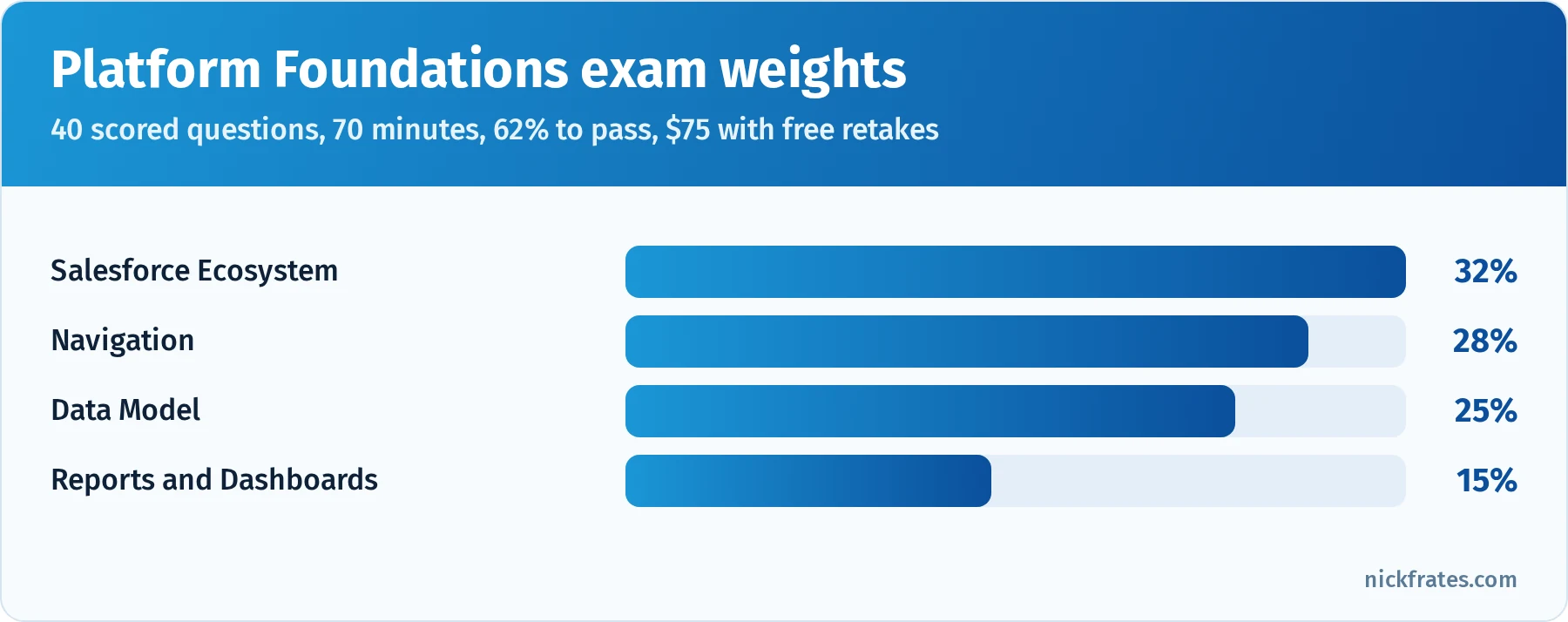
Ecosystem and Navigation together make up 60% of the exam.
Took the exam or a practice test? Enter your section scores in my Salesforce exam score calculator to see your estimated overall score and which sections are costing you the most points.
Also preparing for the Admin or Platform Developer exam? Cert Lab has lessons, practice questions and flashcards for both.
Contents
- Who this certification is for
- What changed for 2026
- How to use this guide
- Salesforce Ecosystem (32%)
- Navigation (28%)
- Data Model (25%)
- Reports and Dashboards (15%)
- Deep dive: a worked scenario from lead to dashboard
- Deep dive: Salesforce terminology that trips people up
- Deep dive: Lightning Experience vs. Salesforce Classic
- Deep dive: the Salesforce release cycle and staying current
- Deep dive: data quality and data management basics
- Deep dive: who can see what
- Exam-day strategy
- Hands-on checklist
- Common exam traps
- Flashcard terms
- Mixed practice exam: 20 more questions
- Quick-reference cheat sheet
- Frequently asked questions
- Related study guides
Who this certification is for
Platform Foundations is designed for people who are new to Salesforce: career changers, students, end users who want to understand the platform better, and professionals in adjacent roles (sales ops, marketing ops, project managers) who work with Salesforce teams. It checks that you understand what Salesforce is, how the ecosystem works, how to get around the user interface, how data is organized and how reports and dashboards turn data into insight.
It isn't a prerequisite for anything, and many people go straight to Administrator. But it's a low-risk way to experience a proctored Salesforce exam, and free retakes remove the pressure. If you're breaking into Salesforce, read How to Break Into Salesforce in 2025 With No Experience alongside this guide.
What changed for 2026
- New name. "Salesforce Certified Associate" is now "Salesforce Certified Platform Foundations." Content and format stayed focused on the same four areas.
- Cheapest remaining exam. With AI Associate retired, Platform Foundations is the remaining $75 exam with free retakes.
- Registration moved to Trailhead Academy, with Pearson VUE delivery.
- Product names keep changing. You might see Data 360 (formerly Data Cloud), Agentforce and Slack mentioned in ecosystem questions. Know what they are at a high level.
How to use this guide
- Sign up for a free Trailhead account and a Trailhead Playground or Developer Edition org.
- Read one section of this guide, then click through the same features in your org.
- Answer the practice questions and read every explanation.
- Take a timed practice exam: 40 questions in 70 minutes is about 1 minute 45 seconds per question.
New to Salesforce entirely? My guide to Salesforce training for beginners compares the free and paid ways to learn the basics.
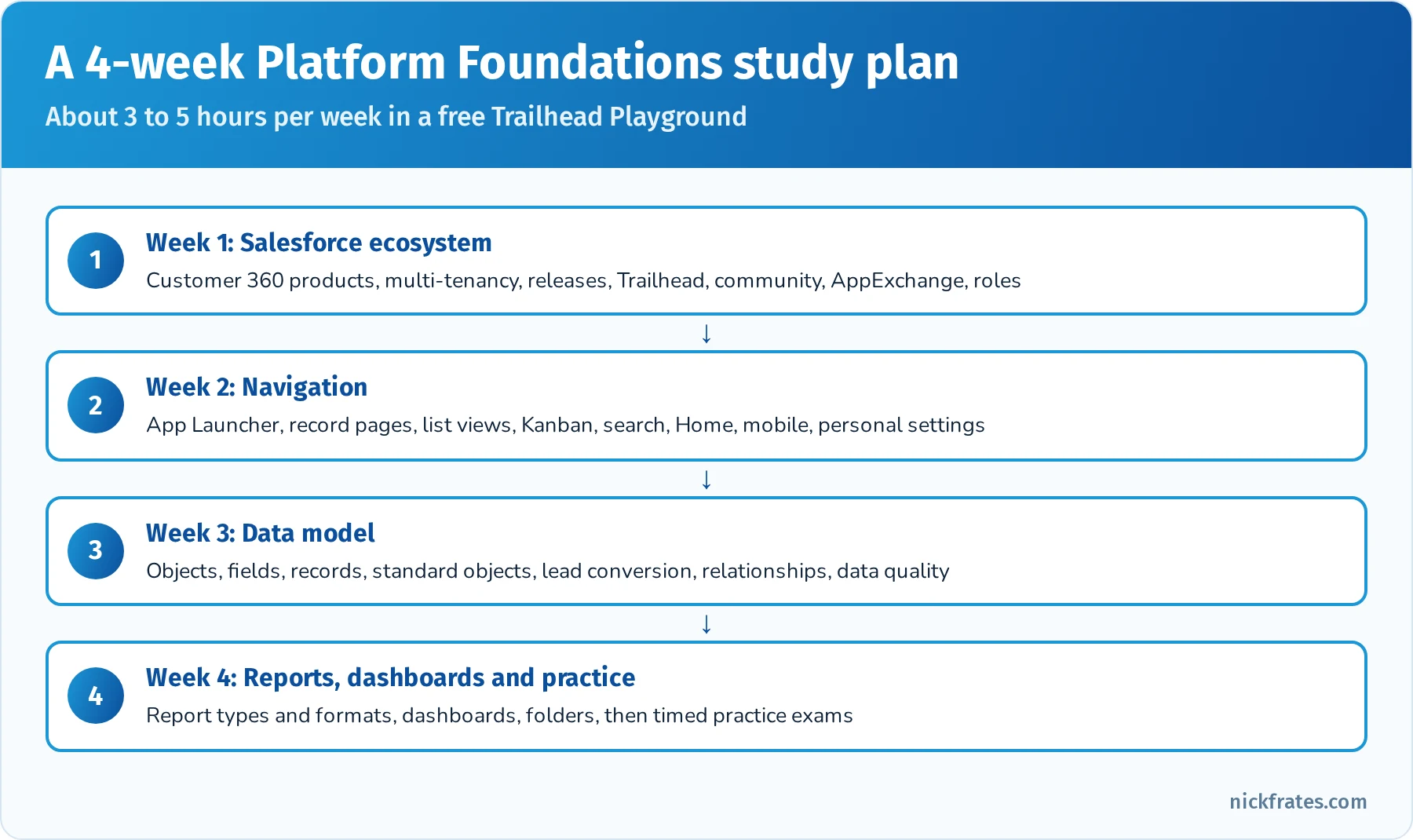
Most people need two to four weeks of light study.
Salesforce Ecosystem (32%)
The largest section. It covers Salesforce as a company and platform, its products, and the community and resources around it.
What Salesforce is. Salesforce is a cloud-based customer relationship management (CRM) platform. Customers access it through a browser or mobile app, with no software to install. It's multi-tenant: many customers share the same infrastructure and code base, each with its own secure org and data. Salesforce delivers three major releases a year (Spring, Summer and Winter), and every customer is upgraded automatically. trust.salesforce.com shows system status and maintenance.
The Customer 360 idea. Salesforce's goal is a single view of every customer across sales, service, marketing, commerce and more, built on one platform with shared data. Know the main products at a high level:
| Product | What it does |
|---|---|
| Sales Cloud | Leads, opportunities, forecasting, the sales process |
| Service Cloud | Cases, customer support, knowledge, contact centers |
| Marketing Cloud and Marketing Cloud Account Engagement | Marketing journeys, email, lead nurturing |
| Commerce Cloud | Online storefronts for B2C and B2B |
| Experience Cloud | Websites and portals for customers and partners |
| Data 360 (formerly Data Cloud) | Unifies customer data from many sources |
| Agentforce | AI agents that work with people to complete tasks |
| Tableau and CRM Analytics | Analytics and data visualization |
| Slack | Collaboration and messaging |
| MuleSoft | Integration between systems |
| Platform (Lightning Platform) | Build custom apps, objects, automation and code |
Trailhead and the community. Trailhead is Salesforce's free learning platform: modules (short lessons), projects (hands-on builds), trails (guided paths), trailmixes (custom collections), superbadges (advanced scenario challenges), badges, points and ranks. Trailhead Playgrounds are free orgs for hands-on practice. The Trailblazer Community includes online groups, local community groups, events such as Dreamforce and World Tours, and the IdeaExchange, where users suggest and vote on product ideas. Salesforce MVPs are recognized community leaders.
AppExchange and partners. AppExchange is Salesforce's marketplace for apps, components, Flow solutions and consulting partners. Apps go through a security review before listing. Consulting partners implement Salesforce for customers; ISV partners build apps on the platform.
Roles and careers. Know common roles: administrator (configures and maintains the org), developer (writes code), consultant (designs solutions for business needs), business analyst (gathers requirements and maps processes), architect (designs large-scale solutions), marketer and end user. For more on where the market is going, see The Future of Salesforce Careers.
Configuration vs. customization. Many business needs can be met with clicks: configuring standard features, creating custom objects and fields, and automating with Flow. Code (Apex, Lightning Web Components) is for requirements that go beyond declarative tools.
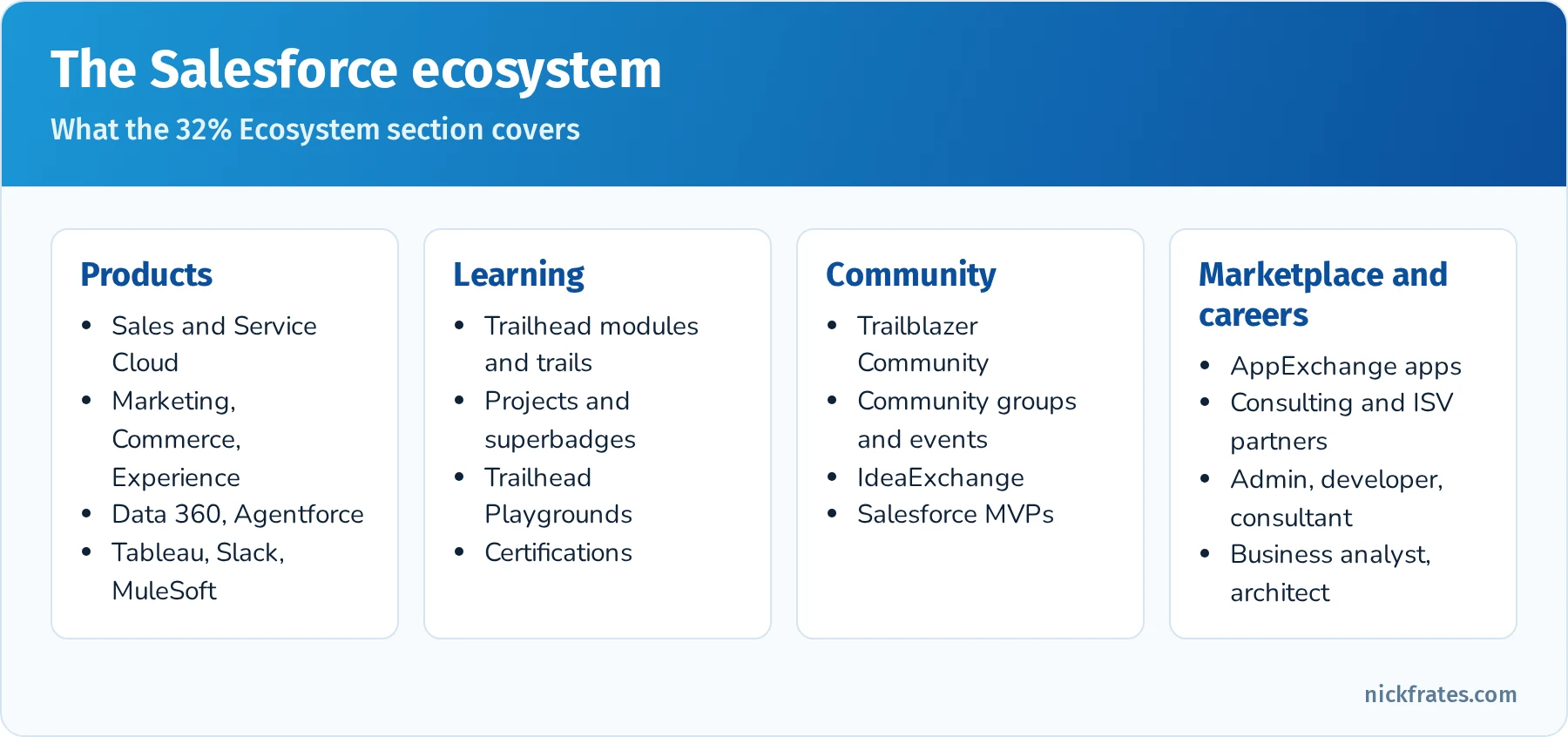
The parts of the Salesforce ecosystem the exam covers.
Practice questions: Salesforce Ecosystem
Question 1. What does it mean that Salesforce is multi-tenant?
- A. Each customer gets its own physical server
- B. Many customers share the same infrastructure and code base while their data stays separate and secure
- C. Customers must install software on their own servers
Answer: B. Multi-tenancy lets Salesforce upgrade everyone at once while keeping each org's data private.
Question 2. How many major Salesforce releases happen each year?
- A. One
- B. Three
- C. Twelve
Answer: B. Spring, Summer and Winter releases are delivered automatically.
Question 3. A company wants to give customers a self-service portal to view their cases. Which product fits?
- A. Experience Cloud
- B. Tableau
- C. MuleSoft
Answer: A. Experience Cloud builds portals and sites for customers and partners.
Question 4. Where can a user suggest a new Salesforce feature and vote on others' suggestions?
- A. AppExchange
- B. IdeaExchange
- C. Trust site
Answer: B. The IdeaExchange collects and ranks product ideas from the community.
Question 5. A company needs a pre-built e-signature app. Where should it look first?
- A. AppExchange
- B. Setup Audit Trail
- C. Schema Builder
Answer: A. AppExchange lists apps and components that extend Salesforce.
Question 6. Which Trailhead feature provides challenging, real-world scenarios that test multiple skills?
- A. Superbadges
- B. Trailmixes
- C. Points
Answer: A. Superbadges are advanced challenges. See the Trailhead superbadge overhaul for recent changes.
Question 7. Where can a customer check whether Salesforce is experiencing an outage?
- A. trust.salesforce.com
- B. The IdeaExchange
- C. AppExchange
Answer: A. The Trust site shows real-time system status and planned maintenance.
Navigation (28%)
This section checks whether you can find your way around Salesforce Lightning Experience and understand what you see.
Apps and the App Launcher. An app is a collection of tabs, items and settings for a job (Sales, Service, Marketing). The App Launcher (the waffle icon) lets you switch apps and find items. The navigation bar shows the current app's tabs, which users can personalize.
Records and record pages. A record page usually has a highlights panel (key fields and actions), details, related lists (child records such as contacts on an account), an activity timeline (tasks, events, emails), and sometimes Chatter and Path (stages for a process). Admins customize pages with Lightning App Builder.
List views. List views show filtered lists of records (for example, "My Open Opportunities"). Users can create, filter, sort, share (if permitted), display as Kanban boards, add charts and inline edit fields.
Search. Global search at the top of the page searches across objects and records, with recent items and suggested results. You can filter search results by object and use list view search for a specific list.
Home page, favorites and help. The Home page can show performance charts, assistants, news, tasks and recent records. Favorites (the star icon) save quick links. Help and Training links to documentation and Trailhead. The Setup menu (gear icon) gives admins access to configuration, with Quick Find to locate settings.
Mobile. The Salesforce mobile app gives access to records, tasks, dashboards and actions on phones and tablets, using the same data and much of the same configuration as desktop.
Personal settings. Users can change their language, locale, time zone, email settings, password and notification preferences in personal settings.
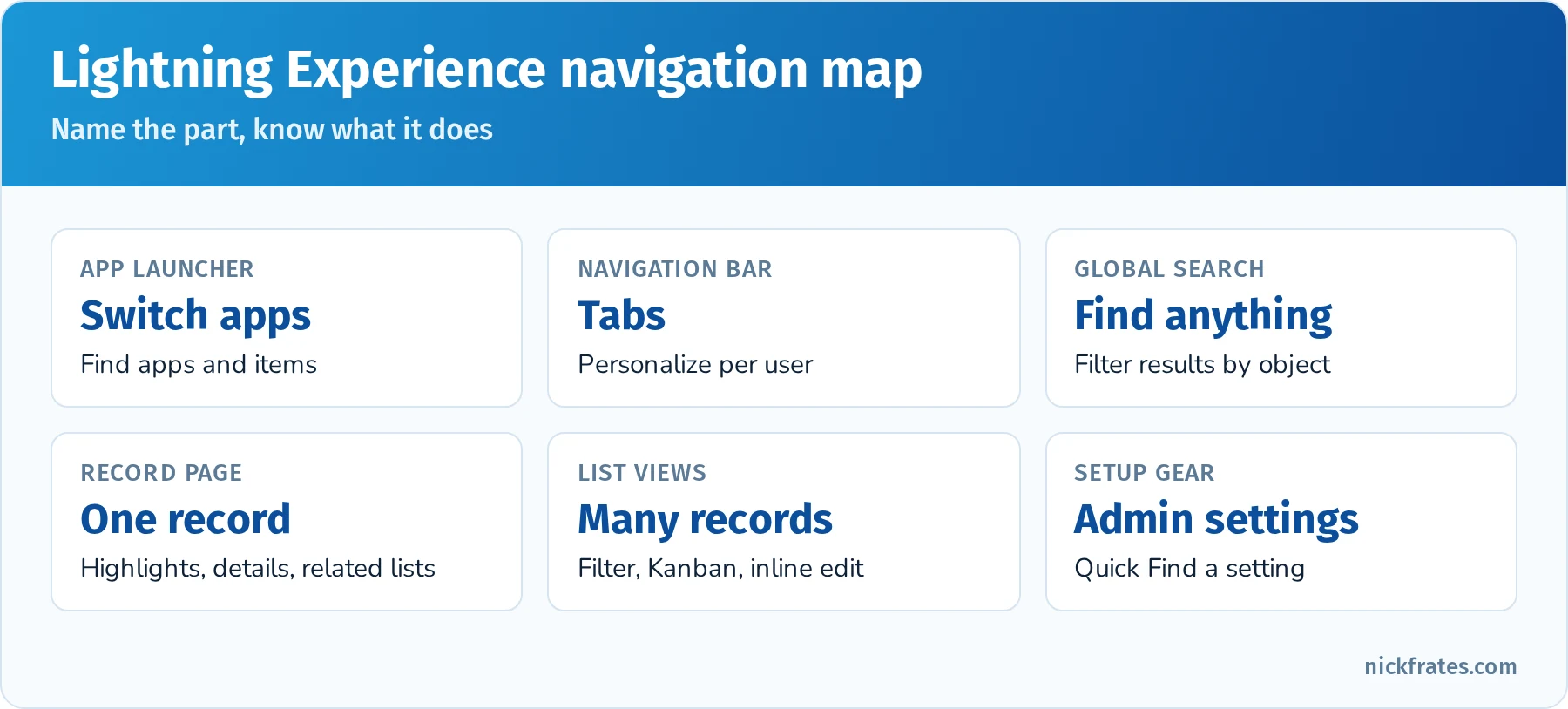
The parts of the Lightning Experience interface you should be able to name.
Quick reference: navigation tasks
| Task | Where |
|---|---|
| Switch from the Sales app to the Service app | App Launcher |
| Find a contact named Lee anywhere in Salesforce | Global search |
| See open opportunities as columns by stage | Kanban list view |
| Update the Stage on 10 records quickly | Inline editing in a list view |
| See tasks and emails related to an account | Activity timeline on the record |
| Change your time zone | Personal settings |
| Find a setting as an admin | Setup, Quick Find |
Practice questions: Navigation
Question 1. A user needs to switch from the Sales app to the Service app. What should they use?
- A. Global search
- B. App Launcher
- C. Setup
Answer: B. The App Launcher lists all apps and items available to the user.
Question 2. Where on a record page would a user find the contacts related to an account?
- A. Related lists
- B. The highlights panel
- C. The utility bar
Answer: A. Related lists show child records.
Question 3. A sales rep wants to see opportunities visually grouped by stage and drag them between stages. What should they use?
- A. A Kanban list view
- B. A dashboard
- C. The activity timeline
Answer: A. Kanban views group records into columns and support drag and drop.
Question 4. How can a user quickly change a field on several records in a list view without opening each record?
- A. Inline editing
- B. Data Loader
- C. The App Launcher
Answer: A. List views support inline editing when the user has edit access.
Question 5. Where does a user change their own time zone?
- A. Company Information
- B. Personal settings
- C. Schema Builder
Answer: B. Users can change their language, locale and time zone in personal settings.
Question 6. A user wants a one-click link to an important report. What feature fits?
- A. Favorites
- B. Sharing rules
- C. Path
Answer: A. Favorites save quick links to records, lists, reports and dashboards.
Data Model (25%)
This section covers how Salesforce organizes data: objects, fields, records and relationships.
Objects, fields and records. An object is like a database table (Accounts, Contacts). A field is like a column (Account Name, Phone). A record is like a row (one specific account). Standard objects come with Salesforce; custom objects are created by admins and have API names ending in __c.
Core standard objects.
| Object | Represents |
|---|---|
| Account | A company or organization you do business with |
| Contact | A person, usually associated with an account |
| Lead | A potential customer who isn't qualified yet |
| Opportunity | A potential deal with an amount, stage and close date |
| Case | A customer question, problem or request |
| Campaign | A marketing initiative |
| Task and Event | Activities: to-dos and calendar items |
| User | A person who logs in to Salesforce |
Lead conversion. When a lead is qualified, converting it creates an account, a contact and optionally an opportunity.
Field types. Text, number, currency, percent, date, date/time, checkbox, picklist (one choice), multi-select picklist, email, phone, URL, formula (calculated, read-only), roll-up summary (calculates values from related records), lookup and master-detail (relationships), and auto number.
Relationships. A lookup relationship loosely links two objects (a contact looks up to an account). A master-detail relationship tightly links them: the detail can't exist without the master, deleting the master deletes details, and the master can show roll-up summaries. A junction object with two master-detail relationships models many-to-many relationships.
Schema Builder shows objects and relationships visually. Data quality matters: required fields, validation rules, picklists and duplicate rules help keep data accurate and complete. Data import tools include the Data Import Wizard (up to 50,000 records) and Data Loader (larger volumes).
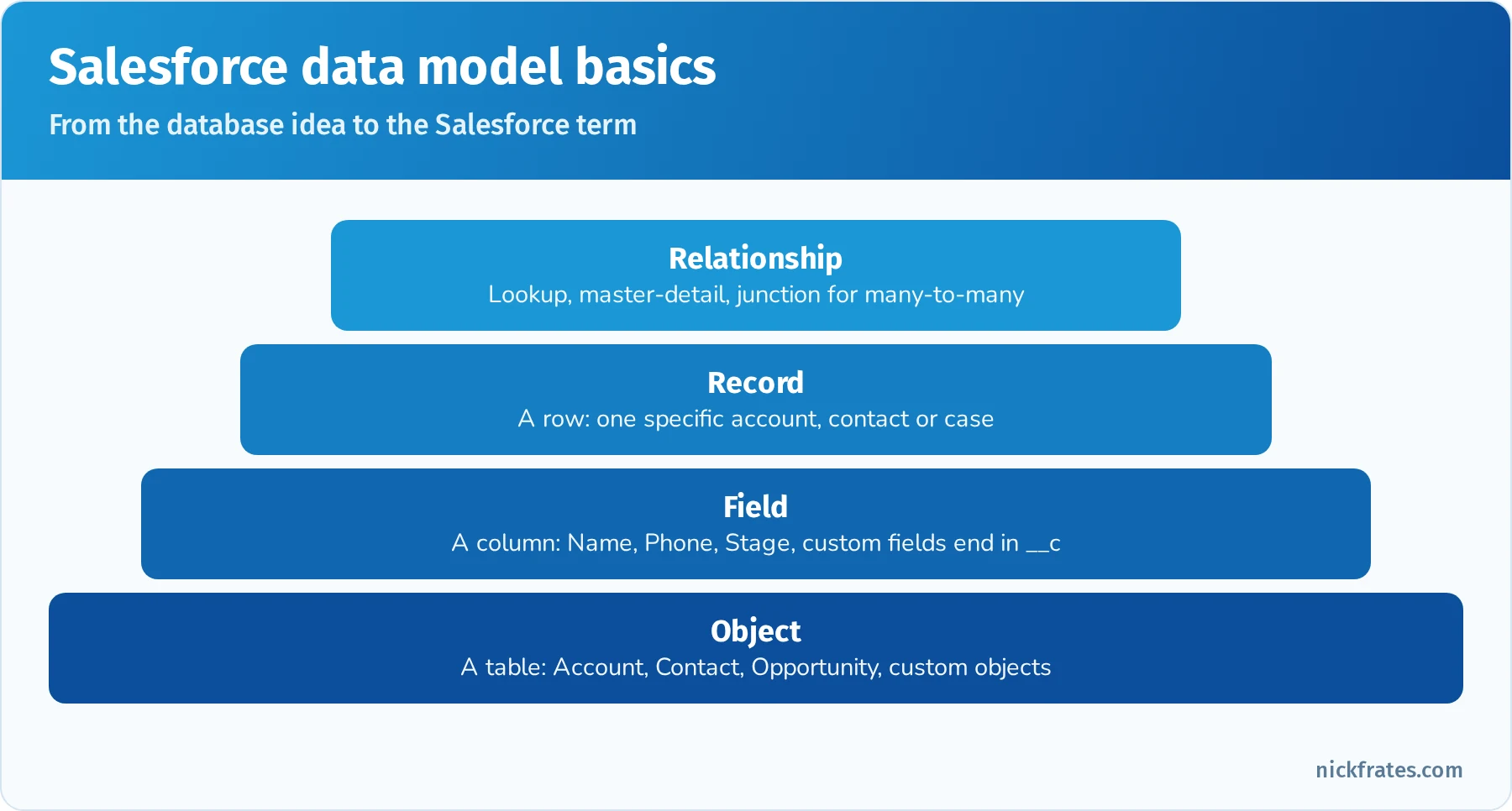
Objects, fields, records and relationships.
Practice questions: Data Model
Question 1. In Salesforce, what is a record?
- A. A single row of data, such as one specific account
- B. A column, such as Phone
- C. A type of report
Answer: A. Objects are tables, fields are columns, records are rows.
Question 2. What happens when a lead is converted?
- A. It's deleted with no other records created
- B. An account, a contact and optionally an opportunity are created
- C. It becomes a case
Answer: B. Lead conversion turns a qualified lead into an account, contact and optional opportunity.
Question 3. Which relationship type deletes related child records when the parent is deleted?
- A. Lookup
- B. Master-detail
- C. Hierarchical
Answer: B. Master-detail relationships cascade deletes from master to detail.
Question 4. How can you tell a field or object is custom from its API name?
- A. It ends in
__c - B. It starts with
std_ - C. It contains a number
Answer: A. Custom objects and fields have API names ending in __c.
Question 5. A company wants users to choose one value from a fixed list of regions. Which field type fits?
- A. Text
- B. Picklist
- C. Checkbox
Answer: B. Picklists enforce consistent values.
Question 6. Which tool shows objects and their relationships in a visual diagram?
- A. Schema Builder
- B. List views
- C. Global search
Answer: A. Schema Builder displays the data model visually.
Reports and Dashboards (15%)
Reports. A report is a list of records that meet criteria, built from a report type (which defines the objects and fields available). Formats: tabular (simple list), summary (grouped rows with subtotals), matrix (grouped rows and columns) and joined (several blocks). Reports can have filters, groupings, summary fields, charts and conditional highlighting. Reports are stored in folders, and folder sharing controls who can see them. Users can subscribe to reports to receive them by email.
Dashboards. A dashboard is a visual display of key metrics using components (bar charts, line charts, donut charts, gauges, metrics and tables). Each component is based on a source report. Dashboards run as a specific user (everyone sees that user's data) or as the viewer (dynamic dashboards). Dashboard filters let viewers change what they see.
Data visibility. Users can only see records in reports that they have access to, so two users can see different results from the same report.
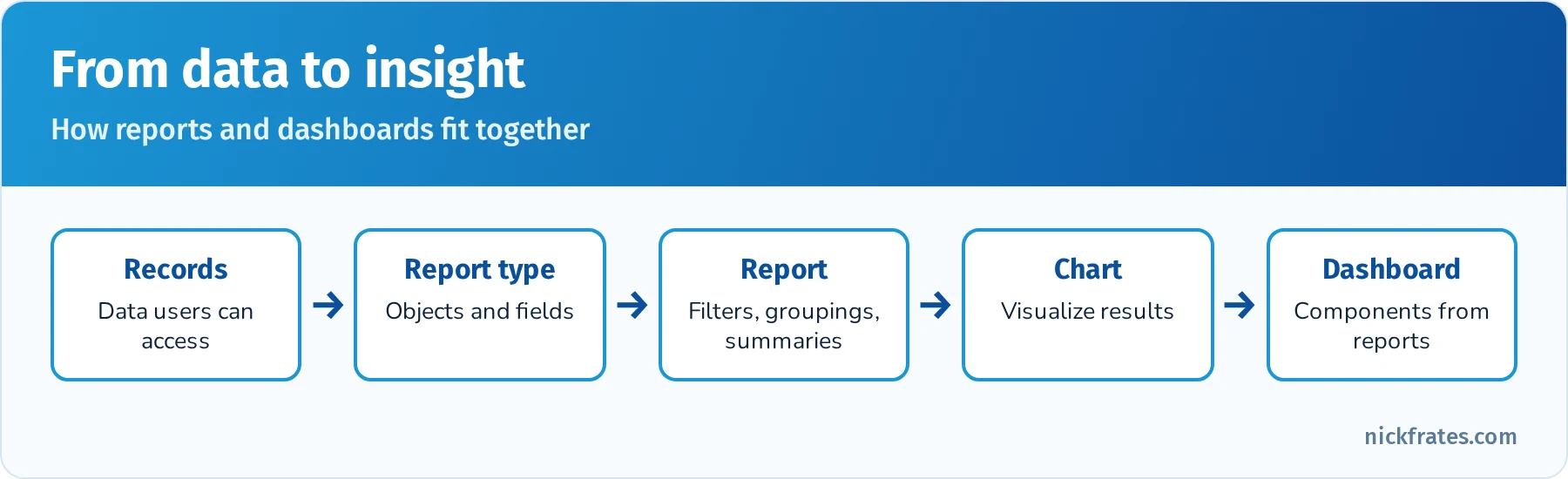
Reports turn records into answers; dashboards show many answers at a glance.
Practice questions: Reports and Dashboards
Question 1. Which report format groups rows and shows subtotals?
- A. Tabular
- B. Summary
- C. Joined
Answer: B. Summary reports group rows and show subtotals.
Question 2. What determines which objects and fields are available when building a report?
- A. The report type
- B. The page layout
- C. The App Launcher
Answer: A. Report types define the available objects, fields and relationships.
Question 3. Every dashboard component is based on what?
- A. A source report
- B. A list view
- C. A record page
Answer: A. Each component displays data from one source report.
Question 4. Two users run the same report and see different numbers of records. Why?
- A. Reports show only records each user has access to
- B. Reports are random
- C. One user has a different App Launcher
Answer: A. Record access determines report results.
Question 5. A manager wants a report emailed every Monday morning. What should they use?
- A. Report subscription
- B. Kanban view
- C. Schema Builder
Answer: A. Report subscriptions send results on a schedule.
Cert Lab by Nick Frates
Practice each section with the Platform Foundations Cert Lab
Short lessons, flashcards and a practice quiz for all 4 exam sections: Salesforce Ecosystem, Navigation, Data Model, and Reports and Dashboards.
Start the Platform Foundations Cert Lab for $9.99 →Deep dive: a worked scenario from lead to dashboard
Many Platform Foundations questions describe a simple business situation and ask which feature, object or page fits. Following one example from start to finish connects all four sections of the outline.
The company. Greenleaf Solar sells residential solar panels. It uses Sales Cloud for its sales team and Service Cloud for installation support. A new sales rep, Priya, starts on Monday.
Step 1: Logging in and finding her way. Priya logs in and lands on the Home page, which shows her assigned tasks, a performance chart for the quarter and recent records. She opens the App Launcher and selects the Sales app. The navigation bar shows tabs for Home, Leads, Accounts, Contacts, Opportunities, Reports and Dashboards. She removes the Campaigns tab from her personal navigation bar because she doesn't use it, and adds Calendar. That's personalization, and it doesn't affect anyone else.
Step 2: Working a lead. A homeowner fills out a web form, and a lead record is created with the person's name, email and address. Priya opens the Leads tab and switches to the "My Unread Leads" list view. She calls the homeowner, logs the call from the activity timeline, and schedules a site visit as an event. After the site visit, she decides the homeowner is a real prospect and converts the lead. Salesforce creates an account (the household), a contact (the homeowner) and an opportunity (the potential solar installation).
Step 3: Moving the deal forward. The opportunity has a Path across the top of the record page showing stages such as Qualification, Site Survey, Proposal, Negotiation and Closed Won. Priya updates the stage as she goes. The highlights panel shows the amount and close date. In the Opportunities list view she switches to Kanban to drag deals between stages, and uses inline editing to update close dates for several deals at once.
Step 4: Understanding the data model. Behind the scenes, the account is the parent of the contact (through the Account lookup on Contact) and of the opportunity. Greenleaf's admin has created a custom object, Site Survey (Site_Survey__c), with a master-detail relationship to Opportunity, so every survey belongs to a deal and is deleted if the deal is deleted. The opportunity shows a roll-up summary field counting completed surveys. A picklist field on Site Survey captures Roof Type, so data stays consistent.
Step 5: Reporting. At the end of the month, Priya's manager builds a summary report using the Opportunities report type, grouped by Stage, with a filter for this quarter and a bar chart. She saves it in a folder shared with the sales team, then adds it as a component on the Sales Pipeline dashboard. Because the dashboard runs as the viewer, each rep sees their own pipeline. The manager subscribes to the report so it's emailed every Monday.
Step 6: Getting help. Priya wants to learn more, so she opens Trailhead and completes a module on opportunity management, joins the local Trailblazer Community Group, and finds an e-signature app on AppExchange that her admin might install. When Salesforce feels slow one morning, she checks trust.salesforce.com and sees there's no incident, so she contacts her admin.
Every bolded term in that story can show up on the exam.
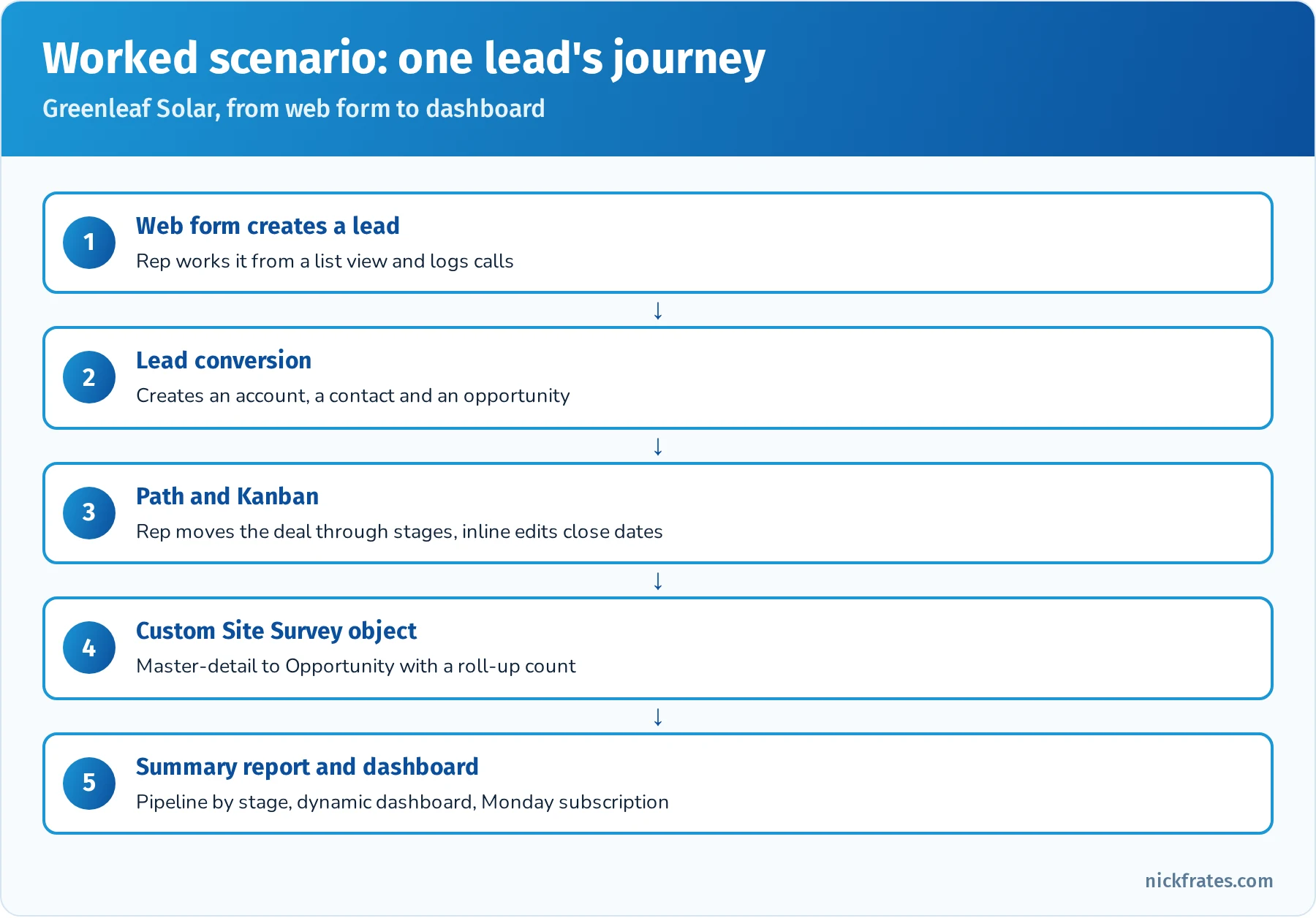
One lead's journey touches every section of the exam.
Deep dive: Salesforce terminology that trips people up
Salesforce uses some everyday words in specific ways. The exam expects you to know the difference.
| Term | What it means in Salesforce | Often confused with |
|---|---|---|
| Org | A customer's own Salesforce instance, with its own data, users and configuration | A company or organization chart |
| App | A collection of tabs and items grouped for a job | A mobile app or AppExchange listing |
| Tab | A navigation item that opens an object, a web page or a Lightning page | A browser tab |
| Object | A table that stores a type of data | A record |
| Record | One entry in an object | A report |
| Field | A single piece of information on a record | A filter |
| Page layout | Controls which fields and related lists appear on a record page | A Lightning record page |
| Lightning record page | The overall page built in Lightning App Builder, with components | A page layout |
| List view | A filtered, sortable list of records for one object | A report |
| Report | A query that can summarize and chart records across objects | A list view |
| Dashboard | A visual collection of components based on reports | A Home page |
| Sandbox | A copy of a production org for building and testing | A Trailhead Playground |
| Release | One of the three automatic upgrades each year | A deployment of your own changes |
List view vs. report. A list view is quick and works on one object with simple filters, inline editing and Kanban. A report can group, summarize, chart and combine related objects. If a question asks about subtotals, charts on dashboards or scheduled emails, the answer is a report. If it asks about quickly working through records, the answer is a list view.
Page layout vs. Lightning record page. The page layout controls fields, related lists and some buttons in the details section. The Lightning record page, built in Lightning App Builder, arranges components such as the highlights panel, tabs, related lists and Path. At the foundations level you just need to know both exist and that admins use them to customize what users see.
Deep dive: Lightning Experience vs. Salesforce Classic
Lightning Experience is the modern Salesforce user interface, and new features are built for it. Salesforce Classic is the older interface. Some long-time orgs still have Classic enabled, and users with the right permission can switch between them. For the exam:
- Assume Lightning Experience unless a question says otherwise.
- Lightning features such as Kanban list views, Path, the activity timeline, the utility bar, dynamic dashboards and Lightning App Builder pages are the ones you'll be asked about.
- The Salesforce mobile app is built on the same Lightning technology and respects much of the same configuration (compact layouts, actions, Lightning pages).
Deep dive: the Salesforce release cycle and staying current
Salesforce delivers three major releases a year, named for the season in the Northern Hemisphere: Spring, Summer and Winter. Winter releases are named for the following year, so Winter '27 arrives in fall 2026. Each release goes through:
- Pre-release orgs, which anyone can sign up for to try new features early.
- Release notes, published before the release with details of every change.
- Sandbox preview, when sandboxes on preview instances get the release weeks before production.
- Production upgrades, rolled out across instances over several weekends.
Admins check release notes, test in sandbox preview and use Release Updates in Setup to manage changes that will be enforced in future releases. Users benefit from new features without installing anything. Trailhead publishes release readiness content, and many community groups hold release reviews.
Deep dive: data quality and data management basics
The Data Model section includes the basics of keeping data accurate and useful. You don't need admin-level depth, but you should know which tool solves which problem.
| Problem | Tool | What it does |
|---|---|---|
| Users leave important fields blank | Required fields | Field can't be saved empty |
| Users enter values in the wrong format | Validation rules | Block save when a formula condition is true and show an error |
| Users spell regions differently | Picklists | Only allowed values can be chosen |
| The same company is entered twice | Duplicate and matching rules | Warn or block when a likely duplicate is created |
| Need to bring in records from a spreadsheet | Data Import Wizard | Guided import of up to 50,000 records for common objects |
| Need to load or export a large volume | Data Loader | Client tool for large inserts, updates, deletes and exports |
| Need a backup of all data | Data Export | Weekly or monthly export of data as CSV files |
| Need to see the data model | Schema Builder | Visual diagram of objects, fields and relationships |
Why data quality matters. Reports and dashboards are only as good as the data behind them. Duplicate accounts split activity history, blank fields leave holes in reports, and inconsistent values break groupings. Questions in this area usually describe a problem and ask for the simplest tool that prevents it.
Deep dive: who can see what
Platform Foundations doesn't go deep on security, but several questions assume you know that not everyone sees the same records or fields.
- Profiles and permission sets control what users can do: which objects they can read, create, edit and delete, and which apps and settings they can use.
- Field-level security controls which fields a user can see or edit.
- Record access (organization-wide defaults, role hierarchy and sharing rules) controls which specific records a user can see.
- Reports, dashboards and list views only show records the user has access to, which is why two users can get different results from the same report.
- Folders control who can see reports and dashboards themselves.
If a question asks why a user can't see a record, field or report, the answer is almost always one of these access controls, not a bug.
Exam-day strategy
- Pace. 70 minutes for 40 to 45 questions gives you about 1 minute 30 seconds each, including unscored items. Most foundations questions take less than a minute.
- Three options. With only three choices, eliminate the clearly wrong answer first. The remaining two often differ by one word, such as "lookup" vs. "master-detail" or "report" vs. "list view."
- Mark and return. Flag questions you're unsure about and come back at the end.
- Read the scenario's goal. Questions often include extra detail. Find the actual ask: which object, which feature, which page.
- Online proctoring. Test your system ahead of time, clear your desk and plan for check-in time.
- Retake if needed. Retakes are free, so a failed attempt is a cheap diagnostic. Review the section scores on your results and focus there.
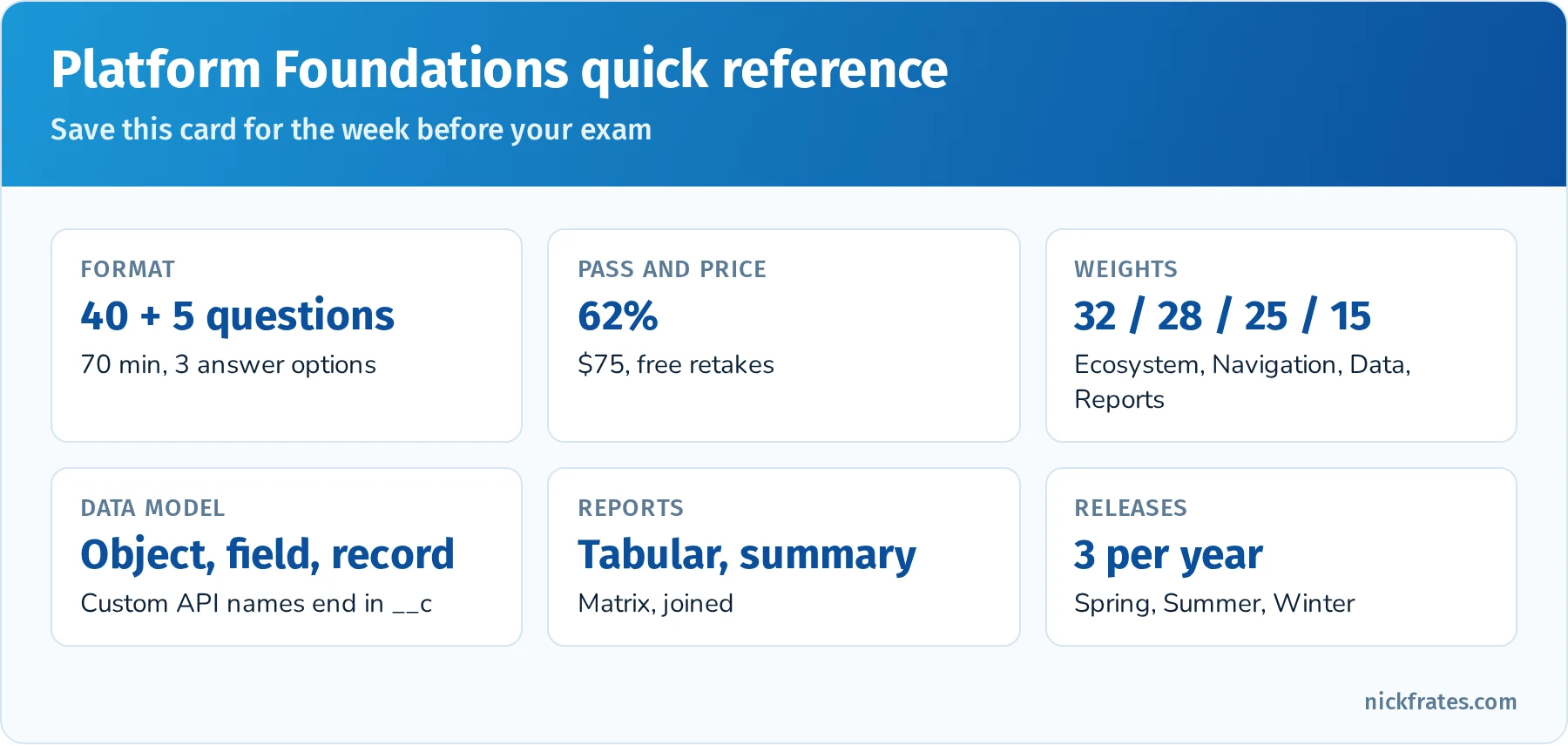
Print this card or save it to your phone.
Hands-on checklist
Complete each item in a Trailhead Playground or Developer Edition org:
- Use the App Launcher to switch between the Sales and Service apps, and personalize the navigation bar.
- Create an account, two contacts and an opportunity. Log a call and schedule a meeting from the activity timeline.
- Create a lead and convert it, then find the resulting account, contact and opportunity.
- Build a list view of open opportunities, switch it to Kanban and inline edit a field.
- Use global search to find a contact, then filter the results by object.
- Open Schema Builder and look at Account, Contact, Opportunity and Case.
- Create a custom object with a picklist field and a lookup to Account.
- Build a summary report of opportunities by stage with a bar chart, save it to a folder, and add it to a new dashboard.
- Subscribe to the report and add the dashboard to your favorites.
- Earn a few Trailhead badges and explore the Trailblazer Community.
Common exam traps
- Three answer options. With only three options, read each one carefully; distractors are often close in wording.
- Lookup vs. master-detail. Master-detail means required, cascade delete and roll-ups.
- App vs. object vs. tab. An app is a collection of tabs; a tab displays an object or page; an object stores data.
- Report access. Users only see records they have access to in reports and dashboards.
- Product names. Data 360 was Data Cloud, Platform Foundations was Associate, and Agentforce is Salesforce's AI agent platform.
Flashcard terms
- CRM: customer relationship management.
- Multi-tenant: many customers share infrastructure while data stays separate.
- Org: a customer's instance of Salesforce.
- App: a collection of tabs and items for a job.
- Object / field / record: table / column / row.
- Lead conversion: creates an account, contact and optional opportunity.
- Related list: child records on a record page.
- List view: a filtered list of records.
- Kanban: list view as columns grouped by a field.
- Report type: defines objects and fields available in a report.
- Dashboard component: a chart, gauge, metric or table based on a report.
- AppExchange: Salesforce's marketplace.
- Trailhead: Salesforce's free learning platform.
- IdeaExchange: where users suggest and vote on product ideas.
Mixed practice exam: 20 more questions
Question 1. Which Salesforce product unifies customer data from many sources into one profile?
- A. Data 360
- B. Experience Cloud
- C. Slack
Answer: A. Data 360 (formerly Data Cloud) unifies data.
Question 2. A sales rep wants to see their upcoming tasks and recent records as soon as they log in. Which page helps?
- A. Home page
- B. Setup
- C. Schema Builder
Answer: A. The Home page can show tasks, recent records and performance.
Question 3. What is a Trailhead Playground?
- A. A free org for hands-on practice
- B. A paid sandbox
- C. A report type
Answer: A. Playgrounds let learners complete hands-on challenges.
Question 4. Which object represents a potential deal?
- A. Case
- B. Opportunity
- C. Campaign
Answer: B. Opportunities track deals with stages and amounts.
Question 5. A field calculates the number of days since a record was created. What type is it?
- A. Formula
- B. Picklist
- C. Lookup
Answer: A. Formula fields calculate values automatically.
Question 6. Which role typically gathers requirements and maps business processes?
- A. Business analyst
- B. Developer
- C. End user
Answer: A. Business analysts focus on requirements and processes.
Question 7. Where are reports stored and shared?
- A. Folders
- B. Related lists
- C. The utility bar
Answer: A. Folder sharing controls report access.
Question 8. Which tool would an admin use to import 10,000 contacts with a simple wizard?
- A. Data Import Wizard
- B. Kanban view
- C. App Launcher
Answer: A. The Data Import Wizard handles up to 50,000 records.
Question 9. What does a dynamic dashboard do?
- A. Shows each viewer data based on their own access
- B. Updates the data model
- C. Deletes old reports
Answer: A. Dynamic dashboards run as the logged-in user.
Question 10. Which statement about Salesforce upgrades is correct?
- A. Customers must install each release themselves
- B. Salesforce upgrades all customers automatically three times a year
- C. Upgrades happen every five years
Answer: B. Releases are automatic for every org.
Question 11. A support agent needs to see every case for a customer while viewing the customer's account. Where should they look?
- A. The Cases related list on the account
- B. The App Launcher
- C. Personal settings
Answer: A. Related lists show child records, such as cases on an account.
Question 12. Which tool should a company use to connect Salesforce with its ERP system?
- A. MuleSoft
- B. Experience Cloud
- C. Trailhead
Answer: A. MuleSoft is Salesforce's integration platform.
Question 13. A user can see the Accounts tab but can't see the Annual Revenue field on accounts. What's the most likely cause?
- A. Field-level security hides the field
- B. The account was deleted
- C. The report type is wrong
Answer: A. Field-level security controls field visibility per profile or permission set.
Question 14. An admin wants to prevent users from saving an opportunity with a close date in the past. Which tool fits?
- A. Validation rule
- B. Kanban view
- C. Dashboard filter
Answer: A. Validation rules block saves that break business rules.
Question 15. A manager wants to see the current quarter's pipeline grouped by both stage and sales rep, in rows and columns. Which report format fits?
- A. Tabular
- B. Matrix
- C. Summary with no groupings
Answer: B. Matrix reports group by rows and columns.
Question 16. Which statement about custom objects is correct?
- A. They can be created by admins without code to store data unique to the business
- B. They require Apex code to create
- C. They can't have relationships to standard objects
Answer: A. Custom objects are declarative and can relate to standard objects.
Question 17. A new user wants a guided path through Salesforce basics with hands-on challenges. What should they use?
- A. A Trailhead trail
- B. Setup Audit Trail
- C. A sharing rule
Answer: A. Trails are guided learning paths of modules and projects.
Question 18. Which feature shows the key stages of a sales process across the top of an opportunity record?
- A. Path
- B. Utility bar
- C. Related list
Answer: A. Path displays stages and can include guidance for each stage.
Question 19. A company's same customer appears as three separate account records. Which feature helps prevent this in the future?
- A. Duplicate and matching rules
- B. Report subscriptions
- C. Favorites
Answer: A. Duplicate rules warn or block when users create likely duplicates.
Question 20. Which Salesforce product helps teams communicate in channels and connect conversations to Salesforce records?
- A. Slack
- B. Tableau
- C. Commerce Cloud
Answer: A. Slack is Salesforce's collaboration platform.
Quick-reference cheat sheet
| Topic | Remember |
|---|---|
| Format | 40 questions, 70 minutes, 3 answer options |
| Passing score | 62% (about 25 correct) |
| Cost | $75, free retakes |
| Largest section | Salesforce Ecosystem 32% |
| Releases | Spring, Summer, Winter |
| Data model | Object = table, field = column, record = row |
| Custom API names | End in __c |
| Master-detail | Required, cascade delete, roll-ups |
| Report formats | Tabular, summary, matrix, joined |
| Dashboard component | Based on one source report |
Frequently asked questions
Is Platform Foundations worth it? It's a low-cost, low-risk first certification that shows employers you understand Salesforce basics. If you plan to become an admin, it's a good warm-up, but many people go straight to Administrator.
Is it the same as the old Salesforce Associate certification? Yes, it's the same credential with a new name.
How long does it take to prepare? Two to four weeks of light study with hands-on practice is typical for beginners.
Are retakes really free? Salesforce lists free retakes for this exam. Check the current policy when you register.
What should I take next? Platform Administrator is the most common next step.
Related study guides
- 25 free Platform Foundations practice questions, weighted by exam section, with every answer explained.
- Salesforce Administrator (Platform Administrator) study guide, the usual next step.
- Salesforce Business Analyst study guide for process and requirements roles.
- Salesforce AI Associate retirement guide for AI fundamentals and what replaced that exam.
- All Salesforce certification study guides.
- The science of studying for Salesforce certifications for active recall, spaced repetition and an Anki workflow.
Hope this helps!
Best,
Nick
Cert Lab by Nick Frates
Ready to test yourself?
The Platform Foundations Cert Lab ends with 4 full 60-question practice exams weighted like the real exam, and every answer is explained with a link to Salesforce Help or Trailhead.
Start the Platform Foundations Cert Lab for $9.99 →