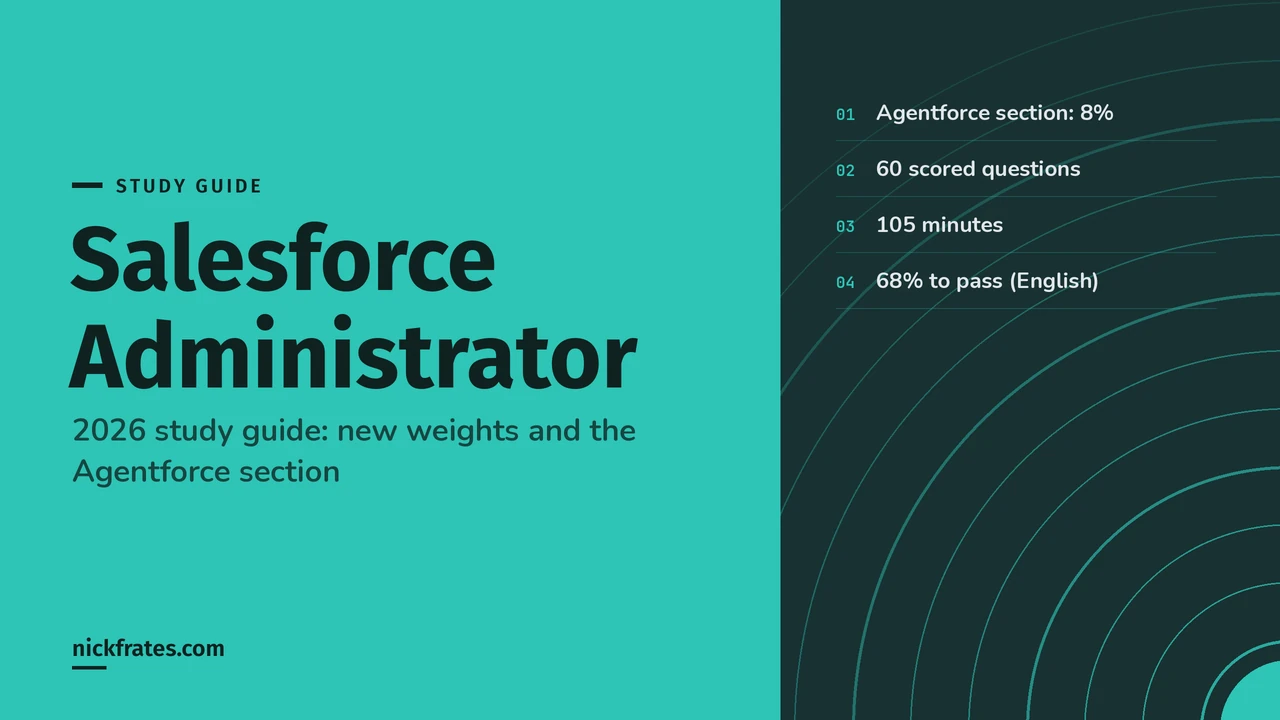
This is a deep study guide for the Salesforce Certified Platform Administrator exam, the certification most people still call "Salesforce Admin" or ADM-201. It follows the current exam outline section by section, with explanations, quick-reference tables, diagrams, hands-on exercises and practice questions with answers and explanations for every section.
Updated for 2026: written for the refreshed exam outline that took effect on December 15, 2025, which renamed the credential to Platform Administrator, re-weighted the sections and added a new Agentforce section worth 8%.
| Section | Weight | Approx. questions |
|---|---|---|
| Configuration and Setup | 15% | ~9 |
| Object Manager and Lightning App Builder | 15% | ~9 |
| Sales and Marketing Applications | 10% | ~6 |
| Service and Support Applications | 10% | ~6 |
| Productivity and Collaboration | 10% | ~6 |
| Data and Analytics Management | 17% | ~10 |
| Automation | 15% | ~9 |
| Agentforce | 8% | ~5 |
| Exam fact | Detail |
|---|---|
| Official name | Salesforce Certified Platform Administrator (formerly Salesforce Certified Administrator) |
| Format | 60 scored multiple-choice/multiple-select questions, plus up to 5 unscored |
| Time | 105 minutes |
| Passing score | 68% (about 41 of 60) for the English exam |
| Fee | $200, retake $100, plus applicable taxes |
| Prerequisites | None |
| Delivery | Onsite or online proctored, registered through Trailhead Academy and delivered by Pearson VUE |
| Maintenance | Annual Trailhead maintenance module to keep the credential active |
| Official resources | Exam guide, credential page and the Admin blog's summary of the update |
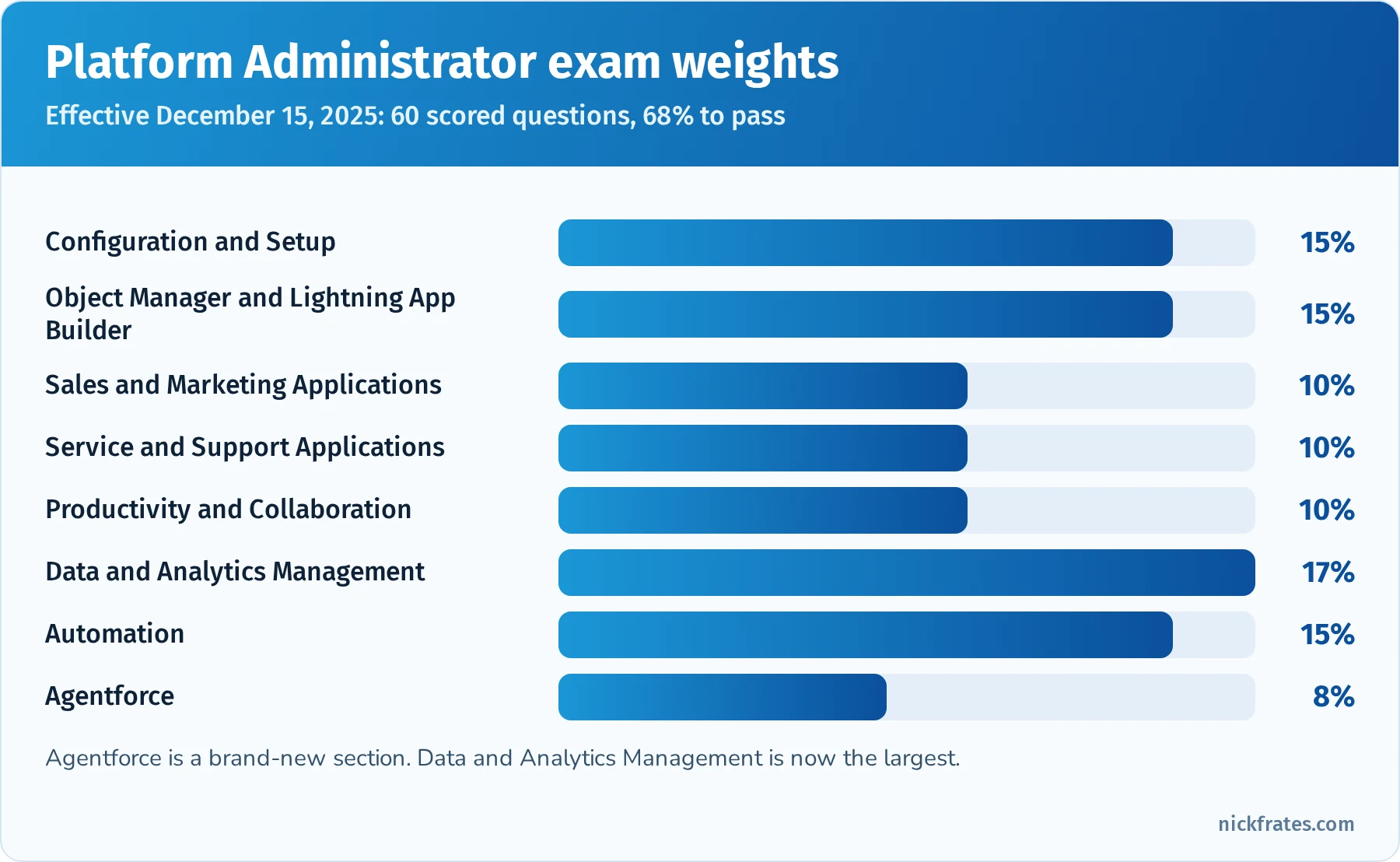
Data and Analytics Management is now the largest section at 17%.
Took the exam or a practice test? Enter your section scores in my Salesforce exam score calculator to see your estimated overall score and which sections are costing you the most points.
Cert Lab by Nick Frates
Start the free Admin Cert Lab
Lessons, practice questions and flashcards for every Salesforce Administrator exam section, in one free course.
Start the free Admin Cert Lab →Contents
- What changed in the 2025-2026 exam update
- How to use this guide
- Configuration and Setup (15%)
- Object Manager and Lightning App Builder (15%)
- Sales and Marketing Applications (10%)
- Service and Support Applications (10%)
- Productivity and Collaboration (10%)
- Data and Analytics Management (17%)
- Automation (15%)
- Agentforce (8%)
- Hands-on project: configure a small org end to end
- Deep dive: troubleshooting access step by step
- Deep dive: reports and dashboards
- Mixed practice exam: 15 more questions
- Exam-day strategy
- Common exam traps
- Flashcard terms
- Quick-reference cheat sheet
- Frequently asked questions
- Related study guides
What changed in the 2025-2026 exam update
- New name. The credential is now Salesforce Certified Platform Administrator. Existing Administrator holders keep their certification and maintain it as usual.
- New Agentforce section (8%). It covers Agentforce use cases, when AI is appropriate, security and permissions for agents, troubleshooting agent access, and maintaining prompts and instructions in Agentforce Builder, including light testing with conversation preview.
- Re-weighted sections. Data and Analytics Management is now the largest section at 17%. Configuration and Setup, Object Manager and Lightning App Builder, and Automation are 15% each.
- Flow only. Workflow Rules and Process Builder reached end of support on December 31, 2025, so automation questions focus on Flow, approvals and the Migrate to Flow tool.
- Registration and delivery. Exams are registered through Trailhead Academy and delivered by Pearson VUE.
How to use this guide
The Admin exam is broad rather than deep. You'll see short scenarios ("A sales manager needs...", "Users report that...") and choose the best standard, declarative solution. The fastest path is to learn each concept, then immediately configure it in a free Developer Edition org or Trailhead Playground.
- Work through one section per study block and do the hands-on exercise at the end of it.
- Make flashcards for anything you'd have to look up, and review them on a spaced schedule (1 day, 3 days, 7 days, 14 days).
- Answer the practice questions before reading the explanations.
- In the last two weeks, take timed practice exams and use the cheat sheet near the end of this guide.
Want a separate set of questions to test yourself? My Salesforce Admin practice test has 25 original questions weighted like the real exam, with every answer explained. If you'd like lessons, quizzes and flashcards in one place, my free Admin Cert Lab course is rolling out section by section.
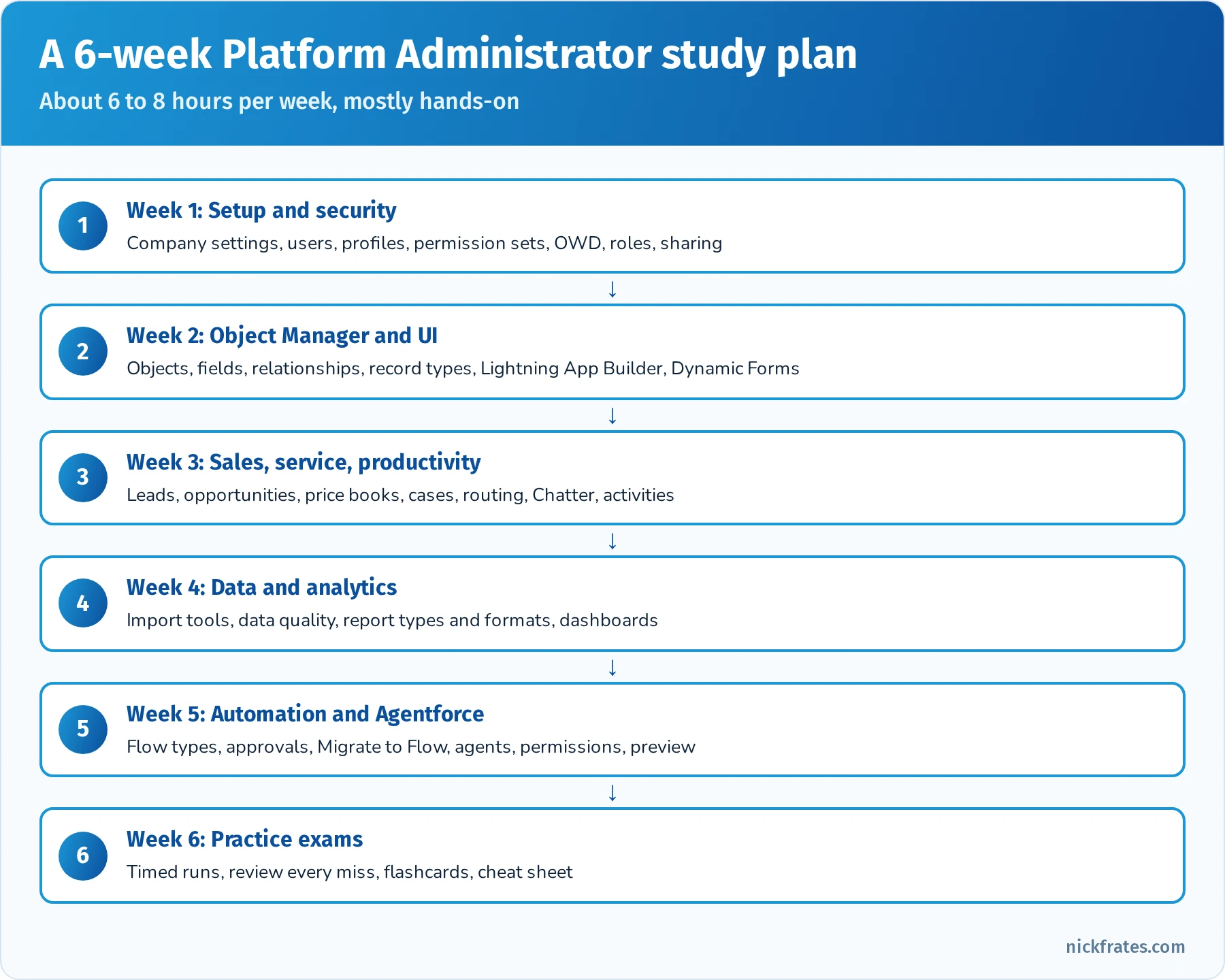
A sample six-week plan for working professionals.
Configuration and Setup (15%)
This section covers how an org is configured and secured: company settings, users, and the full security and sharing model. It's one of the most practical sections, and many questions are troubleshooting scenarios about access.
Company settings. Company Information holds the default locale, language, time zone and currency, fiscal year settings (standard or custom), business hours and holidays, and license counts. Know that multiple currencies, once enabled, can't be disabled, and that custom fiscal years can't be reverted to standard. Users can override their own locale, language and time zone.
User management. Know how to create, freeze and deactivate users (you can't delete users), reset passwords, assign licenses, profiles, roles and permission sets, and log in as another user (with "Administrators Can Log in as Any User" enabled). Freezing a user stops logins immediately while you clean up ownership; deactivating releases the license. Login settings include login hours and IP ranges on profiles, trusted IP ranges at the org level, multi-factor authentication (required for UI logins), session settings, password policies, and single sign-on with SAML or other identity providers.
Object and field access. Profiles set baseline permissions (each user has exactly one). Permission sets add permissions on top, and permission set groups bundle them by persona. Salesforce recommends minimum-access profiles with permissions granted through permission sets, and has been moving permission management away from profiles. Muting permission sets inside a group can remove a permission from that group without changing the underlying sets. Field-level security controls read and edit access to each field.
Record access. Organization-wide defaults (OWD) set the baseline for each object: Private, Public Read Only, Public Read/Write, Controlled by Parent, and for some objects Public Read/Write/Transfer or Public Full Access. Then you open access with the role hierarchy, sharing rules (owner-based and criteria-based), public groups, queues, account/opportunity/case teams, manual sharing and enterprise territory management. Restriction rules filter records for specific users, and scoping rules set default record scope. The Sharing Settings page also has separate internal and external defaults for Experience Cloud users. For a fuller walkthrough with examples, see my guide to the Salesforce security model.
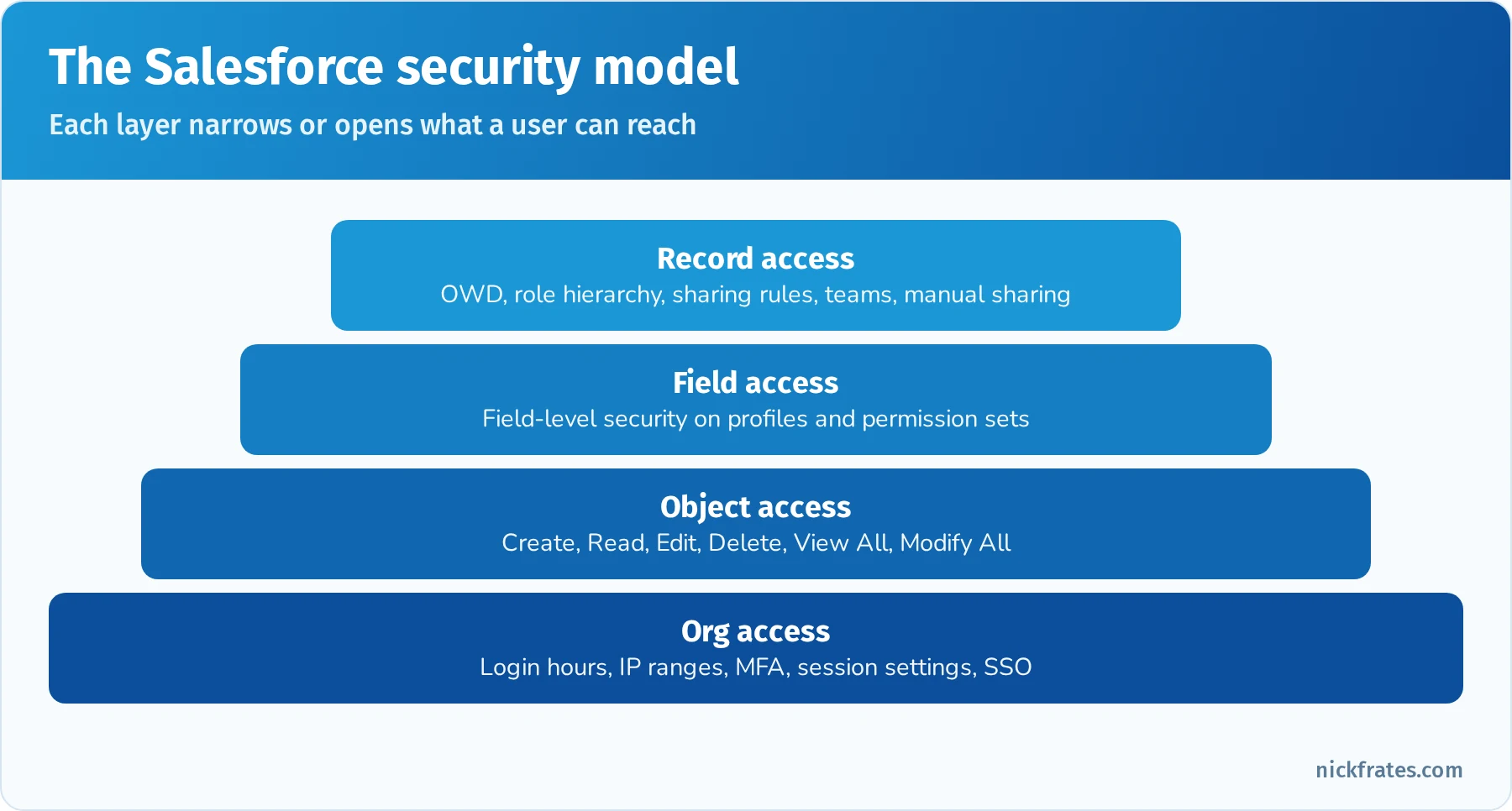
Four layers of security, from logging in to seeing a specific field on a specific record.
Troubleshooting access. When a user can't see something, check in this order: can they log in (login hours, IP, MFA, frozen)? Do they have object permission? Can they see the record (OWD, role, sharing, ownership)? Can they see the field (FLS)? Is it on their page layout or Lightning page? The sharing button on a record ("Sharing Hierarchy") shows why someone has access, and the user access summary (View Summary on a user) shows their permissions and where they come from.
Quick reference: security tools
| Need | Tool |
|---|---|
| Stop a departing user's access right now | Freeze the user, then deactivate after reassigning records |
| Only allow logins from the office network | Login IP ranges on the profile |
| Give a few users permission to export reports | Permission set (or permission set group) |
| Hide a field from everyone except Finance | Field-level security via permission sets |
| Managers see their team's records | Role hierarchy |
| Share accounts in a region with a public group | Criteria-based sharing rule |
| Let a rep share one record with a colleague | Manual sharing |
| Explain why a user can see a record | Sharing Hierarchy on the record, user access summary |
Practice questions: Configuration and Setup
Question 1. An employee is leaving today, and the admin must stop them from logging in immediately, but records still need to be reassigned. What should the admin do first?
- A. Delete the user
- B. Freeze the user
- C. Change the user's profile
- D. Remove the user's role
Answer: B. Freezing blocks login immediately without the side effects of deactivation. Users can't be deleted, and deactivation can be done after records are reassigned.
Question 2. The OWD for Opportunity is Private. Sales reps in the same territory need read-only access to each other's opportunities. Which feature fits?
- A. Role hierarchy
- B. A sharing rule granting Read Only to a public group or role for that territory
- C. Change OWD to Public Read/Write
- D. Field-level security
Answer: B. Sharing rules open access laterally to peers. The role hierarchy only opens access upward to managers.
Question 3. A user reports they can see the Account record but not the Annual Revenue field, even though it's on the page layout. What's the most likely cause?
- A. The OWD is Private
- B. Field-level security hides the field for the user's profile and permission sets
- C. The user lacks a role
- D. The record is locked
Answer: B. If a field is on the layout but invisible, FLS is the usual reason.
Question 4. Which statement about profiles and permission sets is true?
- A. A user can have many profiles
- B. Each user has one profile and can have many permission sets
- C. Permission sets can only remove permissions
- D. Profiles control record sharing
Answer: B. One profile per user, plus any number of permission sets and permission set groups. Permission sets add permissions; muting permission sets remove them within a group.
Question 5. The company wants to restrict all users of a profile to logging in only between 7 AM and 7 PM. Where is this configured?
- A. Session settings
- B. Login hours on the profile
- C. Password policies
- D. Network access trusted IPs
Answer: B. Login hours are set per profile. Trusted IP ranges and session settings are different controls.
Question 6. An admin needs to know exactly why a specific user can edit a specific case. What should they check?
- A. The case's Sharing Hierarchy and the user's access summary
- B. Setup Audit Trail
- C. Login History
- D. Debug logs
Answer: A. The sharing hierarchy on the record shows the reasons for access, and the user access summary shows where permissions come from.
Object Manager and Lightning App Builder (15%)
This section covers the data model and user interface: standard and custom objects, fields, relationships, record types, page layouts, Lightning record pages and apps.
Standard and custom objects. Know the core standard objects (Account, Contact, Lead, Opportunity, Case, Campaign, Product, Price Book, Quote, Contract, Order, Task, Event, User) and when to create a custom object instead. Custom objects get API names ending in __c and can have tabs, record types, page layouts, validation rules, triggers and relationships.
Field types. Text, text area (long and rich), number, currency, percent, checkbox, date, date/time, time, picklist, multi-select picklist, email, phone, URL, geolocation, auto number, formula, roll-up summary, lookup, master-detail and external lookup. Global value sets share picklist values across fields. Dependent picklists filter one picklist's values by another's. Changing a field's type can cause data loss, and some changes are blocked if the field is used elsewhere.
Relationships. Lookup (loose, optional, child keeps its own owner and sharing), master-detail (tight, required, details inherit sharing and are deleted with the master, enables roll-up summaries), many-to-many through a junction object with two master-detail fields, hierarchical (User only), and external lookups for external objects. Know that you can convert lookup to master-detail only if every record has a value, and master-detail to lookup only if no roll-up summaries depend on it. I compare them side by side in lookup vs master-detail relationships.
Record types and page layouts. Record types offer different picklist values, business processes (sales processes for opportunities, support processes for cases, lead processes) and page layouts to different users. Page layouts control field placement, related lists, and buttons. Page layout assignment is by profile and record type. Compact layouts control the highlights panel and mobile header. For the sales and service setup tested on the exam, see my Sales and Service apps cheat sheet.
Lightning App Builder. Builds record pages, app pages and home pages from standard, custom and AppExchange components. Record pages can be assigned as org default, app default, or by app, record type and profile. Dynamic Forms put fields and sections directly on the page with visibility rules, and Dynamic Actions control which buttons appear. Component visibility shows or hides components by record values, user, permissions or device. Lightning apps group tabs, a utility bar and branding, and can use standard or console navigation.
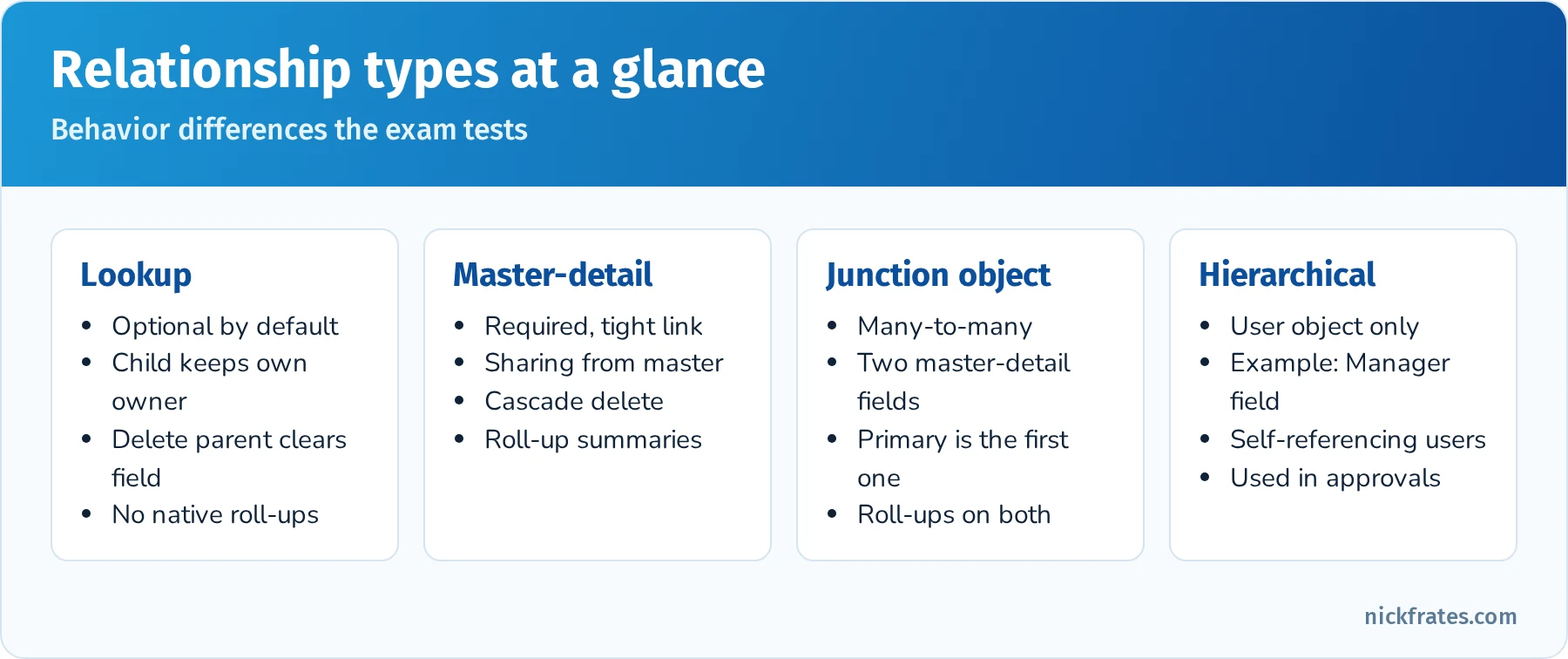
Know the behaviors of each relationship type.
Quick reference: UI configuration
| Requirement | Feature |
|---|---|
| Different picklist values for two business units | Record types |
| Different sales stages for two sales teams | Sales processes with record types |
| Show a field section only when Status is Escalated | Dynamic Forms visibility rule |
| Show an Approve button only to managers | Dynamic Actions with visibility filter |
| Key fields at the top of the record and on mobile | Compact layout |
| A custom home page for the Service team | Lightning App Builder home page assigned by app and profile |
| Share picklist values across several objects | Global value set |
| Filter City picklist by Country picklist | Dependent picklist |
Practice questions: Object Manager and Lightning App Builder
Question 1. Two sales teams sell different products and need different opportunity stages. What should the admin configure?
- A. Two custom opportunity objects
- B. Two sales processes, each tied to an opportunity record type
- C. Validation rules
- D. Two page layouts only
Answer: B. Sales processes control which Stage values are available, and record types tie them to users.
Question 2. The business wants the number of related Expense records displayed on each Trip record, and Expenses should be deleted when a Trip is deleted. What should the admin do?
- A. Create a lookup and a formula field
- B. Create a master-detail relationship from Expense to Trip and a COUNT roll-up summary on Trip
- C. Create a junction object
- D. Use a report
Answer: B. Master-detail gives cascade delete and supports roll-up summaries on the master.
Question 3. Users want certain fields to appear on the Case record page only when the case is Escalated. What's the best approach?
- A. A new record type for escalated cases
- B. Dynamic Forms with field visibility rules
- C. A validation rule
- D. A custom Visualforce page
Answer: B. Dynamic Forms supports conditional visibility without extra record types or layouts.
Question 4. Which layout controls the fields shown in the Salesforce mobile app's record header?
- A. Search layout
- B. Compact layout
- C. Page layout
- D. List view
Answer: B. Compact layouts define key fields for the highlights panel and mobile header.
Question 5. An admin needs the Region picklist values to stay identical on Account, Lead and a custom object. What should they use?
- A. Three separate picklists maintained by hand
- B. A global value set
- C. A dependent picklist
- D. A formula field
Answer: B. Global value sets share one list of values across fields.
Question 6. The admin wants a different Account record page for users in the Service Console app than in the Sales app. How?
- A. Assign Lightning record pages by app
- B. Create a new Account object
- C. Change the OWD
- D. Use a compact layout
Answer: A. Lightning record pages can be assigned by app, record type and profile.
Sales and Marketing Applications (10%)
This section tests how Sales Cloud features support the sales process from lead to closed deal, plus basic campaign management.
Leads and lead conversion. Leads are unqualified prospects. Lead assignment rules route them to users or queues, web-to-lead captures them from a website form (up to 500 per day by default), and lead conversion creates an Account, a Contact and optionally an Opportunity. Map custom lead fields to account, contact and opportunity fields so data carries over at conversion. Duplicate rules can warn or block when a lead matches an existing record.
Opportunities and the sales process. Opportunities track deals with Stage, Amount, Close Date and Probability. Sales processes define available stages per record type. Path guides reps through stages with key fields and guidance. Opportunity teams and opportunity splits handle shared credit. Products and price books: products are added to price books with a list price; each opportunity uses one price book; opportunity products (line items) roll up to the opportunity Amount. Quotes are generated from opportunities and one can sync with the opportunity. Forecasting (Collaborative Forecasts) rolls up opportunity amounts or quantities by forecast category and role hierarchy, with manager adjustments.
Campaigns. Campaigns track marketing initiatives. Campaign members are leads or contacts with a status (Sent, Responded and custom statuses). Campaign hierarchies roll up results, and the Campaign Influence feature attributes opportunity revenue to campaigns. Know that a user needs the Marketing User feature license checkbox (or equivalent permissions) to create campaigns.
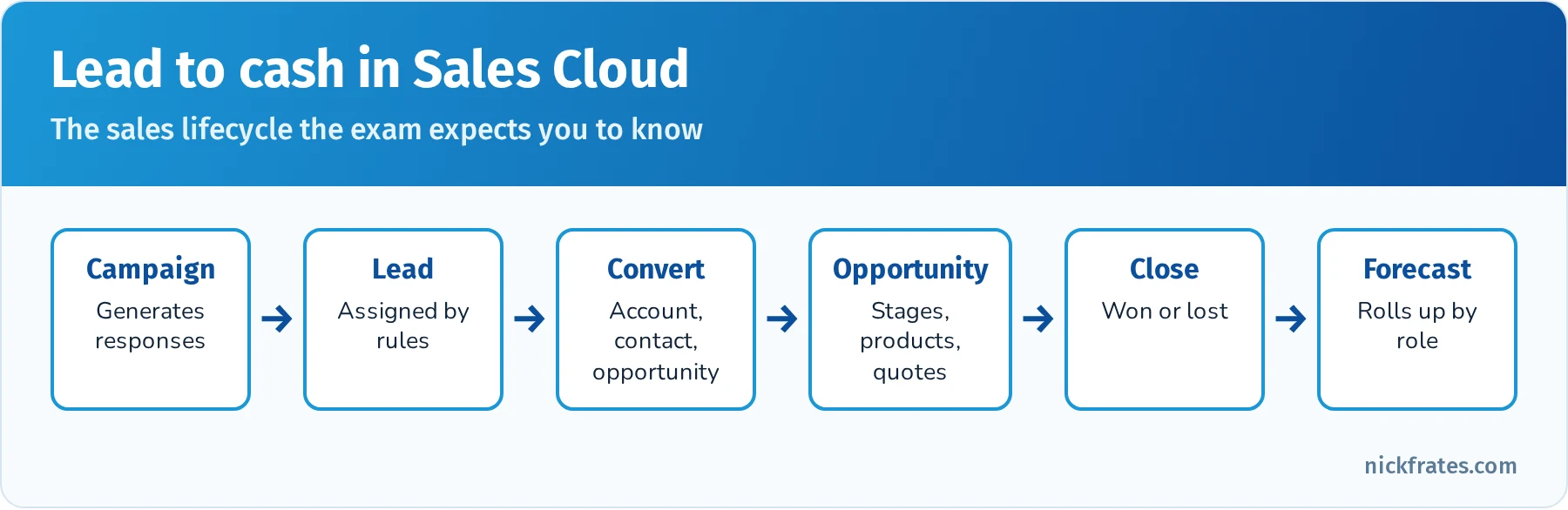
The Sales Cloud lifecycle the exam expects you to know.
Quick reference: Sales Cloud features
| Requirement | Feature |
|---|---|
| Route web leads to the right rep by state | Lead assignment rules |
| Carry a custom lead field into the new opportunity | Lead field mapping |
| Show reps guidance for each stage | Path |
| Different prices for partners and customers | Multiple price books |
| Share opportunity credit between two reps | Opportunity splits (with opportunity teams) |
| Track revenue influenced by marketing | Campaign influence |
| Managers adjust forecasts | Collaborative Forecasts with adjustments |
Practice questions: Sales and Marketing Applications
Question 1. When a lead is converted, the value in a custom lead field must appear on the new opportunity. What should the admin do?
- A. Create a flow on lead conversion
- B. Map the custom lead field to a custom opportunity field
- C. Use a validation rule
- D. Nothing, it happens automatically
Answer: B. Lead field mapping copies custom field values to account, contact or opportunity fields at conversion.
Question 2. Reps need to sell the same product at different prices to government and commercial customers. What should the admin set up?
- A. Two products with different names
- B. Two price books with different list prices
- C. A discount field and a validation rule
- D. Two opportunity record types only
Answer: B. Price books hold different prices for the same products.
Question 3. Marketing wants to know how much closed revenue each campaign influenced. Which feature fits?
- A. Campaign influence
- B. Lead assignment rules
- C. Path
- D. Opportunity splits
Answer: A. Campaign influence attributes opportunity revenue to related campaigns.
Question 4. A user can't create a campaign even though they have Create permission on Campaign. What's the likely cause?
- A. The Marketing User checkbox isn't enabled on their user record
- B. The OWD is Private
- C. They lack a role
- D. Campaigns are read-only
Answer: A. Creating and editing campaigns requires the Marketing User setting in addition to object permissions.
Question 5. Which statement about opportunity products is true?
- A. An opportunity can use several price books at once
- B. The opportunity Amount is calculated from opportunity products when products exist
- C. Products can't have prices
- D. Quotes can't sync with opportunities
Answer: B. When opportunity products exist, their total drives the Amount, and each opportunity uses one price book.
Service and Support Applications (10%)
This section covers Service Cloud fundamentals: how cases are created, routed, escalated and resolved.
Case creation channels. Email-to-Case (On-Demand uses Salesforce email services; standard Email-to-Case uses an agent behind your firewall), Web-to-Case (up to 5,000 cases per day), phone, chat and messaging channels, and Experience Cloud self-service portals.
Routing and assignment. Case assignment rules route cases to users or queues based on criteria. Queues hold records until someone takes ownership. Omni-Channel routes work items to available agents based on capacity, skills or queues. Auto-response rules send an automatic email reply when a case is created. Escalation rules reassign or notify when a case isn't resolved within a time limit, using business hours.
Knowledge, entitlements and the console. Salesforce Knowledge stores articles with data categories and article record types for agents and customers. Entitlements define the support a customer is eligible for, and milestones in entitlement processes track required steps such as first response. The Service Console (a console-navigation Lightning app) gives agents tabs, subtabs, a utility bar and macros. Macros automate repetitive steps, and quick text inserts standard messages.
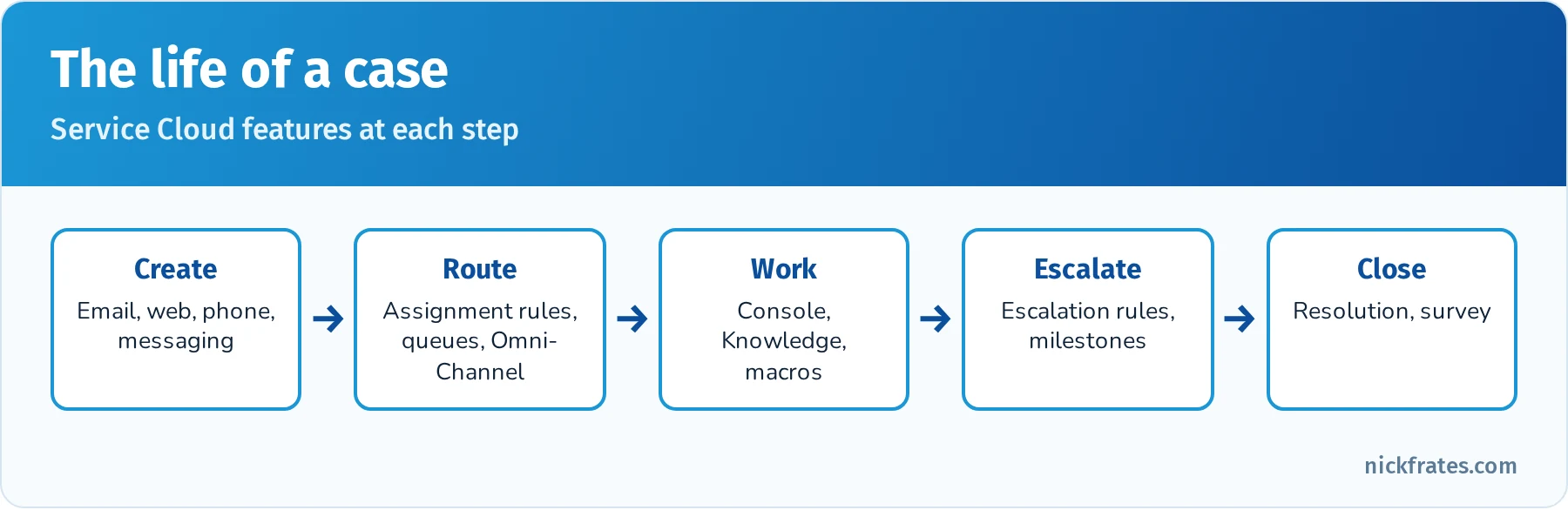
The Service Cloud features that support each stage of a case.
Quick reference: Service Cloud features
| Requirement | Feature |
|---|---|
| Create cases from customer emails | Email-to-Case |
| Capture cases from a website form | Web-to-Case |
| Send an automatic acknowledgment email | Auto-response rules |
| Route cases to the right team | Case assignment rules and queues |
| Route by agent availability and skills | Omni-Channel |
| Escalate cases not resolved in 8 business hours | Escalation rules with business hours |
| Track SLA steps like first response | Entitlements and milestones |
| Help agents answer consistently | Knowledge and quick text |
Practice questions: Service and Support Applications
Question 1. Customers email support@company.com, and each email should create a case. What should the admin configure?
- A. Web-to-Case
- B. Email-to-Case
- C. Auto-response rules
- D. Escalation rules
Answer: B. Email-to-Case converts incoming emails into cases.
Question 2. High-priority cases that remain open for more than four business hours must be reassigned to a supervisor. Which feature fits?
- A. Assignment rules
- B. Escalation rules with business hours
- C. Auto-response rules
- D. Queues only
Answer: B. Escalation rules act on cases that aren't closed within a time limit, respecting business hours.
Question 3. Cases should go to whichever available agent has the right language skill and capacity. Which feature fits?
- A. Omni-Channel with skills-based routing
- B. Case teams
- C. Manual assignment
- D. Web-to-Case
Answer: A. Omni-Channel routes work based on availability, capacity and skills.
Question 4. Premium customers are promised a first response within one hour. How should this be tracked?
- A. A formula field
- B. Entitlements with an entitlement process milestone
- C. A validation rule
- D. A report only
Answer: B. Entitlement processes track milestones such as first response time and can trigger actions when they're violated.
Question 5. Agents spend time writing the same responses. What should the admin provide?
- A. Quick text and Knowledge articles
- B. New validation rules
- C. More queues
- D. A new record type
Answer: A. Quick text inserts standard messages and Knowledge provides approved answers.
Productivity and Collaboration (10%)
This section covers activities, Chatter, email and mobile features that help users work together.
Activities. Tasks and events are activities related to records through Name (WhoId, a lead or contact) and Related To (WhatId, an account, opportunity, case or custom object with activities enabled). Shared activities allow one task or event to relate to up to 50 contacts. The activity timeline shows past and upcoming activities. Calendars can be shared, and Einstein Activity Capture syncs emails and events from Gmail or Outlook.
Chatter. Chatter provides feeds on records, profiles and groups (public, private and unlisted), posts, polls, @mentions and file sharing. Feed tracking lets users follow field changes on records. Chatter can be enabled or disabled org-wide, and you can create Chatter-only users with Chatter Free licenses.
Email and templates. Classic and Lightning email templates, letterheads and enhanced templates, mass email (with daily limits), email deliverability settings (Access Level: No access, System email only, All email) and Gmail or Outlook integration. Sandboxes default to "System email only," which surprises many admins after a refresh.
Mobile and other productivity tools. The Salesforce mobile app uses the same metadata as desktop. Admins customize the mobile navigation menu, compact layouts and actions. Kanban list views, list view charts, favorites, in-app guidance, Slack integration and Salesforce Files round out the toolset.
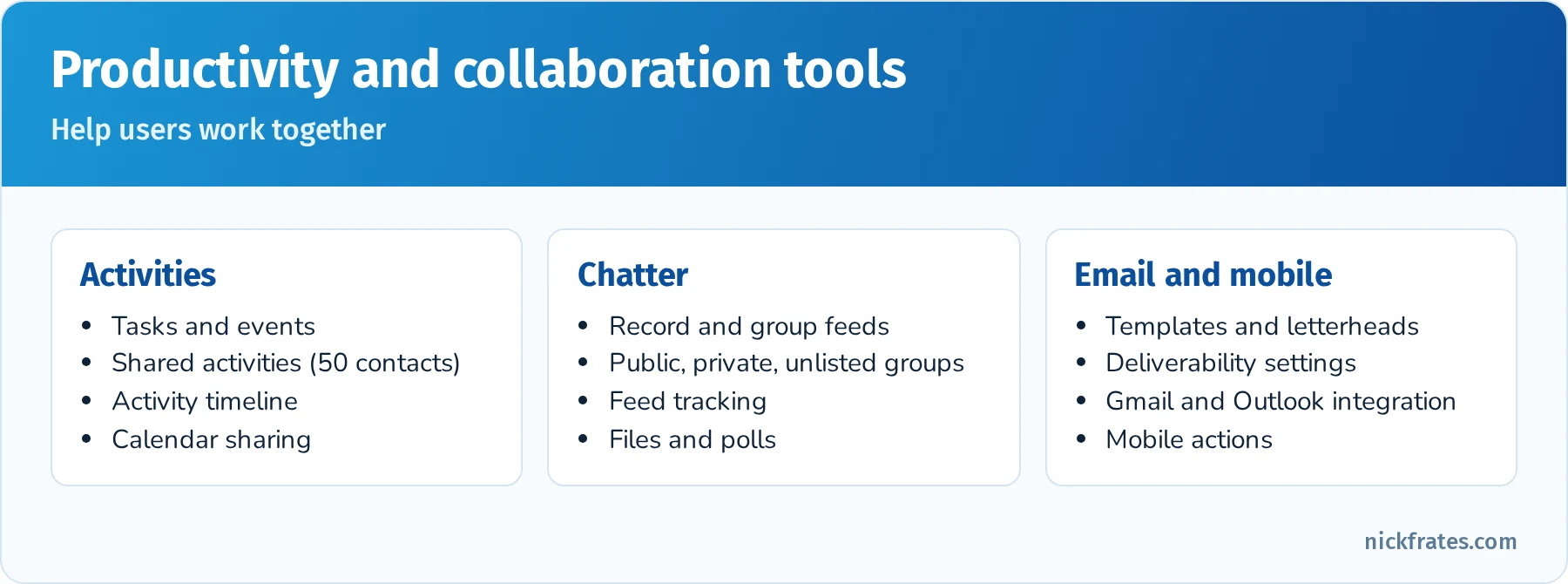
The productivity features the exam covers.
Quick reference: productivity features
| Requirement | Feature |
|---|---|
| Log one meeting with five contacts | Shared activities on an event |
| Collaborate privately on a project | Private Chatter group |
| Get notified when an opportunity's Stage changes | Follow the record with feed tracking on Stage |
| Emails from a sandbox aren't being delivered | Check Deliverability access level |
| Sync Gmail or Outlook emails and events | Einstein Activity Capture or the email integrations |
| Mobile users need a faster way to log calls | Quick action on the mobile action bar |
Practice questions: Productivity and Collaboration
Question 1. After a sandbox refresh, test emails from flows aren't being received. What should the admin check first?
- A. Email deliverability access level
- B. The OWD for Contact
- C. Page layouts
- D. Login hours
Answer: A. Sandboxes default to "System email only." Set deliverability to "All email" for testing.
Question 2. A sales rep wants to log one meeting with three contacts from the same account. What feature supports this?
- A. Shared activities
- B. Opportunity splits
- C. Case teams
- D. Campaign members
Answer: A. Shared activities let one event relate to multiple contacts.
Question 3. A project team wants to collaborate in Salesforce without people outside the team seeing posts. What should they use?
- A. Public Chatter group
- B. Private Chatter group
- C. Email template
- D. List view
Answer: B. Private group posts are visible only to members.
Question 4. Managers want to be notified in their feed when a high-value opportunity's Amount changes. What should the admin enable?
- A. Feed tracking on the Amount field, and managers follow the records
- B. A validation rule
- C. A roll-up summary
- D. Field-level security
Answer: A. Feed tracking posts field changes to the record feed for followers.
Question 5. Mobile users need a one-tap way to log a call on an account. What should the admin configure?
- A. A quick action added to the mobile action bar via the page layout or Dynamic Actions
- B. A dashboard
- C. A validation rule
- D. A report type
Answer: A. Quick actions appear in the mobile action bar and simplify common tasks.
Data and Analytics Management (17%)
The largest section. It covers importing, exporting, protecting and cleaning data, plus reports and dashboards. For a hands-on walkthrough of the reporting side, see my Salesforce reports and dashboards guide.
Data import and export.
| Tool | Records | Best for |
|---|---|---|
| Data Import Wizard | Up to 50,000 per import | Accounts, contacts, leads, solutions, campaign members, person accounts and custom objects; duplicate matching; easy for admins |
| Data Loader | Up to 5 million (Bulk API for large jobs) | All objects, insert/update/upsert/delete/hard delete/export, command-line scheduling |
| Data Export Service | Whole org | Weekly or monthly CSV backups |
| Mass transfer and mass delete tools | Varies | Changing ownership or deleting records in bulk |
Use External IDs with upsert to match records from other systems. Know the difference between delete (Recycle Bin, 15 days) and hard delete (bypasses the Recycle Bin, needs the Bulk API Hard Delete permission).
Data quality. Validation rules, required fields, unique fields, picklists, lookup filters, duplicate rules and matching rules, and periodic reports on missing values keep data clean. Duplicate rules can allow with an alert, block, and report on duplicates. Field history tracking records changes to up to 20 fields per object (more with Field Audit Trail). For real formulas, see my Salesforce validation rule examples.
Data protection. Backups (the Data Export Service, or Salesforce Backup and partner tools) protect against bad loads. Before a large import, export the affected records first so you can roll back.
Reports. Report types define which objects and relationships a report can use (standard report types and custom report types with "with" or "with or without" related records). Formats: tabular (a list), summary (grouped rows), matrix (grouped rows and columns) and joined (multiple blocks with different report types). Know filters (standard, field, cross filters such as "Accounts without Opportunities"), filter logic, row limits, bucket fields, summary formulas, row-level formulas, conditional formatting, charts and report subscriptions.
Dashboards. Dashboards show components (charts, gauges, metrics, tables) based on source reports. Each dashboard runs as a specific user (everyone sees that user's data) or as the logged-in user (a dynamic dashboard). Dashboard filters let viewers narrow data. Reporting snapshots store report results in a custom object on a schedule to track trends over time.
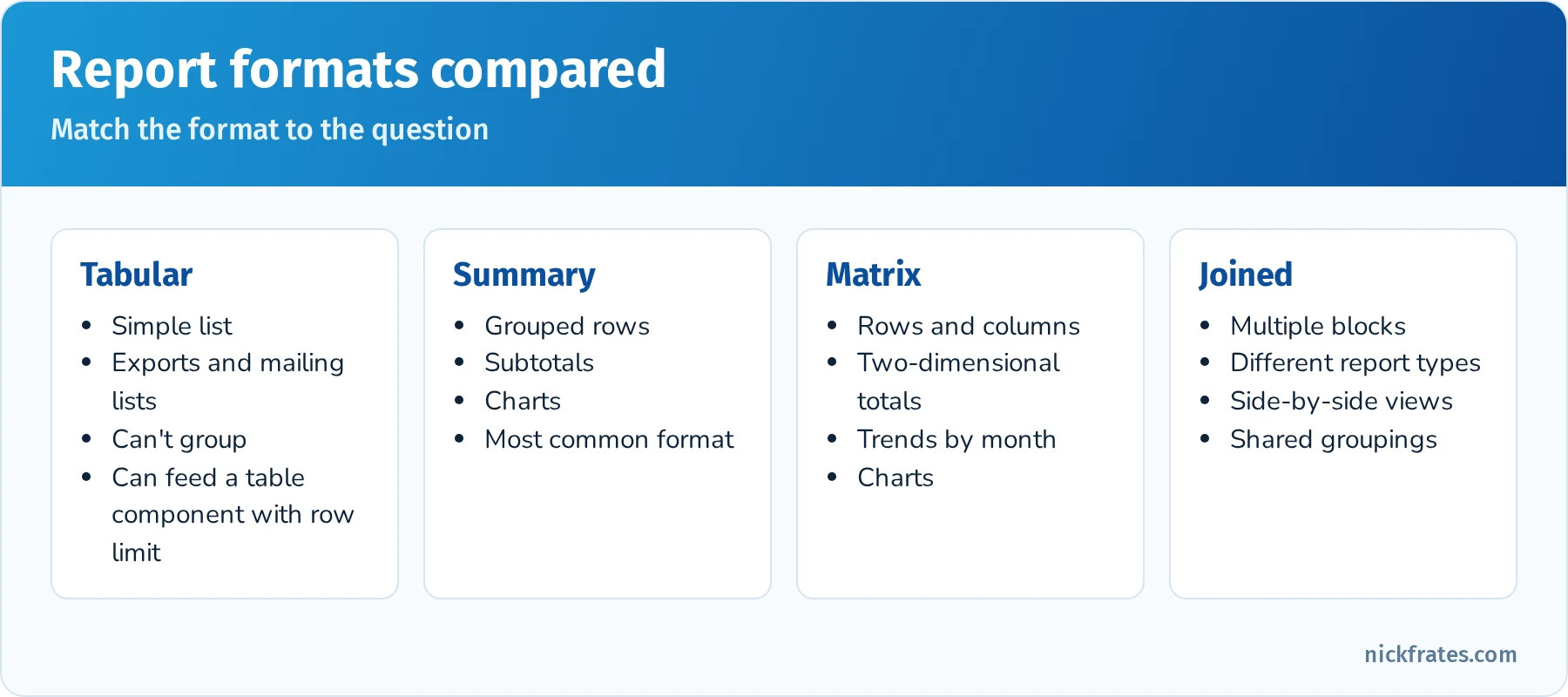
Pick the report format that matches the question you're answering.
Quick reference: reporting requirements
| Requirement | Feature |
|---|---|
| Accounts with no opportunities | Cross filter: Accounts without Opportunities |
| Group opportunities by stage and by month | Matrix report |
| Group values into Small, Medium, Large without a new field | Bucket field |
| Show win rate percentage in the report | Summary formula |
| Each manager sees only their team's data on one dashboard | Dynamic dashboard |
| Track pipeline value at the end of every week | Reporting snapshot |
| Report on a relationship the standard types don't include | Custom report type |
| Email a report to the team every Monday | Report subscription |
Practice questions: Data and Analytics Management
Question 1. An admin needs to import 120,000 contact records. Which tool should they use?
- A. Data Import Wizard
- B. Data Loader
- C. Mass transfer
- D. Copy and paste
Answer: B. The Data Import Wizard's limit is 50,000 records per import.
Question 2. The sales VP wants a report showing all accounts that don't have any opportunities. What should the admin use?
- A. A summary report with a formula
- B. A cross filter: Accounts without Opportunities
- C. A matrix report
- D. A joined report with two blocks
Answer: B. Cross filters handle "with" and "without" related record conditions.
Question 3. One dashboard must show each sales manager only the data they're allowed to see. What should the admin build?
- A. One dashboard per manager
- B. A dynamic dashboard that runs as the logged-in user
- C. A dashboard running as the System Administrator
- D. A reporting snapshot
Answer: B. Dynamic dashboards display data according to the viewer's own access.
Question 4. Leadership wants to see how total pipeline changed week over week for the last six months. What should the admin set up going forward?
- A. A bucket field
- B. A reporting snapshot that stores pipeline totals weekly
- C. A cross filter
- D. Field history tracking on Amount
Answer: B. Reporting snapshots capture report data on a schedule into a custom object for trending.
Question 5. Users keep creating duplicate accounts with slightly different names. What should the admin configure?
- A. Matching rules and duplicate rules
- B. A new record type
- C. A validation rule requiring a phone number
- D. A dynamic dashboard
Answer: A. Matching rules identify likely duplicates, and duplicate rules decide whether to alert or block.
Question 6. A report needs to show Opportunities with their Products and, separately, related Cases for the same Accounts in one view. Which format fits?
- A. Tabular
- B. Summary
- C. Joined
- D. Matrix
Answer: C. Joined reports combine blocks from different report types.
Automation (15%)
Automation questions ask you to choose and configure the right declarative tool. Flow is the center of this section now that Workflow Rules and Process Builder are past end of support.
Flow types. Screen flows (guided UIs launched by users), record-triggered flows (before save for fast same-record updates; after save for related records, emails and actions; with scheduled paths and an asynchronous path), schedule-triggered flows (batch jobs on a schedule), platform event-triggered flows, and autolaunched flows (called from other flows, Apex, buttons, APIs or agents). Know the core elements: Get, Create, Update and Delete Records, Decision, Assignment, Loop, Collection Filter and Sort, Transform, Action, Subflow, Screen and fault connectors. For exam-focused examples, see my guide to Salesforce Flow for the Admin exam.
Approval processes. Route records to approvers with entry criteria, approval steps, approver selection (manager, user, queue, related user), record locking and actions on submit, approve, reject and recall. Flows can submit records for approval.
Other automation tools. Validation rules (block invalid data), formula fields (calculated values), roll-up summaries, assignment rules (leads and cases), auto-response rules, escalation rules, and the Migrate to Flow tool for converting legacy Workflow Rules and Process Builder processes.
Best practices. Before-save flows for same-record field updates, entry conditions so flows run only when needed, no DML or Get Records inside loops, fault paths on elements that can fail, consistent naming and descriptions, and testing with Flow debug before activation. Review Salesforce Flow Best Practices and How to Debug Salesforce Flows for more depth.
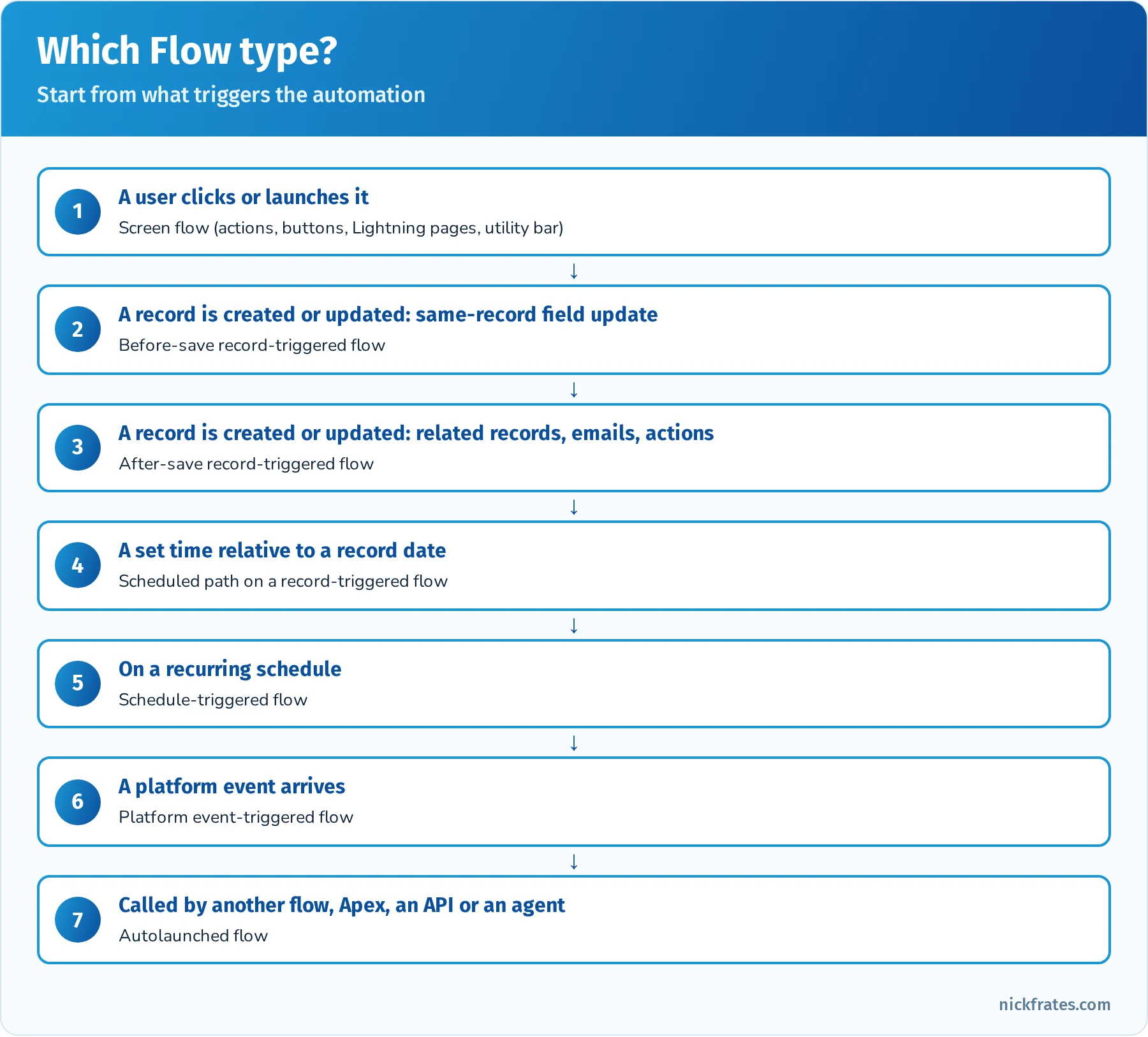
Match the trigger to the Flow type.
Quick reference: automation requirements
| Requirement | Tool |
|---|---|
| Default a field when a record is created | Before-save record-triggered flow (or a default field value) |
| Create a renewal opportunity when a deal closes | After-save record-triggered flow |
| Remind the owner 3 days before a date | Scheduled path |
| Archive old cases every Sunday night | Schedule-triggered flow |
| Walk agents through a return process | Screen flow |
| Require manager sign-off on large discounts | Approval process |
| Convert an old Process Builder process | Migrate to Flow tool |
| Stop users from saving bad data | Validation rule |
Practice questions: Automation
Question 1. When a case is closed, a survey task must be created for the account owner. What should the admin build?
- A. Before-save record-triggered flow
- B. After-save record-triggered flow
- C. Validation rule
- D. Formula field
Answer: B. Creating a related record requires an after-save flow.
Question 2. A field on Lead should be set to "Web" when the Lead Source contains "Website," and this must run as fast as possible. Which tool fits?
- A. After-save flow
- B. Before-save record-triggered flow
- C. Schedule-triggered flow
- D. Approval process
Answer: B. Before-save flows update the triggering record without an extra save, which is the fastest option.
Question 3. The org still has several Process Builder processes. What should the admin do?
- A. Leave them; they're fully supported
- B. Use the Migrate to Flow tool and test the converted flows
- C. Convert them to Workflow Rules
- D. Delete them without replacement
Answer: B. Process Builder is past end of support. Migrate to Flow converts many processes, and the results must be tested.
Question 4. A flow updates related contacts one by one inside a loop and fails on large accounts. What's the fix?
- A. Add more loops
- B. Add contacts to a collection inside the loop and use one Update Records after it
- C. Use a validation rule
- D. Increase the governor limit
Answer: B. Bulkified collections avoid hitting the DML statement limit.
Question 5. Expense reports over $5,000 need director approval, and the record must be locked until approved. What should the admin use?
- A. Approval process
- B. Screen flow
- C. Validation rule
- D. Escalation rule
Answer: A. Approval processes route records and lock them during approval.
Question 6. A flow sometimes fails when a required field is missing, and users see an ugly error. What should the admin add?
- A. A fault path that handles the error and notifies an admin
- B. More screens
- C. A roll-up summary
- D. A new record type
Answer: A. Fault paths handle errors gracefully. See Flow Error Handling 101.
Agentforce (8%)
The newest section. You aren't expected to architect complex agents (that's the Agentforce Specialist exam), but you should understand what agents do, when AI is appropriate, how agent security works and how admins maintain agents.
Use cases and when AI is appropriate. Agentforce agents handle conversations and take actions for employees (for example, summarizing a record or updating opportunities) or customers (answering questions and starting returns on a website). AI is appropriate when tasks involve language, judgment over unstructured information or high volumes of repetitive requests. Deterministic tasks with clear rules (always set this field when that happens) are still better served by Flow, validation rules or formulas.
How an agent is built. In Agentforce Builder, an agent has a role and description, subagents (called topics in older builders and in the exam guide) that each cover a job to be done, instructions that guide the agent's reasoning, and actions such as flows, Apex, prompt templates and standard actions. The agent decides which subagent and action fit a request.
Security and permissions. Agents act with a specific user context. Employee agents generally run with the permissions of the user they're helping; service agents use a dedicated agent user whose permission sets control which objects, fields and actions the agent can access. Least privilege matters: if an agent can't see a field or run an action, check the agent user's permission sets, object and field access, and whether the action is assigned to the agent. The Einstein Trust Layer masks sensitive data, keeps zero data retention agreements with model providers and logs activity.
Maintaining agents. Admins update instructions and subagent descriptions when the agent picks the wrong action, update prompt templates in Prompt Builder, and test with the conversation preview in Agentforce Builder before activating changes. Larger test suites run in the Testing Center. Agent analytics and session logs show how agents are performing.
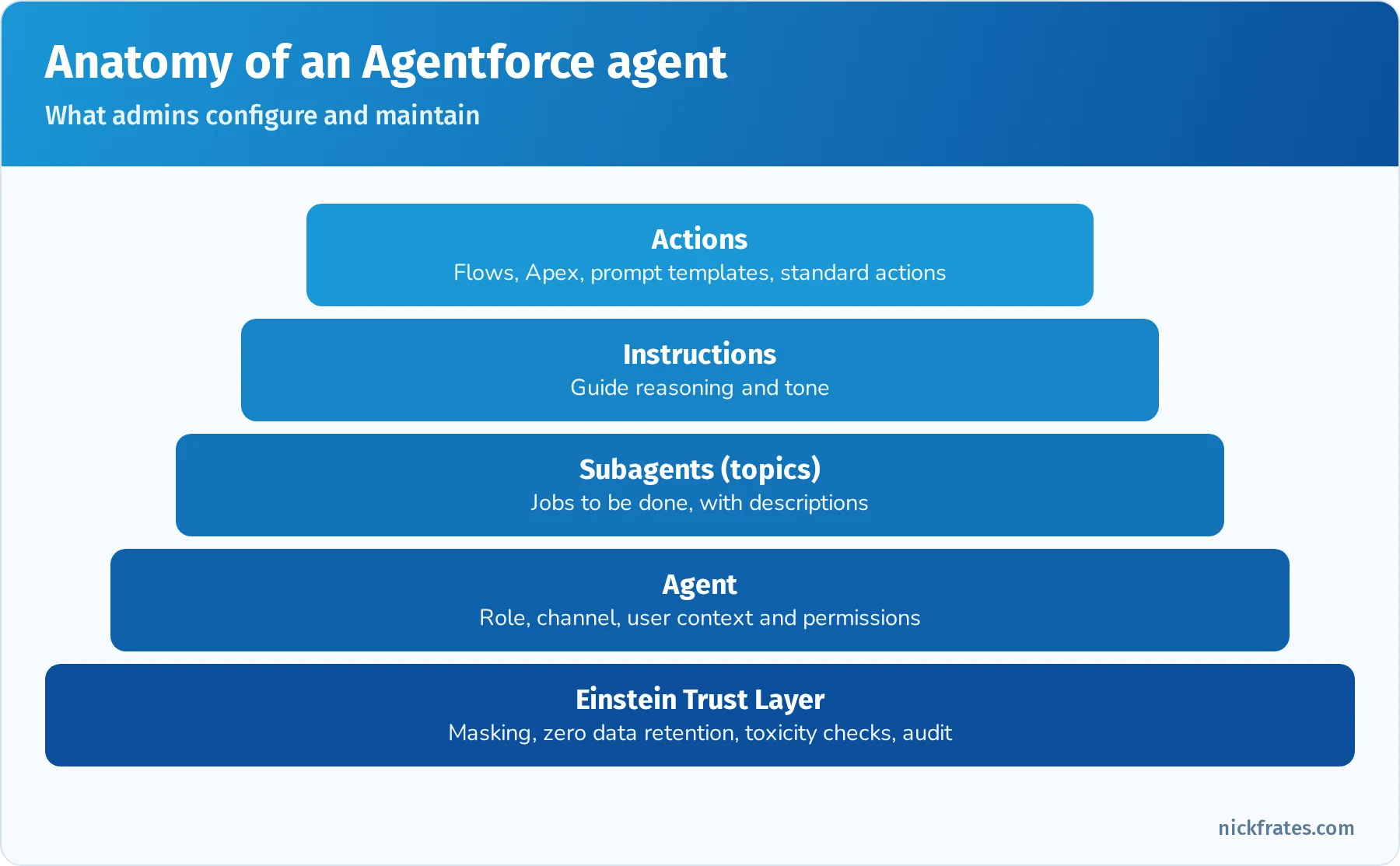
What admins configure and maintain in an agent.
Quick reference: Agentforce for admins
| Scenario | What to check or do |
|---|---|
| Agent can't update a field it should | Agent user's object and field permissions, action configuration |
| Agent picks the wrong action | Clarify instructions and subagent or action descriptions, then test in preview |
| Need a rule applied the same way every time | Use Flow or validation rules, not AI |
| Update tone of generated emails | Edit the prompt template in Prompt Builder and preview |
| Validate changes before customers see them | Conversation preview, then Testing Center |
| Protect sensitive data in prompts | Einstein Trust Layer masking and permission-aware grounding |
Practice questions: Agentforce
Question 1. A service agent tells customers it can't look up order status, even though an order lookup action exists. What should the admin check first?
- A. The OWD for Account
- B. Whether the action is assigned to the right subagent and the agent user has permission to the objects and fields it uses
- C. Email deliverability
- D. The fiscal year settings
Answer: B. Missing action assignment or missing permissions on the agent user are the most common reasons an agent can't act.
Question 2. Which requirement is better solved with Flow than with an AI agent?
- A. Answer open-ended product questions from customers
- B. Always set Priority to High when Type is Outage
- C. Summarize a long case history
- D. Draft a personalized follow-up email
Answer: B. A clear, deterministic rule should be automated with Flow. AI fits language and judgment tasks.
Question 3. After updating an agent's instructions, how should the admin check the change before activating it?
- A. Activate and wait for customer complaints
- B. Test sample conversations in the conversation preview in Agentforce Builder
- C. Run a report
- D. Refresh a sandbox
Answer: B. Conversation preview lets admins test how the agent reasons and which actions it chooses.
Question 4. Which feature protects sensitive customer data when agents send prompts to a large language model?
- A. Page layouts
- B. The Einstein Trust Layer
- C. Queues
- D. Dynamic dashboards
Answer: B. The Trust Layer provides data masking, zero data retention with model providers, toxicity detection and audit logging.
Question 5. The tone of AI-drafted sales emails is too formal. Where should the admin make the change?
- A. In the prompt template in Prompt Builder
- B. In the Opportunity page layout
- C. In the role hierarchy
- D. In Data Loader settings
Answer: A. Prompt templates control instructions and tone for generated content.
Hands-on project: configure a small org end to end
Do this in a free Developer Edition org over a few evenings. It touches every section.
- Setup and security: set company time zone and business hours. Create three users (sales rep, sales manager, service agent) with a minimum-access profile and permission sets. Set Opportunity OWD to Private, build a two-level role hierarchy and add a criteria-based sharing rule for one region. Log in as each user to check access.
- Object Manager: create a custom object "Site Visit" with a master-detail to Account, a picklist, a date and a formula field. Add a roll-up summary on Account counting site visits. Build a Lightning record page with Dynamic Forms and a Path.
- Sales: create a price book with two products, convert a lead with custom field mapping, and add products to the resulting opportunity.
- Service: set up Web-to-Case, a case assignment rule to a queue, an auto-response rule and an escalation rule using business hours.
- Productivity: create a private Chatter group, enable feed tracking on Opportunity Stage, and add a "Log a Call" quick action to the mobile action bar.
- Data and analytics: import 50 contacts with the Data Import Wizard, then export them with Data Loader. Build a summary report, a matrix report, a cross-filter report and a dynamic dashboard.
- Automation: build a before-save flow, an after-save flow with a scheduled path, a screen flow launched from a quick action and an approval process. Add a fault path.
- Agentforce: if your org has Agentforce available (for example, a Trailhead Playground from an Agentblazer module), open Agentforce Builder, review a subagent's instructions and actions, and test a conversation in preview.
Deep dive: troubleshooting access step by step
Access troubleshooting shows up across several sections, so it's worth a repeatable method. Here's a worked example.
Scenario. Priya, a sales rep in the West region, says she can't see the "Acme West" opportunity that her colleague Marcus owns. She also says that on opportunities she can see, the Discount field is missing.
Step 1: Can she log in and use the app? She can log in, so login hours, IP ranges and MFA aren't the problem. She sees the Opportunities tab, so she has at least Read on the object.
Step 2: Object permissions. Use the user access summary to confirm she has Read on Opportunity through her profile or a permission set. If she needed to edit, you'd check Edit too.
Step 3: Record access. Opportunity OWD is Private. Marcus is her peer, not someone below her in the role hierarchy, so the hierarchy doesn't help. Check sharing rules: is there a rule that shares West opportunities with the West Sales public group or role? Use the Sharing Hierarchy button on the record (as an admin) to see who has access and why. The fix is usually a criteria-based or owner-based sharing rule, or adding her to the opportunity team if access should be one-off.
Step 4: Field access. The Discount field is missing on records she can see. If it's on the layout or Dynamic Form, field-level security is the cause. Grant Read (or Edit) on Discount through the Sales Rep permission set.
Step 5: Page and layout. If FLS is correct but the field still doesn't appear, check which Lightning record page and page layout are assigned to her app, record type and profile, and any visibility rules on the field.
Step 6: Test as the user. Log in as Priya (or use a test user with the same access) to confirm the fix, and document the change.
| Symptom | Most likely cause | Fix |
|---|---|---|
| Can't log in at 9 PM | Login hours on profile | Adjust login hours or explain policy |
| Tab not visible | Tab settings or app assignment | Tab visibility in profile/permission set, add to app |
| Can't see a peer's record | OWD Private, no sharing | Sharing rule, team or manual share |
| Can see record, not a field | Field-level security | Grant FLS through a permission set |
| Can see field, can't edit | FLS read-only, or record access read-only | Grant edit FLS or edit record access |
| Can't create records | No Create object permission | Permission set with Create |
Deep dive: reports and dashboards
Reports and dashboards are a big part of the largest section, and the questions get specific.
Report types. Standard report types are generated for standard objects and their relationships. Custom report types let you choose a primary object and up to three related objects (for four total), and decide whether each related object is "with" (only records that have related records) or "with or without" (all primary records, whether or not they have related records). Fields from lookup relationships can be added through "Add fields related via lookup."
Filtering. Standard filters (Show Me, date range), field filters, filter logic (1 AND (2 OR 3)), cross filters ("Accounts with Cases" or "Accounts without Opportunities," including subfilters on the related object) and row limits ("Top 10 opportunities by Amount").
Calculations. Summary formulas calculate at grouping levels (for example, win rate per owner), row-level formulas calculate per record (for example, days since last activity), and bucket fields group values into categories without creating a new field. Conditional formatting highlights values, and charts visualize grouped data.
Dashboards. A dashboard can have many components, each with one source report. The running user determines what data appears: a specific user (everyone sees the same data), the logged-in user (dynamic dashboard, with limits on how many each org can have), or "Let authorized users change running user." Dashboard filters let viewers switch between values such as region. Dashboards can be subscribed to and refreshed on a schedule.
Folders and sharing. Reports and dashboards live in folders. Folder access (Viewer, Editor, Manager) is granted to users, roles, roles and subordinates, or public groups. If a user can't see a report, check folder sharing first.
Mixed practice exam: 15 more questions
Set a timer for 26 minutes.
Question 1. An admin wants a sales manager to approve opportunities with a discount above 15% from a mobile phone. What makes this possible?
- A. An approval process; approvals can be handled in the Salesforce mobile app and by email response
- B. A validation rule
- C. A dashboard
- D. A report subscription
Answer: A. Approvers can respond in the mobile app, in Salesforce or by email (if email approval response is enabled).
Question 2. Users in Japan see dates in a US format. What should be changed?
- A. Company default currency
- B. The users' locale settings
- C. Fiscal year
- D. Business hours
Answer: B. Locale controls date, time and number formats.
Question 3. An admin needs to give 25 users the ability to view encrypted data. What's the best approach?
- A. Change their profiles to System Administrator
- B. Assign a permission set with View Encrypted Data
- C. Create a sharing rule
- D. Remove field-level security
Answer: B. Permission sets grant specific permissions to specific users without changing profiles.
Question 4. A custom object should be visible in the Sales app but hidden from the Service app. What should the admin adjust?
- A. The object's OWD
- B. The app's navigation items
- C. Field-level security
- D. Page layout assignment
Answer: B. Apps define which tabs and items appear in their navigation.
Question 5. Which statement about the Recycle Bin is correct?
- A. Deleted records stay for 30 days
- B. Deleted records stay for 15 days and can be restored by the user who deleted them or an admin
- C. Hard-deleted records go to the Recycle Bin
- D. Users can't restore their own records
Answer: B. Records stay in the Recycle Bin for 15 days. Hard delete bypasses it.
Question 6. The company wants a weekly backup of all data as CSV files. What should the admin use?
- A. Data Loader export
- B. The Data Export Service, scheduled weekly
- C. Reports
- D. Change sets
Answer: B. The Data Export Service can schedule weekly or monthly exports.
Question 7. Opportunities should only allow a Close Date in the past when Stage is Closed Won or Closed Lost. What should the admin create?
- A. A validation rule
- B. A before-save flow
- C. A formula field
- D. A sharing rule
Answer: A. Validation rules enforce data conditions on save.
Question 8. A support manager wants to see cases by status and by priority in a grid. Which report format fits?
- A. Tabular
- B. Summary
- C. Matrix
- D. Joined
Answer: C. Matrix reports group by rows and columns.
Question 9. New users must complete a short walkthrough the first time they open the Opportunity page. What should the admin create?
- A. In-app guidance walkthrough or prompt
- B. A report
- C. A sharing rule
- D. A validation rule
Answer: A. In-app guidance shows prompts and walkthroughs inside Salesforce.
Question 10. A user needs to temporarily cover for a manager and see all the manager's team's records for two weeks. What's the simplest secure approach?
- A. Change the OWD to Public Read/Write
- B. Temporarily assign the user to the manager's role or a permission set group designed for coverage, then remove it after two weeks (using permission set assignment expiration where available)
- C. Share the manager's password
- D. Give the user Modify All Data permanently
Answer: B. Temporary role or permission changes, ideally with expiration dates, avoid permanent over-sharing. Never share credentials.
Question 11. A screen flow must know which Account record it was launched from. What should the admin configure?
- A. A text variable named
recordIdthat's available for input - B. A global action
- C. A roll-up summary
- D. A report filter
Answer: A. Lightning pages and quick actions pass the record Id into a recordId input variable. See How to Get the Current Record ID in a Salesforce Screen Flow.
Question 12. Which tool lets the admin find out who changed a picklist's values last week?
- A. Field history tracking
- B. Setup Audit Trail
- C. Login history
- D. Debug logs
Answer: B. Setup Audit Trail logs configuration changes for 180 days.
Question 13. The admin needs to update the Industry on 8,000 existing accounts using a spreadsheet with Salesforce Ids. What's the best tool?
- A. Data Import Wizard update or Data Loader update
- B. Manual edits
- C. A report
- D. Mass transfer
Answer: A. Both handle updates at this volume. Data Loader is especially convenient when you already have Salesforce Ids. For a side-by-side comparison, see Data Import Wizard vs Data Loader.
Question 14. A company sells through partners who need to log deals in Salesforce through a portal. Which feature fits?
- A. Experience Cloud partner site
- B. Chatter Free licenses
- C. Web-to-Lead only
- D. A dashboard
Answer: A. Partner sites on Experience Cloud give external partners controlled access to records.
Question 15. An agent should help sales reps summarize account activity. The summaries look good, but reps say the agent sometimes includes data from accounts they can't access. What should the admin investigate?
- A. Whether the agent and its actions respect the running user's permissions, and the grounding configuration of the prompt template
- B. The fiscal year
- C. Email templates
- D. List views
Answer: A. Employee agents should respect the user's access. Review how actions and prompt grounding retrieve data and which user context they run in.
Exam-day strategy
- Pace yourself: 105 minutes for up to 65 questions is about 1 minute 35 seconds each. Mark long questions and come back.
- Read the last sentence first: it tells you what's being asked (the best solution, the first step, the two correct answers).
- Watch for "choose two" or "choose three": multiple-select questions tell you how many answers to pick, and all must be correct.
- Eliminate retired features: Workflow Rules, Process Builder and Classic-only features are rarely right for new solutions.
- Prefer least privilege and standard features: permission sets over profile changes, sharing rules over Public Read/Write, declarative before code.
- Online proctoring: test your system, webcam and room in advance, and keep your desk clear.
Common exam traps
- Deleting users. You can't delete users. Freeze to stop access immediately, deactivate to free the license.
- Page layout isn't security. Use field-level security to hide data.
- Role hierarchy opens access upward only. Peers need sharing rules or teams.
- Data Import Wizard tops out at 50,000 records. Above that, use Data Loader.
- Dynamic dashboards show each viewer their own data; a dashboard running as one user shows everyone that user's data.
- Sandbox email deliverability defaults to system email only.
- Before-save flows can't create related records or send emails.
- Workflow Rules and Process Builder are wrong answers for new automation.
- Agents act with permissions. If an agent can't do something, check its user's permissions and action assignments before rewriting prompts.
Flashcard terms
- Organization-wide defaults: baseline record access per object.
- Permission set group: a bundle of permission sets for a persona.
- Muting permission set: removes permissions within a permission set group.
- Freeze user: blocks login immediately without deactivating.
- Global value set: shared picklist values across fields.
- Sales process: the Stage values available to an opportunity record type.
- Lead conversion: creates an account, contact and optional opportunity from a lead.
- Price book: a list of products with prices.
- Escalation rule: reassigns or notifies on cases not resolved within a time limit.
- Omni-Channel: routes work based on agent availability, capacity and skills.
- Entitlement process: milestones that track service commitments.
- Shared activities: one task or event related to multiple contacts.
- Cross filter: "with" or "without" related records in a report.
- Bucket field: groups report values into categories without a new field.
- Dynamic dashboard: runs as the logged-in viewer.
- Reporting snapshot: saves report results over time.
- Scheduled path: runs flow actions relative to a date on a record.
- Migrate to Flow: tool that converts legacy automation to Flow.
- Subagent (topic): a job to be done within an Agentforce agent.
- Conversation preview: tests an agent's responses in Agentforce Builder.
Quick-reference cheat sheet
| Topic | Remember |
|---|---|
| Passing score | 68% of 60 scored questions (about 41 correct) |
| Largest section | Data and Analytics Management 17% |
| New section | Agentforce 8% |
| Record access order | OWD, role hierarchy, sharing rules, teams, manual sharing |
| Users | Freeze, deactivate, never delete |
| Import limits | Data Import Wizard 50,000; Data Loader up to 5 million |
| Recycle Bin | 15 days |
| Field history | Up to 20 fields per object |
| Web-to-Lead / Web-to-Case | 500 / 5,000 per day by default |
| Report formats | Tabular, summary, matrix, joined |
| Same-record update | Before-save flow |
| Related records and actions | After-save flow |
| Agent can't act | Check agent user permissions and action assignment |
Frequently asked questions
Is the Platform Administrator exam the same as the old Salesforce Administrator exam? Yes. It's the same credential with a new name and a refreshed outline that took effect on December 15, 2025.
How long does it take to prepare? Most people with some hands-on Salesforce experience need six to ten weeks at five to eight hours per week. Complete beginners should plan for longer and spend most of that time in an org.
Do I need Agentforce experience? You need to understand the basics: what agents are, when to use them, how permissions affect them and how to test changes in preview. Agentblazer Champion trails on Trailhead are a good way to get hands-on practice.
What's the passing score? 68% for the English exam.
What should I take after Admin? Platform App Builder is the natural next step. Advanced Administrator (now Platform Administrator II) goes deeper on configuration, and Agentforce Specialist covers AI agents in depth.
Related study guides
- Salesforce Admin practice test: 25 free, original Platform Administrator questions with every answer explained.
- Salesforce Admin certification guide: the short overview of cost, retake rules, booking, maintenance and an 8-week study plan.
- Salesforce Platform App Builder study guide covers data modeling, Flow and UI in more depth.
- Salesforce Advanced Administrator (Platform Administrator II) study guide for your next step.
- Agentforce Specialist study guide if the Agentforce section sparked your interest.
- Salesforce Platform Foundations study guide if you want a lower-cost first exam.
- All Salesforce certification study guides.
- The science of studying for Salesforce certifications for active recall, spaced repetition and an Anki workflow.
- Agentforce Sales Consultant (formerly Sales Cloud Consultant) study guide for the sales-focused consultant exam that builds on Admin.
- Agentforce Service Consultant (formerly Service Cloud Consultant) study guide for the service-focused consultant exam that builds on Admin: Omni-Channel, Knowledge, entitlements and Agentforce Service agents.
- How to pass the Salesforce Admin exam on your first try
- 6-week Salesforce Admin study plan for people with full-time jobs
- Best Salesforce Admin certification courses in 2026
- Salesforce Admin vs Platform Developer I
- Salesforce Admin salary (2026)
Want to go deeper on automation? Automation is 15% of this exam, and Flow is the only supported declarative automation tool now that Workflow Rules and Process Builder are past end of support. My Salesforce Flows course walks through record-triggered, screen, scheduled and platform event flows with real-world challenges.
Hope this helps!
Best,
Nick