Hey friends,
Agentforce is Salesforce's platform for building AI agents: autonomous assistants that use a large language model (LLM) to understand a request, decide what to do, and take action in Salesforce, using your data, your permissions and the guardrails you set. Salesforce Help calls agents “goal-oriented, autonomous AI assistants” that can start and finish a sequence of tasks, not just answer a question (What Are Agents?).
This is the guide I'd want if I were starting today. It covers the pieces of an agent, how one handles a single message, which agent type fits which job, how Agentforce keeps data safe, how usage is counted, and how to try it for free. Each section links to a deeper post when you want the details.
What is Agentforce?
The developer guide describes Agentforce as “the agent-driven layer of the Salesforce Platform” (Get Started with Agentforce). Because it sits on the platform, agents work with the same things you already build with: your CRM data, flows, Apex, prompt templates and permissions.
Salesforce Help lists four kinds of work agents are meant to take on:
- Repetitive tasks. Updating a record, answering a simple question or drafting an email. During a conversation the agent works out which actions the task needs and runs them.
- Customer service. Context-aware answers grounded in business data, with automatic escalation to a live agent for complex issues.
- Insights about a record or page. For example, summarizing a case and suggesting actions based on the page a user is viewing.
- Complex, creative tasks. Drafts of emails, newsletters and text messages, plus help brainstorming and planning.
One naming point saves confusion. Salesforce's glossary separates two kinds of AI features. An Agentforce feature uses the LLM gateway and the reasoning engine. An embedded (Einstein) feature uses AI for one job, such as a prediction or a generated summary, without the reasoning engine. If it can choose between actions, it's Agentforce. If it does one fixed thing, it's an embedded feature.
Agentforce vs Einstein Bots
Bots and agents both chat, but they work differently. This comparison comes straight from Help:
| Einstein Bots | Agents | |
|---|---|---|
| How they converse | Scripted replies, which suit straightforward or transactional interactions | Fluid conversations that use the context of the conversation |
| How they process intent | Limited to predefined dialogs and rules | Built on LLMs, so they're better at interpreting the intent behind a message |
| How they're built | Simple intent models and hard-coded dialogs, often with more setup and training | LLMs that decide what to do using subagents and actions |
Help is clear that bots still have a place: they're well suited when you need transparency and control, for example in a regulated industry that requires explainable processes, or when conversations must follow highly specific, deterministic flows. I go deeper in Einstein Bots vs Agentforce Service Agents.
The building blocks of an agent
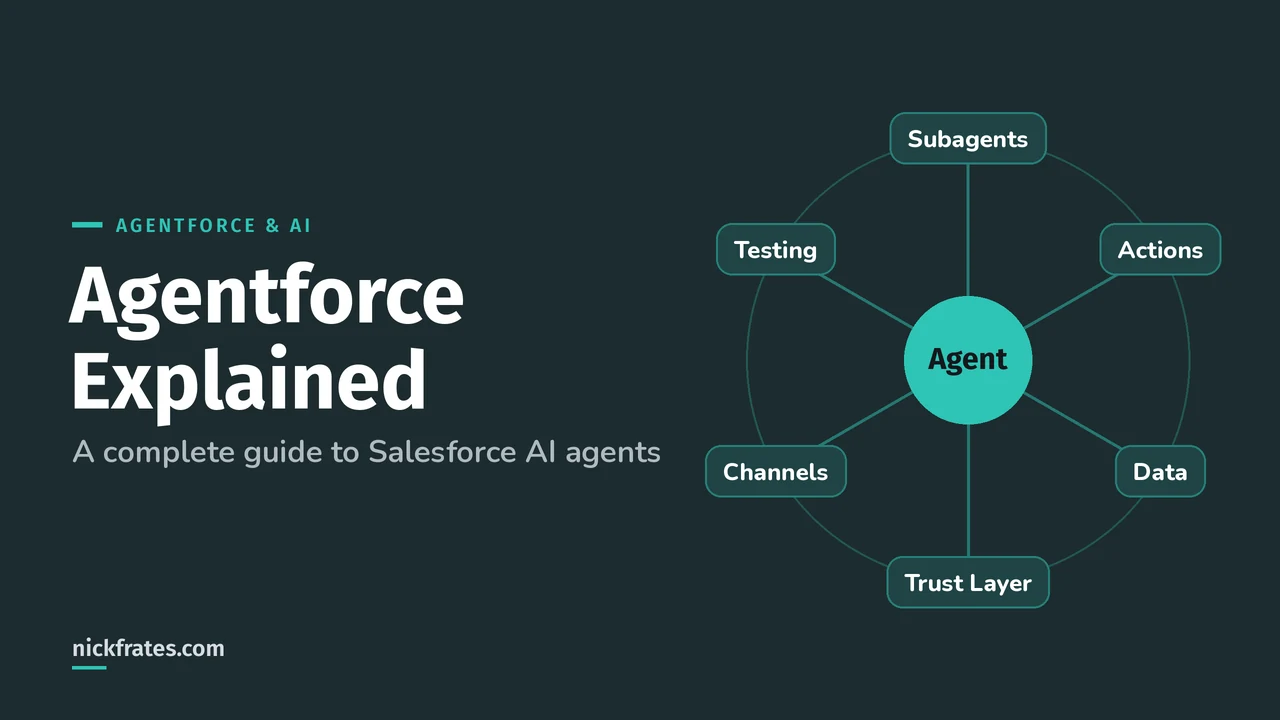
Every agent is assembled from the same parts (The Building Blocks of Agents in Help):
| Part | What it is |
|---|---|
| Agent | Goal-oriented, autonomous AI that works within the use cases and guardrails you specify. Built from scratch or from a template. Example: a service agent for your help portal. |
| Subagent | A particular job the agent can do. It holds actions (the tools for the job) and instructions (how to decide). Example: a Deal Management subagent that helps a rep find opportunities and contacts, create to-dos and log calls. |
| Action | How the agent gets things done. An action calls an API, a flow, a prompt template, an Apex class or a predictive model. Example: drafting an email grounded in Salesforce data. |
| Instructions | Natural language that tells the agent how and when to act. There are agent-level and subagent-level instructions. Example: escalate to a person when the customer asks for a refund over the limit. |
| Data | What the agent is grounded in: CRM data you control, plus knowledge articles, uploaded files or web sources through Agentforce Data Libraries. Example: a data library built from your Knowledge articles. |
| Channels and connections | Where the agent works. A connection holds the response formats and Omni-Channel routing for one channel. Example: messaging, voice, Slack, email. |
| Reasoning engine | Routes the conversation to subagents, resolves instructions into a prompt and reasons with the LLM. Example: the Atlas reasoning engine. |
One rename to know: beginning in April 2026, agent topics are called subagents, with no change in functionality (Help). Older tutorials and some exam prep material still say “topic.” They mean the same thing. My post on subagents and actions covers how the two work together.
How an agent handles one message
The reasoning engine is called Atlas. Help describes it as graph-based, like a flowchart with nodes, variables and transitions, so agents follow specific, predictable paths. Unlike strictly prompt-based engines, it separates the agent's big-picture workflow from its conversational skills. Salesforce calls the result hybrid reasoning: LLM flexibility where you want it, rules where you need them (How Agents Work).
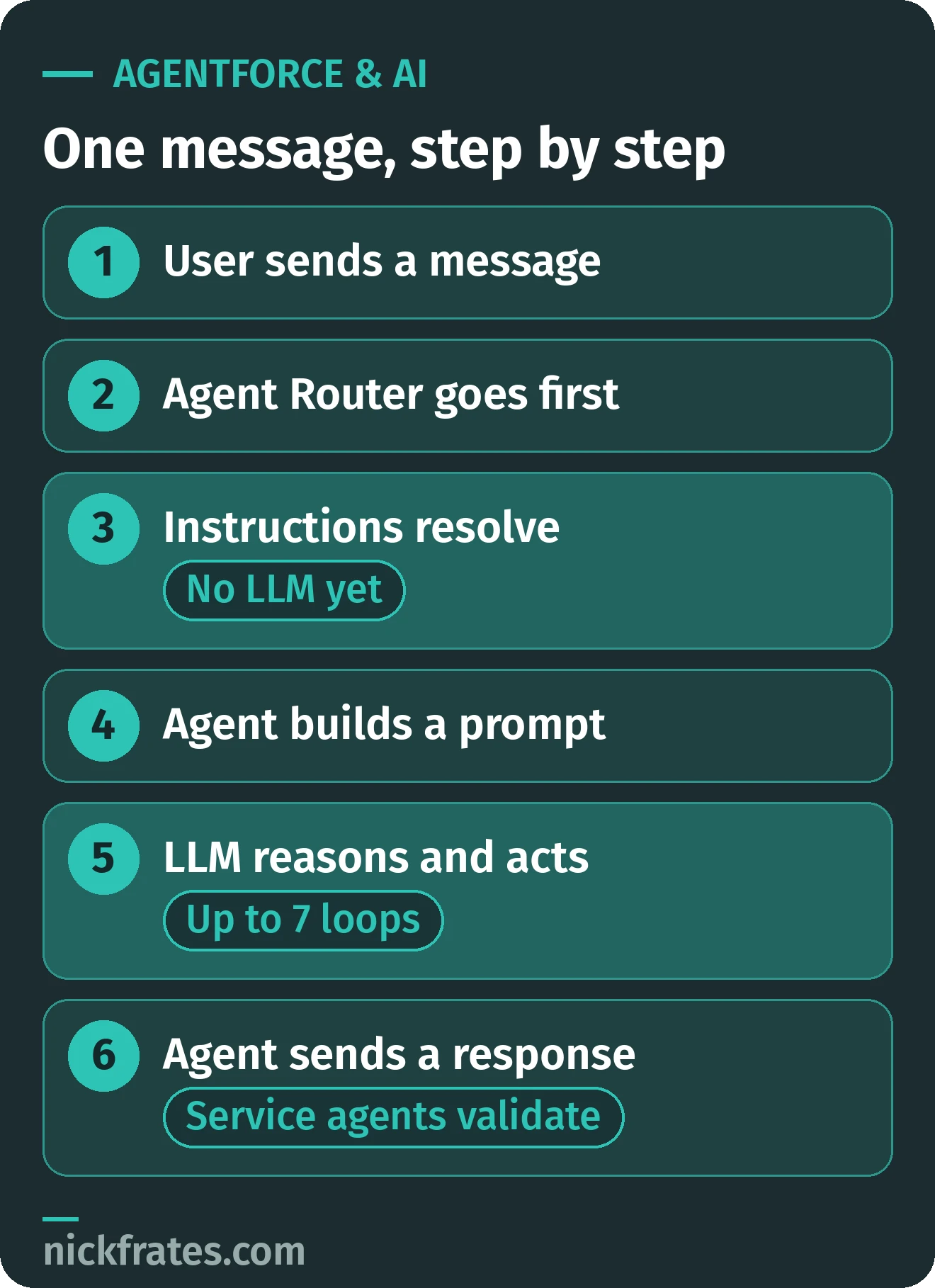
The path of one message, condensed from Salesforce Help.
- User sends a message. A question, a request or a trigger arrives.
- The Agent Router takes it first. The starting subagent picks the best subagent from the conversation so far.
- The subagent's instructions resolve. They run top to bottom, in the order written, and logic and transitions run here. No LLM is involved yet.
- The agent builds a prompt. It combines the agent-level instructions, the recent conversation, the resolved subagent instructions and the actions the agent may use.
- The LLM reasons and acts. It can run an action, ask the user a question, or answer. Each result loops back, up to seven loops.
- The agent sends its response. Service agents first check that the answer is grounded and in scope.
Three details in that path are worth remembering:
- Routing comes first. Every conversation starts at the starting subagent. By default that's the Agent Router, which picks a subagent based on the recent conversation and the subagents available.
- Step 3 involves no LLM. Help says the agent resolves the subagent's instructions deterministically, in the order written, and no reasoning happens at that stage. If a transition sends the conversation elsewhere, it redirects before any reasoning.
- Actions loop. After an action runs, the agent checks the result, then decides whether to run another action, ask the user more questions or send a final answer. Help says this continues up to seven reasoning loops.
Service agents add a safety step. Before sending, they check whether the response is grounded in data sources, stays within the subagent's scope and instructions, and doesn't include hallucinations, unverified information or potential prompt injection. If it fails, the agent generates a new response. If it can't produce one that passes, it tells the user it can't help with that request.
Agent Script: predictable where it has to be
In the new Agentforce Builder, agents are written in Agent Script, which “combines the flexibility of natural language instructions for handling conversational tasks with the reliability of programmatic expressions for handling business rules” (Get Started with Agent Script). You don't have to write it by hand. You can chat with Agentforce about what you want, edit in Canvas view, or switch to Script view for the code.
Here's the simple example from Salesforce's own page:
The example from Salesforce's Get Started with Agent Script page.
Look at the start_agent block at the bottom. After the ->, the if and else lines are logic that runs the same way every time. Lines that start with | are natural language for the LLM. So the premium flag decides which instruction the LLM sees, and the LLM handles the wording.
The variable matters too. Script uses variables to hold the agent's current state reliably, “rather than relying on LLM context memory.” My rule of thumb: identity checks, eligibility rules and anything compliance cares about belong in logic. Tone, phrasing and judgment calls belong in natural language.
Which agent type should you use?
Salesforce ships several agent types, each tied to a job and a place to work (Agent Types and Considerations):
| Agent type | What it does and where it runs |
|---|---|
| Employee agent | Assists employees with company knowledge, tasks and workflows across departments. Requires Flex Credits. Works in: Lightning Experience, the Salesforce mobile app, Slack and Enhanced Web Chat v1 on Experience Cloud sites. Runs as: the logged-in user. |
| Service agent | Supports customers with common inquiries and escalates complex issues. Works in: enhanced messaging channels such as Enhanced Chat v1 and v2. Runs as: an agent user, unless credential-based user verification is on. |
| Lead Nurturing agent (formerly SDR, Sales Development Representative) | Engages leads with personalized content, answers common questions and schedules meetings. Works in: outbound email. Runs as: a dedicated agent user. |
| Sales Coach | Gives reps personalized, actionable, stage-specific feedback on a sales pitch or role-play session. For sales reps, with its own permission sets. |
| Service Assistant | Helps service reps resolve cases faster with case summaries and step-by-step resolution guidance. Needs the Agentforce for Service add-on or Agentforce 1 Service Edition. |
| Setup with Agentforce | Helps admins with Setup tasks such as managing users, troubleshooting and customizing the org. It's created automatically when you enable it and isn't visible or customizable in Agentforce Builder. |
Most types are available in Enterprise, Performance, Unlimited and Developer Editions with Foundations or Agentforce 1 Editions, and some standard actions need add-on licenses. Two older agents are retired: Agentforce (Default), which gets no new features and isn't available in new environments, and Agent for Setup, which can't be enabled in new orgs beginning April 2026.
Who the agent runs as matters more than most people expect. An Employee agent uses the logged-in user's profile, permission sets and sharing, so it can only see what that person can see. A Service agent usually runs as an agent user instead. Help puts it bluntly: without additional configuration, the customer has access to all of the records the agent user has access to, and you must proactively limit data access (Agent Execution Context and Data Access by Type).
Help's fix is to verify the customer, store the verified ID in a variable (VerifiedCustomerId), scope your Apex and flows to that customer's records, and use filters so only verified customers reach sensitive subagents and actions. For the sales and service side in depth, see Agentforce for Sales and Agentforce for Service.
Where you build: Agentforce Studio and Agentforce Builder
Agentforce Studio is the home of the new Agentforce Builder and “a central hub for building, testing, and monitoring your agents” (Access Agentforce Studio). Open the App Launcher, choose Agentforce Studio, then Agents. To see the Agents list and open the builder, Einstein and Agentforce must be enabled in the org and you need the Manage AI Agents permission.
That permission is powerful. Help notes it grants org-wide management access to all agents, including activating, deactivating and customizing them, so give it only to people who need that. The upside is that the builder lives outside Setup, so people can build agents without admin-level permissions.
Trailhead's tour of the new builder names the parts you'll use every day:
- Explorer: every subagent, action and asset of the agent in one place
- Canvas: a document-style editor, with a switch to Script view
- Preview: test with real utterances and see a summary of the agent's reasoning for each message
- Agentforce Assistant: describe what you want, or ask it to help debug
- Save and Commit Version: commit locks a snapshot so you can activate it or start a new draft
Want to click through it? My Agentforce tutorial builds a first agent step by step.
Grounding: how agents get your data
Help's line is hard to beat: agents are only as useful as the data they're grounded in. Grounding means adding domain knowledge and customer information to the prompt so the model has the context to answer accurately. Agentforce does that in a few ways (Help):
- CRM data. Agents run on the platform, so they use your records, and you control what they can access.
- Agentforce Data Libraries. Index knowledge articles and fields, file uploads or web sources so the agent can retrieve what's relevant.
- Search the Web. A standard agent action for public information.
- Retrieval Augmented Generation (RAG). For unstructured sources, build a more advanced retrieval setup with chunking, search indexes and retrievers in Data 360 (formerly Data Cloud).
If grounding is the part you're curious about, read Data 360 for Agentforce. Prompt templates are the other grounding tool: a template is a string with placeholders that get replaced with business data at run time, and I cover building them in Prompt Builder.
How Agentforce keeps your data safe
Agentforce is integrated with the Einstein Trust Layer, a secure AI architecture built into Salesforce. According to Trust and Agentforce, it provides:
| Trust Layer service | What it does |
|---|---|
| Zero data retention | No data is stored or used for model training by third-party LLMs. Other features, including agents, may still store data. |
| Dynamic grounding with secure data retrieval | Uses trusted company data, your knowledge base or other configured sources to answer a question. |
| Prompt defense | System policies that limit hallucinations and the chance of harmful output, plus prompt injection detection. |
| Toxicity detection | Potentially harmful LLM responses are detected and flagged. |
| Audit and feedback | Prompts, responses and trust signals are logged in Data 360 so you can see the result of each interaction. |
One surprise: pattern-based and field-based data masking is disabled for agents. Help explains that this is to improve performance and accuracy, and that data stays protected in transit under the zero-data-retention policy. If you were expecting masked prompts, plan around that. The Trust Layer post goes through each service in detail: Einstein Trust Layer Explained.
Beyond the Trust Layer, three controls come up in every project:
- Permissions. Agents respect licenses, permissions, field-level security and sharing. A custom action follows whatever the Apex class, flow or prompt template behind it enforces.
- Trusted URLs. If an agent tries to include a URL that isn't on your allowlist, it's replaced with “URL_Redacted.”
- Instructions as guardrails. Subagent instructions set boundaries, such as scope, tone and when to escalate.
Cert Lab by Nick Frates
Studying for the Agentforce Specialist exam?
Lessons weighted like the exam, with a section check, quiz and flashcards for every section, and each fact linked to the Salesforce Help page behind it.
Start the Agentforce Specialist Cert Lab for $9.99 →Test before you go live
Agent Preview in the builder shows the agent's reasoning for each message, and batch tools let you run many conversations at once. Help lists the options that count as testing: the builder preview, Agentforce Grid, Testing Center and a sandbox. My walkthrough of Agentforce Testing Center covers building test suites and reading the results.
Plan for usage while you test. Building an agent in Agentforce Builder isn't metered, but previewing in chat or voice is, and so is testing through the builder, Agentforce Grid, Testing Center and sandboxes (Agentforce and Generative AI Usage and Billing).
What Agentforce costs and how usage is counted
Salesforce describes three pricing models for AI usage (Help):
- Consumption-based: you pay for what you use, measured in basics like prompts or actions.
- Hybrid: per-user licensing combined with consumption, for price certainty per user in many scenarios.
- Business-metrics-based: you pay for high-level outcomes, such as Agentforce Voice Minutes.
Usage is recorded in its native unit and then converted into Flex Credits using the Agentforce Rate Card. Agentic usage, where agents reason and act on their own, is counted in actions triggered. Prompt-based usage, such as a generated summary or a drafted email, is counted in prompts. Utilities like escalating to a person, setting a variable or transitioning to another subagent aren't billed as actions.
To use Flex Credits you need Salesforce Foundations, which is included and active with Agentforce 1 Editions, and you can watch consumption in Digital Wallet (Flex Credits Billable Usage Types). Current rates change, so I keep them out of this guide. Agentforce Pricing Explained walks through the options, Agentforce Billing shows how metering adds up, and Salesforce Digital Wallet covers monitoring and alerts.
Try Agentforce for free
You don't need an expensive org to start learning. The Salesforce developer free trials page offers a Developer Edition, a free Salesforce Platform environment that includes Agentforce and Data 360, along with a 30-day Salesforce Platform free trial. Use it, not your employer's org, for experiments.
Then pair it with Trailhead. Agentforce Key Components: Quick Look is about five minutes and covers role, knowledge, actions, guardrails and channels. New Agentforce Builder: Quick Look walks through the builder. My guide to the Agentforce Trailhead modules puts the rest in order.
Free checklist: is this a job for an agent?
Before you build anything, run your idea through these questions. If you can't answer one, that's the thing to fix first.
- The job. Can you describe it in one sentence from the user's point of view?
- The user. Is it an employee or a customer, and which agent type matches?
- The decisions. Which choices can the LLM make, and which must never be left to it? Put the second group in logic.
- The actions. What does each one call: a flow, Apex, a prompt template, an API or a predictive model?
- The data. Where does it live (CRM fields, Knowledge, files, Data 360), and is it clean enough to ground an answer?
- The identity. Who does the agent run as, and what can that user see?
- The handoff. When should it escalate to a person, and what context travels with it?
- The tests. Which 10 to 20 conversations will you rerun after every change, including ones the agent should refuse?
- The usage. What will previews, tests and live traffic cost in credits, and who watches Digital Wallet?
- The owner. Who reviews real conversations after launch and updates instructions?
Agent spec template. Copy this into a doc and fill it in before you open the builder:
- Name and agent type:
- Job in one sentence:
- Subagents: a name and a one-line scope for each
- Actions per subagent: name, what it calls, inputs, outputs
- Data sources:
- Runs as: logged-in user or agent user, and the permissions it needs
- Rules that must always happen: these become logic, not prompt wording
- Escalation rules:
- Test conversations: at least ten, with the expected result for each
- Owner and review date:
Mistakes that trip people up
- Putting must-happen rules in prompt wording. If a step has to run every time, make it logic. Asking the LLM nicely isn't a guarantee.
- Vague or overlapping subagent descriptions. Subagent classification works from the descriptions you write, so if two subagents sound alike, the router has to guess. If you can't explain the difference in one sentence, merge them.
- Forgetting what the agent user can see. A customer-facing agent only protects data if you scope its actions to the verified customer.
- Assuming masking protects prompts. It's off for agents, so rely on permissions, scoping and zero data retention, and design accordingly.
- Giving out Manage AI Agents too widely. It's org-wide access to every agent.
- Skipping testing because building is free. Preview and batch tests are the cheap place to find a routing bug. Budget a few credits for them.
- Starting with an agent that does everything. I'd start with one narrow job, prove it, then add subagents.
- Mixing old and new names. Topics are subagents, and Agentforce (Default) is retired. Check which one a tutorial means before copying it.
Agentforce and the Agentforce Specialist exam
If you're aiming for the Agentforce Specialist credential, this guide maps onto the exam closely. The numbers below come from the official exam guide and the Trailhead Academy exam page:
| Exam fact | Detail |
|---|---|
| Questions | 60 multiple-choice, plus up to five unscored |
| Time | 105 minutes |
| Passing score | 72% |
| Fee | $200 to register, $100 to retake, plus applicable taxes |
| Prerequisite | None |
| Version | Questions align to the Spring '26 release |
Here is where each section is covered in this guide:
| Exam section | Weight | Start here |
|---|---|---|
| AI Agents | 35% | Building blocks, how an agent handles a message, Agent Script, agent types |
| Prompt Engineering | 20% | Grounding, and Prompt Builder |
| Data 360 Fundamentals | 20% | Grounding, and Data 360 for Agentforce |
| Testing, Deployment, and Maintenance | 10% | Testing, and Testing Center |
| Governance and Observability | 10% | Trust, and Einstein Trust Layer |
| Multi-Agent Orchestration | 5% | The guide names Model Context Protocol (MCP) and Agent-to-Agent (A2A) communication |
The guide says a typical candidate has about a year of experience with platform configuration and standard objects, and isn't expected to know the basics of Apex or Python. So you can come at this from the admin side.
For study material, I built Cert Lab at nickfrates.com. The Agentforce Specialist Cert Lab follows the exam sections and weights with lessons, a section check, a quiz and flashcards for each, and links every fact to Salesforce Help, the developer guide or Trailhead. You can Try a free lesson first. Free resources are plentiful too: the Agentforce Specialist study guide and practice questions are on this site, and Salesforce AI Certifications compares the AI exams so you pick the right one.
Where to go next
- Agentforce Tutorial: build your first agent in Agentforce Builder.
- Agentforce Topics (Now Subagents) and Actions: how an agent decides what to do.
- Data 360 for Agentforce: RAG, search indexes and retrievers.
- Salesforce Prompt Builder: prompt templates that ground your actions.
- Einstein Trust Layer: what each safeguard does.
- Agentforce Testing Center: test agents at scale.
- Agentforce Pricing Explained and Agentforce Billing: credits, conversations and metering.
- Agentforce for Sales and Agentforce for Service: the two biggest agent families.
- Einstein Bots vs Agentforce: when a bot still makes sense.
Cert Lab by Nick Frates
Ready to practice what you just read?
Lessons, a section check, a quiz and flashcards for each exam section of the Agentforce Specialist exam, with every answer explained and linked to Salesforce Help.
Start the Agentforce Specialist Cert Lab for $9.99 →FAQ
What is Agentforce? Agentforce is Salesforce's platform for building AI agents, which are autonomous assistants that use a large language model to understand a request, decide what to do and take action in Salesforce. They work with your data, your permissions and the guardrails you set.
What is the difference between Agentforce and Einstein Bots? Einstein Bots follow predefined dialogs and rules, while agents are built on LLMs and decide which actions to take. Salesforce Help says bots still fit when you need transparency and control or fully deterministic flows. See Einstein Bots vs Agentforce for the details.
Can I try Agentforce for free? Yes. The Salesforce Developer Edition is free and includes Agentforce and Data 360, and Salesforce also offers a 30-day Salesforce Platform free trial. Use one of those instead of your employer's org for experiments.
Does Agentforce use my data to train other companies' AI models? No. Through the Einstein Trust Layer, zero data retention means third-party LLMs don't store your data or use it for model training, although other features, including agents, may still store data. The Einstein Trust Layer post covers each safeguard.
How is Agentforce usage priced? Salesforce describes consumption-based, hybrid and business-metrics-based models, and usage is converted into Flex Credits using the Agentforce Rate Card. Rates change, so check Agentforce Pricing Explained and Salesforce's current rate card.
Hope this helps!
Best,
Nick