Hey friends,
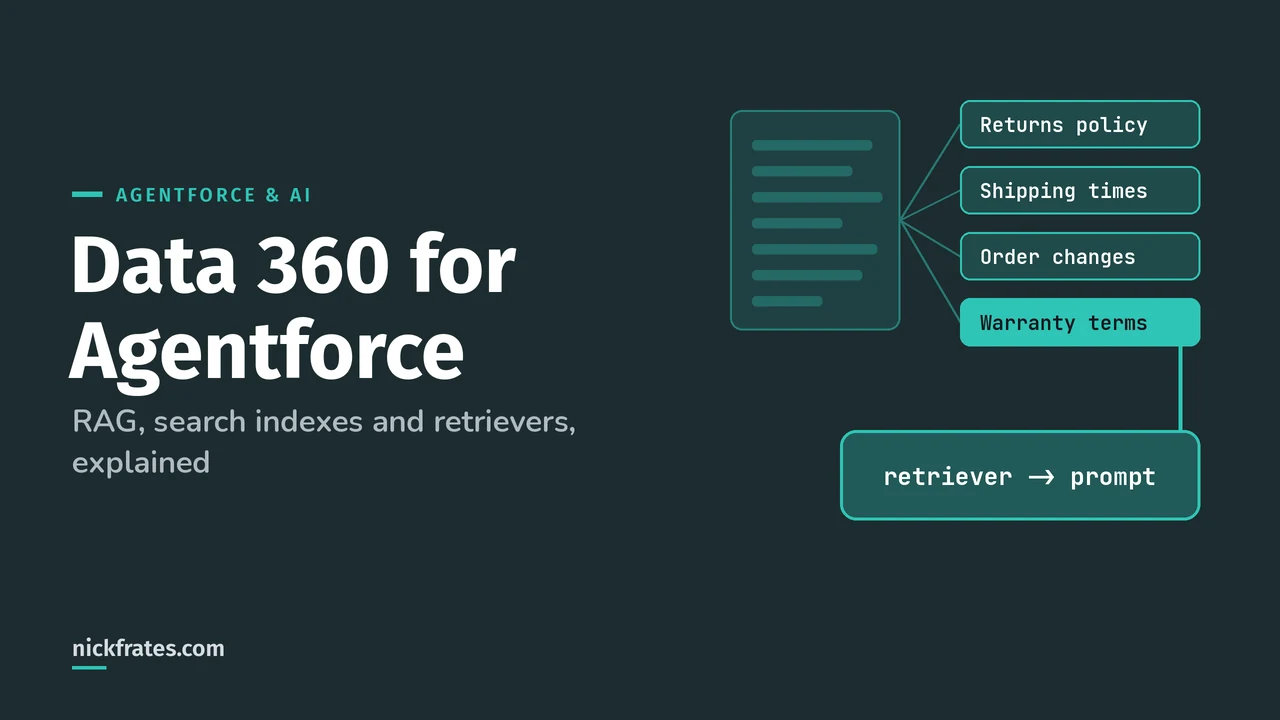
Data 360 (the product most of us still call Data Cloud) is where Agentforce gets the company knowledge it answers from: it chunks and indexes your documents, and a retriever pulls the most relevant chunks into the prompt at run time. That pattern is called retrieval augmented generation, or RAG.
It's also 20% of the Agentforce Specialist exam ("Data 360 Fundamentals"), and the exam guide names the exact concepts: chunking, indexing, retrievers and the Agentforce Data Library. Everything here comes from Salesforce Help, starting with the RAG in Data 360 overview. You'll see both names in Help, so I use them interchangeably.
Why agents need it
Most LLMs were trained on older internet content and know nothing about your return policy. RAG lets you give the model accurate, current, proprietary information at the moment it answers, without retraining or fine-tuning anything.
The other reason is size. A model can only take so many tokens per call, and searching whole documents is slow. So Data 360 breaks content into chunks, indexes them, and hands the model only the few that matter.
How RAG works in Data 360
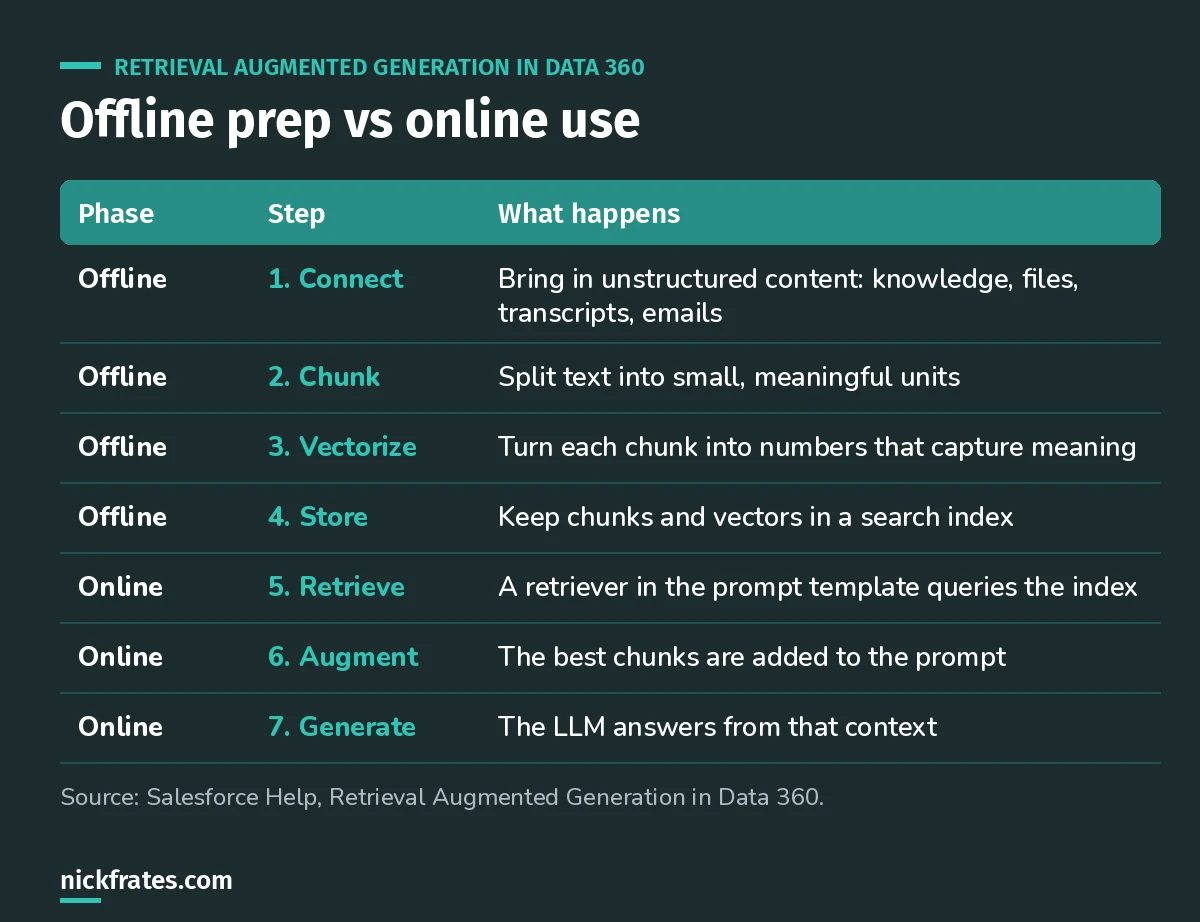
Offline happens once (and on refresh). Online happens on every question.
Chunking splits text into smaller, meaningful units. Vectorization turns each chunk into numbers that capture meaning, so "How do I log in?" and "How can I sign on?" land close together. Chunks are stored in chunk data model objects and the vectors in index data model objects.
Chunking strategies
Data 360 picks a strategy based on the content type, and you can set it in the search index advanced setup (Help).
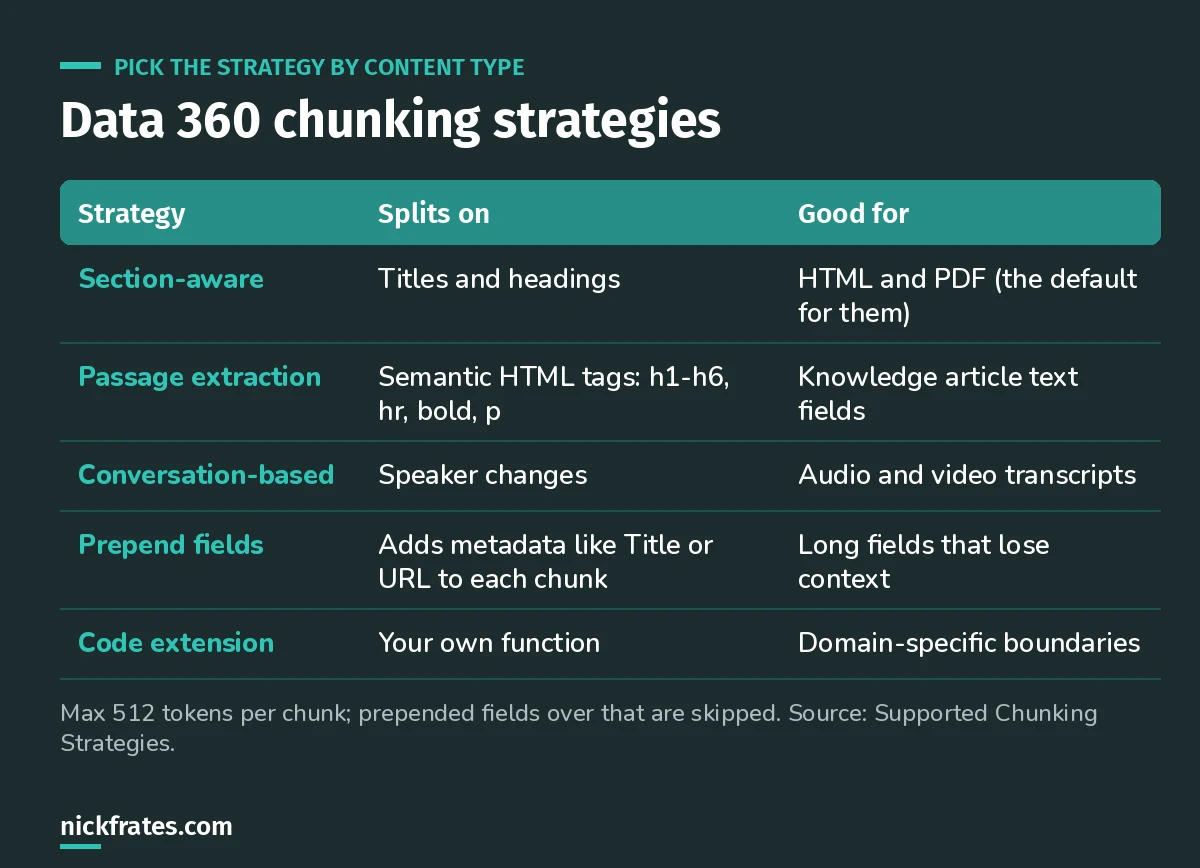
Section-aware never splits in the middle of a sentence or paragraph.
Two settings matter with section-aware chunking: Max Token merges small neighboring sections into one chunk, and Overlap Tokens repeats the end of one chunk at the start of the next when a long section gets split.
Vector search vs hybrid search
- Vector search understands meaning and context. It's weak on exact numbers and domain terms (Help).
- Hybrid search builds a vector index and a keyword index, queries both, then merges and reranks the results. You can add ranking factors like recency or popularity (Help).
Salesforce's own example: vector search knows two login questions mean the same thing, but can treat "LaserPrinter TX 400" and "LaserPrinter TX 440" as the same. If your content is full of SKUs, error codes or model numbers, use hybrid.
Retrievers: the bridge to the prompt
A retriever searches an index and returns what's relevant to the prompt template or agent. You manage them in AI Models, formerly Einstein Studio (Help).
- Default retriever: created automatically with each search index. You can't customize it.
- Custom (individual) retriever: your own filters and result settings, with up to ten filter conditions.
- Ensemble retriever: runs several individual retrievers, combines and reranks the results. It can't include Code-type retrievers or retrievers with dynamic filters.
- Dynamic retriever: a placeholder filled in at run time by the prompt template.
- Citations: turned on per retriever, so users can check the answer against the source.
- Versions: every save creates a new version. Only one is active at a time.
Prefilters narrow a retriever's search, for example to one country or product, using a value from the prompt template. The catch: the retriever needs at least one filter condition marked Dynamic, or the Pre-filter field doesn't appear (Help).
Cert Lab by Nick Frates
Practice Data 360 Fundamentals
Data 360 is 20% of the Agentforce Specialist exam. The Cert Lab section covers chunking, indexes, retrievers and data libraries, with scenario questions like the ones below.
Start the Agentforce Specialist Cert Lab, $9.99 →Agentforce Data Libraries: the shortcut
You don't have to build all of this by hand. When you save an Agentforce Data Library, Salesforce creates the data stream, the data lake and data model objects, maps them, creates the search index, chunks the content, and creates a retriever (Help). A status card shows each stage.
- Sources: Salesforce Knowledge, uploaded files, or a custom retriever. One source per library, and you can't change it later (Help).
- Each feature can use one data library at a time. Each library gets its own retriever.
- New web search libraries aren't supported anymore; existing ones are read-only.
- You need Data 360 set up, and data libraries consume Data 360 credits.
- Agents use the library through the Answer Questions with Knowledge action.
Mistakes I'd avoid
- Indexing everything. Pick the fields that actually answer questions. More text isn't better grounding.
- Ignoring prepend fields. A chunk from the middle of a long article often makes no sense without its title.
- Vector-only for technical content. Product codes need keyword matching.
- Picking the wrong library source. You can't switch it later, so decide Knowledge vs files up front.
Practice questions
1. A long Knowledge article's chunks come back without enough context to be useful. What do you change?
Answer: prepend the article Title (and maybe Product Name) to each chunk.
2. Which retriever can't you customize?
Answer: the default retriever created with the search index. Create a custom one in AI Models instead.
3. What does Data 360 do first when you save a data library: create the index or create the data stream?
Answer: the data stream. The index only gets created after the objects are created and mapped.
Keep going
- Agentforce Specialist study guide: Data 360 in the context of the whole exam.
- Data 360 Consultant study guide if you want to go deeper on Data 360 itself.
- Einstein Trust Layer explained: what happens to the grounded prompt after retrieval.
Cert Lab by Nick Frates
Get the Agentforce Specialist Cert Lab
Lessons, practice questions and flashcards for all 6 Agentforce Specialist exam sections, built from Salesforce Help.
Start the Agentforce Specialist Cert Lab, $9.99 →Hope this helps!
Best,
Nick


