This is a deep, one-stop study guide for the Salesforce Certified Platform Developer exam, still widely called Platform Developer I or PD1. It follows the official exam outline section by section, with explanations, hands-on exercises, flashcard terms, quick-reference tables and practice questions with answers and explanations for every section.
Updated for 2026: this guide now reflects the current exam outline (Developer Fundamentals 27%, Process Automation and Logic 28%, User Interface 25%, Testing, Debugging, and Deployment 20%), the official name change to "Salesforce Certified Platform Developer", Agentforce for Developers topics, current sf CLI commands, and the end of support for Workflow Rules and Process Builder on December 31, 2025.
| Section | Weight | Approx. questions |
|---|---|---|
| Developer Fundamentals | 27% | ~16 |
| Process Automation and Logic | 28% | ~17 |
| User Interface | 25% | ~15 |
| Testing, Debugging, and Deployment | 20% | ~12 |
| Exam fact | Detail |
|---|---|
| Official name | Salesforce Certified Platform Developer (formerly Platform Developer I) |
| Questions | 60 scored multiple-choice/multiple-select, plus up to 5 unscored |
| Time | 105 minutes |
| Passing score | 68% (about 41 of 60) |
| Fee | US$200 registration, US$100 retake, plus taxes |
| Prerequisite | None (it is the prerequisite for Platform Developer II) |
| Delivery | Proctored online or at a test center; registration through Trailhead Academy |
| Maintenance | Free annual maintenance module on Trailhead |
| Official resources | Exam guide, Trailhead study trail, credential page |
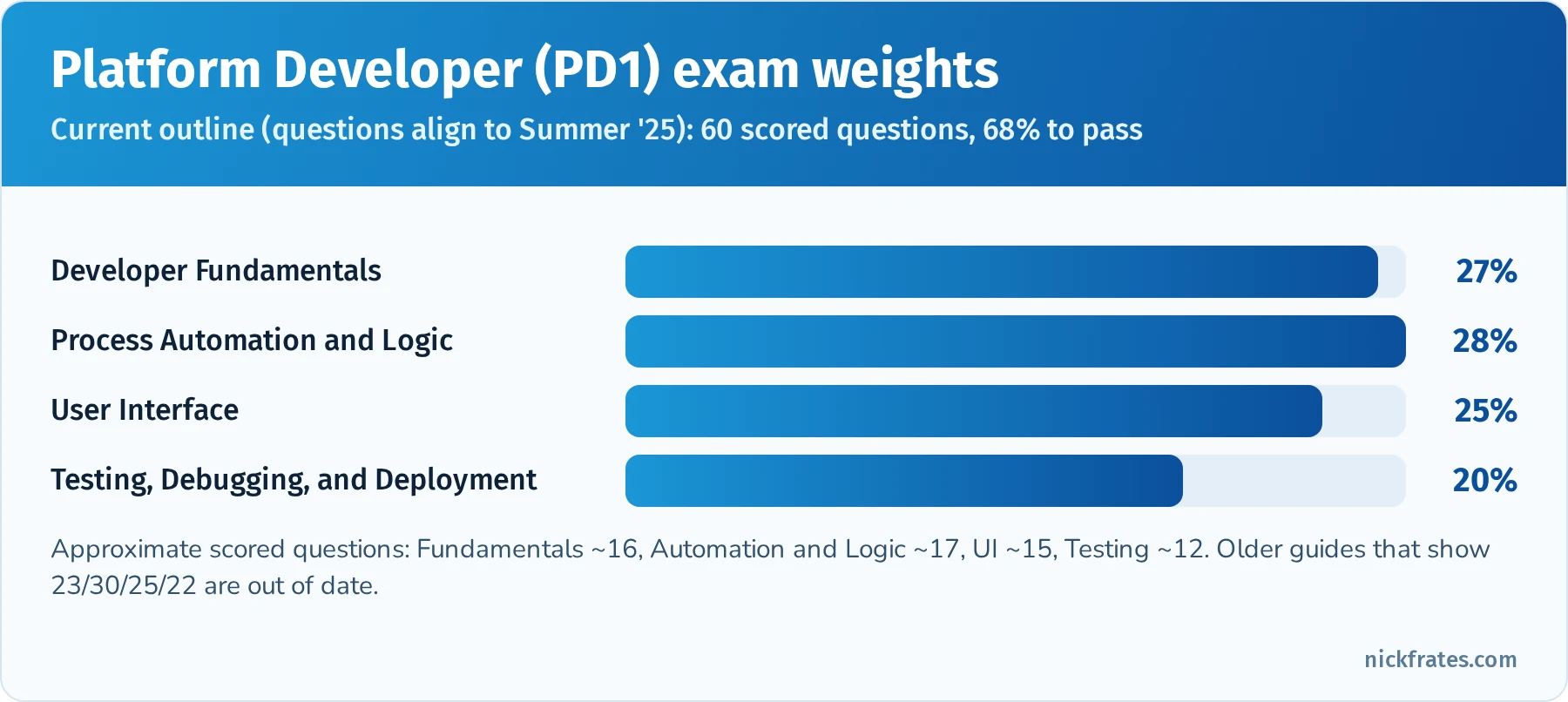
The current PD1 section weights. Spend study time roughly in proportion, then adjust for your weak spots.
Contents
- What changed for 2026
- How to use this guide
- Developer Fundamentals (27%)
- Process Automation and Logic (28%)
- User Interface (25%)
- Testing, Debugging, and Deployment (20%)
- Final preparation strategies
- Quick-reference cheat sheet
- Frequently asked questions
- Related study guides
What changed for 2026
If you studied from an older PD1 guide (including the first version of this one), these are the changes that matter:
- New weights. Developer Fundamentals went up to 27%, Process Automation and Logic went down to 28%, and Testing, Debugging, and Deployment went down to 20%. User Interface stayed at 25%. Process Automation and Logic is still the single heaviest section, but only by one point, so Fundamentals deserves real study time.
- New name. The exam guide now calls the credential "Salesforce Certified Platform Developer". It is the same certification, and it is still the prerequisite for Platform Developer II.
- Agentforce for Developers. The outline now expects you to know the use cases and limitations of Agentforce for Developers, the AI coding assistant in VS Code and Code Builder, and how Apex can power Agentforce actions.
- Workflow Rules and Process Builder are retired from support. Salesforce ended support for both on December 31, 2025. Existing automations still run, but there are no bug fixes or support, and Flow is the only supported declarative automation tool. Older exam questions and old practice tests may still mention them, so know what they did, but design every new solution in Flow or Apex.
- The CLI changed. The old
sfdx force:...commands were replaced by the unifiedsfCLI. Usesf project deploy start,sf project deploy validateandsf apex run test. - New exam delivery. Registration moved to Trailhead Academy and exams are delivered through Pearson VUE. Old posts that mention Webassessor describe the retired process.
How to use this guide
Each exam section below follows the same pattern: an overview of what the section tests, the key concepts in depth, hands-on exercises, flashcard terms, exam focus tips, a quick-reference table, and at least five practice questions with answers and explanations. Read a section, do the exercises in a free Developer Edition org or Trailhead Playground, then answer the questions without looking at the explanations.
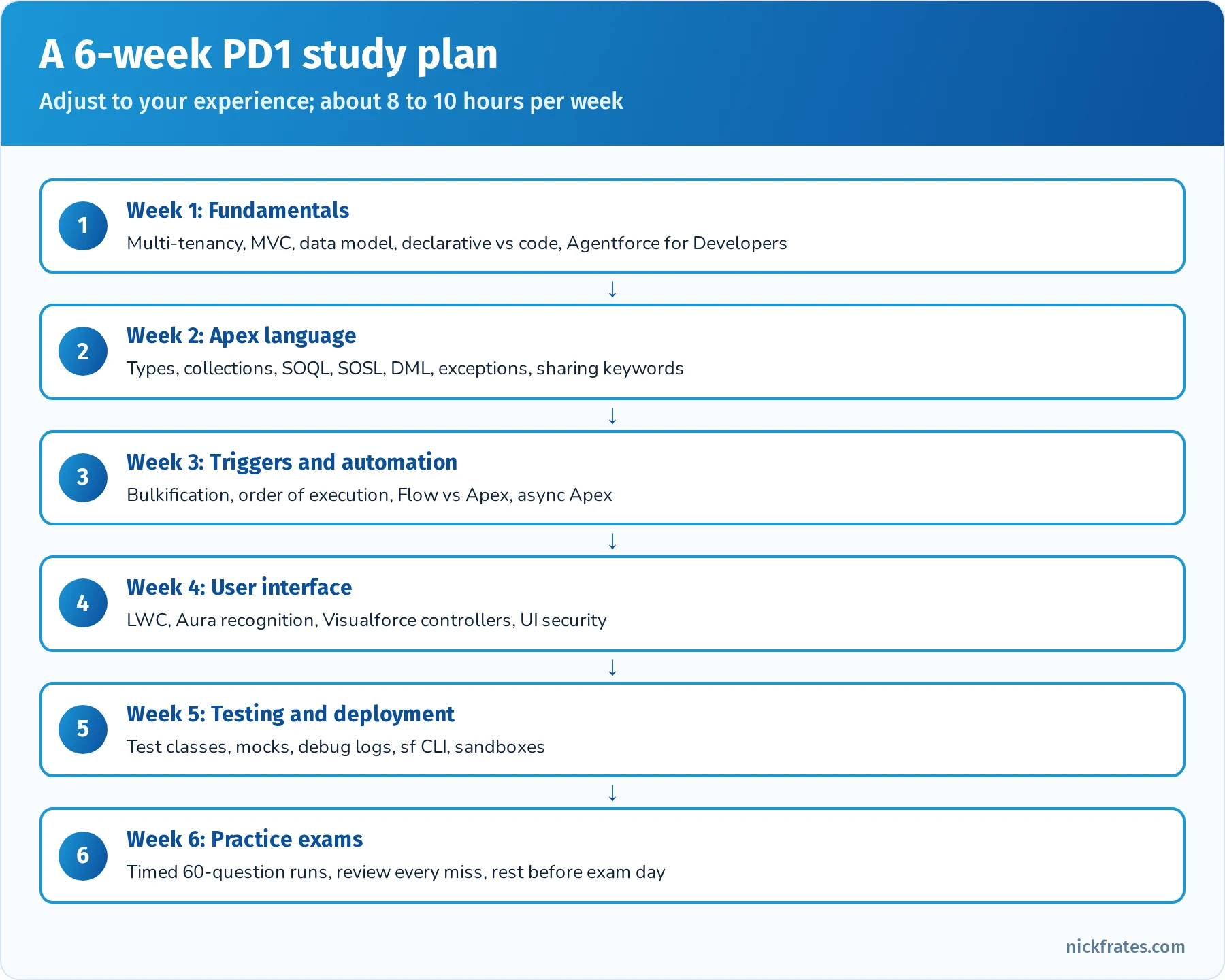
A realistic six-week plan for someone with admin experience and some coding exposure.
If you are new to studying for Salesforce exams, the techniques that work best are active recall (quiz yourself instead of rereading), spaced repetition (review on a schedule that stretches out over time) and interleaving (mix topics in one session). The flashcard lists in each section are written so you can paste them straight into Anki or Quizlet.
Developer Fundamentals (27%)
Overview: This section covers core architectural concepts and declarative vs. programmatic fundamentals on the Salesforce platform. Start with Salesforce’s multi-tenant architecture: Salesforce runs on a multi-tenant cloud, meaning many customers share the same infrastructure and application resources. To ensure fairness, Salesforce enforces governor limits (restrictions on CPU, queries, DML, etc.) so that no single tenant can monopolize resources. For example, if a transaction exceeds certain limits (like too many queries or too much CPU time), a runtime exception (e.g. a LimitException) will occur to stop it. Multi-tenancy also means all customers are on the same version of Salesforce; updates are pushed automatically three times a year (Spring, Summer, Winter releases) with no manual upgrades. Trust and security are paramount in this model – even though hardware and code are shared, each org’s data is isolated and secure, and every org benefits from the platform’s reliability, security, and new features with each release.
Another fundamental is the MVC design pattern and how Salesforce’s platform features map to it. In Salesforce’s interpretation of Model-View-Controller (MVC), the Model represents the data and schema (e.g. standard and custom objects, fields, relationships, and even Apex classes as business logic containers). The View is the user interface – think of page layouts, Lightning pages, Visualforce pages, and Lightning Web Components (all the components and pages that display data to the user). The Controller is the business logic that interacts with the model and dictates what the view displays – this includes Apex code (classes, triggers) and even declarative logic like process automation that responds to user input or data changes. Understanding MVC helps to conceptualize how different pieces of Salesforce (database, UI, logic) work together in a governed, multi-tenant environment.
Salesforce provides two main approaches for building customizations: declarative (no-code) and programmatic (code). A key skill is knowing when to use declarative tools vs. programmatic solutions in a given scenario. Declarative tools (clicks-not-code) include Formula Fields and Roll-Up Summary Fields (for read-only calculations), validation rules, Flow Builder (record-triggered, screen, scheduled, autolaunched and platform event-triggered flows), and others. These are often faster to build and easier to maintain. Programmatic solutions involve Apex classes and triggers, Lightning Web Components, and Visualforce, used for requirements that declarative tools can't satisfy. Best practice is to use declarative features as much as possible (for example, a roll-up summary field to summarize child data instead of an Apex trigger) and only use code when a requirement can't be met declaratively or when scale, complexity or transaction control demand it. An exam scenario might ask which approach is best for a given requirement: use a formula field for a simple calculation on a record, a roll-up summary field on a master-detail to aggregate child data, a record-triggered flow for routine automation (field updates, related record creation, email alerts), and Apex for complex logic, heavy data volumes, complex integrations, or fine-grained error handling. Workflow Rules and Process Builder reached end of support on December 31, 2025, so they are never the right answer for a new build.
Data modeling is another critical fundamental. You should be able to design an appropriate data model given a set of requirements – this means deciding what objects are needed (standard or custom), what fields, and especially what types of relationships to use between objects. Salesforce offers relationship types like Lookup and Master-Detail. A Lookup relationship loosely links two objects – the child can exist without the parent and does not inherit parent’s sharing or deletion (if you delete a lookup parent, the child record remains, just with its lookup field cleared). A Master-Detail relationship tightly links objects – the child (detail) record inherits ownership and security from the parent (master), and if you delete the master, all its detail records are also deleted (cascade delete). Master-detail allows additional features like roll-up summary fields on the master to aggregate detail data. You should also understand Many-to-Many relationships, which are implemented in Salesforce by using a third object called a junction object with two master-detail fields (allowing each junction record to link one instance of each of the two objects, enabling many-to-many connectivity). Additionally, be aware of External relationships (External Lookup and Indirect Lookup) which link Salesforce records to external data (for instance, linking a Salesforce object to an external object record via an external ID). An External ID is a flag on a field (often a text/number field) that marks it as a unique record identifier from an outside system – external IDs are used to match and upsert data. They let you load or integrate data by an alternate key instead of the Salesforce record Id. For example, when using the API or Data Loader, you can upsert records using an external ID field to decide insert vs. update. Make sure you grasp the implications of schema design: changing field types or object relationships can have impact on existing Apex code and integrations (e.g. a master-detail conversion might require adding required parents to all child records, or changing a text field to number could break Apex code expecting text).
Finally, importing and exporting data is part of this section. Know the common tools and considerations for moving data in or out of Salesforce, especially in development and test environments. For small data loads (<50K records), the Data Import Wizard (built-in to Setup) is convenient but limited to certain standard objects and simple mappings. For larger or more complex data loads, Data Loader is a go-to tool; it can import, update, upsert using external IDs, or export records and handles up to 5 million records. Be mindful of how these tools trigger automation: both will fire Apex triggers, workflows, flows, etc. unless those are deliberately disabled in the target org. When exporting data, consider tools like Data Loader (or the SOQL export in Developer Console or Workbench) and understand the format (CSV) and the need to preserve record IDs for relationships. In a development context (like sandboxes or scratch orgs), you might use sandbox refreshes, sandbox seeding, or the Salesforce CLI with source and data commands to migrate sample data. Also, remember that when using Change Sets or metadata deployments, data isn’t moved – only metadata. If an exam scenario asks how to move configuration vs. how to move data sample records, be sure you choose the appropriate mechanism.
Hands-On Practice (Trailhead & Exercises):
- Trailhead Module: Understand the Salesforce Architecture – Provides a friendly overview of multitenancy, metadata-driven platform, and API basics. This will reinforce multi-tenant concepts and why governor limits and trust are important.
- Trailhead Module: Data Modeling – Practice creating custom objects and relationships. Focus on scenarios of when to use lookup vs master-detail. For instance, create a simple app with a
Project__cobject andTask__cdetail records to see how roll-up summaries work. - Trailhead Module: Cert Prep: Platform Developer: Salesforce Fundamentals & Data Modeling – This is an official prep module covering multi-tenancy, MVC, data model design, and import/export considerations. Complete the quizzes and hands-on challenges to test your understanding.
- DIY Exercise: In a Developer Edition org or Trailhead Playground, try designing a mini schema: for example, Library and Book objects with different relationship types. Implement a master-detail (Library–Book) and observe how deleting a library deletes its books. Then change it to a lookup to see the difference in behavior. Also practice using the Data Import Wizard to load some Book records (e.g. from a CSV) and use Data Loader to export them, getting comfortable with each tool.
- Trailhead Projects/Superbadges: The App Customization Specialist Superbadge (or similar Admin superbadges) can be useful here – they involve building data models, fields, and security, which solidify fundamental platform knowledge.
Key Concepts for Flashcards: (Use these to drill yourself – define each term and understand its significance.)
- Multitenant Architecture: A single, shared infrastructure where all customers’ orgs run on the same platform instance, with isolated data. Enforced by governor limits to ensure fair use.
- Governor Limits: Limits on resource usage in Salesforce (e.g. 100 SOQL queries per transaction, 50,000 records query return limit, 150 DML statements per transaction) that prevent any one process from over-consuming shared resources. Example: You can retrieve at most 50,000 records in total via SOQL in a single transaction – more will throw a LimitException.
- MVC Pattern – Model: The data layer (sObjects, fields, relationships, metadata). View: The UI layer (pages, components, Lightning pages, Visualforce). Controller: The logic layer (Apex controllers, triggers, or declarative logic like flows and rules). Be able to cite Salesforce examples of each.
- Lightning Component Framework: Modern UI framework for building single-page apps in SF. Includes Aura Components and Lightning Web Components (LWC). Key benefits: client-side JS for rich interactivity and server-side Apex for data, with an event-driven architecture for communication.
- Declarative vs. Programmatic: Know examples of declarative tools (Flow, formulas, roll-ups, validation rules) and when they're sufficient, versus when to use Apex code. Flashcard prompt: "When should you prefer a declarative solution over Apex?" (Answer: When out-of-the-box features can meet requirements, since they are easier to maintain and less error-prone. Use Apex only for scenarios that cannot be achieved declaratively or that need code-level control.)
- Roll-Up Summary Field: A field on a master object that aggregates data from its detail records (count, sum, etc.) – only available for master-detail relationships. No coding needed, but cannot be used on lookup relationships.
- External ID: A field marked as a unique identifier for external data. Often used for upsert operations and integrations to match records by an external system’s ID. Note: External IDs improve performance when upserting (acts like a key/index) and can be used in SOQL queries (
[SELECT ... FROM Account WHERE External_Id__c = 'XYZ']). - Data Loader vs. Import Wizard: Data Loader handles up to 5 million records and supports insert, update, upsert, delete, hard delete and export. The Data Import Wizard handles up to 50,000 records, supports a limited set of standard objects plus custom objects, and can add new records, update existing ones, or do both. Typical exam question: "How do you load 100,000 new records with an external ID for matching?" (Data Loader.)
- AppExchange: (Still useful to know) The marketplace for pre-built apps and components. Common scenario: When to build vs. buy? If a requirement is common (e.g. document generation), you might get an AppExchange package rather than coding from scratch.
Exam Focus Tips: This section carries 27% of the exam, so roughly 16 out of 60 questions. Many fundamentals concepts tie into other sections (for example, understanding data model and declarative features underpins Process Automation & Logic questions). If you have an Admin/App Builder background, you may find some of these questions straightforward (e.g. identifying a master-detail vs lookup use-case, or knowing what a roll-up summary can do). Don’t skip studying this section, but if you’re strong here, you can prioritize extra time on the heavier coding sections. Focus on memorizing terminology and “why/when” knowledge: Why multi-tenancy imposes limits, when to choose one relationship type or solution over another. These lend themselves well to flashcards and quick concept checks. Aim to be comfortable with Salesforce data modeling scenarios and the basic platform architecture, as this creates a foundation for understanding the deeper development topics.
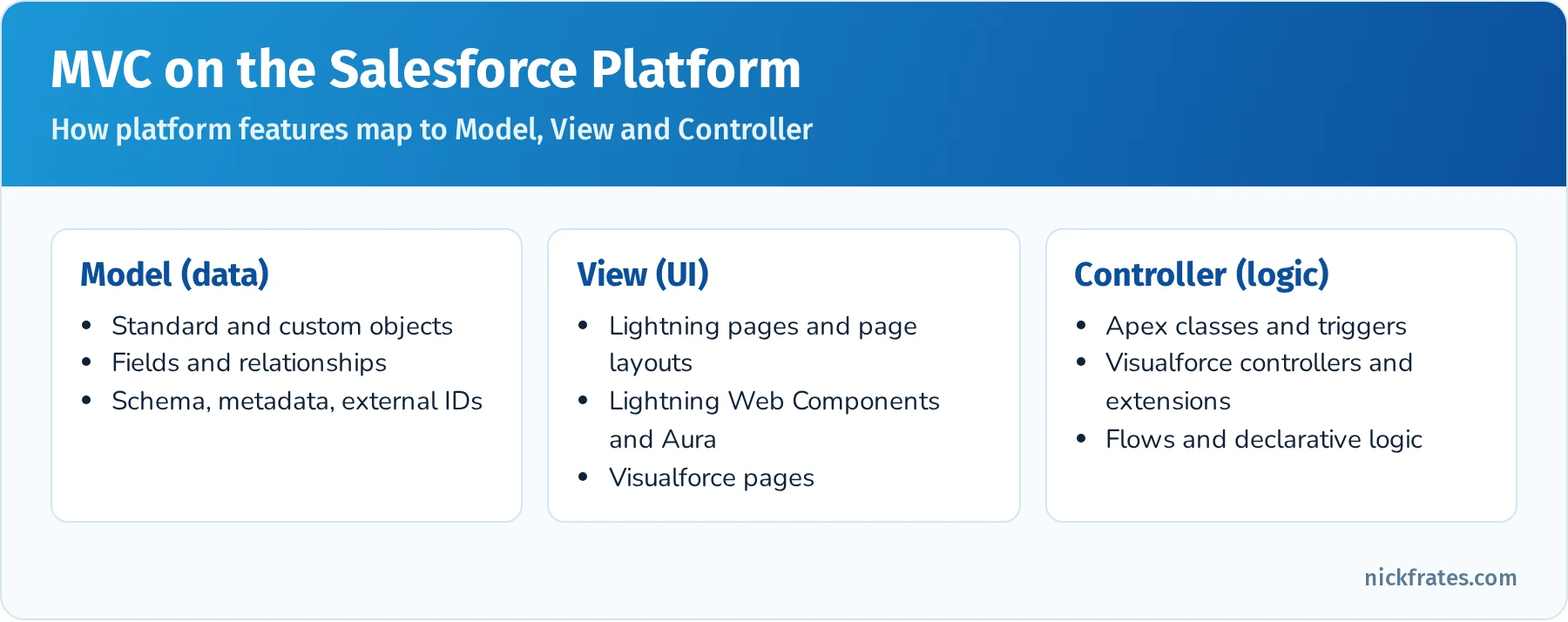
How the platform maps to Model, View and Controller.
Agentforce for Developers (new in the outline). Agentforce for Developers is Salesforce's AI coding assistant for VS Code (with the Salesforce Extensions) and Code Builder. It was previously called Einstein for Developers. Know its use cases: inline code completion for Apex and LWC, generating Apex or LWC code from a natural-language prompt, explaining existing code, generating Apex unit test scaffolding, and a chat-style Dev Assistant inside the IDE. Know its limitations just as well: generated code can be wrong, incomplete or not bulk-safe, it may not know your org's specific metadata or business rules, it doesn't replace code review, testing or the 75% coverage requirement, and you're still responsible for security (sharing, CRUD and FLS). The exam favors answers where a developer uses the assistant to speed up work and then reviews, tests and adjusts the output.
Quick reference: relationship types
| Feature | Lookup | Master-detail |
|---|---|---|
| Child can exist without parent | Yes (field can be optional) | No (parent required) |
| Delete parent | Child kept, lookup cleared (default) or delete blocked | Children cascade-deleted |
| Sharing and ownership | Child has its own owner and sharing | Child inherits from parent |
| Roll-up summary fields | No (use Flow or Apex) | Yes |
| Limit per object | Up to 40 relationship fields total | Up to 2 master-detail |
Practice questions: Developer Fundamentals
Question 1. A developer needs to show the total Amount of all related Line_Item__c records on a parent Invoice__c record. Line_Item__c has a master-detail relationship to Invoice__c. What is the simplest solution?
- A. An Apex trigger on Line_Item__c that updates Invoice__c
- B. A roll-up summary field on Invoice__c
- C. A formula field on Invoice__c
- D. A scheduled flow that recalculates totals nightly
Answer: B. Roll-up summary fields are built for exactly this on master-detail relationships, need no code, and recalculate automatically. A trigger works but adds code to maintain, a formula field can't aggregate child records, and a nightly flow leaves totals stale during the day.
Question 2. Which two statements about multi-tenancy are true? (Choose two.)
- A. Governor limits exist so one tenant can't monopolize shared resources
- B. Each customer can choose when to apply the seasonal release
- C. All orgs on an instance share infrastructure, but each org's data is isolated
- D. Exceeding a governor limit throws a catchable exception you can handle in a try-catch
Answer: A and C. Seasonal releases are applied by Salesforce, not scheduled by each customer (B is false), and LimitException can't be caught (D is false).
Question 3. An integration sends records with a unique ERP number. The developer must insert new records and update existing ones in one operation without querying Salesforce Ids first. What should they use?
- A. A text field marked Unique, then
insert - B. An External ID field and
upsert - C. A formula field and
update - D. A lookup field to a custom ERP object
Answer: B. Marking the ERP number as an External ID lets upsert (in Apex, the API or Data Loader) match on it to decide insert vs. update.
Question 4. A developer uses Agentforce for Developers to generate an Apex trigger. What should they do before deploying it?
- A. Deploy it directly, since AI-generated code is pre-validated by Salesforce
- B. Review it for bulkification and security, write unit tests, and run them
- C. Skip test classes, because generated code is exempt from coverage rules
- D. Regenerate it until no warnings appear in the IDE
Answer: B. Generated code is a starting point. It still needs review (bulk safety, sharing, CRUD/FLS), tests that assert behavior, and the normal 75% coverage requirement.
Question 5. A business wants a field that shows the number of days since a Case was opened, always current, with no storage of the value. What should the developer use?
- A. A number field updated by a scheduled flow
- B. A formula field using
TODAY() - DATEVALUE(CreatedDate) - C. A roll-up summary field
- D. An Apex trigger on Case
Answer: B. Formula fields calculate when read, so the value is always current and nothing is stored. The scheduled flow and trigger approaches store values that go stale or consume DML, and a roll-up summary aggregates children, not dates on the same record.
Question 6. Which tool should a developer use to load 2 million Contact records with an external ID for matching?
- A. Data Import Wizard
- B. Data Loader
- C. Change Set
- D. Developer Console Query Editor
Answer: B. Data Loader supports up to 5 million records and upsert by external ID. The Import Wizard caps at 50,000 records, Change Sets move metadata not data, and the Query Editor only reads data.
Process Automation and Logic (28%)
Overview: This is the largest and arguably most important section – 28% of the exam – focusing on Apex programming, declarative automation, and the nuts and bolts of business logic on the platform. A significant portion of questions will test your understanding of Apex code (the Salesforce proprietary programming language similar to Java) and how/when to use it in conjunction with or instead of declarative tools. Expect scenario-based questions about triggers, classes, and automation design.
Start with declarative process automation. Flow is the go-forward automation tool: record-triggered flows (before-save for fast field updates on the triggering record, after-save for related records and actions), screen flows for guided user input, scheduled flows, autolaunched flows called from Apex or other flows, and platform event-triggered flows. Workflow Rules and Process Builder reached end of support on December 31, 2025; existing ones still run, and Salesforce provides the Migrate to Flow tool to convert them. Old exam questions might mention them, so know that Workflow did single if/then field updates, emails, tasks and outbound messages, and Process Builder added multiple branches, record creation and Apex invocation. Understand the limits of Flow too: very complex looping over thousands of records, complex integrations, or logic needing precise transaction control are where Apex comes in. When to use declarative automation vs. triggers is a common decision point. A scenario like "on update of an Account, do X on related Contacts" can be a record-triggered flow or an Apex trigger. Salesforce encourages low-code solutions, so if a flow can do it cleanly and within limits it's often the correct choice, but weigh maintainability, volume and governor limits.
Next, dive into Apex language basics. You need to know how to declare variables and constants, use Apex data types, and write simple expressions. Key Apex data types include primitives (Integer, String, Boolean, Decimal, etc.), collections (List, Set, Map), sObjects (standard and custom objects as types), and more complex types like Apex classes and enums. Understand the syntax for loops and control flow: if-else statements, for loops (including the special SOQL-for loop), and while loops. Also know how to write methods and use access modifiers (public, private, global, protected) and keywords like with sharing/without sharing (which control record-level security in Apex code). Apex also supports interfaces and inheritance – for the exam, you should at least grasp what an interface is (a template of methods that a class can implement) and a typical use case (Salesforce has built-in interfaces like Database.Batchable, Schedulable that you implement to run batch or scheduled jobs). The exam may include a question like “given this interface and class, what is the outcome when executed” or a question on the implications of using with sharing.
A large chunk of this section is about writing and understanding Apex Triggers and Classes. Know how to write a basic trigger, including the context variables (like Trigger.new, Trigger.old, Trigger.isInsert, etc.). Trigger bulkification is paramount: Salesforce triggers fire per batch of 200 records by default, so Apex code must handle collections of records efficiently. This means using for loops and collections instead of singleton operations. Best practice is to avoid SOQL or DML inside loops; instead, query or process data in sets to stay within limits. For example, if updating child records when a parent changes, one would gather all child IDs and do one SOQL query, rather than querying inside a loop for each parent. Expect questions on what a piece of trigger code does, or identifying why a given trigger is failing (often due to not handling bulk updates or recursion). One trigger per object is a recommended design (using logic in helper classes if needed) – while the exam might not explicitly test that pattern, it might implicitly in a scenario about controlling trigger execution order (since if you have multiple triggers on the same object event, their execution order is indeterminate). Also, understand the order of execution in a save transaction (the sequence of events when a record is saved: before triggers, after triggers, workflow rules, processes, escalation rules, etc., and how recursion could happen). Knowing the order of execution is crucial for troubleshooting why a certain outcome is occurring (e.g. a validation rule firing after a before trigger, etc.).
In Apex, you must also know how to work with SOQL and SOSL queries and DML statements. SOQL (Salesforce Object Query Language) is like SQL: for example SELECT Id, Name FROM Account WHERE Name = 'Acme'. Know how to write SOQL in Apex, use bind variables (WHERE Name = :acctName), query parent fields through relationships (Account.Name from Contact) and child records with subqueries (SELECT Id, (SELECT Id FROM Contacts) FROM Account). SOQL has no JOIN keyword; you filter across objects with semi-joins and anti-joins (WHERE Id IN (SELECT AccountId FROM Contact) or NOT IN). SOSL (Salesforce Object Search Language) is a text search across multiple objects at once (for example, find every record containing "Acme" in a name or phone field). SOQL returns a list of records of one object type (plus related records); SOSL returns a list of lists of sObjects, one list per object searched. DML statements in Apex are insert, update, upsert, delete, undelete and merge, and you should always run DML on lists rather than single records inside loops. The exam often shows a code snippet and asks for the outcome. Two classics: assigning a query that returns no rows to a single sObject variable (Account a = [SELECT Id FROM Account WHERE Name = 'Nope'];) throws a QueryException with the message "List has no rows for assignment to SObject"; and insert records; is all-or-none, while Database.insert(records, false) allows partial success and returns Database.SaveResult objects you inspect for errors.
Governor limits are frequently tested in this section. You should memorize key limits and understand their impact on design. For instance: 100 SOQL queries per transaction (synchronous) – if you exceed this, you get a runtime exception. 50,000 records retrieved total by SOQL per transaction – exceeding that yields a LimitException. 150 DML statements per transaction (so batch your record changes into at most 150 operations). Other notable limits: 20 SOSL queries per transaction, 100 callouts per transaction, 6 MB synchronous Apex heap size, 10,000 rows processed by DML operations in a transaction, etc. You cannot catch LimitExceptions with try-catch (they will always halt execution when a governor limit is hit). Instead, you must design your code to avoid hitting limits (e.g. bulkify queries, use batch Apex for large data operations). Flashcards on these numbers are useful: a question might simply ask “What is the maximum number of SOQL queries allowed in a single Apex transaction?” or present a scenario and you have to know which limit is violated.
Another topic is the relationship between Apex transactions and the save order of execution. This includes understanding how before triggers can modify field values before the record is saved, how after triggers can query additional data or make changes that require the record ID, and how one trigger firing can cause other records’ triggers to fire (cascade) or recursively trigger itself (for example, if an after update trigger updates another record of the same object type, it can re-fire triggers on that object). Salesforce has protections to prevent infinite recursion (there’s a limit on trigger depth of 16 and on future calls, etc.), but you are expected to know strategies to avoid unwanted recursion – e.g. using static variables to ensure a trigger only runs once on the same set of records. Also know that each trigger execution is part of a single transaction, and all DML either succeeds or is rolled back if an uncaught exception occurs.
Exception handling in Apex is another key area. You should know how to use try-catch-finally blocks to handle errors, and when to throw exceptions. Salesforce has a hierarchy of exception types (like DmlException, NullPointerException, QueryException, etc.). Be aware of which exceptions you can catch and which you cannot (for example, you cannot catch LimitException governor limit errors in your code). The exam may ask which exception type would be thrown in a given scenario, or what happens if an exception is not caught (it bubbles up and rolls back the transaction). Also, custom exceptions can be created by extending Exception class – you might see a question about when to use a custom exception (e.g. to create a specific error type for business logic errors and throw it to caller). A typical scenario is using try-catch around a callout or DML and then throwing a custom exception or returning an error.
Finally, understand how declarative and programmatic automation can work together. A common example is an Invocable Method (an Apex method annotated with @InvocableMethod) called from a Flow, combining code with Flow for advanced logic. The same invocable methods can be exposed as Agentforce actions, where the label and description tell the agent when to use the action, so clear descriptions on the method and its @InvocableVariable inputs and outputs matter. Another pattern is calling an autolaunched flow from Apex with Flow.Interview. If both an after-save flow and an after trigger exist on the same object, both run: triggers run first, and after-save record-triggered flows run later in the order of execution. Use Flow trigger ordering (the trigger order value) to control the order of multiple record-triggered flows on the same object, and keep one Apex trigger per object to keep code ordering predictable.
Hands-On Practice (Trailhead & Exercises):
- Trailhead Module: Apex Basics & Variables – This teaches Apex syntax, how to declare variables, data types, and write simple Apex code. Practice writing basic classes and triggers in your dev org, even a “Hello World” trigger on a Contact that sets a field value.
- Trailhead Module: Apex Triggers – Walks through trigger scenarios and best practices (bulkification, context variables). Make sure to do the exercises, like creating a trigger that updates a parent field when children change.
- Trailhead Module: SOQL and SOSL – (e.g. “SOQL for Admins” or “Apex Basics & Database” modules) to practice writing queries. In a Playground org, try queries in the Developer Console’s Query Editor to get familiar with syntax. Then try writing equivalent queries in an Apex class and iterating over results.
- Superbadge: Apex Specialist Superbadge – This is a more involved challenge, but if you have time, it’s extremely useful. It makes you write Apex classes, triggers, and tests for a realistic scenario. Even if you don’t complete it before the exam, attempting parts of it will expose you to typical use cases that often align with exam topics.
- Practice Apex Problems: Come up with small scenarios, for example: "When an Account's rating is changed to 'Hot', automatically create a Task." Solve it first with a record-triggered flow, then with an Apex trigger, to compare both approaches. Or "Write an Apex method to find all Accounts with no Contacts" (hint: SOQL has no LEFT JOIN, so use an anti-join:
SELECT Id FROM Account WHERE Id NOT IN (SELECT AccountId FROM Contact)). Exercises like these build intuition for Apex logic and governor limits. - Trailhead Project: Quick Start: Apex – A guided project to set up a developer environment and deploy Apex code. This can help you learn to use Developer Console and see debug logs when running code.
- Use Developer Console: Write a simple Apex class with a few methods (e.g. math operations or string manipulations) and call them using Anonymous Apex to see results. Practice using
System.debug()and checking debug logs – this will also prepare you for debugging scenarios in the Testing/Debugging section.
Key Concepts for Flashcards:
- Record-Triggered Flow vs. Apex Trigger: Both can run logic on record changes. Flashcard prompt: “When should you use a Flow instead of an Apex trigger?” (Answer: If the logic can be achieved declaratively without hitting limits – e.g. small-scale or straightforward record manipulations – use Flow for ease of maintenance. Use Apex trigger for complex logic, large data volumes, or when needing transactions spanning multiple objects or custom error handling).
- Apex Data Types: Know the difference between List, Set, and Map. For example, a Set<String> avoids duplicates, a Map<Id, Account> maps Ids to Account records (useful for bulk operations). Flashcard example: “What collection type would you use to store unique Id values? (Set).”
- SOQL vs SOSL: SOQL is for structured queries (one object at a time (or with parent-child subqueries)), returns records. SOSL is for free-text search across multiple objects, returns lists of sObject lists.
- DML Options: All-or-none vs partial (Database class methods). E.g.,
insert accounts;(all-or-none) vsDatabase.insert(accounts, false)(continues on errors). Understand that partial allows successful records to commit while others fail. - Trigger Context Variables: e.g.
Trigger.new(new records in insert/update),Trigger.old(old values for update/delete),Trigger.isExecuting,Trigger.isInsert,Trigger.isAfter, etc. Flashcard: “What does Trigger.new contain in a before insert vs. before delete trigger?” (Answer: In before insert, Trigger.new contains the new records about to be saved; in before delete, Trigger.new is not available (since records are being deleted), but Trigger.old contains the records being deleted). - Order of Execution: The simplified sequence when a record is saved: system validation, before-save flows, before triggers, validation rules and duplicate rules, save (not committed), after triggers, assignment and auto-response rules, legacy workflow, escalation rules, after-save flows, roll-up recalculation, commit, then post-commit logic. Common quiz: "At what point is a record assigned an Id?" (When it's saved to the database after before triggers and validation, so the Id exists in after triggers.)
- Governor Limit Values: Memorize key limits: 100 SOQL queries per transaction (200 async), 50,000 records retrieved by SOQL, 150 DML statements, 10,000 records processed by DML, 20 SOSL queries, 100 callouts with a 120-second cumulative timeout, 6 MB heap (12 MB async), 10 seconds of CPU time (60 seconds async), 50
@futurecalls per transaction, and 100 scheduled Apex jobs in an org at one time. These make good flashcards (question on one side, number on the other). - System Mode vs User Mode: Apex generally runs in system mode, ignoring the running user's object and field permissions. Sharing (record access) depends on the class keyword:
with sharingenforces sharing rules,without sharingignores them, andinherited sharinguses the caller's mode. A class with no keyword inherits the sharing mode of its caller, and runs without sharing when it's the entry point. To enforce object and field permissions too, use user mode:WITH USER_MODEin SOQL,Database.insert(records, AccessLevel.USER_MODE)for DML, orSecurity.stripInaccessible().WITH SECURITY_ENFORCEDis the older option that throws an exception instead of stripping fields. - Exception Handling: Know at least one example of an exception that cannot be caught – e.g. LimitException (governor limits). Also know how to intentionally throw an exception (
throw new CustomException('msg');) and that throwing an exception will rollback the transaction unless caught. - Best Practices: Bulkify your code (no SOQL inside loops!), use collections. Avoid hardcoding IDs or values (use Custom Settings/Metadata or describe calls). Use “one trigger per object” principle and delegate logic to handler classes. Use test-driven development (which ties into Testing section).
Exam Focus Tips: This is the highest-weight section (28%), which means roughly 17 questions. A strong performance here is critical to passing. It’s also the section that tends to be most challenging for those new to coding, so allocate significant study time to practicing Apex and automation logic. Prioritize understanding over rote memorization – for example, rather than just memorizing trigger syntax, practice reading small Apex code snippets and predicting what they do. The exam often presents a short code block and asks for the outcome or error, testing your applied knowledge. If you find coding concepts daunting, break your study into subtopics (SOQL, triggers, Apex basics, etc.) and tackle one at a time with hands-on practice; Trailhead and sample problems are your friends. Given the weight, aim for mastery: you should reach a point where you can mentally run through an Apex snippet and catch mistakes (e.g. see a SOQL in a loop and realize it would hit limits on bulk data). Also remember, since this section is broad, don’t neglect the declarative aspects – a few questions will likely cover Flows or formulas vs. code scenarios. By focusing on this section, you build confidence for nearly one-third of the exam. Lastly, leverage flashcards for the limit numbers and terminology, but use a sandbox or Playground to actually write code for real understanding. The combination of memorization and applied practice will yield the best results here.
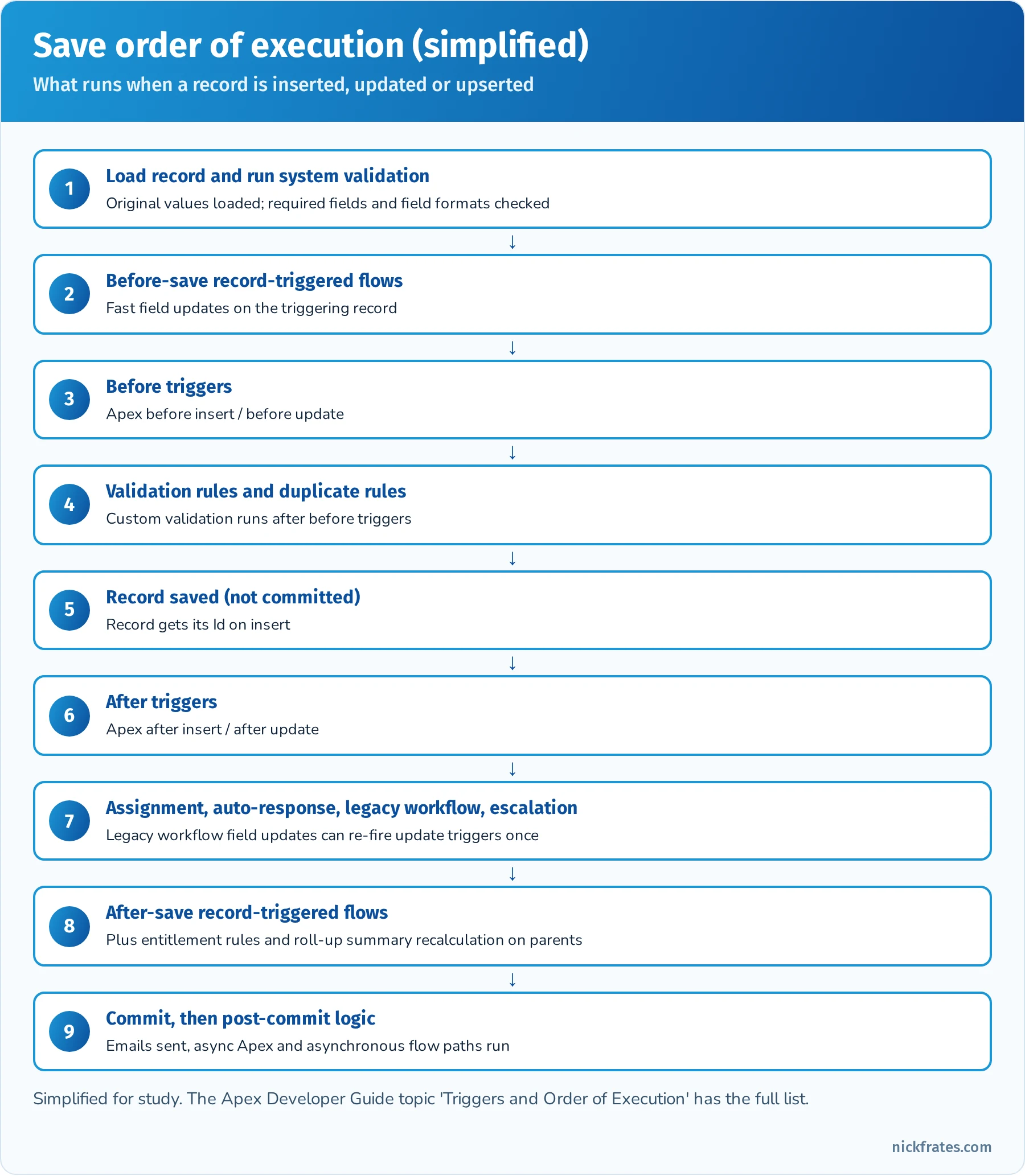
The simplified save order. Before-save flows run before before triggers; after-save flows run after after triggers.
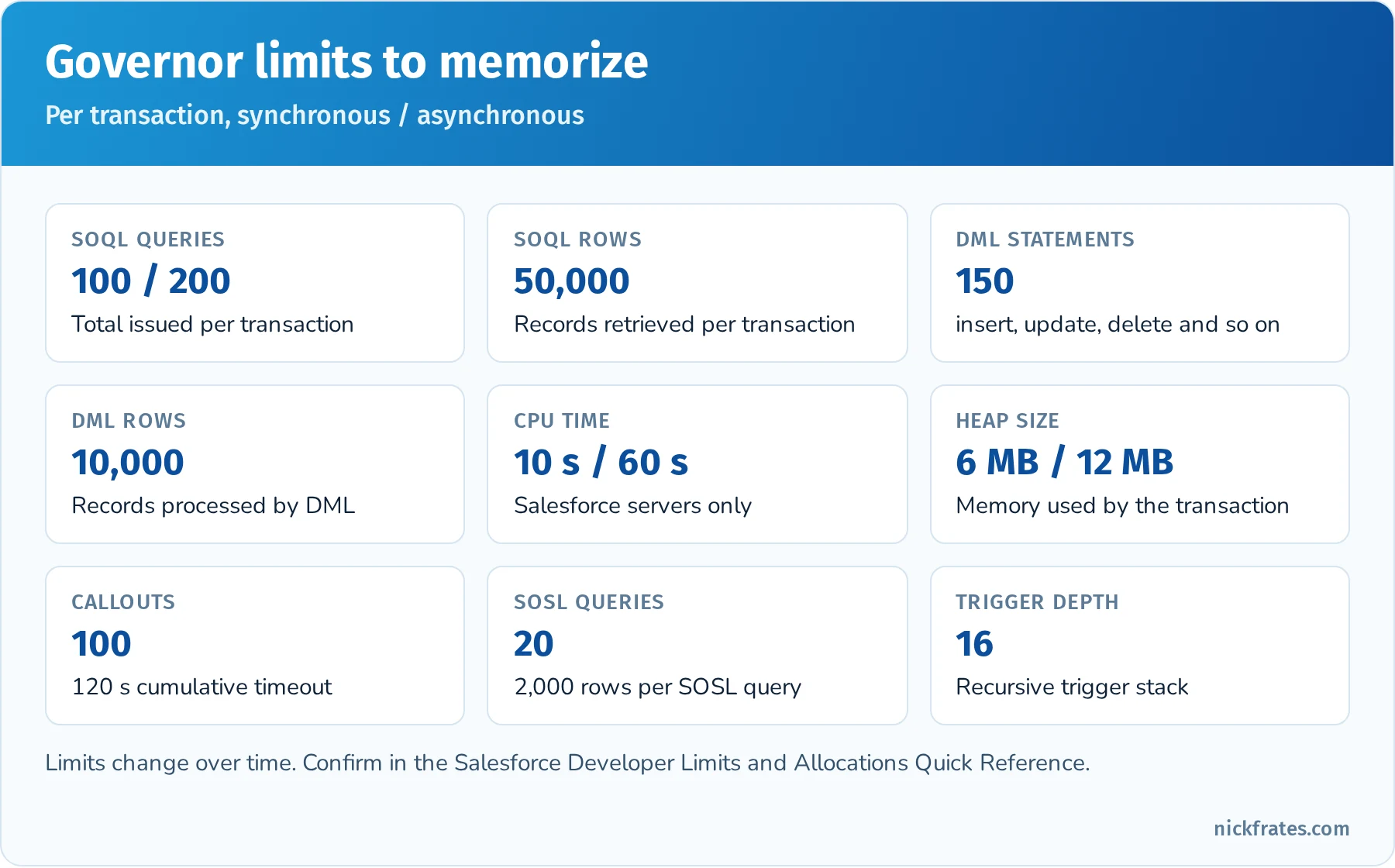
The governor limits that show up most often in PD1 questions.
Asynchronous Apex. The outline expects you to know when to use each async option. @future methods are the simplest (static, void, primitive parameters, and the usual way to make a callout after a trigger), but you can't chain them or get a job Id. Queueable Apex accepts complex types, returns a job Id you can monitor, and can chain one job from another. Batch Apex processes very large data sets (up to 50 million records with a QueryLocator) in chunks with fresh governor limits per execute call. Scheduled Apex implements Schedulable and runs on a cron expression, often to kick off a batch. Platform events and Change Data Capture decouple processes and let triggers or flows react asynchronously.
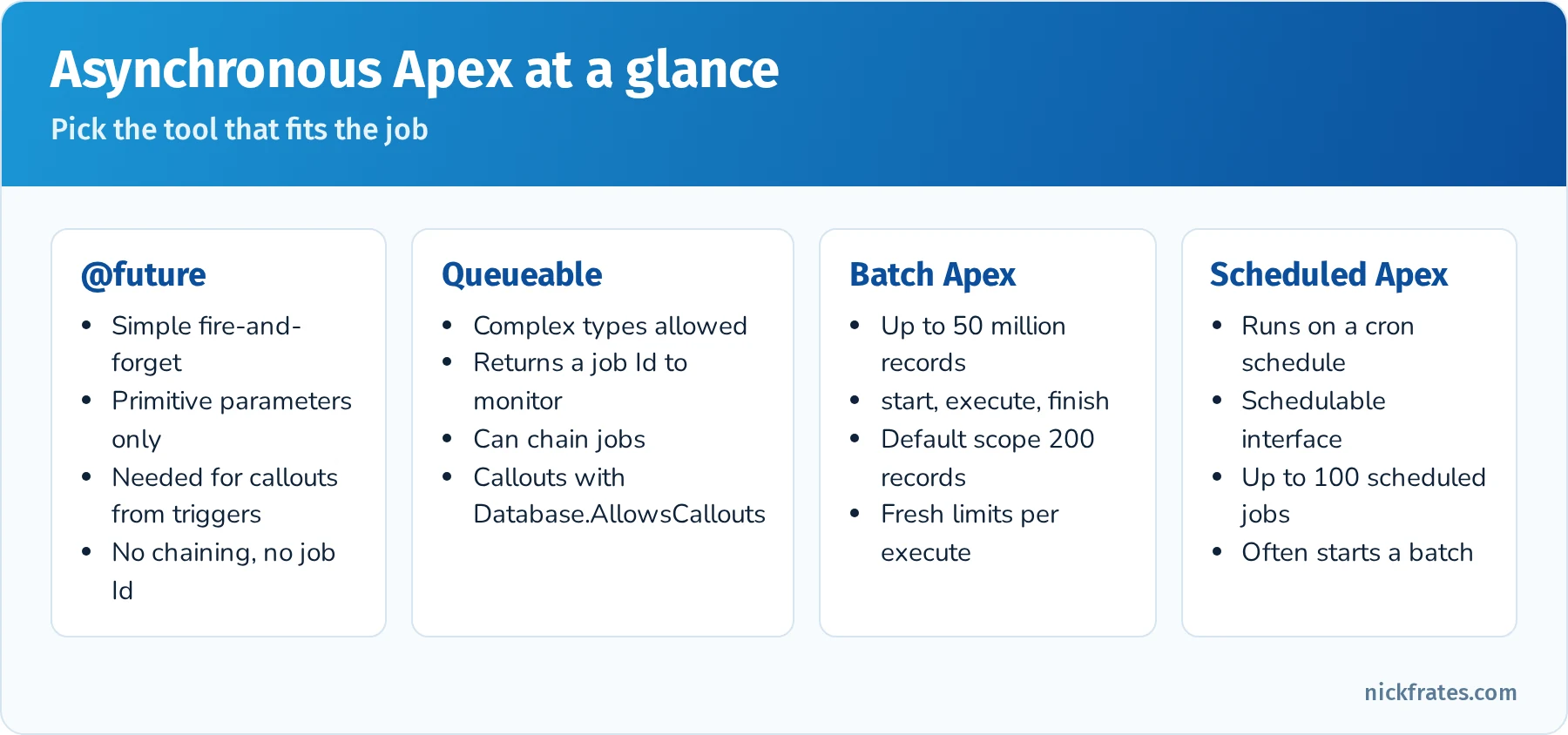
Choose the simplest async tool that meets the requirement.
Quick reference: Flow or Apex?
| Requirement | Better fit | Why |
|---|---|---|
| Update fields on the same record when it's saved | Before-save record-triggered flow | Fastest option, no extra DML |
| Create related records or send emails after save | After-save record-triggered flow | Declarative and maintainable |
| Complex logic across many objects with custom error handling | Apex trigger with a handler class | Full control over transactions and exceptions |
| Callout to an external system after a record change | Flow with an asynchronous path, or Queueable/future Apex | Callouts can't run synchronously in the save transaction |
| Reusable complex calculation used by many flows | @InvocableMethod Apex called from Flow | Code where needed, Flow everywhere else |
| Process millions of records nightly | Batch Apex (scheduled) | Fresh limits per chunk of records |
Quick reference: exceptions you should recognize
| Exception | Typical cause |
|---|---|
QueryException | Assigning zero or several rows to a single sObject variable |
DmlException | A DML operation fails (validation rule, required field, duplicate) |
NullPointerException | Using a variable or field that is null |
ListException | List index out of bounds |
LimitException | A governor limit is exceeded (can't be caught) |
CalloutException | Callout failure or a callout after uncommitted DML |
Practice questions: Process Automation and Logic
Question 1. A trigger on Contact contains a SOQL query inside a for (Contact c : Trigger.new) loop. What happens when 201 Contacts are inserted through Data Loader in one batch?
- A. Nothing, triggers process one record at a time
- B. The trigger runs in chunks of 200 records, and the query runs once per record, which can exceed 100 SOQL queries
- C. The query is automatically bulkified by the platform
- D. Data Loader skips triggers by default
Answer: B. Triggers receive up to 200 records per chunk. A query per record quickly passes the 100-query limit and throws an uncatchable LimitException. Query once into a Map or Set outside the loop instead.
Question 2. What does this code do when no Account named 'Nope' exists? Account a = [SELECT Id FROM Account WHERE Name = 'Nope' LIMIT 1];
- A. Sets
ato null - B. Throws a
QueryException: List has no rows for assignment to SObject - C. Throws a
NullPointerException - D. Returns an empty Account record
Answer: B. Assigning a SOQL result directly to a single sObject requires exactly one row. Query into a List<Account> and check isEmpty() to avoid the exception.
Question 3. A developer needs to insert 500 records and keep the successful ones even if some fail validation. Which statement should they use?
- A.
insert records; - B.
Database.insert(records, false); - C.
upsert records; - D.
Database.insert(records, true);
Answer: B. Passing false for allOrNone allows partial success and returns SaveResult objects to inspect. insert and Database.insert(records, true) roll back everything on the first failure.
Question 4. A record-triggered flow and an Apex after-update trigger exist on Opportunity. Which statement about order is correct?
- A. The flow always runs first
- B. Before-save flows run before before triggers, and after-save flows run after after triggers
- C. Their order is random every time
- D. Flows can't run when an Apex trigger exists on the object
Answer: B. Before-save record-triggered flows run early (before before triggers), and after-save flows run later in the save order, after after triggers and the legacy rules.
Question 5. Which Apex class declaration enforces the running user's sharing rules for record access?
- A.
public without sharing class Foo - B.
public with sharing class Foo - C.
public class Foocalled from an Anonymous Apex entry point - D.
global class Foo implements Schedulable
Answer: B. with sharing enforces record-level sharing. A class with no keyword inherits its caller's mode and runs without sharing as an entry point. Remember that sharing keywords don't enforce object or field permissions; use WITH USER_MODE or Security.stripInaccessible() for that.
Question 6. A trigger must call an external REST API when an Account is updated. What is the correct approach?
- A. Make the callout directly in the trigger
- B. Call a
@future(callout=true)method or enqueue a Queueable that implementsDatabase.AllowsCallouts - C. Use a before-save flow
- D. Use a workflow outbound message
Answer: B. Synchronous callouts aren't allowed from triggers because the transaction has uncommitted work. Move the callout to async Apex (or a flow's asynchronous path). Workflow outbound messages are legacy automation past end of support.
Question 7. Which collection type is best for storing unique Account Ids collected in a loop before a single query?
- A.
List<Id> - B.
Set<Id> - C.
Map<String, String> - D.
Id[]
Answer: B. A Set ignores duplicates automatically and works directly in a SOQL bind: WHERE Id IN :accountIds.
User Interface (25%)
Overview: This section tests your knowledge of building custom user interfaces on the Salesforce platform, including older technologies like Visualforce and newer ones like Lightning Web Components (LWC) and Aura components. It makes up about 25% of the exam, so roughly 15 questions. A key theme is knowing how to display and update data via custom UI and ensuring security on those interfaces.
First, understand Visualforce Page fundamentals. Visualforce (VF) is a framework for building custom pages, primarily for the classic UI (though VF pages can also appear in Lightning Experience). A VF page uses an HTML-like markup with Salesforce-specific tags (e.g. <apex:page>, <apex:form>, <apex:outputField>, etc.) and is served from Salesforce. Know how a Visualforce page can display Salesforce data using a controller. There are three controller types: Standard Controller (binds the page to a standard or custom object, giving you basic CRUD operations and access to a record or list of records), Custom Controller (an Apex class you write from scratch with logic for the page, not using a standard controller at all), and Controller Extension (an Apex class that extends or augments a standard controller). You should know when to use each. For instance, to make a quick page that edits a record, a standard controller might suffice. To override a standard button action with some extra logic, you might use a controller extension. To build something completely custom (say a page that pulls data from multiple objects and external web service), a custom controller is needed. The exam may present a scenario like “You need a page to display a list of related records and allow inline edit, which controller approach do you use?” – understanding the capabilities of each is key.
Also be aware of the types of content you can embed in Visualforce pages. VF can include static HTML/JavaScript, use CSS for styling, and even embed other web content via iframes or Canvas. It can also host Lightning components via Lightning Out or include an <apex:includeLightning /> tag to apply Lightning Experience styling to a VF page (by setting lightningStylesheets="true" on the <apex:page> tag, the page will use SLDS styles for a more modern look). One common use case is adding a VF page as a custom tab or override, or using VF in places where Lightning Components might not be available (e.g., a quick action in certain contexts). Although Visualforce is considered an older tech now, it is still on the test and widely used in many orgs, so don’t skip studying it. Make sure you know basic Visualforce page syntax, how to reference data ({! record.Field__c } merge expressions), and how to call Apex methods from VF (e.g. using <apex:commandButton action="{!save}" /> that calls a controller’s method).
Next, Lightning components: Salesforce has the Aura Component Framework (often just referred to as “Lightning Components” historically) and the modern Lightning Web Components (LWC). The exam outline explicitly mentions the “Lightning Component framework, its benefits, and types of content in an LWC”. Key points: The Lightning Component framework is used to build dynamic, single-page style applications for Lightning Experience. Aura components were the original model (with a component bundle containing markup, controller, helper, etc.), and Lightning Web Components are the newer model built on standard web standards (a bundle of HTML, JavaScript, and metadata files). Benefits of Lightning Components include a more interactive UX, better performance (because of client-side rendering and partial page updates), and reusability (components can be dropped into different pages or apps). LWC specifically has benefits of using native browser capabilities, which means less Salesforce-specific framework overhead and easier adoption of web standards.
Know what content can be in an LWC: since LWC uses standard web tech, you can include HTML for structure, CSS for styles (or use the Salesforce Lightning Design System classes), and JavaScript for client-side logic. You can also import Apex methods to call them imperatively or use wire adapters to get data. LWC can also utilize Pub/Sub modules for communication between components. The outline mentions “use cases and best practices for LWC events” – you should understand how components communicate: an LWC can fire a CustomEvent to send data to a parent component (this is akin to Aura component events but now using DOM events). Best practices include using events for parent-child comms, avoiding overly broad event scope (in Aura, you’d prefer component events to application events; in LWC, you might use a shared messaging service for sibling components rather than abusing the event system). Essentially, know how events propagate in LWC (they bubble up the DOM, can be stopped or composed across shadow DOM boundaries) and that you usually use a CustomEvent with a detail property to pass data. A best practice: keep event payloads small (primitives) to avoid giving child components direct references to parent data (which could be mutated unexpectedly). Also, LWC events can be configured with bubbles and composed flags – generally default events are non-bubbling and non-composed within the shadow DOM (which is safer and encapsulated). The exam might not get too low-level on this, but it could ask something conceptual like “How do two sibling LWCs communicate?” (Answer: via a parent mediator – either the parent handles an event from one and passes data to the other, or use a pub-sub module since siblings can’t directly interact without a common parent or an event bus).
The UI section also covers security in custom interfaces. This includes understanding user data access and UI security vulnerabilities. For Visualforce and Apex controllers, this means respecting CRUD/FLS (object and field-level security) – Apex running in system mode can violate these unless you enforce them manually (using Schema.sObjectType describes or with sharing for record sharing). Lightning components (Aura/LWC) run in user context for data access (meaning they typically use Apex to get data, and that Apex can be with or without sharing). The exam objective explicitly states “Given a scenario, prevent user interface and data access security vulnerabilities.” This implies you should know about common vulnerabilities like SOQL injection (and how to prevent it by binding variables or using escapeSingleQuote), Cross-Site Scripting (XSS) in Visualforce (for example, outputting user input without escaping can be dangerous; always use <apex:outputText escape="true"> by default), and avoiding exposing sensitive data on the client side. Lightning Locker (now Lightning Web Security) is Salesforce’s mechanism to isolate component namespaces, but you likely just need to know that it exists to protect components from each other. Also know that if you’re using JavaScript in LWC, the framework automatically escapes HTML output to prevent XSS in most cases. A scenario might describe a piece of code vulnerable to SOQL injection (e.g. constructing dynamic SOQL with unchecked user input) and ask what the issue is or how to fix it (by using bind variables or escaping quotes). Another might describe a Visualforce page where a query string parameter is used in the controller SOQL – to secure it, you’d sanitize or type-cast the parameter.
Finally, be familiar with how custom UI components are surfaced in Salesforce and how Apex works with them. You can put a Lightning Web Component on a record page, home page, app page, utility bar or quick action, embed a screen flow in a Lightning page, and show a Visualforce page through the Visualforce component. The outline asks you to implement Apex that works with page components such as Lightning components, Flow and Agentforce actions. In practice: LWC and Aura call Apex methods annotated with @AuraEnabled (use cacheable=true for read-only methods you want to @wire); Flows call @InvocableMethod Apex; Agentforce actions can be backed by invocable Apex, flows or prompt templates; and Visualforce uses controllers and action methods. A typical question: "How should an Apex method be declared so an LWC can call it with @wire?" (Public or global static, annotated @AuraEnabled(cacheable=true).)
Hands-On Practice (Trailhead & Exercises):
- Trailhead Module: Visualforce Basics – Build a simple Visualforce page and controller. For example, create a VF page that shows a list of Accounts and lets you select one to view details. This will reinforce how to use standard list controllers vs. writing SOQL in a custom controller.
- Trailhead Module: Lightning Web Components Basics – Go through the basics of LWC, create a “Hello World” LWC and deploy it to a record page. Practice passing data via @api properties and firing a simple CustomEvent (perhaps have a child LWC fire an event and a parent LWC handle it to update a message).
- Trailhead Module: Aura Components Basics – Aura is less emphasized now, but completing a basic Aura component exercise (creating a component with a controller and helper) helps you recognize Aura syntax (aura:id, components, etc.) in case it appears on the exam. Some questions might still reference Aura components or application events.
- Visualforce Exercise: Try overriding a standard action. For instance, override the “New” button of an object with a Visualforce page that has a custom form. This will teach you how VF interacts with standard controller navigation and saving. Also practice using
lightningStylesheets="true"on the VF page to see how it adopts Lightning look. - Security Practice: Intentionally introduce a vulnerability in a test Visualforce page (like outputting
<script>alert('xss')</script>from a string variable) and see how using<apex:outputText escape="false">vsescape="true"behaves. Similarly, write an Apex snippet that builds a SOQL string from user input, and then fix it by using a binding variable. This hands-on approach will solidify what not to do in terms of security. - Trailhead Module: Lightning Aura and LWC Events – If available, find Trailhead content specifically on communication patterns between components. Otherwise, Salesforce documentation examples for LWC events are great – try to implement a parent-child LWC where the child emits an event and the parent reacts (e.g., child component has a button that when clicked, sends an event to increment a counter in the parent).
- App Builder Mix: Use the Lightning App Builder to combine components – e.g., place a flow, a visualforce page, and a custom LWC on one Lightning Home Page. This will give you a practical sense of how these pieces coexist. It’s also useful to see how you pass parameters to Visualforce via Lightning pages or how a Flow’s output could be input to a component (though mostly flows and components don’t directly feed each other without custom integration).
Key Concepts for Flashcards:
- Visualforce Standard vs Custom Controller: Standard controllers provide out-of-the-box CRUD logic for a single record or list (and come with a
save()method, etc.), whereas a custom controller is an Apex class you write to define custom logic and data fetching. Flashcard prompt: “What’s the difference between a Visualforce standard controller and a custom controller?” - Controller Extension: An Apex class that extends a standard controller’s functionality (it has a constructor taking
ApexPages.StandardControlleras a parameter). Use this when you need to add logic to a standard controller page (e.g. a custom button that does additional processing before save). - Lightning Web Component (LWC): A UI component model using standard web technologies (HTML, JS, CSS). Key traits: Uses the shadow DOM for encapsulation, communicates with Apex via @AuraEnabled methods, and with other components via events.
- Aura vs LWC: Aura components use a proprietary component model (with
.cmpfiles, controllers, events), while LWC uses modern JavaScript. Both can coexist and both run in Lightning. Aura had the concept of application events vs component events – in LWC, all events are essentially component (DOM) events. Potential question: “How do you ensure two independent LWCs communicate if they are not in the same DOM hierarchy?” (One answer: use a Lightning Message Service or pub-sub pattern, which isn’t deeply covered on PD1 but good to know conceptually). - SLDS (Styling): Salesforce Lightning Design System – a CSS framework for styling components/pages with the Lightning Experience look. You might need to know that in Visualforce you enable SLDS by adding
lightningStylesheets="true"on the page, or by manually including the SLDS stylesheets. - Security: XSS Prevention: In Visualforce, use
<apex:outputText>(which escapes HTML by default) instead of outputting raw user input. In Lightning, know that data-binding in LWC is safe by default (it won’t render raw HTML unless you specifically use LWC’s dangerous HTML rendering withinnerHTML, which is rare). - Security: SOQL Injection Prevention: Never concatenate unchecked user input into dynamic SOQL strings. Instead, use bind variables or the escape methods. E.g., read the parameter into a variable (
String namefrom the page parameters) and query with a bind variable, as in[SELECT Id FROM Account WHERE Name = :name], rather than building a query string. - UI API vs Apex in UI: Although not heavily tested, be aware that standard Lightning components often use the Lightning Data Service under the hood (UI API) to fetch and save data without Apex. But custom logic or multi-object operations often require Apex.
- Lightning Events: In Aura: component event vs application event (component event is narrower scope). In LWC: use CustomEvent. Flashcard: “True or False: In LWC, you should typically use CustomEvent with detail to communicate from child to parent, and avoid global event buses unless necessary. (True).”
- Navigation: How do you expose a component or VF page? E.g., Visualforce can be a custom tab or override standard actions. LWCs can be made available in the App Builder by specifying targets (like record page, home page). Aura components can also have design files for placement. Not heavily quizzed, but you might get a question like “How can an LWC be used in a quick action?” (By configuring it as a Lightning Component Quick Action target).
Exam Focus Tips: At 25% weight, the UI section is significant. Many candidates find this section tricky if they haven’t worked with Visualforce or Aura/LWC before, because it involves different technologies. Do not underestimate Visualforce – even though it’s “old,” several exam questions often cover VF page logic or controllers. If you come from a modern LWC-focused background, brush up on Visualforce basics. Conversely, if you’re from a classic background, update yourself on LWC concepts, as the exam is updated to include LWC (e.g. understanding events, @wire, etc.). Pay attention to security best practices, as those are high-yield and often straightforward points if memorized (e.g. knowing that a certain code snippet is vulnerable to SOQL injection is an easy question if you’ve seen it before). For preparation, prioritize Visualforce and Apex controller interactions and LWC basics. Aura components appear less, but a general awareness can’t hurt (maybe 1 question). Because this section has a lot of different pieces (VF, Aura, LWC, security, UI API), consider making a small chart or mind map of UI technologies and their key points to visually organize the info. In terms of study allocation, if you’re not strong in front-end development, spend extra time doing the hands-on exercises to solidify these concepts – seeing how a Visualforce page or LWC actually works will help the knowledge stick much more than just reading. Finally, recall that UI scenarios might tie in with Apex – for instance, a question might span UI and logic: “A Lightning component calls an Apex method to get data – how should that Apex method be declared?” (Answer: @AuraEnabled, maybe cacheable=true if just fetching data). So having integrated understanding is useful. Overall, treat this section as “applied knowledge” – visualizing how users and data interact through custom interfaces – and you’ll be able to work through the scenario-based questions effectively.
Quick reference: UI technologies
| Technology | Built on | Calls Apex with | Where you'll see it on the exam |
|---|---|---|---|
| Lightning Web Components | Web standards (HTML, JS, CSS) | @AuraEnabled methods, imperative or @wire | Events, data binding, targets, security |
| Aura components | Salesforce component framework | @AuraEnabled methods | Recognize syntax, component vs. application events |
| Visualforce | Server-side page markup | Standard controllers, custom controllers, extensions | Controller choice, merge syntax, XSS and SOQL injection |
| Screen flows | Flow Builder | Invocable Apex actions | Guided UIs, embedding flows in pages |
| Agentforce actions | Agentforce Builder | Invocable Apex, flows, prompt templates | Apex that powers agent actions |
Quick reference: LWC communication
| Scenario | Pattern |
|---|---|
| Parent to child | Public @api property or method on the child |
| Child to parent | Dispatch a CustomEvent with a detail payload |
| Unrelated components on the same page | Lightning Message Service |
| Read a record without Apex | Lightning Data Service (lightning-record-form, getRecord wire adapter) |
| Read data with Apex reactively | @wire to an @AuraEnabled(cacheable=true) method |
Practice questions: User Interface
Question 1. A Visualforce page must override the standard Edit button on Account and add custom logic before save. Which approach is best?
- A. A custom controller written from scratch
- B. A controller extension on the standard Account controller
- C. A static resource
- D. An Aura application event
Answer: B. An extension keeps the standard controller's behavior (record loading, save, navigation) and adds custom logic. A full custom controller would make you rebuild what the standard controller already does.
Question 2. A Lightning Web Component needs read-only Account data that should refresh reactively when a property changes. How should the Apex method be declared?
- A.
public static List<Account> getAccts() - B.
@AuraEnabled(cacheable=true) public static List<Account> getAccts(String filter) - C.
@InvocableMethod public static List<Account> getAccts() - D.
@future public static void getAccts()
Answer: B. Wired Apex methods must be @AuraEnabled(cacheable=true) and static. @InvocableMethod is for Flow and Agentforce actions, and @future can't return data.
Question 3. A child LWC must tell its parent that a user selected a record. What should the child do?
- A. Set a property on the parent directly
- B. Dispatch a
CustomEventwith the record Id indetail - C. Call
location.reload() - D. Use an Aura application event
Answer: B. Child-to-parent communication uses DOM events. The parent listens with an on<eventname> handler in its template.
Question 4. A Visualforce controller builds dynamic SOQL from a URL parameter: 'SELECT Id FROM Account WHERE Name = \'' + name + '\''. What's the risk and the fix?
- A. No risk, Visualforce escapes all input
- B. SOQL injection; use a bind variable or
String.escapeSingleQuotes() - C. Cross-site scripting; add
escape="false" - D. Governor limits; add
LIMIT 1
Answer: B. Concatenating user input into dynamic SOQL allows injection. Prefer static SOQL with a bind variable, or escape the input if dynamic SOQL is unavoidable.
Question 5. Two LWCs sit side by side on a Lightning record page with no parent-child relationship. How should one notify the other?
- A.
CustomEventwithbubbles: true - B. Lightning Message Service
- C. A Visualforce remote action
- D. A platform event published from JavaScript
Answer: B. Lightning Message Service is the supported way to communicate across the DOM between components that don't share a parent in the same hierarchy.
Question 6. An Apex method should be available as an action that an Agentforce agent can call. What is required?
- A.
@AuraEnabled(cacheable=true) - B.
@InvocableMethodwith a clear label and description, plus@InvocableVariableinputs and outputs - C.
@RemoteAction - D.
webservice static
Answer: B. Agent actions can be built on invocable Apex. The label and descriptions help the agent's reasoning decide when to use the action, so write them clearly.
Testing, Debugging, and Deployment (20%)
Overview: This section covers the lifecycle after development: writing and running tests, debugging issues, and deploying code to different environments. It comprises about 20% of the exam (~12 questions). Though it’s the smallest section by weight, it’s still crucial – plus, mastering testing and deployment will improve your ability to deliver working solutions in practice.
Begin with Apex testing – Salesforce places heavy emphasis on test coverage and best practices. Every candidate should know that you must have at least 75% code coverage from tests to deploy Apex to production, and all triggers must have some coverage. Testing on the platform isn’t just about hitting a percentage; it’s about ensuring logic works as expected and doesn’t break in production. Know how to write an Apex test class: it’s an Apex class annotated with @isTest. Test methods are static, void, take no arguments, and have the @isTest annotation (or you can use the older testMethod keyword). You’ll often create test data within test methods (since tests run in isolation, and by default have no access to org data). Key concept: Use utility test classes or @testSetup methods to create common test records that all tests can use. Understand the testing framework requirements: tests do not commit data and roll back at the end, unless you use Test.startTest() / Test.stopTest() which are for isolating asynchronous calls and resetting governor limits within a test. The exam might include a question on the purpose of Test.startTest() and Test.stopTest() (Answer: to simulate a fresh context and to execute any enqueued async code like future methods or batch executes after stopTest). Also, know how to run tests: via Developer Console, via Salesforce CLI, or in UI (Setup > Apex Test Execution).
Be familiar with testing specific scenarios: testing triggers (usually by inserting or updating records to fire the trigger), testing future/queueable/batch (you call them like normal methods in a test, but for batch you might need to start and stop test around the Database.executeBatch), and testing callouts. For callouts, remember you must use Mock callouts (implement HttpCalloutMock interface) since tests can’t call external services. Also, know about seeAllData=true – by default it’s false, meaning tests cannot see org data. It’s best practice to leave SeeAllData false (for isolation) and create the data you need in the test. The exam might ask how to test something in a scenario: e.g., “How to test a method that performs a web service callout?” (Answer: set up a mock using Test.setMock and call Test.startTest()/stopTest() to invoke the callout which then uses the mock response).
For debugging, you should know the tools available: Debug Logs, Developer Console log inspector, and system debug statements. If an exam scenario describes an issue in production, likely the answer involves checking debug logs or using the setup audit tools. Understand log categories and levels (e.g. setting Apex code logging to DEBUG, etc.). Also, know how to debug Flow errors: when a Flow fails, Salesforce can send an email with an error, and you can also debug-run flows in Flow Builder or check the Flow Interview logs (in Setup under Flows, there's a section for Paused and Failed flow interviews). Flow activity also shows up in debug logs (as FLOW_ entries), and Flow Builder's Debug button lets you run a flow, roll back changes and inspect each element. If a question asks “How can a developer find the cause of a process failing after deployment?”, a safe bet is “review debug logs and look for error messages or exceptions in the flow’s context”.
Also, asynchronous debugging: if dealing with Queueables, Future methods, or Batch jobs, you might use the Async Apex Job monitor and check logs for those specifically. The exam may mention “monitoring asynchronous and batch jobs” – be aware of the Apex Jobs page in Setup (which shows batch jobs, scheduled jobs, etc.), the Scheduled Jobs page for scheduled Apex, and the fact that each batch execution has its own log.
Know how to use tools like the Salesforce CLI (sf) for deployments and running tests. The outline references developer tools such as Salesforce DX, the CLI, VS Code with the Salesforce Extensions, Code Builder and the Developer Console. Know at a high level what each is for:
- Developer Console: in-browser tool for writing/debugging Apex and running tests or SOQL queries. Good for quick diagnostics (e.g. checking debug logs, running test classes on the fly).
- **Salesforce CLI (
sf):** a command-line tool for retrieving and deploying metadata, running tests, creating scratch orgs and loading data. The oldsfdx force:...command style was replaced by unifiedsfcommands such assf project deploy startandsf apex run test. - Salesforce DX (Developer Experience): not a tool per se but a set of features including scratch orgs, unlocked packaging – likely you won’t be asked deeply about packaging, but maybe know that DX encourages source-driven development in scratch orgs and uses CLI for deployments.
- Workbench: not explicitly mentioned, but sometimes used for queries or deployments in the web.
- VS Code with Salesforce Extensions: how many devs write code now, but the exam might not cover IDE specifics.
Moving to deployment: Understand the typical environments and deployment process. Know the various sandbox types (Dev, Test/QA, UAT, Full) and that you develop in sandboxes or scratch orgs and deploy to production. Deployment options include Change Sets (point-and-click, between connected orgs), Metadata API (using tools like ANT or SFDX CLI to push source), and newer options like Unlocked Packages. The exam might ask, for example, “Which deployment tool would you use to deploy metadata to a related org without manual steps?” – answer: Change Set if within same environment, or metadata API (CLI/ANT) for more control. Also remember that Apex code deployment requires all tests to run and pass (with 75% coverage overall). You might get a question about test execution on deploy: by default, all local tests (and any relevant managed package tests) run on production deployment. If a test fails, the deployment is rolled back. For large orgs, you can run a subset of tests with certain tools, but you still need 75% coverage overall.
Release management: be aware of the concept of Continuous Integration (CI) – not deeply tested, but a general knowledge that you can use source control and automated tests to ensure quality. More specific might be sandbox strategy: e.g., develop in a Dev sandbox, test in a QA sandbox, then UAT in a UAT sandbox, then deploy to Prod. Sandbox refresh intervals might come up: Developer sandboxes can refresh daily, Full copy every 29 days – maybe one question on environment choice: “Which sandbox should be used for performance testing with a copy of production data?” (Answer: Full sandbox, because it copies all data and has production-equivalent performance and a 29-day refresh cycle).
Finally, change management: The outline mentions describing environments and processes for deploying code and config. This means know how things like profiles or picklist values might need to be moved along with code. Some things are metadata (can be deployed), some are data (need to be migrated separately). An exam question might be, “You have a new custom field and Apex code referring to it – how do you deploy to production?” The answer: via a Change Set or Metadata API deployment that includes the field and the Apex, and by running tests to meet coverage. Or “What’s a necessary step to take before deploying Apex?” (Run all tests and ensure 75% coverage).
Hands-On Practice (Trailhead & Exercises):
- Trailhead Module: Apex Testing – Write test classes for Apex code you wrote in earlier sections. If you created triggers or classes, now write tests for them. Use
System.assert()to verify outcomes. This module will cover key points like test data isolation and best practices. - Trailhead Module: Debugging Apex – This will show you how to use debug logs and set debug log levels. A good exercise is to cause a known error (e.g., divide by zero in Apex) and then find it in the debug log. Practice reading a debug log from top to bottom; they can be verbose, but get a feel for locating “EXCEPTION_THROWN” or “FATAL_ERROR” lines.
- Trailhead Module: Developer Console Basics – Make sure you can navigate the Developer Console: open logs, use the Query Editor, run tests from the UI. The certification might not directly test clicking in Developer Console, but experience here will help understanding.
- CLI Exercise: Install the Salesforce CLI, authorize a Developer Edition org with
sf org login web --alias dev, retrieve metadata withsf project retrieve start --metadata ApexClass, then validate a deployment without saving it usingsf project deploy validate --source-dir force-app --test-level RunLocalTests --target-org dev. Seeing a check-only deployment and its test results makes the deployment questions much easier. - Trailhead Module: Change Set Development – If new to change sets, follow a trail or help article to create and deploy a change set between a sandbox and another org. This will underscore how profiles/permissions need to be added, etc.
- Error Scenario Drills: Write a simple Apex class with an intentional bug (like something that queries too many records in a loop). Deploy it to a sandbox and run it with a test to generate a governor limit error, then practice reading the debug log or the error email (if any). This will make you comfortable diagnosing limit errors.
- Trailhead Module: Cert Prep: Platform Developer: Testing, Debugging, and Deployment – There may be an official prep unit that recaps these topics. Use it to ensure you’ve covered everything, and answer the quizzes to test your knowledge.
Key Concepts for Flashcards:
- Test Coverage Requirement: 75% of Apex code must be covered by tests to deploy to production. Also: all tests must pass. Good to remember that test methods themselves don’t count toward the lines of code.
- @isTest and @testSetup:
@isTestclass is used to indicate a test class.@testSetupannotated method runs once per class to create test data that each test method can use (improves efficiency and consistency of data setup). - System.runAs(): Used to run test code under the context of a different user (to test sharing rules or profile permissions). It doesn’t enforce field level security or permissions by itself, but it does simulate user record sharing. Note that runAs still won’t allow you to break org-wide limits (like user license limits on doing DML).
- Test.startTest()/stopTest(): Used in test methods to reset governor limits count and execute async code. Everything between start and stop is considered a new context (so you can, for example, enqueue a future method and then at stopTest, that future will run).
- Debug Log Levels: E.g., NONE, ERROR, WARN, INFO, DEBUG for Apex code logs. Knowing that you can configure what to capture (Apex, Database, Validation, Workflow, etc.) can be useful if an exam question asks “how to obtain more detailed logging for a specific area.”
- Deployment Tools: Change Sets (point-and-click, only between connected orgs such as a sandbox and its production org), the Metadata API through the
sfCLI or CI tools (scriptable, any org you can authenticate to, supports deletions with destructive changes), DevOps Center (Salesforce's source-control-backed release tool), and unlocked packages for modular, versioned delivery. Change Sets can't delete components and can't move data. - Profiles/Permission Sets in Deployments: If deploying components that require profile access (like a new field or VF page), ensure the profile settings are included or updated post-deployment. The exam might not dig in here deeply, but an awareness that deployment isn’t just code – you must consider security settings – is good.
- Continuous Integration (CI): e.g. using tools like Jenkins, GitHub Actions with the CLI to automate tests on every commit. Not likely a direct exam topic, but conceptually useful if a question asks about ensuring code quality before deployment (answer: implement a process to run all tests in a staging environment or use scratch orgs with a CI pipeline).
- Sandbox Types & Uses: Developer vs Developer Pro vs Partial vs Full – storage and refresh differences (Dev/Dev Pro daily, Partial 5 days, Full 29 days). Know that Full sandbox is needed for performance/load testing as it includes full data, whereas Developer sandbox is for unit testing and development (no data copied by default except setup and maybe template if applied).
- Error Monitoring: Besides debug logs, know about Apex Trigger Emails (if a trigger throws an uncaught exception in production, SF can send an email to admins), and tools like Lightning Exception Logs for LWC errors (these are in the Browser console rather than server logs). Possibly out of scope, but worth knowing error handling mechanisms.
Exam Focus Tips: While this section is smaller in percentage, it’s often where you can secure points with straightforward knowledge. Many questions in this domain are direct: e.g., “What must be done to deploy Apex to production?” or “How to identify the cause of a failing test?” If you study the clear-cut rules (75% coverage, seeAllData, etc.) and the purpose of each tool, you can answer confidently. Pay attention to any known Salesforce quirks: for instance, remember that deploying to production runs all tests by default (which might catch you off guard if some old test is failing – though that’s more a real-world tip). Also recall that tests do not count toward storage or leave data – a question might ask what happens after test execution (answer: data is rolled back, so it won’t persist). Time management in study: ensure you devote some time to writing test classes if you haven’t before – the act of writing a test will teach you more than reading about it. And since the exam might include one or two code snippet questions about tests, that practice will pay off. Deployment questions might be scenario-based, like choosing the right tool or sequence for deployment; think from a best-practice standpoint (e.g. deploy to a staging sandbox first, run all tests, then prod). Given the integrated nature of Salesforce, some questions here could also tie back to earlier topics (for example, a question about a piece of code failing only in production might relate to not having SeeAllData in tests or a profile missing permission after deployment). So having a holistic view helps. All in all, this section is about ensuring quality and moving changes reliably – if you prepare with that mindset, you’ll likely cover the necessary ground to pick up these points.
Quick reference: sf CLI commands for PD1
sf org login web --alias devsf project retrieve start --metadata ApexClass --target-org devsf project deploy start --source-dir force-app --target-org devsf project deploy validate --source-dir force-app --test-level RunLocalTests --target-org prodsf project deploy quick --job-id <validated job id> --target-org prodsf apex run test --test-level RunLocalTests --code-coverage --result-format human --target-org dev
sf project deploy validate runs a check-only deployment with tests. sf project deploy quick deploys a validated deployment without re-running tests, as long as you do it within 10 days of the validation and nothing changed in between. For a step-by-step CLI setup, see Stop Copy-Pasting Flow XML: Set Up Claude Code and the Salesforce CLI.
Quick reference: sandbox types
| Sandbox | Copies | Storage | Refresh interval | Typical use |
|---|---|---|---|---|
| Developer | Metadata only | 200 MB data, 200 MB files | 1 day | Individual development and unit testing |
| Developer Pro | Metadata only | 1 GB data, 1 GB files | 1 day | Larger dev and test data sets |
| Partial Copy | Metadata plus a sample of data (sandbox template) | 5 GB data | 5 days | QA and integration testing |
| Full | Metadata and all data | Same as production | 29 days | UAT, staging, performance testing, training |
Quick reference: test annotations and methods
| Item | What it does |
|---|---|
@isTest | Marks a test class or method; test code doesn't count toward your code size limit |
@testSetup | Creates common test data once per class |
Test.startTest() / Test.stopTest() | Fresh set of governor limits; async work queued in between runs at stopTest() |
System.runAs(user) | Runs code as another user to test record sharing (doesn't enforce FLS on its own) |
Test.setMock() | Supplies a fake response for HTTP callouts (HttpCalloutMock) |
@isTest(SeeAllData=true) | Lets a test see org data; avoid it except for rare cases |
Assert.areEqual() / System.assertEquals() | Verifies behavior; tests without assertions prove nothing |
Practice questions: Testing, Debugging, and Deployment
Question 1. What is required to deploy Apex to production?
- A. 100% coverage on every class
- B. At least 75% overall code coverage, every trigger with some coverage, and all tests passing
- C. 75% coverage only on new classes
- D. No tests if the deployment uses a change set
Answer: B. Production deployments need at least 75% of Apex covered overall, at least some coverage for each trigger, and passing tests. Change Sets follow the same rules.
Question 2. A test enqueues a Queueable job. How does the developer make sure the job runs before the assertions?
- A. Call
System.enqueueJob()twice - B. Wrap the enqueue between
Test.startTest()andTest.stopTest(), then assert afterstopTest() - C. Add
@isTest(SeeAllData=true) - D. Use
Thread.sleep()
Answer: B. Async work queued between startTest and stopTest runs synchronously when stopTest is called.
Question 3. How should a developer test a method that makes an HTTP callout?
- A. Tests can call the real endpoint if Remote Site Settings are configured
- B. Implement
HttpCalloutMockand callTest.setMock()before invoking the method - C. Skip testing callout code; it doesn't count toward coverage
- D. Use
System.runAs()
Answer: B. Tests can't make real callouts. A mock returns a predictable response so you can assert behavior.
Question 4. A team wants to confirm a production deployment will succeed during the day and deploy it in the evening without waiting for tests again. What should they use?
- A. Deploy twice
- B. A validated (check-only) deployment followed by a quick deploy within 10 days
- C. A Change Set with no tests
- D.
sf project retrieve start
Answer: B. Validate with sf project deploy validate (or a validated Change Set), then quick deploy with sf project deploy quick within 10 days.
Question 5. Which sandbox should be used for performance testing with production-sized data?
- A. Developer
- B. Developer Pro
- C. Partial Copy
- D. Full
Answer: D. Only a Full sandbox copies all production data, which you need for realistic performance and load testing.
Question 6. A test passes in a sandbox but fails in production because it expects a specific Account to exist. What is the best fix?
- A. Add
SeeAllData=true - B. Create the required test data inside the test (or in a
@testSetupmethod) - C. Delete the test
- D. Deploy the Account record with a Change Set
Answer: B. Tests should create their own data so they run the same way in every org. SeeAllData=true makes tests fragile and org-dependent.
Final preparation strategies
In summary, success on the Platform Developer exam comes from a blend of conceptual understanding, memorization of key facts, and lots of hands-on practice. Here are some closing tips to optimize your study:
- Focus on High-Weight Sections First: Process Automation and Logic (28%) and Developer Fundamentals (27%) together are more than half the exam, so be very comfortable with Apex basics, triggers, Flow vs. code decisions, data modeling and Agentforce for Developers. User Interface (25%) is close behind, so don't neglect Visualforce and LWC. Testing, Debugging, and Deployment (20%) is the smallest but very memorizable (coverage rules, test annotations, sandbox types). Allocate time roughly in proportion to these weights, then adjust for your weak spots.
- Leverage Trailhead and Documentation: Salesforce provides official modules and the exam guide (objectives) – use them as a checklist. If you find a topic challenging (say, LWC events or Apex testing), search for specific Trailhead projects or official blog posts on that topic. The Salesforce Developer documentation is also excellent for deep-dives (e.g. the Apex Developer Guide’s chapter on Governor Limits, or Visualforce Developer Guide for VF components).
- Practice in a Developer Org: Reading and memorizing can only take you so far – make sure to implement mini-examples for each key area in an actual org. Create triggers, run tests, build a Visualforce page, and spin up an LWC. This practical experience will make the exam scenarios much easier to parse because you’ve done it, not just read it.
- Use Flashcards and Spaced Repetition: The lists of terms and limits in this guide are ideal for flashcards. For example, put “Max SOQL queries per transaction” on one side and “100 (sync), 200 (async)” on the back. Use a spaced repetition system (like Anki) to drill these facts daily. By exam day, you should instantly recall governor limit numbers, what features are declarative vs code, and the key definitions.
- Join the Community and Discussion: If you get stuck on a concept, chances are someone on the Trailblazer Community or forums (StackExchange, Reddit’s r/salesforce) has asked about it. Sometimes hearing an explanation from a fellow learner or an MVP can make things click. Plus, community threads often highlight which topics recent exam-takers found tricky (e.g., several people emphasize not to ignore Visualforce and roll-up summaries). Just be careful to use community content as a supplement to official info (to avoid any outdated advice).
- Take Practice Exams (but use them wisely): If you have access to practice exams (like those from Focus on Force or others), use them to gauge your readiness after you’ve studied. They can identify weak areas to revisit. However, don’t just memorize practice Q&As – ensure you understand the reasoning behind each answer. The real exam questions will differ, but the underlying concepts will be the same.
- Time Management in the Exam: You’ll have roughly 105 minutes for 60 questions, which is plenty if you know your stuff. However, some scenario questions can be long. Practice reading questions carefully and identifying keywords (e.g. “given a scenario… use declarative vs programmatic” hints at the decision of Flow vs Apex). If a question stumps you, remember elimination techniques: rule out obviously wrong answers (e.g., if a limit is clearly exceeded, any answer suggesting that code works is wrong). Mark tough questions for review and move on – sometimes a later question can jog your memory for a previous one.
By following this guide and approaching your preparation methodically, you will build both the knowledge and the confidence needed to master the Salesforce Platform Developer exam. Good luck on your certification journey – with diligent study and hands-on practice, you’ll be well on your way to achieving the Platform Developer I credential and advancing your Salesforce development expertise!
Sources: This guide follows the official Salesforce Certified Platform Developer exam guide, the Platform Developer study trail on Trailhead, the Apex Developer Guide, and the Salesforce Developer Limits and Allocations Quick Reference. Limits and exam details change, so confirm numbers against the official sources before exam day.
Quick-reference cheat sheet
| Topic | Remember |
|---|---|
| Passing score | 68% of 60 scored questions (about 41 correct) |
| Heaviest sections | Process Automation and Logic 28%, Developer Fundamentals 27% |
| Bulkification | No SOQL or DML inside loops; triggers get up to 200 records per chunk |
| Sharing | with sharing, without sharing, inherited sharing; no keyword inherits the caller |
| Object and field security | WITH USER_MODE, AccessLevel.USER_MODE, Security.stripInaccessible() |
| Uncatchable exception | LimitException |
| Wired Apex | @AuraEnabled(cacheable=true) static method |
| Flow and agent actions | @InvocableMethod and @InvocableVariable |
| Coverage | 75% overall, every trigger covered, all tests pass |
| Validate then deploy | sf project deploy validate, then sf project deploy quick within 10 days |
| Legacy automation | Workflow Rules and Process Builder: end of support Dec 31, 2025 |
Frequently asked questions
Is Platform Developer I the same as "Salesforce Certified Platform Developer"? Yes. The official exam guide dropped the "I" from the name, but it's the same credential and still the prerequisite for Platform Developer II.
How hard is PD1 compared to Administrator and App Builder? It's harder for people without coding experience, because about half the exam involves reading Apex, triggers, tests and component code. Admins with some coding practice usually need six to ten weeks of focused study.
Do I need to know Visualforce in 2026? Yes. Lightning Web Components are the modern default, but Visualforce controllers, extensions and security still appear in the User Interface section.
Will Workflow Rules or Process Builder appear on the exam? They can appear in older-style questions, but Salesforce ended support for both on December 31, 2025, so the correct answer for any new automation is Flow or Apex.
What should I do the week before the exam? Take two or three timed practice exams, review every question you missed, drill governor limits and test annotations with flashcards, and rest the night before.
Related study guides
- Salesforce Platform App Builder study guide for the declarative side of the platform.
- Development Lifecycle and Deployment Architect study guide if you want to go deeper on environments, packaging and release management after PD1.
- The AI Associate retirement guide explains what replaced Salesforce's entry-level AI certification.
- Flow fundamentals that show up in PD1 questions: Before-Save vs After-Save Flows, Flow Error Handling and Fault Paths, Looping in Flow and SOQL Secrets.
Want to go deeper on automation? Flow shows up on almost every Salesforce exam, and it is the only supported declarative automation tool now that Workflow Rules and Process Builder are past end of support. My Salesforce Flows course walks through record-triggered, screen, scheduled and platform event flows with real-world challenges.
Hope this helps!
Best,
Nick