Hey friends,
Use a DML statement like insert records; when one failure should stop everything and throw an exception you catch. Use a Database method like Database.insert(records, false) when you want partial success: good records save, bad ones come back as errors in a result list, and no exception is thrown.
PD1 asks you to write DML "and assess what it will return" and to implement exception handling. This follows Trailhead's DML unit.
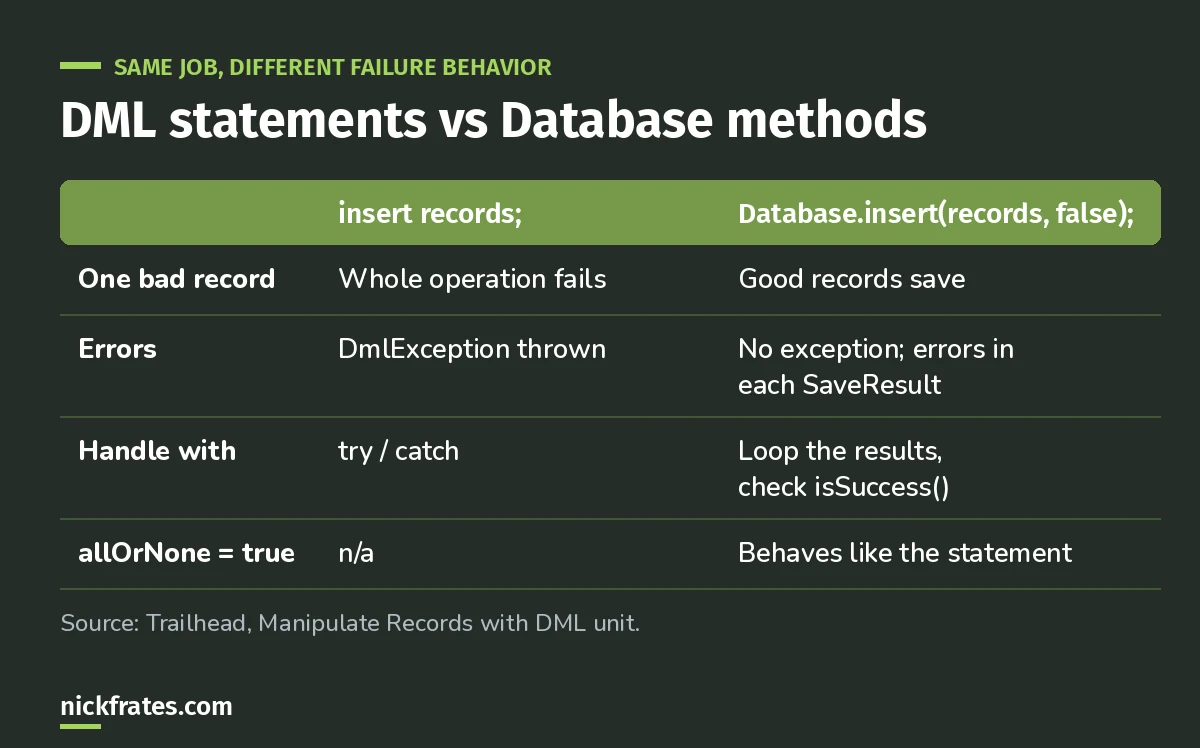
The second parameter is the whole difference.
DML statements
insert, update, upsert, delete, undelete and merge. If any record fails, the operation throws a DmlException, and control jumps to your catch block.
Database methods
Each statement has a Database method with an optional allOrNone parameter. Set it to false and the successful records commit while the failures come back in a list of Database.SaveResult. Leave it true and it behaves like the DML statement.
Trailhead's example: four contacts, one with no LastName. With partial success, three save and one returns an error. To collect the failures, a List or Map helps; see my Apex collections cheat sheet.
Which to use
- All or nothing matters (an order and its lines must save together): DML statement with try/catch.
- Bulk loads where some bad rows are expected: Database method with
allOrNone = false, then log or report the failures. - Either way, never inside a loop. One call on a list. See trigger best practices.
Upsert and merge, quickly
- Upsert inserts new records and updates existing ones in one call, matching on Id or another field you name, which helps avoid duplicates.
- Merge combines up to three records of the same type into one, deletes the others and reparents related records. Only leads, contacts, cases and accounts can be merged.
Cert Lab by Nick Frates
Practice DML and exception questions
The Platform Developer Cert Lab covers DML, SOQL, exceptions and governor limits with practice questions that explain every option.
Start the PD1 Cert Lab, $9.99 →Exception handling beyond DML
- Catch the specific exception you expect, like
DmlExceptionorQueryException, before a genericException. - Create a custom exception by extending
Exception, with a name ending inException, for your own business errors. - In triggers, prefer
addError()on the record to stop a save with a clean message for the user.
With sharing vs without sharing
Declare classes with sharing so the running user's record access applies to the code. Every Trailhead Apex example in these modules does this. without sharing ignores the user's sharing and should be a deliberate, documented choice for a narrow system task. PD1's UI section asks you to prevent data access security vulnerabilities, and this keyword is the first line of defense, along with queries that run in user mode.
Keep studying
Hope this helps!
Best,
Nick


