Hey friends,
Use a List when order matters or you're about to insert or update records. Use a Set when you need unique values, usually Ids for a WHERE Id IN :ids filter. Use a Map when you need to find something by key quickly, usually a record by its Id. Apex has only these three collections, and no arrays apart from lists.
These definitions come from Trailhead's Apex & .NET Basics and Apex Database units.
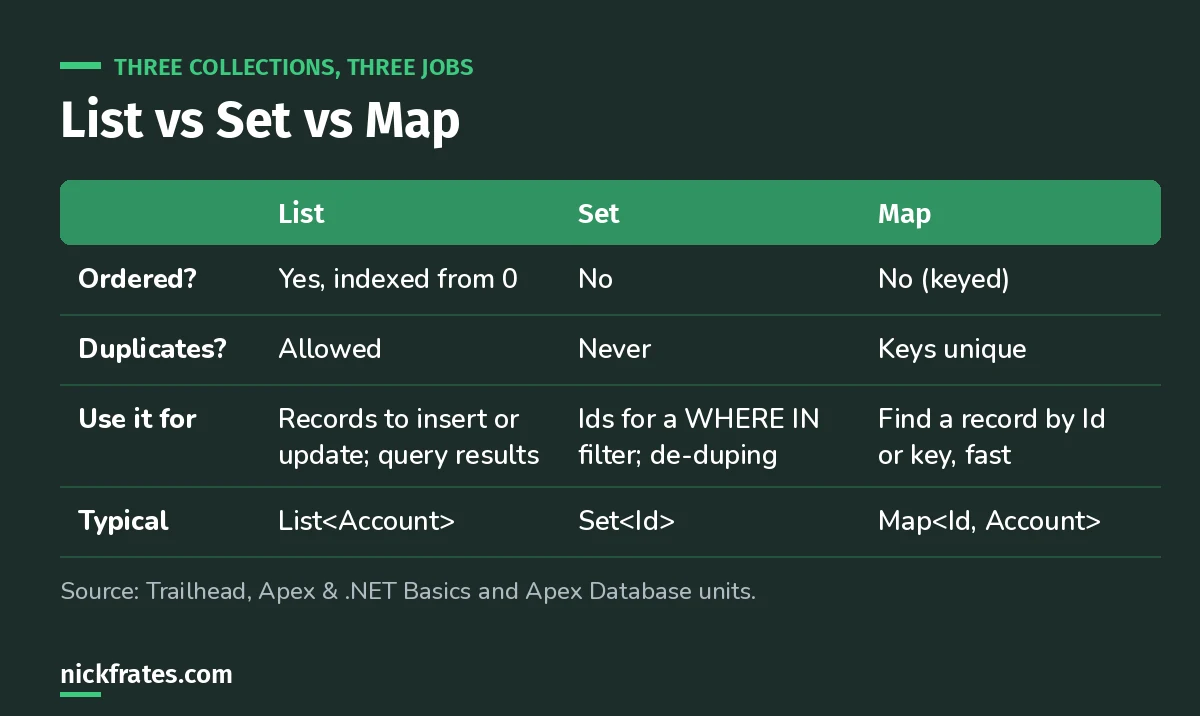
The whole cheat sheet in one table.
List
An ordered, indexed collection, like an array. The first element is index 0.
Query results come back as lists, and DML takes lists. That's why insert accts; on a list beats inserting inside a loop.
Set
An unordered collection with no duplicates. Trailhead's example: a set is commonly used to store Ids because they're always unique, and then used in a SOQL WHERE clause.
Map
Key-value pairs. Keys are unique and each maps to one value. Trailhead's example maps Accounts to their Ids, which you can build straight from a query:
Cert Lab by Nick Frates
Practice collections the PD1 way
The Platform Developer Cert Lab covers Apex data types, collections, SOQL and bulk patterns with practice questions that explain every option.
Start the PD1 Cert Lab, $9.99 →The pattern: Set to query, Map to look up, List to save
This is the shape of almost every bulk-safe trigger, and it's the heart of my trigger best practices:
- Loop the records once and collect the Ids you need in a
Set<Id>. - Run one query with
WHERE Id IN :idsand put the results in aMap<Id, SObject>. - Loop again, look each related record up with
map.get(), and add changes to aList. - One DML statement on the list, outside the loop.
One query and one DML, no matter how many records. That keeps you far from the governor limits.
Exam traps
- Index out of bounds: reading
list[0]on an empty query result throws an exception. CheckisEmpty()first. - Sets don't keep order. Don't rely on iteration order.
- Map.get on a missing key returns null, not an error. Check
containsKey()or null. - Adding a duplicate to a Set silently does nothing.
Keep studying
Hope this helps!
Best,
Nick