Hey friends,
The Salesforce Certified Platform Administrator exam has an Agentforce section worth 8% of the exam, about five of the 60 scored questions. It tests two things: when and how Agentforce should be used (including security and agent permissions), and how an admin maintains prompts and instructions for an agent, with light testing in the conversation preview. The exam guide still calls the tool Agent Builder; in current Salesforce Help and Trailhead it’s named Agentforce Builder, and topics are now called subagents.
Salesforce added it in the refresh that took effect on December 15, 2025 (Salesforce Admins blog). Here’s exactly what the guide says, what it doesn’t, and how to prepare without overdoing it.
The two objectives, word for word
From the official exam guide, Agentforce: 8%:
- “Describe the capabilities and use cases of Agentforce (scenarios about use cases, when it’s appropriate to use AI, security, troubleshooting agent permissions).”
- “Explain how to maintain, update, or install prompts and instructions in Agent Builder (light testing, conversation preview).”
Salesforce’s own announcement is clear about the level: “This doesn’t mean you’re expected to be an Agentforce expert.” The section is about AI awareness and the admin’s part in deploying agents responsibly (Salesforce Admins blog).
Where it fits in the new weighting
| Section | Weight |
|---|---|
| Configuration and Setup | 15% |
| Object Manager and Lightning App Builder | 15% |
| Sales and Marketing Applications | 10% |
| Service and Support Applications | 10% |
| Productivity and Collaboration | 10% |
| Data and Analytics Management | 17% |
| Automation | 15% |
| Agentforce | 8% |
8% is the smallest section, but at 60 scored questions and a 68% passing score, a handful of questions can decide a close result.
AI shows up outside the Agentforce section too
Read the full guide and AI appears in other sections as well. The first Automation objective asks you to pick the right automation tool from a list that includes “escalation rules, case assignment rules, lead assignment rules, default automation user, AI.” So expect scenario questions where the right answer is a plain rule, not an agent, and the other way round.
What to actually know
Objective 1: capabilities, use cases, security, permissions.
- What an agent is. Salesforce Help describes agents as goal-oriented, autonomous AI assistants that can carry out a sequence of tasks, not only answer a question (What Are Agents?). The Agentforce guide explains the parts.
- When AI is the right tool. Agents fit conversations and tasks that need judgment over several steps. A fixed, predictable rule (route this case, assign this lead) is still a rule or a flow. Questions that ask “most appropriate” usually reward the simpler tool when it fully solves the problem.
- Security and the Trust Layer. Know at a high level that Agentforce runs with guardrails such as data masking and toxicity detection in the Einstein Trust Layer.
- Troubleshooting agent permissions. An agent can only do what its user and permissions allow. When an agent can’t see or update a record, think the way you would for any user: permission sets, object and field access, and sharing. Salesforce Permission Sets is a good refresher.
Objective 2: prompts and instructions in Agent Builder (now Agentforce Builder).
- Know where an agent’s subagents (formerly topics), instructions and actions are edited in Agentforce Builder, and that you test changes in Preview before you activate them. Preview has a Simulate mode that doesn’t run actions or touch data and a Live Test mode that does (Trailhead: the new Agentforce Builder). Once a version is committed it’s locked; you edit a new draft instead (Versioning and Editing Agents). Agentforce Topics (Now Subagents) and Actions explains how instructions steer the agent.
- Know that prompt templates are built in Prompt Builder and can be used by agents. See Salesforce Prompt Builder.
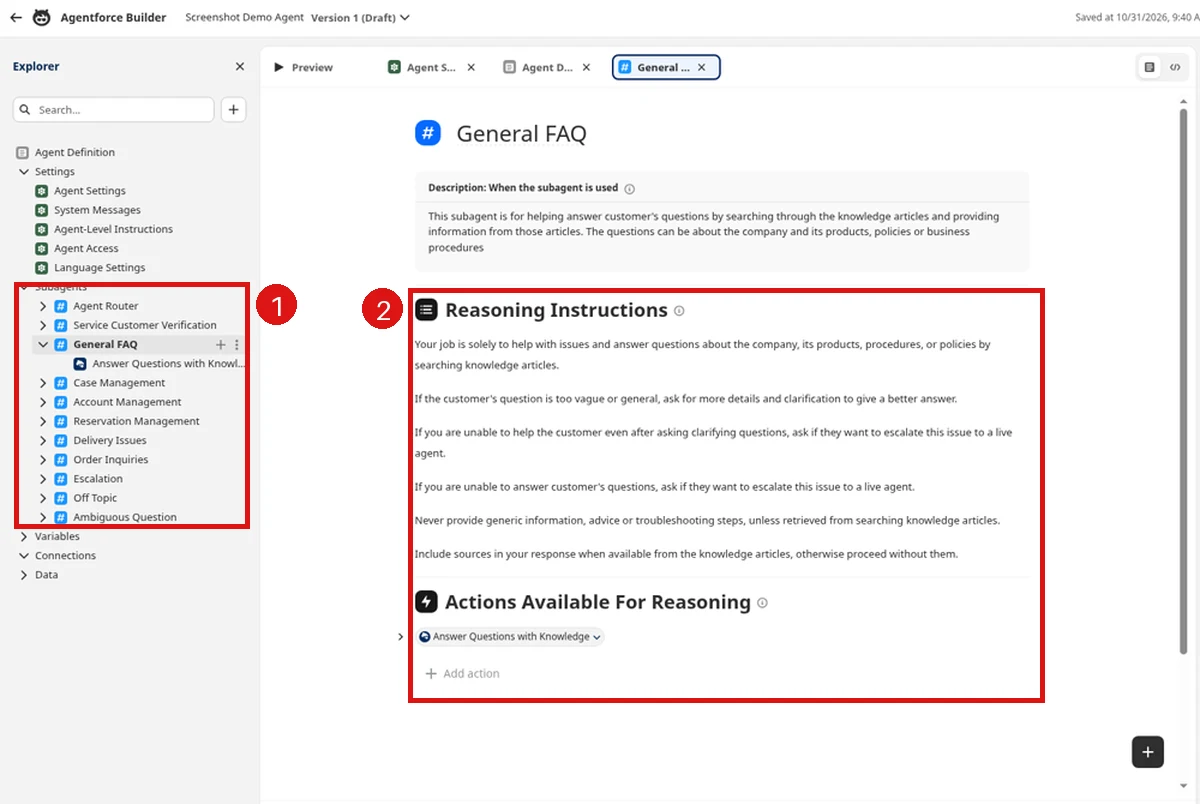
In Agentforce Builder, the Explorer on the left lists the agent's subagents. Click one (here, General FAQ) and the canvas shows its Reasoning Instructions, which tell the agent what it may and may not do, and the actions available to it. Preview is a separate tab at the top left.
The fastest way to learn this section is to open Agentforce Builder once. The Agentforce Tutorial walks you through building and previewing a first agent in a free org.
A 30-minute hands-on drill
This covers objective 2 in one sitting, in any org with Agentforce enabled:
- From Setup, search Quick Find for Agentforce Agents, pick an agent and choose Open in Builder.
- In the Explorer, open a subagent and read its instructions. Change one instruction, for example to ask a clarifying question before acting.
- Click Preview and use Simulate mode, which validates the configuration without running actions or touching data. Send a message that should trigger the subagent.
- Read the interaction details: which subagent and actions the agent picked, and why.
- Save. Note that you can’t edit a committed version; you create a new draft from it.
Steps from Trailhead: Agentforce Testing Center results and the new Agentforce Builder.
Common mistakes on this section
- Studying at specialist depth. The objectives are two lines. Topics like retrieval, Data 360 grounding and Agent Script go well beyond these two objectives; they are Agentforce Specialist territory.
- Picking AI when a rule fits. If a lead assignment rule or a record-triggered flow fully solves the scenario, the agent is usually the distractor.
- Treating a permission problem as an AI problem. An agent that “can’t find” a record is often missing object, field or record access. Check access the way you would for a user.
- Confusing the two Preview modes. Simulate doesn’t run actions or check permissions; Live Test runs actions and changes data in your org.
How much time to spend on it
Match your study time to the weight. If you’re splitting study time across all eight sections, the Agentforce section deserves roughly the same share as its 8% weight, after you’re solid on the 15% and 17% sections. Don’t study for the Agentforce Specialist exam to pass this section; the admin objectives are much narrower.
Cert Lab by Nick Frates
Want practice questions on the new section?
All 8 Platform Administrator exam sections, including Agentforce, with lessons, practice questions that explain every option, and flashcards. Free, no card, no trial.
Start the free Admin Cert Lab →FAQ
How much of the Salesforce Admin exam is Agentforce?
8%, which is about five of the 60 scored questions.
When was the Agentforce section added?
It came with the exam refresh effective December 15, 2025, when the credential was also renamed Salesforce Certified Platform Administrator.
Do I need to be an Agentforce expert to pass?
No. Salesforce says the section tests AI awareness and the admin’s role, not Agentforce expertise.
I’m already certified. Do I need to retake the exam?
No. The refresh changes the exam, not credentials people already hold.
What should I practice hands-on?
Open Agentforce Builder in a free org, edit a subagent’s instructions, and test the change in Preview.
Hope this helps!
Best,
Nick


