Hey friends,
These are the nine Apex code examples I reach for most: a SOQL query with a bind variable, a query that runs once instead of inside a loop, a trigger that blocks a bad save, a changed-field check, a bulk insert that survives bad rows, a DML error handler, an HTTP callout, a test class and a limits check. Copy any of them and change the object and field names. Each one comes with what it does and the trap it avoids.
Two quick definitions before the code. Apex is Salesforce's programming language, and DML (data manipulation language) means the statements that change records: insert, update, delete and undelete. Apex runs under governor limits, which are per-transaction caps Salesforce enforces so one org's code can't hog shared resources. Most good Apex habits exist to stay under them. The limit numbers in this post come from Salesforce's Apex Developer Guide, checked on October 28, 2026.
How to run these examples
The queries, the DML and the limits check are plain statements, so paste them into the Execute Anonymous window in the Developer Console and run them. I wrote a short post on the Execute Anonymous window if you haven't used it. The trigger, the class and the test class are saved code, so create each one as its own trigger or class. Use a free Developer Edition org, not production, so a mistake costs you nothing.
Step: in the Developer Console, click Debug, then Open Execute Anonymous Window, enter your code, leave Open Log ticked and click Execute (1). This capture shows the last lines of a small demo snippet that is not one of the nine examples below. The window is narrow, so the end of line 7 is cut off at its right edge.
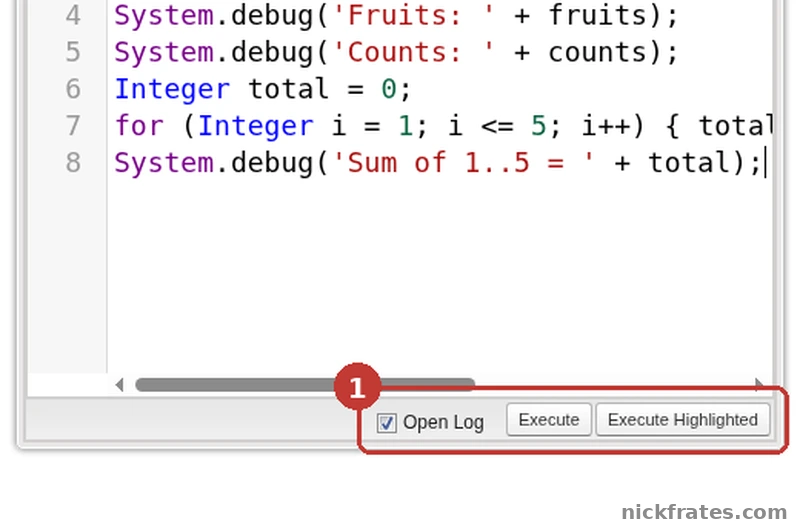
Developer Console > Debug > Open Execute Anonymous Window.
Step: when the log opens, tick Debug Only to hide the system lines and keep your own. Each USER_DEBUG row holds the text of one System.debug call, with its line number in brackets.
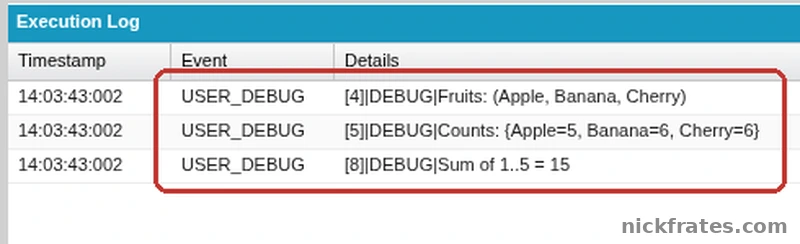
Execution Log with Debug Only ticked, for the same demo snippet.
1. Query records with SOQL and a bind variable
SOQL (Salesforce Object Query Language) reads records. The colon in :stage is a bind variable: it drops the value of an Apex variable straight into the query, which is safer and cleaner than gluing strings together.
The query returns a list of Opportunity records, and the loop prints each one. For joins across objects, see my SOQL relationship queries cheat sheet.
2. Query once, not inside a loop
This is one of the most common Apex mistakes. A query inside a for loop runs once per record, and a synchronous transaction gets only 100 SOQL queries. The fix is to bulkify the code, which just means handling a whole list of records at once. Collect the IDs in a set, run one query, and keep the results in a map so you can look each record up by ID. Here contacts is a list of Contact records you already have, such as Trigger.new.
A trigger receives up to 200 records at a time, so a query per record would break the 100-query limit quickly. The pattern above uses one query for any number of records. It is the same pattern Salesforce teaches in its guide to common bulk trigger idioms. For more on sets, lists and maps, see my Apex collections cheat sheet.
3. Block a bad save with a before trigger
A trigger is Apex that runs when records are inserted, updated or deleted. A before trigger runs before the record is saved, so you can reject it with addError. The user sees your message and nothing is saved.
Put the loop over Trigger.new, never a single record, because triggers always arrive in batches. For one-trigger-per-object structure and the full list of context variables, read my Apex trigger best practices post.
4. Do something only when a field changed
In an update trigger, Trigger.oldMap holds the records as they were before the change, keyed by ID. Compare the new value with the old one and act only when they differ. Without this check, your code runs on every edit to the record.
Trigger.oldMap only exists for update and delete triggers. In an insert trigger there is no old version, so using it there fails.
5. Insert many records and keep going when one fails
A plain insert statement is all-or-nothing: one bad row and the whole statement fails. Database.insert with the second argument set to false saves the good rows and reports on the bad ones. Each row gets a SaveResult back, in the same order as your list.
Here the second account has no name, so it fails and the first one saves. A single transaction can process up to 10,000 records through DML, and 150 DML statements. I compare the two styles in DML statements vs Database methods.
6. Catch a DML error
When you use a plain DML statement, wrap it in try and catch so a failed save becomes a message you control instead of an unhandled error. A Contact needs a last name, so the insert below fails and lands in the catch block.
One trap: this only catches errors your code can recover from. Salesforce's guide says that when code exceeds a governor limit, the runtime throws an exception that can't be handled. A catch block won't save you from 101 queries.
7. Call an external API
A callout is an HTTP request from Apex to another system. Use a Named Credential, which stores the endpoint and login in Setup so your code carries no secrets. In this example, Weather_API is a Named Credential I made up, so create your own or change the name. Check the status code before you trust the body.
Per the governor limits page, one transaction can make 100 callouts, with a combined timeout of 120 seconds, and each callout times out after 10 seconds by default. The response body counts toward heap size, and callout requests and responses are capped at 6 MB for synchronous Apex.
8. Test that the trigger works
A test class proves your code does what you think and keeps working after the next change. This one checks the trigger from example 3 by trying to save a one-letter name and asserting that the save was rejected with the right message. Without that check, a test can pass while proving nothing.
Test.startTest() and Test.stopTest() bracket the code you are testing. For coverage requirements and what a good test looks like, see my post on Apex test class code coverage.
9. Check how close you are to the limits
The Limits class tells you how much of each limit the current transaction has used. Run it at the end of a piece of code you are tuning, or log it in a trigger while you are debugging.
Each line prints the amount used and the maximum, for example SOQL: 2 of 100. The output shows up in the debug log, not on the screen.
The limits behind these examples
These are the numbers from the Execution Governors and Limits page that shape the examples above. Where the two differ, the table shows synchronous first, then asynchronous (Batch Apex and future methods).
| Limit per transaction | Synchronous / asynchronous |
|---|---|
| SOQL queries issued | 100 / 200 |
| Records retrieved by SOQL | 50,000 / 50,000 |
| DML statements | 150 / 150 |
| Records processed by DML | 10,000 / 10,000 |
| CPU time on Salesforce servers | 10,000 ms / 60,000 ms |
| Heap size | 10 MB / 25 MB |
| Callouts | 100 / 100 |
| Trigger batch size | 200 records |
Limits are checked per transaction, not per org, and Salesforce can change them, so check the page before you design around a number.
Cert Lab by Nick Frates
Learning Apex for the exam?
The Platform Developer Cert Lab has lessons weighted like the exam, practice questions that explain every option, flashcards and timed practice exams, so you can see which Apex topics you still need to work on.
Start the Cert Lab, $9.99 →Frequently asked questions
What are the most common Apex code examples?
The ones every developer writes early: a SOQL query, a bulkified query that runs once for many records, a before trigger that validates a save, DML with error handling, an HTTP callout and a test class.
How do I run Apex code in Salesforce?
For a quick statement, use the Execute Anonymous window in the Developer Console. For triggers and classes, save them in the Developer Console, Visual Studio Code or another editor connected to your org.
Why shouldn't I put a SOQL query inside a for loop?
The loop runs the query once per record, and a synchronous transaction allows only 100 SOQL queries. Query once before the loop and use a map to look records up.
What is the difference between insert and Database.insert?
A plain insert fails the whole statement if one record fails. Database.insert with allOrNone set to false saves the valid records and returns a result for each one, so you can handle the failures.
Can I catch a governor limit exception?
No. Salesforce's guide says the exception raised when code exceeds a limit can't be handled, so you have to stay under the limits by design.
Where can I practice Apex for free?
In a free Salesforce Developer Edition org. I show how to sign up in my Developer Edition guide.
Hope this helps!
Best,
Nick