Hey friends,
Salesforce data integration means keeping data in step between Salesforce and another system, and you choose the approach by answering four questions: which system owns the data, whether a change has to arrive now or can wait, how much data moves, and whether Salesforce needs its own copy at all. One-off loads use import tools, near-real-time changes use events, bulk and scheduled loads use the Bulk API through an ETL or middleware tool, and data you only need to look at can stay where it lives.
This guide is the map. It follows Salesforce's Integration Patterns guide on developer.salesforce.com, plus its API limits and REST API pages, as I read them on October 28, 2026. Each approach links to a deeper post. If integration is new to you, start with Salesforce Integration Basics, then come back.
Four questions that pick your approach
Answer these on paper before you open a tool. They decide almost everything else.
- Who owns the data? Name one system of record for each object, and for each field if the two systems share a record. The guide says data integration needs master data management, governance, mastering and de-duplication techniques to stay sustainable.
- Does the change have to show up now? A rep clicking a button and waiting for a shipping quote is synchronous. An order handed to your ERP (enterprise resource planning) system while nobody waits is asynchronous. The guide classifies every pattern by this timing.
- How much data moves? The guide says a synchronous REST or SOAP call can create, update or delete up to 200 records at a time, and that any operation over 2,000 records is a good candidate for Bulk API 2.0.
- Does Salesforce need a copy? If users only need to view or search the data, you may not need to store it at all. The guide's Data Virtualization pattern is built for that case.
Then add direction. Salesforce's selection tables say that when Salesforce is the caller, the key patterns are Request and Reply for synchronous work, Fire and Forget for asynchronous process integration, and Data Virtualization when you only need to view external data. When another system is the caller, Remote Call-In covers the synchronous cases and Batch Data Synchronization covers asynchronous data integration.
Salesforce data integration approaches compared
Three terms first. ETL means extract, transform, load: pulling data from one system, reshaping it, and loading it into another. Middleware is software that sits between systems and moves, transforms and routes data. Pub/Sub API is Salesforce's API for publishing and subscribing to events.
| Approach | Direction and timing | Pick it when | Watch out for |
|---|---|---|---|
| Data Import Wizard and Data Loader | Either way, manual or scripted | One-off loads, clean-ups and migrations | The guide says neither is a recommended base for an integration strategy |
| Flow HTTP Callout or External Services | Salesforce to another system, synchronous | A user or flow needs an answer from a REST service now | External Services is the best fit when the service has an OpenAPI spec. HTTP Callout in Flow is rated Good without one |
| Apex callout with a Named Credential | Salesforce to another system, sync or async | SOAP services, custom parsing, or logic Flow can't do | Calls from trigger context must run asynchronously |
| REST, SOAP or Composite API | Another system to Salesforce, synchronous | Small volumes, or a remote system creating and updating records | Per-call record limits and the daily API allocation |
| Bulk API 2.0 | Another system to Salesforce, asynchronous | More than 2,000 records, or scheduled loads | Batches run in parallel with no guaranteed order, so locks can collide |
| Change Data Capture or platform events with Pub/Sub API | Salesforce to another system, asynchronous | Keeping an external copy current, or starting a process elsewhere | Subscribers handle retries and replay, and events aren't kept forever |
| Salesforce Connect | Live read (and write) of external data, no copy | Users need to see data that should stay where it is | Some features aren't available for external objects, and reports can be slower |
| Data 360 and zero copy | Reference and unify data from many sources | You want one customer view across systems | The guide says data in Data 360 can't be edited |
| ETL or middleware, such as MuleSoft or Informatica | Either way, scheduled or event-driven | Many systems, heavy transformation, orchestration or multi-system transactions | Another platform to build, run and pay for |
Files and wizards: where most people start
The Data Import Wizard and Data Loader are the right tools for a one-time migration or a periodic clean-up. They are not an integration. Salesforce's guide says directly that neither is a recommended base for a data integration strategy, and that they should complement your data stewardship and maintenance instead. If you're choosing between them, read Data Import Wizard vs Data Loader, then Salesforce Data Loader and Salesforce Data Migration.
Calling out: when Salesforce needs an answer from another system
This is the guide's Request and Reply pattern. A button, a screen or a flow asks a remote service something and uses the answer. The guide rates these solutions:
- External Services. Rated Best when the remote service is RESTful and has an OpenAPI 2.0 or 3.0 definition. No code, and you can call it from a flow.
- A Lightning component calling Apex. Also rated Best. The Apex makes the REST or SOAP callout through a Named Credential, and the guide recommends an asynchronous callout (a continuation) if the endpoint might be slow.
- HTTP Callout action in Flow. Rated Good. It makes synchronous REST calls without Apex and without registering a full External Service, which suits services with no OpenAPI spec.
- An Apex trigger that calls out. Rated Suboptimal. Calls from trigger context have to run asynchronously, so it isn't a fit when someone needs the answer right away.
Use Named Credentials for the endpoint and authentication every time. The guide says not to build your own authentication mechanism. For the longer version with code, see Salesforce Integration Patterns.
Pushing changes out with events
When another system needs to hear about Salesforce changes and nobody has to wait, events are the modern answer. Change Data Capture publishes a change event when a record is created, updated, deleted or undeleted, and the guide notes that turning it on is purely declarative. A flow can also publish a platform event when, say, an opportunity closes. External systems subscribe through Pub/Sub API, which the guide calls the recommended way for external consumers to read the event bus.
Two details decide whether this works in production:
- Salesforce publishes once and doesn't retry. The guide says it's up to the subscriber to ask for a replay. Each event has a replay ID, and the guide says you can replay events for 72 hours (three days).
- Events aren't part of the database transaction. A published event can't be rolled back. For platform events you can choose Publish After Commit, so subscribers don't look for data that never committed.
The guide marks two older options as legacy: Outbound Messaging (use Flow with platform events) and the Streaming API (use Pub/Sub API). For the full mechanics, see Salesforce Platform Events.
Pulling data in: APIs, Bulk API and upserts
When the remote system is the caller, you're in the Remote Call-In and Batch Data Synchronization patterns. The guide's rule of thumb is simple. Small and interactive work goes through REST (or Composite, which sends up to 25 requests in one call). Anything over 2,000 records goes through Bulk API 2.0, which accepts the data synchronously but processes it asynchronously. Salesforce API Types helps you choose between them, with deeper posts on the REST API and the Bulk API.
The most useful habit for any inbound load is the upsert on an external ID. Add an external ID field to the Salesforce object, store the other system's key in it, and let Salesforce decide whether to insert or update. From the REST API guide:
What comes back tells you what happened. If the external ID isn't matched, a record is created (HTTP 201). If it matches once, the record is updated (HTTP 200). If it matches more than once, Salesforce returns a 300 and changes nothing. That last case is why the external ID field should be unique. Add updateOnly=true to the URL when you never want a new record created.
Run the same load twice and you get no duplicates. That property is called idempotency, and the guide treats it as a core design rule, because retries after errors and timeouts are normal.
Reading data without copying it
Sometimes the best integration moves nothing. The guide's Data Virtualization pattern fits when the data is large, users need the latest values in real time, or there are data residency concerns, and they only need a small amount at any one time.
- Salesforce Connect. Maps tables in an external system to external objects, and fetches the data in real time when a user opens it. The guide lists adapters for OData (versions 2.0, 4.0 and 4.01), AWS and Snowflake sources, GraphQL, other Salesforce orgs (cross-org) and custom Apex adapters. You can use external objects in list views, related lists and reports, and you can create, update and delete external data through them.
- Data 360 with zero copy. Data can be referenced in Data 360 without being copied, but the guide says that's available with some platforms only. It also says data in Data 360 can't be edited, so if users must edit, use Salesforce Connect.
Salesforce says some features aren't available for external objects, and external objects can slow reports. Check both before you promise a business user the same experience as a normal object.
When middleware or an ETL tool earns its place
You don't need middleware for every integration. The guide points to it for specific jobs Salesforce doesn't do natively:
- Multi-system transactions. Salesforce is transactional within itself, but the guide says it can't take part in distributed transactions, so rollback and compensation logic belongs in the middleware layer.
- Complex orchestration and aggregation. Calls spread across several systems, with combined results. The guide recommends doing complex cross-system orchestration in middleware to avoid Salesforce timeouts and governor limits.
- Heavy transformation, queuing and protocol conversion. The guide says moderate transformations are possible with Flow data mapping, OmniStudio Integration Procedures and Apex, but middleware is still preferred for complex ones.
- Scheduled bulk replication. For large batch loads the guide rates a third-party ETL tool that detects changes in the source and calls the Bulk API as the Best option when the other system is the data master.
The guide highlights MuleSoft and Informatica as foundational pillars of an integration strategy. It describes MuleSoft as Salesforce's integration platform for connecting applications, data and devices across on-premises and cloud environments, and Informatica as a data management and integration platform that uses ETL.
Cert Lab by Nick Frates
Let the Platform Integration Architect Cert Lab test you to success
Scenario questions on integration patterns, callouts, platform events and API choice for all six Platform Integration Architect sections, with every option explained.
Start the Platform Integration Architect Cert Lab for $9.99 →Not ready to buy? Try a free lesson and see how fast you learn.
A worked example: ERP and Salesforce
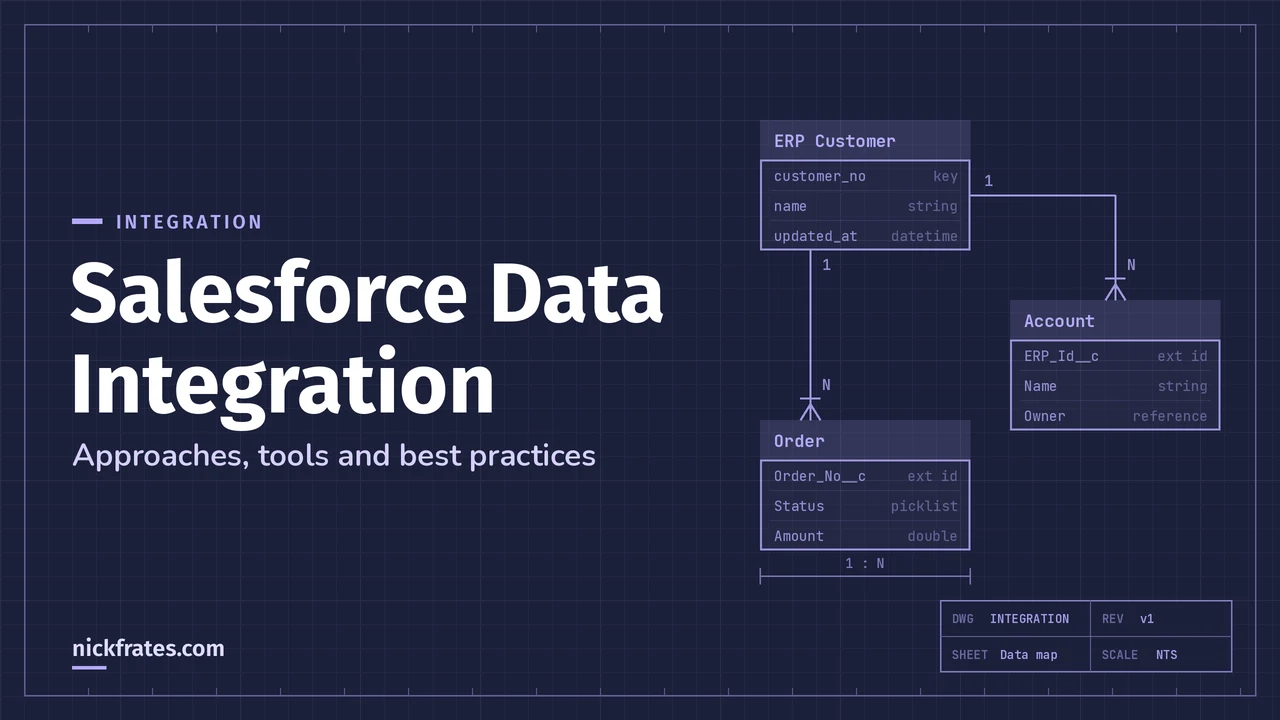
Here's a made-up but typical setup, so you can see how one project mixes approaches. Your ERP owns customers and orders. Salesforce owns leads, opportunities and the sales conversation.
| Need | Approach | Why |
|---|---|---|
| Customers from the ERP appear in Salesforce nightly | ETL tool or middleware calling Bulk API 2.0, upserting on an ERP ID field | Large, scheduled, one-way, and the ERP is the master |
| A closed-won opportunity creates an order in the ERP | Flow publishes a platform event, and the ERP side subscribes through Pub/Sub API | Asynchronous and nobody waits. The guide walks through a very similar example |
| The ERP writes the order number back | A call to the REST API, upserting on the Salesforce record's external ID | The remote system calls in, one record at a time |
| A rep checks live stock on the account page | Salesforce Connect external object, or a Flow HTTP Callout for a single value | Real time, and you don't want to store inventory in Salesforce |
| Finance fixes 3,000 addresses once a quarter | Data Loader | A one-off job, so it doesn't need an integration |
Best practices that apply to every approach
- Pick one owner per field. If both systems can change a value, decide who wins. The guide warns that two systems pushing every change at each other cause constant traffic and can hurt performance for users.
- Keep a shared key. Store the other system's ID on the Salesforce record, or Salesforce's ID in the other system. The guide recommends matching incoming data on primary keys from both systems.
- Design for retries. Every approach fails sometimes. Use upserts and unique message IDs so a replay or retry doesn't create duplicates.
- Authenticate properly. Use Named Credentials for callouts and OAuth 2.0 for inbound connections. The platform applies the connecting user's profile, sharing and field-level security, so give each integration its own user with only the access it needs.
- Schedule bulk work away from your users. The guide says loading during business hours can cause contention, and that child records should be grouped by their parent key so loads don't fail on locks.
- Budget your API calls. Per Salesforce, an Enterprise Edition org gets 100,000 calls per 24 hours plus an allocation for each license, and a Developer Edition org gets 15,000. Calls from installed managed packages count, and so do Bulk API and Bulk API 2.0. You can watch usage in Setup, in the
Sforce-Limit-Inforesponse header and through the/limitsresource. - Read the response body, not just the status. A Composite API call can return HTTP 200 even when a subrequest failed, and writes return per-record results you should use for retries.
- Test in a sandbox or Developer Edition org first. Run a small load, check the errors, then scale up.
- Retire the legacy pieces. The guide lists Outbound Messaging and the Streaming API as legacy. It says Salesforce-to-Salesforce retires in Spring '27 and that the SOAP API
login()call is already unavailable in API version 65.0 and above, with full retirement in Summer '27.
Mistakes to avoid
- Treating a scripted Data Loader job as a permanent integration. It works until a schema change or a failed run nobody notices.
- Making callouts from a trigger and expecting an answer. Trigger-context calls have to be asynchronous.
- Copying data you only need to look at. That's a Salesforce Connect case, not a nightly sync.
- Trusting HTTP 200. Check the body of Composite responses.
- Assuming events live forever. A subscriber that is down for more than the replay window has to resync another way.
- Hard-coding endpoints and credentials. Use Named Credentials, so a rotated password or a new endpoint is a setting change.
Cert Lab by Nick Frates
Practice the integration scenarios
Lessons, flashcards, a quiz for each of the six exam sections and full practice exams, every answer explained.
Start the Platform Integration Architect Cert Lab for $9.99 →Not ready to buy? Try a free lesson and see how fast you learn.
If you're building these skills for a certification, my Platform Integration Architect study guide lists every exam objective. For a real-world connector with a specific vendor, HubSpot Salesforce Integration walks through one end to end. And if you want to practice scenarios like the ones above, the Platform Integration Architect Cert Lab I built covers them.
FAQ
What is Salesforce data integration?
It's keeping data consistent between Salesforce and other systems, by moving it, by sending change notifications, or by letting Salesforce read it where it lives. Salesforce's guide groups these into data, process and virtual integration.
What are the main ways to integrate data with Salesforce?
Import tools for one-off loads, callouts and External Services for real-time requests, REST, SOAP and Bulk APIs for inbound data, Change Data Capture and platform events for outbound changes, Salesforce Connect for data you don't copy, and ETL or middleware for complex or large-scale work.
How do I sync Salesforce data in near real time?
Use Change Data Capture or platform events and let the other system subscribe through Pub/Sub API. Salesforce describes it as near-real-time, and subscribers can replay missed events for 72 hours.
When should I use Bulk API instead of REST?
Salesforce's guide says any data operation above 2,000 records is a good candidate for Bulk API 2.0, and smaller jobs should use synchronous calls such as REST Composite or SOAP.
Do I need middleware like MuleSoft?
Not always. The guide points to middleware for multi-system transactions, complex orchestration, heavy transformation and large scheduled loads, and says simple or moderate cases can stay inside Salesforce.
Is Data Loader an integration tool?
Not on its own. Salesforce's guide says neither Data Loader nor the Data Import Wizard is a recommended base for an integration strategy, though both are fine for migrations and clean-ups.
What is the difference between Salesforce Connect and importing data?
Importing copies records into Salesforce. Salesforce Connect leaves the data in the external system and fetches it in real time through external objects.
How many API calls does my org get?
Salesforce lists 100,000 calls per 24 hours plus a per-license allocation for Enterprise Edition and 15,000 for Developer Edition. Check Setup for your own org's numbers, because add-ons and edition change the total.
Hope this helps!
Best,
Nick


