Hey friends,
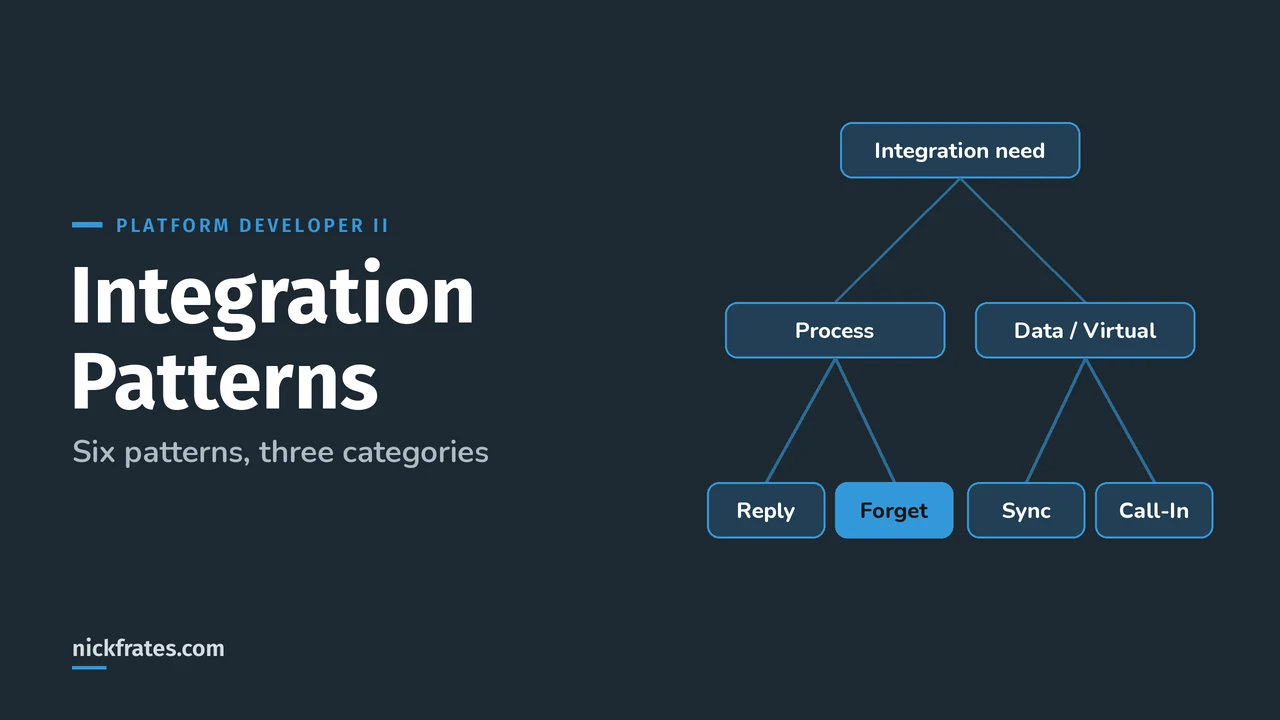
Salesforce's Integration Patterns and Practices guide defines six integration patterns: Remote Process Invocation (Request and Reply), Remote Process Invocation (Fire and Forget), Batch Data Synchronization, Remote Call-In, UI Update Based on Data Changes, and Data Virtualization. Pick one by asking who starts the exchange, whether the caller waits, and how much data moves.
Everything below is from the official Integration Patterns and Practices guide on developer.salesforce.com. On the Platform Developer II exam, integration lives in Process Automation, Logic, and Integration (27%), which asks you to apply inbound and outbound techniques. If APIs are new to you, read my Salesforce integration basics first.
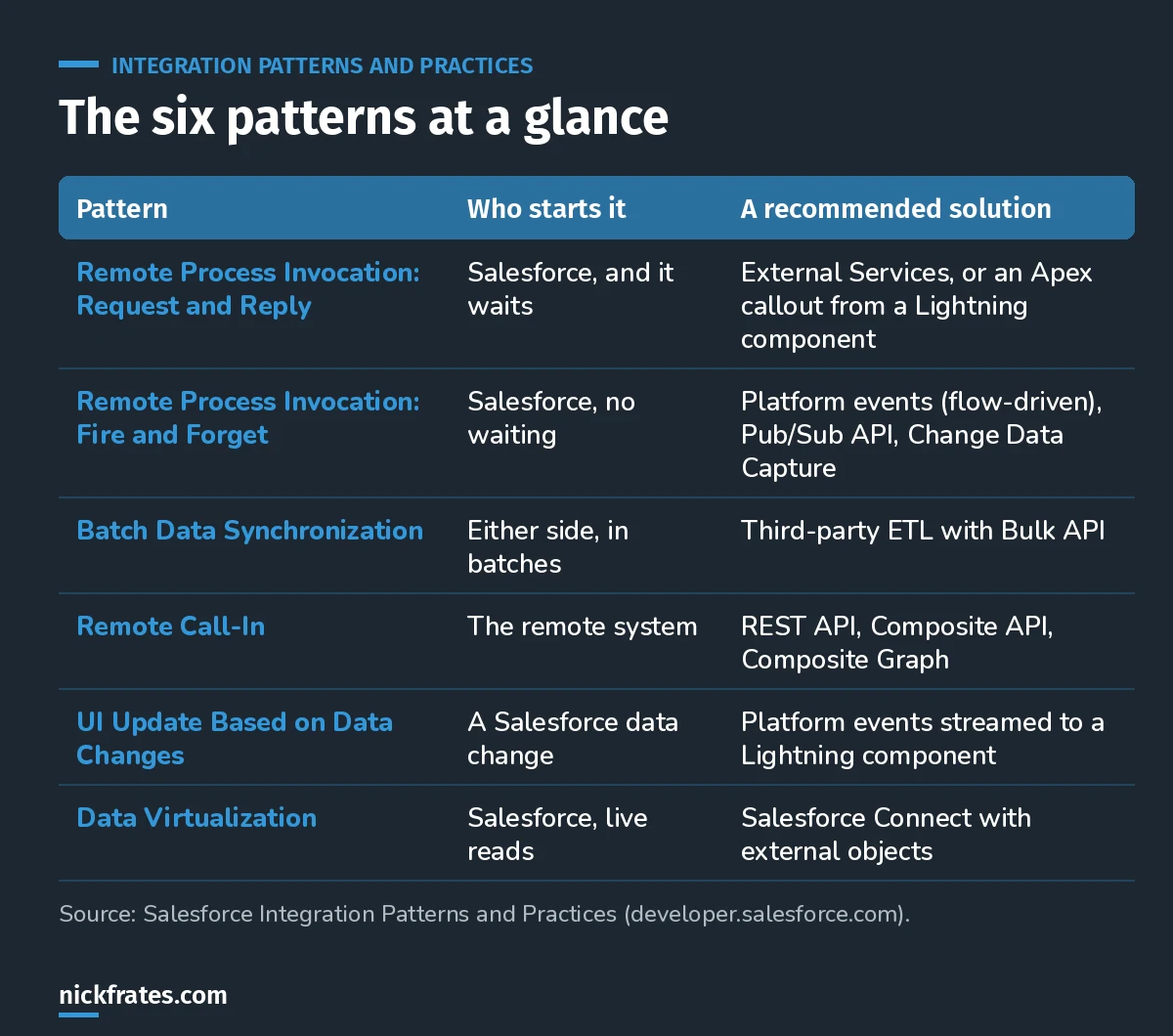
Six patterns. Most exam scenarios hinge on who calls whom and whether anyone waits.
What are the three integration categories?
| Category | The need | Patterns |
|---|---|---|
| Process integration | A business process spans two or more apps | Request and Reply, Fire and Forget |
| Data integration | Keep data in two or more systems in sync | Batch Data Synchronization, Remote Call-In |
| Virtual integration | View, search and change external data in real time without copying it | Data Virtualization |
UI Update Based on Data Changes is about pushing Salesforce changes to the screen, so think of it as event-driven.
What is Request and Reply?
Salesforce calls a remote system, waits for the result, and updates state from the response. Example: a rep clicks a button to get a live shipping quote.
Best fits per the guide: External Services when the remote REST service has an OpenAPI spec (no code), or a Lightning component calling Apex that makes a REST or SOAP callout through a Named Credential. If the endpoint might be slow, the guide recommends an asynchronous callout, also called a continuation. A trigger can't make a synchronous callout, so that's not a fit here.
What is Fire and Forget?
Salesforce sends a request and doesn't wait for the remote process to finish. The remote system acknowledges and Salesforce moves on. Example: a closed-won opportunity tells the ERP to create an order.
The guide rates flow-driven platform events as Best when the process starts from an insert or update. External apps subscribe through the Pub/Sub API (gRPC). Change Data Capture is also rated Best for publishing record changes. If the trigger is the starting point, the guide says calls from trigger context must run asynchronously.
What is Batch Data Synchronization?
Data moves in bulk, in either direction, on a schedule. Example: nightly product and price updates from the ERP. The guide recommends a third-party ETL tool that calls the Bulk API, or REST APIs when volumes are small. It also lists Data 360 data actions and MuleSoft options.
What is Remote Call-In?
The remote system creates, reads, updates or deletes Salesforce data. The guide lists REST API, the Composite API (up to 25 subrequests in one call) and Composite Graph (up to 75 graphs and 500 nodes per graph) as Best options, and suggests GraphQL for complex multi-object reads. One trap it calls out: a composite call can return HTTP 200 even when a subrequest failed, so check the response body.
Cert Lab by Nick Frates
Let the Platform Developer II Cert Lab test you to success
Integration and async scenario questions: callouts, platform events, Named Credentials and limits, each answer explained.
Start the Platform Developer II Cert Lab for $9.99 →Not ready to buy? Try a free lesson and see how fast you learn.
What is UI Update Based on Data Changes?
The Salesforce UI updates automatically when data changes, with no refresh. The recommended solution is a trigger or flow publishing a platform event, consumed by a Lightning component. Platform events give a 72-hour replay window. Limits the guide lists: delivery and order of notifications aren't guaranteed, and Bulk API changes don't generate them.
What is Data Virtualization?
Salesforce reads external data live instead of copying it. The Best fit is Salesforce Connect, which maps external tables to external objects you can use in list views, detail pages, related lists and reports.
How do you pick the right pattern?
- Who starts it? Salesforce (Request and Reply, Fire and Forget, Virtualization) or the remote system (Remote Call-In).
- Does the caller need the answer now? Yes means Request and Reply. No means Fire and Forget.
- Is it a lot of data on a schedule? Batch Data Synchronization.
- Should the data stay outside Salesforce? Data Virtualization.
- Does a user's screen need to change when data changes? UI Update Based on Data Changes.
What integration mistakes should you avoid?
- Synchronous callouts from triggers. Trigger-context calls must run asynchronously.
- Hard-coded endpoints and credentials. Use Named Credentials.
- Non-idempotent designs. The guide stresses idempotency so retries don't create duplicates.
- Trusting HTTP 200 from composite calls. Read the body for subrequest errors.
- Copying data you only need to look at. That's a virtualization use case.
Quick backstory. I loved Focus on Force and used it on my way to 17 Salesforce certifications. At first I read the study guide cover to cover, then took the tests. What I eventually noticed: I learned way faster when I skipped ahead and took practice tests rapid-fire, reading the explanation for every miss. So I built Cert Lab around fast testing, with up-to-date doc links in every explanation. It's designed to test you to success.
FAQ
How many Salesforce integration patterns are there?
Six in the Integration Patterns and Practices guide: Request and Reply, Fire and Forget, Batch Data Synchronization, Remote Call-In, UI Update Based on Data Changes, and Data Virtualization.
Which pattern uses platform events?
Fire and Forget (flow-driven platform events are rated Best) and UI Update Based on Data Changes.
Where does MuleSoft fit?
The guide lists MuleSoft Anypoint as an option for batch-style data movement, including extracting data from Data 360. The patterns themselves are tool-neutral.
Is this the Integration Architect exam?
The patterns are core to the Integration Architect exam too. Platform Developer II tests the developer side: callouts, Apex web services, platform events and async choices.
Where should you go next?
- The Platform Developer II study guide for every exam objective.
- Batch Apex for the Salesforce side of bulk processing.
- Platform Developer II practice questions including integration scenarios.
Nick Frates, a senior Salesforce developer with 17 certifications, built the Platform Developer II Cert Lab at nickfrates.com: rapid-fire practice questions for every exam section, each answer explained.
Cert Lab by Nick Frates
Let the Platform Developer II Cert Lab test you to success
Lessons, flashcards, a quiz for each of the five exam sections and full practice exams, every answer explained.
Start the Platform Developer II Cert Lab for $9.99 →Not ready to buy? Try a free lesson and see how fast you learn.
Hope this helps!
Best,
Nick