Hey friends,
Bulk API 2.0 is Salesforce's asynchronous REST API for inserting, updating, upserting, deleting and querying large data sets: you create a job, upload a CSV, tell Salesforce the upload is complete, and come back for the results. Salesforce suggests it for any operation over 2,000 records. It has no completion SLA, so it's the wrong choice when a user is waiting.
It's one of the APIs compared in Salesforce API types, and choosing it (or not) is a common Design question on the Salesforce Certified Platform Integration Architect exam. Every limit below comes from Salesforce's own pages, linked as I go.
When should I use Bulk API 2.0?
The Bulk API documentation says any data operation with more than 2,000 records is a good candidate for Bulk API 2.0, and that jobs with fewer than 2,000 records should use bulkified synchronous calls in REST, for example Composite, or SOAP. Because both Bulk APIs are asynchronous, Salesforce doesn't guarantee a service level agreement.
| Situation | Use | Why |
|---|---|---|
| Nightly load of millions of rows | Bulk API 2.0 | Asynchronous, built for large data sets |
| A user taps a button and waits | REST or Composite | Bulk API 2.0 has no SLA and carries job overhead |
| A few hundred related records in one go | Composite API | Synchronous, and one request counts as one API call |
| Exporting a very large table | Bulk API 2.0 query job | Results come back as files you page through |
Salesforce's API blog also calls out that Bulk API 2.0 operates on a single object per job and isn't ideal for small workloads because of the overhead. For a load you can run from a desktop tool, Data Loader can use Bulk API 2.0 as well.
What is the difference between Bulk API 2.0 and Bulk API?
Salesforce recommends Bulk API 2.0 over the original Bulk API if you want a simpler workflow, and says 2.0 is where future innovation will go. The limits pages show how they differ:
| Bulk API | Bulk API 2.0 | |
|---|---|---|
| Batches | You create and manage the batches yourself | Created for you automatically |
| Upload size | 10 MB per batch | 150 MB per job, after base64 encoding |
| Records per batch | 10,000 maximum | Not applicable |
| Records per 24 hours | 150,000,000 | 150,000,000 |
| Data format | Not covered on the limits page | CSV only |
The 150 MB cap is measured after base64 encoding, which can grow your data by about 50%. Salesforce's advice is to keep each upload under 100 MB before encoding.
How does a Bulk API 2.0 ingest job work?
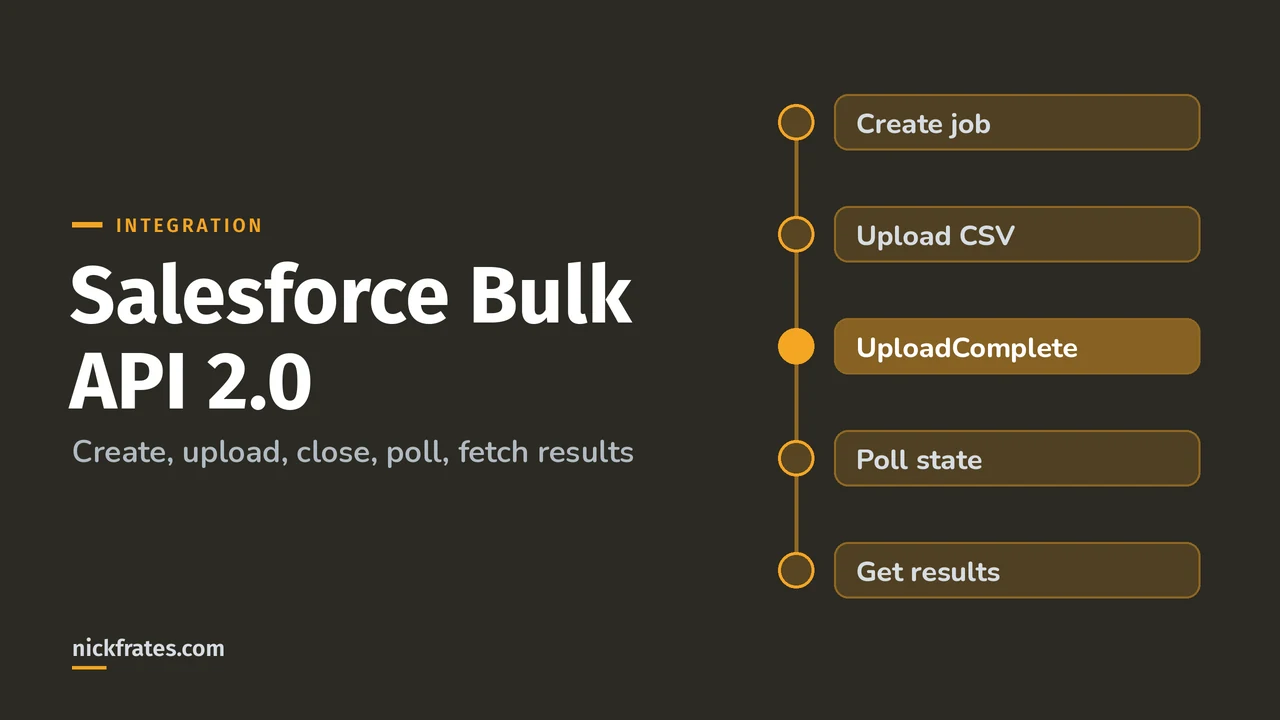
Five steps, shown in the Bulk API 2.0 walkthrough. First create the job, saying which object and operation you want:
POST that to /services/data/v68.0/jobs/ingest/. The response gives you a job ID and a contentUrl, and the job state is Open. Then upload the CSV with a PUT, and close the job with a PATCH:
Step 3 isn't optional. The Upload Complete page says the request is required for every Bulk API 2.0 ingest job, and without it processing never starts. Step 5 is fetching results from successfulResults, failedResults and unprocessedRecords once the job is in JobComplete or Failed. The operations you can run are insert, update, upsert, delete and hardDelete, and an upsert job names its external ID field in externalIdFieldName.
What do the job states mean?
| State | Meaning |
|---|---|
| Open | The job exists and you can still add data |
| UploadComplete | No more data can be added, and Salesforce is processing the job |
| JobComplete | Salesforce processed the job |
| Failed | Some records in the job failed. Records that were processed successfully aren't rolled back |
| Aborted | The job was aborted. Its creator, or a user with the Manage Data Integrations permission, can abort it |
If you learn best by testing yourself, the Platform Integration Architect Cert Lab has quick practice questions on choosing the right API for a data load, with every option explained.
What are the Bulk API 2.0 limits?
These come from the Bulk API limits and allocations page:
| Limit | Value |
|---|---|
| Batches per rolling 24 hours | 15,000, shared between Bulk API and Bulk API 2.0. Only ingest jobs use batches in 2.0, query jobs don't |
| Records uploaded per rolling 24 hours | 150,000,000 |
| Upload size per job | 150 MB after base64 encoding |
| Characters in a field | 131,072 |
| Fields in a record | 5,000 |
| Characters in a record | 400,000 |
| How long a job can stay open | 24 hours |
| Results available after completion | 7 days |
| Query jobs per rolling 24 hours | 10,000 |
| Total query results per rolling 24 hours | 1 TB |
Salesforce also gives Bulk API and Bulk API 2.0 their own CPU time limit of 60,000 milliseconds, separate from the normal Apex limits. Remember the rolling windows: they're 24-hour windows, not calendar days.
What happens when a record or a job fails?
- The API retries automatically. A batch is retried after 5 minutes, and if you see a message that it retried more than 20 times, upload a smaller file.
- Successful records are not rolled back when a job fails. Use the failed and unprocessed results to work out what to resubmit.
- Keep your local CSV until you've confirmed every record was processed. Salesforce says not to delete it before that.
- Download results within 7 days of the job finishing. After that they're gone.
- Bulk API 2.0 only runs jobs in parallel, so lock errors from data skew can show up on big loads. The fixes are in Salesforce large data volumes.
How does Bulk API 2.0 show up on the exam?
Mostly as a choice. A scenario gives a volume, a timing and a direction, and you have to decide between Bulk API 2.0, Composite, REST and SOAP. The signals to look for are record count over 2,000, nobody waiting on the answer and a recurring batch window. If the scenario needs the result immediately or only moves a handful of records, it's not Bulk. I wrote more about loading data into Salesforce and there are Bulk API questions in the practice set on the study plan page.
Here's why I care about practice questions so much. I earned 17 Salesforce certifications, and Focus on Force was a big part of that. My early approach was study guide first, tests later. Flipping it, taking practice tests fast and often, cut my study time way down. Cert Lab is my version of that: fast testing with explanations that link to current docs.
FAQ
What is Bulk API 2.0 in Salesforce?
An asynchronous REST API for inserting, updating, upserting, deleting and querying large data sets. You create a job, upload CSV data, set the job to UploadComplete and fetch the results.
How many records can Bulk API 2.0 handle?
Up to 150,000,000 records uploaded per rolling 24 hours, with 150 MB per job after base64 encoding.
Is Bulk API 2.0 real time?
No. It's asynchronous with no completion SLA, so it's meant for large loads, not for a user waiting on a screen.
What is the difference between Bulk API and Bulk API 2.0?
In Bulk API 2.0 batches are created automatically and the workflow is simpler. Salesforce recommends 2.0 and says future innovation is there.
When should I use Composite instead of Bulk API 2.0?
When you have fewer than about 2,000 records, need the result right away, or want several related operations in one call.
Where should you go next?
- Salesforce Composite API for the synchronous option.
- Salesforce API types for the full comparison.
- Salesforce large data volumes for skew and lock errors.
- Platform Integration Architect study plan for the full exam.
Nick Frates, a senior Salesforce developer with 17 certifications, built the Platform Integration Architect Cert Lab at nickfrates.com: rapid-fire practice questions for every exam section, each answer explained.
Cert Lab by Nick Frates
Let the Platform Integration Architect Cert Lab test you to success
Lessons, flashcards, a quiz for each of the six exam sections and full practice exams, every answer explained.
Start the Platform Integration Architect Cert Lab for $9.99 →Not ready to buy? Try a free lesson and see how fast you learn.
Hope this helps!
Best,
Nick