Hey friends,
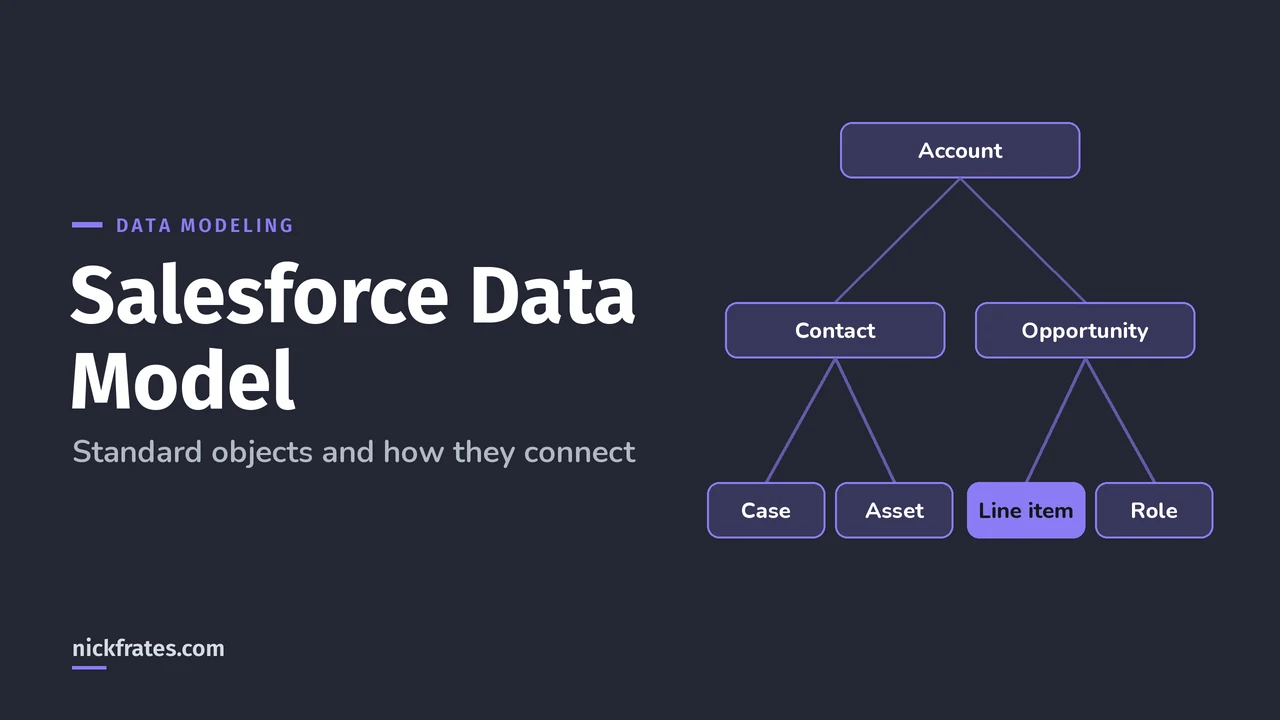
The Salesforce data model is a small set of standard objects joined by lookup relationships: Account sits in the middle, Contact, Opportunity, Case and Asset point to it, and in Sales Cloud products attach to opportunities through price book entries. Here are the two ERD diagrams I wish I'd had when I started, one for Sales Cloud and one for Service Cloud and Field Service, with the relationship names you'll see in SOQL.
I checked every relationship against the Salesforce Object Reference. If you want to design your own custom objects, my post on Salesforce data modeling covers that. This one is about the standard model you inherit.
What is the Salesforce data model?
It's the set of objects (tables), fields (columns) and relationships that Salesforce ships with, plus whatever your org adds. An ERD, short for entity relationship diagram, shows the objects as boxes and the relationships as arrows. Almost every standard relationship is a lookup, which means the child record stores the ID of its parent.
In the diagrams below, each arrow points from the object that holds the lookup field to the object it refers to, and the label is the field name.
What does the Sales Cloud data model look like?
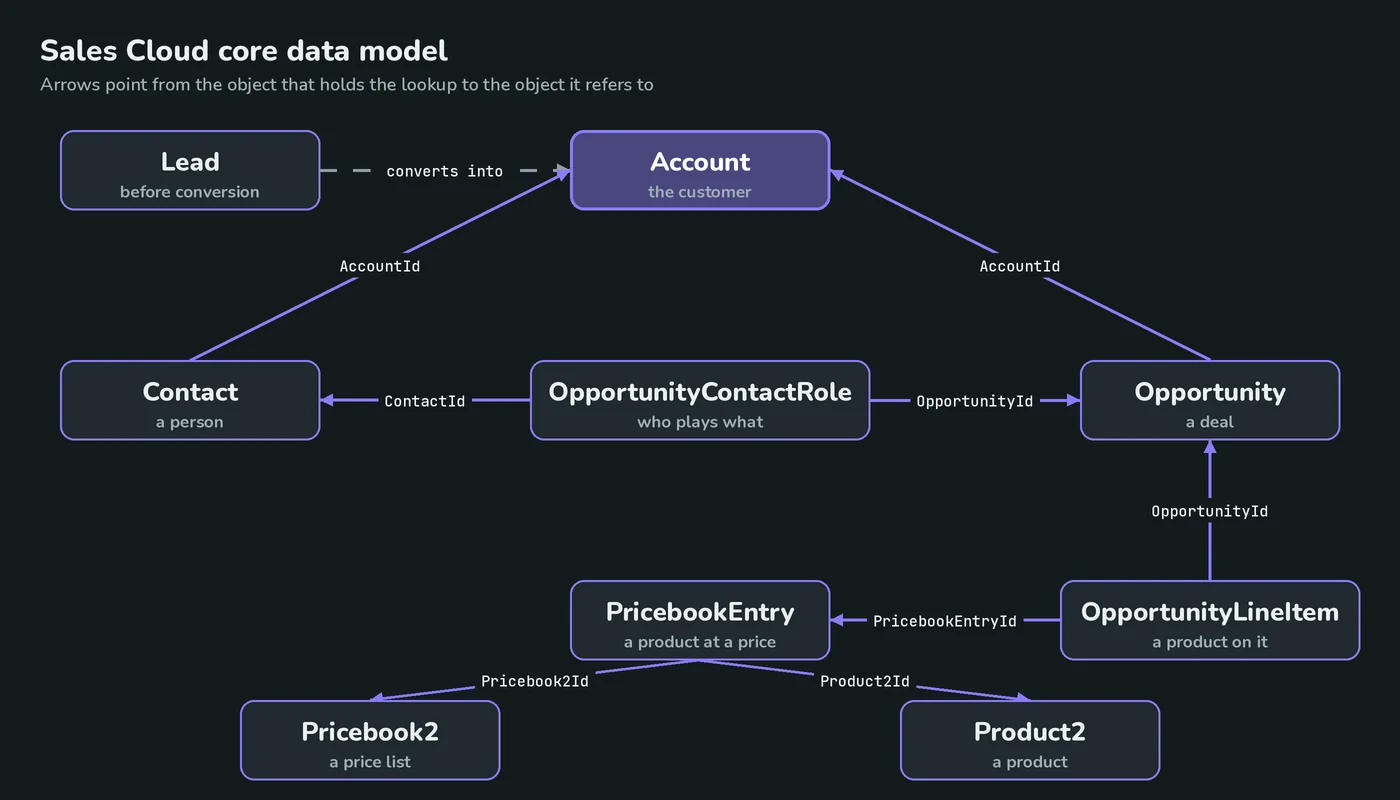
Read it from the top:
- Lead is a prospect before qualification. Converting a lead creates an Account and Contact and, optionally, an Opportunity, per the convertLead() reference.
- Account is the customer. Contact and Opportunity both have an
AccountIdlookup. Accounts can also point to a parent account withParentId, which is how account hierarchies work. - OpportunityContactRole links a Contact to an Opportunity and stores the role, such as Business User or Decision Maker, and an
IsPrimaryflag. See the OpportunityContactRole reference. - OpportunityLineItem is a product on an opportunity. It points at the Opportunity and at a PricebookEntry, which is the association between a Pricebook2 and a Product2. See OpportunityLineItem and PricebookEntry.
That chain, Opportunity to line item to price book entry to product, is why you can't add a product to an opportunity until it exists in the price book.
The dots walk child-to-parent lookups. For parent-to-child queries and the relationship names, see my SOQL relationship queries cheat sheet.
What does the Service Cloud data model look like?
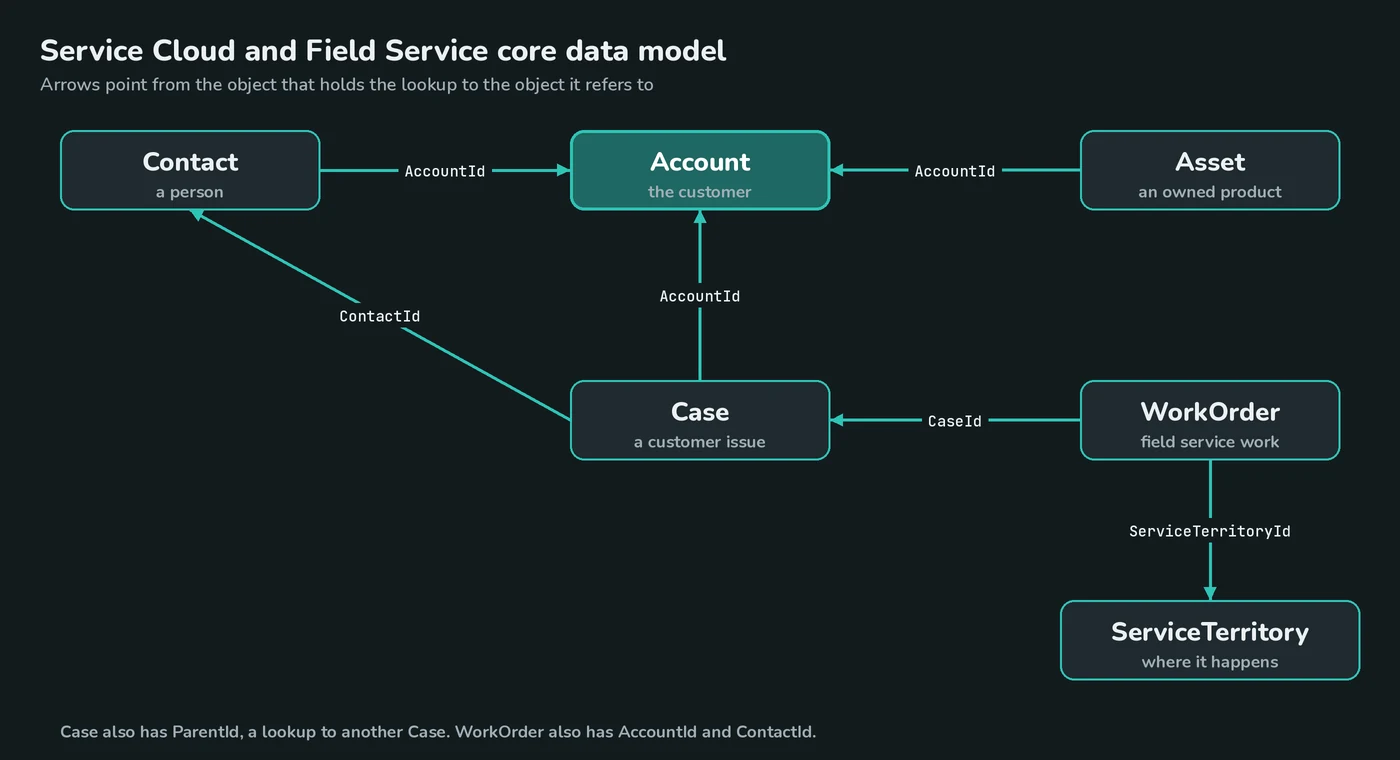
- Case is a customer issue. It has lookups to Account (
AccountId), Contact (ContactId) and to another Case (ParentId, the parent case). See the Case reference. - Asset is an item a customer has bought. It needs an Account or a Contact, because the AccountId is required if ContactId isn't specified. See the Asset reference.
What about the Field Service data model?
A WorkOrder represents field service work to be performed for a customer. It has lookups to Account, Contact, Case and ServiceTerritory, which is where the work takes place. See the WorkOrder reference. In practice a service rep opens a Case, and if someone has to go on site, a work order points back at that case.
How do contacts belong to more than one account?
A Contact has one primary account, but the AccountContactRelation object represents a relationship between a contact and one or more accounts, so the same person can be tied to several companies. It also supports person accounts, so a person account can be a related contact on a business account. Details are in the AccountContactRelation reference. Contacts to Multiple Accounts is one of the topics in Salesforce's Architect Journey Trailmix for the Data Architect exam.
What about Financial Services Cloud and other industry data models?
Industry clouds add their own objects on top of the standard model, and each cloud's developer guide documents them. For example, in Financial Services Cloud, a FinancialAccount represents a financial account such as an investment account, and a FinancialAccountParty records the role a person or organization plays on it, like owner, beneficiary or trustee. It requires the Financial Account Management Standard Objects setting.
For the exam, you don't need every industry object memorized. You need to know how to reason about the core model, the relationship types and the limits.
Cert Lab by Nick Frates
Practice data modeling questions
Quick questions on relationships, skew and big objects for all six Platform Data Architect sections, with every option explained.
Start the Platform Data Architect Cert Lab for $9.99 →Not ready to buy? Try a free lesson and see how fast you learn.
Which relationship rules and limits matter?
| Rule | What Salesforce says |
|---|---|
| Master-detail | The detail record inherits security from the master, is deleted with it, and has no Owner field. Detail-side custom objects can't use sharing rules, manual sharing or queues |
| Lookup | Links two objects like master-detail, but doesn't support sharing or roll-up summary fields |
| Master-detail per custom object | Up to two |
| Total relationships per object | 40 by default, with a hard maximum of 50 that Salesforce Support can raise you to |
| Roll-up summary fields per object | 25 by default, with a hard maximum of 40 |
| Child records per master | As a best practice, don't exceed 10,000 |
These come from the object relationships overview, the relationship limit article and the roll-up summary limit article. The 10,000 number is the doorway to data skew, which I explain in my large data volumes guide.
How do I see the ERD for my own org?
Open Setup, then Schema Builder, and add objects to see their fields and relationships on a canvas. I wrote a short post on the Schema Builder. To check relationship limits for one object, go to Object Manager, pick the object and open Object Limits. The Custom Relationship Fields row shows your current limit.
How does this show up on the Data Architect exam?
Data Modeling/Database Design is 25% of the Salesforce Certified Platform Data Architect exam. The scenarios usually ask you to pick between lookup, master-detail and a junction object, decide whether a big object makes sense, or spot a design that creates skew. My Platform Data Architect study plan shows where this fits, and the practice questions test it.
What data model mistakes do people make?
- Parking thousands of contacts under one placeholder account, which creates data skew.
- Using a lookup when they need roll-up summary fields or sharing inherited from the parent.
- Building many-to-many with a multi-select picklist instead of a junction object.
- Assuming an account hierarchy gives users access to child accounts. The role and territory hierarchies do that, the account hierarchy doesn't.
- Forgetting that a custom object can have only two master-detail relationships.
Here's why I care about practice questions so much. I earned 17 Salesforce certifications, and Focus on Force was a big part of that. My early approach was study guide first, tests later. Flipping it, taking practice tests fast and often, cut my study time way down. Cert Lab is my version of that: fast testing with explanations that link to current docs.
FAQ
What is the main Salesforce data model?
Account is the central object. Contact, Opportunity, Case and Asset each have a lookup to it, and Sales Cloud products connect to opportunities through price book entries.
Is there an official Salesforce ERD?
Salesforce documents each object and its relationships in the Object Reference. These diagrams are my summary of the core relationships.
What relationship type are most standard relationships?
The Object Reference lists them as lookups, for example AccountId on Contact, Opportunity and Case.
How many master-detail relationships can an object have?
Up to two, and 40 relationships in total by default.
How do I export my org's data model?
Use Schema Builder to see it on a canvas, and the Object Reference to check standard objects.
Where should you go next?
- Salesforce data modeling for building custom objects.
- Lookup vs master-detail for choosing the relationship.
- Salesforce large data volumes for data skew and indexes.
- Platform Data Architect study plan for the full exam outline.
Nick Frates, a senior Salesforce developer with 17 certifications, built the Platform Data Architect Cert Lab at nickfrates.com: rapid-fire practice questions for every exam section, each answer explained.
Cert Lab by Nick Frates
Let the Platform Data Architect Cert Lab test you to success
Lessons, flashcards, a quiz for each of the six exam sections and full practice exams, every answer explained.
Start the Platform Data Architect Cert Lab for $9.99 →Not ready to buy? Try a free lesson and see how fast you learn.
Hope this helps!
Best,
Nick