Hey friends,
Learn Apex in this order: get a free org to practice in, learn the language basics, learn to query and change data with SOQL and DML, write a trigger, write tests for it, then learn limits, debugging and asynchronous Apex. Apex looks like Java, runs on Salesforce's servers and works directly with your org's data, so you learn it by running small pieces of code against real records, not by reading alone.
The facts below come from Salesforce's own pages, checked on October 28, 2026: the What is Apex? page and the Apex Developer Guide, the testing page, the Platform Developer exam guide and two Trailhead pages. The order of the steps is my own opinion from teaching this. Salesforce does not give a study time for Apex, and I will not invent one. The code was checked for syntax only, not run in an org.
What Apex is, in plain English
Salesforce describes Apex as a strongly typed, object-oriented programming language. Object-oriented means code is organized into classes that hold data and the methods that work on it, and strongly typed means every variable has a declared type. The syntax looks like Java. Apex runs on Salesforce servers, and it has built-in support for database operations: DML (data manipulation language, the statements that insert, update and delete records) and inline SOQL queries that return lists of records.
Two more details matter for beginners. Apex runs in a multitenant environment, which means many customers share the same servers. The page says the runtime is designed to guard against runaway code, so code that breaks limits fails with an error. And Apex has built-in support for unit tests.
The path at a glance
| Step | Learn | Where to start |
|---|---|---|
| 1 | Get a practice org and a place to run code | Developer Edition org, then the Developer Console or Web Console |
| 2 | Language basics: variables, collections, loops, classes | Apex Developer Guide, Writing Apex |
| 3 | Read and change data: SOQL and DML | Trailhead Apex Basics and Database |
| 4 | Triggers, bulk code and best practices | Trigger and code example posts |
| 5 | Unit tests | Apex Developer Guide testing page |
| 6 | Limits, debug logs and asynchronous Apex | Governor limits, CPU time and async posts |
| 7 | Prove it with a project or the Platform Developer exam | Exam guide outline |
Step 1: Get a practice org and run your first line
Do not practice in production. Sign up for a free Developer Edition org. Apex is included in Developer Edition, according to the What is Apex? page. Then open the Developer Console or Web Console. Salesforce made Web Console the default in-browser editor with Winter '27, so see my post on how to open the Developer Console if you cannot find it. In either one, run anonymous Apex, which is code that runs once and is not saved. For more practice problems after that, try CampApex, my free Apex coding practice site.
Before you write code, make sure you know what the declarative tools can already do. A lot of requirements are better solved with a flow, and my post on Apex vs Flow shows where code starts to win.
Step 2: Learn the language basics
The Apex Developer Guide has a section called Writing Apex. It says Apex uses classes, data types, variables and if-else statements, and that you can make code run on a condition or repeat. Start with those, then collections: lists, sets and maps. My Apex collections cheat sheet covers when to use each. Paste this into anonymous Apex to see a list, a map and a loop work together:
Next, write a class. A class is where you keep reusable code. This one has one static method, which you can call without creating an object:
Step: to create the class in the Developer Console, click File, then New, then Apex Class, name it, paste the code and save. In my practice org I named it DemoGreeter, so the class name in the later screenshots differs from the Greeter above.
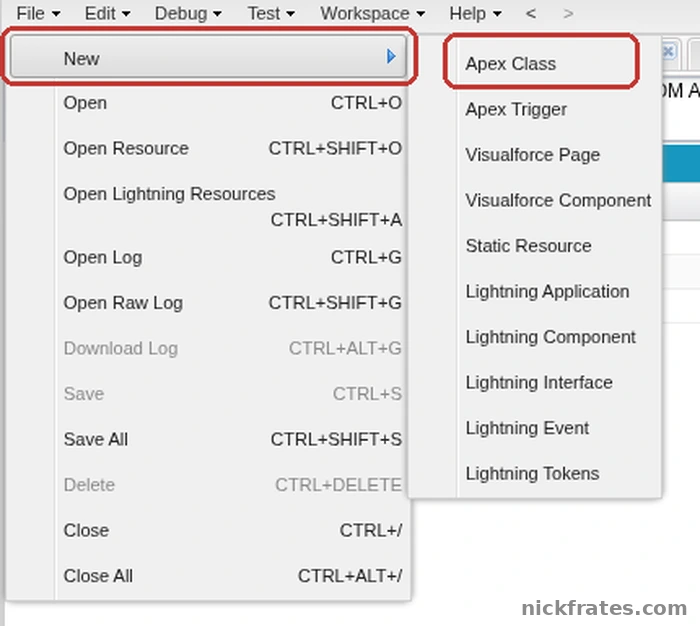
Developer Console > File > New > Apex Class.
Save it as a class in your org, then call it from anonymous Apex:
Step: click Debug, then Open Execute Anonymous Window, paste the call, leave Open Log ticked and click Execute (1). The capture calls DemoGreeter, my practice-org name for the class.
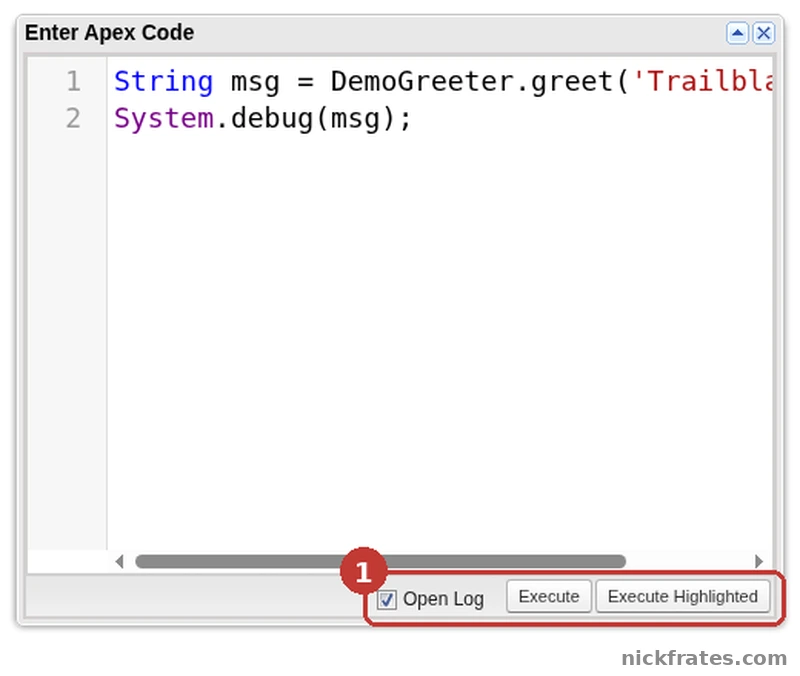
Developer Console > Debug > Open Execute Anonymous Window.
Step: in the execution log that opens, the USER_DEBUG line holds the text the method returned. Mine reads Hello, Trailblazer!
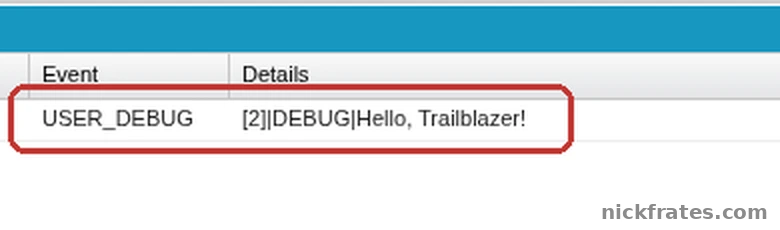
Execution Log in the Developer Console, one USER_DEBUG line.
Step 3: Learn SOQL and DML
Apex exists to work with data, so this is the step that makes it click. Start with the Trailhead module Apex Basics and Database, which Salesforce labels intermediate and about 2 hours 45 minutes. Its SOQL unit teaches queries inside Apex, and the DML unit covers inserting and updating records. For the query language itself, read my beginner post on SOQL in Salesforce.
Practice by writing small anonymous scripts: insert a few accounts, query them back, change a field and update them. My Apex code examples have working patterns for queries, DML and error handling.
Step 4: Write a trigger and learn bulk code
A trigger is Apex attached to an object that runs when its records change, and Salesforce lists triggers on objects as one way Apex gets started. The exam guide lists writing classes and triggers with best practices as a core skill, and my trigger best practices post covers context variables, bulkification and one trigger per object. Bulkification means writing code that handles many records at once instead of one. The testing page says up to 200 records can be passed through your code in one call, for example when it is invoked through the SOAP API, so code that only handles a single record is not enough.
Step 5: Learn to test
Salesforce says that before you can deploy your code, unit tests must cover at least 75% of your Apex code and all of those tests must complete successfully. Every trigger must also have some coverage. The same page says not to chase the percentage: cover every use case, positive and negative, single record and bulk. Calls to System.debug and test code itself do not count toward coverage. Write a test for every class and trigger you build in step 4, and run them in the org.
Step 6: Learn limits, debugging and asynchronous Apex
Because of the multitenant design, Apex has limits on things like queries and CPU time. Read my governor limits cheat sheet, and when you hit the CPU error, my post on the Apex CPU time limit exceeded error shows how to find the cause in a debug log. Then learn the asynchronous options: future methods, queueable, batch and scheduled Apex are compared in my asynchronous Apex post, with a deeper look at batch Apex and a guide to writing, chaining and calling a Queueable class.
Step 7: Prove it
Build one small project end to end, such as a trigger that stops duplicate records, with tests and a debug-log walkthrough. If you want a credential, the Platform Developer exam guide lists 60 multiple-choice questions in 105 minutes with a passing score of 68%. The outline is split into Developer Fundamentals (27%), Process Automation and Logic (28%), User Interface (25%) and Testing, Debugging and Deployment (20%). The guide says candidates generally have 1 to 2 years of developer experience and at least 6 months on the platform, so treat the exam as a milestone, not step one. See my posts on which developer certification to take first and the best ways to learn Salesforce development. To practice explaining what you learned, read my Apex interview questions.
Mistakes beginners make
- Reading without running code. Run every example in a Developer Edition org.
- Writing code for one record. Your code can be handed up to 200 records at once.
- Skipping tests until the end. Salesforce wants coverage and passing tests before deployment.
- Chasing coverage numbers. Salesforce says to cover every use case instead.
- Using Apex when a flow would do. Check the declarative option first.
- Practicing in production. A mistake there changes real data.
Cert Lab by Nick Frates
Learning Apex for the exam?
The Platform Developer Cert Lab has lessons weighted like the exam, practice questions that explain every option, flashcards and timed practice exams, so you can see which Apex topics you still need to work on.
Start the Cert Lab, $9.99 →Frequently asked questions
How do I learn Apex in Salesforce?
Get a Developer Edition org, learn the language basics, practice SOQL and DML, write a trigger, write tests, then study limits and asynchronous Apex. Run every example yourself.
How long does it take to learn Apex?
Salesforce does not publish a number. The Platform Developer exam guide says candidates generally have 1 to 2 years of developer experience and at least 6 months on the platform.
Do I need to know Java to learn Apex?
No. Salesforce says Apex is based on familiar Java idioms, so Java experience helps, but you can learn Apex without it.
What should I learn before Apex?
Know the Salesforce data model and what flows can do, so you can tell when code is needed.
Where do I write Apex?
In the Developer Console or Web Console in your browser, or in Visual Studio Code with the Salesforce extensions.
Is a trigger the first thing to learn?
No. Learn the language, SOQL and DML first. Triggers use all three.
How much test coverage do I need?
Salesforce requires unit tests to cover at least 75% of your Apex code, and all tests must pass, before you can deploy.
Is Apex on the Platform Developer exam?
Yes. The Process Automation and Logic section covers Apex variables, control flow, SOQL, SOSL, DML, classes, triggers and governor limits.
Hope this helps!
Best,
Nick