Hey friends,
SOQL (Salesforce Object Query Language) is how you read records from Salesforce with a query. A basic query has a SELECT list of fields, a FROM object, and optionally a WHERE filter, an ORDER BY sort and a LIMIT on the number of rows, in that order. There is no SELECT *: you name the fields, or use FIELDS().
Everything below comes from Salesforce's own pages, checked on October 28, 2026: the SOQL reference, the SELECT and FIELDS() page, the COUNT() page, the GROUP BY page and the Trailhead unit SOQL Queries in Apex. I only checked the queries below for syntax. Run them in a Developer Edition org or sandbox and change the object and field names to match yours.
What SOQL is and where you run it
Salesforce describes SOQL as similar to the SELECT statement in SQL (Structured Query Language, the standard language for databases) but designed for Salesforce data. The reference lists the places you can use it: Apex code, the REST and SOAP APIs, the Salesforce CLI and the Salesforce extensions for Visual Studio Code. In the browser, you can use the Query Editor in the Developer Console (see my post on opening the Developer Console) or Query Builder in Web Console, which the Trailhead unit describes.
SOQL is not full SQL. The reference says you cannot use it for arbitrary joins, wildcards in field lists or calculation expressions.
The basic shape: SELECT and FROM
A query names the fields you want and the object they come from. This one returns the name and phone of every account you can see:
The Trailhead unit explains the two parts. The fields come after SELECT as a comma-separated list, and FROM names the standard or custom object. A custom object name ends in __c, for example Invoice_Statement__c. When you query in Apex, the Id field is always returned, whether you list it or not.
Filter with WHERE
WHERE limits the rows to those that match a condition. The Trailhead unit notes that comparisons on strings are case-insensitive. This query returns accounts with that exact name:
Join conditions with AND and OR, and use parentheses to say which belongs together. This returns accounts named SFDC Computing, plus any account with more than 25 employees and a billing city of Los Angeles:
For a fuzzy match, use LIKE. The percent sign matches any or no characters, and an underscore matches exactly one character:
Sort and limit the results
The Trailhead unit warns that a query returns records in no particular order, so do not rely on the order unless you add ORDER BY. The default is ascending (ASC), and DESC reverses it. LIMIT caps how many rows come back. When you combine the clauses, they go in this order: WHERE, then ORDER BY, then LIMIT.
Step: in the Developer Console, open the Query Editor tab, paste a query and click Execute. The results appear in a grid in the same tab. This capture runs a different query from the one above, with ORDER BY Name and LIMIT 10, and shows only the Name column of the 10 rows.
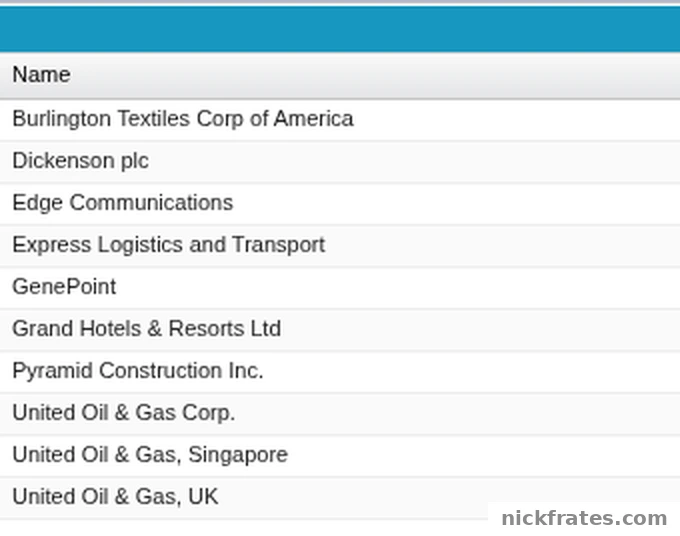
Developer Console > Query Editor tab. Query: SELECT Id, Name, Industry, Type FROM Account WHERE Industry != null ORDER BY Name LIMIT 10. Only the Name column is shown.
Select all fields with FIELDS()
Because there is no SELECT *, Salesforce added FIELDS() in API version 51.0. The reference says FIELDS(STANDARD) selects all standard fields, FIELDS(CUSTOM) all custom fields and FIELDS(ALL) all of them, and that each one respects field-level security. In Apex, only FIELDS(STANDARD) is supported, because the other two are unbounded. The reference also says that if you know the fields you need, naming them gives better performance.
Query related records
Records link to each other through lookup and master-detail relationships, and SOQL can follow them. To get child records, add an inner query. Its FROM uses the relationship name, not the object name. Contacts hang off an account through the Contacts relationship:
To go from a child up to its parent, use dot notation. This returns each contact with the name of its account:
Custom relationship names end in __r. I go deeper on this in my SOQL relationship queries cheat sheet, and my post SOQL Secrets shows questions a query can answer when a report cannot.
Count and group
To count rows, use COUNT(). The reference says it must be the only item in the SELECT list and cannot be combined with ORDER BY. To count per value, use GROUP BY. The GROUP BY page says that if the SELECT list has an aggregate function, every non-aggregated field must also be in the GROUP BY clause. This query counts leads for each lead source:
Use a query in Apex
In Apex, you put the query in square brackets and assign the result to a list of records. The reference notes that you can use Apex variables in the query when you put a colon in front of them. Salesforce calls that a bind. Here is a query with a bind, sorted and limited, run as anonymous Apex:
If you get stuck on where to run it, see my posts on the Developer Console and how Apex works, and the Apex code examples for queries inside triggers.
When a query returns thousands of records, the Trailhead unit suggests a SOQL for loop. It fetches records in chunks of 200 instead of loading them all at once, which helps you stay under the heap limit.
SOQL or SOSL?
SOSL is the search language. The reference says to use it when you do not know which object or field holds the data, or when you want to search several objects at once for a term. If you know the object and the fields, SOQL is the tool.
Mistakes to avoid
- Writing SELECT *. It is not supported. List the fields or use FIELDS().
- Reading a field you did not select. Salesforce gives an error because the field was not retrieved.
- Relying on the order. Without ORDER BY the order can change from one run to the next.
- Mixing COUNT() with other fields. COUNT() must be the only item in the SELECT list.
- Leaving a field out of GROUP BY. Every non-aggregated field in the SELECT list must be in it.
- Using FIELDS(CUSTOM) on an object with no custom fields. On its own, it returns an error.
Cert Lab by Nick Frates
Learning SOQL for the exam?
The Platform Developer Cert Lab has lessons weighted like the exam, practice questions that explain every option, flashcards and timed practice exams, so you can see which Apex and SOQL topics you still need to work on.
Start the Cert Lab, $9.99 →Frequently asked questions
What is SOQL in Salesforce?
SOQL, the Salesforce Object Query Language, is the language you use to read Salesforce records. It is similar to the SELECT statement in SQL but designed for Salesforce data.
What is the basic syntax of a SOQL query?
SELECT fields FROM object, with optional WHERE, ORDER BY and LIMIT clauses, in that order.
Can I use SELECT * in SOQL?
No. Name the fields, or use FIELDS(STANDARD), FIELDS(CUSTOM) or FIELDS(ALL). In Apex, only FIELDS(STANDARD) is supported.
How do I filter in SOQL?
Add a WHERE clause. Combine conditions with AND and OR, group them with parentheses, and use LIKE for partial matches.
How do I query related records?
For child records, add an inner query that uses the relationship name, such as (SELECT LastName FROM Contacts). For parent fields, use dot notation, such as Account.Name.
How do I use a variable in a SOQL query?
In Apex, put a colon before the variable name, for example WHERE Department = :targetDepartment.
What is the difference between SOQL and SOSL?
SOQL queries records from objects you name. SOSL searches for text across several objects when you do not know where the data lives.
Where can I run a SOQL query?
In Apex, the Developer Console Query Editor, Web Console, the REST and SOAP APIs, the Salesforce CLI and VS Code with the Salesforce extensions.
Hope this helps!
Best,
Nick