Hey friends,
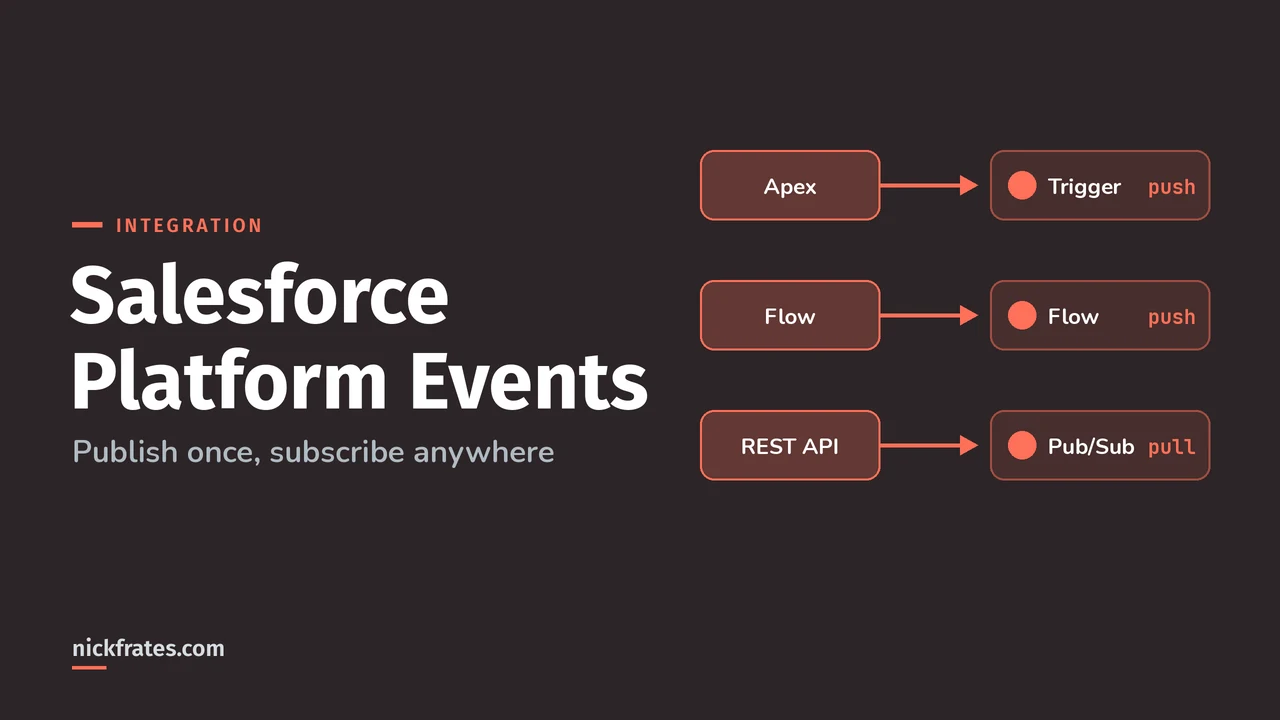
Salesforce platform events are custom messages that you define, publish to the event bus, and let any number of subscribers process asynchronously, so the sender never waits for the receiver and never needs to know who it is. They're how you build event-driven integrations on the platform: publish from Apex, a flow or an API, and subscribe with Apex triggers, flows, Lightning components or external clients.
They sit squarely in the Design and Build sections of the Salesforce Certified Platform Integration Architect exam. This post covers publishing, subscribing, replay and the allocations, with the numbers from the Salesforce docs. If you're still choosing between APIs, see Salesforce API types first.
What are Salesforce platform events?
A platform event is a notification about a meaningful change in state, such as an order being placed or a printer running low on ink. Salesforce's event-driven architecture page defines the parts:
| Term | What it is |
|---|---|
| Event message | The data about the event, also called an event notification |
| Event producer | Whatever publishes the message |
| Event channel | A stream of events, for one platform event or a custom channel that groups several |
| Event consumer | A subscriber that reads from the channel |
| Event bus | A multitenant, multicloud storage and delivery service based on publish-subscribe, with a time-ordered log, so messages are delivered in the order Salesforce receives them |
The key idea is decoupling. In request-response, the caller depends on the service being up. With events, producers don't know their consumers, and any number of consumers can react to the same event. The only dependency is the shape of the message.
Some facts about the events you define, from the platform event fields page and the considerations page:
- The API name ends in
__e, for exampleLow_Ink__e. - Custom fields can be Checkbox, Date, Date/Time, Number, Text or Text Area (Long) only.
- You can't query events with SOQL, and they have no tab or record page.
- Field-level security doesn't apply: every field is in the message, and all fields are read only.
- To define one you need the Customize Application and API Enabled permissions.
How do I publish a platform event?
After you define the event in Setup, you publish with a flow, Apex, a Salesforce API, or Pub/Sub API. In Apex, you call EventBus.publish:
Publishing is asynchronous, and this is the part people miss. When isSuccess() is true, the publish request is only queued. A successful call returns an OPERATION_ENQUEUED status with the event's UUID, and EventBus.publish doesn't throw on failure, similar to Database.insert with partial success. To get the final result, implement an Apex publish callback with EventBus. or EventBus.. The publish callbacks page says they work for high-volume platform events and run as the Automated Process user.
From outside Salesforce, you insert the event like any other record. Any API works, including REST, SOAP and Bulk API 2.0, as the publish with APIs page explains:
To publish many events in one request, use the Composite resource. I cover its limits in my Composite API post. If you want the final publish result for external publishing, use Pub/Sub API, which returns it. I compare it with Streaming API in Salesforce API types.
Publish Immediately or Publish After Commit?
Pick Publish Immediately unless the subscriber needs committed data. Per the platform event fields page, Publish Immediately is the default and the recommendation for most implementations. It publishes when the call runs, even if the transaction later fails. Publish After Commit publishes only after the transaction commits, and never if it fails.
The decoupled publishing page shows why this is an exam favorite. Say an after insert trigger on a custom object publishes an event with Publish Immediately, and a subscriber such as a flow or process looks up that record. The subscriber can run before the transaction commits, so the lookup finds nothing. The fix is to change the event to Publish After Commit.
- The setting doesn't apply to events published with Pub/Sub API.
- After you change it, expect up to a 5-minute delay.
- In Apex, Publish After Commit counts as one DML statement per call. Publish Immediately counts against a separate limit of 150
EventBus.publish()calls.
Can platform events be lost or duplicated?
Yes, in rare cases, and an architect has to design for it. The considerations page says publishing uses an at-least-once model, not exactly-once. A duplicate is an event with the same EventUuid, a different ReplayId and the same payload. Handle it in the subscriber by tracking the UUID.
The same page says that in rare cases an event might not be persisted in the distributed system and then isn't delivered or recoverable. For must-not-lose data, keep the source of truth in a record and use the event as the notification.
How do I subscribe to platform events?
You have five main options, listed on the subscribing page:
| Subscriber | How it works | Know this |
|---|---|---|
| Apex trigger | An after insert trigger on the event | Runs in its own transaction, so limits reset. Batches of up to 2,000 events, in replay ID order. Runs as Automated Process unless you configure a user |
| Flow | A platform event-triggered flow, or a Pause element that resumes on a matching event | If a triggered flow and a paused interview wait on the same event, order isn't guaranteed |
| Lightning component | empApi in a Lightning web or Aura component | Uses a CometD connection and counts as a concurrent client. Not for sites with many users, such as Experience Cloud |
| Pub/Sub API | An external client over gRPC | Pull-based. The client says how many events it wants per Subscribe call |
| CometD | An external client over Streaming API | Push-based, so the client can't control how many arrive |
Triggers get the most exam attention. Here's one that reacts to the low ink event and retries on a transient failure, based on the pattern in the Apex trigger subscription page:
If a trigger throws EventBus.RetryableException, Salesforce resends the whole batch after a growing delay, and DML done before the exception is rolled back. A trigger runs at most 10 times, the first run plus 9 retries, then goes into an error state and stops processing new events until you fix and save it. Salesforce recommends fewer than 9 retries. The alternative is setResumeCheckpoint(), which the comparison page describes:
| setResumeCheckpoint() | EventBus.RetryableException | |
|---|---|---|
| Use it when | Earlier events succeeded and an unhandled exception, such as a limit, hits later | You expect an external condition to change or a transient error to clear |
| DML before it | Committed | Rolled back |
| What is resent | Only events after the checkpoint | The whole previous batch |
| Retry cap | No limit | Nine retries after the first run |
For volume, Salesforce supports parallel subscriptions for Apex triggers, available for custom high-volume events but not standard or change events. You can also set the running user and batch size with PlatformEventSubscriberConfig, which is the supported way to change the default batch of 2,000.
How does replay work, and how long are events kept?
High-volume platform events stay on the event bus for 72 hours, and a subscriber can replay anything inside that window. The durability documentation says Salesforce doesn't guarantee storage beyond 72 hours, and purging sometimes starts later, so older events can still show up.
Every event message gets a ReplayId, an opaque value that marks its position in the stream. Two rules from the docs: replay IDs aren't guaranteed to be contiguous, and you must never compute one from another. Store them as bytes. To identify an event uniquely, use EventUuid, because a replay ID isn't guaranteed unique after Salesforce maintenance such as an org migration.
| Goal | Pub/Sub API | CometD |
|---|---|---|
| Only new events after I subscribe | LATEST (the recommended default) | -1 (the default) |
| Catch up after a disconnect | CUSTOM with the last replay ID you saved | The saved replay ID |
| Everything still retained | EARLIEST, used sparingly | -2, used sparingly |
The replay options are in the Trailhead API Basics module and the durability page. Subscribing with EARLIEST or -2 when lots of events are stored can slow performance. The pattern for a durable external subscriber: save the replay ID after each processed batch, then resume from it after a restart.
Cert Lab by Nick Frates
Practice platform events scenarios
Scenario questions on events, replay, allocations and the other integration topics for all six Platform Integration Architect sections, with every option explained.
Start the Platform Integration Architect Cert Lab for $9.99 →Not ready to buy? Try a free lesson and see how fast you learn.
What are the platform event allocations?
There are two usage allocations and a few hard caps. The platform event allocations page has the details, and it's one to bookmark. These are the defaults for orgs with no add-on:
| Allocation | Performance and Unlimited | Enterprise | Developer |
|---|---|---|---|
| Event publishing, per hour, all publishing methods | 250,000 | 250,000 | 50,000 |
| Event delivery, per 24 hours, shared by Pub/Sub API, CometD, empApi and event relays | 50,000 | 25,000 | 10,000 |
| Platform event definitions per org | 100 | 50 | 5 |
| Concurrent CometD clients | 2,000 | 1,000 | 20 |
| Distinct platform events in one custom channel | 50 | 50 | 5 |
| Largest event message you can publish | 1 MB | 1 MB | 1 MB |
The part that surprises people: the delivery allocation doesn't apply to Apex triggers, flows and Process Builder processes. If Apex publishes and a trigger subscribes, you use only the publishing allocation. If Apex publishes and a Pub/Sub API client subscribes, both apply, and the delivery count adds up across every subscribed client.
What happens when you run out:
- Publishing: the call fails with LIMIT_EXCEEDED. The events aren't queued, so you must republish them after usage drops.
- Delivery: the subscriber gets an error and is disconnected. Events keep landing in the bus for 72 hours, so reconnect with the replay ID once usage falls.
- Publishing over REST, SOAP or Bulk API also uses your daily API request allocation. Publishing with Apex, flows, processes or Pub/Sub API doesn't.
To reduce delivery use, filter the stream with custom channels and remove subscribers you don't need. A platform events add-on adds 100,000 delivered events per day and 25,000 publishes per hour, and allows spikes through a grace allocation. You can watch usage in Setup, with REST API, or by querying PlatformEventUsageMetric in SOQL.
How do platform events show up on the Platform Integration Architect exam?
| If the scenario says... | The answer usually is... |
|---|---|
| Salesforce must tell several systems something changed, and the sender shouldn't wait | Platform events, with each system subscribing |
| A subscriber needs the record the publisher just saved | Publish After Commit |
| An external client was offline for a day and missed events | Resubscribe with the saved replay ID, as long as it's inside the 72-hour window |
| A subscriber was offline for four days | That's past the retention window, so plan to reconcile from the source records |
| An external client is overwhelmed by the event rate | Pub/Sub API, because the client controls how many events it pulls |
| Delivery limits are being hit | Filter with a custom channel, drop extra subscribers, or buy the add-on |
If you learn best by testing yourself, the Platform Integration Architect Cert Lab has quick practice questions on platform events and event-driven integration, with every option explained.
What mistakes do people make with platform events?
- Treating
isSuccess()as proof the event was delivered. It only means it was queued. - Leaving Publish Immediately on when the subscriber reads records the publisher just saved.
- Computing the next replay ID instead of storing the one you were given.
- Using EARLIEST or -2 on every reconnect, which replays everything retained.
- Ignoring duplicates, when the docs say at-least-once delivery can produce them.
- Subscribing with empApi on a site with thousands of users and exhausting concurrent clients.
- Retrying forever. After the ninth retry the trigger stops, and so does everything behind it.
Here's why I care about practice questions so much. I earned 17 Salesforce certifications, and Focus on Force was a big part of that. My early approach was study guide first, tests later. Flipping it, taking practice tests fast and often, cut my study time way down. Cert Lab is my version of that: fast testing with explanations that link to current docs.
FAQ
What is a platform event in Salesforce?
A custom message you define, publish to the event bus, and let subscribers such as Apex triggers, flows and external clients process asynchronously.
How long does Salesforce keep platform events?
High-volume platform events and change data capture events are kept for 72 hours. Subscribers can replay events within that window.
What is a replay ID?
An opaque value that marks an event's position in the stream. Store it and use it to resume after a disconnect. Don't compute new ones.
What is the difference between Publish Immediately and Publish After Commit?
Publish Immediately publishes when the call runs, even if the transaction fails. Publish After Commit publishes only after a successful commit.
Do Apex triggers count against the platform event delivery allocation?
No. The delivery allocation covers Pub/Sub API, CometD, empApi and event relays. Apex triggers, flows and Process Builder processes are excluded.
Can I query platform events with SOQL?
No. You can't query event messages with SOQL, and they don't appear in the Salesforce user interface.
Are platform events guaranteed to be delivered exactly once?
No. Publishing is at-least-once, so duplicates are possible. Use the EventUuid field to deduplicate.
Where should you go next?
- Salesforce API types for Pub/Sub API and the Streaming API comparison.
- Salesforce REST API for publishing events from an external system.
- Salesforce integration patterns for where events fit among the six patterns.
- Apex trigger best practices for writing triggers that keep up with the event rate.
- Platform Integration Architect study plan for the full exam.
Nick Frates, a senior Salesforce developer with 17 certifications, built the Platform Integration Architect Cert Lab at nickfrates.com: rapid-fire practice questions for every exam section, each answer explained.
Cert Lab by Nick Frates
Let the Platform Integration Architect Cert Lab test you to success
Lessons, flashcards, a quiz for each of the six exam sections and full practice exams, every answer explained.
Start the Platform Integration Architect Cert Lab for $9.99 →Not ready to buy? Try a free lesson and see how fast you learn.
Hope this helps!
Best,
Nick