Hey friends,
An Agentforce Employee agent is an AI agent for your own employees, not your customers. It runs in the logged-in user’s context, and you choose who gets it with permission sets or profiles.
That second sentence is the whole difference, and it’s the easy part to miss. So let’s start there, then build one.
How is an Employee agent different from a Service agent?
Salesforce Help’s Employee agent setup article says Employee agents help employees find information, complete tasks, and get personalized support. Unlike other agent templates, they:
- are designed for internal employees,
- run in the logged-in user context, and
- can be assigned to specific profiles or users.
“Logged-in user context” means the agent works with the permissions of the person using it. The way I read it, the agent is working inside that person’s access, not a separate admin-level view. (That’s a nice property for an internal tool.)
What do I need before I start?
- Edition: Enterprise, Performance, Unlimited, or Developer Edition. Required add-on licenses vary by agent type.
- Permission to build: Manage AI Agents or Customize Application.
- Setup: set up Einstein Generative AI and enable Agentforce first.
How do I create one?
From the App Launcher, enter Agent and open the Agentforce Studio app. On the Agents tab, click New Agent. Select an Agentforce Employee agent template, name it, and click Let’s Go.
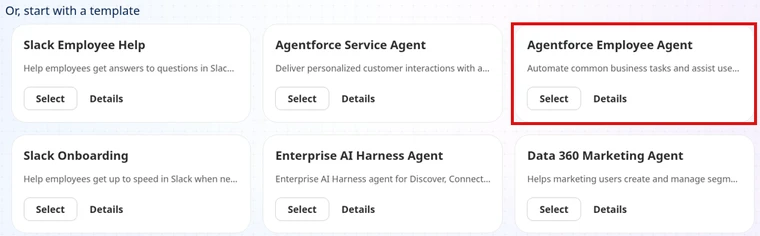
Then work through three sections, per Help:
- Settings: how the agent behaves in conversations, like system messages and language settings.
- Subagents: the agent’s subagents and actions. (A subagent is one job area. The exam guide still calls it a topic.)
- Data: pick a data library. The Answer Questions with Knowledge action uses it to ground answers, meaning it answers from your own content.
Test on the Preview tab. Help says to confirm it performs as expected and meets your security standards.
How do I give employees access?
Don’t skip this one. The Manage Employee Agent Access article says you control access with permission sets or profiles.
In Agentforce Builder, go to the Explorer panel, and under Settings, click Agent Access. Add the permission sets or profiles that should get the agent.
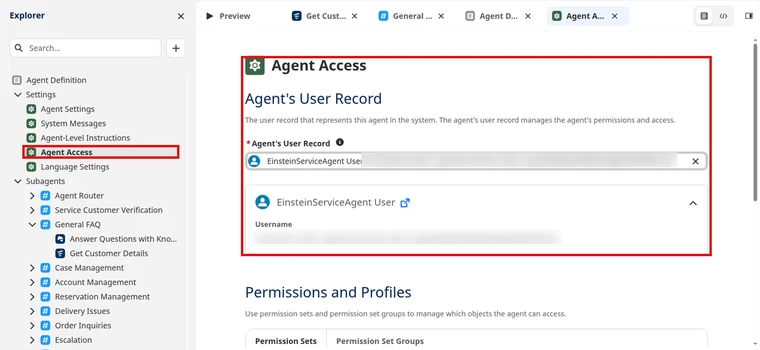
You can also do it from Setup. Open a permission set or profile, edit Enabled Agent Access, select the Employee agents, and save.
Don’t see your agent in that list? Help says only Employee agents appear there. If an active agent is missing, check that it really is an Employee agent.
Is there a catch with Experience Cloud?
Yes, and it’s a good one to know. On an Experience Cloud site, the agent runs as the logged-in site user. Help warns that these sites often share a single profile across many external users.
So if you grant access on that shared profile, everyone on it gets the agent. To limit it, enable the agent on a permission set and assign that only to the right users.
Agentforce Specialist Cert Lab
Know when to use each agent type
Get exam-style questions on Employee vs Service agents and the rest of the AI Agents section, each answer explained, plus hands-on tasks.
Start the Agentforce Specialist Cert Lab for $9.99 →Where can employees use it?
Help says you can connect it to Enhanced Web Chat v1, Enhanced Chat v2, or Slack, then activate it. If Slack is your plan, see Agentforce in Slack.
Should I use the legacy builder?
No. Help says that starting the week of July 13, 2026, you can no longer create agents in the legacy builder in Setup. Build in Agentforce Studio, and Salesforce recommends migrating existing agents to the new builder.
That also means a lot of older tutorials show screens you won’t find anymore.
Is this on the Agentforce Specialist exam?
Yes. The exam guide asks you to identify, given a scenario, when to use an Employee or a Service agent. More in Agentforce subagents and actions and the Salesforce certification study guides.
Agentforce Specialist Cert Lab
Get ready for the Agentforce Specialist exam
Practice every exam section with explained answers, so scenario questions feel familiar.
Start the Agentforce Specialist Cert Lab for $9.99 →P.S. If you only do one thing after reading this, open Agent Access and check who actually has your agent.
Hope this helps!
Best,
Nick


