Hey friends,
To use a flow as an Agentforce action, build a flow with input and output variables. Then, in Agentforce Builder, create a custom action with Reference Action Type set to Flow, require its inputs, and tell the subagent when to run it.
That’s the whole idea. Below is how each piece works, plus the two checkboxes that are easy to miss. I’m following Salesforce’s Trailhead unit on flow-based actions.
Quick vocabulary first. A subagent is a job area inside an agent, with its own instructions and actions. The exam guide still calls it a topic.
Why would I use a flow instead of Apex or a prompt?
Because you can build it with clicks. The Agent Script actions reference says an action can call a flow, a prompt template, or an Apex class.
If you already know Flow Builder, a flow is the fastest way to let an agent look something up or create a record. (The Trailhead unit assumes you’re comfortable with Flow Builder, so brush up there first if you’re not.)
What does the flow need?
Give every flow variable a clear description. In the Trailhead unit, the action’s default input description is copied from the flow variable’s description, so a good variable description carries straight into the action.
How do I turn the flow into an Agentforce flow action?
You can do it without leaving Agentforce Builder. Open the Agentforce Studio app and select your agent.
If that version is committed, you can’t edit it. Click New Version first.
Open the subagent. Under Actions Available for Reasoning, click Select action, then Create a custom action. Give it an Action Name and a Description that says what it does and what it needs.
Set Reference Action Type to Flow, pick your flow in Reference Action, and click Create and Open.
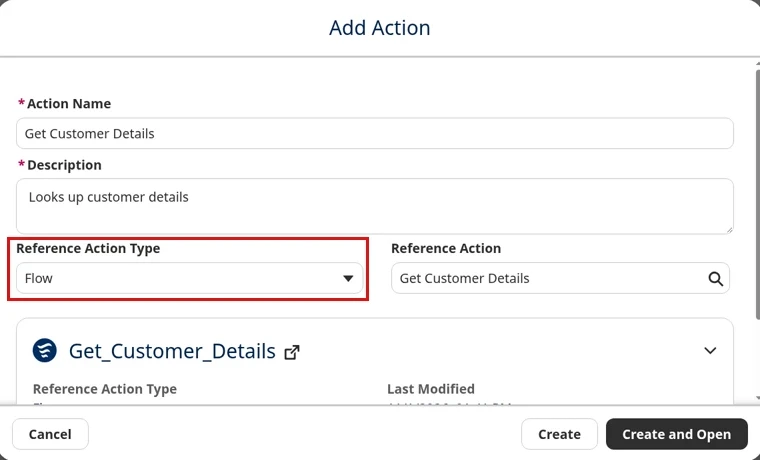
One more thing on descriptions. The actions reference says the large language model (LLM) reads the description when it decides whether to call the action. A vague description means a confused agent.
Which checkboxes actually matter?
Two of them, and they’re easy to miss.
Require input to execute action goes on each input. The agent won’t run the action until it has data for that input, so the flow never runs without what it needs.
Show in conversation goes on each output the customer should see. If it’s unchecked, Trailhead says that variable’s contents won’t ever be shared with the customer.
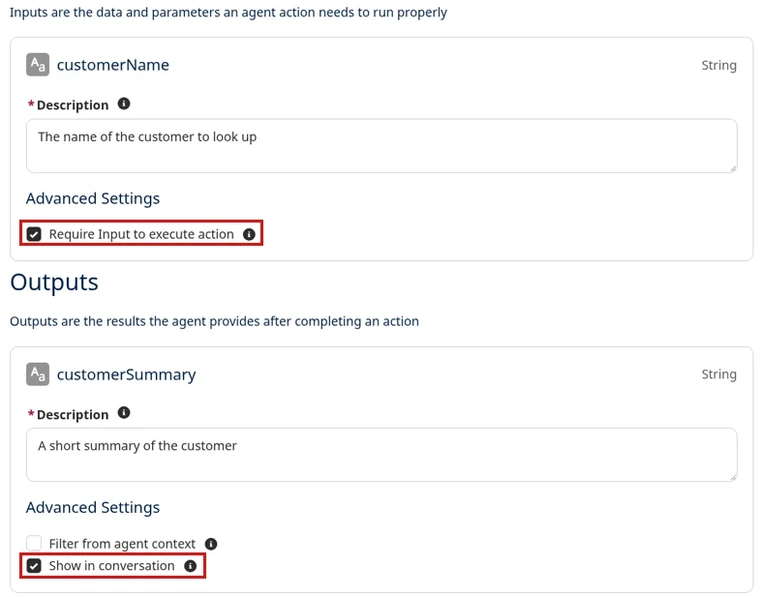
Then go back to the subagent canvas and open the action. The inputs should say Agent Populated, which means the agent fills them from the conversation.
If the Inputs and Outputs sections show up blank, Trailhead’s fix is simple: click another tab, then come back.
What if my flow returns a list of records?
Then you need a small fix in the script. Trailhead says record collection variables must be specially configured in the subagent’s script.
Switch the Canvas dropdown to Script. Find the output, and change its type and data type name like this:
Under the hood, the action points at your flow with a target like flow://Your_Flow_API_Name. That’s the format in the actions reference.
How do I make the agent actually use it?
Tell it, in plain words. In the subagent’s Reasoning Instructions, say exactly when to run the action. Type @ to reference the action by name.
Trailhead also adds two guardrails I’d copy every time:
- Don’t use any Salesforce data that wasn’t provided by an action. (Agents can see every object and field their permissions allow.)
- Don’t show the customer any ID values. Record collection variables always include record IDs.
Save, then test on the Preview tab in Agentforce Builder.
Agentforce Specialist Cert Lab
Practice actions the way the exam asks
Get scenario questions on subagents and actions, each answer explained, plus hands-on tasks you do in your own org.
Start the Agentforce Specialist Cert Lab for $9.99 →Is this on the Agentforce Specialist exam?
Yes. The exam guide has an AI Agents objective about selecting and configuring standard and custom actions. AI Agents is 35% of the exam.
For the bigger picture, see Agentforce subagents and actions and how to pass the Agentforce Specialist exam. The Agentforce guide covers the rest, and the Salesforce certification study guides compare every cert.
Agentforce Specialist Cert Lab
Get ready for the AI Agents section
Work through exam-style questions on actions, subagents and testing, each answer explained.
Start the Agentforce Specialist Cert Lab for $9.99 →So, tell me: what’s the first flow you’re going to hand to an agent? Let me know!
Hope this helps!
Best,
Nick


