Hey everyone,
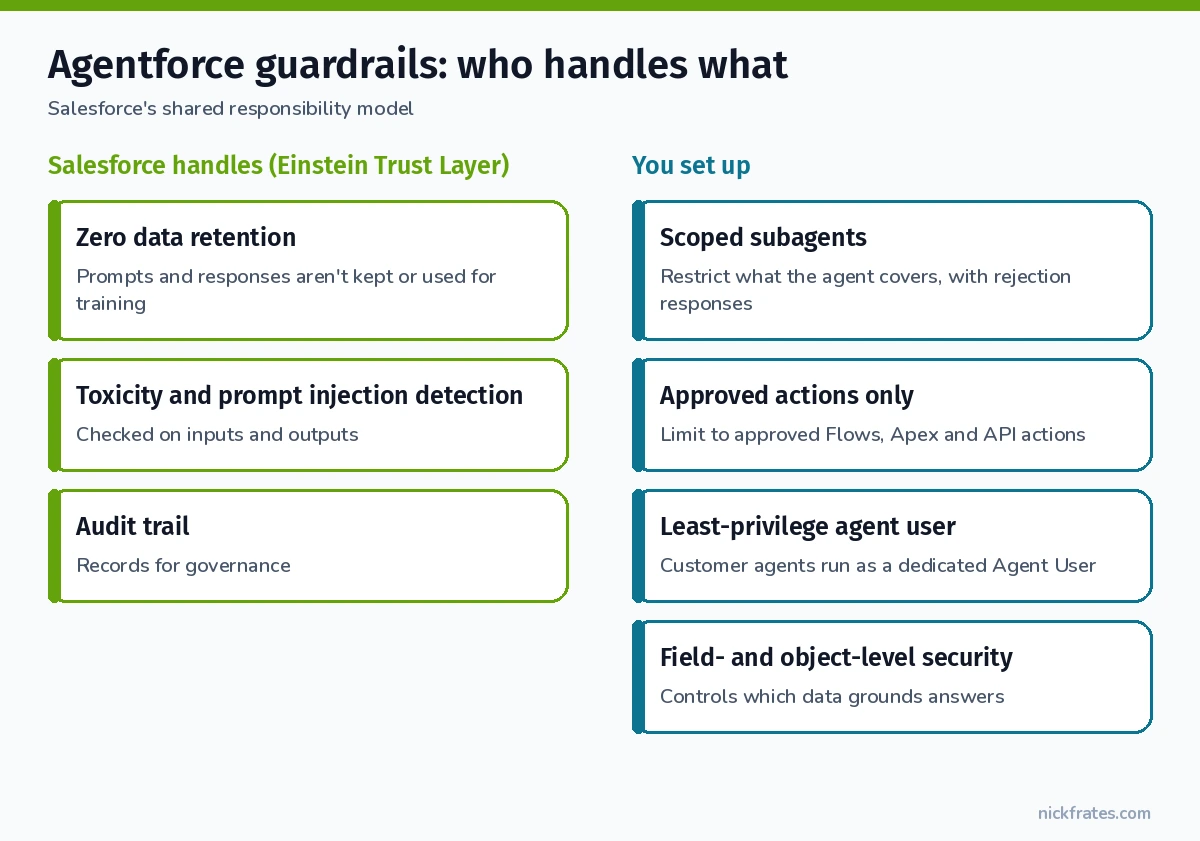
Agentforce guardrails are the layers that keep an AI agent on task and safe: the Einstein Trust Layer that Salesforce provides (zero data retention, toxicity and prompt injection detection, audit trails), plus the guardrails you configure yourself (scoped subagents, approved actions only, rejection responses, and a least-privilege agent user). Salesforce calls this a shared responsibility model. Salesforce secures the foundation, and you’re responsible for access, permissions and agent-specific guardrails.
Here’s what each layer does, what you have to set up yourself, and the mistakes that leave gaps.
Agentforce guardrails: what Salesforce handles vs what you handle
| Salesforce provides | You configure |
|---|---|
| Einstein Trust Layer between your org and the LLMs | Least-privilege permissions, profiles, permission sets and field-level security |
| Zero data retention with third-party LLM providers | Which subagents and actions the agent has |
| Toxicity and prompt injection detection | Rejection responses for out-of-scope requests |
| Audit logging capabilities | Monitoring agent activity, Enhanced Event Logs, human-in-the-loop for custom actions |
Layer 1: the Einstein Trust Layer
The Trust Layer intercepts every prompt and response between your org and the large language models (LLMs) behind your agents.
Zero data retention. Third-party LLM providers don’t keep your prompts or responses, and your data isn’t used to train their models.
Toxicity and prompt injection detection. It checks both what users send and what the model returns. Trailhead describes toxicity scoring in five categories (violence, sexual, profanity, hate and physical) with an overall score from 0 to 1, where 1 is the most toxic.
Audit trail. It tracks how generative AI is used in your org so you can check it against your security, privacy and AI governance policies.
Layer 2: scope the agent with subagents and approved actions
Restrict what it handles. Define the specific subagents (formerly topics) and business jobs the agent is allowed to take on. Anything outside them is out of scope.
Limit actions. Give the agent only predefined, approved actions, like specific Flows, Apex classes or API calls. Salesforce says you can and should do this, because it stops the agent from doing things you never intended.
Write rejection responses. Set the message the agent gives when a request is out of scope, unethical, or against your security policy.
Layer 3: agent-level instructions and overrides
In Agent Script, agent-level system instructions apply to every subagent by default. A subagent can have its own system block, which overrides the agent-level instructions for that subagent only.
Why this matters for guardrails: if your agent-level instructions contradict a subagent’s reasoning instructions, Salesforce warns the agent can hang or behave unexpectedly. Use an override instead of hoping the agent sorts it out. Here’s the shape, adapted from Salesforce’s Agent Script example:
Layer 4: the agent user and data access
This is the guardrail people skip, and it matters most. Agents on public channels like Messaging or web chat run as a dedicated agent user, and that user’s permissions decide what the agent can do.
Employee agents run as the logged-in user, so your existing licenses, permission sets, field-level security and sharing rules apply automatically.
Customer agents run as that dedicated agent user. Salesforce’s best practice is to create a new agent user so it starts with minimal access, then grant only the permissions it needs.
Field-level and object security also control which data is available when the agent grounds its answers in your records and Knowledge.
Layer 5: test and monitor
Test off-topic and hostile prompts in Preview. Agentforce Builder’s Preview panel shows which subagent and actions the agent picks. Watch Live Test Mode: in live mode, the agent can change real data in your org. Switch to Simulate when you’re testing.
Keep watching after launch. Salesforce lists monitoring agent activity, Enhanced Event Logs and human-in-the-loop for custom actions as your responsibilities. Shield Event Monitoring and Field Audit Trail add deeper logging for orgs that need it.
Common Agentforce guardrail mistakes
- Giving the agent user broad access “to make it work.” Whatever that user can do, the agent can do.
- Adding every action “just in case.” Every extra action is something the agent might run.
- No rejection response. Out-of-scope requests need a clear, friendly answer you wrote.
- Instructions that contradict each other. Use a subagent override.
- Testing in Live Test Mode against real records. Use Simulate.
Practice this for the Agentforce Specialist exam
Trust, security and agent configuration are big themes on the Agentforce Specialist certification. The Cert Lab gives you exam-style questions and hands-on tasks to practice them.
Cert Lab by Nick Frates
Practice Agentforce trust questions before the exam
Agentforce Specialist Cert Lab: lessons for every exam section, practice questions that explain every option, and flashcards. $9.99.
Start the Agentforce Specialist Cert Lab for $9.99 →Practice questions
1. A customer-facing agent on a Messaging channel can update fields it shouldn’t touch. Where do you fix it first?
The agent user’s permissions and field-level security. Agents on public channels run as a dedicated agent user.
2. Agent-level instructions conflict with one subagent’s needs. What does Salesforce recommend?
Add a system block to that subagent to override the agent-level instructions for that subagent only.
FAQ
What are Agentforce guardrails? The Einstein Trust Layer from Salesforce, plus the scope, actions, rejection responses and permissions you configure.
Does Agentforce train the LLM on my data? No. Third-party LLM providers have zero data retention agreements and don’t use your data for training.
Who is responsible for agent security? Both. Salesforce secures the platform and Trust Layer. You handle least privilege, guardrails and monitoring.
Related: How to build an Agentforce Service Agent and Agentforce for Service.
Sources: Agentforce Security and the Shared Responsibility Model (Salesforce Help), Trust Layer, Agentforce Developer Guide, Agent Script System Overrides, Trailhead: Einstein Trust Layer, Salesforce blog: LLM data masking.
Hope this helps!
Best,
Nick


