Hey friends,
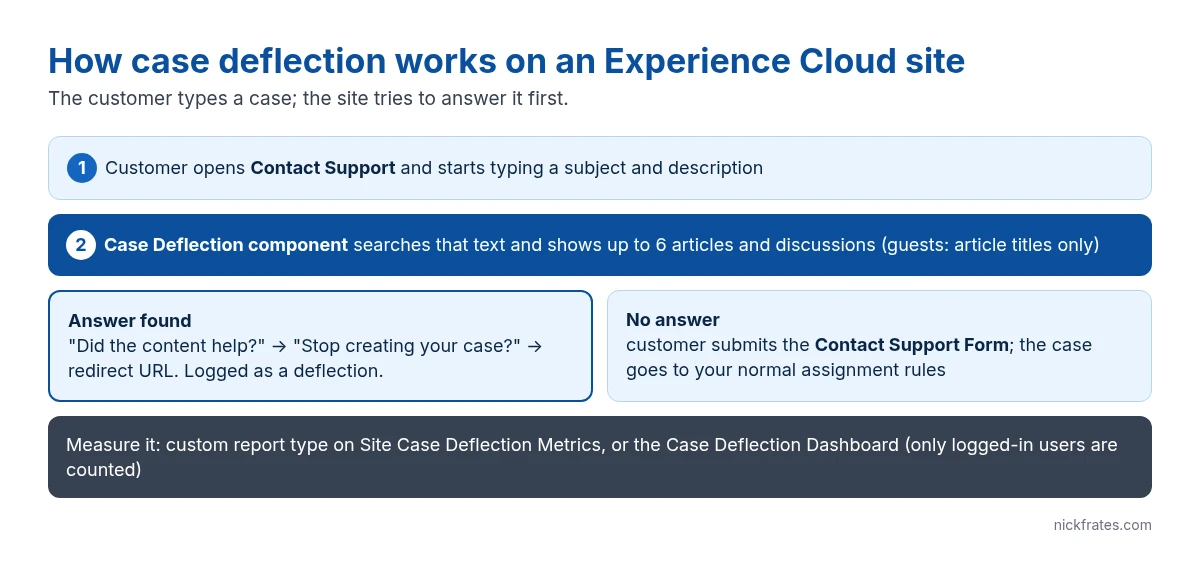
To build case deflection in Salesforce, put the Contact Support Form and the Case Deflection component on the same page of an Experience Cloud site: as customers type their question, the component suggests Knowledge articles and discussions, and if one solves the problem they can stop before a case is created. You measure it with a custom report type on Site Case Deflection Metrics or the Case Deflection Dashboard. Guest users need Web-to-Case and a guest case action to submit cases, and their searches only match article titles.
What case deflection is
Case deflection means a customer finds the answer on their own instead of opening a case. On an Experience Cloud site that happens in two places: search and article pages, and the moment someone starts filling in the support form. The second one is what Salesforce’s Case Deflection component targets, and it’s the one you can measure.
Per Salesforce Help, the Case Deflection component searches the text as it’s typed into the Contact Support Form and returns matching articles and discussions. These are the Contact Support Form and Case Deflection components that replaced the old Create Case Form in Spring ’18 sites.
What you need before you start
- An Experience Cloud site built on an Aura template that includes the support components, such as Customer Service. Deflection signals are documented for Aura sites, so check before planning this on an LWR site.
- Salesforce Knowledge with published articles your customers can see. If you haven’t set it up, start with Salesforce Knowledge and creating Knowledge articles.
- For guest users: Web-to-Case turned on and a guest user case action, so visitors can submit cases without logging in. Guests can’t attach files.
- For reporting: the Manage Custom Report Types permission, plus Manage Public Reports to create the reports folder.
How to build case deflection, step by step
1. Open the support page in Experience Builder. From Setup, go to Digital Experiences > All Sites, click Builder next to your site, and open the Contact Support page.
2. Add the Contact Support Form. This is the component that creates the case. Map it to the case fields you want customers to fill in.
3. Add the Case Deflection component on the same page. Don’t put it in the template header or footer, or it shows on every page.
4. Set its properties. Title and subtitle (defaults: “Need Answers Fast?” and “Find what you need here.”), Maximum Suggestions to Display (default 6), and whether to show articles, discussions or both.
5. Turn on the deflection metrics prompts. Enable “Ask users if they’re satisfied with the suggested content” and the follow-up prompt (“Stop creating your case?”), and set a Redirect URL for Abandoned Cases. Without these prompts, nothing gets counted.
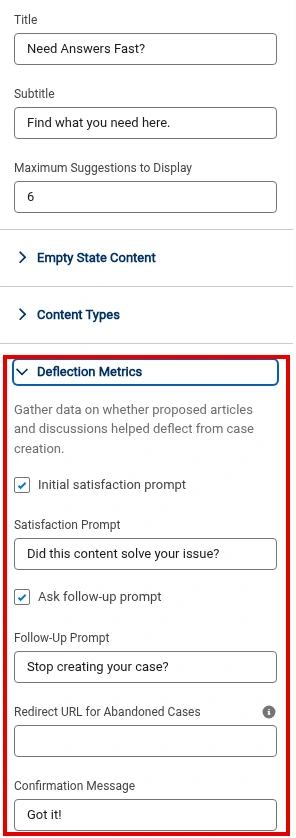
The screenshot above shows the Case Deflection component’s property panel from steps 4 and 5, with the Deflection Metrics prompts, Redirect URL and confirmation message highlighted.
6. Publish and test as a customer. Log in as a test customer user, type a question your articles answer, and check that suggestions appear. Then test as a guest, where only article titles are matched.
Cert Lab by Nick Frates
Practice the Service Consultant scenarios
Lessons, section checks, flashcards and practice questions on Knowledge, self-service channels and case management.
Start the Service Consultant Cert Lab for $9.99 →How to measure case deflection
Salesforce gives you two options, per Site Case Deflection reporting:
Custom reports. Create a custom report type with Site Case Deflection Metrics as the primary object, a public folder, and reports on which articles and discussions deflected cases and which didn’t.
Case Deflection Dashboard. Real-time metrics on potential and confirmed deflections plus the most and least helpful content. It comes with the Salesforce Community Management package on AppExchange.
One thing to know before you promise numbers: per the Experience Cloud Developer Guide, only deflection signals from logged-in users are reported. Guest deflections don’t show up, so if most of your traffic is anonymous, also compare case volume by origin before and after launch.
Case deflection mistakes
- Thin article titles. Guests only match on titles, so a title like “Error 4031” helps nobody. Write titles in the words customers type.
- Skipping the metrics prompts. The component suggests articles without them, but you can’t prove anything was deflected.
- Placing the component in the header. It then appears on every page, not next to the form.
- Treating suggestions as a wall. Customers who still need help must be able to submit easily. A frustrated customer who gives up isn’t a deflection.
Deflected or not, the cases that do come in still need routing and SLAs. See Email-to-Case setup, entitlements and entitlement processes and the Service Console. The full exam picture is in my Service Consultant study guide.
Cert Lab by Nick Frates
Prep for the Service Consultant exam
Lessons, section checks, flashcards and practice questions for all eight sections of the exam guide.
Start the Service Consultant Cert Lab for $9.99 →FAQ
What is case deflection in Salesforce?
Case deflection is when a customer finds an answer, usually a Knowledge article, instead of creating a case. On Experience Cloud sites, the Case Deflection component suggests articles as the customer types in the Contact Support Form.
Which components do I need for case deflection?
The Contact Support Form and the Case Deflection component, placed on the same page of the Experience Cloud site.
How many articles does the Case Deflection component suggest?
Up to 6 by default. You can change it with the Maximum Suggestions to Display property.
Does case deflection work for guest users?
Yes, but guest searches match article titles only, guests can’t attach files, and guest deflections aren’t counted in deflection reports.
How do I report on case deflection?
Create a custom report type on Site Case Deflection Metrics, or install the Salesforce Community Management package for the Case Deflection Dashboard.
The Cert Lab gives you lessons, practice questions and flashcards so prep like this goes faster.
Hope this helps!
Best,
Nick


