Hey friends,
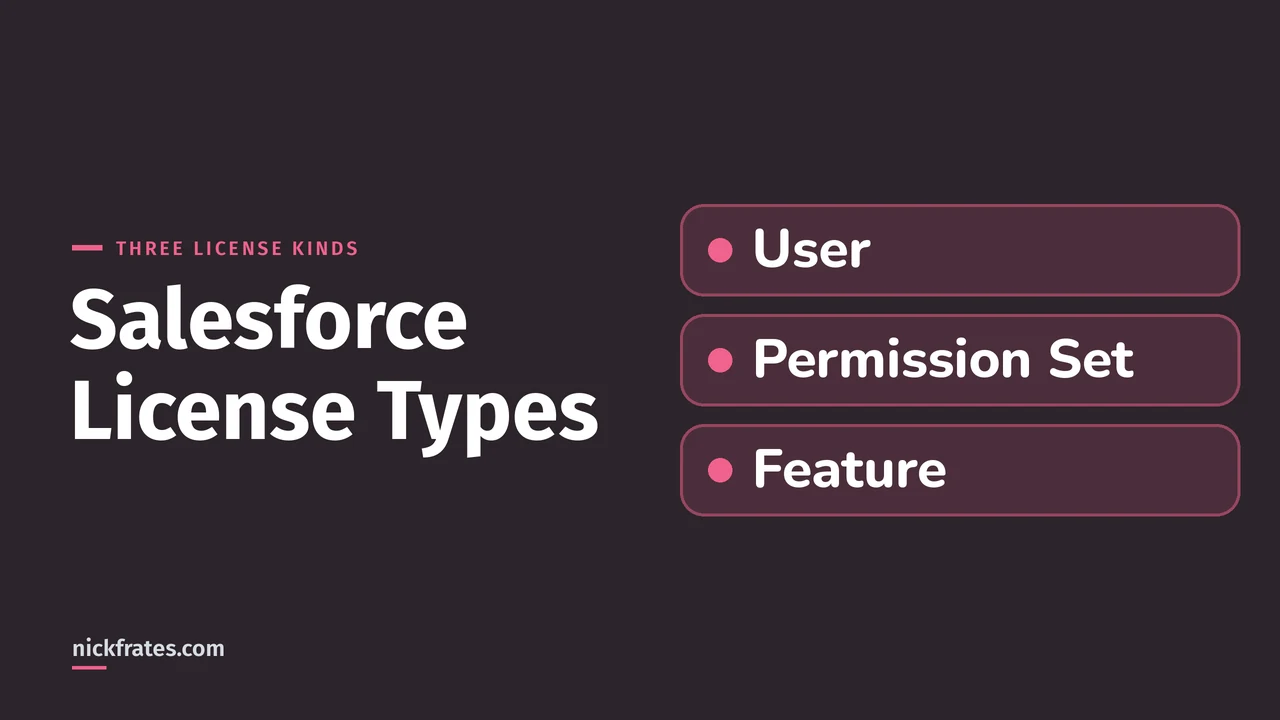
A Salesforce license decides the most a user can be given. Every user must have exactly one user license, which determines the functionality they can access, and you can add permission set licenses and feature licenses on top of it. You can see your org's licenses in Setup on the Company Information page. That is how Salesforce's Licenses Overview Help page and Trailhead's Understanding Salesforce Licenses and Their Types unit describe it. I read both on October 28, 2026, and I mark my own opinions as mine.
I only looked at these screens in a Developer Edition org on that date and changed nothing. Two limits to know up front. First, Salesforce Help has a separate page on Experience Cloud user licenses, and I couldn't load it in full, so for community licenses I only report what my org shows. Second, I found no standalone Permission Set Licenses page in Setup, so the Company Information table stands in for it.
Licenses are the keys, permissions are the locks
Help gives a picture I find useful. Think of permissions as locks and licenses as rings of keys. Before you can give a user a permission, the user must have a license that includes the key for it. Every user has exactly one user license, and you can add permission set licenses or feature licenses to unlock more.
Help's example: the Salesforce user license includes the key to unlock the Read permission on contracts, and the Chatter Free user license doesn't. If you try to give that permission to a Chatter Free user, you get an error. That is why a license is the first thing to check when a permission "won't stick". My posts on permission sets, object-level security and the Salesforce security model cover the permission side.
The three kinds of license
| User license | Permission set license | Feature license | |
|---|---|---|---|
| How many per user | Exactly one | Any number | Any number |
| What it does | Defines the user-level functionality the user can access | Entitles the user to features not included in the user license | Entitles the user to an additional feature not included in the user license, such as Marketing or WDC |
| Where to see it in my org | Company Information > User Licenses, and the User License field on the profile and the user | Company Information > Permission Set Licenses | Company Information > Feature Licenses, and checkboxes on the user record |
Trailhead adds that you don't buy individual licenses. You buy editions and add-ons, which bundle user and permission set licenses (and platform licenses) in different combinations. Its example: the Sales Cloud Enterprise Edition includes the Full CRM user license for users who need CRM, and the Chatter Free license for users who need Chatter but not CRM features.
Where to see licenses in Setup
Help says you can view your org's licenses on the Company Information page in Setup (Setup > Company Information). It also says the Active Licenses tab in the Lightning Usage app tracks the number of active user, permission set and feature licenses. In my org the Company Information page has a User Licenses table with the columns Name, Status, Total Licenses, Used Licenses, Remaining Licenses and Expiration Date.
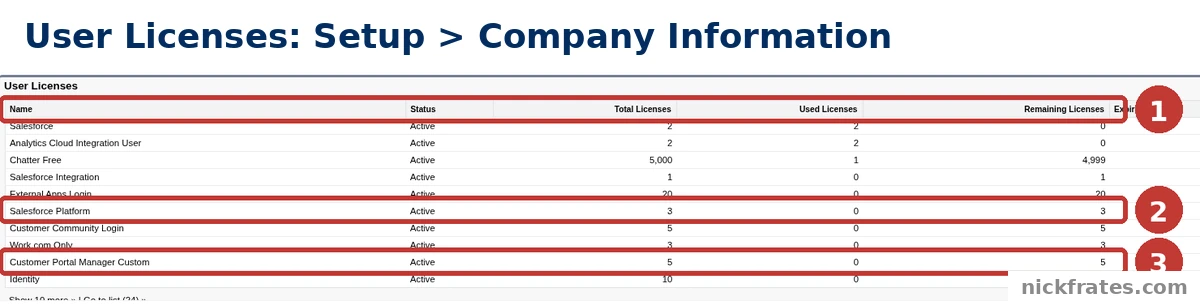
Setup > Company Information: the User Licenses table in my Developer Edition org.
- The columns. Total, Used and Remaining licenses tell you how many seats you have left to assign.
- Salesforce Platform. A user license in my org: 3 total, 0 used.
- Customer Portal Manager Custom. Another user license: 5 total, 0 used.
The first ten rows were Salesforce (2 total, 2 used), Analytics Cloud Integration User, Chatter Free (5,000 total, 1 used), Salesforce Integration, External Apps Login (20), Salesforce Platform, Customer Community Login (5), Work.com Only, Customer Portal Manager Custom (5) and Identity (10). The table says Go to list (24), so my org has 24 user licenses in all. Your list will differ with your edition and add-ons. Trailhead notes that provisioning, the process that activates licenses, doesn't apply to Developer, Demo, Scratch or Trial orgs, so a Developer Edition org's list is no guide to what a paid org has.
Permission set licenses
Help says permission set licenses extend the functionality of user licenses: with them you can give users more permissions than their user license supports. Its example is a user with a Salesforce Platform user license who needs Lightning console apps. You assign the Lightning Console permission set license, which allows the Lightning Console User permission to be granted, and then grant that permission through a permission set.
The key point from the same Permission Set Licenses page: for a user to get the extra functionality, they need both the permission set license and a permission set containing the feature permissions. If you assign permissions through a permission set and the user lacks the required license, you get an assignment error. Help also says some permission set licenses come with auto-generated standard permission sets, and assigning that standard permission set automatically assigns the license.
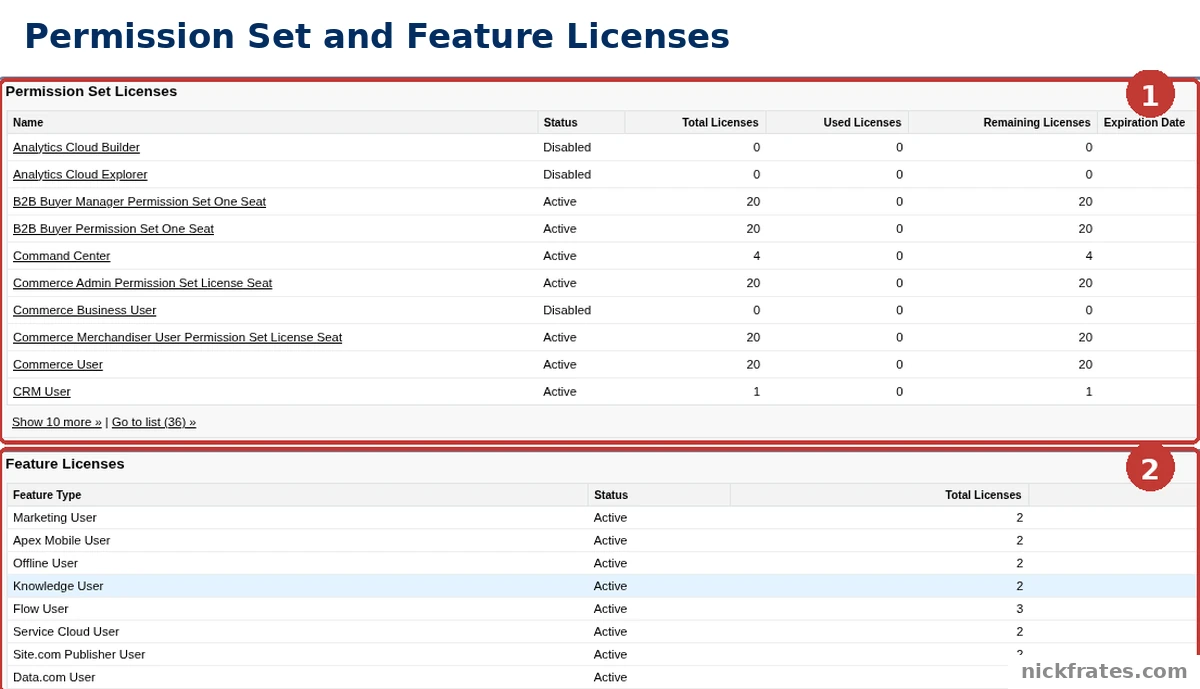
Setup > Company Information: the Permission Set Licenses and Feature Licenses tables in my org.
- Permission Set Licenses. The table lists each license with its status (Active or Disabled) and total, used and remaining counts. It showed ten rows with a Go to list (36) link, so my org has 36. The first ten included Analytics Cloud Builder and Command Center.
- Feature Licenses. A separate table below, with Feature Type, Status and license counts. My first rows were Marketing User, Apex Mobile User, Offline User, Knowledge User, Flow User, Service Cloud User, Site.com Publisher User and Data.com User.
Feature licenses
Help says a feature license entitles a user to a feature that isn't included in their user license, such as Marketing or WDC, and that users can be assigned any number of them. In my org the feature licenses show up as checkboxes on the user record: the record I opened lists Marketing User, Offline User, Knowledge User, Flow User and Service Cloud User, among others, all unticked for that user. So the user record is where a feature license is switched on for a person, as far as that screen shows. Check the seats left in the Feature Licenses table first.
How licenses connect to profiles and users
The license also shows up where you manage access. In my org the Setup > Users > Profiles list has a User License column, and a profile detail page shows a User License field.
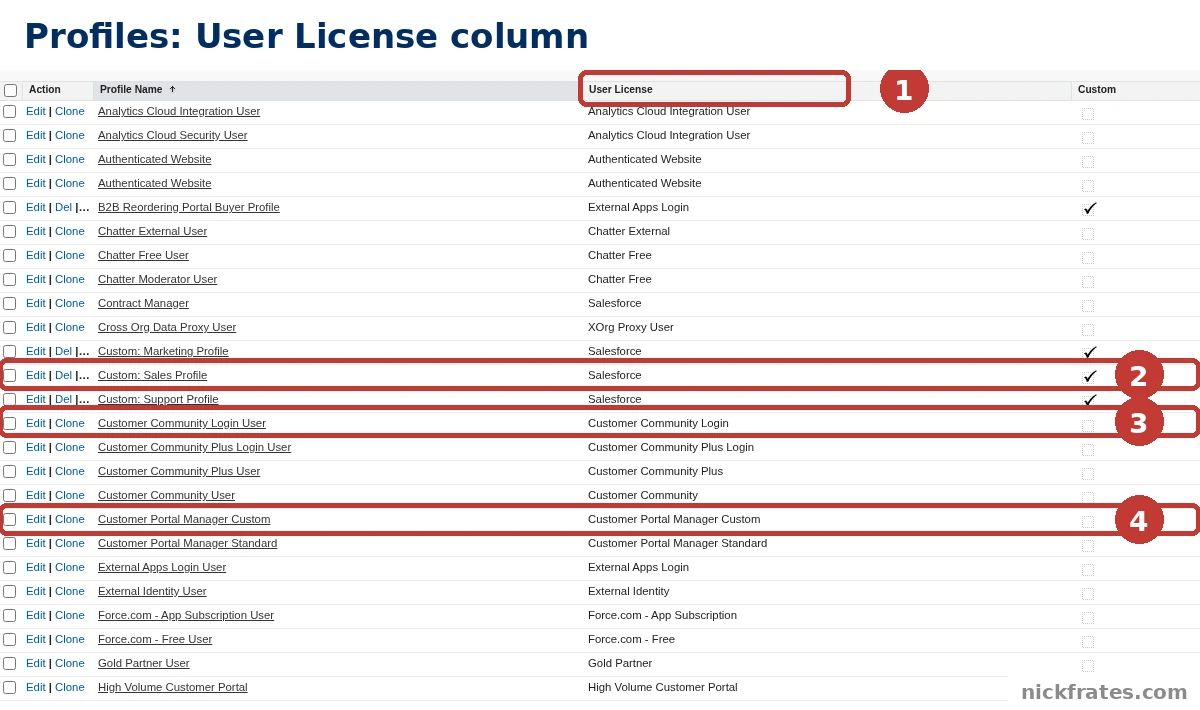
Setup > Users > Profiles: the User License column for each profile in my org.
- User License column. Every profile shows the license it belongs to. The list covers 41 profiles over two pages.
- Custom: Sales Profile. Its license is Salesforce. Opening the profile shows User License: Salesforce in the Profile Detail.
- Customer Community Login User. Its license is Customer Community Login.
- Customer Portal Manager Custom. Its license is Customer Portal Manager Custom.
The user record shows both the User License and the Profile. The test user I looked at had the Salesforce license and the Custom: Support Profile. My reading of these screens is that the profile is tied to a license, so the user license comes first and the profile choice follows. Help's lock and key picture fits that reading.
Experience Cloud licenses in my org
Several license names in my org's User Licenses table are the community kind: Customer Community Login, Customer Portal Manager Custom, External Apps Login and Identity. The Profiles list also has profiles for Customer Community, Customer Community Plus, Customer Community Plus Login, Customer Portal Manager Standard, External Apps Login, External Identity, Authenticated Website and High Volume Customer Portal. Help's Licenses Overview also names a usage-based entitlement example: the allowed number of monthly logins to a Partner Community.
I can't tell you from Salesforce's documentation what each of those includes, because I couldn't load the Experience Cloud licenses page in full. That page is where I would check before choosing between them. My advice, and it is my opinion: read it for the specific license before you assign it, and don't guess from the name.
Cert Lab by Nick Frates
Licenses are on the Admin exam
The free Admin Cert Lab covers all 8 Admin exam sections with lessons, practice questions that explain every option, and flashcards. Free, no card, no trial.
Start the free Admin Cert Lab →How to choose a license for a new user
Salesforce doesn't give one decision chart on the pages I read, so this order is mine, built from them:
- Check what the person needs to do. Help's rule is that their license must contain the key for each permission.
- Check your org's Company Information page. Look at Remaining Licenses for the license you want.
- Pick the user license, then the profile. The profile list shows which license each profile belongs to.
- Add a permission set license only if a feature needs it. Then assign the matching permission set too, since both are required.
- Tick a feature license only for the user who needs it. Check the seats left first.
Mistakes to avoid
- Trying to grant a permission the license can't support. Help says you get an error.
- Assigning a permission set license without a permission set. Help says users need both for the extra functionality.
- Assigning a permission set without the license. Help says that causes an assignment error.
- Not checking remaining licenses. The Company Information page shows Total, Used and Remaining.
- Judging a paid org by a Developer Edition list. Trailhead says provisioning doesn't apply to Developer orgs, so the list is not the same as yours.
FAQ
What is a Salesforce license?
It defines what features and permissions can be given to the org or to individual users. User, permission set and feature licenses define user-level access.
How many user licenses can one user have?
Exactly one. Help says every user must have exactly one user license.
What is the difference between a permission set license and a feature license?
Both entitle a user to features not included in their user license, and a user can have any number of each. A permission set license also needs a permission set with the feature's permissions, and Help says assigning permissions without the license gives an error.
Where do I see my org's licenses?
In Setup on the Company Information page. The Active Licenses tab in the Lightning Usage app also tracks active licenses.
Is a license the same as a profile or a permission set?
No. A license sets what is possible, and profiles and permission sets set what each user gets within it. Help says users' licenses define the maximum functionality available to them.
Do I buy individual licenses?
Trailhead says you buy editions and add-ons, which bundle the licenses.
Is there a separate page for permission set licenses in Setup?
I didn't find one in my org. The permission set licenses are on the Company Information page, in their own table.
Where to go next
- Salesforce security model explained: how licenses, profiles, permission sets and sharing fit.
- Salesforce permission sets and permission set groups: the other half of the PSL story.
- Object-level security in Salesforce: control create, read, edit and delete.
- Field-level security in Salesforce: who can see each field.
- Sharing rules in Salesforce: open up record access.
- Salesforce Security Health Check: check your org's settings.
- Administrator certification study guide: licenses are an exam topic.
- Salesforce Admin certification: cost, exam format and study plan.
- Is the Admin certification worth it?: how to decide.
- Salesforce certification: how it works: where the exams fit.
- To practice user and security questions for free, try the free Admin Cert Lab.
Hope this helps!
Best,
Nick