Hey friends,
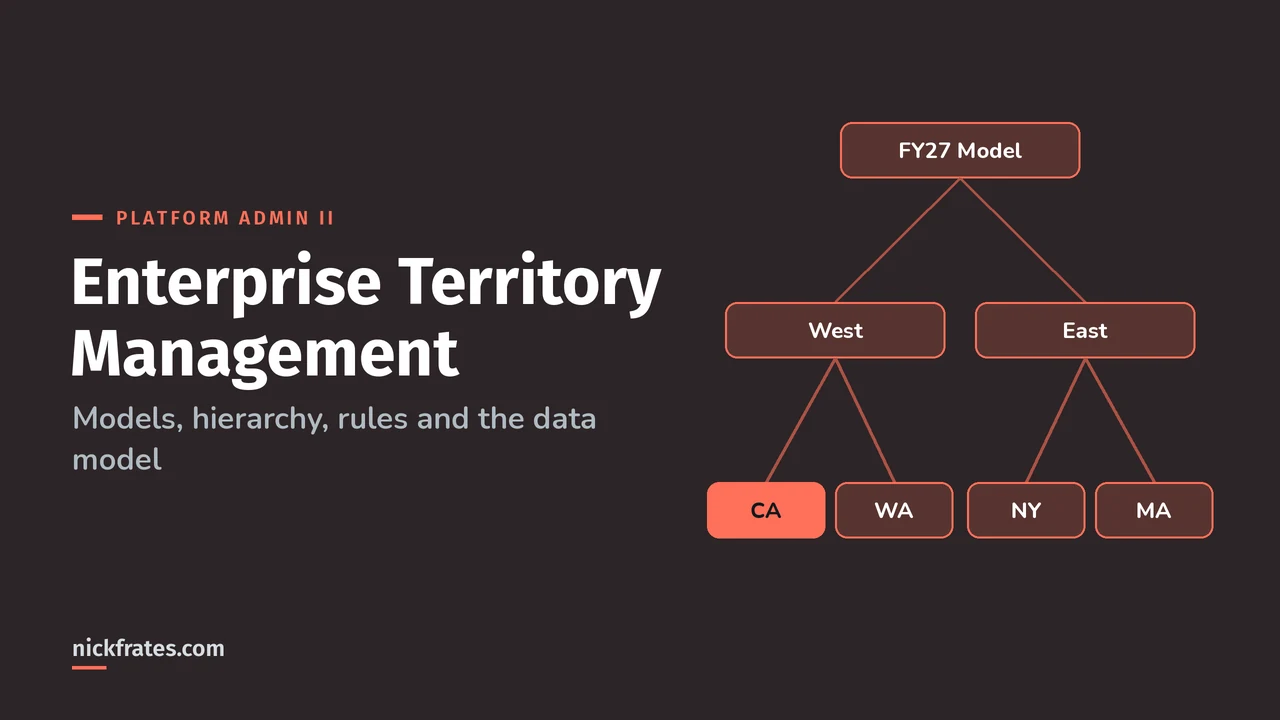
Enterprise Territory Management, now called Sales Territories in Salesforce Help, lets you group accounts and leads into territories, assign sales reps to those territories, and give the reps access to the records based on the territory rather than the role hierarchy. You build territories inside a territory model, try it in Planning state, then activate it. Only one model can be active at a time. Drawing and balancing territories on a map is a separate design tool, covered in Territory Planning with Salesforce Maps.
This post covers the concepts, the setup order, how assignment rules really behave, the limits and the data model. Everything comes from the Sales Territories pages in Salesforce Help, starting with Sales Territories Concepts. Territory Management shows up twice in the Platform Administrator II exam guide: under Security and Access (20%) and Cloud Applications (11%). That exam has 60 questions in 105 minutes, a 65% passing score, and requires the Platform Administrator certification.
What are the building blocks?
| Term | What it means |
|---|---|
| Territory model | A complete territory system for your company. You can build several and preview them before activating one. |
| Territory type | A category, like Named Accounts or US Geographic. Every territory has one. Types don't appear in the hierarchy. |
| Territory type priority | Your own numbering scheme (for example 001) to help people pick the right type. |
| Territory | A group of accounts, leads and the users who work them. |
| Territory hierarchy | The model's parent and child territories. It's where you create territories, run rules and activate or archive the model. |
| Model state | Planning, Active or Archived, plus the error states Activation Failed and Archiving Failed. |
How do you set up Salesforce territory management?
In this order. Each step needs the Manage Territories permission plus View Setup and Configuration, except the Territory Settings page, which needs Customize Application.
- Enable Sales Territories and set default access in Territory Settings: access levels for accounts, leads and opportunities, and for contacts and cases if their org-wide default is Private (Help).
- Create territory types with a clear description and a priority. Help calls this the first step in building your model (Help).
- Create a territory model record. Salesforce creates its hierarchy for you (Help).
- Build the hierarchy: from View Hierarchy, hover over the model name to create top-level territories, then over a territory to create children (Help).
- Add account assignment rules to territories (Help).
- Assign users from the territory's Assigned Users related list (Help). They get access only after the model is active.
- Preview assignments, then activate. The state shows Activating while it processes, and you get an email when it's done (Help).
Activation is one-way. An active model can't go back to Planning. It can only be archived, and an archived model can't be reactivated.
Quick backstory. When I studied for my first certs, Focus on Force was my favorite resource, and what made me learn fastest was rapid-fire practice tests: take a quiz, read why each miss was wrong, go again. I built Cert Lab around that loop, with current Help links and screenshots in the explanations. Certs have brought me interviews, a new job, raises and a way into new parts of the platform. They don't replace experience, though. The cert gets you the conversation; what you've built closes it.
Cert Lab by Nick Frates
Let the Platform Administrator II Cert Lab test you to success
Scenario questions on territory access, sharing, forecasting and the rest of the Admin II exam, with every option explained and linked to the Help page behind it.
Start the Platform Administrator II Cert Lab for $9.99 →How do account assignment rules decide where an account goes?
These are the rules from How Account Assignment Rules Work that trip people up:
- All local rules must match. If a territory has several locally defined rules, an account goes there only if it matches every one.
- Lowest match wins on a branch. If an account matches the rules for several territories on the same branch, it's assigned to the lowest matching territory.
- Inherited rules count. A rule marked Apply to child territories also applies to every territory below it.
- No rules means manual only. A territory with no inherited or local rules only holds accounts you assign by hand.
- Use picklist API names in rule criteria, so renaming a picklist value doesn't break the rule.
Two gotchas from Create Rules to Assign Accounts to Territories: with state and country picklists enabled, state criteria must use contains, not equals. And ZIP codes are text, so in a comparison 9 is "higher" than 80000.
Rules run on account create or update only when the model is active. For updates in the UI, the user needs to select Evaluate this account against territory rules on save. Over the API, send AssignmentRuleHeader. For inserts, turn on Run territory assignment rules during account inserts in Territory Settings.
How does territory access work?
Default access is set per object in Territory Settings, and you can override it per territory. Access rolls up: a parent territory inherits the access of its children. Help's example: San Francisco (view opportunities) is a child of California (view and edit). A user assigned to California gets view access to San Francisco opportunities, not view and edit. My Salesforce security model post shows where territories sit next to roles and sharing rules.
How do opportunities get a territory?
Opportunities don't use assignment rules. Either set the Territory field manually, or enable filter-based opportunity territory assignment in Territory Settings with an Apex class. Salesforce provides one, OppTerrAssignDefaultLogicFilter, or you write your own (Help).
For territory forecasts, assign a forecast manager to each territory that should roll up. The field must be on the territory layout, and the user must be forecast-enabled and assigned to that territory (Help).
What limits should you plan around?
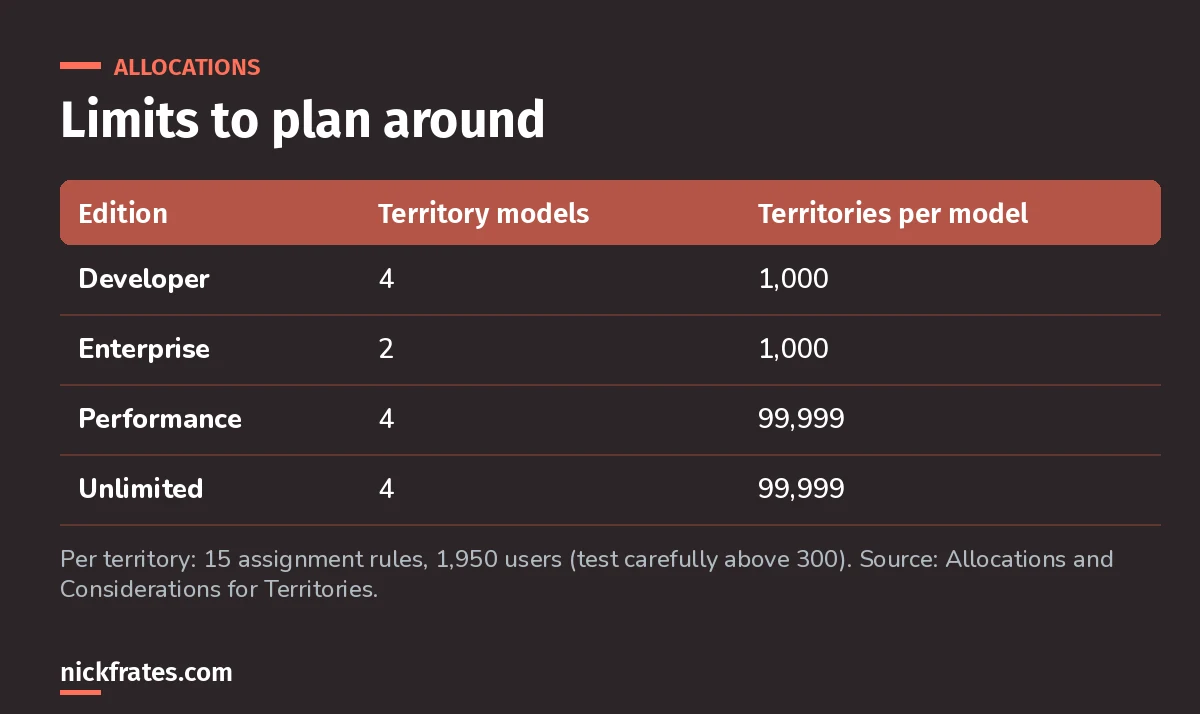
Enterprise Edition gets two models, which matters when you want one active and one in planning.
Customer Support can raise the territory allocation, and requests above 20,000 territories per model need approval (Help). The model count includes models created by cloning.
What does the data model look like?
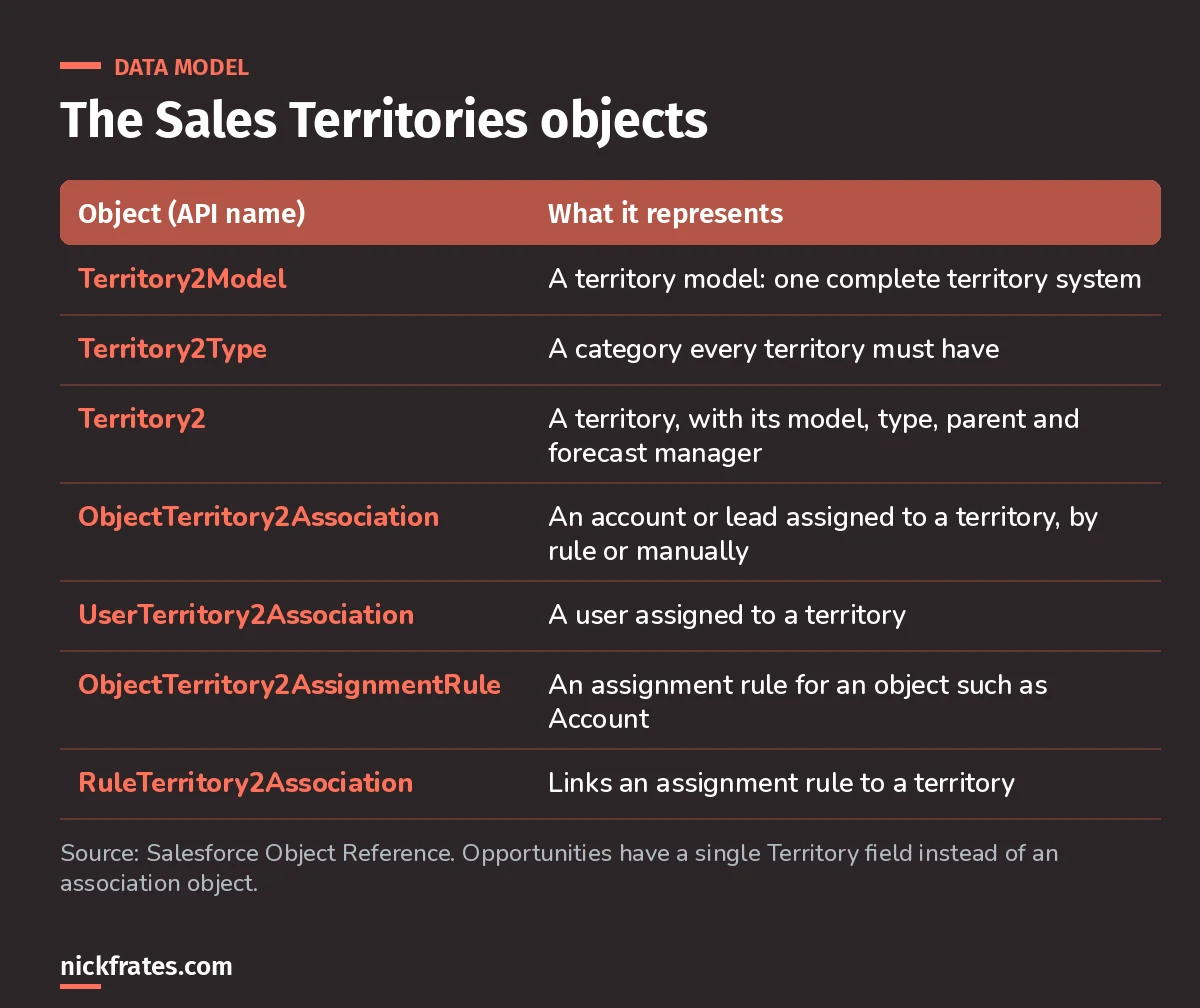
Associations are separate records, so you can report on and query them.
ObjectTerritory2Association has a field called AssociationCause (labeled Method in the UI), set to Territory2AssignmentRule or Territory2Manual. That's how you tell rule-based assignments from manual ones. Leads can be associated from API version 55.0.
What happens when you archive a model?
Salesforce deletes the model's territory forecasts, forecast types, quotas and adjustments, and clears the Territory field on opportunities. Help suggests running the opportunity filter, taking screenshots of the forecasts page or creating a snapshot first (Help). Do that before you click Archive, not after.
If you learn best by testing yourself, the Platform Administrator II Cert Lab is built for that: short quizzes, then explanations for every option.
FAQ
Is Enterprise Territory Management the same as Sales Territories?
Yes. Salesforce Help now calls it Sales Territories, and the objects still use the Territory2 names from Territory Management 2.0.
Which editions include it?
Performance and Developer Editions, and Enterprise and Unlimited Editions with Sales.
Can two territory models be active at once?
No. One active model at a time. Others can stay in Planning or Archived.
Do territories replace the role hierarchy?
No. They add another way to grant record access, based on territory membership, alongside roles and sharing.
Where should you go next?
- Platform Administrator II study guide.
- Platform Administrator II practice questions.
- Platform Administrator II vs Administrator.
Cert Lab by Nick Frates
Let the Platform Administrator II Cert Lab test you to success
Lessons, flashcards, section quizzes and four 60-question practice exams for all seven Platform Administrator II sections, every answer explained.
Start the Platform Administrator II Cert Lab for $9.99 →Hope this helps!
Best,
Nick


