Hey friends,
For the Admin exam, Flow questions mostly come down to two choices: which flow type fits the trigger (record-triggered, screen, schedule-triggered or autolaunched), and whether Flow is even the right tool versus a validation rule, assignment rule, escalation rule or approval process. Learn those decisions and the Automation section gets a lot easier.
Automation is 15% of the Platform Administrator exam. The guide asks you to pick between escalation rules, assignment rules, Flow and approval processes, and it names Flow's order of execution and the default automation user. I've written about two dozen Flow posts, so this one ties them together for exam prep.
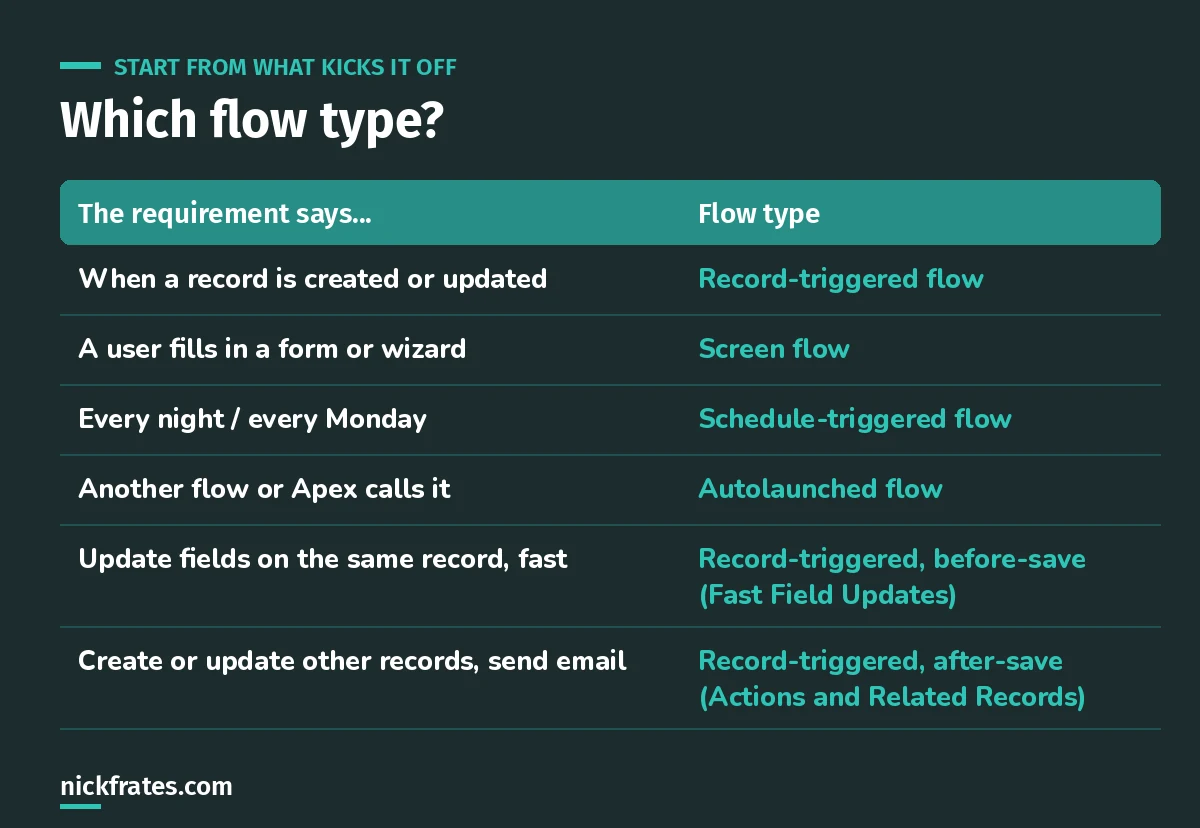
Start from the trigger in the requirement.
The four flow types in one minute
- Record-triggered: runs when a record is created, updated or deleted. Most automation lives here. Full breakdown in Salesforce Flow types explained.
- Screen flow: has screens a user clicks through, launched from a button, a page or an action.
- Schedule-triggered: runs on a schedule against a batch of records. See my scheduled flow guide.
- Autolaunched: no trigger of its own. Another flow, Apex or a process calls it.
Before-save vs after-save
This is the record-triggered decision the exam leans on. Updating fields on the record that triggered the flow? Use before-save (Fast Field Updates); it's faster and needs no extra save. Creating or updating other records, sending email or calling actions? That's after-save. I go deeper in before-save vs after-save flows.
When Flow isn't the answer
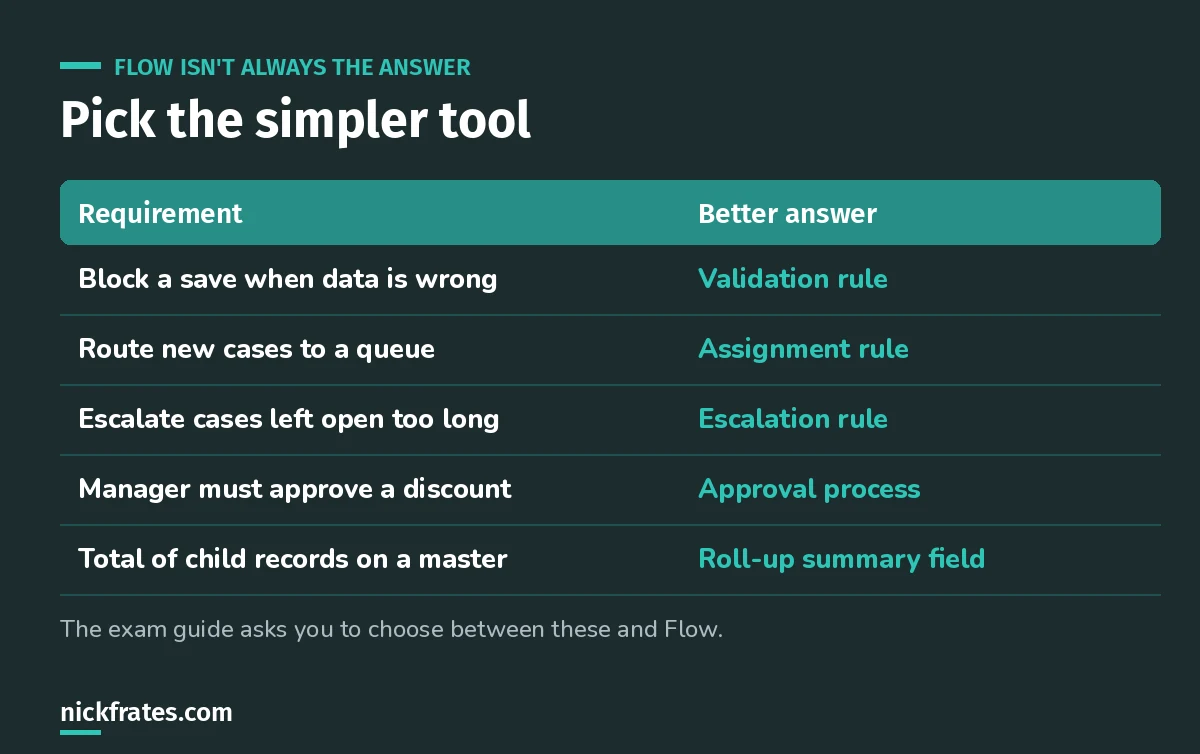
The exam rewards the simplest tool that works.
Worked example. Cases must go to the Tier 2 queue when Priority is High. Answer: an assignment rule. A record-triggered flow could do it, but the purpose-built feature is the expected answer. For assignment and escalation rules, see my Sales and Service apps cheat sheet.
Worked example. A discount over 20% needs the sales manager's sign-off. Answer: an approval process. Fun one: how email approvals work inside Salesforce.
Cert Lab by Nick Frates
Practice the Automation section free
The Admin Cert Lab covers Flow types, approvals and choosing the right automation tool, with practice questions that explain every option.
Start the free Admin Cert Lab →Build these five flows before the exam
Reading about Flow doesn't stick. Building does. In a free Developer Edition org:
- A before-save flow that sets a field on the same record.
- An after-save flow that updates child records.
- A flow with Get Records and a loop over the results.
- A screen flow launched from a record page.
- Any flow with a fault path, then debug it on purpose.
Flow mistakes I see in real orgs
- Get Records or Update Records inside a loop. Same governor-limit problem as Apex. Collect, then update once after the loop.
- No fault paths. Users see an ugly error and nobody knows why.
- Five flows on one object, same trigger, no plan. Hard to debug and easy to loop. Know the Salesforce order of execution before you add another.
- Skipping documentation. I covered Flow best practices and how to keep flows maintainable.
Keep studying
- My 6-week Admin study plan: automation is week 4.
- How to pass the Admin exam on your first try.
- 25 free Admin practice questions.
Cert Lab by Nick Frates
Start the free Admin Cert Lab
Lessons, practice questions and flashcards for the Salesforce Platform Administrator exam, in one free course.
Start the free Admin Cert Lab →Hope this helps!
Best,
Nick


