Hey friends,
In Salesforce formulas, subtract one Date from another to get the number of days between them, use TODAY() for the current date and NOW() for the current date and time, convert a Date/Time to a Date with DATEVALUE() before mixing the two, and use ADDMONTHS() to move by months. Date/Time values are stored in GMT, which is behind most date formula surprises.
The rules here come from Salesforce Help's Using Date, Date/Time, and Time Values in Formulas and the functions reference. The examples are mine.
Three types, three kinds of math
Salesforce has three date and time types. Date is a year, month and day. Date/Time adds a time to the second, stored in GMT and shown in the user's time zone (CreatedDate is one). Time is a time of day with no date, down to the millisecond.
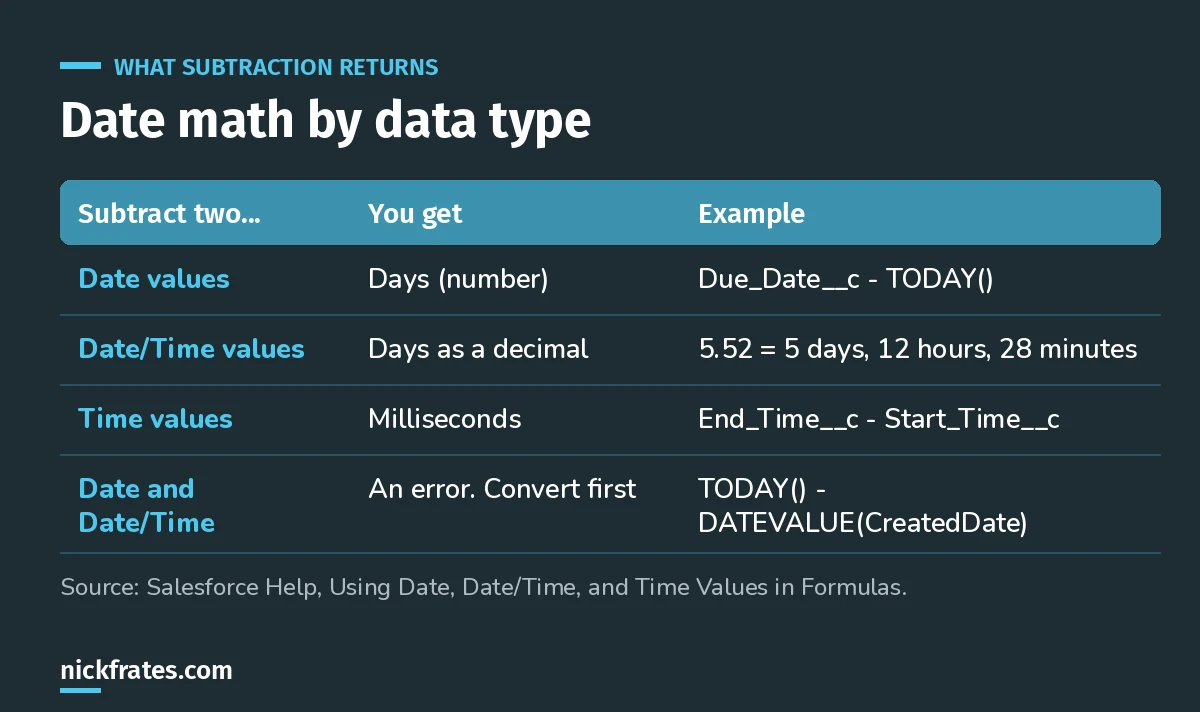
Most date formula errors are a Date and a Date/Time in the same expression.
The everyday examples
Days until a due date (Number):
Days since the record was created. CreatedDate is a Date/Time, so convert it:
Hours a case was open. Two Date/Time values subtract to decimal days, so multiply by 24:
A date three days from now: add a number to a date.
Adding months and years: ADDMONTHS
Adding 30 to a date isn't a month. ADDMONTHS moves by calendar months, and Help describes the end-of-month rule: if the start date is the last day of its month, the result is the last day of the resulting month.
The first day of next month. You might try DATE(YEAR(TODAY()), MONTH(TODAY()) + 1, 1), but Help warns that DATE() returns an error for an invalid date, and in December that month would be 13. This version is always valid:
Weekdays and weekends: WEEKDAY
WEEKDAY returns 1 for Sunday, 2 for Monday, through 7 for Saturday. A checkbox for dates that land on a weekend:
Help also has sample formulas for business days between two dates. Those get long fast, which matters because, as Help notes, complex date functions compile larger than text or number functions.
Cert Lab by Nick Frates
Practice formula questions for App Builder
The App Builder Cert Lab covers formula fields, date logic, validation rules and roll-ups, with practice questions that explain every option.
Start the App Builder Cert Lab, $9.99 →Comparing against a fixed date
Formulas don't support date literals. Help's example: 2025-01-01 is read as arithmetic and evaluates to 2023. Build fixed dates with DATE() and fixed date/times with DATETIMEVALUE():
To check whether a date is empty, use ISBLANK(), not a comparison to null.
Dates as text
TEXT(TODAY()) returns YYYY-MM-DD, not the user's locale format. For a different order, build it from parts:
Going the other way, DATEVALUE("2013-06-01") turns YYYY-MM-DD text into a date, and DATETIMEVALUE takes YYYY-MM-DD HH:MM:SS.
The GMT traps
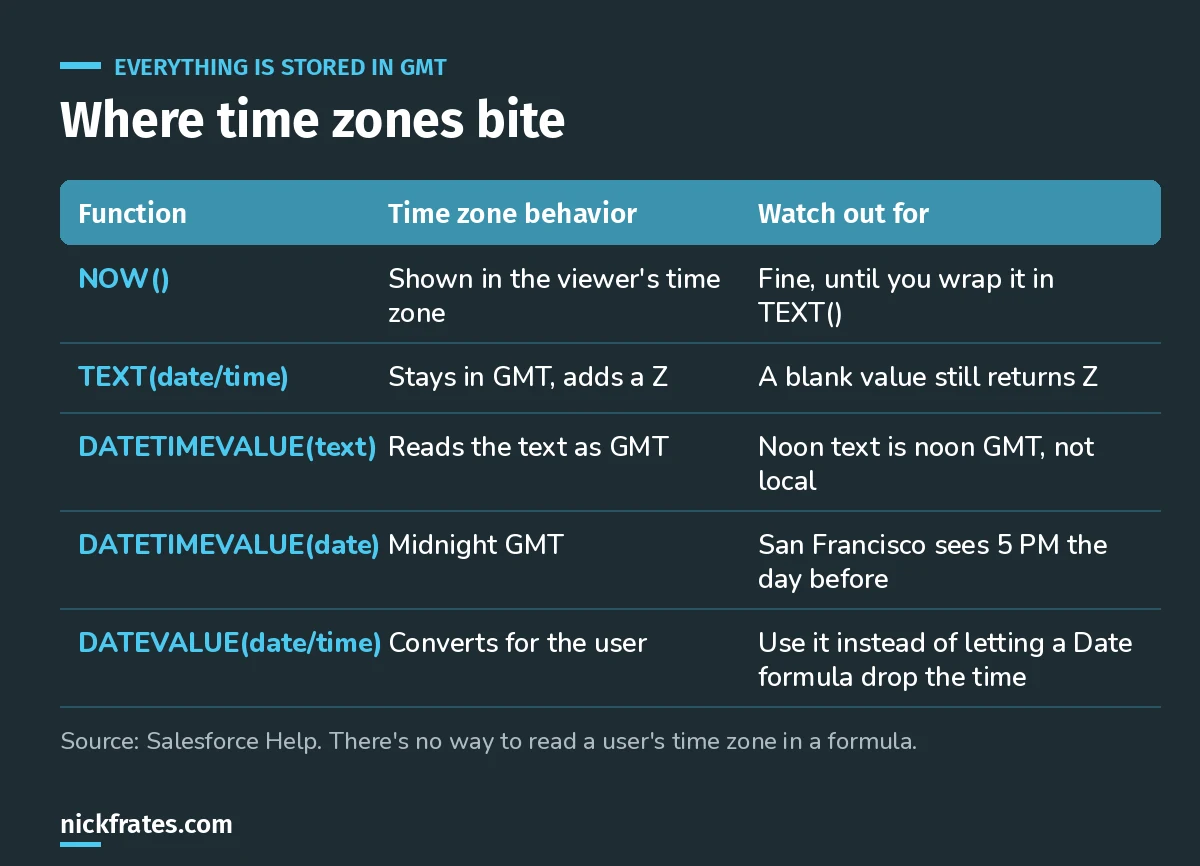
If a value goes through text, assume it's GMT.
Help's clearest example: "The current date and time is " & TEXT(NOW()) run at 5:00 PM on August 1 in San Francisco shows 2013-08-02 00:00:00Z, because TEXT keeps it in GMT.
Another one that catches people: a formula that references a Date/Time field but returns a Date drops the time without converting to the user's time zone, which can give the wrong day. Wrap the field in DATEVALUE() to fix it.
And there's no way to read a user's time zone in a formula. Salesforce recommends Apex for transactions that convert between Date/Time and text or dates.
Combining a Date field and a Time field
TEXT() of a Time includes milliseconds (17:30:00.000), and DATETIMEVALUE expects HH:MM:SS, so trim it with LEFT:
The result is read as GMT, so if the time was entered as local time, the displayed value will be shifted.
Keep going
- Salesforce formula examples: IF, CASE, picklists, text and cross-object.
- Validation rule examples: date checks that block bad data.
- Formulas in Flow: date formulas inside flows.
- App Builder practice questions: test yourself.
Cert Lab by Nick Frates
Get the Platform App Builder Cert Lab
Lessons, practice questions and flashcards for all 5 App Builder exam sections, built from the official exam guide.
Start the App Builder Cert Lab, $9.99 →Hope this helps!
Best,
Nick


