This is a deep study guide for the Salesforce Certified JavaScript Developer exam (exam code JS-Dev-101), the credential that was called Salesforce Certified JavaScript Developer I until Salesforce dropped the "I" from the name. It follows the official exam outline section by section, with plain-English explanations, runnable code snippets, original diagrams, quick-reference tables, a worked project example and 25 practice questions with answers and explanations.
Here's the thing that surprises most Salesforce developers: this is a JavaScript exam first and a Salesforce exam a distant second. You won't be asked about Apex, SOQL or governor limits. You'll be asked what a block of code logs, why a test doesn't prove anything, which array method leaves the original alone, and when a promise callback runs compared to a timer.
Updated for 2026: checked against the current official exam guide, which still aligns the exam to the Summer '22 release, and against Salesforce's Superbadge Retirement FAQ. Since October 1, 2025, you earn the credential by passing the exam alone; the Lightning Web Components Specialist superbadge is no longer required. The outline, weights and passing score below are what you'll actually be tested on.
| Section | Weight | Approx. questions |
|---|---|---|
| Variables, Types, and Collections | 23% | ~14 |
| Objects, Functions, and Classes | 25% | ~15 |
| Browser and Events | 17% | ~10 |
| Debugging and Error Handling | 7% | ~4 |
| Asynchronous Programming | 13% | ~8 |
| Server Side JavaScript | 8% | ~5 |
| Testing | 7% | ~4 |
| Exam fact | Detail |
|---|---|
| Official name | Salesforce Certified JavaScript Developer (formerly Salesforce Certified JavaScript Developer I) |
| Exam code | JS-Dev-101, as listed on the Trailhead Academy registration page (the exam guide itself doesn't print a code) |
| Format | 60 scored multiple-choice/multiple-select questions, plus up to 5 unscored questions |
| Time | 105 minutes |
| Passing score | 65% (about 39 of 60 scored questions) |
| Fee | $200 to register, $100 to retake, plus applicable taxes |
| Prerequisite | None |
| Superbadge | Not required since October 1, 2025, when Salesforce retired the Lightning Web Components Specialist superbadge requirement (Superbadge Retirement FAQ) |
| Release alignment | Summer '22, per the current exam guide |
| Languages | English, Japanese, French and Spanish, per the Trailhead Academy listing |
| Delivery | Onsite at a testing center or online proctored; no reference materials allowed |
| Maintenance | One Trailhead certification maintenance badge per year |
| Official resources | Exam guide, credential page and the official prep Trailmix |
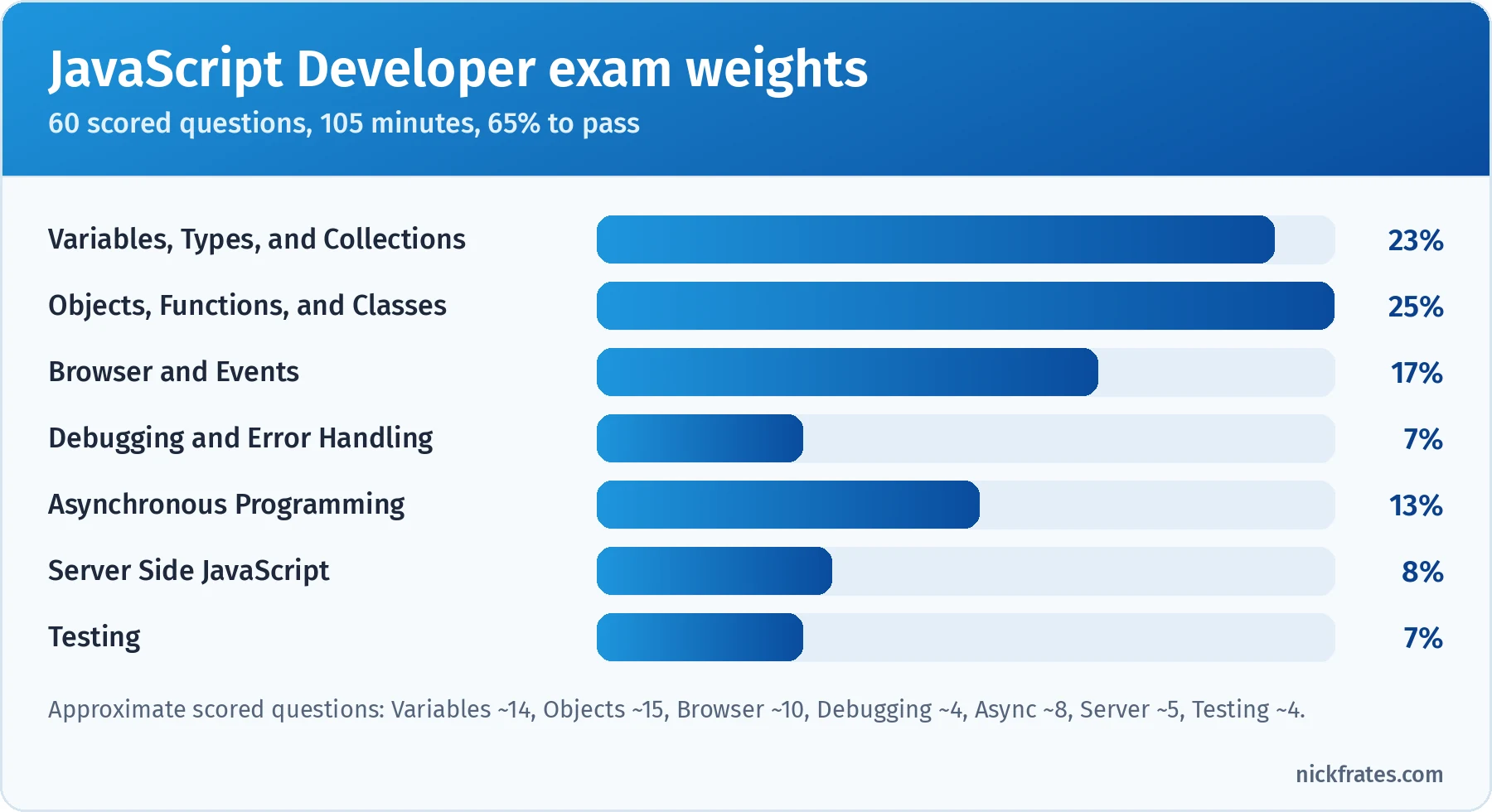
The first two sections are almost half the exam, and both are pure language fundamentals.
Took the exam or a practice test? Enter your section scores in my Salesforce exam score calculator to see your estimated overall score and which sections are costing you the most points.
Cert Lab by Nick Frates
Ready to pass JavaScript Developer?
Lessons, section checks and flashcards for all 7 exam sections, so you can see which topics still trip you up before exam day. Heading toward Platform Developer I too? Start with the Platform Developer Cert Lab.
Get the JavaScript Cert Lab, $9.99 →Contents
- Who this certification is for
- What changed for 2026
- How to use this guide
- The JavaScript runtime in one picture
- Variables, Types, and Collections (23%)
- Objects, Functions, and Classes (25%)
- Browser and Events (17%)
- Debugging and Error Handling (7%)
- Asynchronous Programming (13%)
- Server Side JavaScript (8%)
- Testing (7%)
- Deep dive: design decisions and code tracing
- Worked example: a JavaScript order tracker, end to end
- Hands-on checklist
- Common exam traps
- Flashcard terms
- Mixed practice exam: 4 more questions
- Quick-reference cheat sheet
- Frequently asked questions
- Related study guides
Who this certification is for
Salesforce describes the candidate as someone with 1-2 years of experience developing front-end and/or back-end JavaScript applications for the web stack, who can design, develop and test solutions that are performant, maintainable and reusable. The exam guide is explicit that the skills apply to any framework, such as the Lightning Component framework, and aren't mobile or device specific.
The guide lists the topics candidates typically have experience with. Read it as your syllabus:
- Data types and operators
- Variables and variable scope
- String manipulation
- Type coercion and conversion, both implicit and explicit
- Functions, including higher-order functions
- Data structures: objects and arrays
- Inheritance, classes and modules
- The Document Object Model (DOM) and events
- Error handling and debugging
- Testing, platform agnostic
- Asynchronous programming
- Server-side JavaScript (Node.js)
Salesforce lists roles from JavaScript programmer and Salesforce Developer to full stack, front end and UI/UX engineers. In practice, I see three groups take it:
- Salesforce developers who build Lightning Web Components and want proof they understand the language under the framework. This guide speaks to this group most.
- Web developers moving into Salesforce. If you've written React, Vue or plain JavaScript for a few years, this credential rewards what you already know.
- Admins and Flow builders learning to code. It's a tougher first step than it looks, so give yourself extra weeks and write code every day.
If you're choosing between this and Platform Developer (formerly Platform Developer I): Platform Developer covers Apex, SOQL, data modeling and some LWC. JavaScript Developer goes much deeper on the language itself. Many Salesforce developers hold both, and they complement each other well.
What changed for 2026
The exam outline itself has been stable for a while, but several things around it have moved. Here's what matters if you're studying now:
- The superbadge is gone. For years, this credential had two parts: the proctored exam and the Lightning Web Components Specialist superbadge. Salesforce retired that superbadge requirement on October 1, 2025. The exam itself didn't change; if a course tells you to finish the superbadge first, it predates the change. I wrote about the broader shift in Trailhead Superbadge Overhaul.
- The name dropped the "I". The credential page and exam guide now say Salesforce Certified JavaScript Developer. Trail and Trailmix URLs still say "javascript-developer-i", and you'll see both names in study material. I couldn't find an official announcement date for the rename, so I'm not going to guess one.
- The decorator objective is no longer listed. Older versions of the exam guide had an objective about JavaScript decorators. The current Objects, Functions, and Classes section lists five objectives, and decorators aren't one of them. I mention the LWC decorators only briefly.
- The exam still aligns to Summer '22. The language has kept moving since then. Newer additions such as
toSorted()(ES2023) andObject.groupBy()(ES2024) are worth knowing, but don't expect the exam to test features newer than its alignment date.
How to use this guide
This is a code-reading exam. Most questions show a short snippet or describe a requirement, then ask what the code outputs, which implementation fits, or which option fixes a bug. You need to run code in your head accurately, and the way to get there is to run a lot of real code first.
- Open a browser console or install Node.js and type every snippet in this guide. Change one thing, predict the result, then run it. That loop is the whole game.
- Read one section at a time. Each ends with a key takeaway and practice questions.
- Read every answer explanation, including why the wrong answers are wrong.
- Some real exam questions are multiple-select ("choose two"). The practice questions here are single-answer, so when you review, also ask yourself which other options would be correct if the question said "choose two".
- In the last week, do the worked example, the mixed practice set and the cheat sheet. On exam day, pace yourself: 60 questions in 105 minutes is 1 minute 45 seconds per question.
If you want the learning-science reasons for this order (retrieval practice, spacing, interleaving), read The Science of Studying for Salesforce Certifications. For daily practice reps, the idea in Code Katas works especially well for this exam.
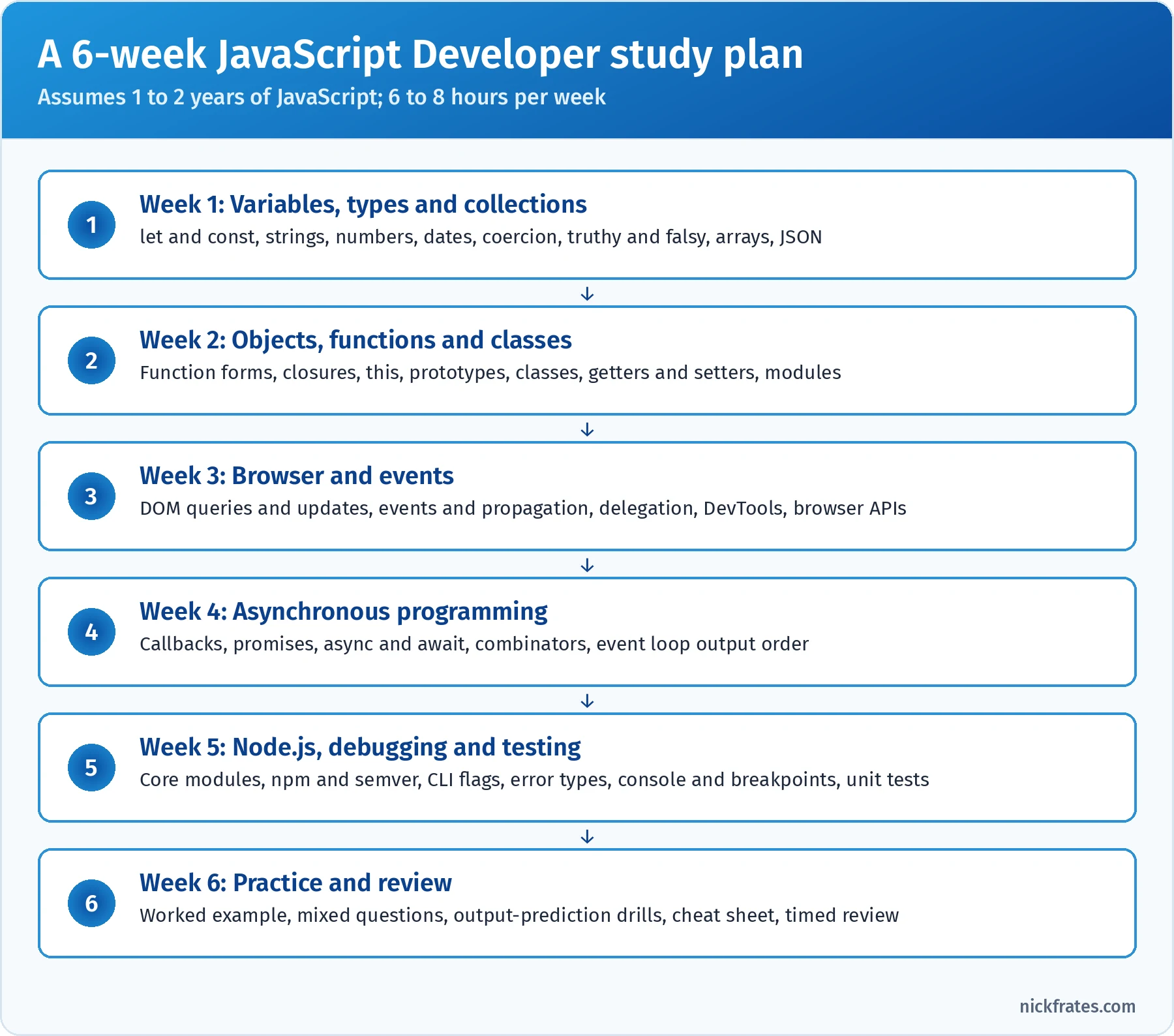
A six-week plan for someone with a year or two of JavaScript.
Want more practice before exam day? Work through the JavaScript Developer practice questions, each with an explanation for every option.
The JavaScript runtime in one picture
Every section of this exam lives somewhere in one mental model. If you can picture it, output-prediction questions get much easier:
- The engine (V8 in Chrome and Node.js) runs your code on a single call stack, one function frame at a time. Variables, scope and
thislive here. - The heap holds objects, arrays, functions and closures. Variables that point at objects hold references into the heap, which is why copying an object variable doesn't copy the object.
- The host environment adds the APIs the language doesn't have on its own. The browser gives you the DOM, events,
fetch, timers and storage. Node.js gives youfs,http,processand streams.setTimeoutisn't part of the JavaScript language; it's a host API. - Queues hold callbacks waiting to run. The microtask queue holds promise reactions and
awaitcontinuations. The task queue (often called the macrotask or callback queue) holds timers, UI events and I/O callbacks. - The event loop moves work from the queues to the stack. When the stack is empty, it runs every microtask, lets the browser render if needed, then takes one task, and repeats.
- Around all of this sit your tools: DevTools for debugging,
try/catchfor errors, and a test runner such as Jest.
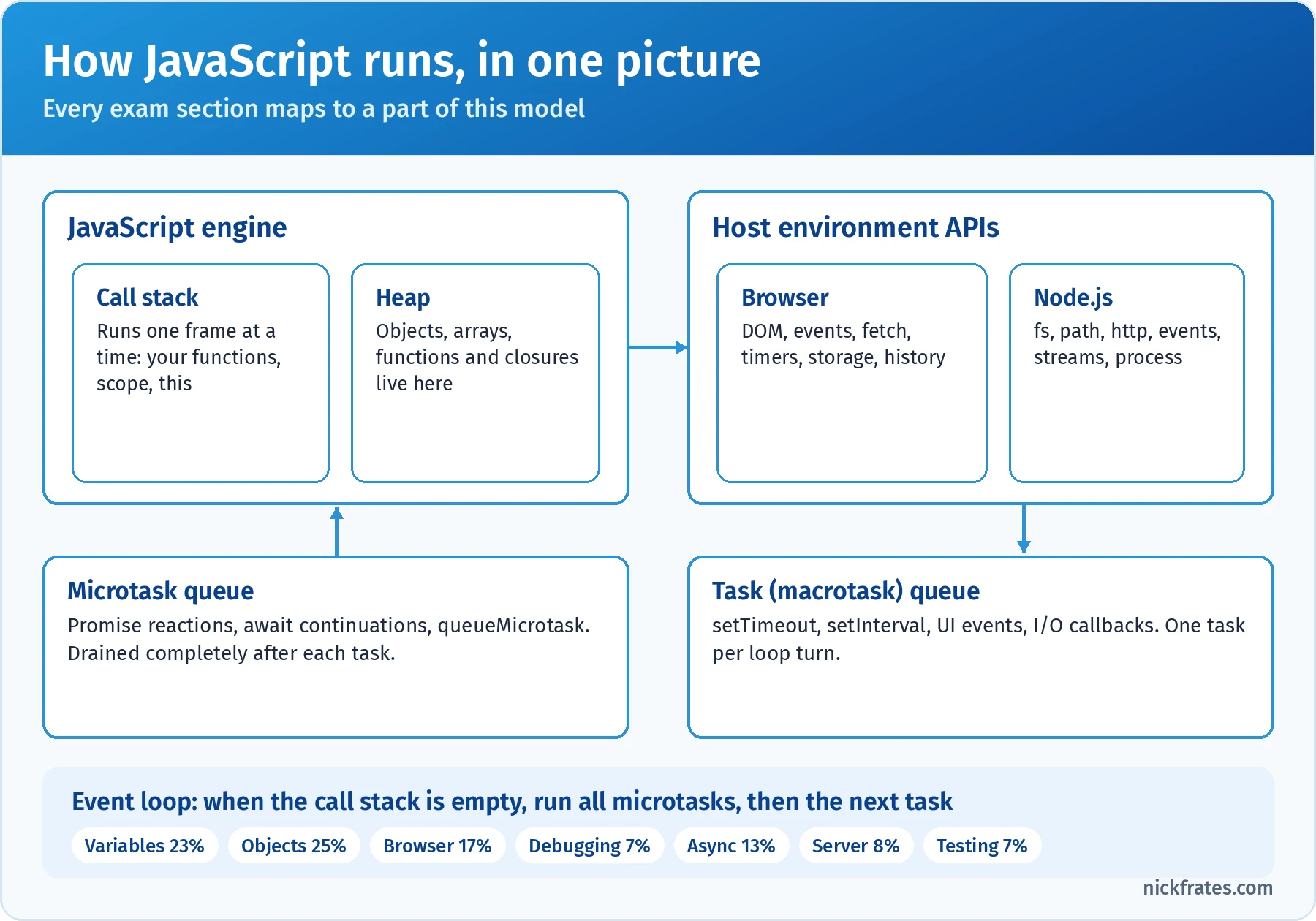
Variables and Objects live on the stack and heap, Browser and Server live in the host APIs, and Async lives in the queues.
Variables, Types, and Collections (23%)
This section tests declarations, type conversion, and working with strings, numbers, dates, arrays and JSON. The official objectives:
- Given a scenario, write code to create variables and initialize them correctly.
- Given a business requirement, utilize strings, numbers, and dates effectively.
- Given a scenario or example, demonstrate awareness of type coercion and its effects.
- Given a specific scenario, distinguish truthy or falsey evaluations.
- Given a list of data, demonstrate data manipulation with arrays.
- Given a JSON response, demonstrate how to operate the JSON object.
Declaring variables. Use const by default, let when the binding must change, and treat var as legacy you need to read but shouldn't write. const must be initialized on the same line, and it protects the binding, not the value: you can't reassign a const array, but you can push to it. Assigning to a name you never declared throws a ReferenceError in strict mode (which includes classes and modules) and silently creates a global in old sloppy-mode scripts. The scope and hoisting rules for all three keywords are in the deep dive.
The types. JavaScript has seven primitive types and one structural type, object. Primitives are immutable and compared by value. Objects (including arrays, functions, dates, maps and sets) are compared by reference. typeof has two famous quirks the exam loves: typeof null is "object" (a bug kept for compatibility), and typeof on a function is "function" even though functions are objects. Use Array.isArray() to detect arrays, because typeof [] is "object".
| Type | Example | typeof result | Watch out for |
|---|---|---|---|
| string | 'tent', template literals | "string" | Immutable; methods return new strings |
| number | 42, 3.14, NaN, Infinity | "number" | Floating point: 0.1 + 0.2 !== 0.3 |
| bigint | 9007199254740993n | "bigint" | Can't mix with number in arithmetic (TypeError) |
| boolean | true, false | "boolean" | Many values coerce to booleans in conditions |
| undefined | declared but unassigned | "undefined" | Also what missing properties and missing arguments return |
| null | intentional "no value" | "object" | The famous typeof bug |
| symbol | Symbol('id') | "symbol" | Unique keys; skipped by JSON.stringify and for…in |
| object | {}, [], functions, dates | "object" or "function" | Copied and compared by reference |
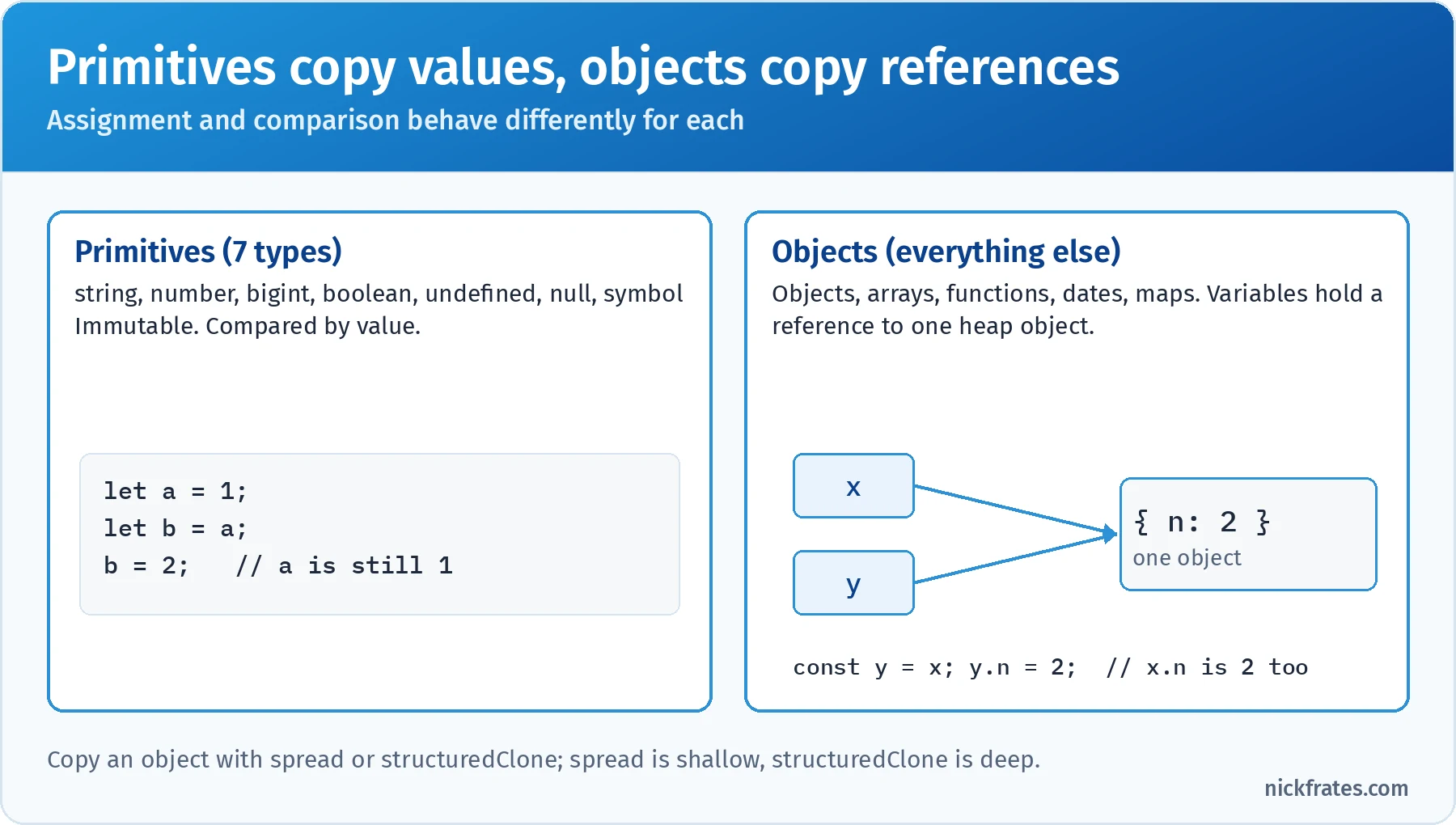
Assigning an object never copies it. Spread copies one level; structuredClone copies all the way down.
Numbers. All number values are 64-bit floating point. That gives you 0.1 + 0.2 equal to 0.30000000000000004, so compare money in cents (integers) or round with care. toFixed(2) returns a string, not a number. Integers are only exact up to Number.MAX_SAFE_INTEGER (2^53 – 1); beyond that, use BigInt. NaN is the only value not equal to itself, so test it with Number.isNaN().
| Conversion | '42px' | '' (empty) | null | '0x1A' |
|---|---|---|---|---|
Number(x) | NaN | 0 | 0 | 26 |
parseInt(x, 10) | 42 | NaN | NaN | 0 |
parseFloat(x) | 42 | NaN | NaN | 0 |
Unary +x | NaN | 0 | 0 | 26 |
Number() and unary plus convert the whole string or give NaN; parseInt and parseFloat read from the left and stop at the first character they can't use.
Strings. Strings are immutable: every method returns a new string. Know these well, especially the ones with similar names:
| Need | Method | Note |
|---|---|---|
| Part of a string | slice(start, end) | Accepts negative indexes from the end |
| Part of a string (older) | substring(start, end) | Treats negatives as 0 and swaps arguments if start > end |
| Contains / starts / ends | includes(), startsWith(), endsWith() | Return booleans; case sensitive |
| Position | indexOf(), lastIndexOf() | Return -1 when not found |
| Replace every match | replaceAll() or a regex with the g flag | replace() with a string replaces only the first match |
| Split and join | split(','), array.join(', ') | split('') gives single characters |
| Pad, trim or last character | padStart(5, '0'), trim(), at(-1) | at() accepts negative indexes |
Dates. The Date object has sharp edges. Months are zero-based, so new Date(2026, 0, 31) is January 31. getDate() is the day of the month, while getDay() is the day of the week (0 is Sunday). A date-only ISO string such as new Date('2026-03-15') is parsed as UTC midnight, while '2026-03-15T10:00' (no offset) is parsed as local time. Date objects are mutable (setDate() changes them in place), and dates subtract to milliseconds.
Type coercion. Coercion is JavaScript converting a value from one type to another, either explicitly (String(x), Number(x), Boolean(x)) or implicitly because an operator needs a different type. The rules the exam leans on:
+with a string on either side concatenates.'5' + 3is'53', and1 + 2 + '3'is'33'because evaluation goes left to right.- The other arithmetic operators convert to numbers.
'5' - 3is2,'5' * '2'is10, and'abc' - 1isNaN. ==coerces,===doesn't.'' == 0,'1' == 1andnull == undefinedare alltrue. Butnull == 0isfalse, becausenullonly loosely equalsundefined. Use===everywhere unless you deliberately want thex == nullshortcut that catches bothnullandundefined.- Objects convert through
valueOf()andtoString(). That's why[1, 2] + [3]is'1,23'andString({})gives'[object Object]'. Object.is()is like===except thatObject.is(NaN, NaN)istrueandObject.is(0, -0)isfalse. Jest'stoBe()uses it.
Truthy and falsy. In an if, a ternary, &&, || or !, every value is treated as true or false. There are exactly eight falsy values: false, 0, -0, 0n, '', null, undefined and NaN. Everything else is truthy, including '0', 'false', [], {} and new Boolean(false). Remember that && and || return one of their operands, not a boolean: '' || 'guest' is 'guest' and 'Ana' && 'Ana!' is 'Ana!'. When 0 or an empty string is a valid value, use the nullish coalescing operator ??, which only falls back on null or undefined.
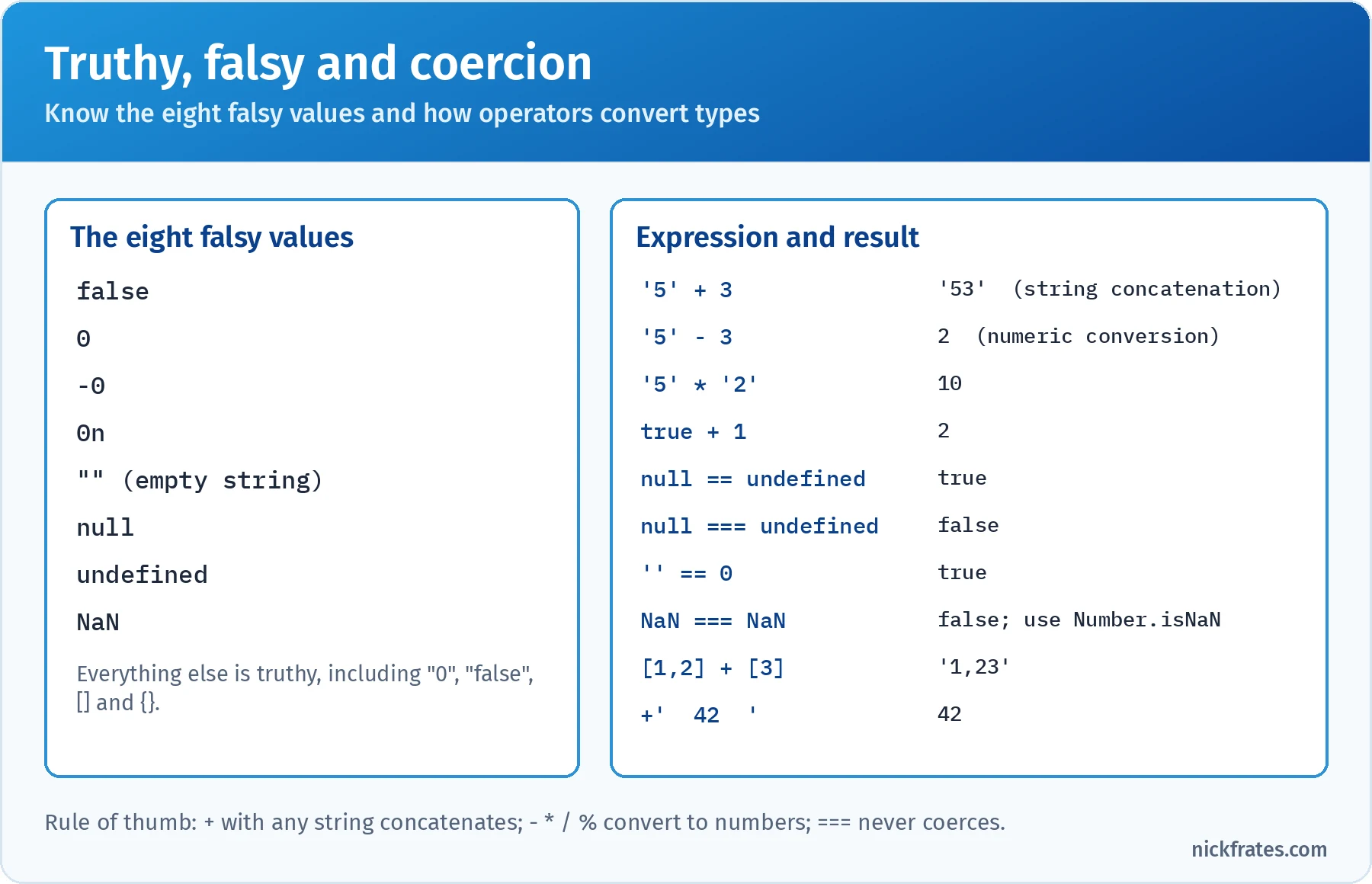
Plus with any string concatenates. Every other arithmetic operator converts to numbers.
Arrays. Arrays are ordered, zero-indexed, can hold mixed types and have a writable length (setting it shorter truncates the array). Watch out for new Array(3), which creates three empty slots rather than [3]. The most tested idea is whether a method mutates the original array or returns a new value.
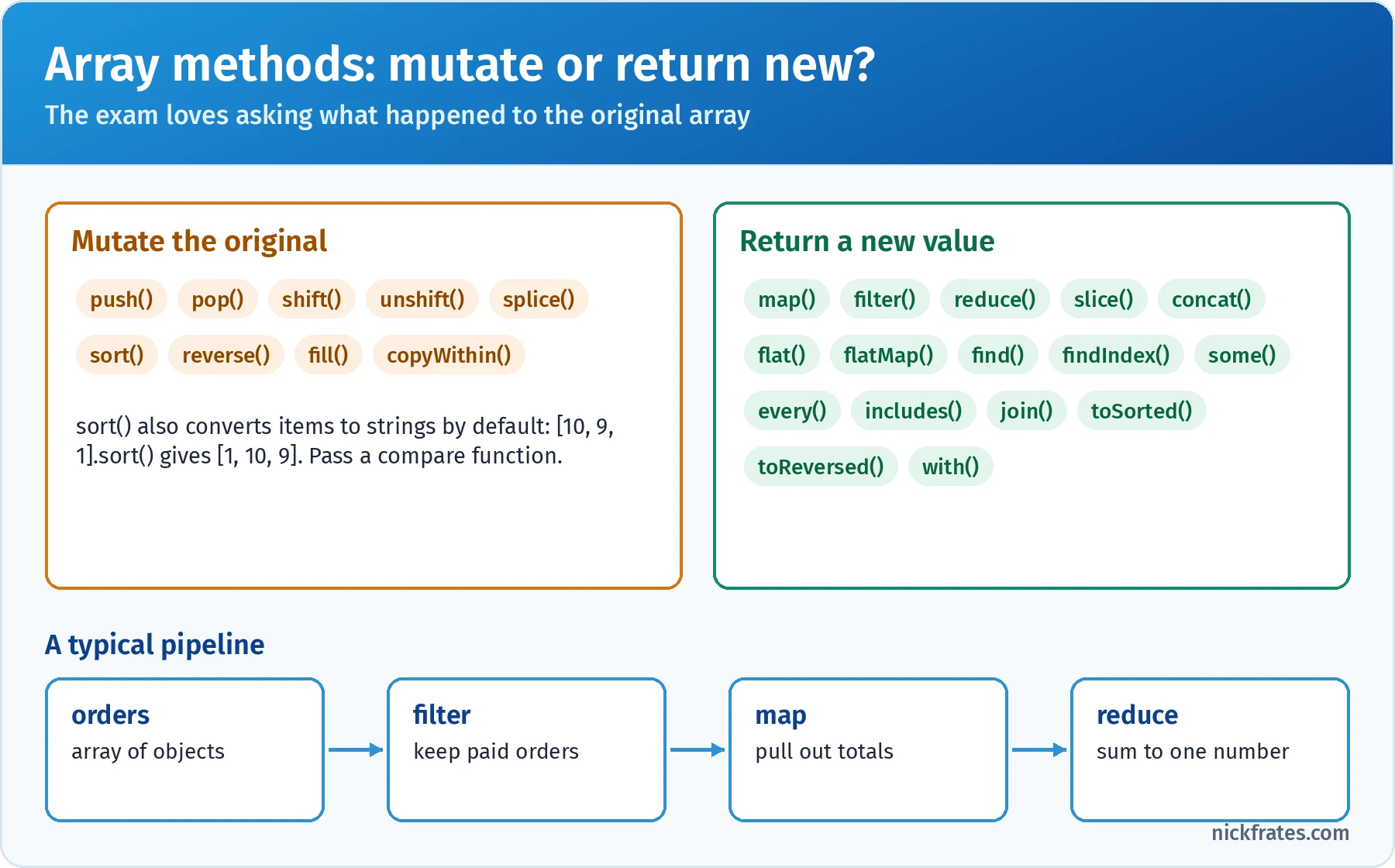
If a question asks what the original array looks like afterward, check this list first.
| Requirement | Method | Returns |
|---|---|---|
| Transform every item | map(fn) | New array, same length |
| Keep items that match | filter(fn) | New array, possibly shorter |
| Combine into one value | reduce(fn, initial) | Whatever the accumulator becomes |
| First match | find(fn) / findIndex(fn) | The item or undefined / the index or -1 |
| Any match / all match | some(fn) / every(fn) | Boolean |
| Contains a value | includes(x) | Boolean; finds NaN, unlike indexOf |
| Copy part | slice(start, end) | New array; original untouched |
| Insert or remove in place | splice(start, count, ...items) | Array of removed items; original mutated |
| Sort numbers safely | [...arr].sort((a, b) => a - b) or toSorted() | Sorted copy |
| Run side effects | forEach(fn) | undefined; you can't break out early |
Always pass reduce an initial value: without one, it uses the first element as the accumulator, and on an empty array it throws a TypeError. And the default sort() compares items as strings, so [10, 9, 1].sort() gives [1, 10, 9]; pass a compare function such as (a, b) => a - b.
JSON. JSON is a text format, and the JSON object converts between that text and JavaScript values. JSON.parse(text) throws a SyntaxError on invalid input (single quotes, trailing commas and unquoted keys are all invalid JSON), so wrap untrusted input in try/catch. parse takes an optional reviver function, and JSON.stringify(value, replacer, space) takes an optional replacer (a function or an array of allowed keys) and an indent. If an object has a toJSON() method, stringify uses its return value; that's how Date becomes an ISO string.
| Value inside an object | What JSON.stringify does |
|---|---|
undefined, functions, symbols | Property is omitted (inside an array they become null) |
NaN, Infinity | Becomes null |
Date | ISO 8601 string, via toJSON() |
Map, Set | Becomes {}: their entries aren't own enumerable properties |
BigInt | Throws a TypeError |
| Circular reference | Throws a TypeError |
That table explains why JSON.parse(JSON.stringify(obj)) is a lossy deep copy: dates come back as strings, and undefined values and methods disappear. Use structuredClone() for a real deep copy of data (it handles dates, maps, sets and circular references, but throws on functions).
Key takeaway: this section rewards precision. Know the eight falsy values, which operators coerce and how, which array methods mutate, and exactly what JSON.stringify drops.
Practice questions: Variables, Types, and Collections
Question 1. A checkout widget reads quantity from a text input and price from an API. A developer logs three values while debugging. What appears in the console?
- A.
34 12 -1 - B.
7 12 -1 - C.
34 34 -1 - D.
7 12 1
Answer: A. qty + price has a string operand, so + concatenates to '34'. * converts both sides to numbers, giving 12. Inside the template literal, - also converts to numbers, so 3 - 4 is -1, which the template turns into the string '-1'. Why not the others: B assumes + converts the string to a number, which only happens when neither operand is a string; C assumes * concatenates, but only + does; D gets the subtraction backward.
Question 2. A leaderboard needs the scores in rank order for display, but the original scores array must stay in submission order for an audit log. A developer writes the code below. What are scores and ranked afterward?
- A.
scoresis unchanged;rankedis[9, 25, 40, 100] - B. Both are
[9, 25, 40, 100] - C. Both are
[100, 25, 40, 9], and they're the same array - D.
scoresis unchanged;rankedis[100, 25, 40, 9]
Answer: C. sort() sorts in place and returns the same array, so ranked === scores. With no compare function it compares items as strings, and '100' < '25' < '40' < '9'. The fix is [...scores].sort((a, b) => a - b) or scores.toSorted((a, b) => a - b). Why not the others: A and D wrongly assume sort() returns a copy; B gets the mutation right but assumes numeric sorting, which needs a compare function.
Question 3. An integration sends an order to a REST API with JSON.stringify. What string is sent?
- A.
{"id":7,"placed":"2026-01-15T00:00:00.000Z","total":null} - B.
{"id":7,"note":undefined,"placed":{},"total":NaN} - C.
{"id":7,"note":null,"placed":"2026-01-15T00:00:00.000Z","total":null,"format":null} - D. It throws a TypeError because the object contains a function
Answer: A. Properties whose values are undefined or functions are omitted. The Date serializes through its toJSON() method to an ISO string, and NaN becomes null. Why not the others: B shows values JSON can't represent (undefined and NaN aren't valid JSON); C converts omitted properties to null, which only happens inside arrays; D confuses functions (silently skipped) with BigInt or circular references (which do throw).
Question 4. A pricing function receives an options object. A discount of 0 is valid and must be kept, but when no discount is provided at all, the function should use 10. Which operator should replace the blank?
- A.
|| - B.
?? - C.
&& - D.
|
Answer: B. The nullish coalescing operator ?? falls back only when the left side is null or undefined, so getDiscount({ discount: 0 }) returns 0 and getDiscount({}) returns 10. Why not the others: || treats 0 as falsy and would return 10 for a real zero discount (A); && returns undefined when the property is missing (C); bitwise OR converts to integers, so 0 | 10 is 10 (D).
Objects, Functions, and Classes (25%)
The biggest section on the exam. The official objectives:
- Given a business requirement, locate the best function implementation.
- Given a business requirement, apply fundamentals of object implementation to solve the business requirement.
- Given a business requirement, apply fundamentals of class implementation to solve the business requirement.
- Given a JavaScript module, give examples of how to use the module.
- Given a block of code, analyze the variable scope and the execution flow.
Function forms. JavaScript gives you several ways to write a function, and they differ in hoisting, this and whether they can be used as constructors. Most "which implementation" questions come down to this table:
| Form | Example | Hoisted? | Own this? | Use with new? |
|---|---|---|---|---|
| Declaration | function total(a, b) {} | Yes, fully: callable before the line | Yes, set by the call | Yes |
| Expression | const total = function () {}; | Only the variable (TDZ for let/const) | Yes | Yes |
| Arrow | const total = (a, b) => a + b; | Only the variable | No: inherits from the enclosing scope | No (TypeError) |
| Method shorthand | { total() {} } or in a class | With the object or class | Yes, usually the object | No |
| Class | class Cart {} | Hoisted but in the TDZ | Yes (instances) | Required |
Arrow functions also have no arguments object, which makes them ideal for callbacks and a poor choice for methods that need this.
Parameters. Default parameters (function ship(order, carrier = 'UPS')) apply only when the argument is undefined, not when it's null. Rest parameters (...items) collect the remaining arguments into a real array. Spread (fn(...list)) does the opposite at the call site. Missing arguments are simply undefined.
Higher-order functions and closures. A higher-order function takes a function as an argument or returns one. map, filter, addEventListener and setTimeout all take functions. A closure is a function plus the variables it captured from the scope where it was created; those variables stay alive as long as the function does.
That's a good "best function implementation" example: a closure keeps timer private, and the inner arrow function forwards the caller's this and arguments.
Objects. Object literals support shorthand properties ({ name }), shorthand methods ({ total() {} }), computed keys ({ [field]: value }), getters and setters, and spread. Property access uses dots or brackets; brackets take any expression. Optional chaining (order?.customer?.email) returns undefined instead of throwing when something in the chain is null or undefined.
| Need | Use | Note |
|---|---|---|
| Keys, values or pairs | Object.keys(), Object.values(), Object.entries() | Own enumerable string keys only |
| Pairs back to an object | Object.fromEntries() | Great after entries() plus map or filter |
| Shallow copy or merge | { ...a, ...b } or Object.assign({}, a, b) | Later sources win; nested objects are shared |
| Deep copy of data | structuredClone(obj) | Throws on functions |
| Does it have its own key? | Object.hasOwn(obj, 'k') | 'k' in obj also checks the prototype chain |
| Prevent all changes | Object.freeze(obj) | Shallow; in strict mode, writes throw a TypeError |
| Fine-grained property control | Object.defineProperty() | Unspecified flags default to false: not writable, enumerable or configurable |
How this works. this is decided by how a function is called, not where it's written, with one exception: arrow functions don't have their own this and use the one from the surrounding scope. The classic bug is passing a method as a callback, such as setTimeout(cart.checkout, 0) or button.addEventListener('click', this.handleClick). The method is called on its own, so this is lost. Fix it with an arrow wrapper (() => cart.checkout()), bind, or a class field arrow function.
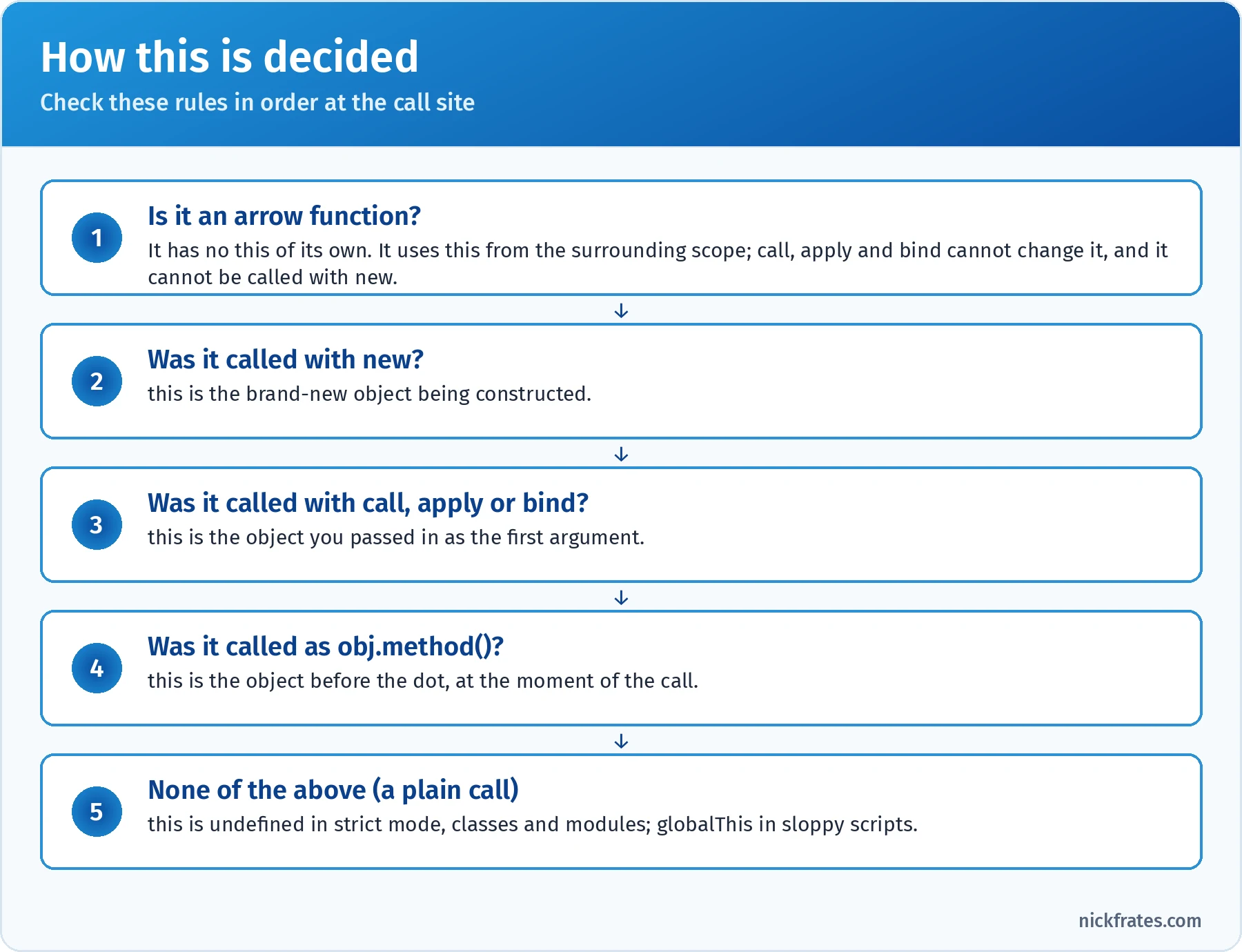
Find the call site, then walk these rules from the top.
| Method | Calls the function now? | Arguments | Typical use |
|---|---|---|---|
fn.call(obj, a, b) | Yes | Listed one by one | Borrow a method for one call |
fn.apply(obj, [a, b]) | Yes | As an array | Forward an arguments-style list |
fn.bind(obj, a) | No: returns a new function | Optional, pre-filled | Callbacks and partial application; can't be re-bound |
Prototypes and inheritance. Every object has an internal link to a prototype object. When you read a property that isn't on the object itself, JavaScript walks up that prototype chain until it finds the property or reaches null. Class methods live on ClassName.prototype, shared by every instance. Object.create(proto) makes an object with a chosen prototype, and Object.getPrototypeOf(obj) reads it. Writing a property creates an own property and never changes the prototype.
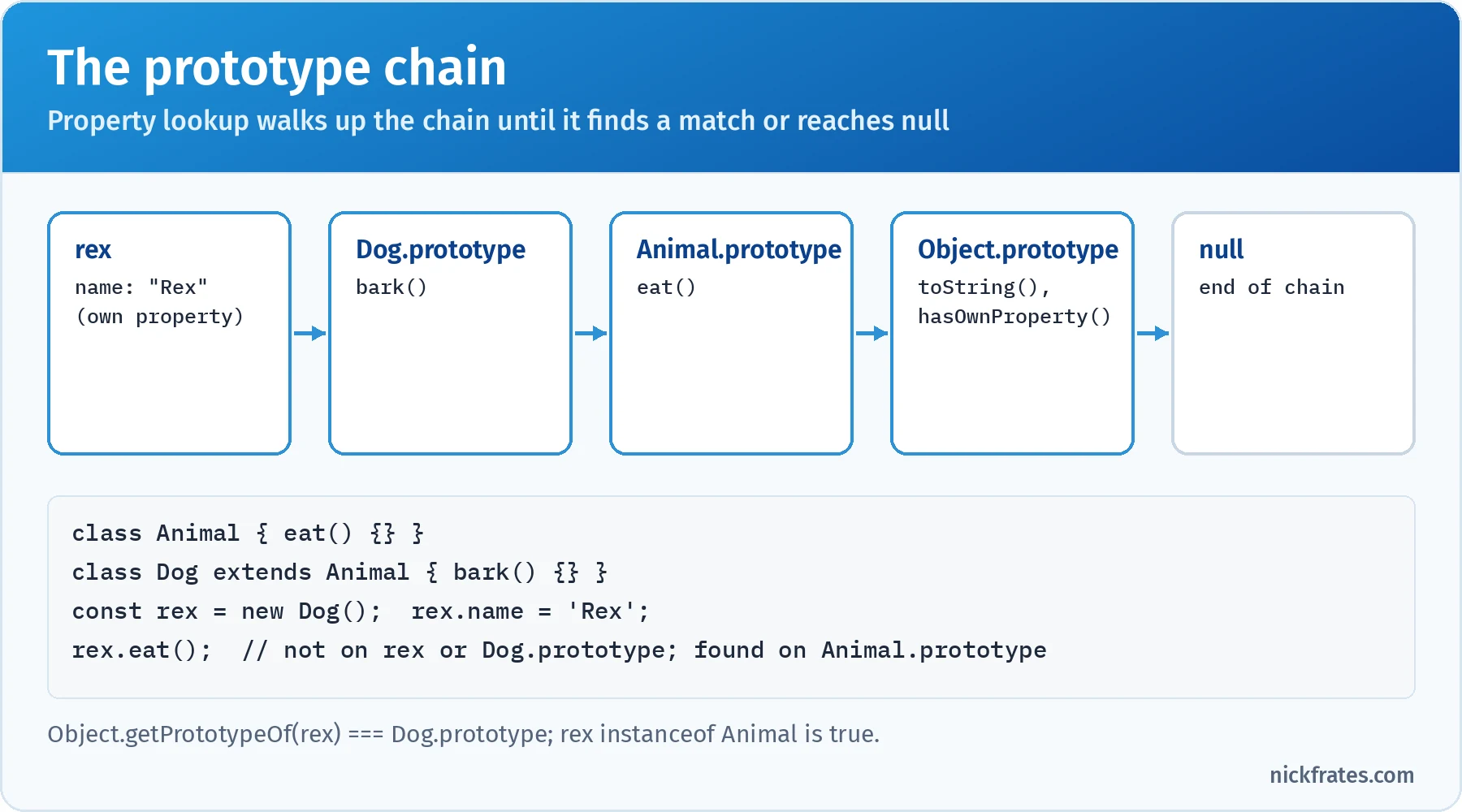
Classes are a cleaner syntax for this same prototype chain.
Classes. A class is syntax over constructor functions and prototypes, with a few stricter rules: class bodies always run in strict mode, classes can't be called without new, and class declarations are hoisted into the temporal dead zone, so using one before its line throws a ReferenceError. The parts to know:
constructorruns onnew. In a subclass, you must callsuper(...)before touchingthis, or you get aReferenceError.- Methods go on the prototype and aren't enumerable. Static methods and properties live on the class itself (
Cart.fromJSON()), not on instances. - Public fields (
count = 0;) are created on each instance. Private fields and methods start with#(#balance) and can only be read inside the class body; trying from outside is aSyntaxError. - Getters and setters (
get total() {},set total(v) {}) look like properties to callers, which is handy for computed values and validation. extendsandsuperset up inheritance;super.method()calls the parent's version from an override.instanceofchecks whether a constructor'sprototypeis in an object's chain.
Modules. ES modules are files that export values and import them from other files. They run in strict mode, have their own top-level scope (no accidental globals), are evaluated once and cached no matter how many files import them, and expose live, read-only bindings: if the exporting module changes an exported let, importers see the new value, but importers can't reassign it. In Node.js, a file is treated as an ES module when it ends in .mjs or the nearest package.json has "type": "module"; otherwise it's CommonJS, which uses require() and module.exports.
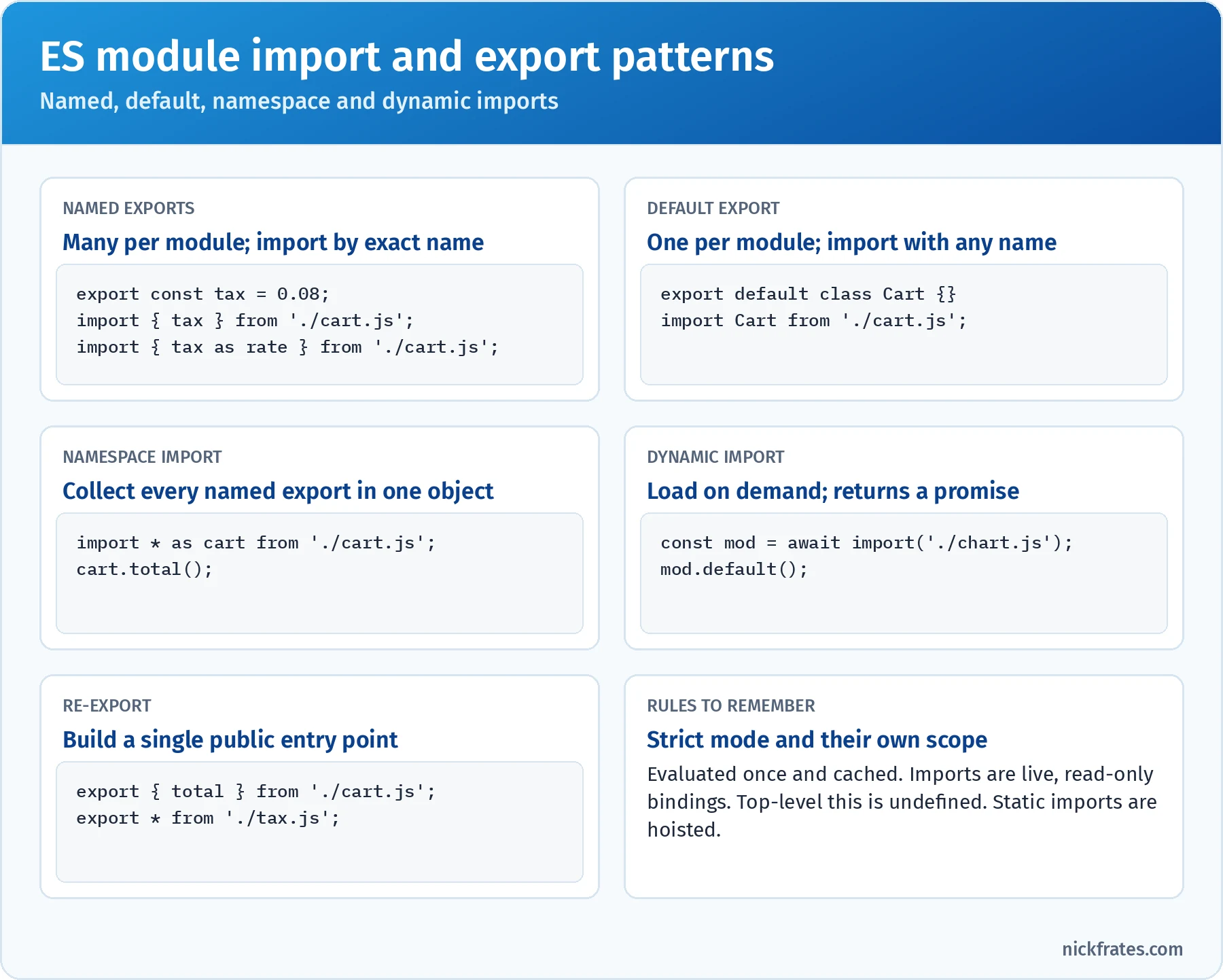
Named imports must match the export name. A default import can use any name.
Lightning Web Components are ES modules too. import { LightningElement, api, wire } from 'lwc'; is a named import, and each component file default-exports its class. Decorators such as @api aren't standard JavaScript yet; LWC compiles them. For the Salesforce side, see my Lightning Web Components basics guide.
Scope and execution flow. JavaScript has global, module, function and block scope, and names resolve from the inside out. Because these are the questions people most often get wrong, they get their own walkthrough in the deep dive.
Key takeaway: for any function, know who calls it and how, because that decides this. For any object, know whether you're holding the object or a copy. For any module, know whether you need a named or default import.
Practice questions: Objects, Functions, and Classes
Question 1. A dashboard shows how long a user has been on a page. The counter never increases, and this.seconds is still 0 after a minute. What's the best fix?
- A. Add
'use strict'at the top of the class - B. Declare
secondswithletinsidestart() - C. Move the increment into a regular method
tick()and callsetInterval(this.tick, 1000) - D. Replace the regular function passed to
setIntervalwith an arrow function:() => { this.seconds++; }
Answer: D. The regular function passed to setInterval gets its own this from the timer call: the global object in browsers, a Timeout object in Node.js. It's never the Timer instance. An arrow function has no this of its own, so it uses the this of start(), which is the instance. Why not the others: a local let wouldn't be the property the dashboard reads (B); passing this.tick unbound loses this in exactly the same way (C); class bodies are already strict, and strict mode doesn't change how the timer calls the function (A).
Question 2. A developer builds a small counter factory for two independent widgets. What does the last line log?
- A.
2 1 - B.
3 3 - C.
2 2 - D.
1 1
Answer: A. Each call to makeCounter() creates a new count variable, and the returned arrow functions close over that specific variable. Counter a was incremented twice and b once, so the result is 2 1. Why not the others: B assumes a single shared count, which would only happen if it were declared outside the factory; C and D ignore that each counter keeps its own state.
Question 3. A developer creates a Bundle class that extends Product. What happens when the last line runs?
- A. A
ReferenceErroris thrown, becausethisis used beforesuper()is called - B.
b.itemsis3andb.nameis'Starter' - C. The object is created, but
b.nameisundefined - D. A
SyntaxErroris thrown when the file is parsed
Answer: A. In a derived class constructor, this doesn't exist until super() runs. Touching it first throws a ReferenceError at runtime when the constructor executes. Moving super(name) to the first line fixes it. Why not the others: B is the intended result only after the fix; C describes forgetting to pass name to super, not this bug; D is wrong because the code is syntactically valid, and the error only appears when new Bundle() runs.
Question 4. money.js contains export default function formatMoney(cents) {} and export const CURRENCY = 'USD';. Another ES module needs both. Which statement is correct?
- A.
import formatMoney, { CURRENCY } from './money.js'; - B.
import { formatMoney, CURRENCY } from './money.js'; - C.
import * as formatMoney from './money.js';then callformatMoney(500) - D.
const { formatMoney, CURRENCY } = require('./money.js');
Answer: A. A default export is imported without braces, under any name you like, and named exports go inside braces. You can combine both in one statement. Why not the others: there's no named export called formatMoney, so B fails when the module links; a namespace import gives an object, so the function is formatMoney.default, and calling the namespace throws a TypeError (C); require is CommonJS and isn't available inside an ES module by default (D).
Question 5. A strict-mode module freezes its configuration so other code can't change it. Then two lines try to change it. What happens?
- A. Both assignments succeed, because
constobjects can be modified - B. Both assignments throw a
TypeError - C. The first assignment succeeds; the second throws a
TypeError - D. The first assignment throws; the second is silently ignored
Answer: C. Object.freeze() is shallow. The nested endpoints object isn't frozen, so changing orders works. retries is a property of the frozen object, and in strict mode writing to it throws a TypeError (in sloppy mode it would fail silently). To freeze everything, freeze nested objects recursively. Why not the others: A ignores the freeze, and const is irrelevant to object mutability anyway; B assumes freeze is deep; D reverses which object is frozen.
Browser and Events (17%)
The official objectives:
- Given a business requirement, utilize Events, event handlers, and propagation.
- Given a business requirement, evaluate and manipulate the DOM.
- Given a scenario, utilize the Browser Dev Tools to investigate code behavior.
- Given a scenario and requirements, utilize browser specific APIs.
The DOM. The Document Object Model is the browser's live tree of objects representing the page. document is the root you start from. Selecting elements is the first skill:
| Method | Returns | Live or static? |
|---|---|---|
document.getElementById('cart') | One element or null | n/a |
document.querySelector('.item.active') | First match for any CSS selector, or null | n/a |
document.querySelectorAll('li') | A NodeList (has forEach) | Static: doesn't update when the page changes |
document.getElementsByClassName('item') | An HTMLCollection | Live: updates automatically |
el.closest('li') | Nearest ancestor (or itself) matching the selector | n/a |
el.matches('.danger') | Boolean | n/a |
Reading and changing content. textContent gets or sets all text, including hidden text, and is the safe, fast default. innerText is layout-aware and skips hidden text. innerHTML parses a string as HTML, which is convenient and dangerous: inserting user input with it opens the door to cross-site scripting (XSS). Classes are easiest through classList.add(), remove(), toggle() and contains(). Custom data-* attributes appear on dataset in camelCase, so data-order-id becomes el.dataset.orderId.
Creating and removing elements. Use document.createElement('li'), set its properties, then insert it with append(), prepend(), before(), after() or the older appendChild(). Remove with el.remove(). To add many elements, build them in a DocumentFragment and insert once.
Events and handlers. Prefer addEventListener(type, listener, options) over onclick properties: you can attach several listeners to one event, and you control the options. The useful options are capture, once, passive and signal. To remove a listener with removeEventListener, you must pass the same function reference and the same capture setting, so an inline arrow function can't be removed later.
Inside a handler, the event object tells you what happened:
| Property or method | What it does |
|---|---|
event.target | The element where the event started (the innermost element clicked) |
event.currentTarget | The element whose listener is running right now |
event.preventDefault() | Cancels the browser's default action, such as submitting a form or following a link; propagation continues |
event.stopPropagation() | Stops the event from moving to further elements; other listeners on the current element still run |
event.stopImmediatePropagation() | Also stops the remaining listeners on the current element |
event.type, event.key, event.detail | The event name, the key pressed, or the custom payload |
Propagation. A DOM event travels in three phases. In the capture phase it goes from window down through each ancestor toward the target. In the target phase it reaches the element itself. In the bubble phase it travels back up to window. Listeners run during bubbling by default. Most events bubble, but some don't: focus, blur, mouseenter, mouseleave and resource load events don't. Use focusin and focusout when you need bubbling focus events.
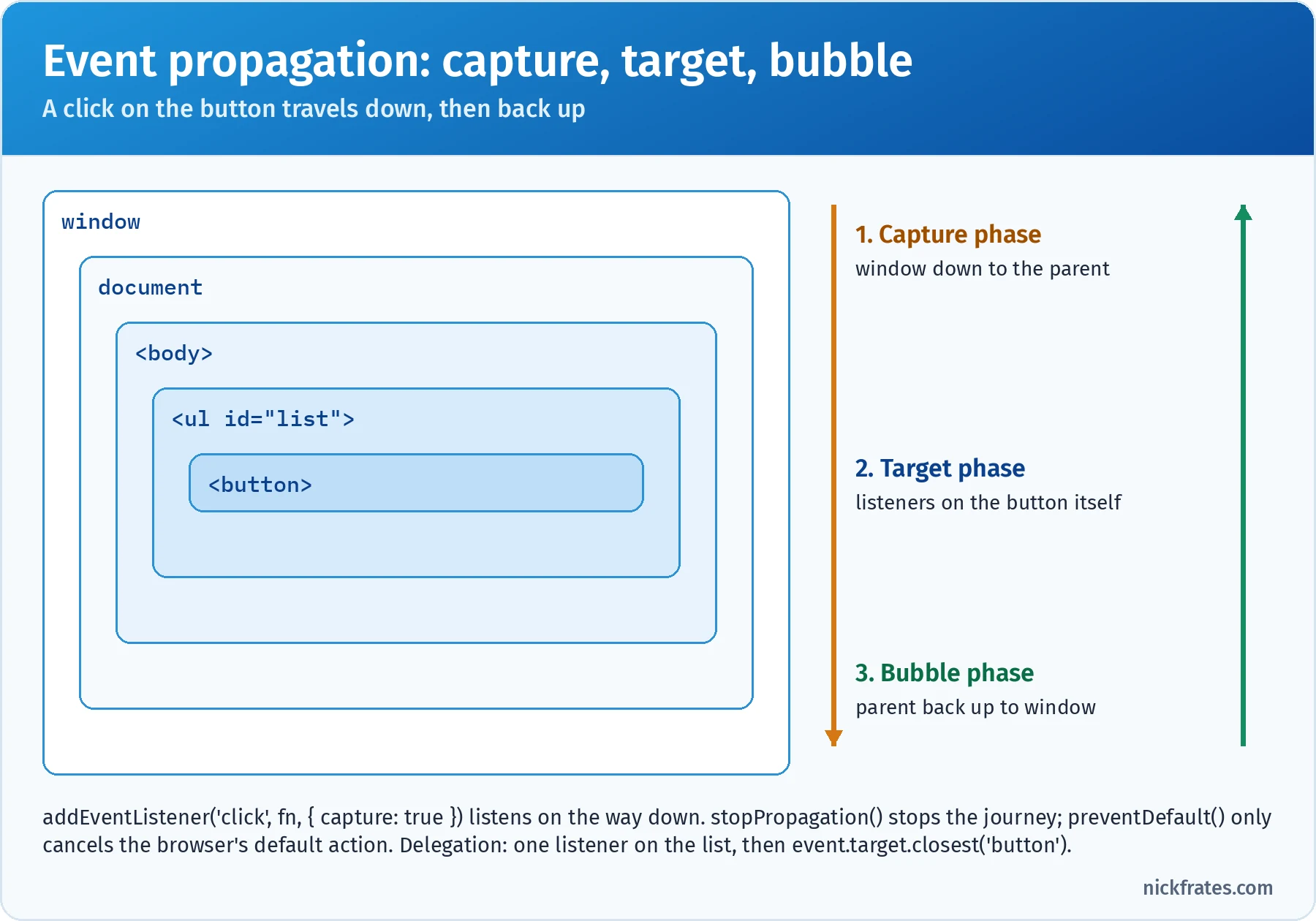
Listeners run on the way up by default. Capture listeners run on the way down.
Event delegation uses bubbling to handle events for many children with one listener on a shared parent. It also works for children added later. The catch is that event.target may be a nested element, such as an icon inside a button, so use event.target.closest('button') to find the element you care about.
Custom events. Create your own with new CustomEvent('orderselected', { detail: { id }, bubbles: true }) and send it with element.dispatchEvent(event). In Lightning Web Components, this is how a child talks to its parent: the child calls this.dispatchEvent(new CustomEvent('select', { detail: this.recordId })), and the parent listens in its template with onselect={handleSelect}. Because LWC uses shadow DOM, an event only crosses the shadow boundary with composed: true, and outside listeners see the component host as event.target (retargeting).
Browser DevTools. The exam expects you to know which tool investigates which problem:
| Problem | DevTools panel or feature |
|---|---|
| Inspect or live-edit HTML and CSS; see listeners attached to an element | Elements (with the Event Listeners tab) |
| Run code, read logs and errors, inspect objects | Console |
| Pause code, step through it, watch variables | Sources (breakpoints, call stack, scope, watch) |
| See requests, status codes, payloads and timing | Network |
| Find slow scripts, long tasks and layout work | Performance |
| Inspect localStorage, sessionStorage, cookies, IndexedDB | Application |
Browser-specific APIs. These belong to the browser, not to JavaScript itself, so they don't exist in Node.js (although Node has added its own fetch, timers and URL).
| Requirement | Browser API | Key facts |
|---|---|---|
| Remember a setting across visits | localStorage | Per origin, strings only (use JSON), about 5 MB, synchronous, never expires |
| Keep data for one tab session | sessionStorage | Per origin and per tab; cleared when the tab closes |
| Call an HTTP API | fetch() | Returns a promise; only rejects on network failure, so check response.ok |
| Cancel a request or listener | AbortController | Pass controller.signal; abort() rejects with an AbortError |
| Change the URL without reloading | history.pushState() | Listen for popstate on back and forward |
| Read query parameters | new URL(location.href).searchParams | URLSearchParams handles encoding |
| Heavy computation off the main thread | Web Workers | No DOM access; talk through postMessage |
Key takeaway: know the difference between target and currentTarget, the three propagation phases, which DevTools panel answers which question, and that fetch only rejects when the network fails.
Practice questions: Browser and Events
Question 1. An order list uses one click listener on the <ul> to handle every Cancel button. Each button has a data-order-id attribute and contains an <svg> icon. Cancels work when users click the button's edge but fail with undefined when they click the icon. What's the best fix?
- A. Call
event.stopPropagation()in a listener on the<svg> - B. Read
event.currentTarget.dataset.orderIdinstead - C. Register the listener with
{ capture: true } - D. Use
const btn = event.target.closest('button[data-order-id]')and readbtn.dataset.orderId
Answer: D. When the icon is clicked, event.target is the <svg> (or a path inside it), which has no data-order-id. closest() walks up from the clicked element to the nearest matching button, which is exactly what delegation needs. Add a null check for clicks that don't land on a button. Why not the others: currentTarget is the <ul> that owns the listener, which has no order ID (B); capture changes when the listener runs, not what target is (C); stopping propagation at the icon would stop the event from reaching the <ul> listener at all (A).
Question 2. A user clicks the button inside #outer. In what order do the messages appear?
- A.
outer capture,button,outer bubble - B.
button,outer bubble,outer capture - C.
outer bubble,outer capture,button - D.
button,outer capture,outer bubble
Answer: A. The capture phase runs first, from the top down, so the capture listener on #outer fires before the event reaches the button. Then the target's own listener runs, then the event bubbles back up to #outer's regular listener. Registration order doesn't change phase order. Why not the others: B and D run the capture listener after the target, which ignores the capture phase; C assumes listeners run in the order they were added, regardless of phase.
Question 3. A product page loads reviews with the code below. When the reviews API returns 404, users see an empty list instead of the error banner. What change makes the banner appear?
- A. Pass
{ mode: 'no-cors' }tofetch - B. Wrap the
fetchcall insetTimeoutso errors surface later - C. In the first
then, checkres.okand throw anErrorwhen it's false, before callingres.json() - D. Replace
.catch()with a second argument toaddEventListener
Answer: C. fetch resolves for any HTTP response, including 404 and 500. It only rejects on network failures or an abort. Checking res.ok (true for status 200-299) and throwing turns an HTTP error into a rejection that the existing .catch() handles. Why not the others: setTimeout changes timing, not whether the promise rejects (B); no-cors gives an opaque response you can't read, which makes things worse (A); D mixes up event listeners and promise handling.
Debugging and Error Handling (7%)
A small section by weight, but the skills show up across the whole exam. The official objectives:
- Given a scenario, handle errors properly.
- Given code to be debugged, use the console and breakpoints.
try, catch and finally. Code in try runs until something throws. If it throws, control jumps to catch, which receives the thrown value. finally runs no matter what: after a normal finish, after a caught error, and even after a return inside try or catch. If finally itself returns a value, that value replaces whatever try or catch returned, so don't return from finally.
Throw errors, not strings. You can technically throw any value, but Error objects carry a name, a message and a stack trace, which is what makes them debuggable. For domain errors, extend Error and set this.name, then check with instanceof in the catch. Catch only what you can handle, and rethrow the rest.
| Error type | Typical cause |
|---|---|
TypeError | Calling something that isn't a function, reading a property of undefined or null, assigning to a frozen property in strict mode, mixing BigInt and number |
ReferenceError | Using an undeclared variable, or a let, const or class in its temporal dead zone |
SyntaxError | Invalid code at parse time, or invalid text passed to JSON.parse |
RangeError | A value outside the allowed range, such as new Array(-1), (1.5).toFixed(101) or unbounded recursion |
AggregateError | Several errors at once, such as when every promise passed to Promise.any rejects |
Custom (class ValidationError extends Error) | Business rules your own code enforces |
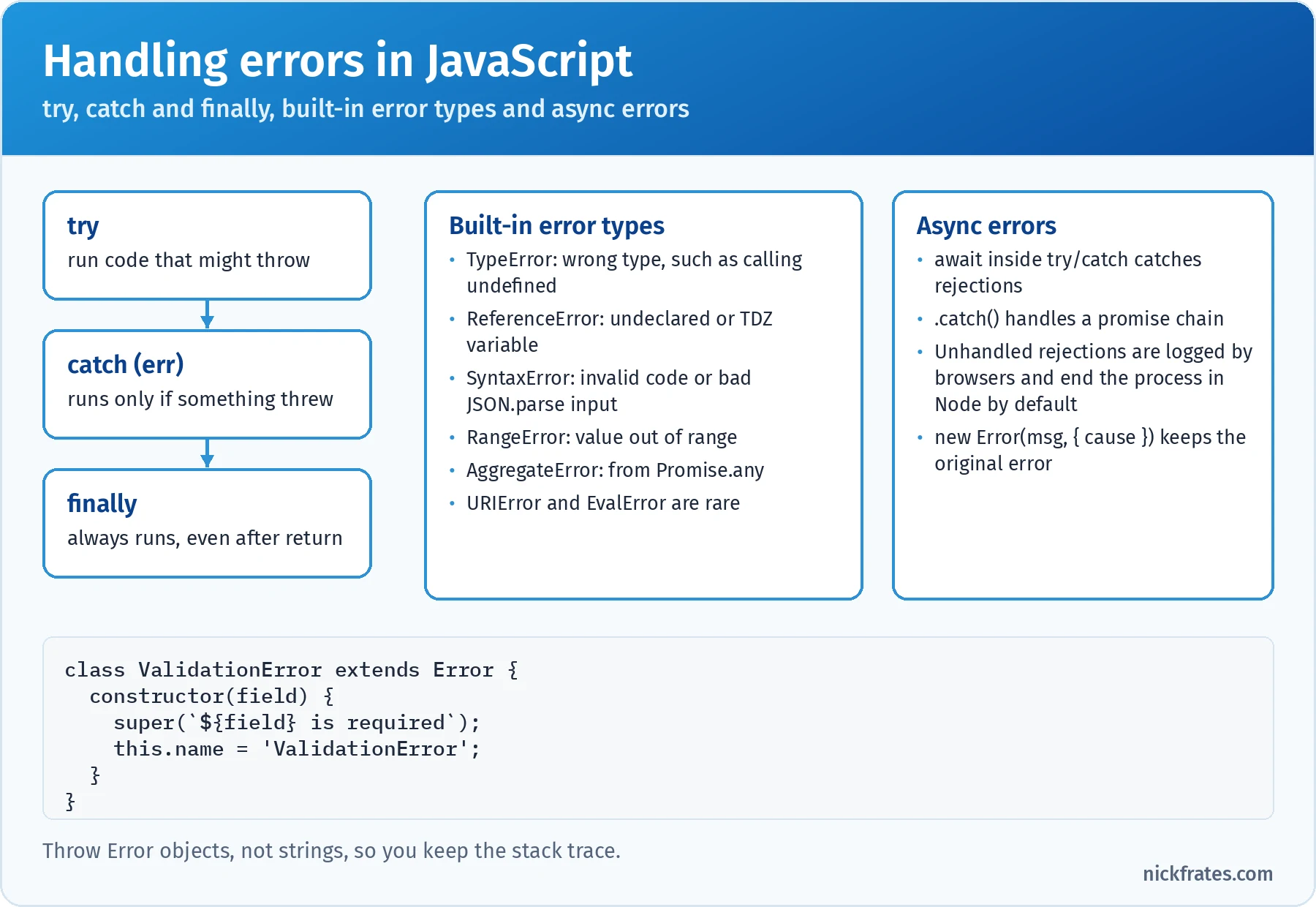
Throw Error objects, catch only what you can handle, and rethrow the rest.
Errors in asynchronous code. A try/catch only catches errors thrown while its block is on the call stack. An error thrown later inside a setTimeout callback or an event handler isn't caught by a try that wrapped the scheduling call. For promises, either await inside a try block or attach .catch(). An unhandled promise rejection triggers the unhandledrejection event in browsers, and in Node.js (version 15 and later) it crashes the process by default.
The console. console.log is the everyday tool, but the exam expects you to know the rest of the toolbox:
| Method | Use it to |
|---|---|
console.log(), info(), warn(), error() | Log at different levels; DevTools can filter by level |
console.table(arrayOfObjects) | Show records as a sortable table |
console.dir(obj) | Show an object's properties as an expandable tree, useful for DOM elements |
console.time('label') / timeEnd('label') | Measure elapsed time between two points |
console.assert(condition, msg) | Log an error only when the condition is false |
console.trace() | Print the current call stack |
One trap: browsers log objects by reference. If you log an object and then change it, expanding it later in the console may show the new values. Log structuredClone(obj) or JSON.stringify(obj) when you need a snapshot.
Breakpoints. Breakpoints pause execution so you can inspect the call stack, every variable in scope, and the values of watch expressions. Once paused, step over runs the next line, step into enters a function call, step out finishes the current function, and resume continues to the next breakpoint.
| Breakpoint type | Pauses when |
|---|---|
| Line-of-code | Execution reaches that line |
| Conditional | That line runs and an expression is true, such as order.total < 0 |
| Logpoint | Never pauses; logs a message instead, with no code change |
debugger; statement | Execution reaches it, but only while DevTools is open |
| Exceptions | Any exception is thrown, or only uncaught ones |
For Lightning Web Components, Salesforce serves minified framework code by default. Turn on Debug Mode for your user in Setup to get readable code in the Sources panel. For Node.js, run node --inspect app.js and attach Chrome DevTools or VS Code.
Key takeaway: catch specific errors and rethrow the rest, remember that finally always runs, and choose a conditional breakpoint or logpoint instead of littering code with console.log.
Practice questions: Debugging and Error Handling
Question 1. A sync job wraps its scheduling code in try/catch so failures appear in the log. What happens when this runs?
- A.
Caught: Sync failedis logged, thenDone - B.
Doneis logged, then an uncaughtError: Sync failedis reported; thecatchblock never runs - C.
Doneis logged, thenCaught: Sync failed - D. Nothing is logged, because the error stops the script before
Done
Answer: B. The try block only schedules the callback; it finishes immediately, so Done is logged. When the timer fires later, the callback throws on a new call stack, where no try is active, so the error is uncaught. Put the try/catch inside the callback, or use promises with .catch(). Why not the others: A and C assume the outer try is still active when the callback runs, which it isn't; D assumes the error is thrown synchronously during setTimeout, but scheduling succeeds.
Asynchronous Programming (13%)
The official objectives:
- Given a scenario, apply asynchronous programming concepts.
- Given a scenario, use event loop and event monitor or determine loop outcomes.
Why async exists. JavaScript runs on one thread, so waiting synchronously for the network would freeze the page. Instead, you start the work and hand the host a function to call later.
Callbacks. The original style: pass a function that runs when the work is done. Node.js core APIs use error-first callbacks, where the first argument is an error or null: fs.readFile(path, (err, data) => {}). Nesting them produces "callback hell", which is why promises took over.
Promises. A promise is an object representing a value that isn't available yet. It starts pending and settles exactly once, as either fulfilled with a value or rejected with a reason. After that, it never changes. The rules that drive most questions:
- The executor runs synchronously. In
new Promise((resolve, reject) => { ... }), the function you pass runs immediately, during the constructor call. Only the.thencallbacks are asynchronous. .then()always returns a new promise. Returning a value from athencallback fulfills the next promise with that value. Returning a promise makes the chain wait for it. Throwing rejects the next promise..catch(fn)is.then(undefined, fn). Acatchhandles rejections from anything earlier in the chain, and the chain continues as fulfilled after it unless thecatchthrows again..finally(fn)runs on either outcome, receives no argument, and passes the original result or error through.- Callbacks are always async. Even for an already-resolved promise,
thencallbacks run as microtasks after the current synchronous code finishes.
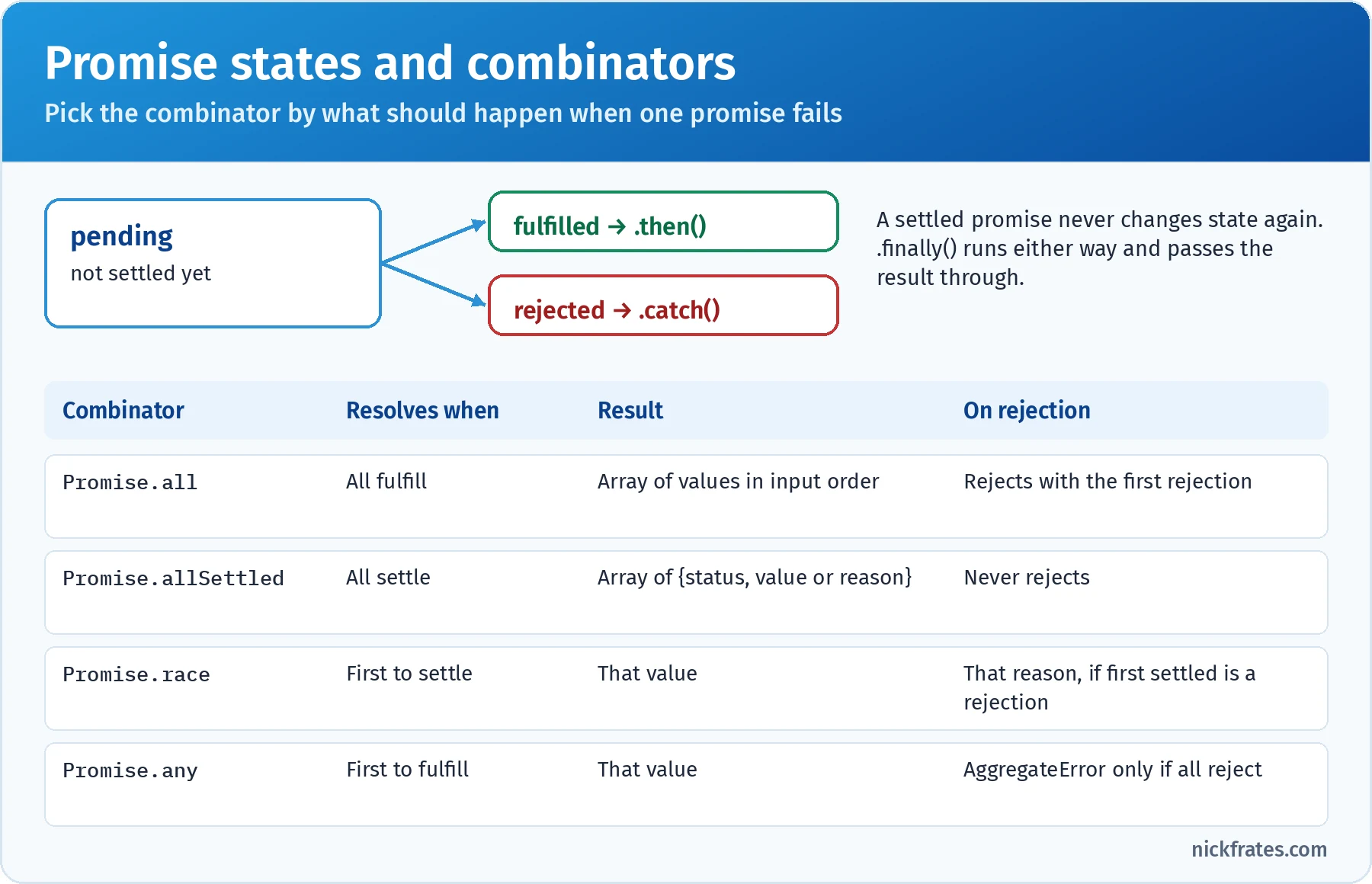
Choose the combinator by what should happen when one of the promises fails.
| Requirement | Combinator |
|---|---|
| Need every result; any failure should fail the whole operation | Promise.all |
| Show whatever succeeded and report what failed | Promise.allSettled |
| Use the fastest of several mirrors; any success will do | Promise.any |
| Enforce a timeout by racing the request against a timer | Promise.race |
async and await. An async function always returns a promise: returning a value fulfills it, and throwing rejects it. Inside it, await pauses that function (not the whole program) until the awaited promise settles, then resumes with the value or throws the rejection, so ordinary try/catch works. Everything after an await runs as a microtask. Top-level await works in ES modules, but not in classic scripts or CommonJS files.
That last line is a favorite exam trap. forEach ignores the promises its async callback returns, so the code after it runs before any save finishes, and rejections become unhandled.
The event loop. This is the second objective, and it's tested with output-order questions. The model:
- Run the current script (or task) to completion. Nothing interrupts synchronous code.
- When the call stack is empty, run every microtask in the microtask queue, including any new microtasks queued along the way.
- In browsers, render if needed (style, layout, paint).
requestAnimationFramecallbacks run just before this step. - Take one task from the task queue, such as a timer callback, a UI event or an I/O callback, and run it. Then go back to step 2.
| Microtasks (run first) | Tasks / macrotasks (run later) |
|---|---|
Promise then, catch and finally callbacks | setTimeout and setInterval callbacks |
Code after await in an async function | User events such as click and keydown |
queueMicrotask(fn) | Network and I/O callbacks, postMessage |
MutationObserver callbacks | setImmediate (Node.js) |
process.nextTick (Node.js; runs even before promise microtasks) | Script and module evaluation |
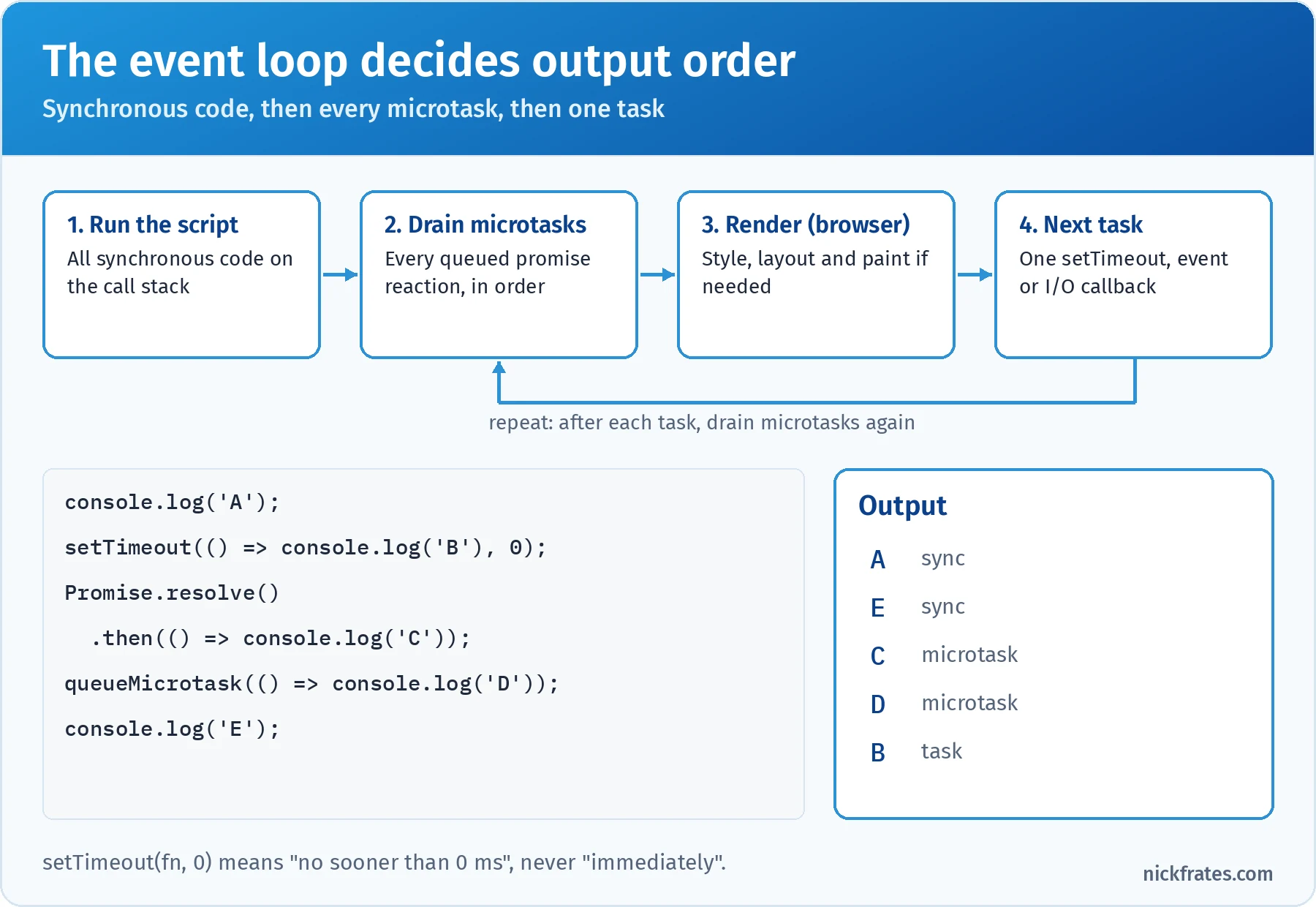
Synchronous first, then all microtasks in the order they were queued, then one task.
Timers deserve a precise definition: setTimeout(fn, 0) means "queue fn as a task after at least 0 ms", not "run now". A busy main thread delays every timer.
The event monitor. The objective's mention of an event monitor maps to tools that show you events as they happen. In the Chrome DevTools Console, monitorEvents(element, 'click') logs every matching event on that element until you call unmonitorEvents(element). The Performance panel records tasks and long tasks, which shows what's blocking the loop.
Key takeaway: an async function returns a promise, await hands the rest of the function to the microtask queue, and microtasks always run before the next timer or event.
Practice questions: Asynchronous Programming
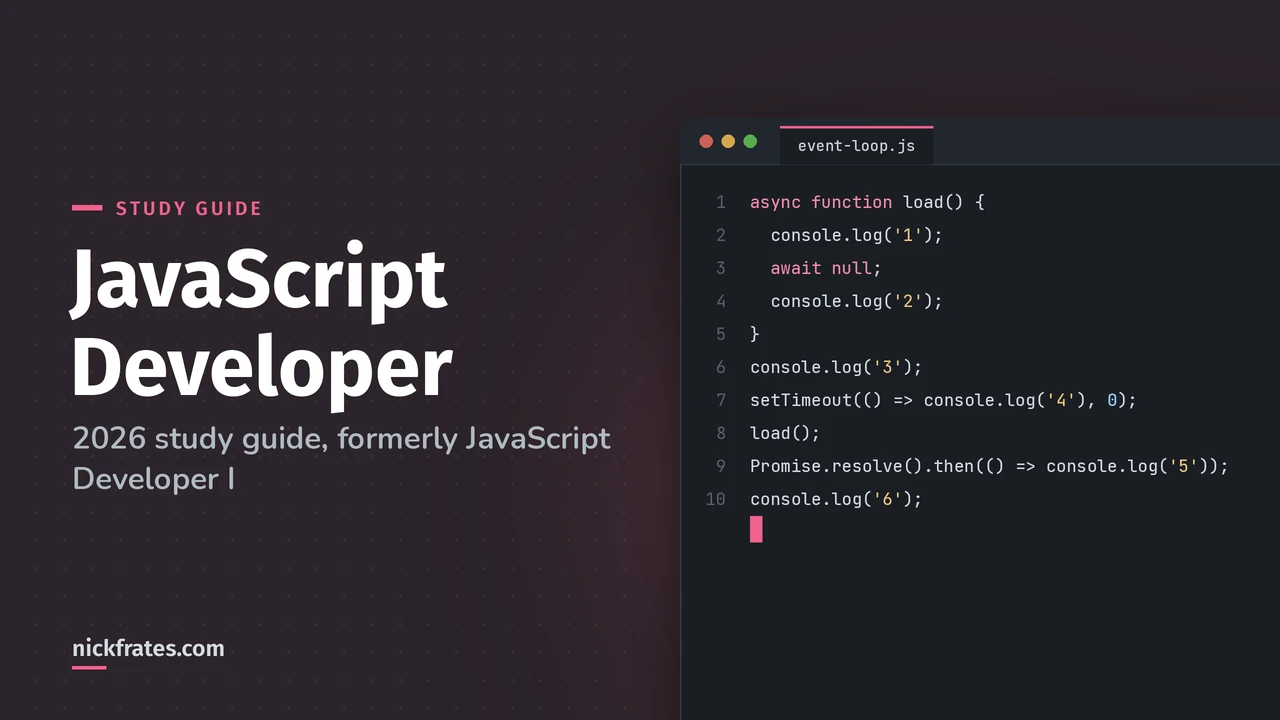
Question 1. What's the console output when this script runs?
- A.
3 1 6 2 5 4 - B.
3 1 2 6 5 4 - C.
1 3 6 5 2 4 - D.
3 6 1 2 5 4
Answer: A. Synchronous code first: 3, then calling load() logs 1 synchronously before the await. The await queues the rest of load as a microtask, and the then callback queues another microtask after it. 6 logs synchronously. Then the microtasks run in order: 2, then 5. The timer is a task, so 4 is last. Why not the others: B runs the code after await synchronously, but await always yields, even for a non-promise value; C ignores that console.log('3') runs before load() is called; D assumes an async function doesn't start running until later, but its body runs synchronously up to the first await.
Question 2. A home page loads three independent widgets (weather, news and stock prices) from separate APIs at the same time. If one API fails, the page must still show the other two and display a small error in the failed widget's place. Which approach fits best?
- A.
Promise.allwith the three requests - B.
Promise.allSettledwith the three requests, then render each result by itsstatus - C.
Promise.racewith the three requests - D.
Promise.anywith the three requests
Answer: B. allSettled waits for every request to finish and never rejects. Each result is { status: 'fulfilled', value } or { status: 'rejected', reason }, so the page can render successes and show an error for each failure. Why not the others: all rejects as soon as one request fails, discarding the successful results (A); race only gives you the first request to settle (C); any gives you only the first success (D).
Server Side JavaScript (8%)
The official objectives:
- Given a scenario and requirements, infer which Node.js implementation is a good solution.
- Given a scenario and requirements, infer which Node.js CLI command is a good solution.
- Know the core Node.js modules and given requirements, infer which Node.js library/framework is a good solution.
- Given a scenario and requirements, distinguish which Node.Js Package Management solution is the most fitting.
What Node.js is. Node.js runs JavaScript outside the browser using the V8 engine, plus a C library called libuv that provides the event loop and non-blocking I/O. Your JavaScript still runs on one main thread, but file, network and timer work happens in the background and comes back as callbacks or promises. That makes Node excellent for I/O-heavy work such as APIs, real-time apps, command-line tools and build tooling. It's a weaker fit for long CPU-heavy calculations, which block the event loop unless you move them to worker threads.
| Requirement | Good Node.js implementation |
|---|---|
| Process a file too big for memory, line by line | Streams: fs.createReadStream() with readline or stream.pipeline() |
| Read a small config file without blocking | fs/promises (await readFile(path, 'utf8')) |
| React to things that happen inside your app | EventEmitter from the events module |
| Run a shell command or another program | child_process (exec, execFile, spawn) |
| Run CPU-heavy work without freezing requests | worker_threads |
| Keep secrets and settings out of code | Environment variables via process.env (and --env-file in Node 20.6+) |
| Turn an old callback API into promises | util.promisify() |
The CLI. Expect questions that describe a need and ask for the command:
| Need | Command |
|---|---|
| Run a script | node app.js |
| Check the installed version | node -v (or node --version) |
| Debug with Chrome DevTools or VS Code | node --inspect app.js (--inspect-brk pauses on the first line) |
| Restart automatically when files change | node --watch app.js (built in since Node 18.11; nodemon is the classic package) |
| Run the built-in test runner | node --test |
| Load environment variables from a file | node --env-file=.env app.js (Node 20.6+) |
Core modules. These ship with Node, so there's nothing to install. You can import them with a node: prefix (import { readFile } from 'node:fs/promises';), which makes it obvious they're built in.
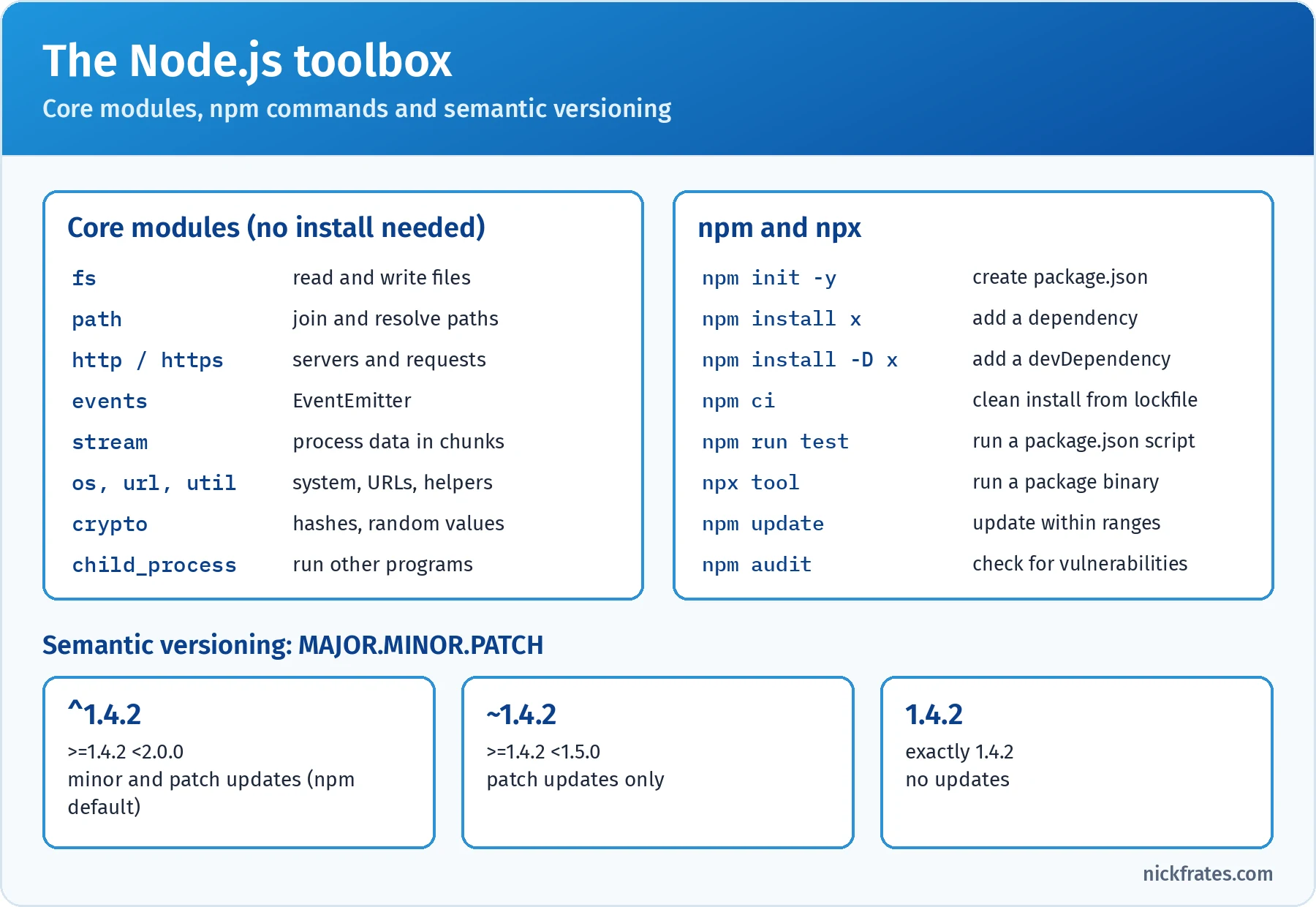
Core modules are built in. npm adds everything else, within the version ranges you allow.
CommonJS and ES modules. Node supports both module systems, and you'll see both in real projects:
| CommonJS | ES modules | |
|---|---|---|
| Syntax | const x = require('x'), module.exports = ... | import x from 'x', export ... |
| When Node uses it | .cjs files, or .js without "type": "module" | .mjs files, or .js with "type": "module" in package.json |
| Loading | Synchronous, at the point require runs | Static imports are resolved before the code runs; import() is async |
| Top-level await | No | Yes |
Libraries and frameworks. The exam guide links to a list of popular Node.js frameworks. You don't need to know their APIs in depth, but you should match each to its purpose:
| Requirement | Common choice |
|---|---|
| Minimal web server with routing and middleware | Express |
| High-performance API with schema validation | Fastify |
| Large, structured TypeScript back end with dependency injection | NestJS |
| React app with server-side rendering and API routes | Next.js |
| Real-time, two-way communication such as chat or live dashboards | Socket.IO (built on WebSockets) |
| Unit testing | Jest, Mocha with an assertion library such as Chai, or the built-in node:test |
Package management. npm ships with Node and is the default package manager; Yarn and pnpm are popular alternatives that use the same registry. package.json describes your project: its name, version, scripts, dependencies (needed at runtime), devDependencies (needed only to build and test, such as Jest or ESLint) and fields like type. package-lock.json records the exact version of every installed package, including nested ones, and belongs in source control.
| Scenario | Most fitting solution |
|---|---|
| CI must install exactly what was tested locally | Commit package-lock.json and run npm ci |
| A tool is only needed for development, such as a test runner | npm install -D jest (a devDependency) |
| Run a package's CLI once without installing it globally | npx package-name |
| Run a project task with the right local tools on the path | A scripts entry, run with npm run name (npm test and npm start are shortcuts) |
| Get bug fixes automatically but avoid breaking changes | A caret range such as ^2.3.1 (npm's default) |
| Allow only patch updates for a sensitive dependency | A tilde range such as ~2.3.1 |
| Check installed packages for known vulnerabilities | npm audit |
Semantic versioning is MAJOR.MINOR.PATCH: breaking changes bump MAJOR, new backward-compatible features bump MINOR, and fixes bump PATCH. One edge case: for versions below 1.0.0, a caret is stricter, so ^0.4.2 only allows 0.4.x patch updates, because pre-1.0 minor releases are allowed to break things. npm install can update the lockfile within your ranges; npm ci deletes node_modules, installs exactly what the lockfile says, and fails if package.json and the lockfile disagree.
Key takeaway: match the requirement to the tool: streams for big data, npm ci with a lockfile for reproducible installs, -D for dev-only tools, and Express-style frameworks for web servers.
Practice questions: Server Side JavaScript
Question 1. A Node.js job must scan a 4 GB server log every night and count lines that contain TIMEOUT. The container has 512 MB of memory. Which implementation is the best fit?
- A.
fs.readFileSync('server.log', 'utf8').split('\n'), then filter the array - B. Read the file with
fs.createReadStream()and process it line by line withreadline - C.
require('./server.log')so Node caches the file - D. Read the file with
await readFile()fromfs/promises, then use a regular expression on the whole string
Answer: B. A stream reads the file in small chunks, and readline turns those chunks into lines, so memory stays roughly constant no matter how big the file is. Why not the others: A and D both load the entire 4 GB file into memory, which can't fit, and A also blocks the event loop; require is for modules and JSON, not log files, and would still load everything (C).
Question 2. A team's build passes on a developer's laptop but fails in CI because CI installed a newer minor version of a dependency declared as "chart-lib": "^3.2.0". They want CI to install exactly the versions the developer tested. What should they do?
- A. Change the range to
~3.2.0and keep runningnpm installin CI - B. Commit
package-lock.jsonand runnpm ciin the CI pipeline - C. Run
npm updatebefore every CI build - D. Delete
package-lock.jsonso npm always resolves fresh versions
Answer: B. The lockfile records the exact resolved version of every package, and npm ci installs exactly those versions (and fails if the lockfile and package.json disagree). That makes CI match the tested setup. Why not the others: a tilde range still allows new patch versions, so builds can still drift (A); npm update deliberately moves to newer versions within the range (C); deleting the lockfile guarantees drift (D).
Testing (7%)
One objective, and it's very specific:
- With a block of code and the associated Unit Test, determine where the test is ineffective and modify it to make it more effective.
In other words, you'll read a function and its test, spot why the test would pass even when the code is wrong (or fail for the wrong reason), and choose the change that fixes it. The guide says testing is platform agnostic, but the snippets usually look like Jest, which is also what Salesforce uses for LWC.
Test anatomy. A good unit test follows arrange, act, assert: set up inputs and dependencies, call the unit once, then check a specific outcome. The exam focuses on unit tests, which check one function or component in isolation.
| Matcher | Checks | Common mistake |
|---|---|---|
toBe(x) | Identity with Object.is (same primitive value or same object) | Using it for objects or arrays that are equal but not the same instance |
toEqual(x) | Recursive equality of values | Ignores undefined properties; use toStrictEqual to catch them |
toBeCloseTo(x, digits) | Floating-point numbers within a precision | Using toBe(0.3) for 0.1 + 0.2 |
toThrow(msgOrType) | The function throws | Calling the function directly instead of wrapping it: expect(() => fn()).toThrow() |
toBeTruthy() | Any truthy value | Too weak to prove a specific result |
resolves / rejects | The outcome of a promise | Forgetting to await or return the expectation |
toHaveBeenCalledWith(...) | A mock was called with specific arguments | Checking only toHaveBeenCalled() |
Test doubles. Replace slow or unpredictable dependencies, never the unit under test. In Jest, jest.fn() creates a mock function that records its calls, jest.spyOn(obj, 'method') wraps an existing method, jest.mock('module') replaces a whole module, and jest.useFakeTimers() with jest.advanceTimersByTime(ms) makes timer code testable without waiting.
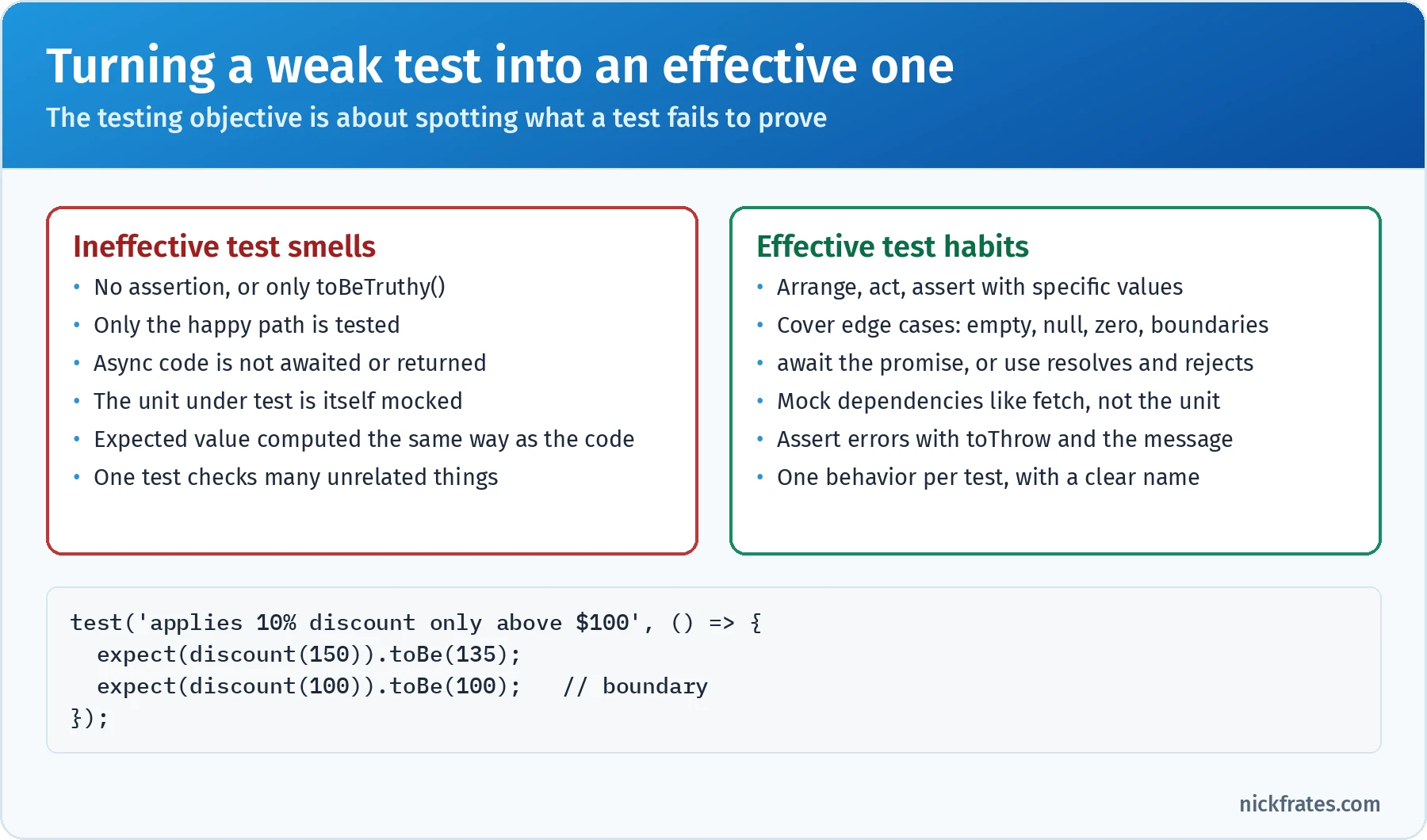
Most exam testing questions are one of these smells. Name it, then pick the fix.
Here's a typical before and after. The function applies a 10% discount to orders over $100 and rejects negative totals:
The weak test would still pass if the discount were 50%, if the boundary were >= instead of >, or if negative totals were silently accepted. The improved tests would catch all three. That's the question to ask on the exam: what bug could slip past this test?
Async tests. If a test starts a promise and doesn't wait for it, the test finishes first and passes no matter what the promise does. Make the test function async and await the call, return the promise, or use await expect(promise).resolves.toEqual(...). Adding expect.assertions(n) makes a test fail if the expected number of assertions never ran, which catches skipped then or catch blocks.
Coverage is not effectiveness. A test can execute every line (100% coverage) without asserting anything meaningful. Coverage tells you what code ran, not what behavior is proven.
Testing Lightning Web Components. LWC uses Jest through the @salesforce/sfdx-lwc-jest package. A test creates the component with createElement from lwc, appends it to document.body, then queries its shadow DOM with element.shadowRoot.querySelector(). After changing a property, await Promise.resolve() gives the component a microtask to re-render before you assert, which is the event loop showing up in a testing context. Apex calls and wire adapters are mocked.
Key takeaway: an effective test asserts specific outcomes, covers boundaries and error paths, waits for async work, and mocks only dependencies.
Practice questions: Testing
Question 1. This test passes, even though the expected name is wrong. What change makes the test effective?
- A. Replace the assertion with
expect(user).toBeTruthy() - B. Replace
toBe('Bob')withtoEqual('Bob') - C. Move the
fetchmock into anafterEachblock - D. Make the test
asyncandawait fetchUser(1)before asserting (or return the promise chain)
Answer: D. The test never waits for the promise. Jest sees the synchronous test function return, marks it as passed, and the assertion runs later, after the test is over. Awaiting (or returning) the promise makes Jest wait, so the wrong expected value fails the test as it should. Adding expect.assertions(1) is a good extra safeguard. Why not the others: toEqual doesn't fix the timing, and for strings it behaves the same as toBe (B); a mock set up in afterEach would run after the test, so fetch wouldn't be mocked during it (C); toBeTruthy is weaker and still doesn't wait (A).
Cert Lab by Nick Frates
Trace code until it feels automatic
Most questions on this exam show a snippet and ask what it logs. The JavaScript Developer Cert Lab drills exactly that across all seven sections, with an explanation for every answer choice so you learn why the output is what it is.
Practise JavaScript questions, $9.99 →Deep dive: design decisions and code tracing
Two skills cut across every section: picking the right construct for a requirement, and tracing a snippet line by line without running it. Here's a reference for the first and a method for the second.
Design decisions at a glance.
| Decision | Choose | When |
|---|---|---|
const, let or var | const by default, let when reassigning | Avoid var in new code; know its rules for reading old code |
| Arrow or regular function | Arrow for callbacks and transforms | Regular functions or methods when you need your own this, arguments or new |
| Class or factory function | Class for many instances sharing methods, or for inheritance | A factory with closures for simple private state without this |
for...of, forEach or map | map to build a new array, for...of when you need await, break or continue | forEach only for simple synchronous side effects |
?? or || | ?? when 0, '' or false are valid values | || when any falsy value should fall back |
textContent or innerHTML | textContent for any user-provided text | innerHTML only for trusted, sanitized markup |
Promise.all or allSettled | all when every result is required | allSettled when partial success is useful |
Sequential or parallel await | Parallel with Promise.all for independent calls | Sequential when each call needs the previous result |
A five-step method for tracing code. When a question shows a snippet and asks what it logs, work through it in this order, on your scratch paper or whiteboard:
- Hoist. List every declaration in each scope. Function declarations are fully available from the top.
varnames exist from the top asundefined.let,constandclassnames exist but throw aReferenceErroruntil their line runs (the temporal dead zone). - Resolve names. For each variable use, find the nearest enclosing scope that declares it. Watch for shadowing, where an inner declaration hides an outer one with the same name.
- Find
thisat each call site using the rules from the Objects section. Ignore where the function was written unless it's an arrow function. - Split the timeline. Mark each line as synchronous, microtask (promise callbacks, code after
await) or task (timers, events). Write the synchronous output first, then the microtasks in queue order, then the tasks. - Track identity. For every assignment involving an object or array, ask whether it creates a new object or shares a reference, and whether the method you're calling mutates.
Hoisting in action. Each of these lines behaves differently, and the exam likes to put two of them side by side:
Note the difference in the last two errors: touching a let before its line is a ReferenceError, while calling a var function expression too early is a TypeError ("helper is not a function"), because the variable exists and holds undefined.
The loop closure classic. With var, there's one i shared by the whole loop, so every callback sees its final value. With let, each iteration gets a fresh binding:
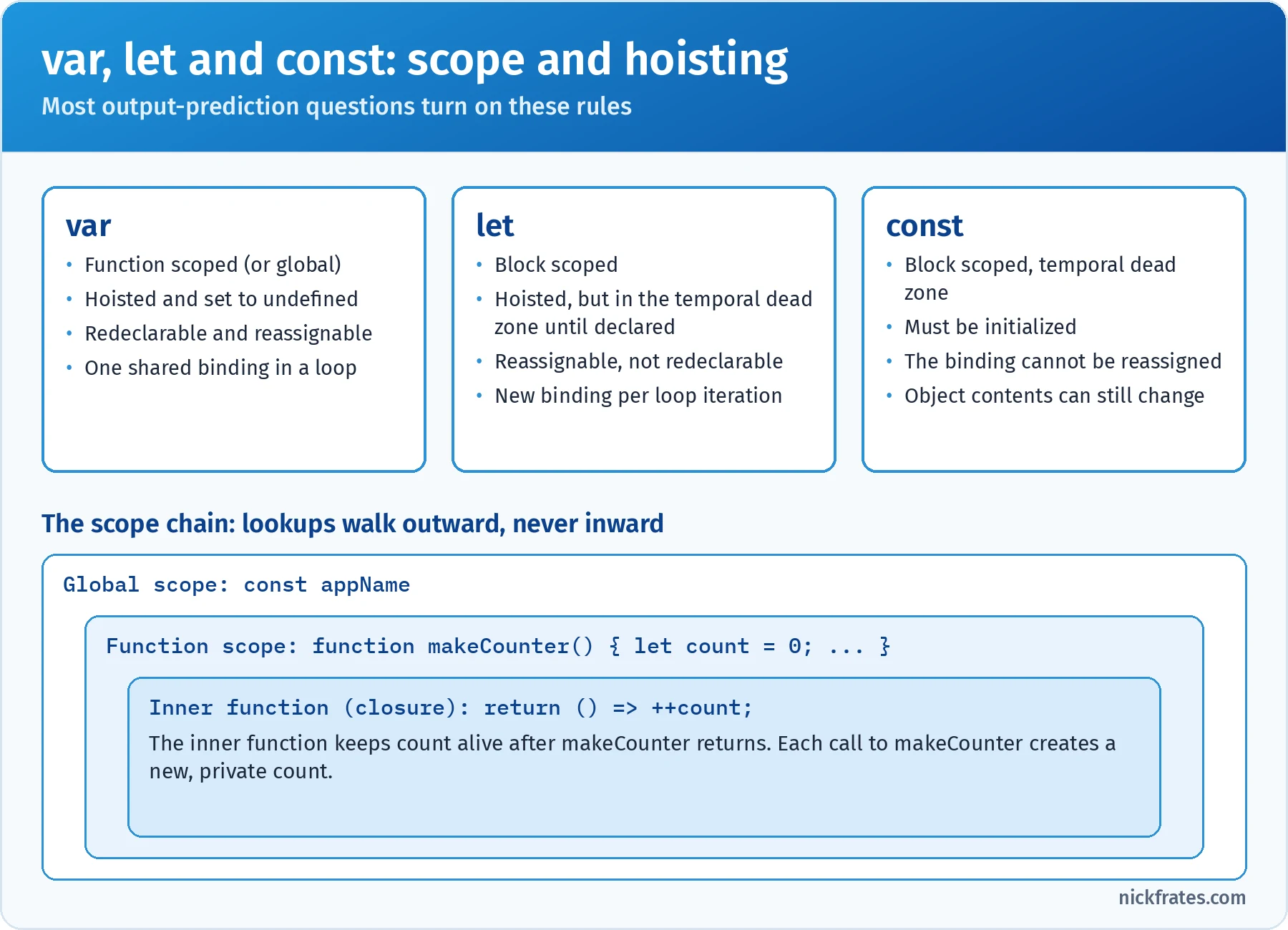
Name lookups walk outward through enclosing scopes. Closures keep those scopes alive.
Control flow details that change output. A few more patterns that show up in execution-flow questions:
- Short-circuiting skips evaluation. In
user && user.save(),save()never runs ifuseris falsy. Ina || b(),b()never runs ifais truthy. - Block-scoped declarations shadow outer ones.
let x = 1; { let x = 2; } console.log(x);logs1. - Strict mode changes plain calls. Inside classes and modules, a function called on its own has
this === undefined, so readingthis.anythingthrows aTypeError.
Worked example: a JavaScript order tracker, end to end
Let's put the outline together with a fictional project, the kind of small app a Salesforce or web developer actually builds.
The customer. Ridgeway Outfitters sells camping gear online. Its support team wants an order tracker page: search orders, see status cards grouped by status, cancel open orders, and get a warning when the shipping API is slow. A small Node.js service sits between the page and the warehouse system.
Shape the data (Variables, Types, and Collections). The warehouse API returns JSON with ISO date strings and money in cents. The developer parses it with a reviver that turns placedAt into a Date, keeps money as integer cents to avoid floating-point errors, and formats it only for display with Intl.NumberFormat. Orders are grouped by status with reduce.
Write a utility module (Objects, Functions, and Classes). Pure helpers live in orders.js with named exports, and the page imports only what it needs. An OrderStore class keeps the list in a private #orders field, exposes a get open() getter, and uses a static fromJSON() factory. Search input is wrapped in the debounce closure from earlier so the API isn't called on every keystroke.
Build the UI and events (Browser and Events). Cards are rendered with createElement and textContent, never innerHTML, because order notes contain customer-typed text. One delegated click listener on the card container handles every Cancel button with event.target.closest('button[data-order-id]'). When a card is selected, the component dispatches an orderselect custom event with the order ID in detail, so the rest of the page can react without tight coupling. The last search term goes in sessionStorage so a refresh keeps it, but a new tab starts fresh.
Load data asynchronously (Asynchronous Programming). The page loads orders, carrier status and return policies in parallel with Promise.allSettled, so a carrier outage still shows orders. Each fetch checks response.ok. A timeout uses AbortController plus setTimeout, and the slow-API warning appears if the request takes more than three seconds.
Add a Node.js service (Server Side JavaScript). An Express app exposes /api/orders, reads the warehouse key from process.env, and streams the nightly order export with fs.createReadStream() rather than loading it into memory. Jest is a devDependency, the lockfile is committed, and the CI pipeline runs npm ci then npm test.
Test and debug (Debugging and Error Handling, Testing). Unit tests cover label() with zero cents, large totals and missing lines; the grouping function with an empty array; and loadDashboard() with one mocked rejection, awaited properly. A rare NaN total turns out to come from a line item with a missing price, found with a conditional breakpoint instead of a dozen console.log calls.
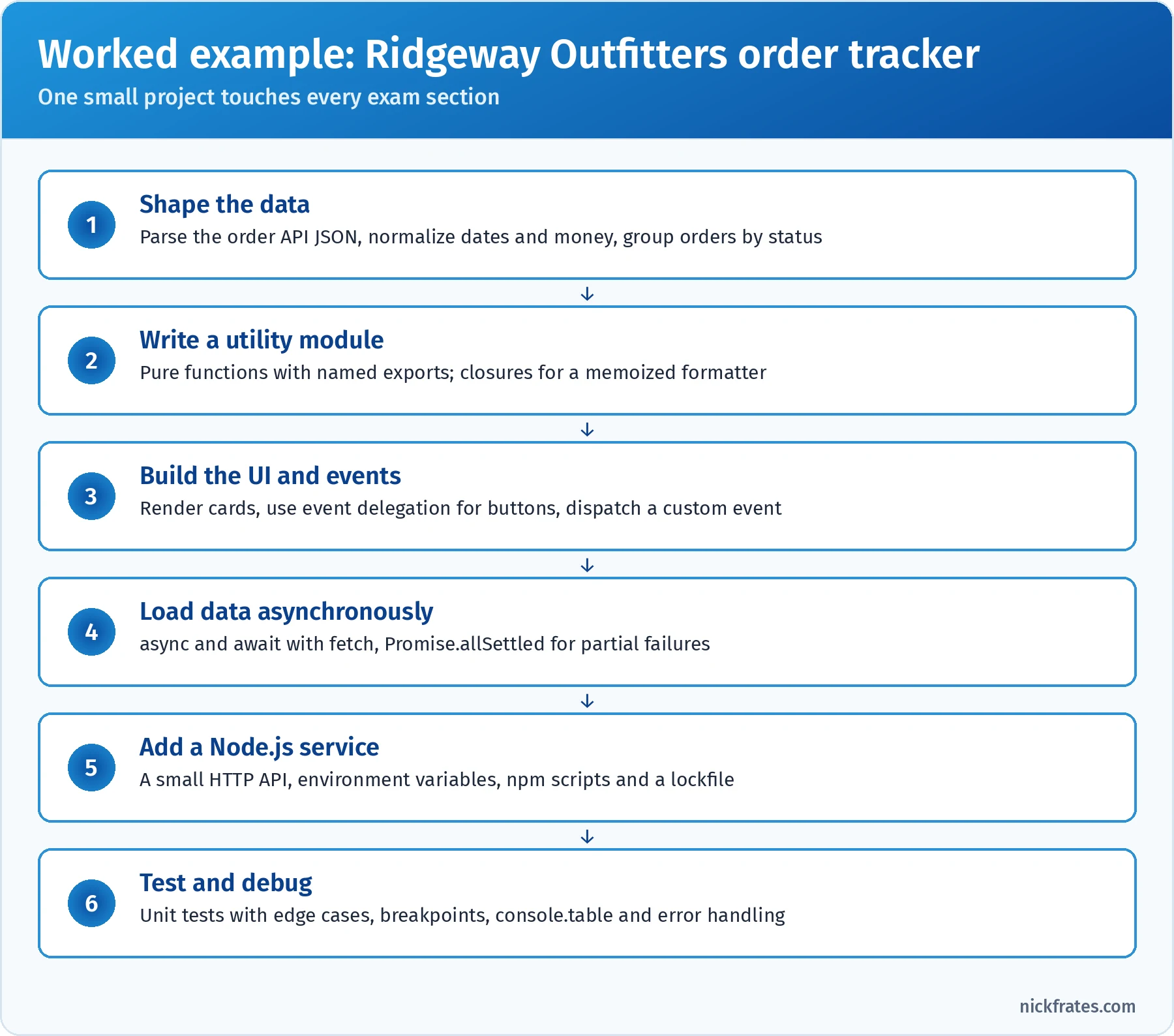
Every exam section shows up in one small, realistic project.
Practice questions: worked example
Question 1. Ridgeway's tracker must turn the order list into an object such as { open: [...], shipped: [...] }. Which implementation does that correctly for any number of statuses?
- A.
orders.map((o) => ({ [o.status]: o })) - B.
orders.reduce((acc, o) => { (acc[o.status] ??= []).push(o); return acc; }, {}) - C.
orders.reduce((acc, o) => { (acc[o.status] ??= []).push(o); return acc; }) - D.
orders.filter((o) => o.status)
Answer: B. reduce with an empty object as the initial value builds one accumulator. ??= creates the array for a status the first time it appears, and the callback returns the accumulator for the next item. (Newer runtimes also offer Object.groupBy(), which is newer than the exam.) Why not the others: map returns an array of one-key objects, not one grouped object (A); without an initial value, reduce uses the first order as the accumulator, so statuses get added as properties of that order object (C); filter only removes orders without a status (D).
Question 2. Out of about 400 orders, a handful show $NaN as the total. The developer wants the debugger to pause inside calculateTotal() only for those orders, without editing or redeploying code. What should they use?
- A.
console.log(total)on every line of the function - B. A
debugger;statement at the top ofcalculateTotal() - C. A conditional breakpoint on the return line with the condition
Number.isNaN(total) - D. The Network panel, filtered to the orders API
Answer: C. A conditional breakpoint pauses only when its expression is true, so the developer stops exactly on the broken orders and can inspect the line items in the Scope panel. It's set in DevTools, so no code changes are needed. Why not the others: debugger; requires a code change and pauses on every one of the 400 calls (B); scattering console.log also means editing code and produces noise (A); the Network panel shows the raw response, not where the calculation goes wrong (D).
Question 3. When a support agent selects an order card, the tracker must notify a listener registered on document, and include the order ID. The card elements are plain DOM elements (no shadow DOM). Which code should the card dispatch?
- A.
document.orderselect(id) - B.
card.dispatchEvent(new Event('orderselect', { detail: { id } })) - C.
card.dispatchEvent(new CustomEvent('orderselect', { detail: { id } })) - D.
card.dispatchEvent(new CustomEvent('orderselect', { detail: { id }, bubbles: true }))
Answer: D. CustomEvent carries data in detail, and bubbles: true lets the event travel up from the card to document, where the listener is registered. Inside an LWC, you'd also need composed: true to cross the shadow boundary. Why not the others: a plain Event ignores the detail option, so the ID is lost (B); without bubbles: true the event stays on the card and never reaches document (C); document has no such method, and calling one directly would couple the card to the page (A).
Hands-on checklist
Do these in a browser console, a small HTML file or Node.js. Each one maps to likely exam questions.
- Log
typeoffor every type, includingnull, a function, an array andNaN. Then test the eight falsy values withBoolean(). - Sort
[10, 9, 1, 100]with and without a compare function. Confirm thatsort()mutates andtoSorted()doesn't. JSON.stringifyan object withundefined, a function, aDate,NaNand aMap. Then parse it back with a reviver.- Build a class hierarchy with a private field, a static method, a getter and a subclass. Break it by touching
thisbeforesuper(). - Create two ES modules with named and default exports, then load them in the browser with
<script type="module">and in Node with"type": "module". - Build a nested HTML list with capture and bubble listeners on each level. Click and log the order, then add
stopPropagation()at different levels. - Call a public API with
fetch, request a URL that returns 404, and handle it with aresponse.okcheck. Add anAbortControllertimeout. - Write five event-loop puzzles mixing
setTimeout,Promise.then,queueMicrotaskandawait. Predict the output before running them. - Set a conditional breakpoint, a logpoint and an event listener breakpoint in DevTools. Try
console.table,console.timeandconsole.assert. - Write a weak Jest test, then improve it with exact values, boundaries, an error case and an awaited async case.
Common exam traps
typeof nullis"object". Andtypeofan array is"object"too; useArray.isArray().+concatenates if either side is a string. Every other arithmetic operator converts to numbers.sort()mutates and sorts as strings by default. So doreverse()andsplice();slice()doesn't.reduceon an empty array without an initial value throws.JSON.stringifydropsundefinedand functions and turnsNaNintonull; dates become strings.constdoesn't freeze objects, andObject.freezeis shallow.- Arrow functions don't have their own
this. Passing a regular method as a callback losesthis. - Derived constructors must call
super()before usingthis. event.targetisn't always the element with the listener. That'scurrentTarget.preventDefault()doesn't stop propagation, andstopPropagation()doesn't cancel the default action.fetchresolves on HTTP errors. Checkresponse.ok.- A
tryaroundsetTimeoutdoesn't catch errors thrown in the callback. - The promise executor runs synchronously;
thencallbacks never do. - Microtasks run before timers, even a
setTimeoutwith a 0 ms delay. forEachdoesn't wait for async callbacks. Usefor...oforPromise.all.- A test that doesn't await its promise passes no matter what.
Flashcard terms
- Primitive: an immutable value of type string, number, bigint, boolean, undefined, null or symbol.
- Reference: what an object variable holds; copying it shares the same object.
- Type coercion: implicit or explicit conversion between types, such as
'5' * 2giving10. - Falsy: one of eight values treated as false:
false,0,-0,0n,'',null,undefined,NaN. - Nullish coalescing (
??): returns the right side only when the left isnullorundefined. - Temporal dead zone: the period before a
let,constor class declaration runs, when accessing it throws aReferenceError. - Hoisting: declarations being processed before code runs; function declarations are fully usable early.
- Closure: a function plus the variables it captured from the scope where it was created.
- Prototype chain: the linked objects JavaScript searches when a property isn't found on an object.
- Private field (
#x): a class field accessible only inside the class body. - Live binding: an ES module import that reflects the exporter's current value and can't be reassigned by the importer.
- Event propagation: the capture, target and bubble phases an event travels through.
- Event delegation: handling child events with one listener on a common ancestor.
- CustomEvent: a developer-defined event that carries data in
detail. - Conditional breakpoint: a breakpoint that pauses only when an expression is true.
- Promise: an object for a future value that settles once, as fulfilled or rejected.
- Microtask: a high-priority callback, such as a promise reaction, run before the next task.
- Task (macrotask): a callback such as a timer or UI event, run one per event loop turn.
- Event loop: the mechanism that runs all microtasks, then one task, whenever the call stack is empty.
AggregateError: an error holding several errors, thrown byPromise.anywhen every promise rejects.- Stream: a way to process data in chunks instead of loading it all into memory.
package-lock.json: the record of exact installed versions, used bynpm ci.- Caret range (
^): allows minor and patch updates within the same major version. - Test double: a stand-in for a dependency, such as a mock, stub, spy or fake.
- Boundary value: a test input at, just below or just above a limit.
Mixed practice exam: 4 more questions
Question 1. A developer schedules three retry messages in a loop. What's logged?
- A.
Retry undefinedthree times - B.
Retry 0,Retry 1,Retry 2 - C.
Retry 1,Retry 2,Retry 3 - D.
Retry 3,Retry 3,Retry 3
Answer: D. var is function scoped, so the loop has a single attempt variable. The callbacks run after the loop finishes, when attempt is 3. Changing var to let creates a new binding per iteration and logs 0, 1, 2. Why not the others: B is the output with let, not var; C is off by one and still assumes separate bindings; the variable is defined when the callbacks run, so it isn't undefined (A).
Question 2. In an ES module, a developer destructures a method from an object to pass it around. What happens on the last line?
- A. It logs
Tent (2 kg) - B. It logs
undefined (undefined kg) - C. It throws a
TypeError - D. It throws a
ReferenceError
Answer: C. describe is called on its own, so this comes from a plain call. ES modules are strict mode, which makes this undefined, and reading this.name on undefined throws a TypeError. Calling product.describe() or using product.describe.bind(product) fixes it. Why not the others: A would require this to be product, which only happens with a method call or bind; B is what a sloppy-mode script might show, because this would be the global object there, not in a module; the variable describe exists, so there's no ReferenceError (D).
Question 3. A long support form must keep a half-finished draft if the agent accidentally closes the browser and comes back the next day on the same computer. The draft shouldn't be sent to the server until the agent submits. Where should the page store it?
- A.
sessionStorage, withJSON.stringifyon save andJSON.parseon load - B.
localStorage, withJSON.stringifyon save andJSON.parseon load - C. A cookie, so it's available on every request
- D. A module-level variable in the page's JavaScript
Answer: B. localStorage persists for the origin until it's cleared, survives closing the browser, and isn't sent to the server. It only stores strings, so serialize the draft with JSON.stringify and parse it on load. Why not the others: sessionStorage is cleared when the tab closes (A); cookies are sent with every request and are limited to about 4 KB, which conflicts with the requirement (C); a variable disappears when the page unloads (D).
Question 4. What's the console output?
- A.
start,executor,end,done - B.
start,end,executor,done - C.
start,executor,done,end - D.
executor,start,end,done
Answer: A. The function passed to new Promise runs synchronously during construction, so executor logs right after start. Calling resolve doesn't run then callbacks immediately; they're queued as microtasks, so done logs after the synchronous end. Why not the others: B assumes the executor is asynchronous; C assumes then runs synchronously once the promise is resolved; D ignores that start is logged before the promise is created.
Quick-reference cheat sheet
| Topic | Remember |
|---|---|
| Format | 60 scored + up to 5 unscored, 105 min, 65% to pass, $200, retake $100 |
| Prerequisite and superbadge | No prerequisite; superbadge not required since October 1, 2025 |
| Largest sections | Objects, Functions, and Classes 25%; Variables, Types, and Collections 23% |
| Types | 7 primitives plus object; typeof null is "object"; Array.isArray() for arrays |
| Coercion | + with a string concatenates; - * / convert to numbers; === never coerces |
| Falsy | false, 0, -0, 0n, '', null, undefined, NaN |
| Arrays | sort, splice, reverse, push mutate; map, filter, slice, toSorted don't |
| JSON | Drops undefined and functions; NaN to null; dates to ISO strings; BigInt throws |
| this | Call site decides; arrows inherit; bind returns a new function |
| Classes | super() before this; #private; static on the class; methods on the prototype |
| Modules | Braces for named imports; default imports take any name; evaluated once; live bindings |
| Events | Capture, target, bubble; target vs currentTarget; delegate with closest() |
| fetch | Rejects only on network failure; check response.ok; cancel with AbortController |
| Errors | finally always runs; throw Error objects; try can't catch later callbacks |
| Event loop | Sync, then all microtasks, then one task; promises before setTimeout |
| Node | Streams for big files; npm ci with a lockfile; -D for dev tools; ^ minor, ~ patch |
| Testing | Specific assertions, boundaries, error paths, await async, mock dependencies only |
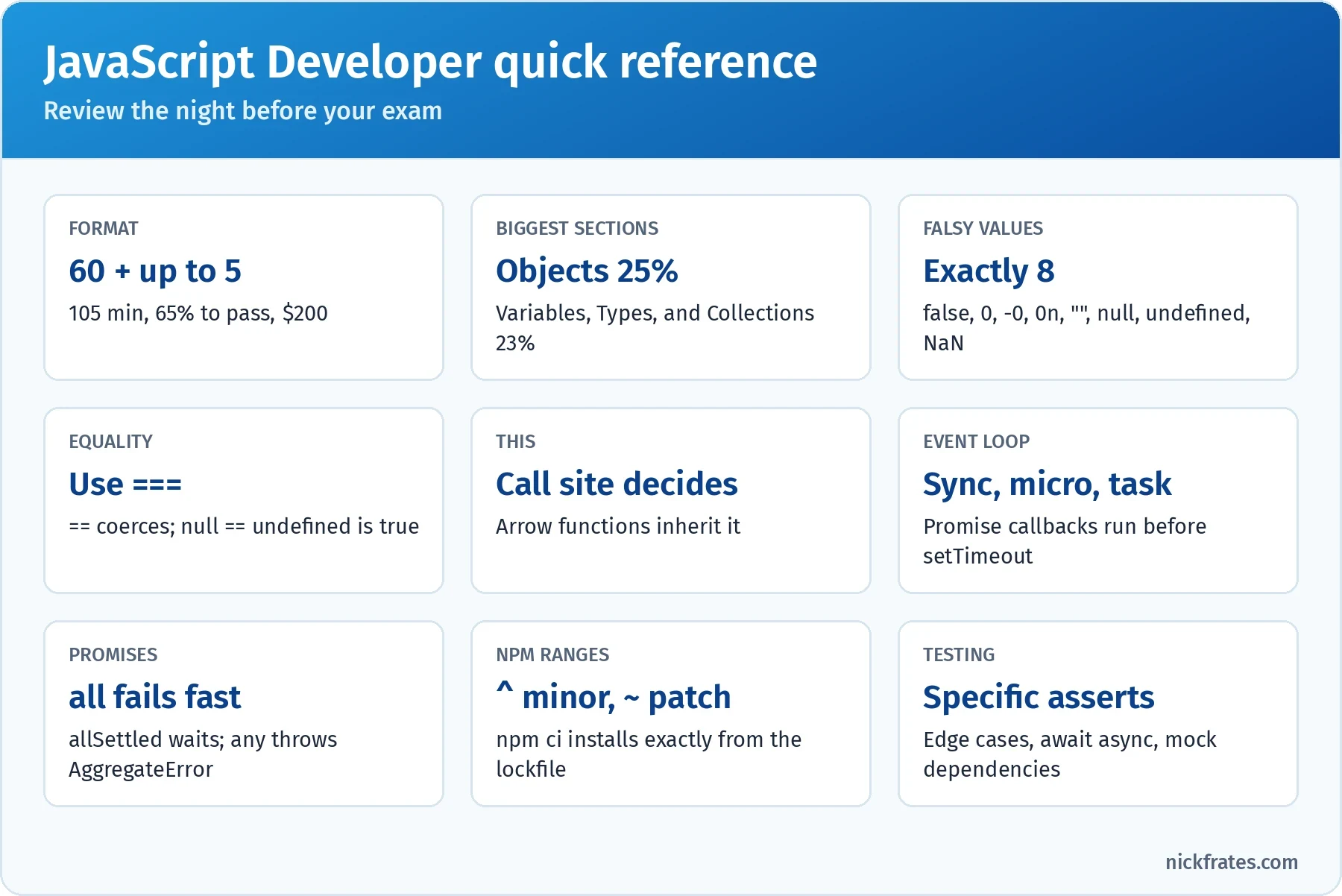
Review this the night before the exam.
Frequently asked questions
Is JavaScript Developer the same as JavaScript Developer I? Yes. Salesforce now calls the credential Salesforce Certified JavaScript Developer, but the exam guide, outline and weights are the same ones you'll find in material that says JavaScript Developer I, and trail URLs still use the old name.
Do I still need the Lightning Web Components Specialist superbadge? No. Salesforce retired that requirement on October 1, 2025. Passing the proctored exam earns the certification.
How hard is the exam? The passing score is 65%, but most questions hinge on one precise detail, such as whether a method mutates or when a callback runs. Developers who write JavaScript daily find it fair if they practice output-prediction questions. Developers who mostly write Apex usually need focused time on coercion, this, async and Node.
How much Salesforce is on the exam? Very little. The exam guide calls it an industry-standard JavaScript certification, and the outline is core JavaScript, the browser, Node.js and testing. Knowing LWC helps because it's modern JavaScript, but you won't be asked about Apex or org configuration.
Which JavaScript version should I study? Study modern JavaScript through roughly ES2022: let and const, arrow functions, classes with private fields, modules, promises, async and await, optional chaining and nullish coalescing. The exam aligns to Summer '22, so newer additions such as toSorted() or Object.groupBy() are nice to know but unlikely to be tested.
How do I keep the certification? Complete the annual JavaScript Developer certification maintenance badge on Trailhead before the due date, or the certification expires.
Should I take this or Platform Developer first? If you write Apex and work in orgs every day, start with Platform Developer. If you come from web development or spend most of your time in LWC, start here. The certification study guides hub can help you plan the rest of the path.
Related study guides
- Salesforce Platform Developer (formerly Platform Developer I) study guide for Apex, SOQL and the Salesforce side of Lightning Web Components.
- Salesforce Development Lifecycle and Deployment Architect study guide for environments, source control, testing and release management.
- Salesforce Platform App Builder study guide for the declarative side of building apps.
- Agentforce Specialist study guide for agents, prompts and the actions developers build for them.
- The Science of Studying for Salesforce Certifications for how to study.
- All Salesforce certification study guides.
Want to go deeper on automation? JavaScript and Flow meet more often than people expect: screen flows host Lightning Web Components, and a lot of what developers once coded is now built declaratively. Knowing where Flow ends and code begins makes you a better Salesforce developer. My Salesforce Flows course walks through record-triggered, screen, scheduled and platform event flows with real-world challenges.
Hope this helps!
Best,
Nick