Category: Newsletter

  • 🏆 How to Calculate Opportunity Win Rate in Salesforce 🏆

    🏆 How to Calculate Opportunity Win Rate in Salesforce 🏆

    Happy Saturday!

    Sometimes you need to calculate percentages in a Salesforce report.

    For example, how many opportunities did Bob Apples, the salesperson, close this week as a percentage of all the opportunities he had?

    This specific metric is called the win rate, and it can come up in various ways.

    Another example: How many accounts did Bob Apples meet with this year as a percentage of all his accounts?

    This metric might be called the meeting rate. In fact, I created a report for a client with this exact request earlier this week.

    Let me show you how to build this type of report in case you need it in the future.

    We'll build a report to track the Opportunity Win Rate.

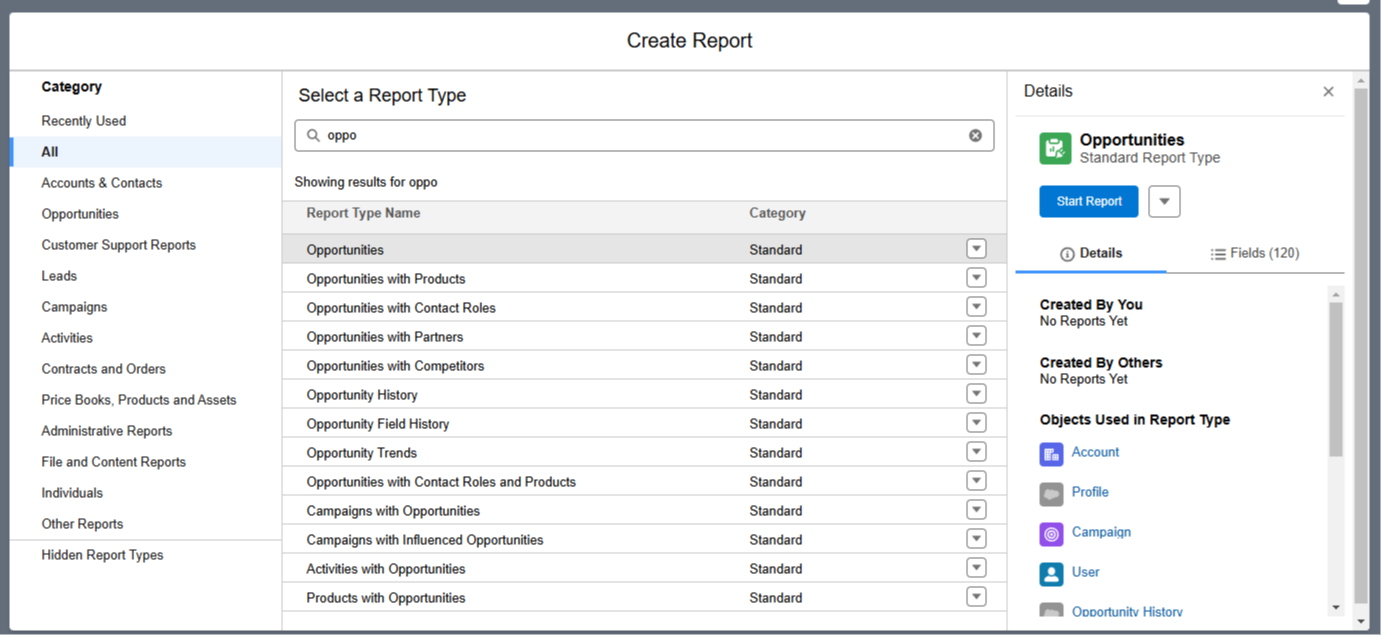
    Step 1: Create the report using the Opportunity object


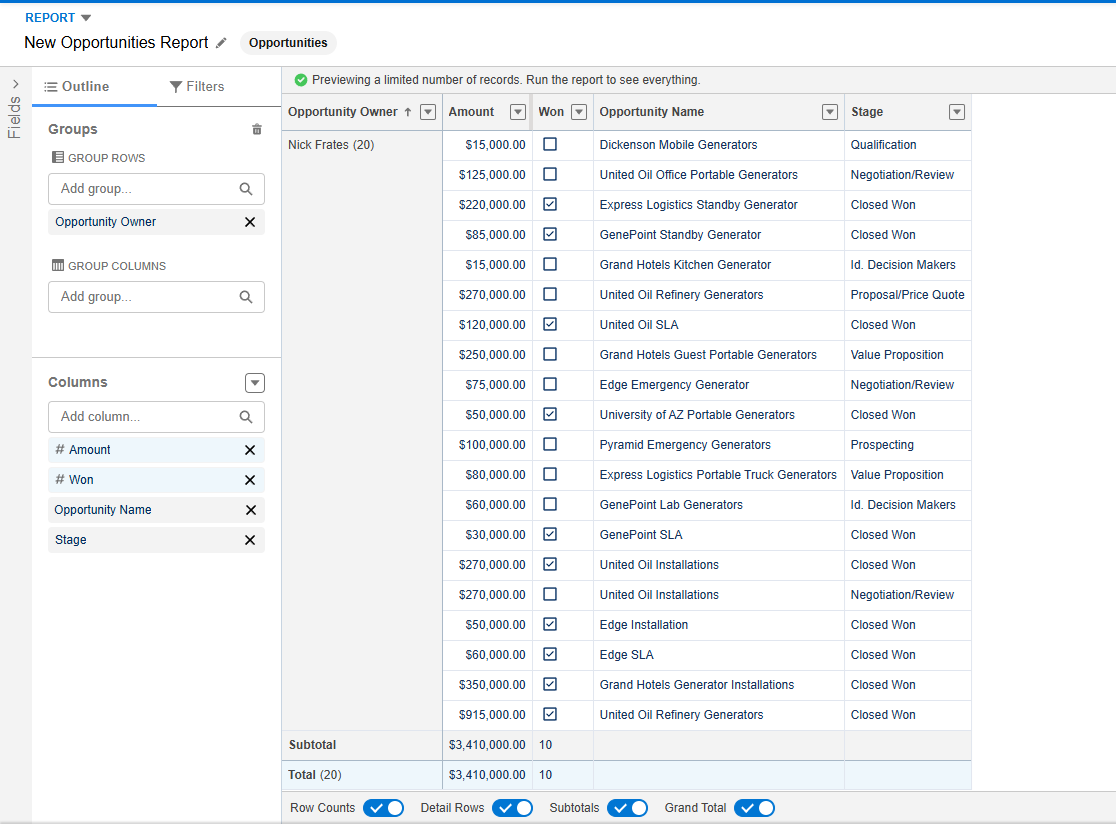
    Step 2: Add these fields to the report:

    1. Opportunity Owner
    2. Amount
    3. Won
    4. Opportunity Name
    5. Stage

    Make sure to group the rows by Opportunity Owner.


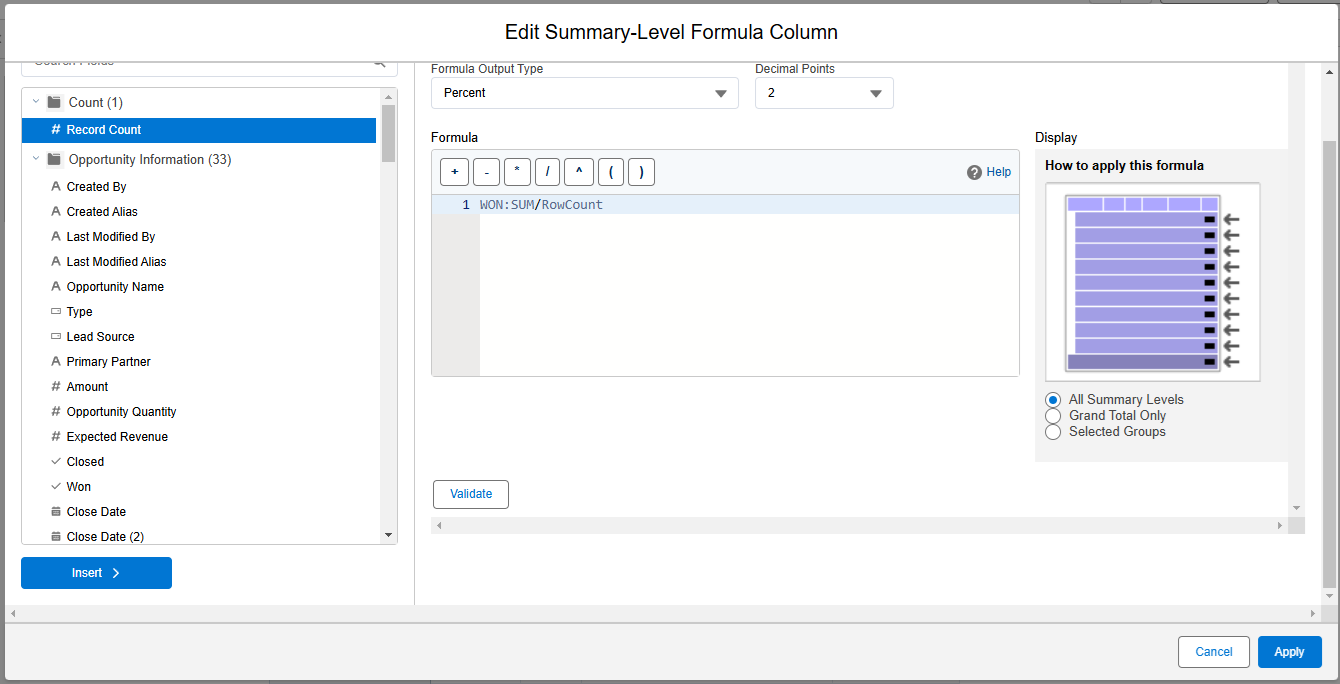
    Step 3: Add a custom summary formula to the report that is visible at all summary levels. Use this formula: WON:SUM / RowCount


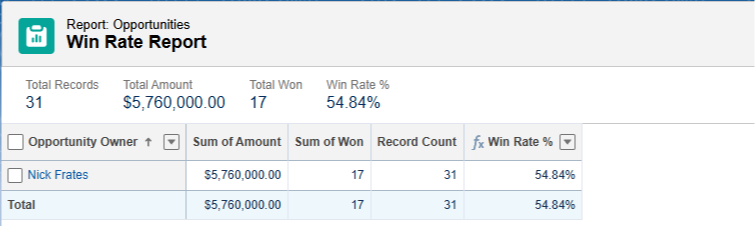
    Step 4: Save your report with the name "Win Rate Report" and then run it. Toggle OFF detail rows to easily see the Win Rate at a glance.


    You're done! You've now created a report that shows the number of won opportunities as a percentage of all opportunities in the report.

    If there are multiple opportunity owners, you'll see the win rate for each of them.

    For the Opportunity object, Salesforce conveniently provides a "Won" checkbox indicating whether the opportunity is closed or not.

    In some scenarios, you'll need to create your own checkbox—such as a formula field that returns true—to represent the scenario you're reporting on.

    Hope this helps!

    Best,

    Nick

  • Salesforce Saturdays

    Salesforce Saturdays

    Super short email this week!

    Many of you know that the major LLMs like ChatGPT, Perplexity, DeepSeek, and Grok offer deep research functionality.

    They scan their entire body of knowledge, and the internet, for up to ten minutes in order to answer a specific research question in depth.

    I recently asked ChatGPT's Deep research to break down the following question

    • Can you write a projection on what the salesforce ecosystem will look like over the next two or three years?
    • What type of jobs will still exist?
    • What type of jobs are will be removed?
    • How will AI affect current Salesforce professionals? 
    • If everyone can write code using a model where will value come from?
    • Job Market Outlook: Provide insights on job growth, demand shifts,  and specific roles
    • AI Impact: Explore AI’s influence on automation, workflow optimization, and job displacement
    • Emerging Skills & Roles: Research what new skills or certifications will be in demand
    • Industry Adoption Trends: Analyze how different industries will implement Salesforce and affect job prospects
    • Freelancing vs. Full-Time Employment: Provide insight into whether the ecosystem will lean toward full-time roles, consulting, or gig-based opportunities

    It thought deeply (for about seven minutes) and produced a comprehensive answer spanning several pages—which you can read for free on my blog at the link below!

    The Future of Salesforce Careers: 2025–2027 Job Market Outlook, AI Impact & Key Skills


    Blog Post

    My hope is that:

    1. The analysis is valuable to you in some way.
    2. You get a feel for what the $200/month ChatGPT Deep Research can do without having to pay for it!


    Best,

    Nick


    P.S. If you have any questions you'd like to ask Deep Research feel free to email them to me!

  • 📖 The Theory of Constraints

    📖 The Theory of Constraints

    Happy Saturday!

    This week I wanted to call your attention to a book worth knowing about.

    Unlike typical business books, it's written as a novel, and follows a factory manager named Alex Rogo as he struggles to save his manufacturing plant from being closed down.

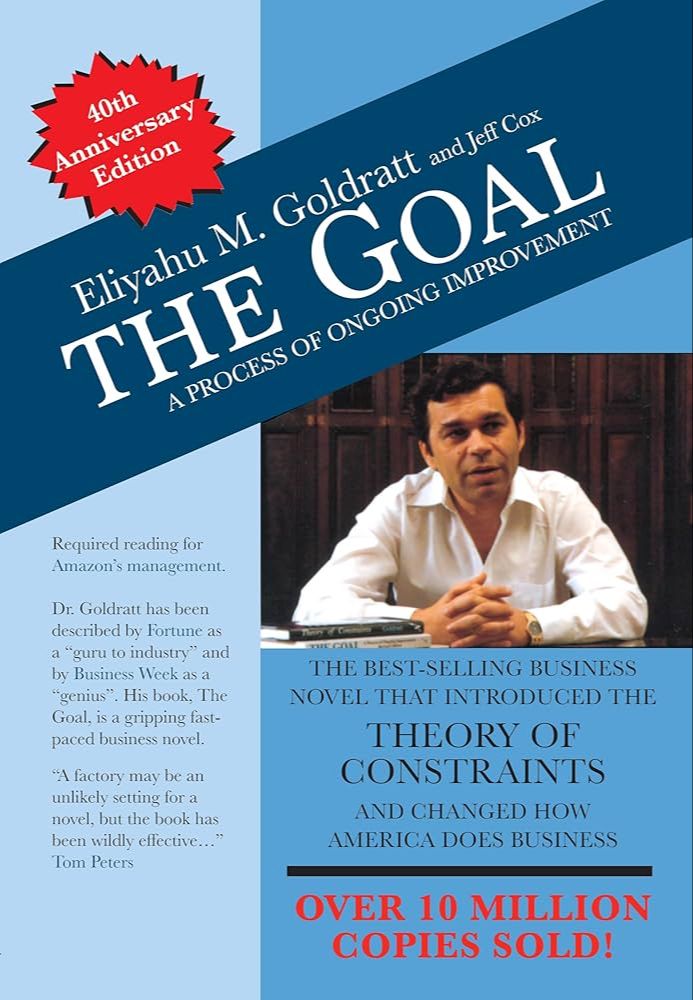
    The Goal: A Process of Ongoing Improvement by Eliyahu Goldratt


    At the heart of the book is what the author calls the Theory of Constraints (TOC).

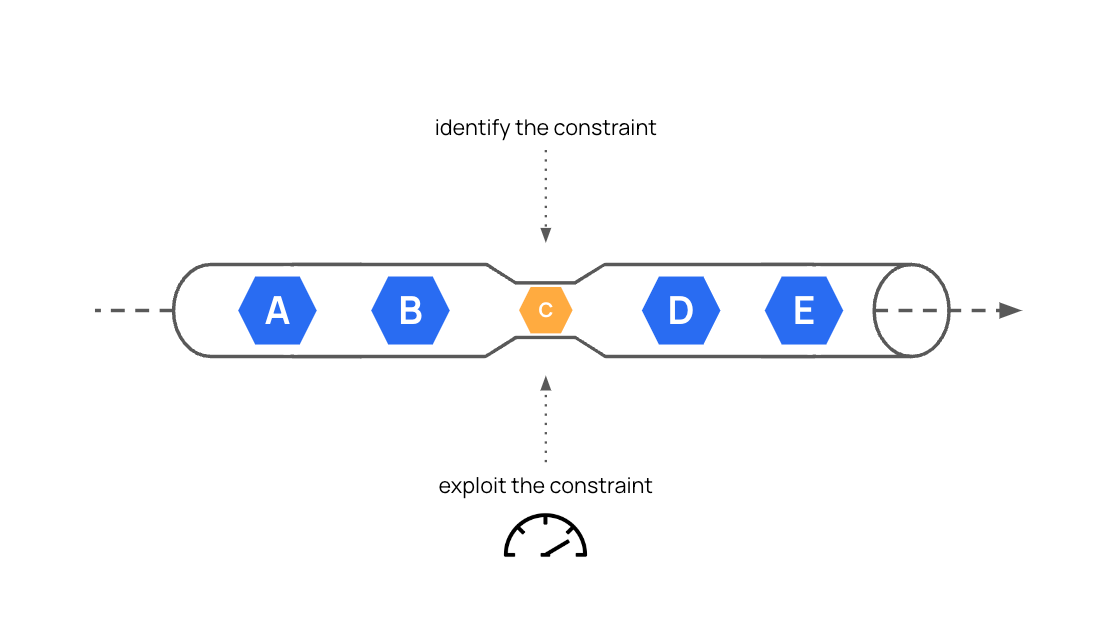
    The central concept is that in any business or process, there is usually one key limiting factor – the bottleneck or constraint – that determines the output of the entire system​.

    Improving anything that is not the constraint does little for the whole; to get big results, you must focus on identifying and managing the system’s weakest link​.


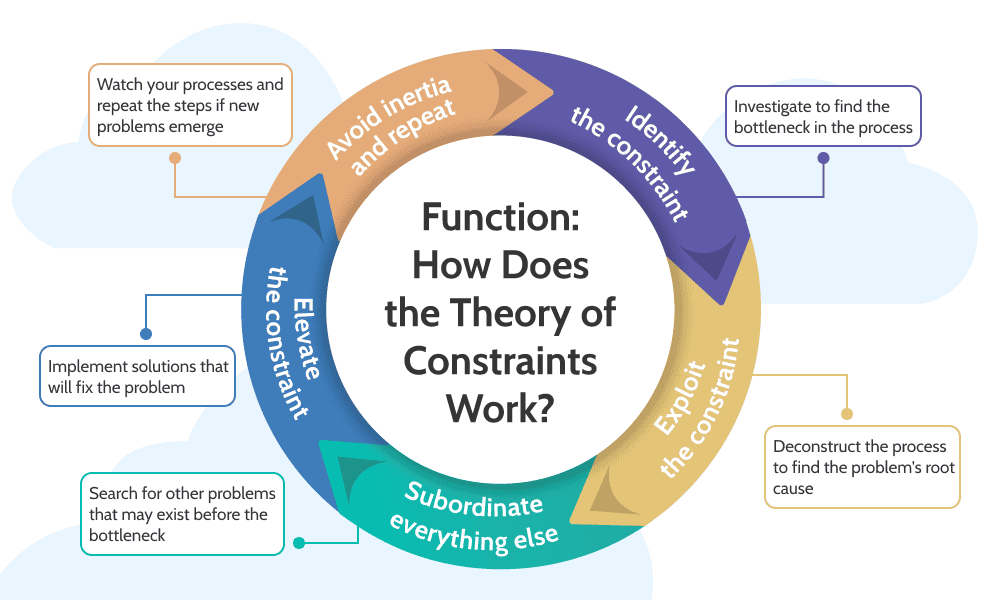
    Goldratt (the author) presents a five-step process (the “Five Focusing Steps”) to apply the Theory of Constraints in any operation​:

    1. Identify the system’s constraint – find the one bottleneck or weakest link limiting output​.

    2. Exploit the constraint – make sure it is used to its fullest capacity (e.g. keep the bottleneck machine working at all times on priority tasks)​.

    3. Subordinate everything else to the constraint – align the entire process to support the maximum output of the constraint (other parts may have to slow down or change to avoid overproduction ahead of the bottleneck)​.

    4. Elevate the constraint – invest in increasing the capacity of the bottleneck (e.g. add another machine or find innovative ways to expand its output)​.

    5. Repeat - Once one constraint is broken, repeat the process for the next constraint – but beware of inertia; never stop looking for the next weakest link​.
         

    This approach to systems thinking is extremely useful as a Salesforce professional.

    One of the key reasons your company exists is to make money.

    This is the goal.

    Every process, procedure, task, action, or activity the people in your company do (or don't do) is "the system" talked about in the theory of constraints.

    Throughput is the rate at which the system generates money through sales.

    You want to maximize this. 

    Here's a possible example.

    Scenario: A mid-sized software company's sales team struggled with stalled opportunities and slow revenue growth. Recognizing the issue, the Salesforce Administrator applied the Theory of Constraints to identify and eliminate the bottlenecks.

    Step-by-Step Solution:

    • Identify the Constraint:

      • The Admin noticed that sales reps spent excessive time on manual quote approvals and administrative tasks.

    • Exploit the Constraint:

      • Immediately streamlined Salesforce Opportunity layouts, enabling quicker data entry.

      • Implemented simple validation rules and quick actions, reducing clicks and speeding up approvals.

    • Subordinate Everything Else:

      • Paused non-critical Salesforce enhancement requests to focus fully on improving the sales process.

    • Elevate the Constraint:

      • Introduced Salesforce CPQ (Configure-Price-Quote) to automate and accelerate quoting.

      • Integrated DocuSign for immediate electronic signatures.

    • Repeat the Process:

      • After seeing immediate improvements, regularly revisited processes to identify the next bottleneck.

    Results:

    • Reduced quote approval time by 65%.

    • Increased opportunity win rate by 20%.

    • Achieved a measurable quarterly revenue increase of 18%.

    Key Takeaway: Applying the Theory of Constraints through strategic Salesforce Administration can directly increase sales productivity and revenue.

    Now this is only one possible example, but you can see how the logic applies.

    If you can incorporate systems thinking like this into your daily work it makes you extremely valuable.

    Have you encountered bottlenecks in your Salesforce processes?

    If so, consider reading The Goal for ideas on how to fix them!


    Best,

    Nick

  • ⚡How to Make Dynamic Salesforce Record URLs⚡

    ⚡How to Make Dynamic Salesforce Record URLs⚡

    Sometimes, in a Salesforce Flow, we need to email an end user a link to a record in Salesforce.

    One way to do that inside a Flow is by manually creating the link to the Salesforce record in the body of the email.

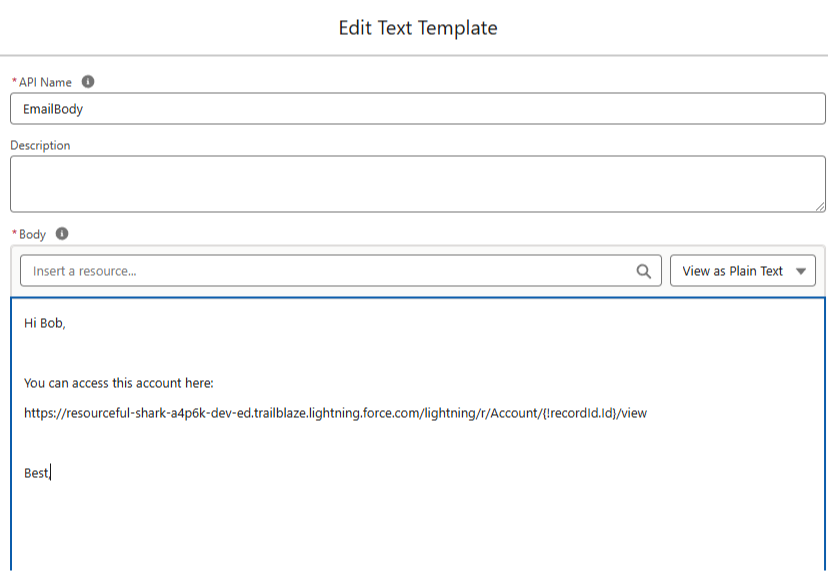
    You can do that by copy and pasting your Salesforce environment's URL directly into the EmailBody resource and inserting the RecordId as a Flow Resource.

    Like this:


    This approach does work, but when you move your Flow from a lower sandbox environment to higher sandbox environments (or to production), it means you need to recreate your URL in each environment.

    And if a production Flow ever goes back down to sandbox (say after a sandbox refresh) the URLs are broken again.

    Can we do this dynamically instead?

    Yes!

    Salesforce has a built in Global Variable that contains a URL to the current environment.

    Its meant to be used with API calls, but we can take the global variable, and apply some formula functions to find the current environment URL.

    Then we can use that URL anywhere we like.

    Let's break it down.

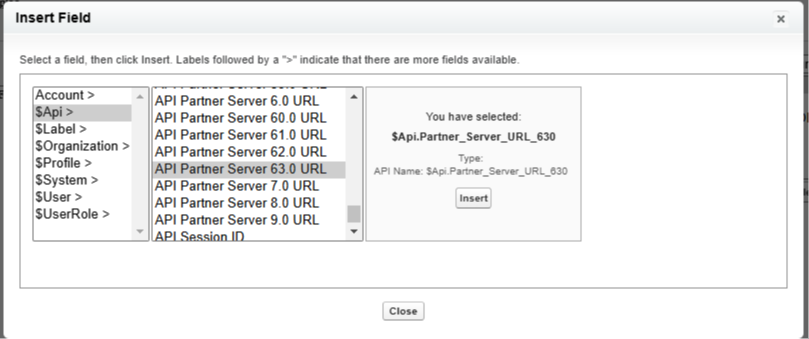
    First, this is the global variable that has your environment URL:


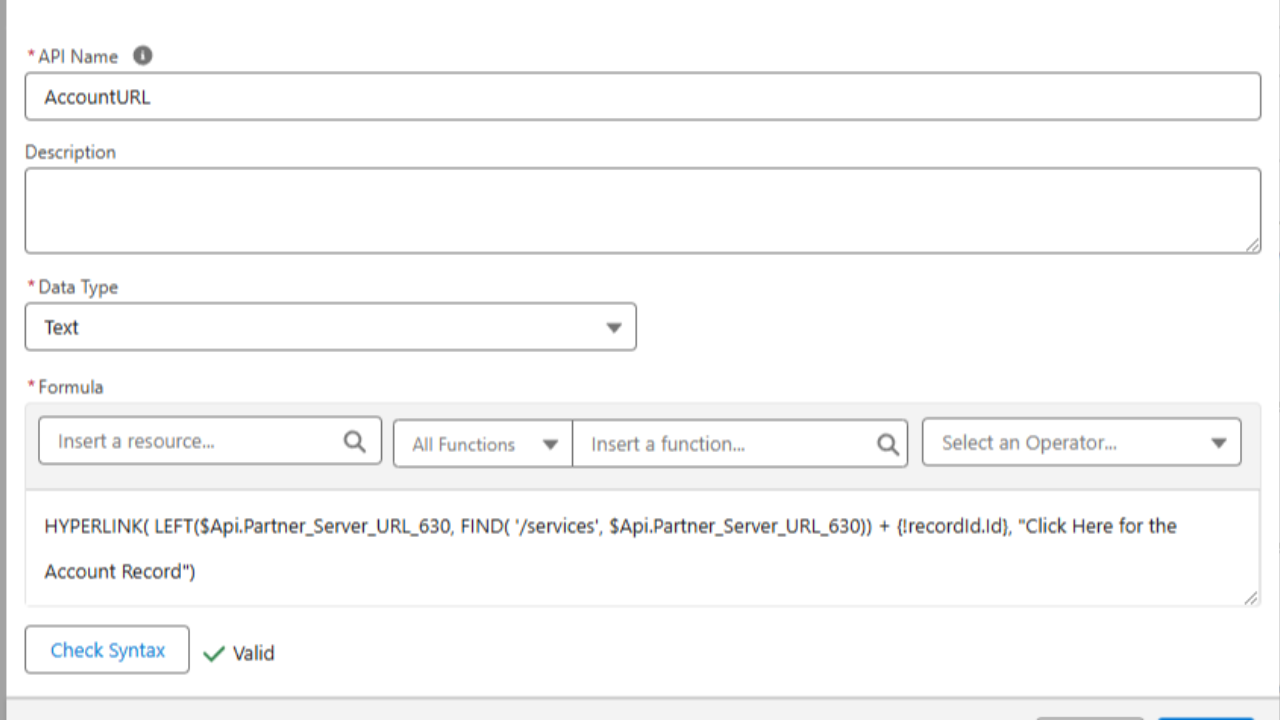
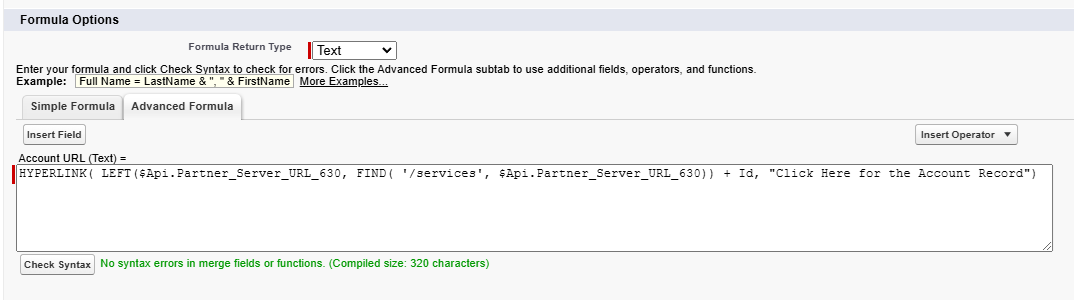
    In the formula field editor (in flows or fields) you can use the $API global variable to find the API Partner Server XX.X URL

    XX.X stands for the current API version which is 63.0 or 630 as of this writing.

    You'll want to choose the highest number which corresponds with the most recent API version.

    We insert the API global variable into our formula. It actually returns a longer URL than we need with extra stuff in it (which we don't want).

    To clear the "extra stuff" out, we use the FIND() function to find out where the "extra stuff" begins.

    Then we use a LEFT() function to return everything to the LEFT side of it in the URL.

    Finally we concatenate the Record ID of the record we want to the end of the formula to create a normal Salesforce record URL.


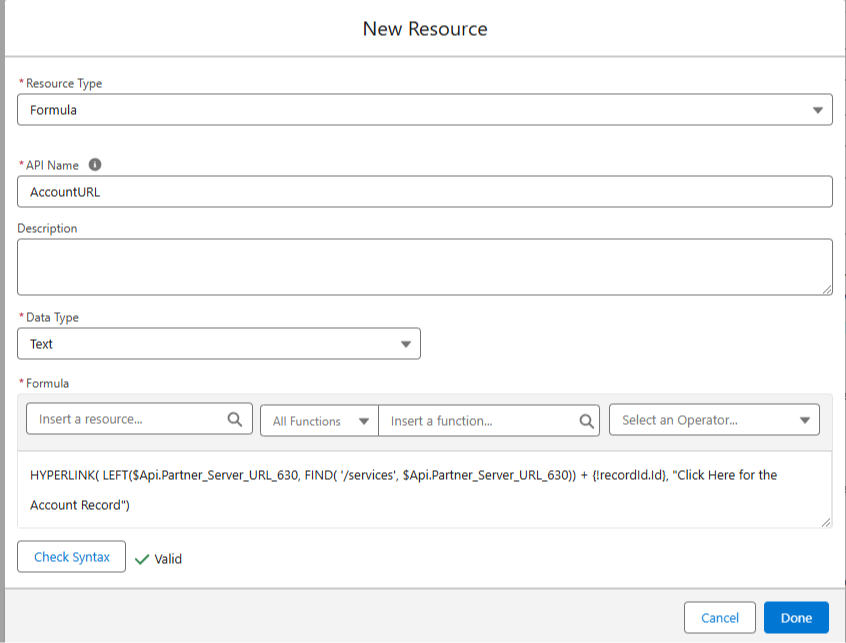
    Note: This exact same formula works in the Flow Builder, you just need to change it to use a flow variable for the Id rather than the formula editor Id shown in the screenshot above.

    Here's the formula from above:

    HYPERLINK( LEFT($Api.Partner_Server_URL_630, FIND( '/services', $Api.Partner_Server_URL_630)) + Id, "Click Here for the Account Record") 

    Below you can see the same thing in the Flow Formula editor:


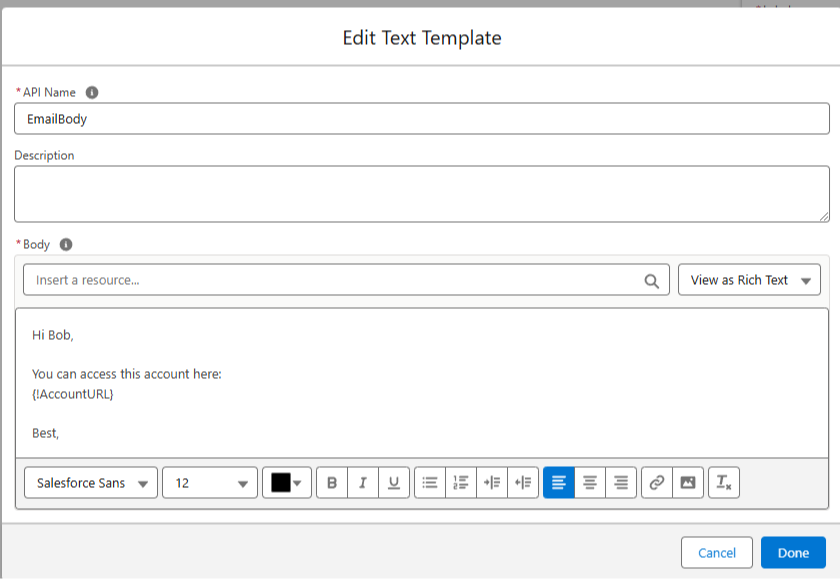
    With our formula built, we can add it to an EmailBody in text template configured for Rich Text:


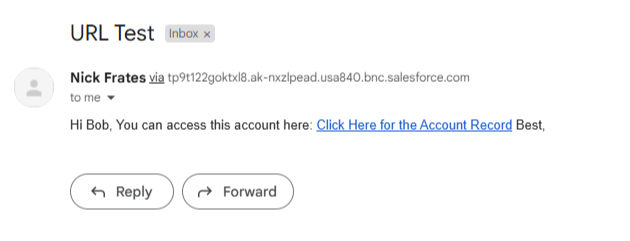
    And when the email goes out, it will include a clickable URL for the current environment to your record!


    No more broken URLs!

    You can set this up once and it's good to go for a long while.

    I was reminded of this solution this week and thought I'd share.

    Hope it helps!

    Best,

    Nick

     
  • 🚀 Salesforce Flow Docs, Done Instantly (No More Manual Work)

    🚀 Salesforce Flow Docs, Done Instantly (No More Manual Work)

    Manually documenting Salesforce Flows sucks.

    What if you could do it in one click?

    Introducing the Flow Documentation Generator 🎉🎉


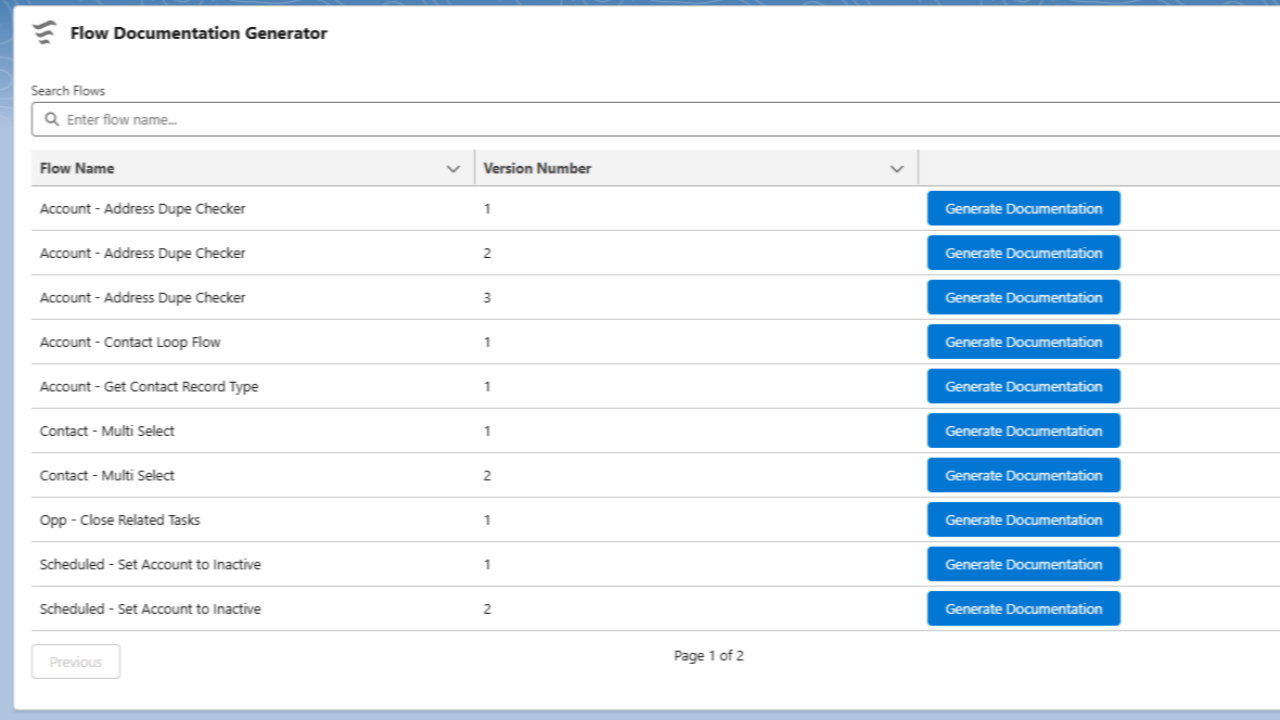
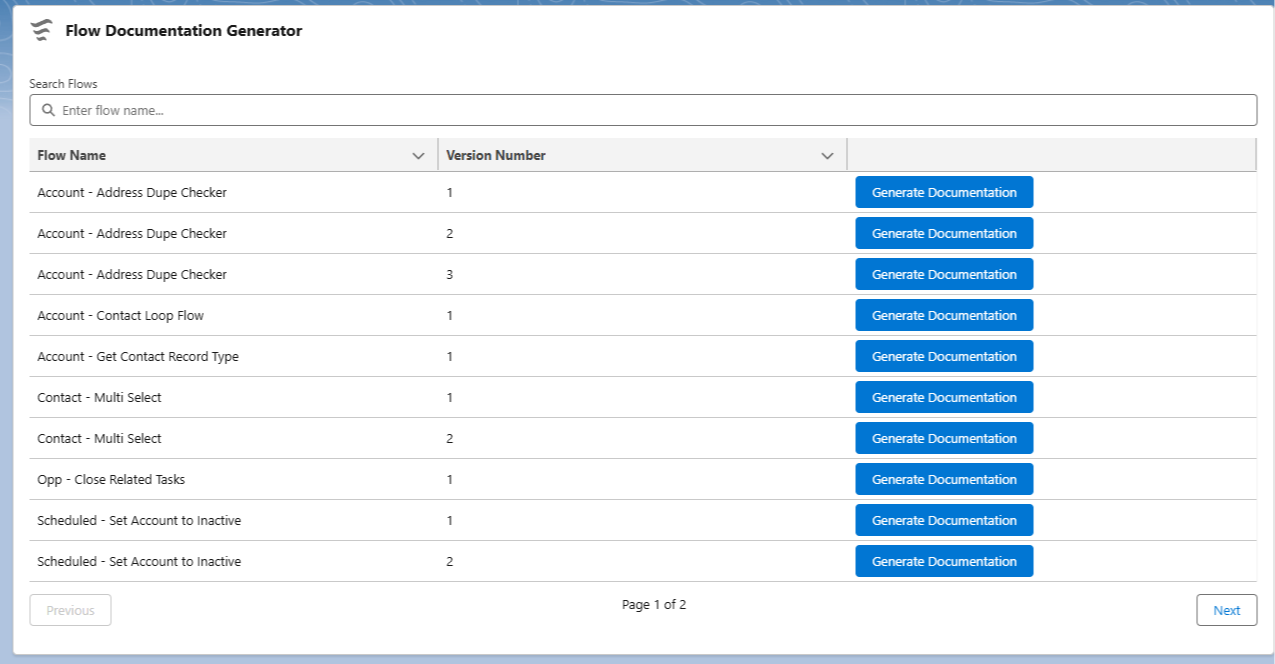
    This is a Lightning Web Component (LWC) that shows a searchable list of the Salesforce Flows you've built in your environment.

    Next to each flow is a button labeled "Generate Documentation".

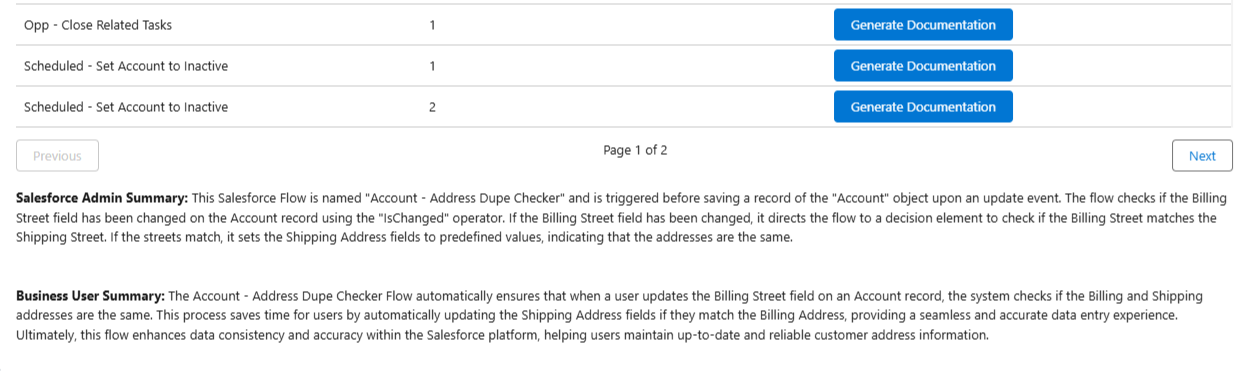
    When you press the button, the LWC sends the Salesforce Flow directly to ChatGPT, which then sends a simple summary of what the Flow does back into Salesforce and shows it in the component.

    It actually sends two summaries, one meant for a Salesforce admin and one meant for a business end user.


    Since this is the first version I built, the functionality is really simple.

    The prompt we send to ChatGPT is very basic, and the model we're using is the 3.5 turbo model, the cheapest and least powerful one.

    This is the actual prompt, written directly into the API Call:

    "You are an expert in documenting Salesforce flows. Given a flow configuration, produce a concise two-paragraph summary in HTML format. The first paragraph must start with <b>Salesforce Admin Summary:</b> and should simply describe the high level technical details for a Salesforce admin, all wrapped in <p> and </p> tags. The second paragraph must start with <b>Business User Summary:</b> and explain the overall purpose and business value for end users, also wrapped in <p> and </p> tags. Separate the two paragraphs with <br/><br/> and output exactly two paragraphs with no extra text."

    As you can see we're not asking for much from ChatGPT, so the summaries tend to be straightforward.

    But the future potential to do more is definitely "there".

    • We could spend more $ on compute to get the latest model with better logic and reasoning
    • We could make the prompt customizable so an admin could send better instructions with every request
    • We could cache the model responses and expand the context window so that the model could build a flow and troubleshoot with you in real time

    I think its cool.

    And definitely cheaper than the current Salesforce AI Flow offerings.

    Would you like to try it? 100% free.

    I packaged the whole thing so that you can install it into a Trailhead, Sandbox, or scratch org.

    Use this link:

    https://login.salesforce.com/packaging/installPackage.apexp?p0=04tDn000000Ry3A

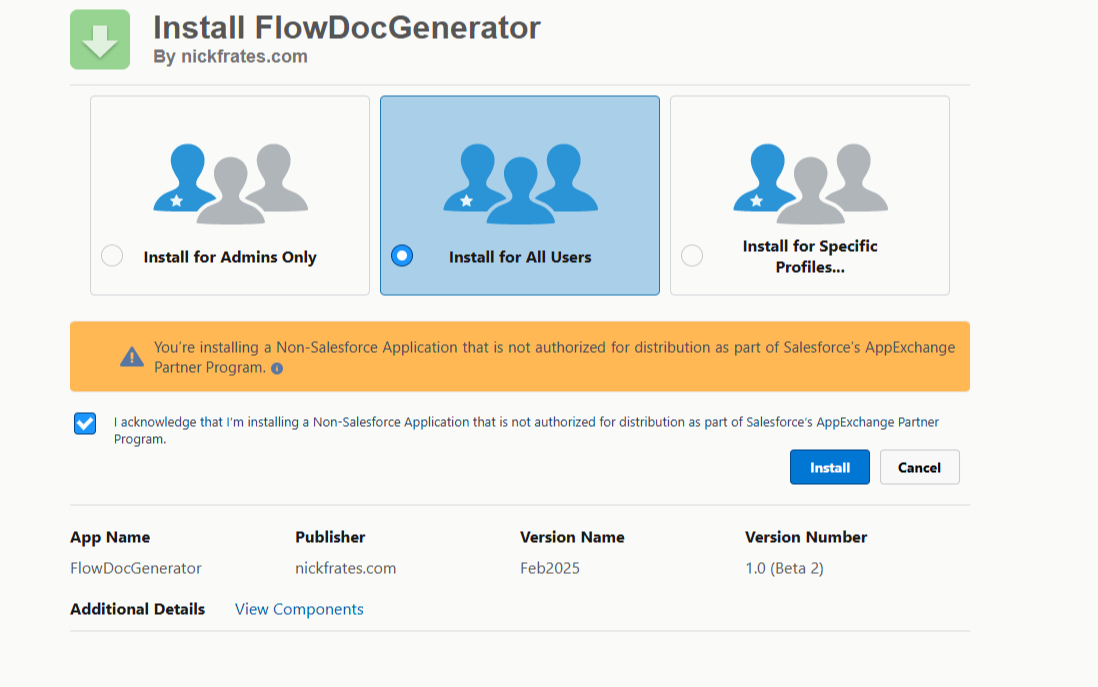
    When you go to install in your environment you'll be prompted to choose for Admins or All Users. Choose all users:


    It'll ask you to Approve Third-Party Access to the ChatGPT AI site api.openai.com. To use the package you'll need to grant access.

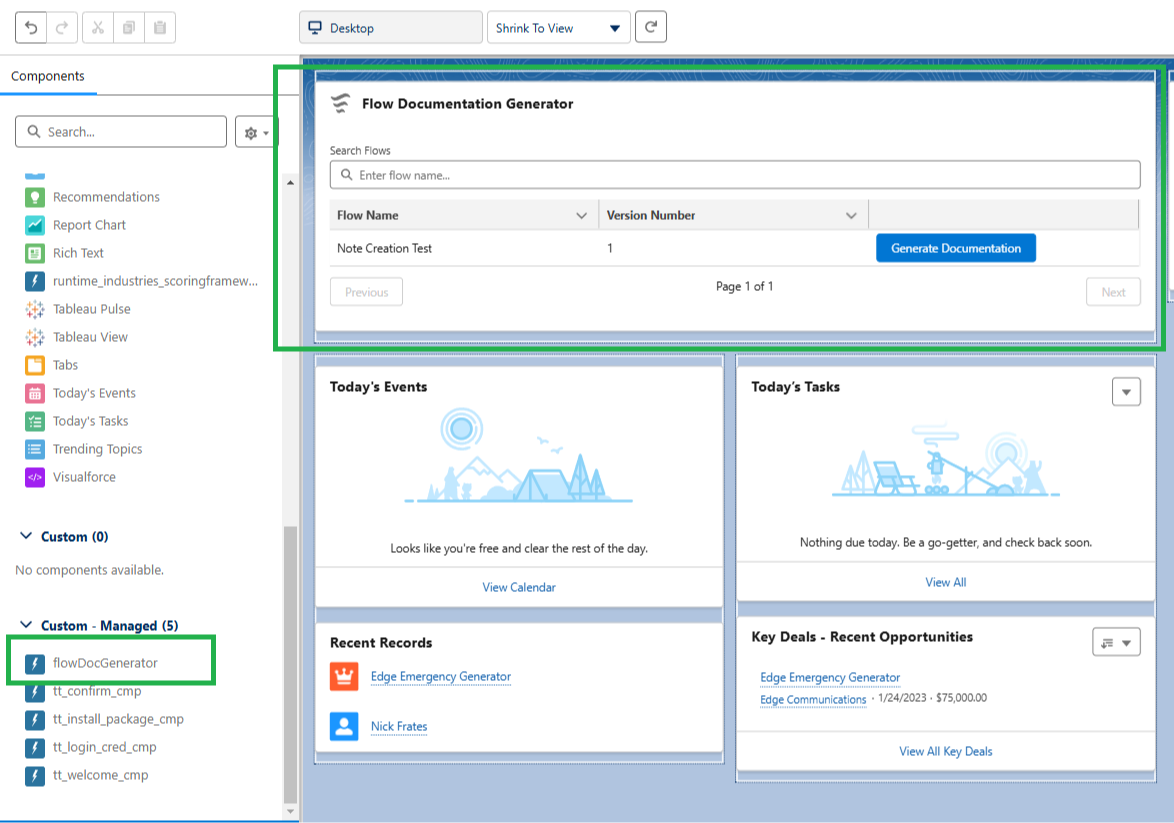
    Once installed, open up the Lightning App Builder on any Home, Record, or App Page and drag the component onto the screen and press Save.


    Then simply open the page you put the component on and press the button for the Flow you want to document.

    The summaries will appear below the list of Flows.

    A few other things to know:

    • This is a beta package. Beta packages can only be installed in scratch, sandbox, or Developer Edition orgs 
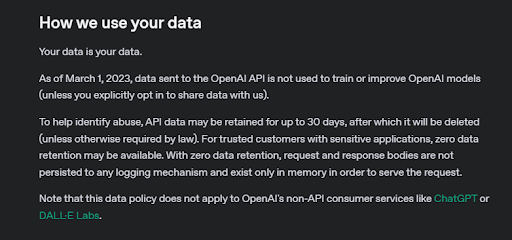
    • Your Flow data is sent to OpenAI, the company who built ChatGPT
    • The LWC only looks at data inside a Flow (the get records, decisions, assignments etc.)
    • No record data (accounts, contacts, etc.) in your Salesforce environment are queried
    • OpenAI says they don't store your data (scroll almost to the bottom at this link). I also put a screenshot below
    • Just in case, I'd recommend not sending anything sensitive. For example don't hardcode real customer data like First Name, Last Name, and Birthdate into a Flow Get Element and then ask the component to Document the flow
    • I believe this package is totally safe — but don't install it in your company environment if it would get you in trouble


    One more thing, each time you press the Generate Documentation button, ChatGPT logs how many tokens (characters of text) are being used.

    After a million tokens, I personally get charged $.

    I loaded up the API Key used in the callout with $25 of compute, but after we hit the quota, the component will stop working.

    I have no idea if $25 of compute will go fast or slow if the 600 people who read this newsletter all start documenting flows.

    If no one uses this component, it'll last a long time!

    But if only 20% of readers start documenting like crazy we might blow the budget quick — so if you're interested in trying the component don't wait.

    And on a final note, feel free to send any feedback to me by replying to this email.

    If enough people find this useful, we could do more with it—smarter AI, interactive debugging, and more. Your feedback could shape what comes next.


    Best,

    Nick

  • Sneaky Address Fields

    Sneaky Address Fields

    Quick tip this week!

    The address field data type inside of Salesforce is made up of five constituent parts:

    1. Street
    2. City
    3. State
    4. Postal Code
    5. Country

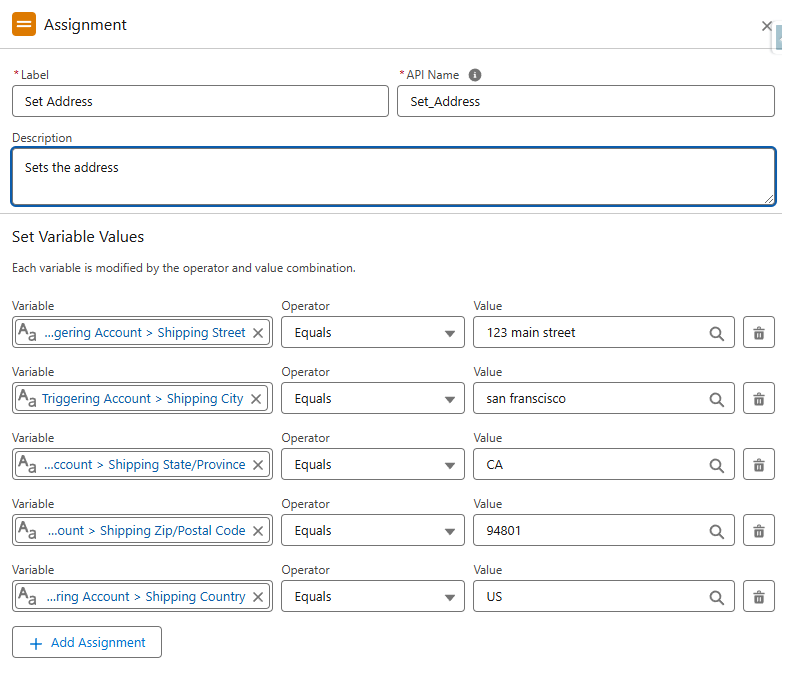
    When setting the values of an address field inside the Flow Builder, you must work with the parts individually.

    For example:


    Set fields one by one

    You can see above that the assignment sets each component part individually.

    This will successfully update the address in the flow.

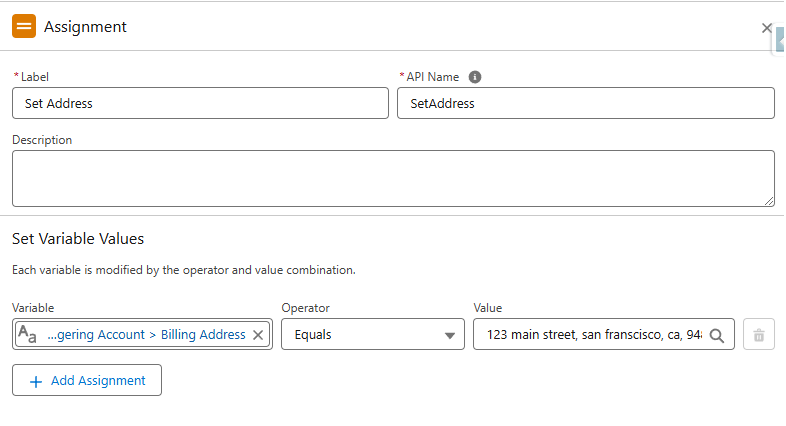
    Below, you can see the incorrect approach:


    Directly setting the full field is a no-go

    Logically, there's nothing wrong with the approach in the screenshot above.

    It seems to make sense that you could set the whole address field at once.

    And the flow builder will even successfully debug!

    But if you activate and test this flow on an actual record it will throw an error at run time.

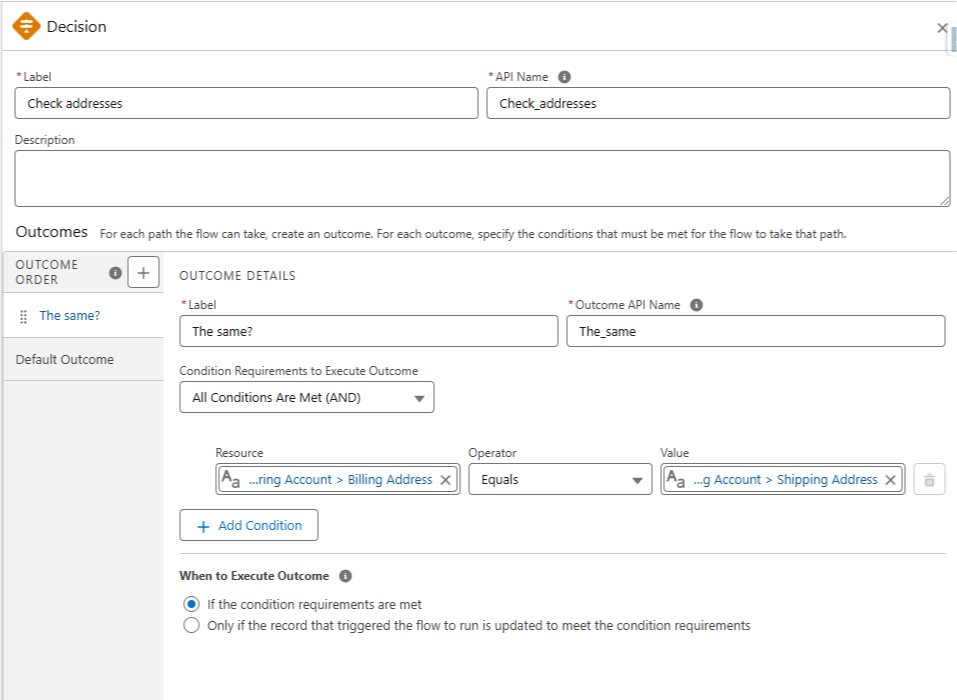
    This is also true when you're comparing addresses (like in a Decision element).

    You have to compare the individual address parts rather than the entire field.

    The below example would not function as expected:


    Direct comparison doesn't work

    Once again, the flow will run, but it would not successfully compare the actual address values.

    And one final example.

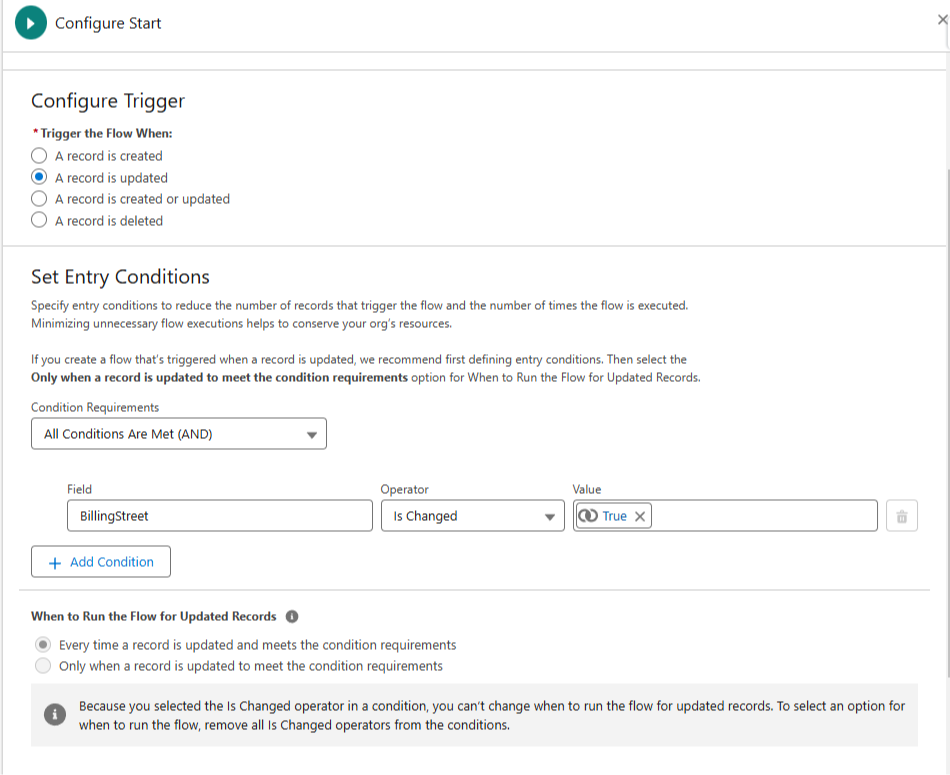
    If you want to trigger a flow when an address changes — then you must trigger off one of the constituent parts (like BillingStreet).


    Notice this start element looks at BillingStreet

    Triggering on the full "BillingAddress" field would not work as expected i.e. the flow doesn't fire at all.

    Now I can't really explain the underlying why behind all this (yet).

    But I can say it's good to know addresses function like this because its frustrating if you don't know what's going on and are getting bugs.


    Hope it helps!


    Best,

    Nick

  • 📊 Goodhart's Law ⚠️

    📊 Goodhart's Law ⚠️

    Every day in business we are asked to measure things.

    • KPIs
    • OKRs
    • Metrics
    • Trends
    • Performance

    The list can be quite long.

    Numbers are essential for understanding the world we live in.

    Many times though, a number is just a proxy. A rough substitute for something else we're actually interested in.

    That's where Goodhart's Law comes in.

    Goodhart's Law: When a measure becomes a target, it ceases to be a good measure.

    Basically, when you start treating a metric itself as an end objective, you set yourself up for unintended consequences.

    An example:

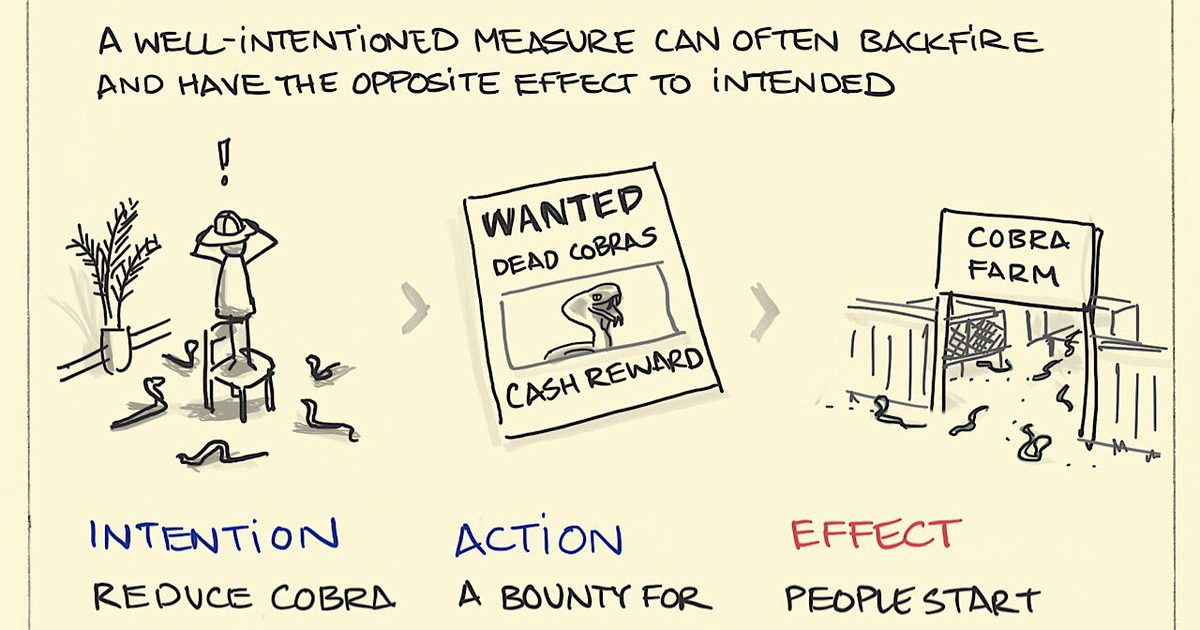
    During British colonial rule in India the British became concerned about the large number of venomous cobras in cities, which posed a threat to both health and trade.

    What to do?

    The British decided to offer a bounty for every dead cobra brought to them by residents as a way to address the snake infestation.

    They reasoned that more dead cobras = fewer total snakes.

    Their metric: dead cobras.

    What happened?

    Instead of merely hunting wild cobras, city residents began breeding them in cobra farms as an easy way to maximize their earnings.

    Eventually the British realized what was happening and canceled the bounty.

    Faced with now-worthless cobra farms, the residents released the cobras into the wild, leading to an even larger cobra population than before the bounty program started.

    Oops!


    This is why the best thinkers always ask: "What happens next?"

    Understanding second-order effects, i.e. how people adapt to a metrics, will make you a sharper decision-maker.

    For example, guessing that the cobra bounty program could be "gamed" before it happened.

    Someone who did this well was Bill Atkinson, an engineer who worked at Apple in the 1980s.

    Bill Atkinson

    In 1982, during the development of the Apple Lisa, managers introduced a system where engineers had to report the number of lines of code they wrote each week.

    Bill, who was working on QuickDraw (a 2D graphics library), strongly disagreed with this approach.

    He thought his goal was to write as small and fast a program as possible, and that the lines of code metric only encouraged writing sloppy, bloated, broken code.

    When he optimized QuickDraw's region calculation system, he reduced the code by about 2,000 lines, making it six times faster.

    Instead of reporting a positive number, he humorously filled in "-2000" on the form, highlighting the absurdity of measuring productivity by lines of code alone.

    Atkinson clearly saw the flaw in the lines of code metric, and proved that great engineering is about impact, not volume.

    But metrics that produce silly effects are everywhere (and probably always will be).


    Dilbert by Scott Adams

    How This Applies to Salesforce

    As a Salesforce professional, you’ll often be asked to build reports, dashboards, and tracking systems that help teams measure performance.

    And these tools can be incredibly valuable.

    But before you set up that next leaderboard or KPI, remember Goodhart’s Law.

    Because when people are only judged by a number, they may game the system instead of actually improving.

    Take these Salesforce examples:

    • Sales Teams: If sales reps are ranked by the number of calls made, they might spam low-quality calls just to hit their quota—without actually closing more deals.
    • Support Teams: If support agents are graded on speed alone, they may rush through tickets, solving the wrong problem just to get a fast resolution.
    • Marketing Teams: If marketers are measured by email open rates, they might write misleading subject lines to trick people into opening emails—damaging trust in the long run.

    So how do you prevent this?

    Do what Andy Grove, the legendary CEO of Intel, did.

    He didn’t just track one metric—he paired it with a second metric to keep people honest.

    For example:

    • Instead of just tracking calls made, pair it with deals closed to make sure quality matters.
    • Instead of only measuring resolution speed, track customer satisfaction to ensure agents aren’t rushing through bad fixes.
    • Instead of ranking email open rates, also include unsubscribe rates so marketing isn’t annoying people just to boost numbers.

    This is a simple but powerful fix—and as a Salesforce pro, you can use it to build better dashboards, reports, and incentives that actually drive the right behavior.

    The lesson?

    Numbers don’t lie—but they can mislead if you don’t track the right ones. So always measure the metric that measures the metric.


    Hope this helps!


    Best,

    Nick

  • Why What You Know Is Becoming Obsolete

    Why What You Know Is Becoming Obsolete

    Learning new knowledge is more important than what you already know.

    Because what you know is rapidly becoming obsolete.

    Imagine if you had a 100% perfect memory and full knowledge of everything that was possible to accomplish on the Salesforce Platform in 2014 (ten full years ago).

    You would've commanded a large salary and been sought out by many companies as an ideal problem solver.

    So what? What's interesting about that?

    • Well, it's 2014, Salesforce Lightning has not been released
    • Process Builder (retired in 2023) also hasn't even been released yet
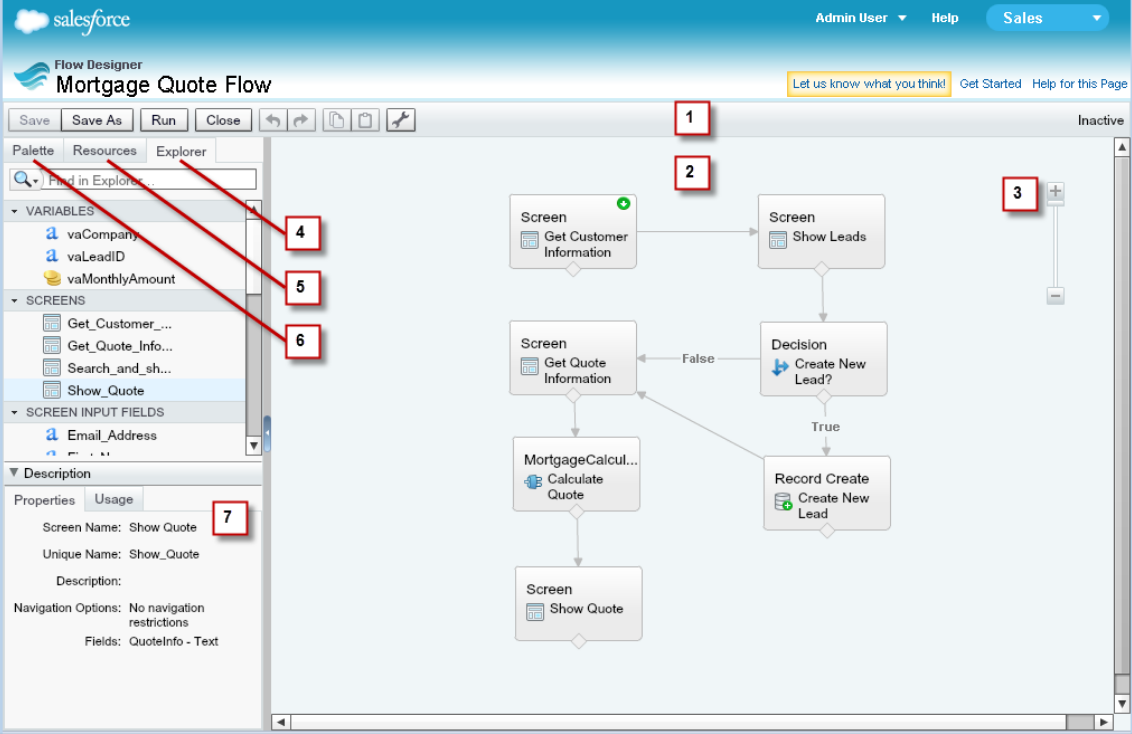
    • You can automate things - but only by using workflow rules, Apex Code, or an extremely clunky version of the flow builder (with way less features) that looked like this:
         

    Ick.

    Countless hours would've gone into your study of the Salesforce Platform to have achieved perfect knowledge in 2014.

    Perhaps many years of hard won experience.

    And it's value today?

    Some - but not much.

    Pretend you're a manager today in 2025 who must hire one of the following:

    1. The imaginary person with perfect 100% knowledge of Salesforce in 2014, who (due to a mysterious space-time anomaly) has no knowledge of Salesforce past 2014
    2. A Salesforce admin who has spent 30 minutes a day studying (and applying) Salesforce best practices for the last 1 year

    Crazy to say, but I'd personally pick option 2!

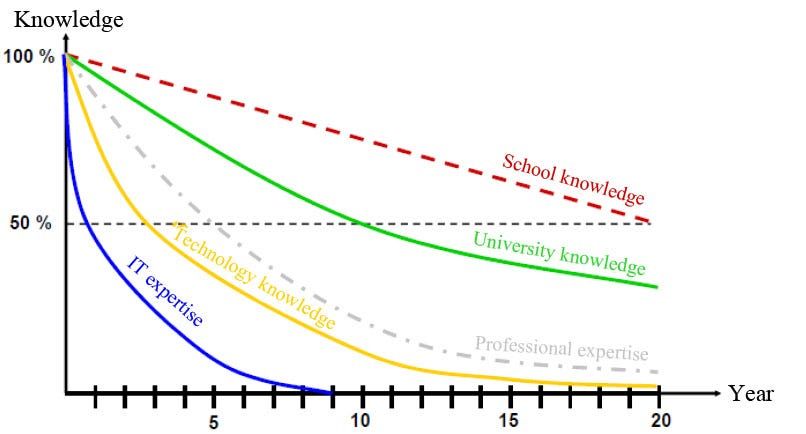
    The ten year time horizon in the example highlights the main point: many forms of knowledge are worth less over time.


    Knowledge decreases in value

    Only 2.5 years ago, ChatGPT wasn't a word that meant anything to most of us.

    Today, it's a little unusual for someone in our field not to have heard of ChatGPT and other AI tools.

    The knowledge frontier continually expands.

    And, as it does, what we know degrades in value.

    So - what to do? 

    Continually invest in yourself with both time AND money.

    • Spend 20+ minutes a day learning a skill that works well with what you currently know
    • Invest money each month "buying" new skills or knowledge (courses, certifications, in-person training, etc)

    One mentor of mine went so far as to recommend that 30% of your discretionary income EVERY month go into "doubling down on your own brain".

    The best skills to invest in?

    Anything that gets you into a Flow State. 

    Why a flow state?

    Enhanced Learning and Retention:

    • Studies suggest that individuals in a flow state experience improved learning and memory retention. This is because the flow state is associated with optimal levels of engagement and focus, which facilitate deeper cognitive processing.
    • A study by Ullén et al. (2012) found that flow states are linked to increased dopamine release, which enhances attention and memory formation. This neurochemical boost can lead to better learning outcomes.

    Productivity and Performance:

    • Research by Csikszentmihalyi and colleagues indicates that people in a flow state are up to 500% more productive than when they are not in flow. This heightened productivity translates to faster and more effective learning.

    The deeper in flow you get, the faster you learn and the more you retain.

    It's a competitive advantage for you against everyone else learning the same topic.

    Your brain is in "superhero mode" for that topic, so that's where you dive deep.

    In so doing, your knowledge will stay relevant, you'll be learning valuable skills, AND you'll be having fun.

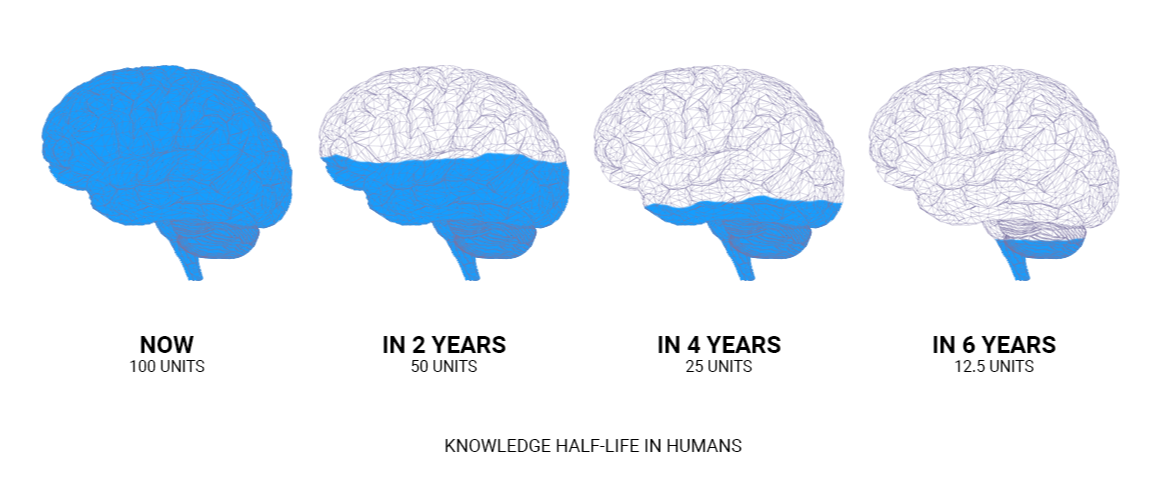
    It's the best way to fight the half life of knowledge:


    And thats a wrap.

    So - what’s one skill you’re investing in this month?

  • How to Quickly Document Your Flows

    How to Quickly Document Your Flows

    Happy Saturday!

    This week's tip dives into the technical side of Salesforce, but the payoff is worth it: you’ll learn how to create detailed Salesforce Flow documentation quickly and efficiently with tools like ChatGPT or Claude AI.

    This method also allows you to upload flows to these AI tools for insights on improving performance, debugging, or re-architecting them for optimal functionality.

    Why This Matters:

    • Save Time: Skip manually documenting complex flows.
    • Enhance Understanding: Get clear explanations of flows you’re unfamiliar with.
    • Improve Quality: Use AI to identify inefficiencies and suggest improvements.
    • Delight Clients: Generate professional documentation with ease.

    Getting Started:

    Here’s what you need to set up before using AI for flow documentation:

    1. Visual Studio Code: Install and configure it as your development environment.
    2. Salesforce CLI: This tool lets you connect to your Salesforce org and retrieve metadata.
    3. Node.js (optional): A runtime needed for Salesforce CLI and other tools.


    Step-by-Step Workflow:

    Install Tools:

    Create a Project and Authenticate with Your Org:

    • Use the VS Code Command Palette (Ctrl+Shift+P or Cmd+Shift+P)
    • Create a new Project (name it anything you like)
    • Open the Command Palette again (Ctrl+Shift+P or Cmd+Shift+P)
    • Select “Authorize an Org” and log in to the Salesforce environment containing your flows.


    Retrieve Flow Metadata:

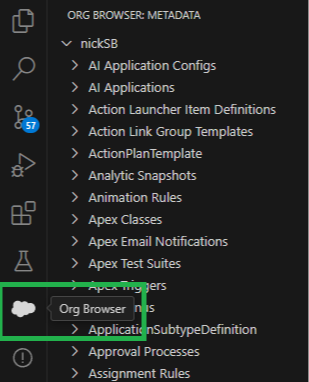
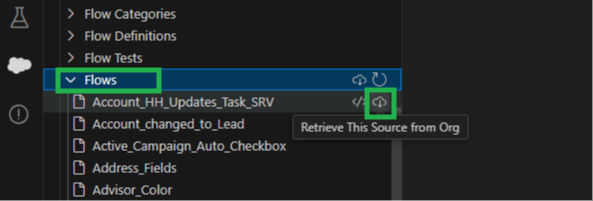
    • In VS Code, click the cloud icon labeled “Org Browser.”
    • Scroll to “Flows” and download the metadata for the flows you want to document.


    Generate Documentation:

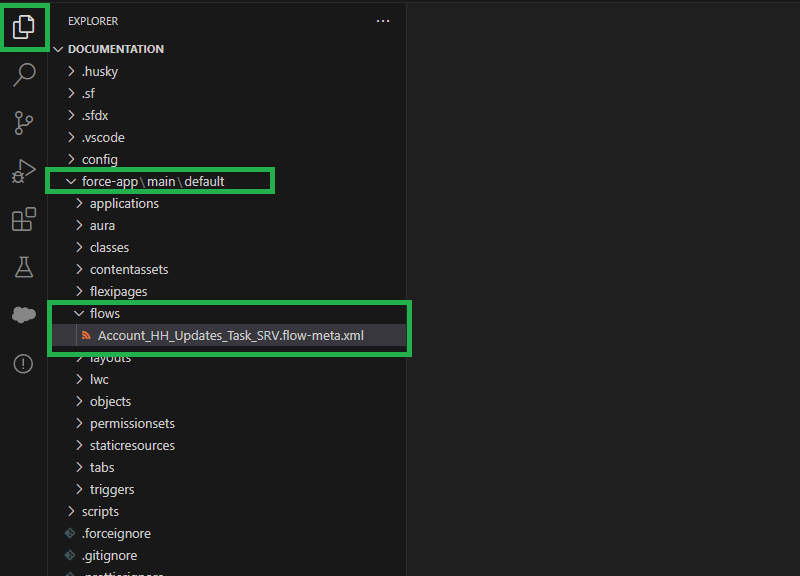
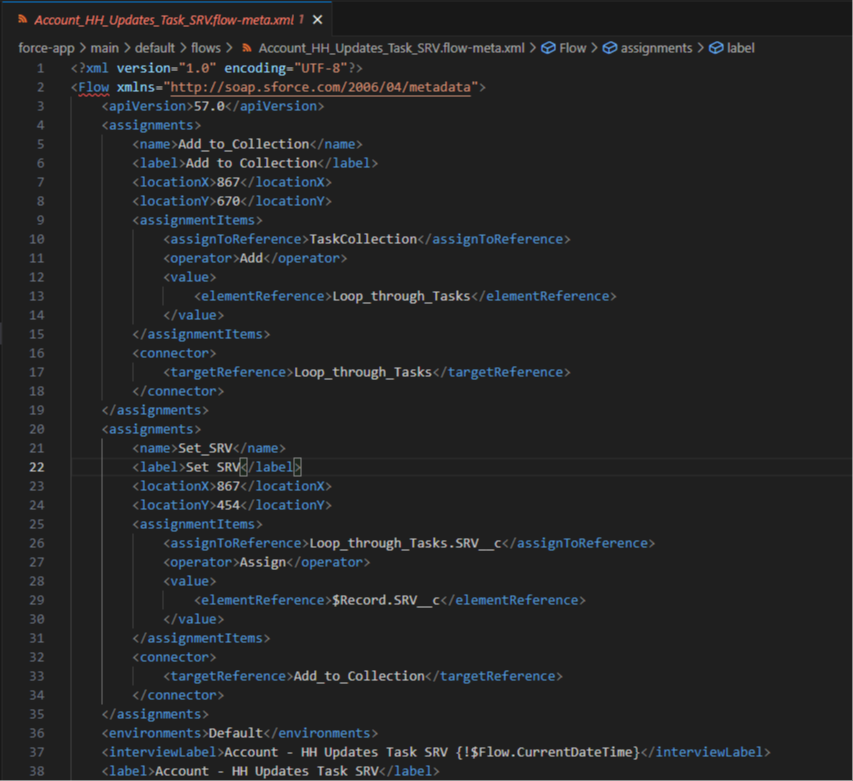
    • Open the retrieved flow’s XML file in VS Code
               
               
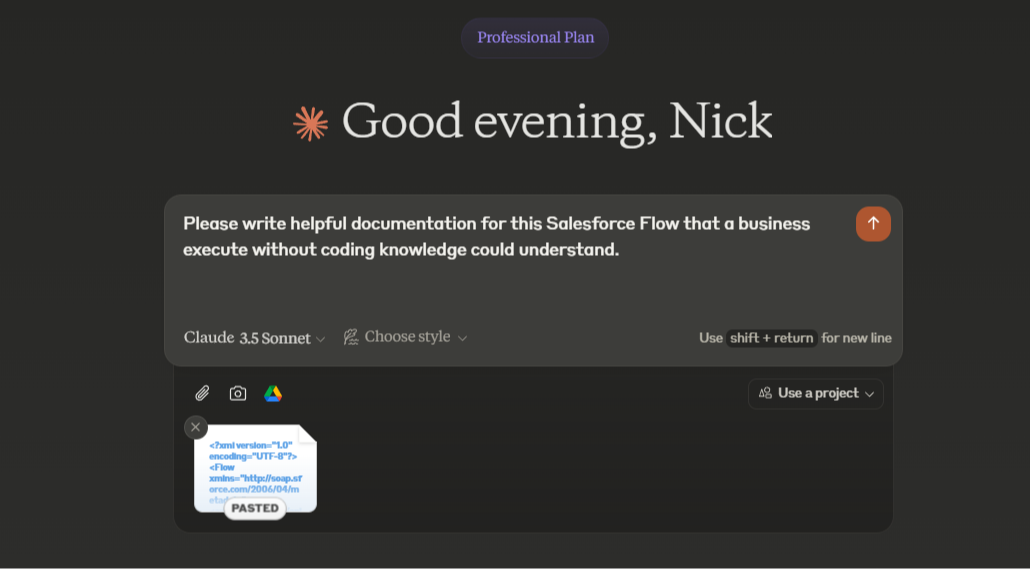
    • Copy its contents and paste them into ChatGPT or Claude AI.


    You can ask the AI to:

    • Summarize the flow.
    • Suggest improvements.
    • Diagnose potential bugs.
               

    And that's it! The AI will output new documentation (or answer your other questions) just as requested.

    You can also ask questions like

    • How might you improve this flow?
    • On a scale of 1-10 how well in this flow built?
    • What are the strengths and weaknesses of this flow? 

    In conclusion, this is a powerful time saving approach to creating flow documentation

    And this method can double as an AI mentor for your flow building skills!

    Hope it helps.


    Best,

    Nick 

  • 🌱 Spring '25

    🌱 Spring '25

    The Spring '25 release is one month away!

    Major dates for the release are:

    • February 7th
    • February 14th

    You can check your specific environment's release schedule on the Salesforce Status site.

    As always, the release notes are available ahead of time. I read through them and thought I'd share some of the cool stuff that's coming out.

    There's some exciting additions. Let's dive in!

    General

    Sort List Views by Multiple Columns

    To see your data in a more intuitive way and to make your list views more actionable, you can now sort list views on object home pages by up to five columns.

    Organize Your Data with Multi-Column Sorting for Related Lists

    To organize and understand your data better, sort related lists by up to five columns. Quickly identify patterns and trends so that you can make informed decisions. Previously, you could sort a related list by only a single column.

    Brand the Welcome Email for Internal Users

    For more control of branding and user experience, customize the welcome email that internal users, such as employees and contractors, receive when they first access your Salesforce org.

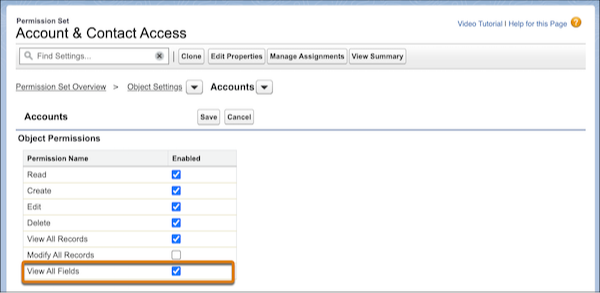
    Allow Users to View All Fields for a Specified Object

    It’s easier to manage permissions for users who require broad data access. Assign the object-level View All Fields permission, which grants assignees access to all fields and field data for a specific object.


    Flows

    Create Flows with a New Streamlined Creation Experience

    We reorganized the flow creation window to help you create the automation you need quickly and more efficiently. Flows are separated into four main categories, and you can filter and search to find the automation you need.

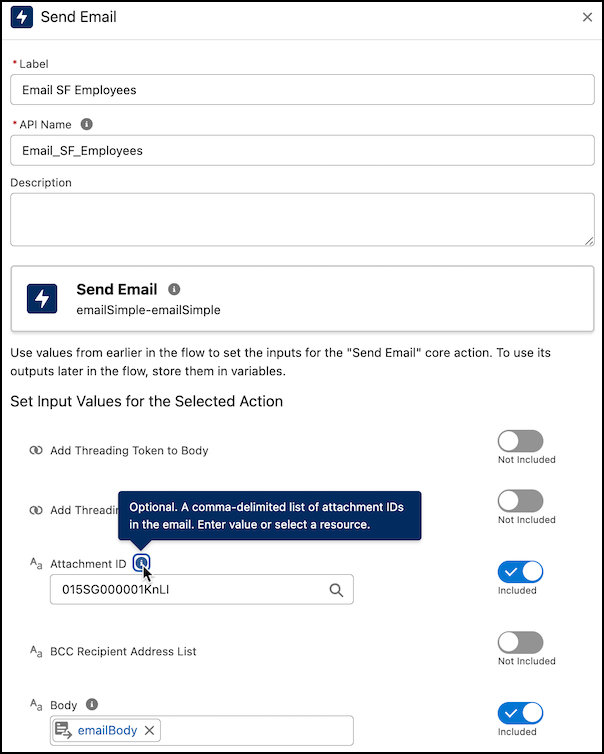
    Send Emails with Attachments in Flow Builder

    Enhance your Flow Builder emails by sharing documents or files with your recipients by using Send Email action. To attach a file, provide the ID of a file to the Send Email action. The maximum size of the email created, including attachments, is 35 MB.


    Undo, Redo, and Save As with Keyboard Shortcuts

    Increase your productivity with new keyboard shortcuts for undo, redo, and save as in the Flow Builder.

    Create Responsive Screens with Automatically Triggered Screen Actions (Beta)

    You can now run autolaunched flows automatically in the background when the input values associated with screen actions change. Previously, the only way to trigger a screen action was with the click of a button by using the Action Button component. The output can be displayed on the same screen, so your users can see the results of their actions on the same screen without clicking any buttons.

    Guide Users Through Screen Flows with Built-In Visual Progress Indicators

    Visually guide your users through the stages of your screen flows by using the built-in progress indicator—no more writing custom code to create your own. Your users see which stage they’re on and how many stages remain.

    Access Flow Versions in Flow Builder 

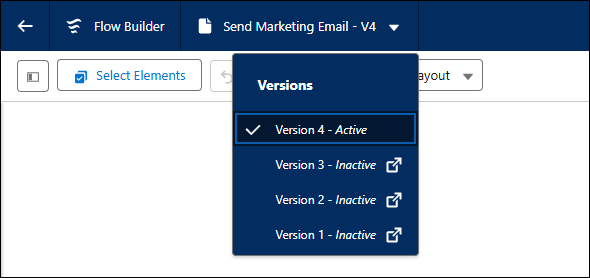
    Quickly manage different versions of a flow and view the status of each version in Flow Builder. To see a flow’s versions, click the flow’s name in the Flow Builder navigation header. Clicking on a different version opens that version in Flow Builder in a new browser tab.


    And that's a wrap!

    I'd encourage you to take a quick glance through the notes yourself.

    There's way more than can be covered by a single email, and you might find some goodies I missed!

    Have a great week :)