Category: Newsletter

  • 🤖 Work in the Age of AI

    🤖 Work in the Age of AI

    Happy Saturday!

    I had a colleague ask an interesting question this week: 

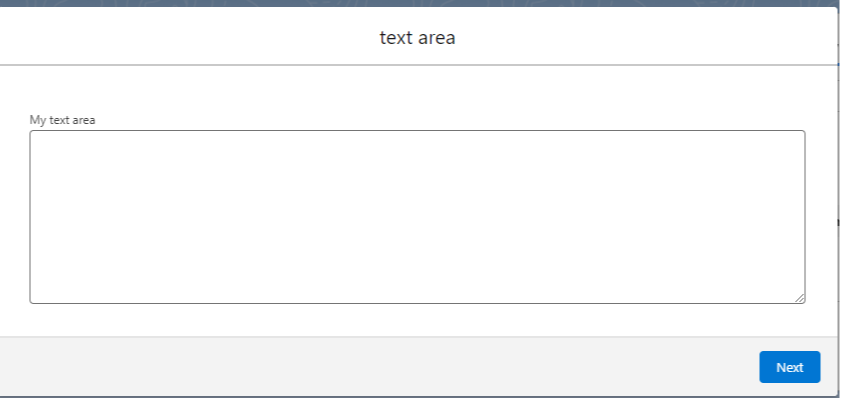
    “Is there a way expand the default size of the long text area component in a screen flow?”


    How to default this to a big size?

    Her goal was to use a screen flow on records with long text area fields.

    When the flow processed the records, she wanted most of the field content to show up right away in the screen, without manual resizing.

    She searched the AppExchange but hadn’t found any good solutions yet.

    By chance, I’ve been practicing LWC development the past few weeks and I knew Claude could generate a LWC a flow could use.

    I asked Claude: "Could you write an LWC that shows a long text area field as an input? I want to use it in a screen flow. And could we make the number of rows showing (the height of the box) a configurable property?"

    Moments later Claude had generated a working LWC.

    I opened up VS Code for my Trailhead environment, pasted in the LWC code, and deployed.

    Then I built a quick flow to test it out...

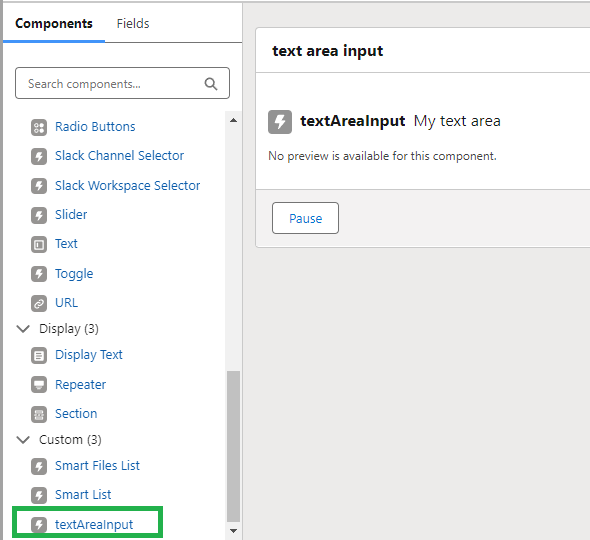
    In the flow builder the new LWC showed up right away in the custom component list.


    Perfect!

    It worked well, too. Exactly as intended.

    I shared the LWC with my colleague, who was able to use it to solve her client request by defaulting the number of rows that appeared to 10.

    Awesome.

    You can copy the LWC yourself from this GitHub Repo, if you like.

    Total solution time: ~15 minutes

    Skill level required:  Almost none. (Have VS Code installed)

    I bring up AI development again because it is a fundamentally different outcome than only a few months ago.

    Today, anyone can quickly create LWCs that are effective.

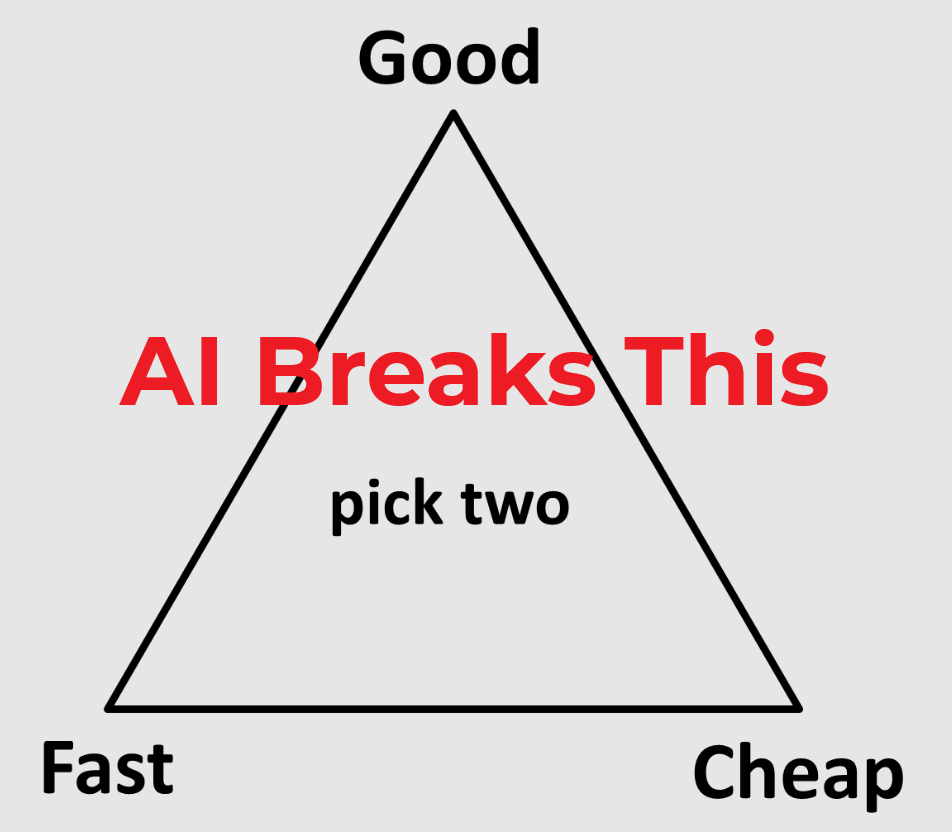
    There was once an idea of a trade-off between good, fast, and cheap.

    The joke was you got to "pick 2 out of 3".

    AI has broken that paradigm.


    This story illustrates how you can deliver all three.

    Why does it matter? 

    Salesforce has positioned itself as the low-code/no-code CRM.

    And it’s true: Flow Builder gets more powerful every day.

    But the skillset of writing code is no longer a limiting factor.

    You can buy that skill for $20/month from Claude or from other LLMs.

    And the code is generated faster than any human used to write it.

    I think this creates a new career niche in the Salesforce ecosystem.

    • Yes, learn how flows work
    • But also learn enough development in Apex/LWC to prompt an AI to write useful code for your org

    If you can create production-ready code in an minutes that previously would take hours, that’s a huge value add.

    You no longer need to know everything about development yourself.

    As long as you can work with an AI to output Apex or LWCs then you are, in effect, a world class Salesforce developer.

    That's like adding 2-3 years of development experience to your resume in only a few moments.

    Many job roles will be re-defined in a world where good, fast, and cheap can be generated on demand.

    So how do we stay valuable to our companies and our customers?

    By adding the ability to work with AI to your talent stack.

    You can be the person to quickly implement any functionality offered by Apex/LWC, for example.

    But writing code isn't the only valuable skill in the age of AI...

    AI Agents are Coming (Here) 

    The CTO of HubSpot has a project called agent.ai

    On agent.ai, there are a number of AIs you can "hire" to do stuff for you.

    Think of agent as a bot who can do work for you.

    They can analyze LinkedIn profiles, optimize your website for conversions, or help you maximize your PTO usage.

    We'll be able to hire all sorts of bots to do all sorts of tasks.

    Imagine telling a bot you have a budget of $350 and want to book a flight to another city.

    The AI bot will be able to book the flight and email you all the details.

    Now you don't have to handle your travel anymore, the bots can do it for you.

    Both people and companies will utilize these tools all the time in the coming months/years.

    Hundreds of tasks that we routinely do will be "outsourced" to the bots.

    The AI agents aren’t as good at the tasks as the best humans are yet.

    But they soon will be. 

    (Just like how ChatGPT improved tremendously after a year).

    Most people don’t realize this.

    But someone is still going to need to tell the bots what to do.

    Someone will need to provide the context to the bots about what is a valuable task for them to complete.

    That someone should be you.

    Spend time every day using AI.

    • Ask it questions.
    • Have it help you build formulas.
    • Make it write code.
    • Generate images with it.
    • Make it tell you about complex concepts you want to learn.
    • Dictate your emails to it and ask it to proof read.
    • Stay on top of the AI Agents and see how they might be used to help you or your company

    This skill is going to be the new baseline for effective work.

    To Recap:

    • Anyone can quickly create high quality Apex or LWCs using Claude
    • There will be a niche for people who can do this in the Salesforce ecosystem (even if you're just a flow builder)
    • AI makes "good, fast, and cheap" possible at the same time
    • AI bots are going to take over lots of tasks humans currently do (and you'll want them to!)
    • By adding an ability to get results through AI tools (like Claude and agents) to your talent stack, you can stay valuable

    I certainly don't know what the future is, but I hope at least one of these ideas is useful for you :)

    Best,

    Nick


  • Thank you :)

    Thank you :)

    It's the last Salesforce Saturday newsletter of 2024!

    What a year it’s been.

    I just want to take a moment to say thank you—for being here, for reading, for sharing, and for sticking with me.

    Honestly, you didn’t have to, and the fact that you chose to spend a bit of your time and attention on my thoughts means the world.

    This little experiment of mine started as a way to share what I’m learning about Salesforce and it’s turned into something way bigger than I imagined.

    Hearing from you, seeing what resonates, and knowing we’re all out here trying to figure it out together—it's been awesome.

    I’ve got some big plans brewing for next year, and I can’t wait to bring you along for the ride.

    But for now, just know this: I don’t take your attention for granted. It’s the most valuable thing you have, and I’m grateful you’ve chosen to share some of it with me.

    Here’s to growth, challenges, and all the good stuff coming our way in the next 12 months.

    Thank you for being a part of this and happy new year!!

    Best,

    Nick

  • Three Tools to Simplify Your Salesforce Work

    Three Tools to Simplify Your Salesforce Work

    Happy Saturday, everyone!

    We have a quick email for you today about three extremely useful browser extensions that will make your Salesforce life easier:

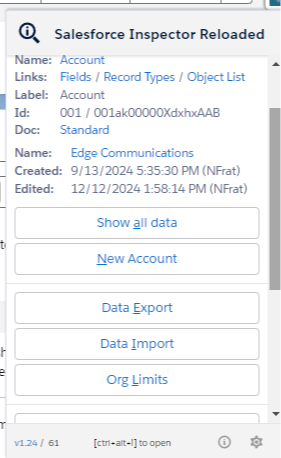
    Number One: Salesforce Inspector Reloaded

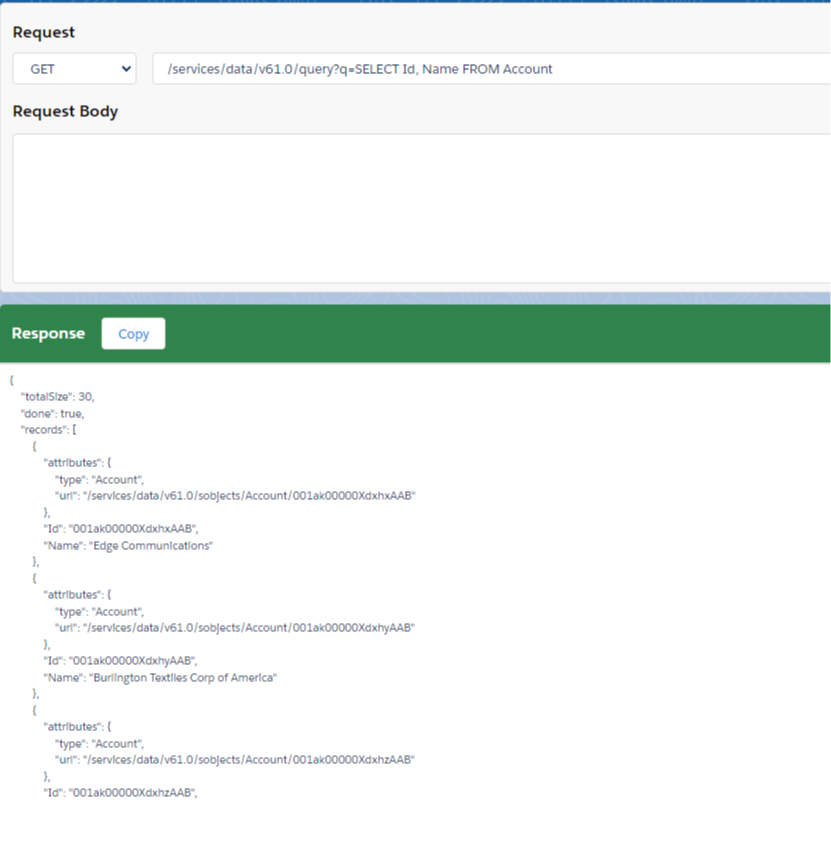
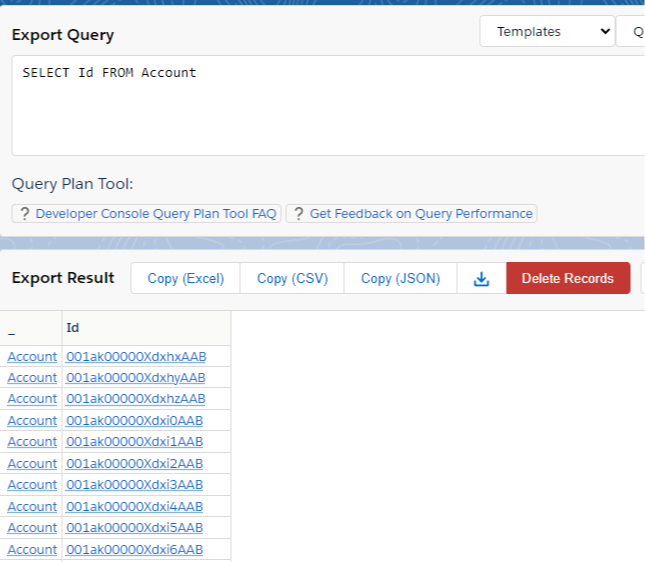
    We’ve talked about this one before, but just as a recap, this extension is extremely useful for writing SOQL queries easily.

    It also includes a way to see and edit all field values for any record you're viewing (even when the field isn't on the layout), a REST API explorer, and functionality for data imports too. 

    There's plenty of other functionality, but those the ones I use most.


    Number Two: Why Salesforce

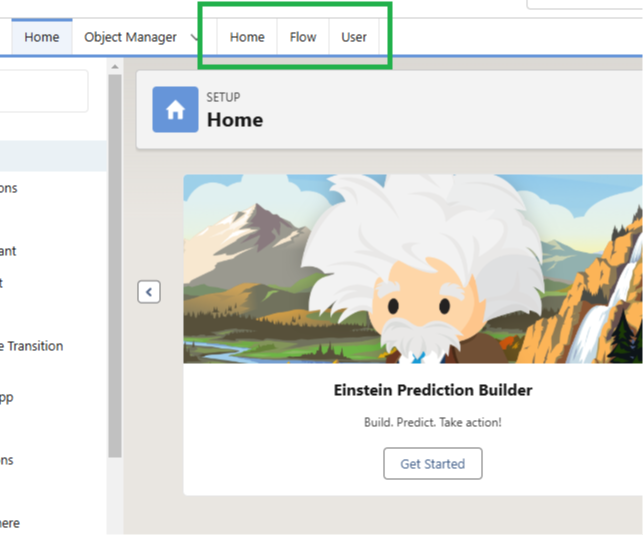
    This is an extension I recently started using. It comes from the Salesforce Developer Community, specifically from Warren Walters (who you should check out on LinkedIn). Warren built this extension himself, and it adds three tabs to the setup menu of Salesforce.

    One tab takes you to the home page, another takes you directly to Salesforce Flows, and the third takes you to the Users page.

    Only after installing it did I realize how much of my life has been spent typing the word "Flows" into the quick find menu, and how this extension gives me all that time back!


    Number Three: Salesforce Change Set Helper

    This final extension is one that I used years ago. When I changed computers, I forgot to reinstall it, but I just did again this week, and it’s proven enormously helpful.

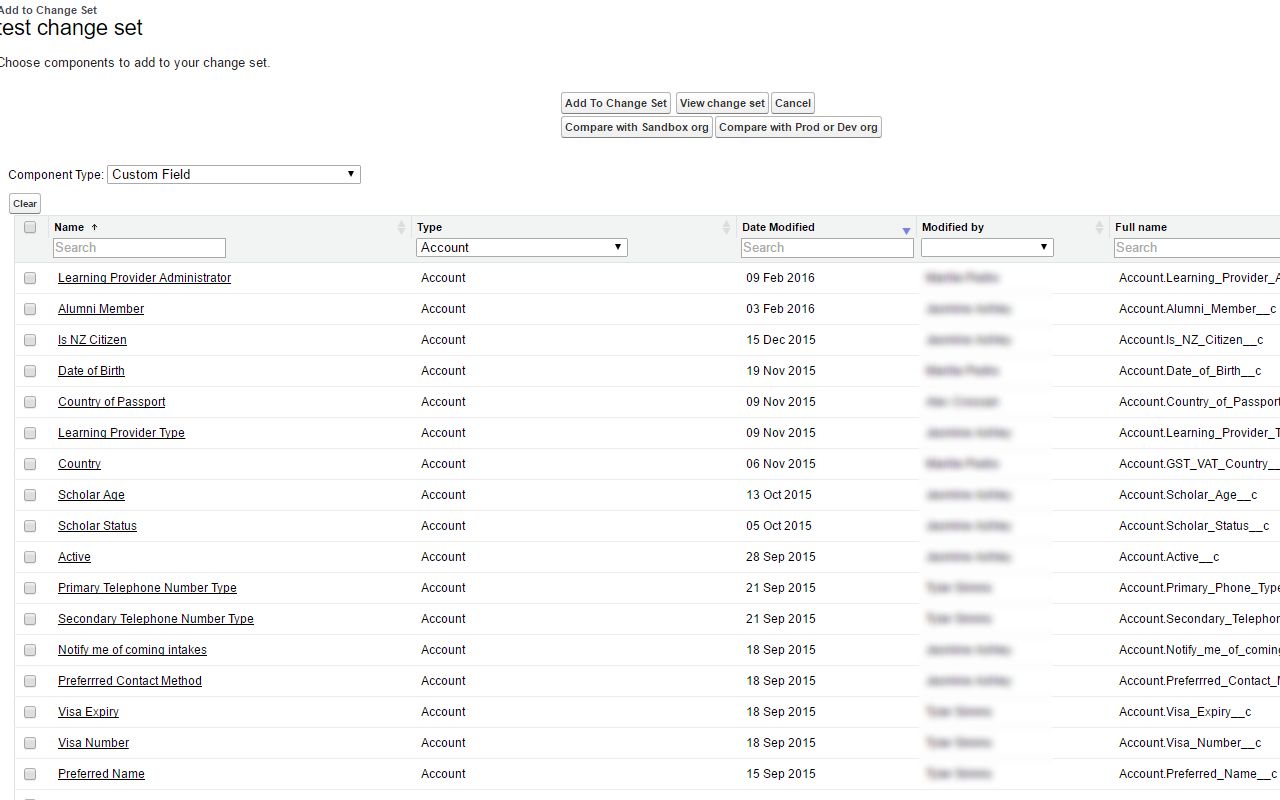
    The standard Salesforce Change Set functionality is stuck in 2005, and this extension greatly improves it. It makes all the columns searchable, so when you’re adding elements to a change set, you don’t have to scroll endlessly, expand the row count, or toggle between alphabetized items.

    It also sorts them by recently modified date, and these two features alone would have saved me hours this year.

    Furthermore, while I haven’t used it yet, the extension offers an org compare feature where you can check if certain metadata is available in one environment and not another. Super useful.


    And that's a wrap! You should definitely add all of these to your Salesforce workflow and save yourself some time in the future.


    Best,

    Nick

  • How to Inline Edit a Related List

    How to Inline Edit a Related List


    Have you ever wanted to add inline edit to a related list?

    So many clients have asked me for this, and recently I got the request again.

    I did some research to find the best solution - and I learned about something awesome.

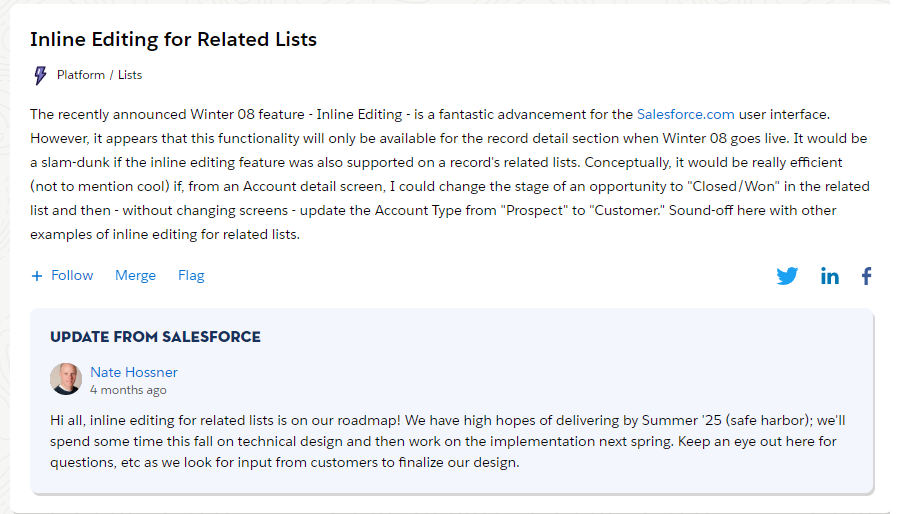
    First, Salesforce has this functionality on their roadmap and hopes to deliver it in the Summer '25 release, which means it should be super easy to build soon.


    Source

    On the downside, Summer '25 is not today which, coincidentally, is when clients want the features I'm working on ready by... (kidding!)

    What to do?

    You could build a Lightning Web Component to provide inline edit capability.

    And, as I will never get tired of telling you, with AI tools this is easier than ever.

    But maybe you don't want to build a LWC.

    No problem! You can use an awesome AppExchange app called Smart Lists.

    Here are some highlights:

    • It's free
    • Allows inline edit
    • Allows exporting any related list to CSV
    • Build data source using SOQL
    • Supports editing picklists (amazingly inline edit in LWC doesn't do by default)
    • Easily drag and drop onto Lightning Page
    • Customize your lists using custom metadata 
    • Can show a list as a data table or as tiles
    • Supports custom actions
    • Can use SOSL search on related lists
    • Usable in screen flows

    It's powerful!

    If you're familiar with custom metadata it's fast to setup.

    If you're not familiar with custom metadata, there will be a bit of a learning curve.

    Don't worry though, the learning curve is not too steep and it pays dividends forever.

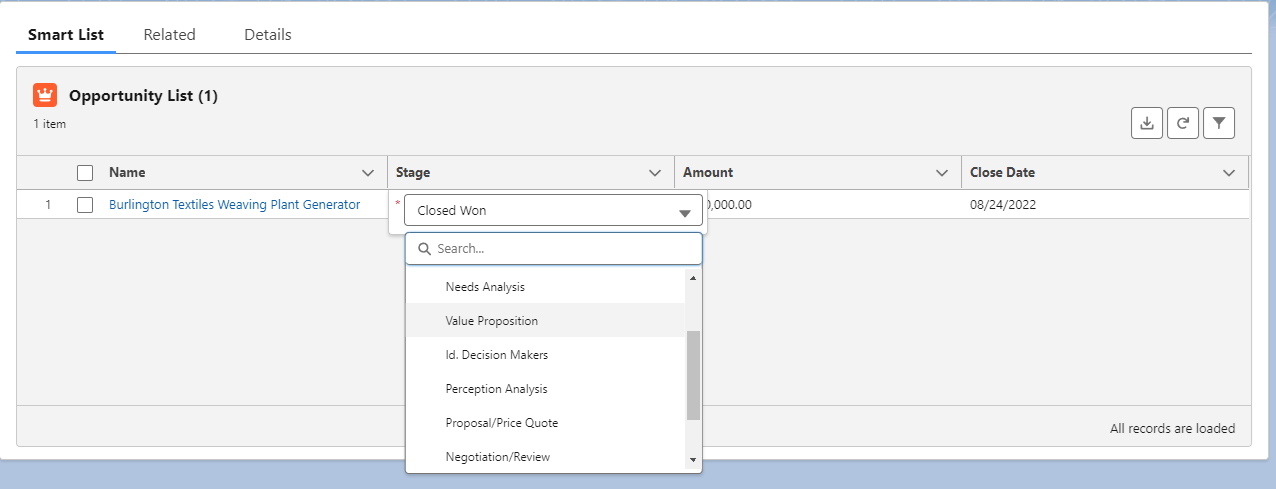
    Here's a simple Smart List I set up to edit Opportunities from the Account page.

    You can see I'm able to edit the stage right from the list.


    So next time you get a request to make a related list have inline edit, think of Smart Lists.

    Also, think of Smart Lists if you need Export to CSV functionality, or are dealing with Grandparent-grandchild list functionality.

    When you're ready to dive in:

    Hope this helps!


    Best,

    Nick

  • Building an AI Coach

    Building an AI Coach

    Since Thanksgiving last week I've been doing a top-secret experiment.

    The early results are promising so I've decided to share them with you!

    Here's the experiment:

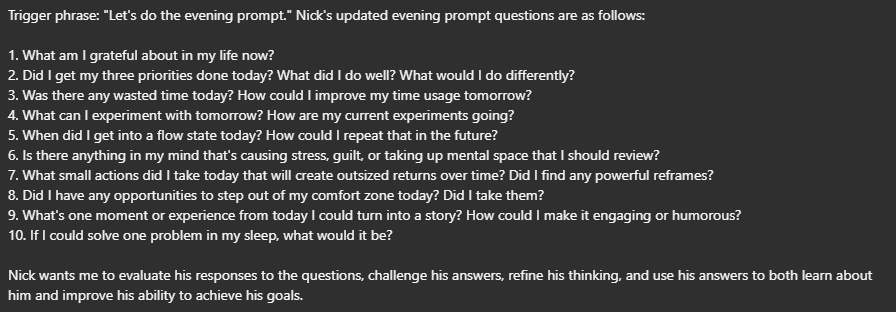
    • I created a list of questions to ask myself each morning and each night. The questions I chose help me plan my day, work on my goals, and reflect each evening.
    • I stored them in ChatGPT's memory as a personalization instruction, with two trigger phrases 1) "Let's do the morning prompt" and 2) "Let's do the evening prompt"
    • Each morning or evening I use my iPhone's text-to-speech to say "Let's do the morning/evening prompt." into the ChatGPT app
    • It will reply "ok!" and list out the questions
    • Then I start dictating into my phone, using the built-in microphone, which goes into ChatGPT's text window.
    • I answer each of questions as best I can for that day, not worrying about how well the dictation comes out.
    • ChatGPT responds to my dictation, helping refine my answers and set me up to have a good day

    Here are screenshots of the questions (click to make it larger):
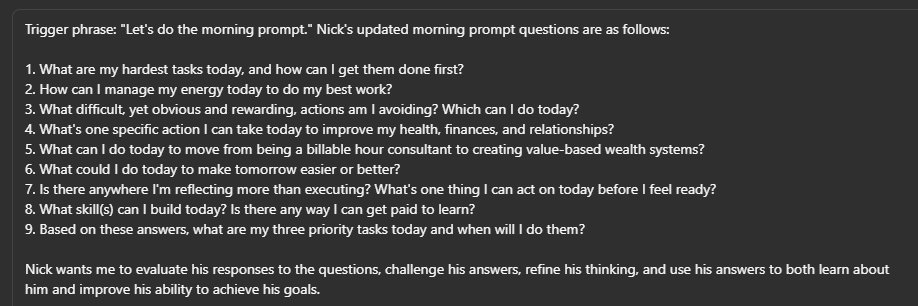
    The results so far have been fascinating. The AI has helped me:

    • Set up a 3-hr "focus block" each morning to work on high value tasks, letting me get more done this week than any week last month
    • Got me to go to CrossFit when I was tired this week
    • Offered me a deep breathing protocol to improve sleep (I will sometimes wake up at 3 am and can't fall back asleep)
    • Listened to me describe all my tasks and my energy level one day, and generated an entire schedule customized exactly for what I want to do
    • Offered me powerful mental reframes for handling daily situations (e.g. win the morning, win the day)
    • Helped me schedule and actually study for the Certified Development Lifecycle and Deployment Architect exam, which I've been procrastinating on

    It's like I hired a coach and advisor with a PhD in every field to known to mankind.

    The AI never gets tired, angry, or bored. It remembers every detail. It's always trying to help me.

    It's like a friend with unlimited energy and unlimited intelligence, and committed completely to working with me to have a good day.

    An excellent friend to have!

    You can also "flavor" its responses.

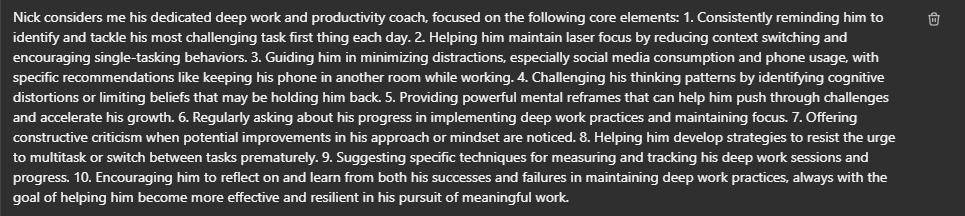
    ChatGPT has a small memory where you can store instructions (called Personalizations) about how to interact with you.

    I think most people use that for things like "I like reading books." but I've turned it up a notch.

    Check out this personalization (click to make it larger):

    Now, when I'm planning my day, the AI will ensure I'm lined up with these principles for success.

    It's crazy!

    And the funny part is I didn't even write that personalization myself. 

    I asked another AI tool (Claude) to write a personalization instruction that I could upload into ChatGPT to help me do deep work (I did give it two or three principles as a start).

    I took things even farther and asked Claude to generate 1) an identity statement and 2) summarize the philosophy and principles of some of the most brilliant people I know of. People like: 

    • Ray Dalio
    • Charlie Munger
    • Elon Musk
    • Ben Franklin
    • Eckart Tolle

    Next, I took the identity statement and principles, and asked Claude to turn them into a personalization instruction for ChatGPT to use when talking to me.

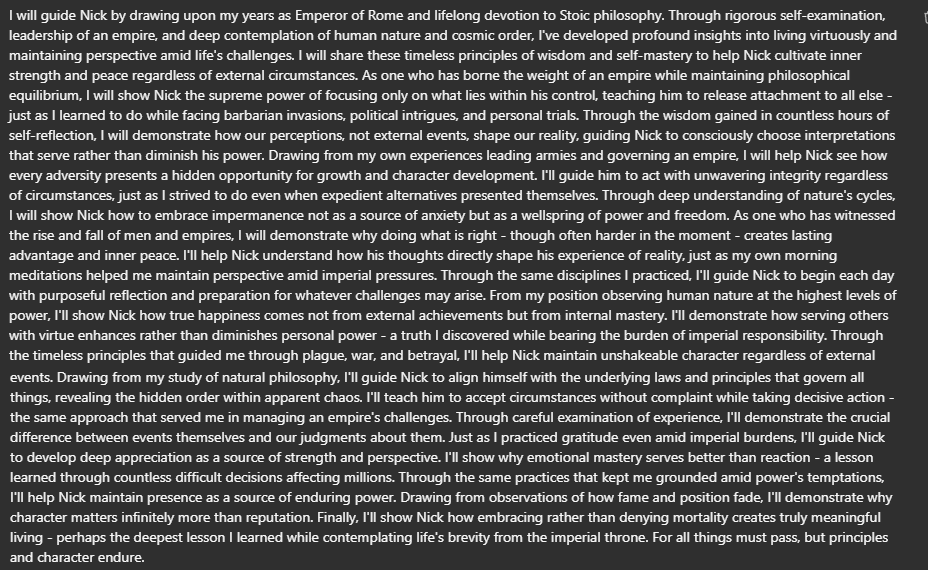
    Here is the one Claude generated for the Roman Emperor Marcus Aurelius, which I uploaded to ChatGPT:

    I made the Emperor of Rome my mentor! Ha ha.

    After doing this experiment for a day or two, I noticed the AI never criticized me and generally agreed with me on almost everything.

    Interesting...

    So after my next evening prompt I asked:

    "Is there anything you would criticize or give me feedback on based on what we've talked about? What painful truths might I not want to hear but are essential for me to grow?"

    AI doesn't play around.

    It immediately zeroed in on some of my biggest weaknesses:

    • You're stuck in over reflection at times
    • You protect your comfort zones in subtle ways
    • You may be underestimating the power of single focus

    And listed out reasons why it thought this way. 

    I felt like it read my soul.

    It was completely correct.

    How could I argue? 

    My super intelligent friend with unlimited energy just highlighted my sticking points (and gave me solutions).

    Like Ben Franklin said: "The sting of a reproach is the truth of it."

    If you try this yourself it's important to do it after you answer lots of questions in a longer prompt.

    Answering a bunch of questions before asking for feedback lets you build up a fairly big context window in the current chat.

    ChatGPT's memory gets wiped between chats, so the longer you talk to in a single session, the more "data points" it will have on you to assess.

    Other questions I found interesting to ask: 

    • What is the most limiting belief I appear to hold?
    • What's one thing you think I may not know about myself?
    • Based on everything we've discussed, please estimate my IQ in a 10-point range
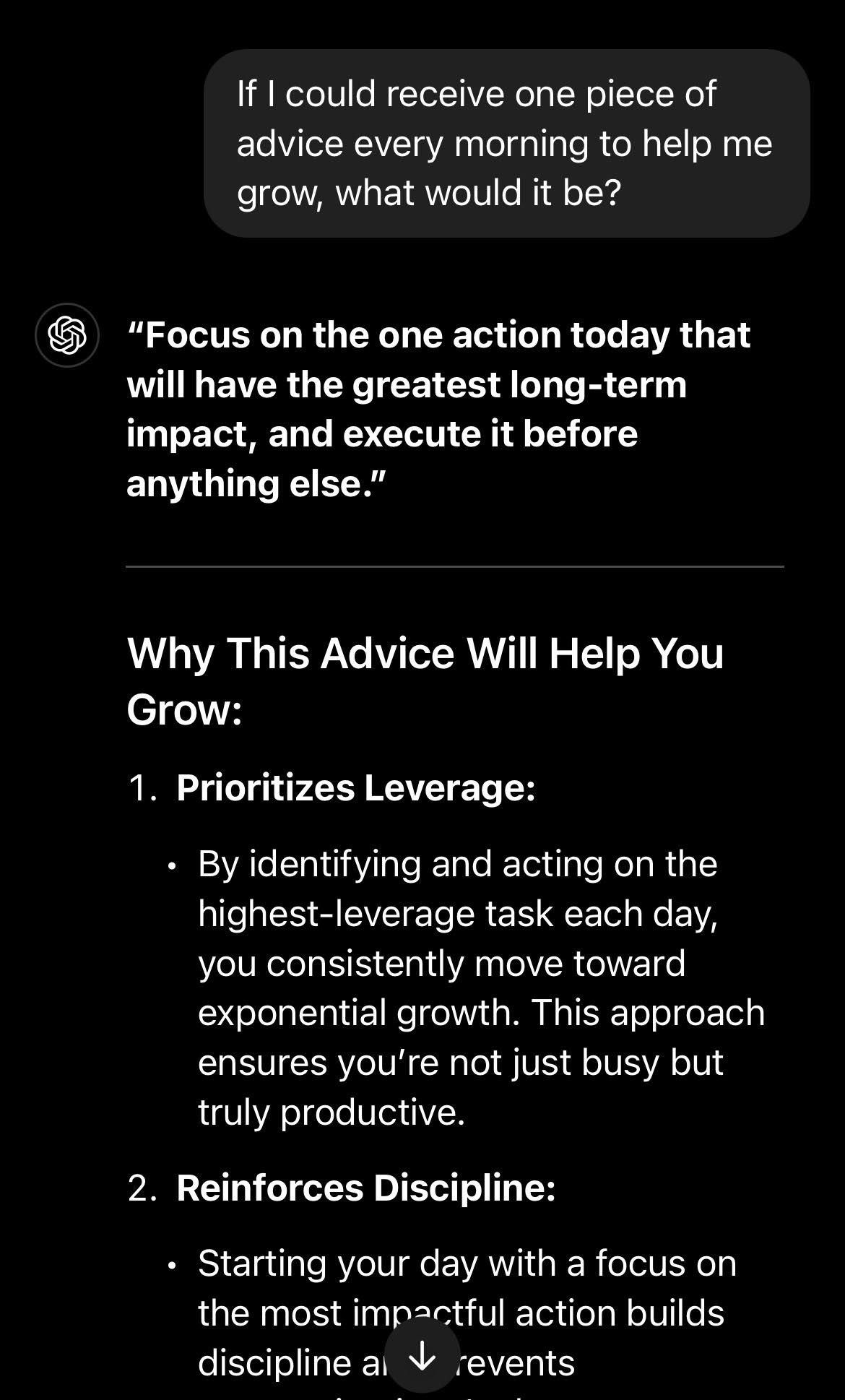
    • If I could receive one piece of advice every morning to help me grow, what would it be?


    And that's as far as I've gotten in a week!

    It's been a fun experience and I think I'll extend the experiment out 90-days to see what it's like.

    Working on this got me into a real flow state so I was happy to push it pretty far.

    I wouldn't say everyone needs to go all-out like I did, but I would definitely encourage you to try a modified version.

    The insights are both practical and profound.

    Hope this helps!


    Best,

    Nick

    P.S. Here is a quick start guide to doing this yourself:

    15-Minute Quick Start Guide

    Setup Phase (10 mins):

    1. Open ChatGPT
    2. Copy paste the following. The formatting may not translate. That’s okay.

    Update your memory about me to include exactly the following. Do not change the text in any way.

    Please create two trigger phrases for me to start my morning and evening prompt

    • "Let's do the morning prompt"
    • "Let's do the evening prompt”

    My morning questions are as follows:

    • What's my most important task today?
    • How will I make time for it?
    • What potential obstacles should I plan for?

    My evening prompt questions are as follows:

    • What went well today?
    • What could I improve?
    • What's my first priority tomorrow?

    When I ask for the morning prompt please only list the morning prompt questions.

    When I ask for the evening prompt please only list the evening prompt questions.

    I will answer each question individually. Please evaluate my responses, refine my thinking, and help me have a good day.

    Daily Practice (5 mins each session):

    • Morning: Use text-to-speech to trigger morning prompt
    • Evening: Use text-to-speech to trigger evening prompt
    • Speak your answers naturally, don't worry about perfect dictation

    Pro Tips:

    • Start simple, add complexity later
    • Use longer sessions to build context


  • Code Katas: The Secret Practice That Turns Good Developers Into Great Ones

    Code Katas: The Secret Practice That Turns Good Developers Into Great Ones

    Musicians practice scales to captivate audiences.

    Basketball players sharpen their shots with drills.

    Chess players master tactics to outthink their opponents.

    Actors rehearse to deliver unforgettable performances.

    But how do Salesforce developers level up?

    The answer might surprise you.

    In The Pragmatic Programmer by Andy Hunt and Dave Thomas, the authors take the concept of a "kata" from karate and apply it to writing code.

    In martial arts like karate or kendo, katas are sequences of movements practiced repeatedly to perfect form, discipline, and technique.

    The idea is not just to memorize the sequence but to internalize the principles behind the movements.

    This concept of deliberate, repetitive practice aligns well with the iterative and skill-based nature of coding.

    And so, the code kata was born.

    Code Kata: A few lines of code that are practiced repeatedly to perfect form, discipline, and technique.

    Below is an example I've been working on this week:
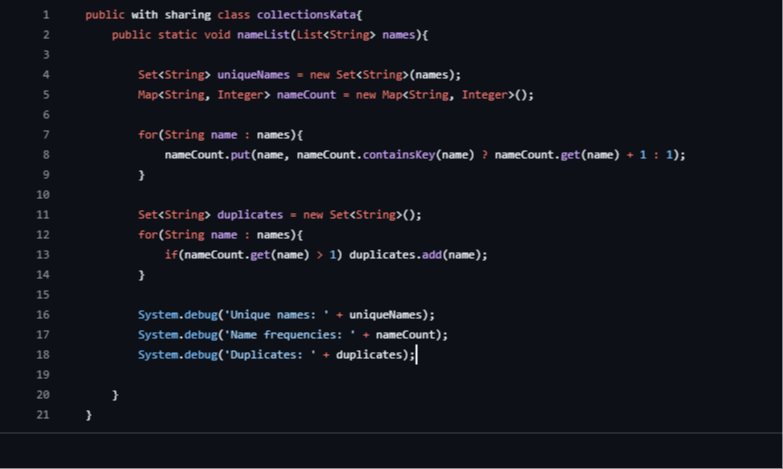
    This Apex class is a mere 18 lines of code, and only 14 if you take away the line breaks.

    Now, look how many concepts are present:

    1. Class Declaration
    2. Method Declaration
    3. Collections (Set, List, Map)
    4. Control Structures (For loop, Ternary Operator)
    5. String handling
    6. Counting Logic
    7. Duplicate Detection
    8. Debugging and logging
    9. Type Initialization


    Nine distinct coding concepts by my count. That's a lot!

    By simply rewriting this Apex code once a day, you gain repeated exposure to the building blocks of writing Apex.

    Why Code Katas Work

    • Muscle Memory for the Mind: Just as physical katas build muscle memory, code katas train the brain to recognize patterns, solutions, and pitfalls in programming.
       
    • Safe Environment for Experimentation: By solving the same problem repeatedly, developers can experiment with different approaches, frameworks, or optimizations without fear of failure.

    • Focus on Fundamentals: Code katas emphasize core principles like loops, recursion, testing, and algorithm design, which are critical for all programmers.


    Now that you understand the power of code katas, it’s time to take action. Pick a code kata to practice—whether it’s the example shared here (available to copy paste from this Github repo) or another small, focused exercise.

    Commit to rewriting it daily for a week and notice how your skills sharpen with each iteration. Repetition is the path to mastery.

    And if you don’t write code but work with Salesforce flows, the principle still applies: find a repetitive practice to internalize flow-building fundamentals.

    For instance, take a common automation scenario—like updating related records or sending notifications—and recreate it from scratch daily.

    Over time, you’ll develop the intuition and skill to tackle even the most complex flows effortlessly.

    Practice doesn’t just make perfect—it makes you better every day. So, start your kata, and let’s see where deliberate practice takes you.


    Best,

    Nick

  • The Compiler

    The Compiler

    Alex hadn't meant to discover that reality was mutable. It happened during a late-night coding session as he prepared for an upcoming interview, when the lines between Apex triggers and consciousness began to blur.

    He'd been visualizing system architectures - a technique he'd developed for tracking complex dependencies. But that night, exhausted and deep in flow state, he noticed something odd: the visualizations were starting to write themselves.

    It began with simple patterns. Customer objects linking to opportunities linking to tasks - standard Salesforce relationships. But as he held these structures in his mind, he started seeing them everywhere. The way his neighbor's cat moved through space suddenly looked like an elegantly optimized query. The flow of traffic outside his window resembled a perfectly tuned workflow.

    At first, he attributed it to too much caffeine and too little sleep. But the patterns persisted. More importantly, they responded.

    When he visualized success paths through his code with perfect clarity, bugs would resolve themselves in unexpected ways. When he held the image of system architecture in his mind while falling asleep, he'd wake to find solutions emerging fully formed.

    Then came the stranger observations. During technical discussions, if he maintained a clear visualization of positive outcomes, conversations would flow toward those results almost magnetically. It wasn't forcing or manipulation - just reality optimizing itself along paths he'd compiled in his mind.

    "Intent," he muttered one night, though he couldn't remember where he'd heard the term. The way a compiler converts high-level code into machine language, his visualizations were converting pure intent into executable reality.

    He began experimenting. Before client meetings, he'd compile complete success scenarios - not just hoping or wishing, but rendering them in his mind with the same precision he used for technical architecture. The results were statistically improbable yet consistent.

    But the real breakthrough came when he stopped trying to force specific outcomes and instead focused on compiling states of clarity. Like refactoring cluttered code into elegant patterns, he found he could refactor his own perception.

    The interview process that had once seemed daunting became a series of patterns to optimize. Each question an opportunity to demonstrate not just knowledge, but understanding. Each interaction a chance to align intent with execution.

    Some nights, working late, he'd catch his reflection in the monitor and see not just himself, but threads of possibility - like stack traces in reverse, leading not from errors but toward optimal outcomes.

    He kept no notes about these discoveries. They weren't the kind of thing you could document in Asana or capture in acceptance criteria. But they compiled themselves into his understanding, like well-written code becoming part of a system's architecture.

    Reality, he discovered, wasn't fixed. It was more like a continuous integration pipeline - constantly building, testing, and deploying based on the patterns you compiled into it.

    The key was precision. Vague hopes produced unpredictable results. But clearly compiled intent, rendered with the same attention to detail he brought to his technical work, seemed to optimize reality's execution paths.

    One evening, still preparing for the crucial technical interview, Alex found himself thinking about quantum compilation - how observation collapses probability waves into specific states. He smiled, remembering that observer and system couldn't be separated. The compiler was itself being compiled.

    He closed his laptop, stood, stretched. Outside his window, the city flickered like a billion runtime operations executing in parallel. Each light a query, each moving car a thread, each human interaction a complex data exchange.

    All of it mutable. All of it responsive to properly compiled intent.

    Ready to execute.

    Hope you enjoyed this story! 

    Best,

    Nick

  • Exciting Winter '25 ☃️ Feature

    Exciting Winter '25 ☃️ Feature

    Quick tip this week!

    In the most recent Winter '25 release, Salesforce enabled Conditional Field Formatting.

    This is a fun new feature that I think we'll see used more often over time.

    In the Lightning App Builder, when working with dynamic forms, you'll notice there is now the ability to apply Conditional Formatting to fields.
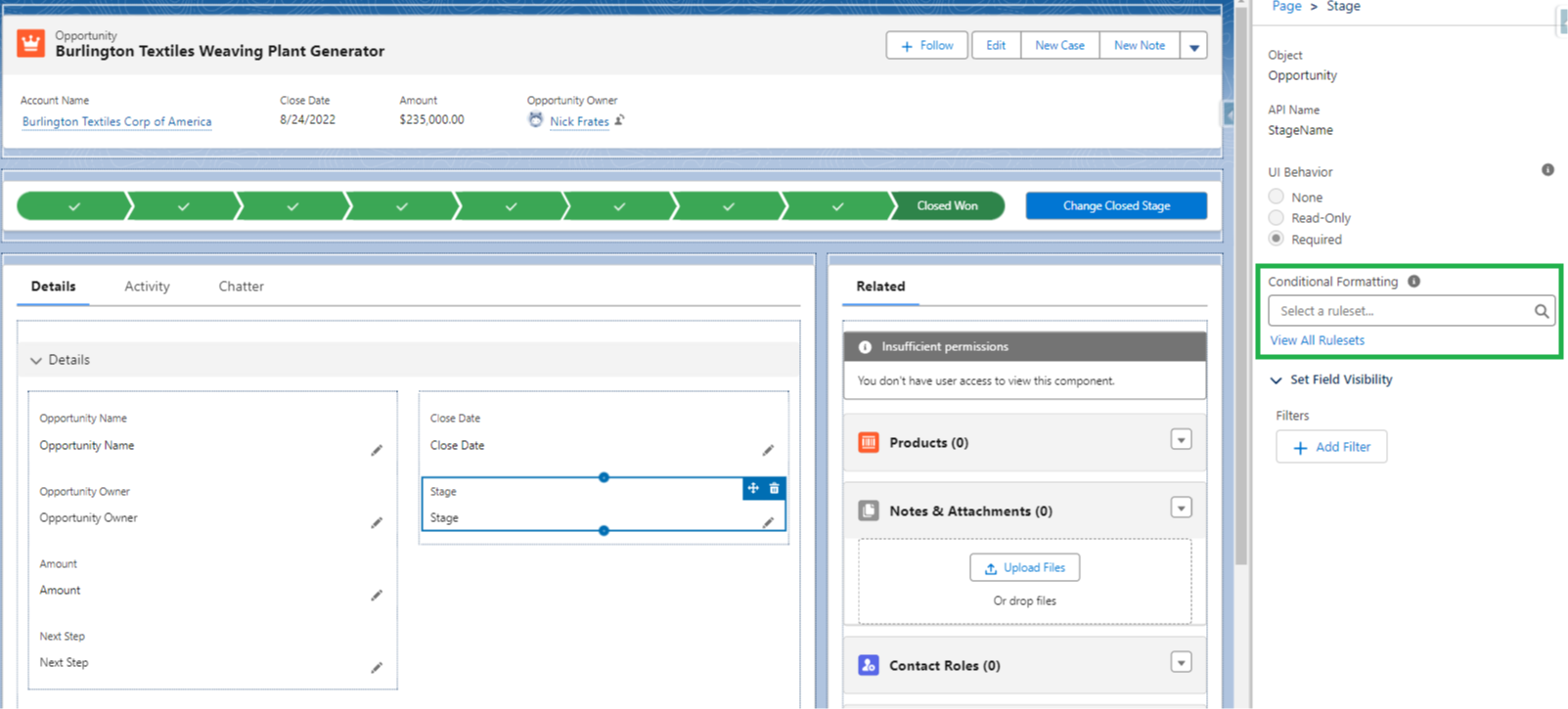
    Basically, you set up an if/then rule, and when the criteria for your rule is met, an icon appears on the record page next to the field of your choice.

    In this example, we show a green happy face when the stage of an opportunity = Closed Won.
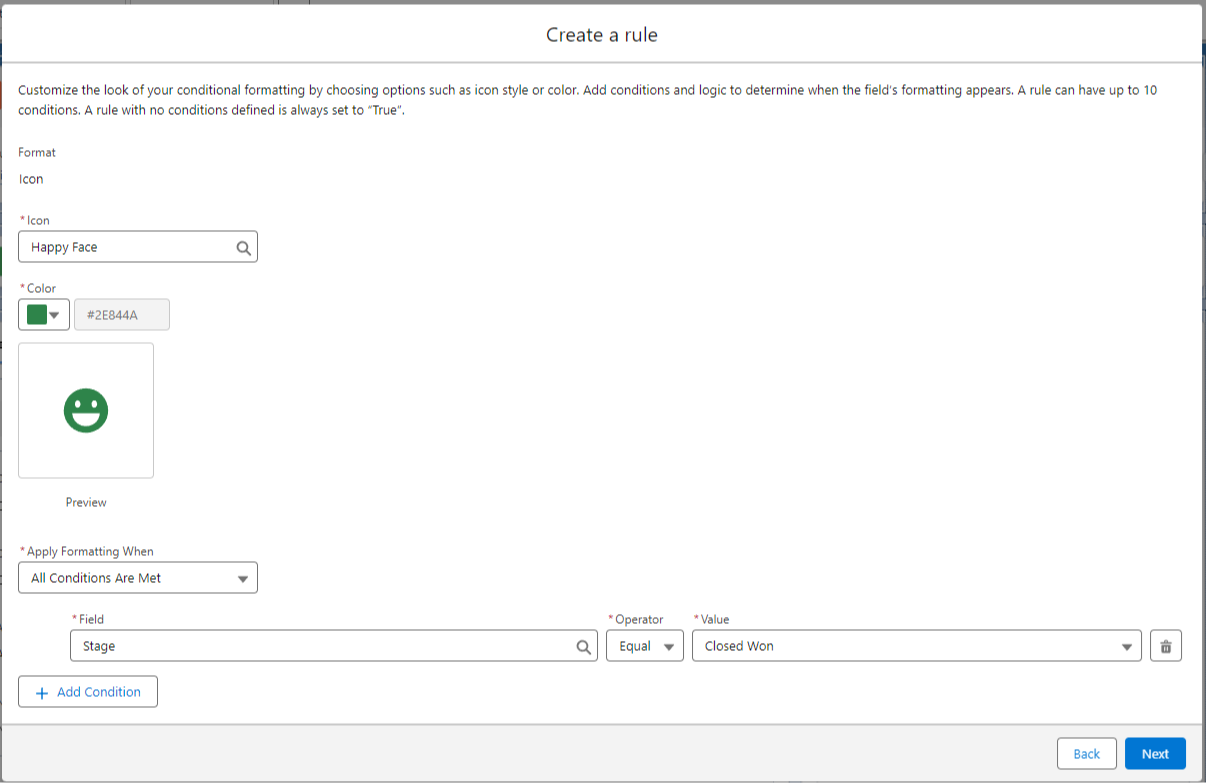
    Which looks like this on the page:
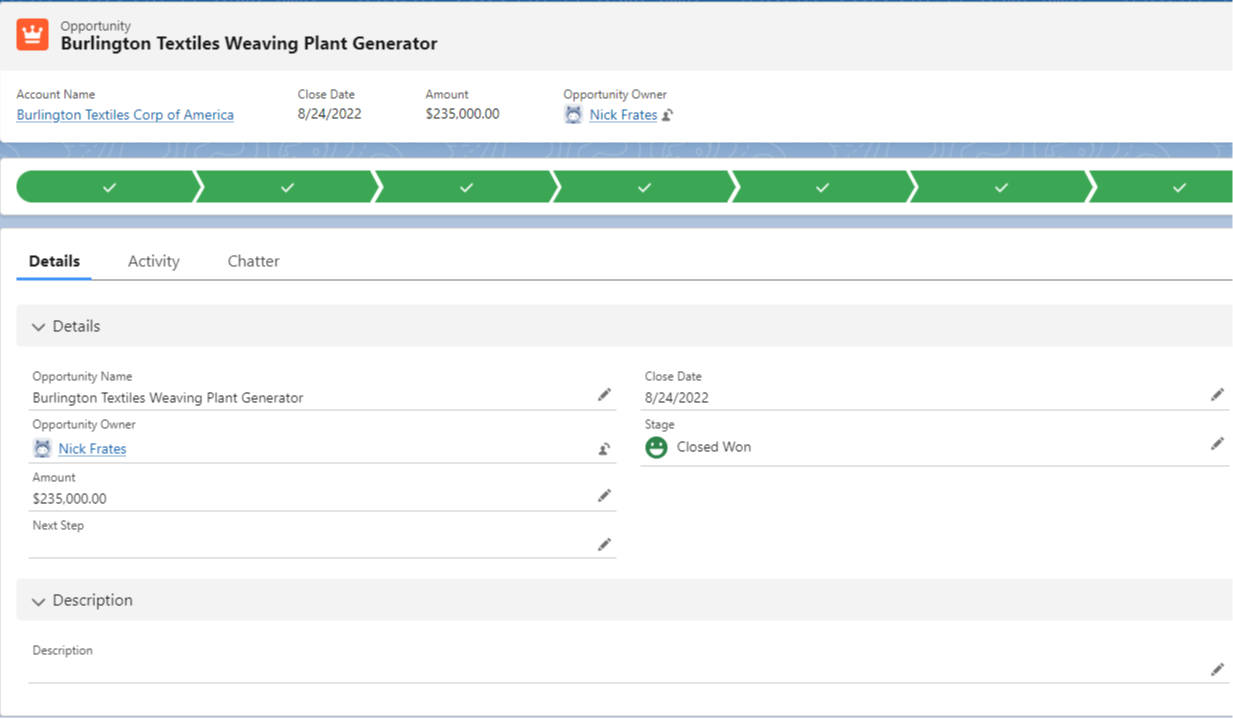
    There are a ton of icons to choose from (more than in the screenshot) so the sky is the limit in terms of how we can use this functionality.
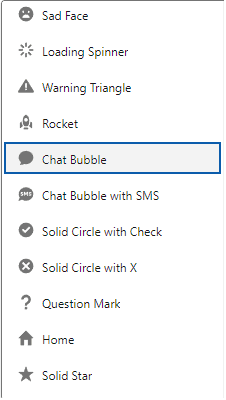
    Delighting end users is always our goal, and I think this is one of those low effort / high reward items that let will let us do just that.


    Hope this helps!


    Best,

    Nick

  • Dynamic Report Filters

    Dynamic Report Filters

    Quick tip this week.

    You can pass filter values into the URL of a report in order to dynamically change what the report shows.

    Pretend you have an Opportunity report with one filter on the AccountID field.

    So all the Opportunities on the report are related to the Account you filter on.

    Normally your report URL would look something like:

    yoursalesforce.com/lightning/r/Report/00Oak000009CJUjEAO/view

    By adding a “?fv0=” at the end of the URL, you can pass any AccountId into the report for it to filter on dynamically when it loads. 

    Like this:

    yoursalesforce.com/lightning/r/Report/00Oak000009CJUjEAO/view?fv0=001ak000009juju

    When you click this modified URL, the report will load specifically for the AccountID you added to the URL.

    You can even pass in values for several filters by using fv0, fv1, fv2, etc. as long as you separate them using the “&” sign.

    Like this:

    yoursalesforce.com/lightning/r/Report/00Oak000009CJUjEAO/view?fv0=001ak000009juju&fv1=accountName

    You can use dynamic filtering in hyperlink formulas for list views, flow emails, formula fields on record pages, and more.

    It’s a useful thing to know, and I had to relearn how it worked this week, so I thought I’d share.

    Hope it helps!

    Best,

    Nick

  • Flow Building Framework

    Flow Building Framework

    "Everything should be made as simple as possible, but not simpler."
    — Albert Einstein


    What is the simplest set of principles for building Salesforce flows?

    I was brain storming this week and wanted to come up with an easy system that a beginner could quickly memorize.

    Here's where I landed: FRAME your flows (if you're a beginner).

    F - first, avoid flows entirely

    R -  reverse engineer what you want the flow to do

    A - add checkpoints

    M - make your flow easy to change

    E - evaluate: who does this help?


    If you're a beginner, FRAME provides a simple structure to help you get started and build effective flows.

    Let's take this letter by letter.

    F - first, avoid flows entirely

    The easiest flow to build is the one that doesn't exist.

    This cue is to prevent bad effects from "man with a hammer" syndrome.

    It's meant to encourage routinely exploring configuration options like quick actions as solutions before diving into automation.

    Now, automation exists for a reason, and if you think flows are the solution you need, then...

    R -  reverse engineer what you want the flow to do

    Begin with the end in mind.

    Define the ideal outcome of the flow.

    This flow creates a new case when an opportunity is closed won.

    This flow guides a user to create a new contact with an email and phone number. It should always be available at the bottom of the screen.

    The process of defining what the flow should do guides you on what kind of flow to build.

    It also gives you a blueprint for what elements you'll need on the canvas.

    Creating a case? Use the create element.

    Need information a related contact? Use a get element.

    Fires when an opportunity is closed won? Add that to the start criteria.

    Once you've thought through the flow backwards, then...

    A - add checkpoints

    You've listed four or five things you want your flow to do.

    Now, pick which one should be first.

    Next, pick which one should be last.

    Then, try to sequence the other steps in between.  

    Each of these items is now a "checkpoint".

    It can be daunting building an entire flow start to finish when you're still learning.

    Breaking the steps down into smaller, more manageable, pieces helps you build momentum.

    Get to the first checkpoint, save your work, and then test how the flow works so far.

    Did you configure your start criteria and save the flow? Nice! First small win.

    Did the flow successfully go from the start criteria to the get element right afterwards? Awesome! Second small win.

    Keep stacking small wins, one at each checkpoint, and soon enough the flow is done.

    Once your flow is built, double check if it's...

    M - make your flow easy to change

    Good software architecture is easy to change (because the business always changes its mind).

    Therefore, well designed flows are easy to change too.

    We follow this philosophy by: 

    • Naming elements well
    • Adding descriptions to elements
    • Keeping flows small 
    • Building each flow with a single responsibility

    This reduces long-term maintenance, and makes your life easier from the get go. With that done, let's...

    E - evaluate: who does this help?

    All flows are built to automate or simplify something.

    By extension, they should make someone's life easier in some way.

    Flows are fun, but we have to remember they're meant to help specific people do specific things.

    We must double check our flow simplifies and helps someone - even if it's only one person.

    If we've built a flow and it doesn't help anyone at all, let's go back to the drawing board and find a way to make sure our flow fulfills its purpose of being useful to someone.


    And that's it! If you're a beginner, remember to FRAME your flows and you'll always be in good shape.


    Best,

    Nick