Category: Newsletter

  • A secret good flow builders know...

    A secret good flow builders know...

    Have you ever used custom meta data?

    Building your Flows to make long term maintenance easy is an excellent design principle (and custom metadata can help).

    Let me tell you a story.

    I have a client in the banking industry.

    And I recently built them a screen flow that helps in their credit risk evaluation process.

    It's big and complicated. There are 23 screens in the flow, one for each unique credit risk scenario.

    Depending on the risk level of the loan, a bank employee using the Screen Flow is shown a list of up to four other bank employees who must review the loan information before it gets approved.

    And with 23 credit scenarios, managing the reviewers for each one is complicated.

    The reviewers change frequently. They swap roles.

    And sometimes new reviewers get added.

    The goal was to avoid having to update the flow (and all 23 screens) every time a reviewer changed.

    Enter custom meta data.

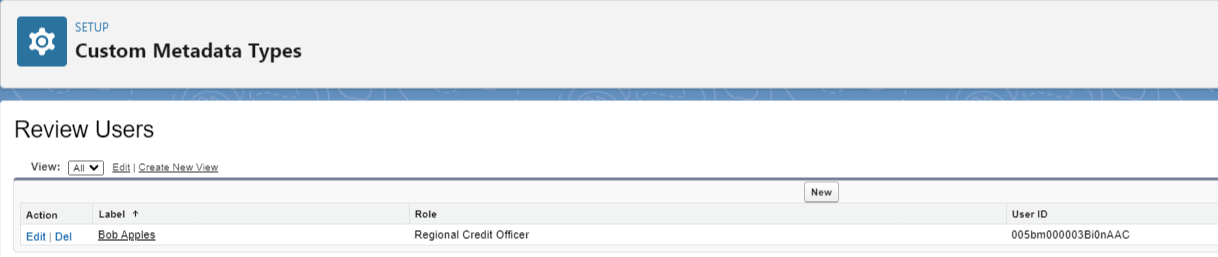
    By creating a custom meta type called "Review User", I was able to store all the review user information outside the flow.
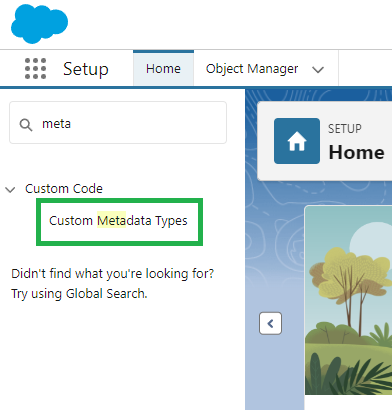
    Custom metadata is like it's own object.

    You can create fields and then create records to store information.

    In my case, I created a User_Id__c and a Role__c field.

    Then I created a record for each reviewer.
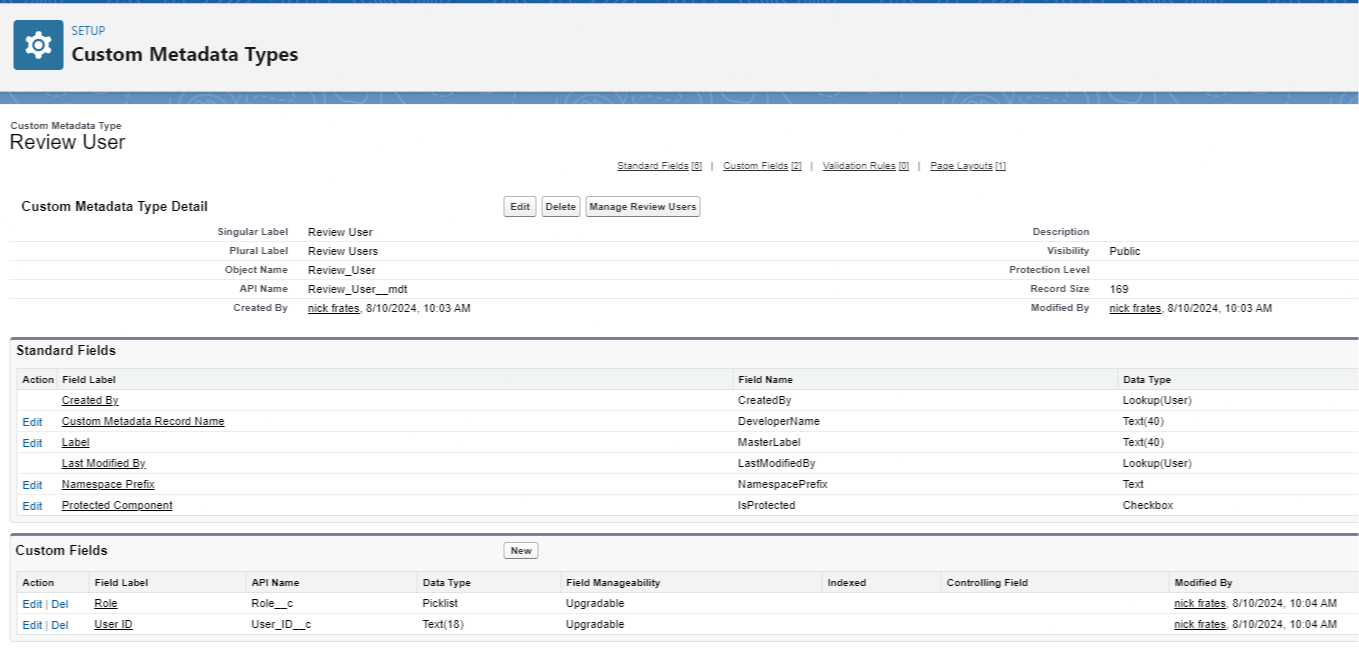
    This is great because now, in my flow, I can use a record collection drop down to query for users in this role (storing the User ID for later use)
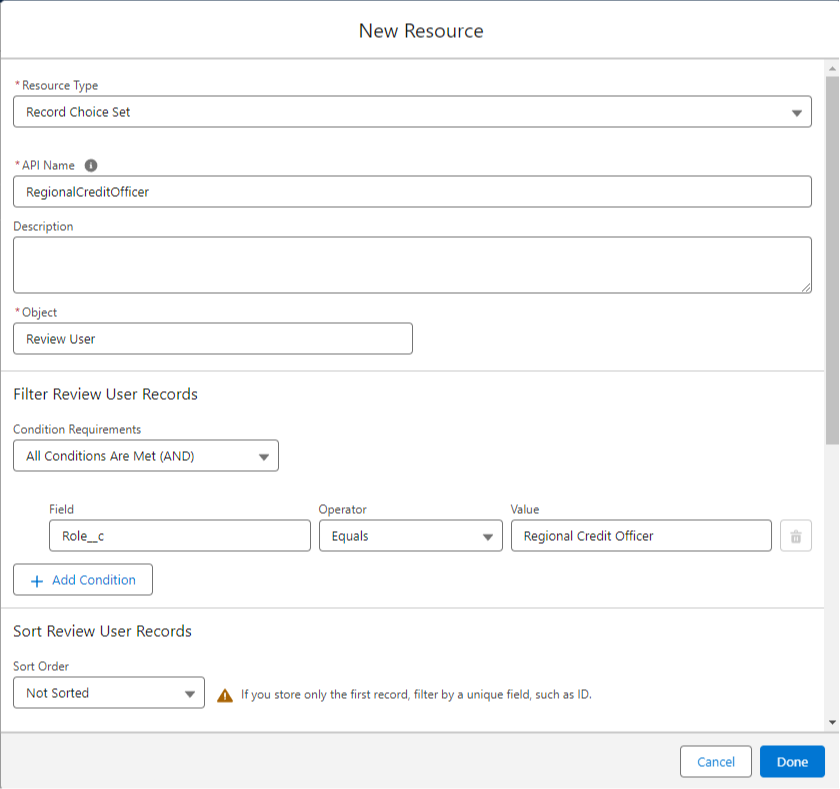
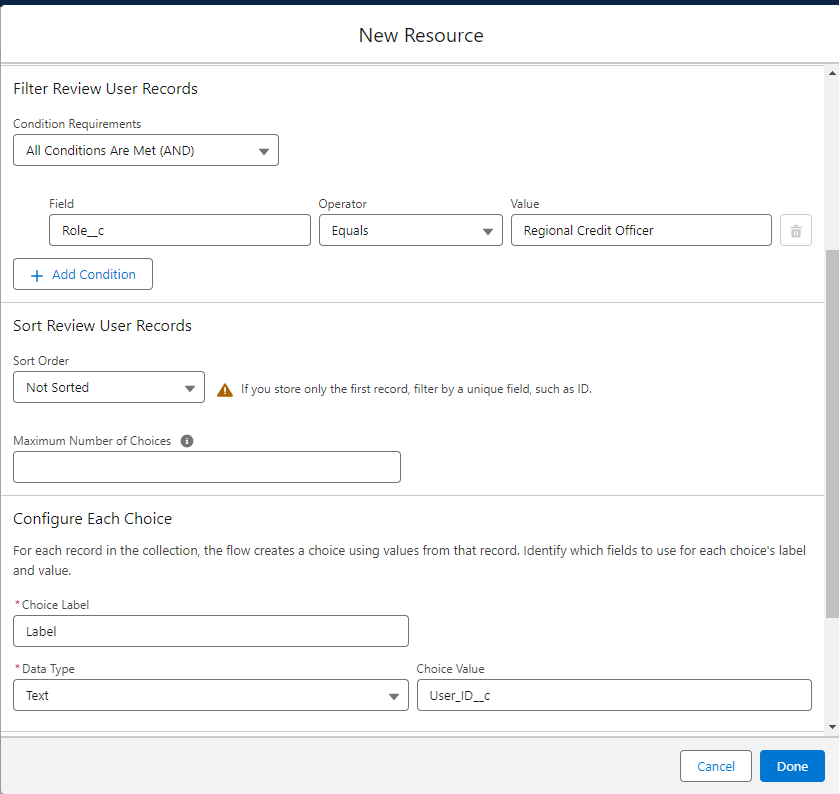
    That means I set the flow up once with a Record Choice collection and its ready forever.

    All my Flow dropdowns will use this record choice collection, and they'll be dynamically kept up to date.

    Adding users and changing roles is all done to the meta data records, rather than in the flow.

    My client loved this because it makes future changes simple.

    Other scenarios you could use custom metadata in include:

    • Discount Rules
    • Lead Scoring Criteria
    • Tax Rate Management

    You get the idea.

    We store compicated and changing information in metadata so that our flow doesn't have to be updated all the time.

    The flow queries the metadata. And any changes we need to make are done on the metadata records.

    Hope this helps!


    Best,


    Nick


    P.S. Check out this YouTube video from me with a live example

    https://youtu.be/7NxLsq8SQNM

  • Your talent stack...

    Your talent stack...

    Happy Saturday!

    Interesting idea for you this week: the talent stack.

    As a professional you have a specific set of skills.

    Some people are accountants. Some are musicians. Some can effortlessly persuade others.

    We are Salesforce professionals.

    And the set of skills that you personally have, including your Salesforce ability, is your talent stack.

    There are two ways talent stacking gets rewarded in the market.

    One is the "best in the world" approach.

    This is where you practice and hone your ability in a single skill to the point where you are among, if not the actual, best in the world.

    • Michael Jordan in basketball.
    • Magnus Carlsen in Chess.
    • Serena Williams in tennis.
    • Warren Buffett in investing.

    These individuals are elite in their respective crafts and are all highly rewarded because of it.

    Now, there are 8 billion people in the world, so it's tough to be #1 in anything.

    Which is where the second approach to talent stacking comes in.

    This is where you learn skills that work well together.

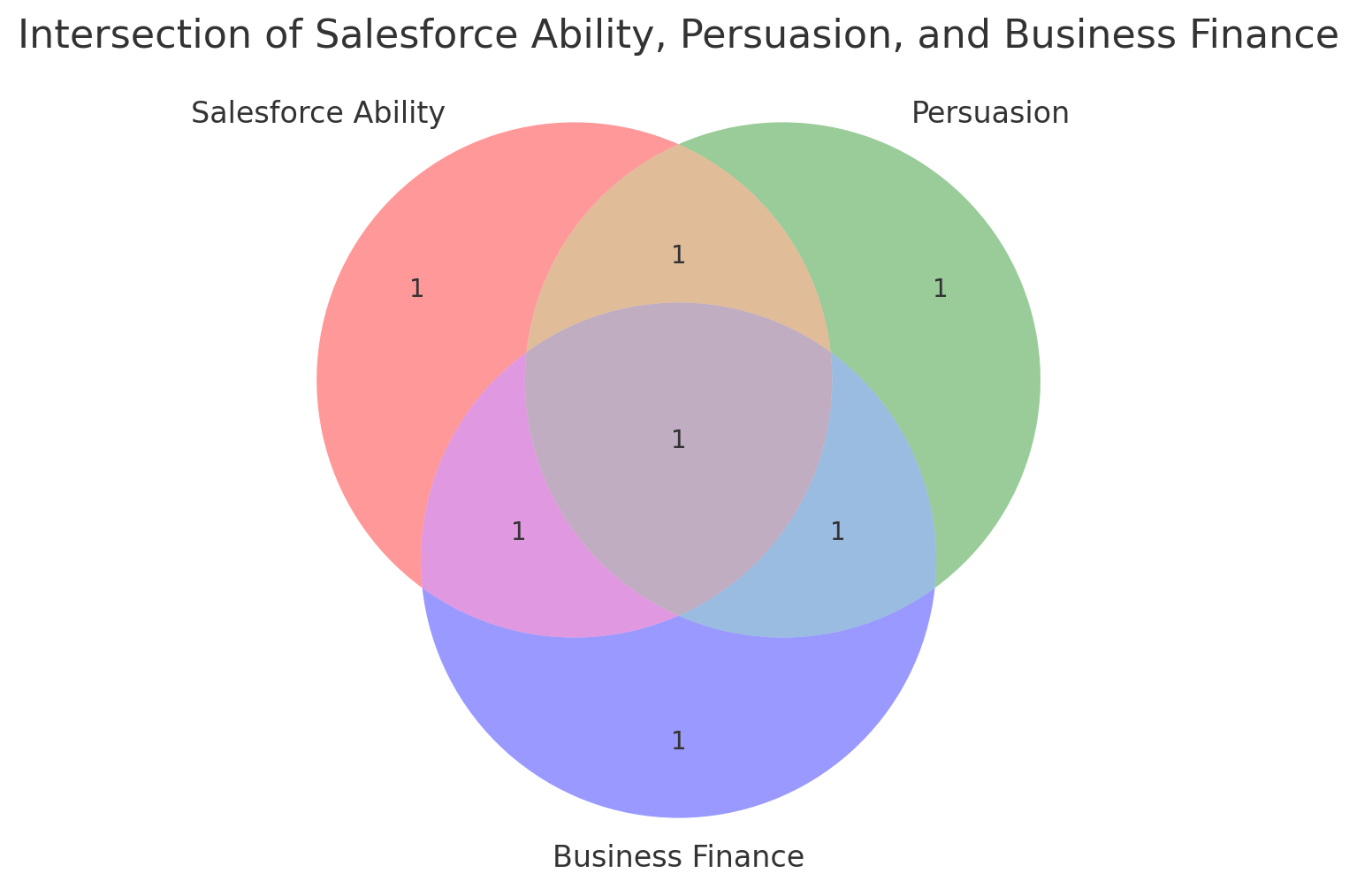
    Say you're top 20% in the world at understanding the Salesforce platform.

    And you're top 20% in the world at persuading executives to execute good business ideas.

    And you're also top 20% in your ability to think financially about a business. To understand the numbers that make up the profit and loss.

    You're not absolutely elite in any one skill, but the combination of these three skills makes you so rare, that you may be in the top 1% of the world with those three skills combined.

    With these three skills you could successfully:

    • Be a solution engineer who sources new business for a Salesforce consultancy
    • Be an executive at a company that uses Salesforce and is responsible for company Salesforce strategy and execution with a team reporting to you
    • Be a freelancer who is hired by, and works directly with, C-level executives to build out their Salesforce environment, commanding well over $100/hr and working only 20 hrs/week

    You can think of this like an animal inhabiting a niche in an ecosystem.

    “ Just as animals flourish in niches, people who specialize in some narrow niche can do very well.”

    ― Charlie Munger

    And by specializing in your own self-defined niche (with in-demand skills) you can earn out-sized returns.

    To sum up the talent stack concept:

    • Your talent stack is related to your earning ability
    • You're unlikely to be the absolute best in the world at one single thing
    • Combining skills that work well together let's you niche down
    • Being in the top 1% of the world in your niche with a combination of 3 or 4 or 5 skills is doable by almost all of us
    • You'll be highly rewarded for building a scarce, in demand, talent stack -- the same way someone who is best in the world at one thing is highly rewarded

    That's it!

    I hope this email gets you thinking about some of the useful skills you currently have, as well as skills that you'd like to stack on top of what you've already got.

    If nothing else, thinking in terms of having 3 or 4 interlinked skills will give you clarity when deciding what you want to learn in the future.

    Have a great weekend!


    Best,

    Nick

  • Could you do me a favor?

    Could you do me a favor?

    "Could you do me a favor?" a client of mine asked this week.

    "Could you make it so an email is sent when the status field changes?"

    They're using a custom object.

    And when it hits a certain status, they want to notify the next person in line that they can start their part of the process.

    Yes, definitely, I thought. That's easy, a Flow can do it.

    And then came the plot twist: "can you also make the email include the most recently uploaded file on the record as an attachment?"

    I know you can include attachments in an email template.

    But pulling a file from a record and dynamically attaching it to an email with a flow?

    I wasn't sure on that one.

    I told my client I'd see what I could come up with.

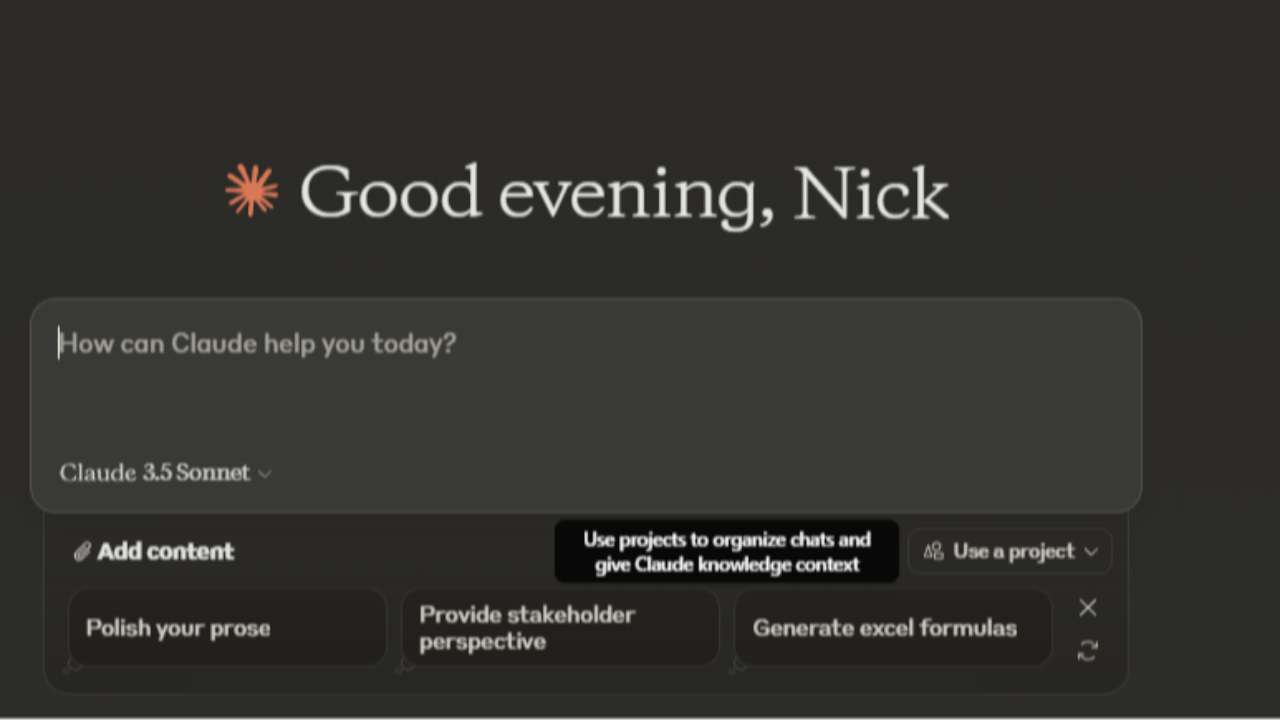
    That's when I thought of Claude.

    I saw some guy raving about its performance online (it's a LLM like ChatGPT) and figured - why not give it a shot?

    So I signed up, got logged in, and asked, "Can you write an Apex component that will allow me to send an attachment in an email via Salesforce Flow?" 

    In about three seconds it generated an Apex class.

    To be honest, I was expecting it to fail (or be impossibly difficult to work with) like much of the ChatGPT code I've worked with.

    So, with low expectations, I pasted it into the developer console, and then headed to the Flow Builder to see if the Apex action was available.

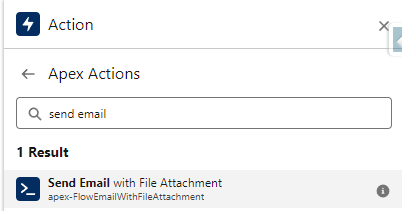
    Sure enough, it was there.

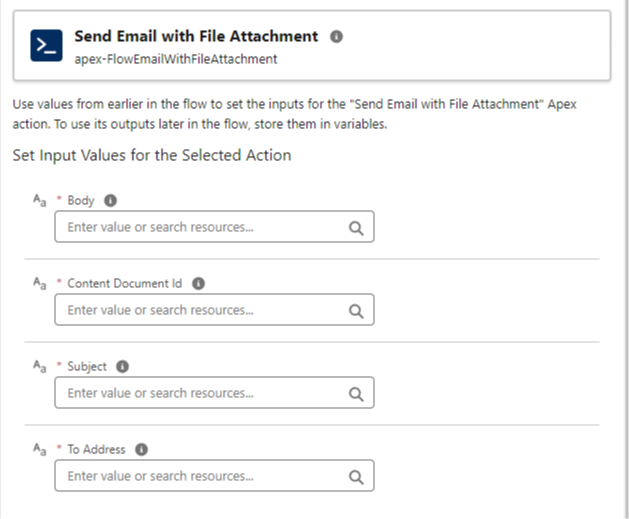
    And after configuring the parameters:

    I was able to send an email - and the attachment of the most recent file came through perfectly.

    Impressive.

    I had Claude create some test classes to get the code to >90% coverage.

    And in less than 15 minutes, we were up and running with production-ready code.

    What a world.

    • Here is a link to the Apex Code and Test class for the Flow Email Attachment action
    • And I also used Claude to rewrite the Convert Lead in a Flow Apex code I shared with you last week. Here is a link to the updated Apex code

    And that's my story this week.

    To be honest, I felt a little spooked by this experience. It left me with questions:

    • Do we even need developers anymore?
    • If LLM's keep improving at such a fast clip, where will be in five years? Will we have jobs?
    • What are other Salesforce professionals using LLM's for that I have no idea about?

    I don't know the answers...

    But if you have any thoughts or ideas on these, reply to this email now and tell me :)

    And I hope you get some use out of that email action.

    Have a great weekend!


    Best,

    Nick

  • "That Needs Apex" and Other Scary Stories...

    "That Needs Apex" and Other Scary Stories...

    "That needs Apex."

    We've all heard it before.

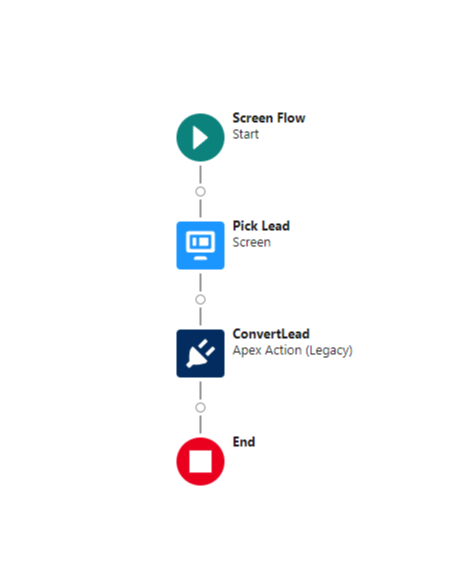
    I was talking with a fellow consultant this week when she mentioned that one of her clients wanted to convert a lead in a screen flow.

    She knew a flow couldn't convert a lead by itself (at least not yet), so she told her client that the solution would need Apex code.

    Now, she was investigating alternatives.

    "That needs Apex."

    If you've been around the Salesforce space for a while, you've likely heard the phrase.

    It can be an idea killer.

    The implication is that writing Apex code is a skill set less common than flow building.

    Furthermore, it suggests that using Apex as a solution will take so much time as to not be worth it for low-priority or "nice to have" requests.

    But, just because something needs Apex doesn't mean it can't be quick and easy.

    Having encountered this lead conversion request before, I know of free code provided by Salesforce that's available here. (Side note: I updated that code sample for 2024 and it's available here)

    Just copy and paste it into your environment, and in minutes - not hours - you're good to go.

    Once this code is in your org, you can drop it on the flow canvas as an action, and it works well.

    I was lucky to have that code bookmarked and was able to share it with my colleague.

    She knew exactly what to do with it and was delighted Salesforce had this resource available.

    So next time you hear "that needs Apex" or something similar, don't give up right away.

    Do what my colleague did and start going through the troubleshooting checklist:

    • Ask a peer if they've solved this before
    • Google for existing open-source code
    • Ask ChatGPT to try and solve it

    You'll be surprised how often you find a solution.

    Hope this helps!

    Best,

    Nick

  • A Mysterious Deployment Error

    A Mysterious Deployment Error

    Happy Saturday!

    Quick story...

    This week I was moving a batch of work between Sandboxes for a client.

    There were 138 items that needed to move, and it had to be done fast.

    The client wanted to demo this functionality in their full sandbox in under 2 hours.

    Normally this is a simple process.

    Use a change set, move the work, validate it, and then deploy.

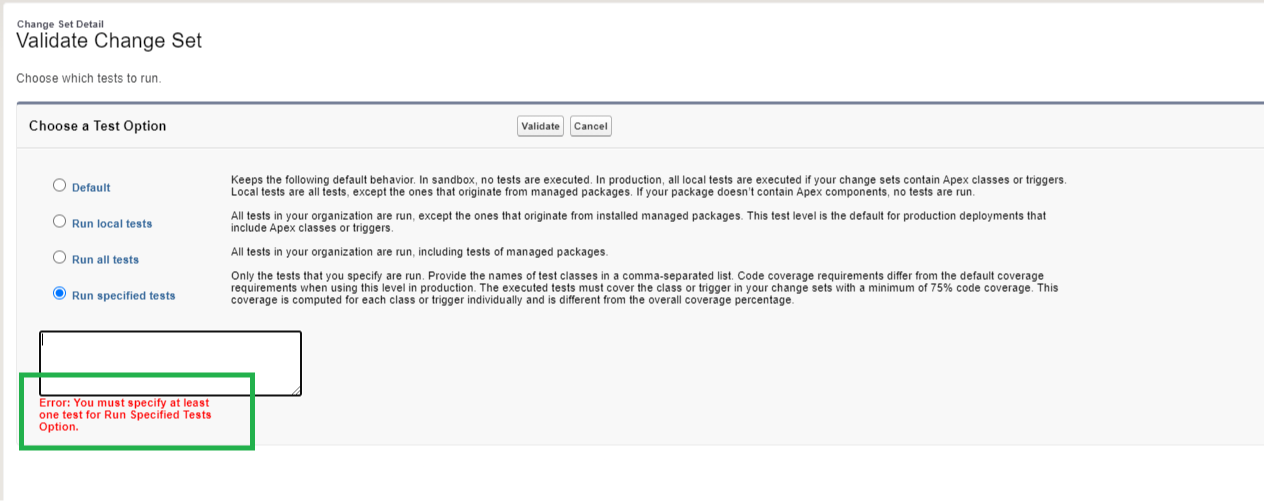
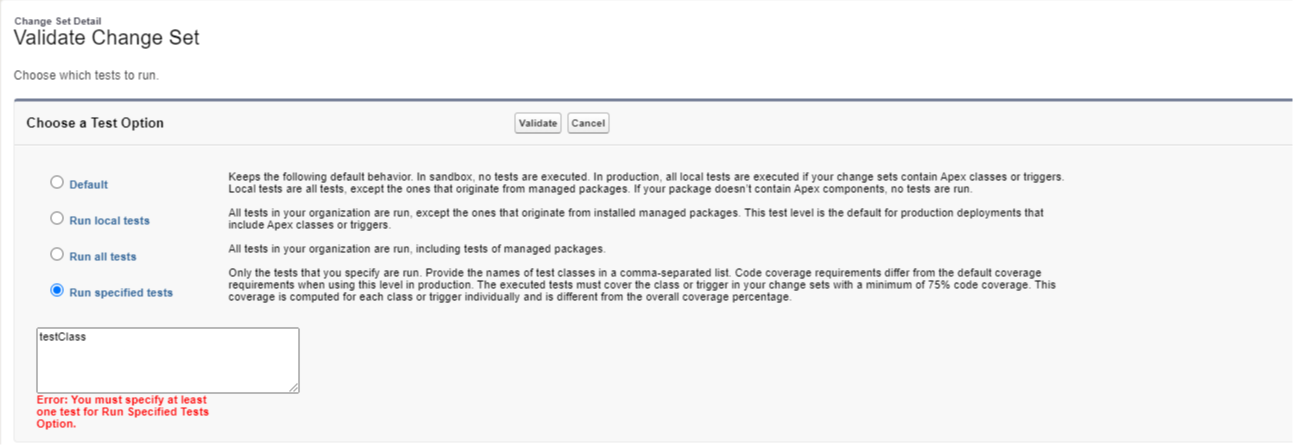
    During validation I often select the Run Specified Tests option and leave it blank (when I'm not deploying Apex).

    But this time, I hit an unusual error:

    Error: You must specify at least one test for Run Specified Tests Option.

    Boo.

    I was confused.

    Why is an Apex test required?

    There's no Apex in the change set!

    This might be a new update in an upcoming Salesforce release, or perhaps a sandbox setting specific to this client.

    At any rate, it was in the way.

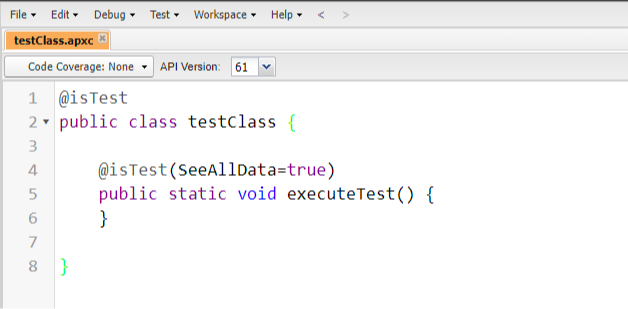
    To get past the error, I wrote an Apex Class designed to test nothing in order to get my changes through.

    This is the Apex Test Class: 

    I saved my work in the developer console and was then able to reference the "testClass" when specifying a test for the deployment.

    The validation worked with my "fake" testClass and I was able to get through the deployment.

    Whew.

    I did some searching online and didn't find any results on this error, which makes me think maybe it's part of an upcoming release.

    Thought I'd share this solution with you in case you encounter a similar situation.

    Hope it helps!


    Best,

    Nick


    P.S. If you know what causes this error, comment here and tell me! :)

  • How to Navigate to a Record in Salesforce Flow

    How to Navigate to a Record in Salesforce Flow

    We're officially halfway through 2024.

    Halfway into the year, are you ahead of schedule, on track, or behind where you want to be on your 2024 goals?

    I'm behind... I definitely want to spend a little more time on my most important 2024 goals.

    Now that we've had a moment of reflection, let's jump into this week's tip: how to navigate to a record from a flow.

    In a screen flow it's often useful to redirect a user to a newly created record.

    And, sometimes, it can be useful to refresh the current record page a user is looking at.

    This solution handles both use cases.

    First, you'll want to go to the Salesforce help site here, and take a look at the three pieces of code.

    Don't worry, you don't need to understand it at all. This is a simple copy and paste operation I'm about to walk you through.

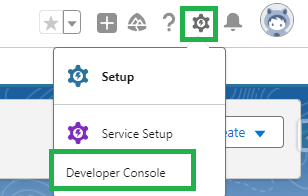
    Next, we'll head to Salesforce and open the developer console.

    And we'll click File -> New -> Lightning Component.

    Type NavigateToRecord as the name and press Submit.

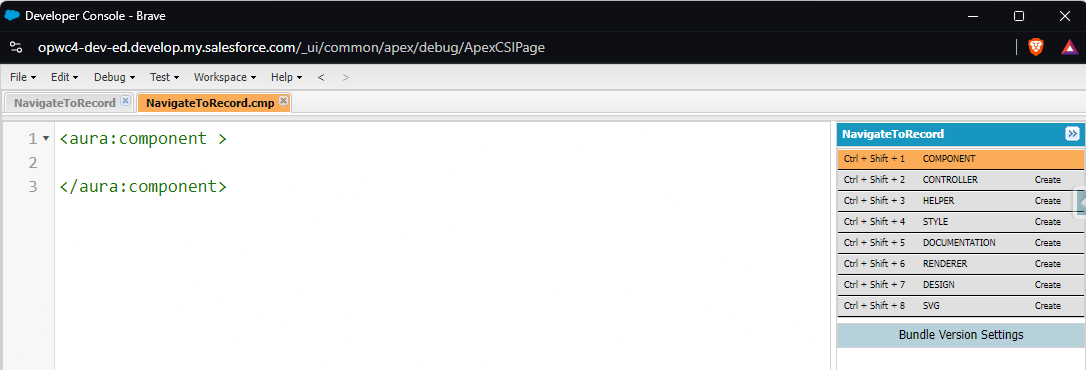
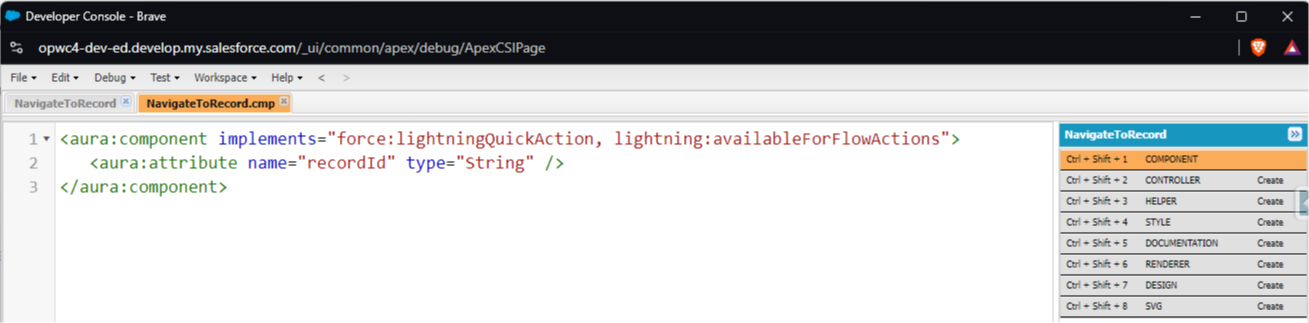
    You'll land on a page like this

    On this page, paste the code from the help site labeled Component Markup.

    It will look like the above image when you're done.

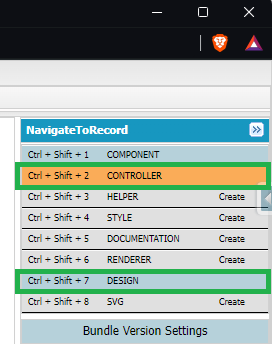
    The next step is to, on the right hand side, click both the word Controller and the word Design once.

    This will create the space for you to paste the other two pieces of code.

    Now:

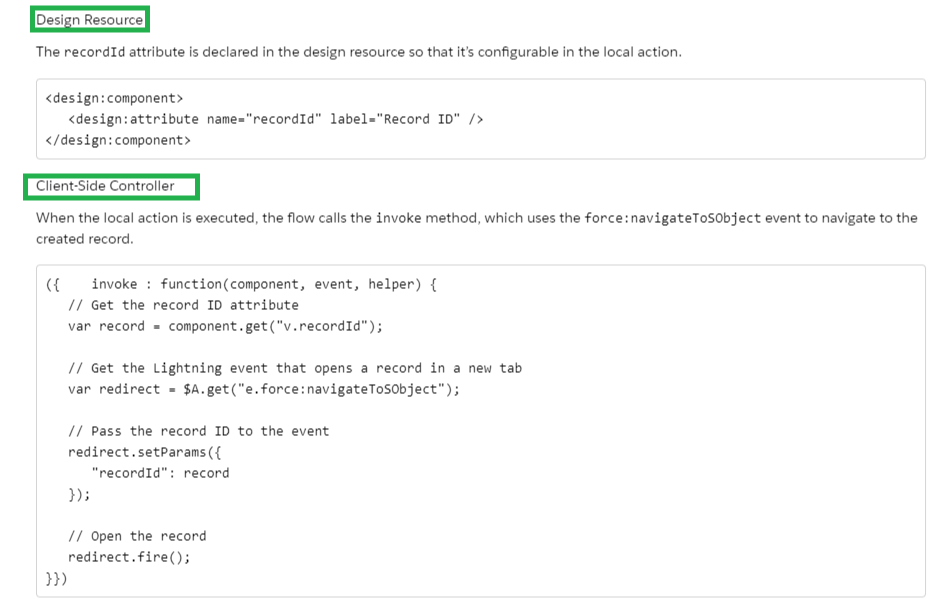
    1. Paste the code from the help site labeled Design Resource into the Design file
    2. Paste the code from the help site labeled Client-Side Controller into the Controller file
    3. Make sure to save each individual tab by pressing Ctrl + S

    The following screenshot shows which code to copy.

    Hard part done! After saving, you can close the developer console.

    Now we can move on to the flow.

    In any screen flow that you'd like to include this action in, click the +Action button on the canvas to add a new action.

    Then search for NavigateToRecord (what we named our component).

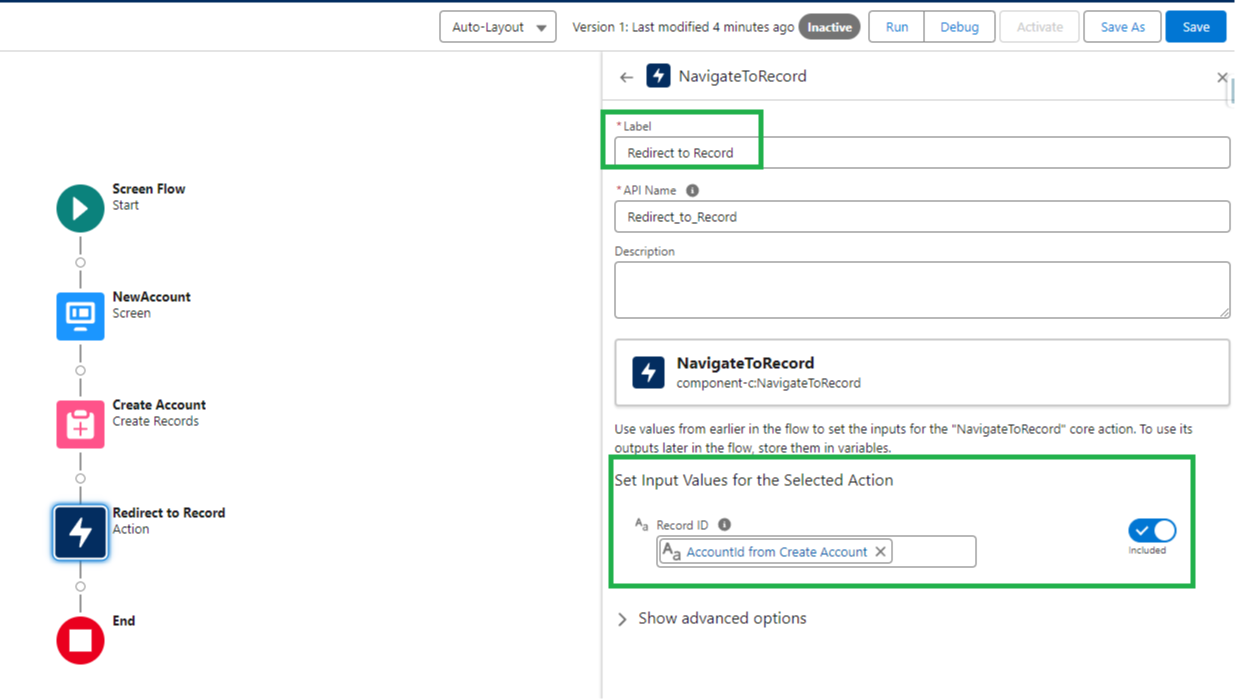
    Click the action, name it, and then specify the record Id of the record you want to send the user to.

    This recordId could be for a newly created record, or even the record that started the flow (to refresh the page).

    Here's an example:

    Once you configure the action, save and activate the flow. And you're done!

    Now any time a user goes through the screen flow, the action will fire, and redirect them to the record you chose.

    Sweet!

    Another good thing about this action is that can be built directly in a production environment. No deployment or developer needed.

    Hope you find this one helpful. I use it all the time.


    Best,

    Nick

  • How to create Conditional Tabs in Salesforce Lightning

    How to create Conditional Tabs in Salesforce Lightning

    Super short email this week!

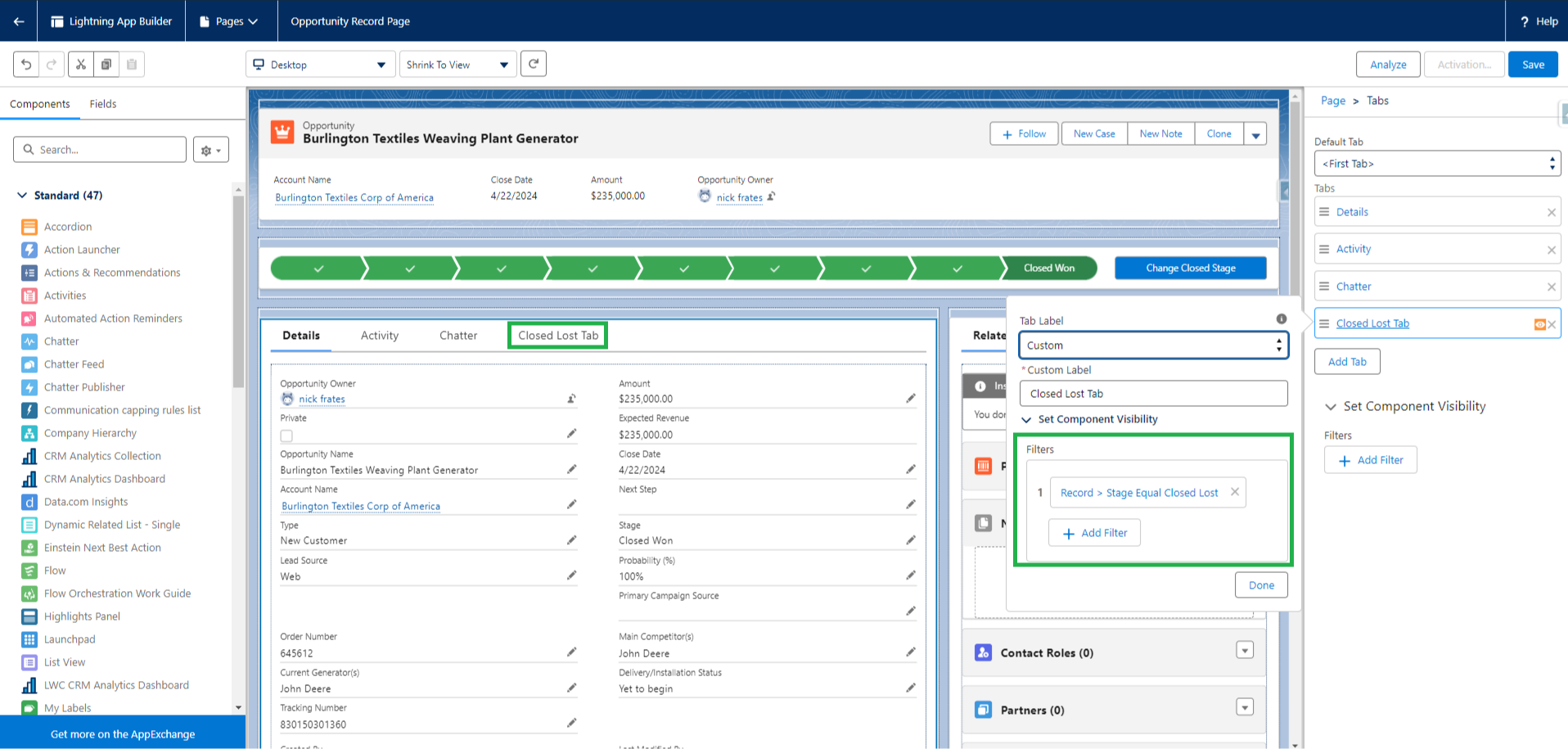
    In the Summer '24 release we got the ability to conditionally show tabs on Lightning Page layouts.

    Set Conditional Visibility for Individual Tabs in Lightning App Builder

    And for the first time this week a client of mine asked for the functionality and I could build it!

    To set it up you simply need to specify visibility conditions in the App Builder just like you would for other visibility scenarios. 


    It's easy after we've been in the Salesforce space awhile to make fun of some of the product limitations (and there certainly are some).

    But every once in a while, new features we've been asking for do get delivered, and it's awesome!

    So if you haven't tried out the conditional tab visiblity yet, give it a shot. I think you'll like it :)


    Best,

    Nick

  • How Email Approvals Work inside Salesforce

    How Email Approvals Work inside Salesforce

    Recently I've been learning more about approval processes.

    Approval process offer an out-of-the-box solution for handing a record back and forth between team members.

    It lets a team member evaluate a record, and then approve or reject it.

    The date/time of approvals are automatically tracked, and a built in notification system is available to alert approvers when it's their turn.

    Approval processes can be helpful for expense reimbursements, discount approvals, time off requests, and more.

    And the built in Salesforce toolkit gives you a leg up on building out solutions in any scenario where back and forth record reviews are required.

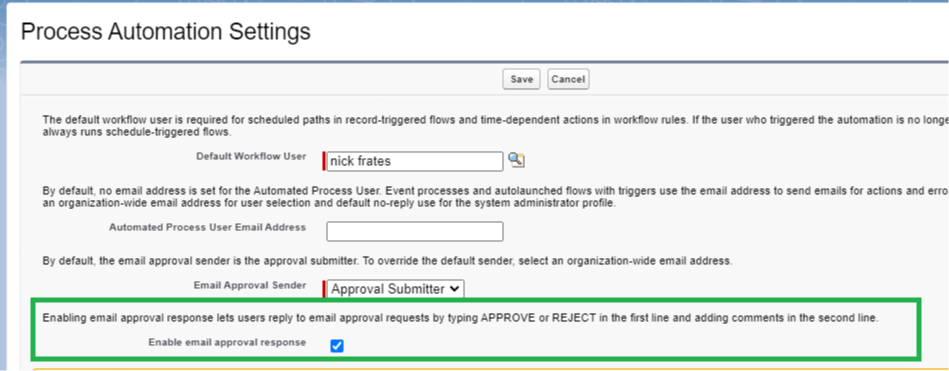
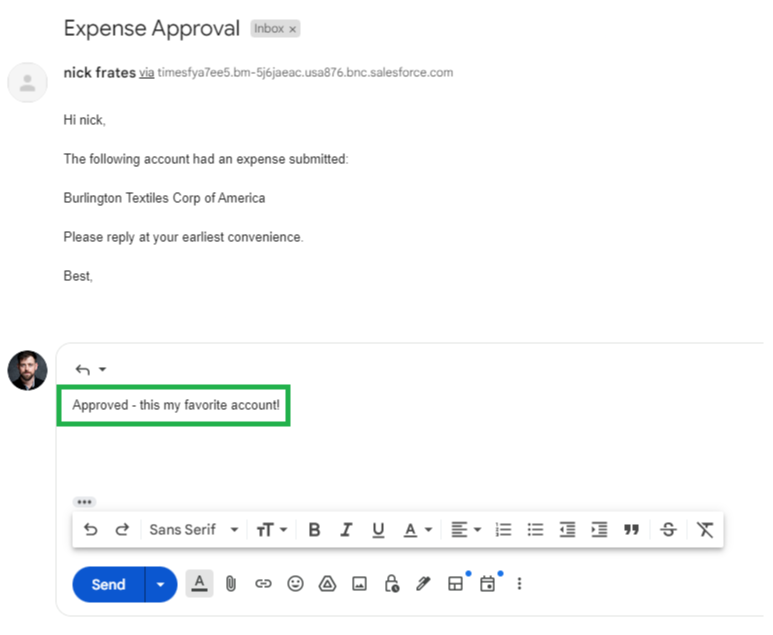
    A feature I didn't know existed (until recently) is the ability to approve or reject records by email.

    When a record is submitted for approval, the approver gets an email alerting them that "they're up".

    Normally they'd need to log into Salesforce and click a button to approve or reject the record.

    However, by enabling this setting under Process Automation, approvers can respond with the words APPROVE, APPROVED, YES, REJECT, REJECTED, or NO and Salesforce will use that to approve or reject the record.

    This is perfect for when approvers need to handle approvals on-the-go where they can't log in to Salesforce.

    Salesforce is even smart enough to record additional comments from the approver in a comments field on the approval record.

    I didn't realize this functionality was present and was impressed when implementing it for a client this week.

    Figured it might be useful for you somewhere down the road.

    And that's a wrap!

    Today we a covered broad outline of approval processes and a specific email approval feature that is really useful.

    Thanks for reading!

    Best,

    Nick 

  • Updating Salesforce with the Execute Anonymous Window

    Updating Salesforce with the Execute Anonymous Window

    Sometimes it's useful to be able to mass delete records in a sandbox.

    I was doing some work for a client this week.

    And they had me building an automation where, when one case record was created, between 3 and 12 more cases were also created as child records.

    I was testing this out in a developer sandbox and I was generating lots of cases.

    I hit a point where I wanted to start fresh from zero, but there were over 30 cases in the system.

    One by one deletion was not appealing, but I did want to delete all the cases.

    What to do?

    Enter a bit of code into the developer console, that's what!

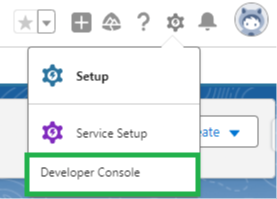
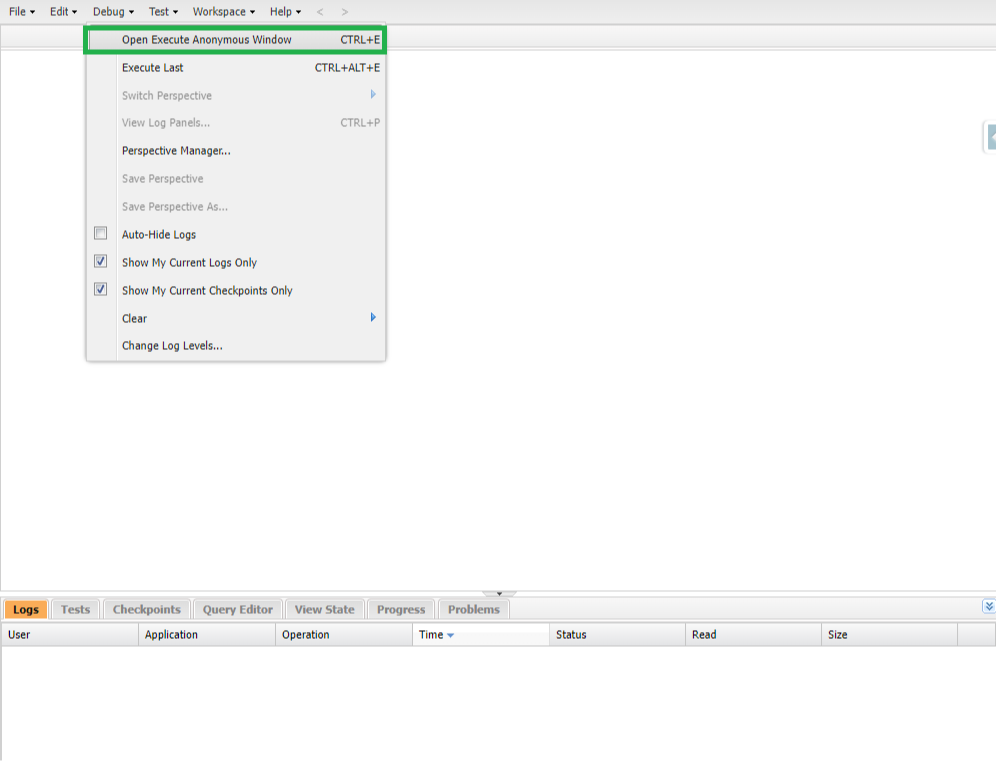
    By opening the Developer Console and clicking Debug -> Open Execute Anonymous Window you can access a code editor that will run code directly in a Salesforce environment.

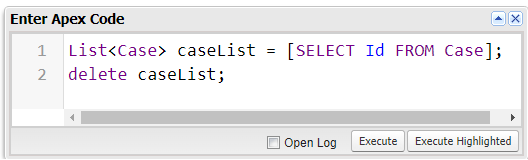
    I wrote the following code:

    List<Case> caseList = [SELECT Id FROM Case];
    delete caseList;

    And after pressing Execute the code ran.

    In this scenario it deleted every case in developer the sandbox environment.

    Perfect!

    Tip: Be very careful not to run this in a production environment.

    We could of course change which Cases were deleted by adding criteria to our SOQL query.

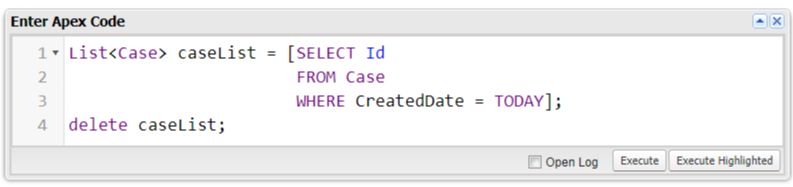
    Below is another example showing how to only delete cases created TODAY.
    List<Case> caseList = [SELECT Id FROM Case WHERE CreatedDate = TODAY];
    delete caseList;

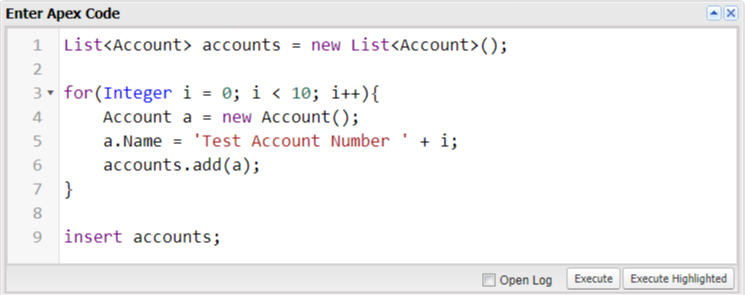
    A similar approach can also be used to create records in a developer sandbox.

    I often find (in a brand new developer sandbox) that its helpful to quickly create several records to test things out on.

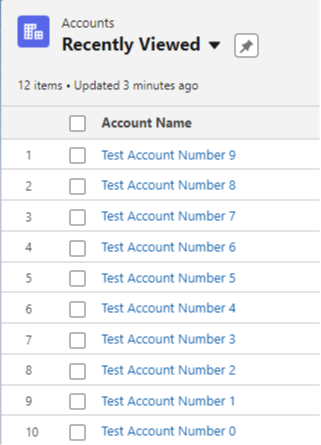
    Running the code below in the Execute Anonymous Window quickly creates 10 new accounts.

    List<Account> accounts = new List<Account>();

    for(Integer i = 0; i < 10; i++){
    Account a = new Account();
    a.Name = 'Test Account Number ' + i;
    accounts.add(a);

    }

    insert accounts;

    And voila!

    Ten new accounts ready for testing in a brand new environment.

    When I first learned how to use the Execute Anonymous Window I would only ever work with it in a sandbox environment.

    I felt it was too risky to ever use in production (because it could delete production data).

    I would recommend you follow the same course and only use it in developer sandboxes.

    I also kept a notepad file with reusable code samples (like the three above) so that I could quickly create accounts or delete test records without needing to rewrite the code everytime.

    And that's a wrap!

    Today we covered how to quickly delete and create records in sandbox through the developer console, and some best practices for doing so.

    Thanks for reading :)

    Best,

    Nick


  • How to Conditionally Require Fields on a Page Layout

    How to Conditionally Require Fields on a Page Layout

    Super quick tip today...

    Have you ever needed to conditionally require a field on a page layout?

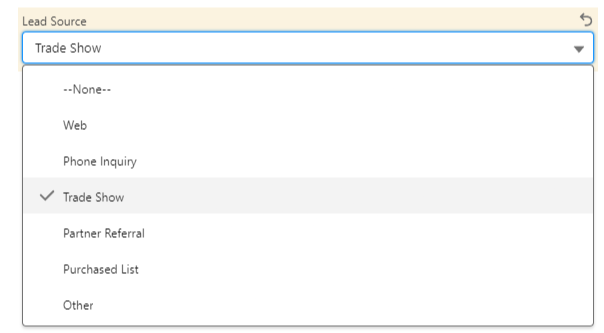
    Imagine a Lead Source picklist field where one option is Trade Show.

    If the Lead Source is set to Trade Show, you might want to require two related custom fields named Event Name and Booth Number to be filled in.

    Previously making these fields conditionally required needed a validation rule.

    With dynamic forms we can now take another approach.

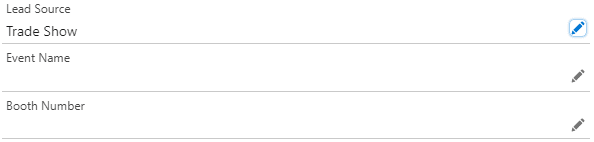
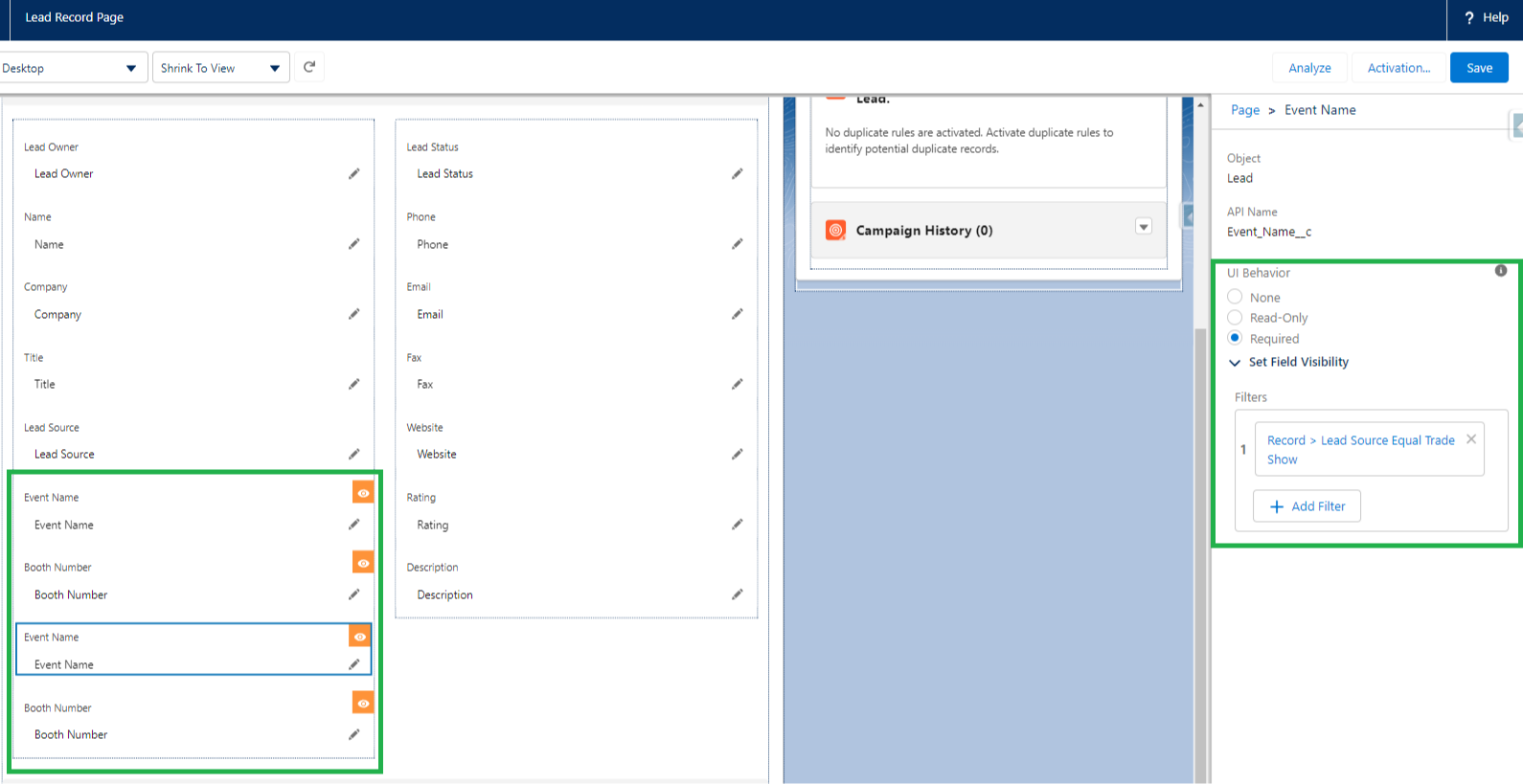
    Through the Lightning App Builder we can add the fields named Event Name and Booth Number to the Lead Record Page twice.

    The first field pair will not be required, and we can set the conditional visibility to be Lead Source does not equal Trade Show.

    This will be useful for when Sales Reps want to record an Event Name related to the lead for reporting, but the lead wasn't actually from a Trade Show.

    The second field pair will be required, and we can set the conditional visibility to be Lead Source equals Trade Show.

    This is how we meet our conditional field requirement need.

    As soon as a user selects Trade Show from the picklist, the two required fields will show on the screen (and the other two will immediately be hidden). 

    In effect, only one pair of the two fields is ever visible to the user.

    Based on their Lead Source selection, however, the two fields will be required if the end user chooses Trade Show and not required any other time.

    An added benefit to this approach is that the end user will see the red star next to the required fields when they are supposed to fill them in.

    Which gives a better experience than attempting to save a record and getting a validation error!

    Sweet!

    Thanks for reading and have a great weekend :)


    Nick