Category: Newsletter

  • How to Create a Dynamic List View

    How to Create a Dynamic List View

    Quick tip today!

    If you ever need to dynamically filter a list view based on who is looking at it, you can use a formula field.

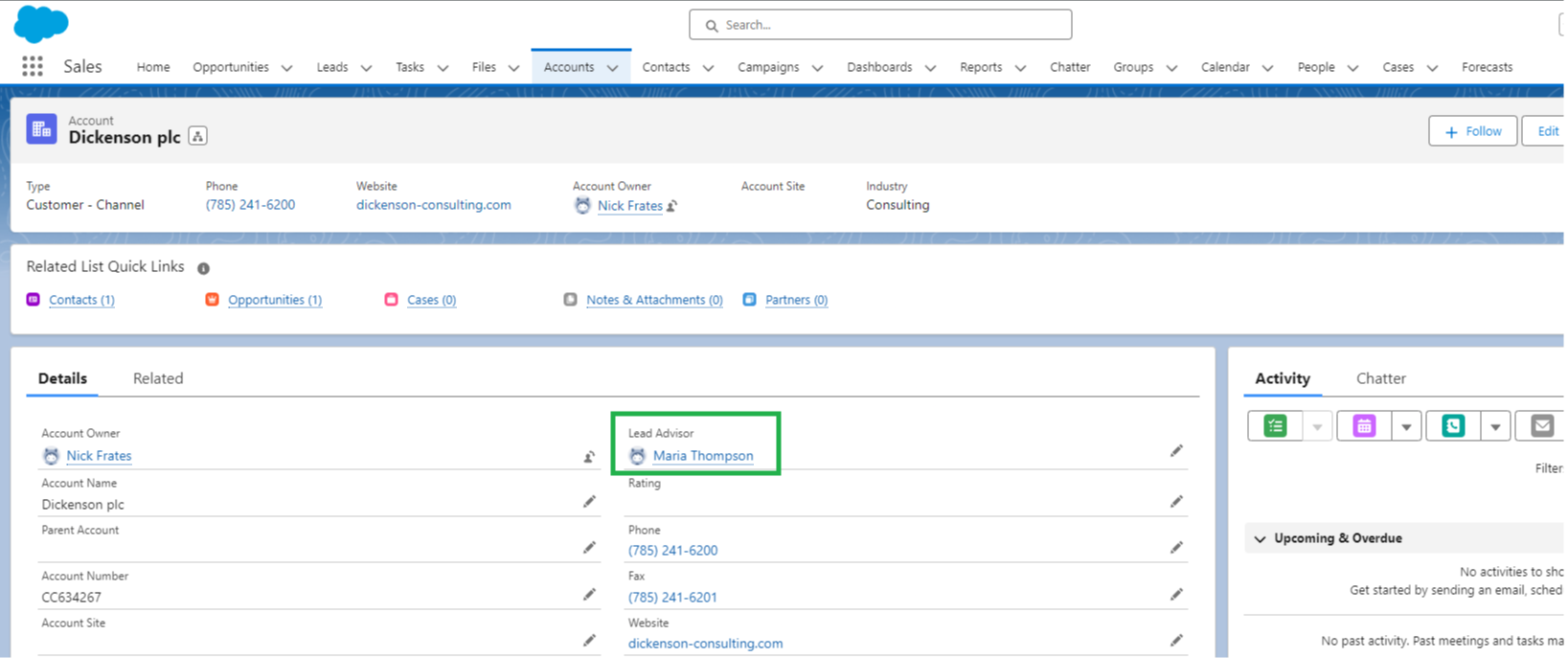
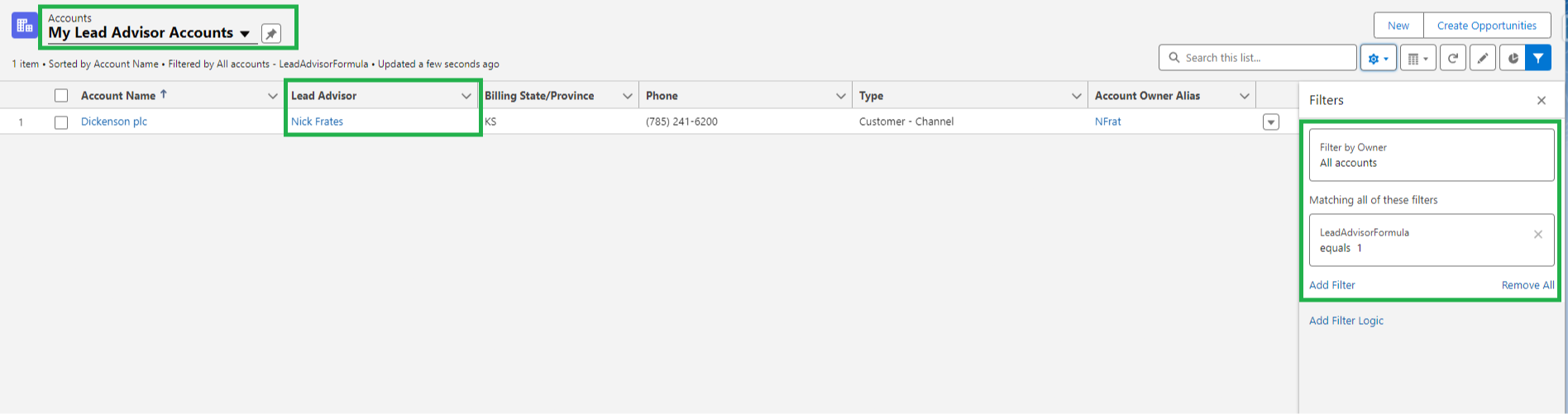
    Imagine an account has a field called Lead Advisor which looks up to user records:

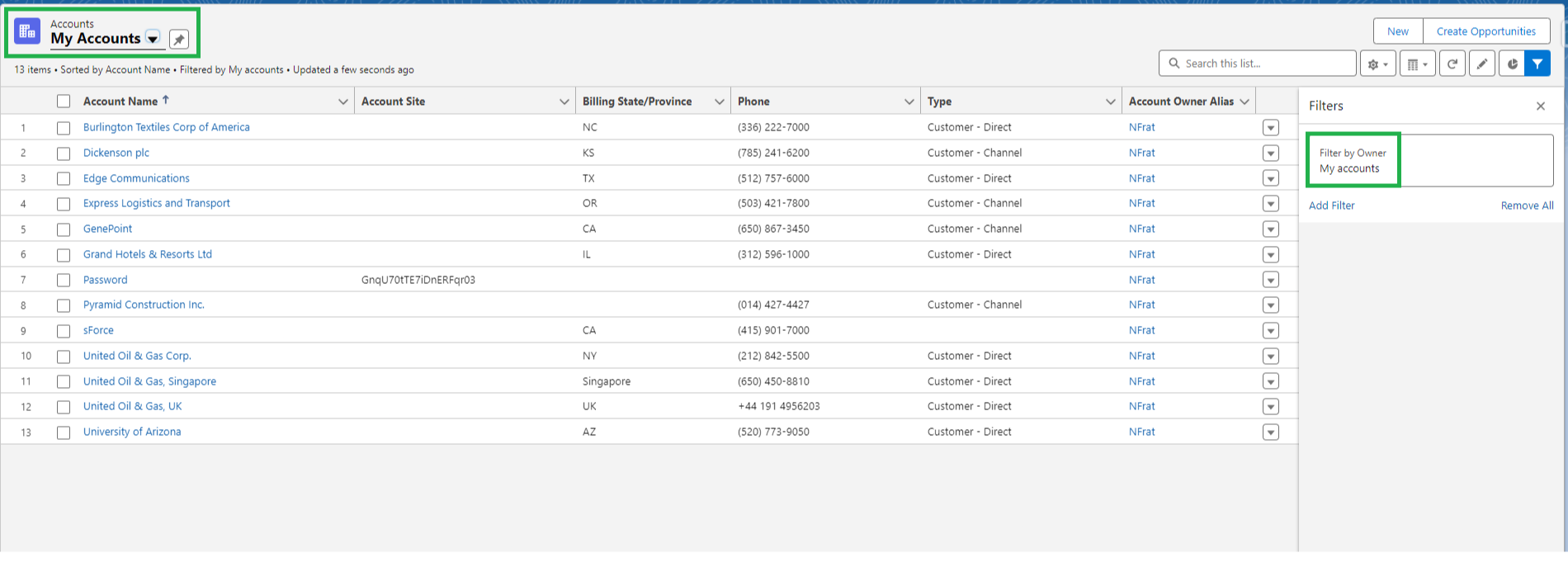
    By default, Salesforce gives us a "My Accounts" list view to see all of your accounts.

    But what do we do if we want to make a list view so that a user can see all of the accounts where they are the lead advisor?

    One approach is to make one list view for each user, using a filter like "Lead Advisor = Nick Frates".... but that's tedious (and hard to maintain).

    Enter the formula field!

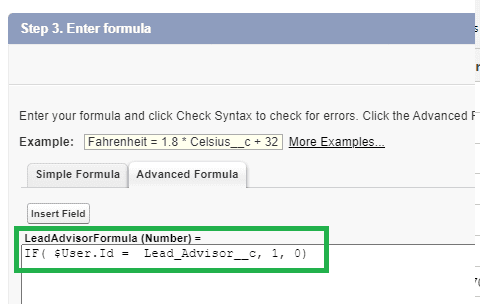
    Instead, we can create a formula like this:

    It's a formula on the Account object that returns a number.

    It will output 1 if the current user is the lead advisor, otherwise it will output 0.

    IF( $User.Id = Lead_Advisor__c, 1, 0)

    Now, we can create one list view with a filter that this field must equal 1.

    And just like that, no matter who is looking at the list view, they will see only the Accounts where they are the Lead Advisor.

    This solution works on any object in Salesforce (where you can make custom fields), and it works well in both List Views and Reports.

    Hope it helps!

  • Be Your Future Self Now

    Be Your Future Self Now

    I'm reading a book called "Be Your Future Self Now" by Dr. Ben Hardy.

    The key idea is that if you mentally project yourself into the future, and then look back to today as your future self, you get immense clarity.

    It's like time travel.

    You could pick a big holiday like Christmas, or Thanksgiving, or New Years and imagine looking back over the time from now until then.

    Looking back from that future point, what would you have done between now and then that would make you proud of yourself?

    As an example, I want to get five new Salesforce Certifications this year.

    And guess how many I've gotten so far?

    ZERO!

    Oops.

    Imagining myself looking back from the first day of 2025 about not getting any certifications in 2024 and I feel embarrased and a little guilty.

    I surely could've gotten those certifications if I had just done a little bit every day.

    If I'm not conscious of it I tend to be, well, lazy - and it appears that tendency has gotten the better of me so far this year.

    And that's a good indication I need to start taking action (which I did by buying a Focus on Force study guide today!)

    Getting certifications is a career goal, but any goal, and any time period is legitimate for this exercise.

    This same "looking back from the future" exercise has been shown to help people:

    • Decide to save and invest more for retirement
    • See that you want to spend more and better quality time with your family
    • Appreciate how great it is to be your present age and in good health
    • Invest more time, energy, and gratitude in your most important relationships

    The idea from the book helped me course correct on my certification goal today.

    I hope sharing it provides similar insight for you.


    Best,

    Nick

  • Take Breaks Between Meetings

    Take Breaks Between Meetings

    Short tip today: take breaks between meetings.

    Microsoft did a study where they placed an EEG monitor on people's heads and had them sit in back to back meetings.

    The results confirmed what we all know:

    Repeated back-to-back meetings are the worst!

    Stress, as measured by the EEG, increases with each meeting until reaching what looks like a plateau by meeting #4.

    Personally, I know that by a fourth meeting (without a break) I turn into an automaton.

    Nodding, smiling, and answering questions at the right times, but not truly engaged in the conversation. 

    Short breaks prevent this!

    If I take 5 minutes after a meeting to:

    • stretch
    • take some deep breaths
    • get a drink
    • go outside to get some sunlight
    • take a quick walk (even if only inside)
    • do light exercise like 5 pushups

    Anything to temporarily "turn on the body" and "turn off the mind" - and I find that I show up to my next meeting or work session with more energy.

    I have a theory that many things in life are fractal without us realizing it.

    Stacking back to back meetings for several hours raises stress levels, and if we "go up to a level" to consider stacking back to back days with meetings - I've found those are stressful too.

    Deep creative work flows easily on days with few meetings.

    And so I try to block out a few days each week with zero meetings for exactly this reason.

    Hopefully you can use this tip to bring a little more of that wonderful flow state to your days - where time stops, the job becomes effortless, and problems are solved without you having to try.

  • Elon Musk and The Algorithm

    Elon Musk and The Algorithm

    After getting the Elon Musk biography in November, I finally finished it this week! Woohoo.

    Say what you will about Elon, but there is no denying his companies continue to change the world.

    Zip2, PayPal, Tesla, SpaceX, Neuralink, OpenAI, The Boring Company, and now Twitter/X are all impressive in their own right.

    To have one person associated in a founder/CEO role with so many is almost beyond belief.

    One interesting lesson from the book is something Elon calls The Algorithm.

    Its one of the methods he uses to build revolutionary products and solve challenges on the cutting edge of engineering.

    He repeats "The Algorithm" constantly to his teams so that it's become a mantra for how they operate.

    And I couldn't help but notice the overlap "The Algorithm" has with what we do in the Salesforce space.

    There are five steps:

    1. Question every requirement, then make the requirements less dumb
    2. Delete any part or process you can
    3. Simplify and Optimize
    4. Accelerate Cycle Time
    5. Automate 

    1. Question every requirement, then make the requirement less dumb

     "Requirements from smart people are the most dangerous, because people are less likely to question them."

    As Salesforce professionals, gathering requirements is a signficant portion of our job.

    This step highlights the fact that we are not order takers (a trap I've fallen into more times than I can count). 

    We're builders, architects, and visionaries. 

    A new requirement from a business is likely flawed in some way. 

    Our job is to find out what the business really needs instead of what they're asking for.

    Done correctly, this builds trust.

    2. Delete any part or process you can

    This represents a bias for substracting rather than adding.

    Less is more. Both with newly built features, and processes that have been in place a while.

    If something can be deleted and Salesforce is still in good order, then the value of that thing is very small, perhaps even negative.

    Proactively deleting unnecessary process steps, unneeded fields, old objects, old dashboards, unused reports, deprecated automation, etc. will keep your Salesforce environment clean.

    Subtraction prevents technical debt.

    "You may have to add back later. If you don't end up adding back 10% of the things you're deleting, then you didn't delete enough"

    3. Simplify and Optimize

    "A common mistake is to simplify and optimize a part or process that should not exist."

    Elon stressed that step 3 must be done only after you follow step 2. 

    Only once you've deleted everything you can do you want to focus on optimization.

    Simplifying navigation, reducing the steps in common processes, and removing any and all "extra clicks" from the tasks your end users perform in Salesforce will make them love you.

    Steps 2 and 3 go hand in hand with two famous questions from Harvey Firestone:

    "Is it necessary?

    "Can it be simplified?"

    In my own career I'm guilty of building more and more new things, without ever returning to check on the how things I previously built were working.

    I just get so excited to build new stuff!

    This step is a good reminder to go back once in a while to do a performance tune up.

    4. Accelerate Cycle Time

    "Cycle time is a measure used in manufacturing and business processes to quantify the total time it takes to complete a single cycle of an operation. This includes the time from the start of a process or production step to its completion." - ChatGPT

    This boils down to move faster.

    This can be done in two ways:

    • By improving how quickly you are able to build new features yourself
    • By improving how quickly your end users can complete their own tasks

    In both cases the cycle time of your company improves.

    5. Automate

    "This comes last. Only after all the requirements have been questioned, parts and processes deleted, and bugs are shaken out."

    How many times have I jumped into building a Salesforce Flow as my first step?

    A whole lot of times.

    Too often I start with trying to automate.

    Step 5 is a reminder that automation is important but only after completing the other four steps.


    In summary, The Algorithm offers unique insight into how Elon builds some of the coolest technology on the planet.

    And if it works to build rockets, autonomous cars, and brain implants then there's definitely some value to us using it while we build Salesforce.


    Best,

    Nick


  • SOQL Secrets

    SOQL Secrets

    Happy Saturday!

    This week a client asked me:

    How many of our Cases are related to an Action Plan?

    An action plan is a Financial Service Cloud object, and natively there isn't a simple report to get answers to a question like this.

    What to do?

    Enter SOQL.

    SOQL stands for Salesforce Object Query Language.

    SOQL lets us "ask" our Salesforce data questions.

    The answers are often insightful.

    To answer my client's question I wrote the following query:

    SELECT Count(Id) total, Status FROM Case WHERE Id IN (SELECT TargetId FROM ActionPlan) GROUP BY Status ORDER BY Count(Id) DESC
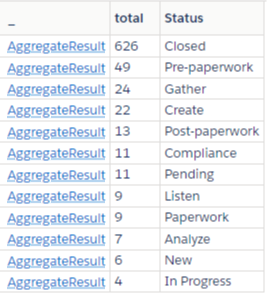
    And then, with one button click, Salesforce gave me a list of Cases related to Action Plans, grouped by their status, in order of their total count.

    Perfect, just what my client needed.

    And thats the key takeway this week.

    SOQL skills let you answer questions you might not be able to otherwise.

    It's a skill that sets you apart.

    Here's a quick refresher on the basics:

    First: Download the Salesforce Inspector Reloaded extension.

    It's immediately useful because it helps you build SOQL queries.

    Next: The basic syntax for a query is:

    SELECT fields FROM object

    For example:

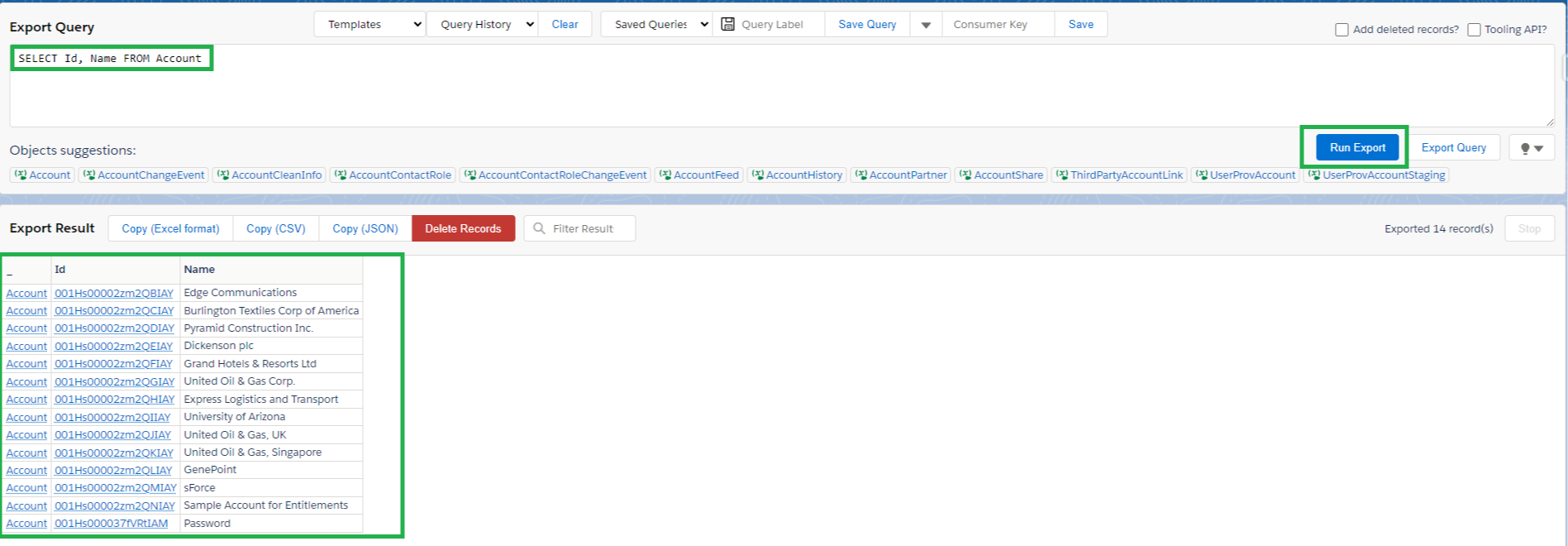
    SELECT Id, Name FROM Account

    This query "selects" the Id and the Name fields from all accounts in the system, and shows them in a list.

    Running this query in the Inspector extension will return results like this:
    You will often add a filter to a query by using a WHERE clause, in order to narrow down your results.

    For example:

    SELECT Id, Name FROM Account WHERE Name = 'Genepoint'

    Notice this is the same query as before, we just added a filter WHERE Name = 'Genepoint' to make our query very specific.

    SOQL is "under the hood" all over the place in Salesforce.

    • Reports
    • List Views
    • Salesforce Flow Get Elements
    • Apex code

    They all use SOQL to query for Salesforce data.

    Here are some other good things to know when you're writing queries:

    You can use AND and OR statements.

    SELECT Id, Name FROM Account WHERE Name = 'Genepoint' OR Name = 'Edge Communications'

    You can Count totals and group records by fields.

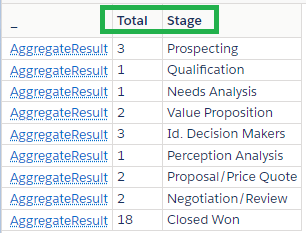
    SELECT Count(Id), StageName FROM Opportunity GROUP BY StageName

    You can give a field or object name an "alias" that shows up in the result header when using aggregrate expressions.

    SELECT Count(Id) Total, StageName Stage FROM Opportunity GROUP BY StageName 
    You can use functions like FORMAT(date) to make results more readable.

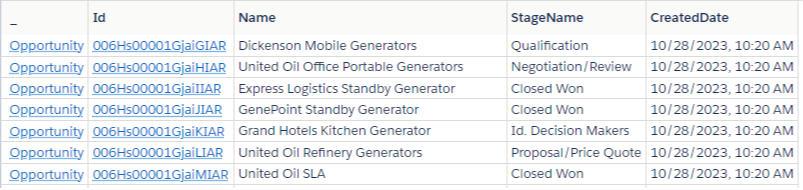
    SELECT Id, Name, StageName, FORMAT(CreatedDate) FROM Opportunity

    Notice how the CreatedDate column is easy to read. Try it without formatting to see the difference.
    You can use aggregrate functions like SUM, AVG, MIN, MAX to aggregate information or perform rollups.

    SELECT SUM(Amount) Total FROM Opportunity WHERE Account.Name LIKE 'United%'

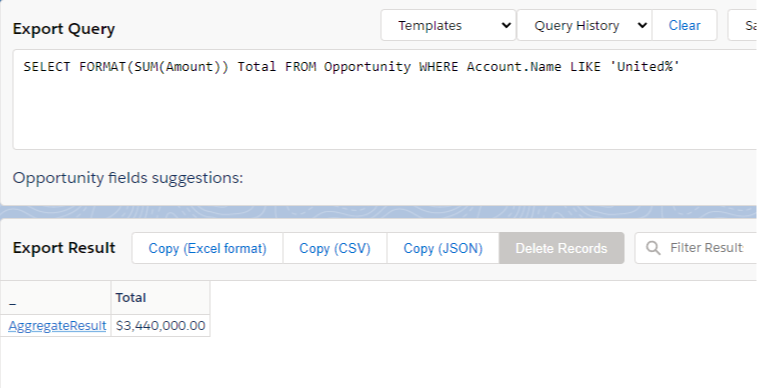
    You can use both an aggregate function and the format function to make results more readable.

    SELECT FORMAT(SUM(Amount)) Total FROM Opportunity WHERE Account.Name LIKE 'United%'
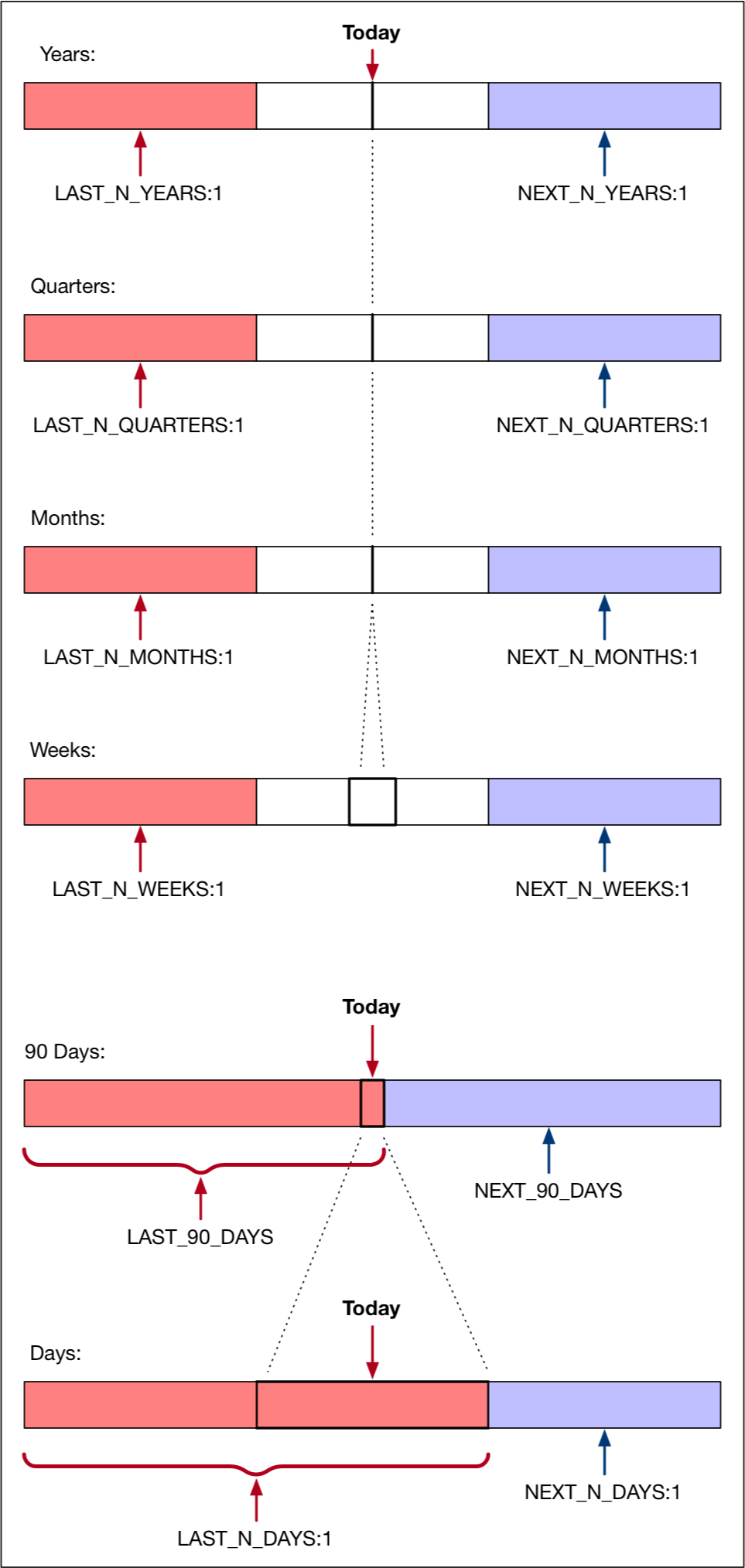
    You can use dynamic dates to specify date ranges:

    SELECT Id, Name, StageName, FORMAT(CreatedDate) FROM Opportunity WHERE CloseDate = LAST_90_Days

    • YESTERDAY
    • TODAY
    • TOMORROW
    • LAST_WEEK
    • THIS_WEEK
    • LAST_90_DAYS
    • NEXT_90_DAYS
    • LAST_N_DAYS:n
    • NEXT_N_DAYS:n

    You can use object relationships to include more fields, or filter records in your queries.

    SELECT Contact.FirstName, Contact.LastName FROM Contact

    SELECT Id, Name FROM Opportunity WHERE Account.Name = 'Genepoint'

    SELECT Id, CaseNumber, Account.Id, Account.Name FROM Case ORDER BY Account.Name

    You can use the IN operator to join parent and child records.

    For example, find Tasks where the Contact for the Task is located in Burlington.

    SELECT Id, Subject, Owner.Name FROM Task WHERE WhoId IN (SELECT Id FROM Contact WHERE MailingCity = 'Burlington') 

    And the list goes on, but we'll stop here. 

    I suspect many of you are already familiar with SOQL.

    Even still, I'd highly encourage you to skim through the SOQL Reference Guide once in a while to brush up your skills.

    Like we said before, it's a skill that will set you apart.

    Hope this helps!


    Best,

    Nick
  • How to Run a Flow from a List View in 8 Steps

    How to Run a Flow from a List View in 8 Steps

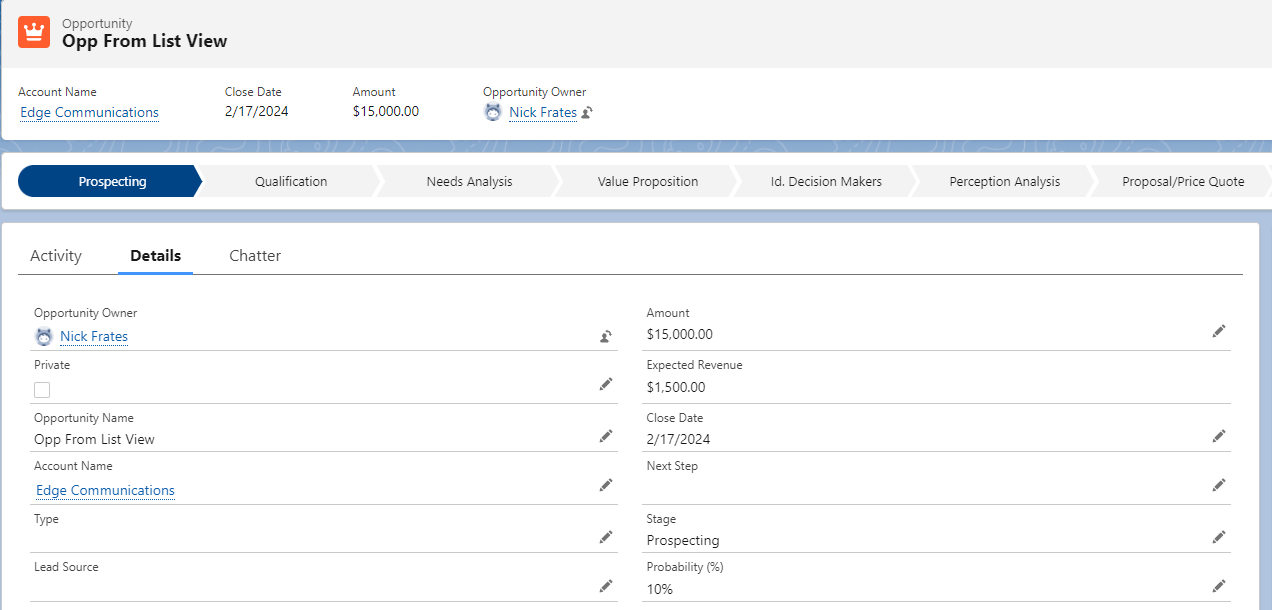
    This week a client of mine asked me to build a custom button on a list view in order to trigger a Flow.

    Have you ever needed something like that?

    Here are 8 steps that will show you how to trigger a Flow for every record in a list view, all from an easy to click button.

    Step 1: Identify your use case.

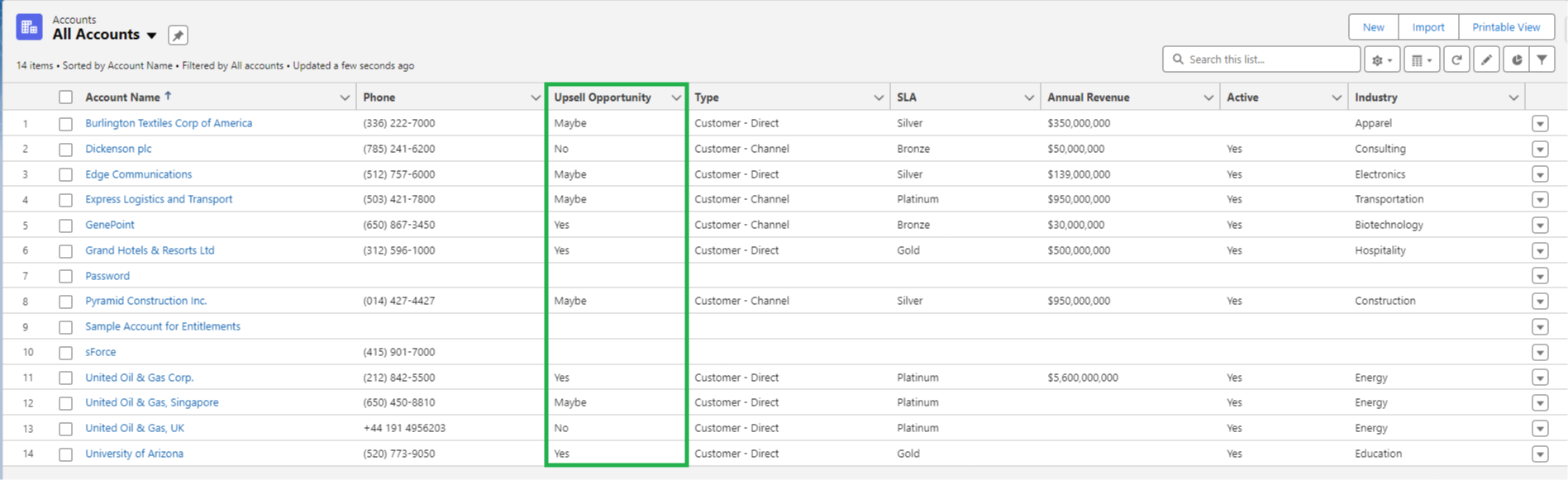
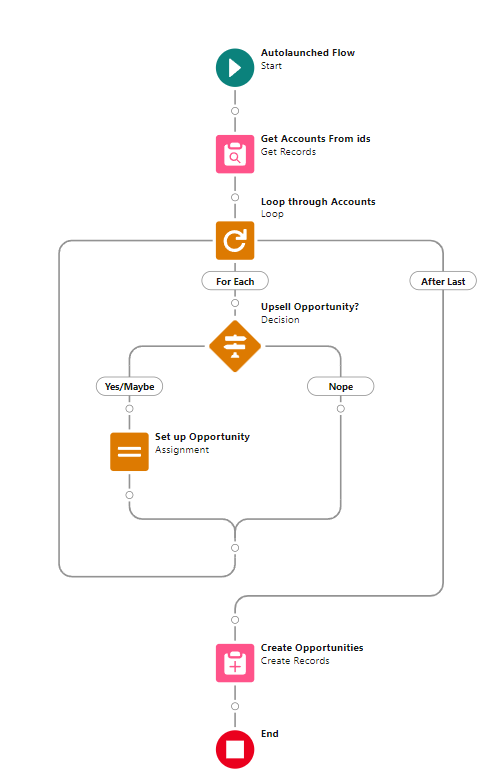
    To keep it simple, we'll pretend we need a Flow to create an Opportunity for any Account where the Upsell Opportunity field is "Maybe" or "Yes".

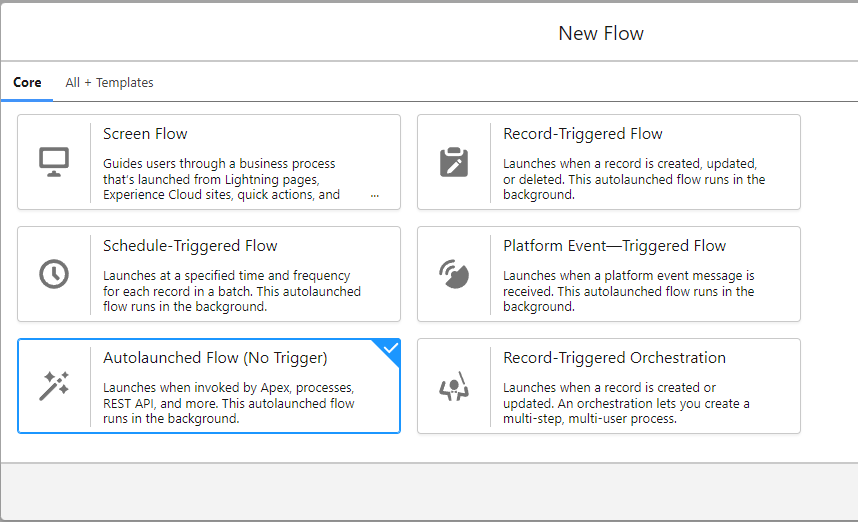
    Step 2: Choose your flow type.

    This process works for Screen Flows and Auto-Launched Flows.

    The main decision is if your use case requires showing a screen to your end users.

    In this case, it does not, so we'll choose Autolaunched Flow.

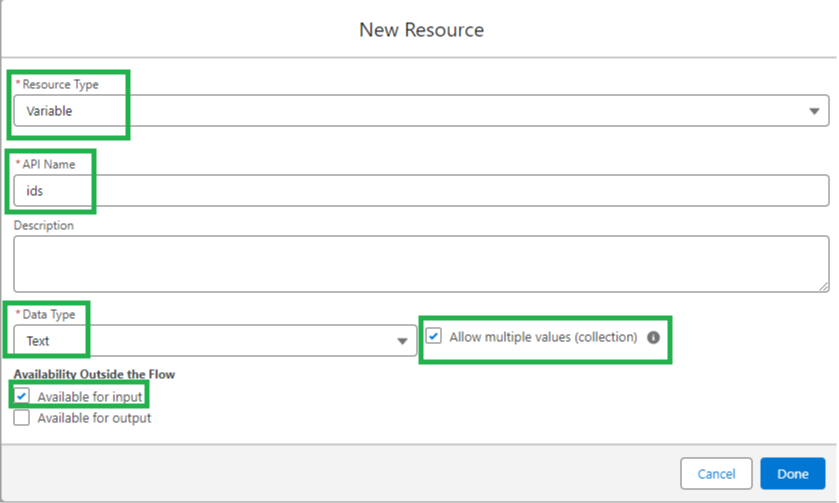
    Step 3: This is one of the most important steps.

    Immediately in the Flow Builder:

    1. Create a variable
    2. Set the text data type
    3. Mark the variable as a collection
    4. Mark the variable as available for input
    5. Name it exactly "ids"

    Note: it must be exactly "ids"

    The variable name is case sensitive.

    Salesforce "knows" to pass the record Ids of all the records from your list view into this variable when you click the button.

    If you do this step wrong, the button won't work!

    Step 4: Build out your flow. Then save and activate it.

    I'll skip the nitty gritty here but in our example, the Flow is designed to create an Opportunity for each Account we select, based on the Upsell Opportunity field.

    The critical thing to know when building your flow is that is must be bulkified.

    Your flow will run on every record you select in your list view.

    Therefore, it must be able to successfully run for dozens (and maybe hundreds) of records at once.

    Step 5: Find the Flow URL.

    Exit the Flow you just built and go to the Flow Builder.

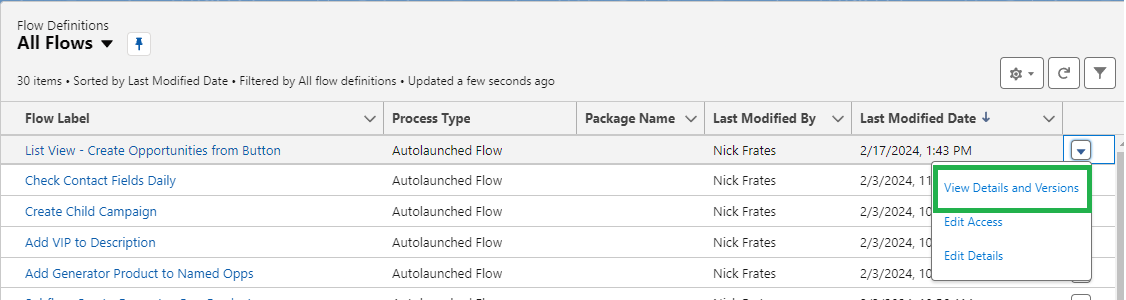
    Find the Flow in the list and click the dropdown on the far right. Select "View Details and Versions"

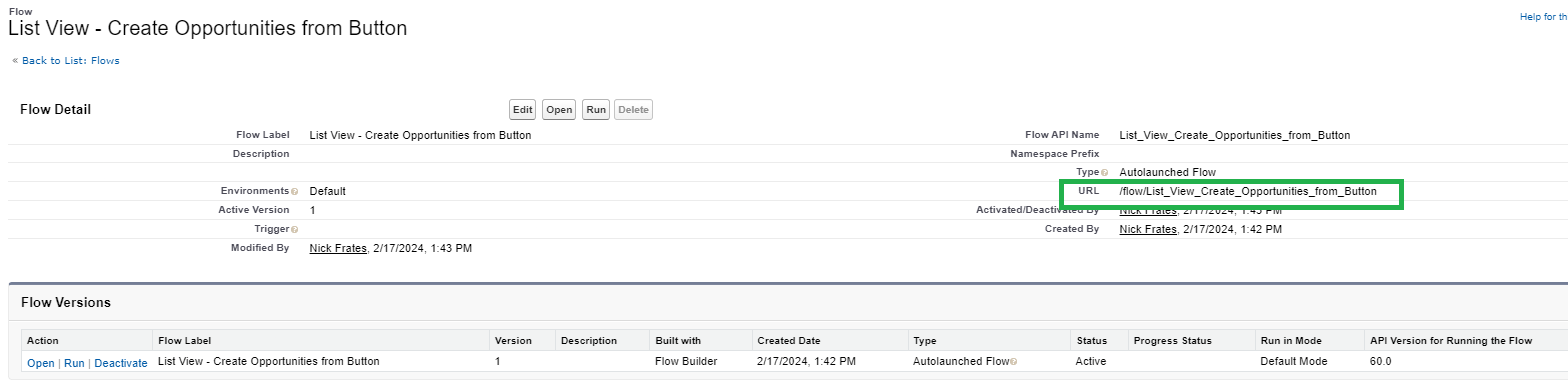
    From the Details page find the URL field.

    Copy the value in that field to your clip board or into a note document.

    You'll need it in Step 6.

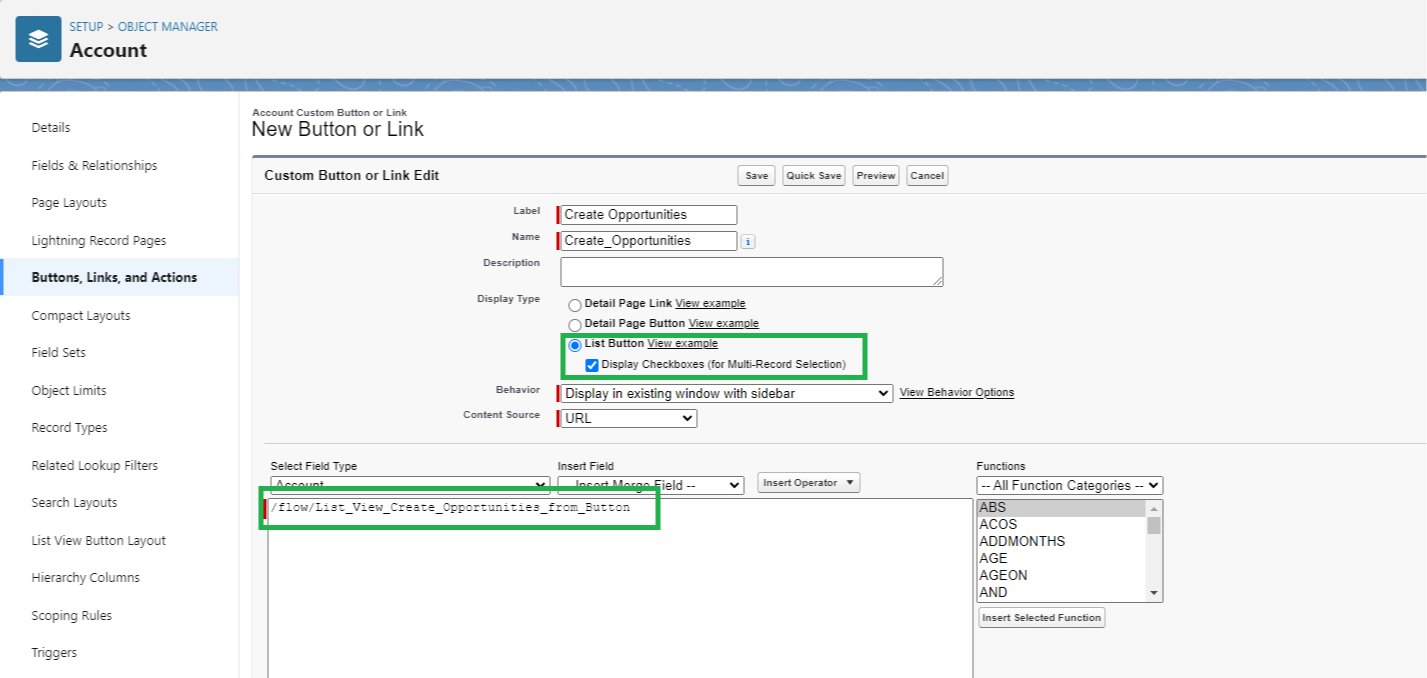
    Step 6: Build your button.

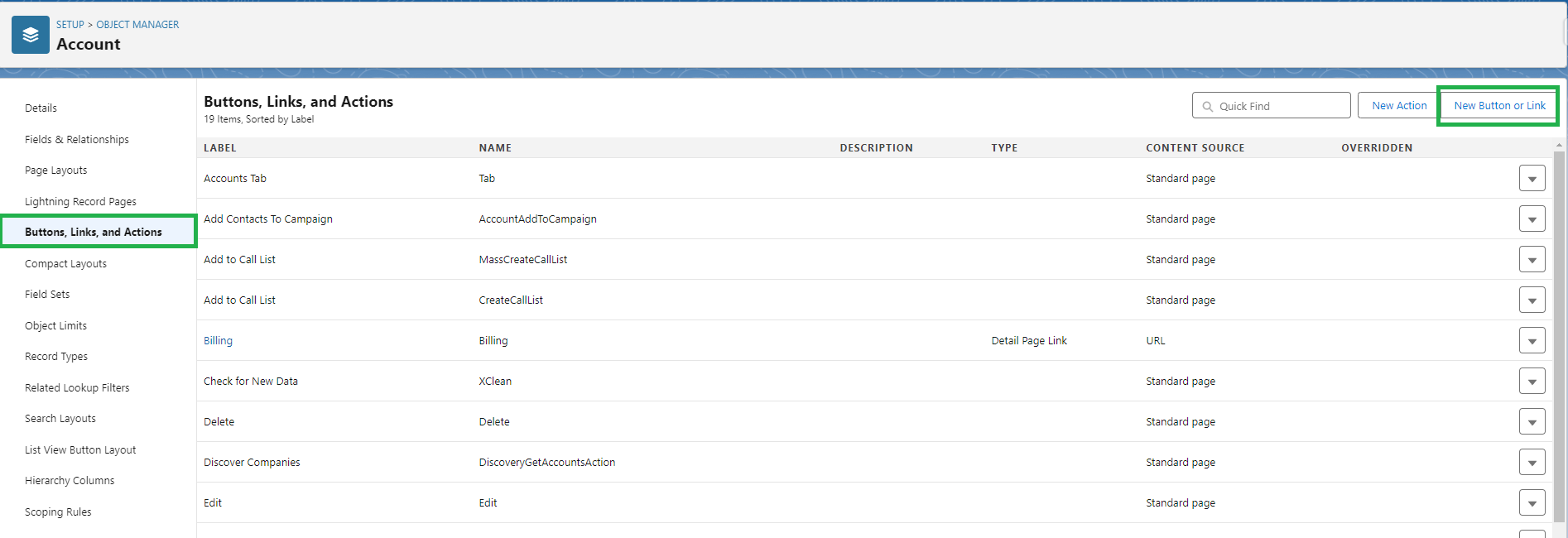
    Navigate to the object in the object manager with the list view you want the button to be on.

    In our example, we want our button to be on the Account list view, so we'll go to Accounts in the object manager.

    Click Buttons, Links, and Actions on the left.

    Then click New Button or Link on the right. 

    Name your button.

    Select List Button for the Display Type.

    And then paste the URL you copied from Step 5 into the field below.

    Then press Save.

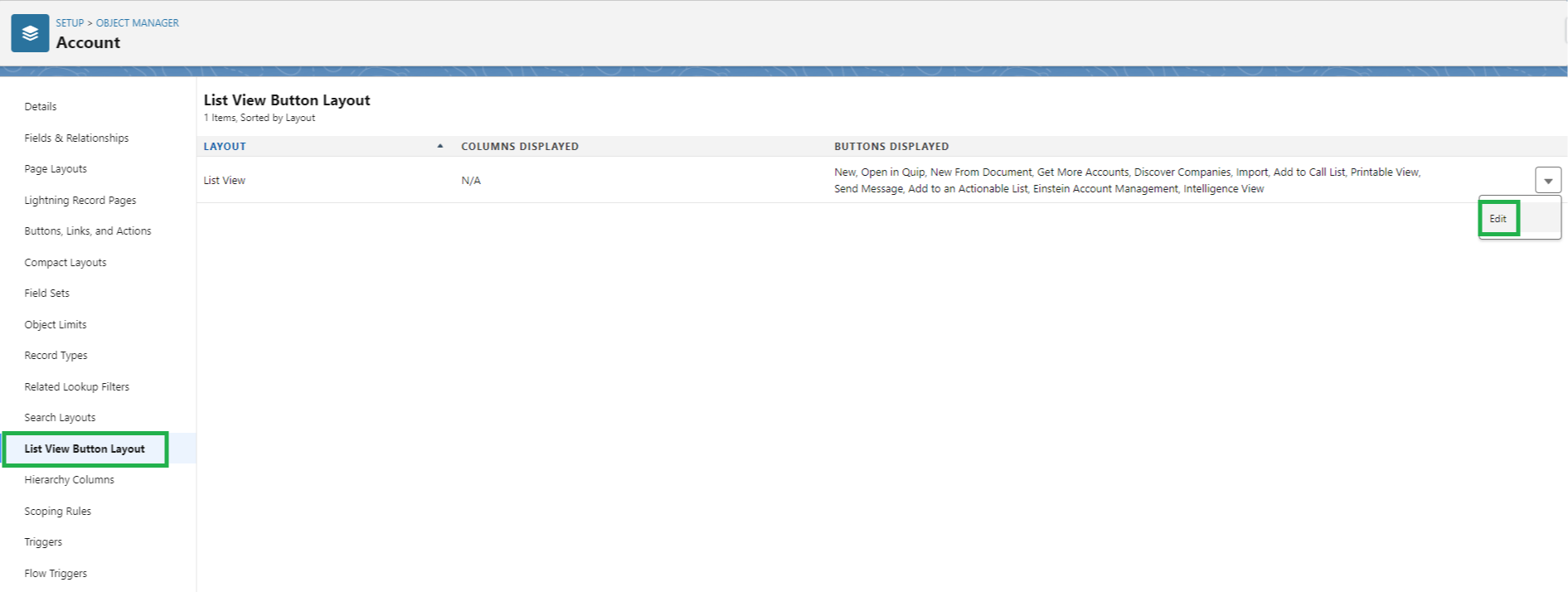
    Step 7: Add the button to the list view.

    Click List View Button Layout.

    Click edit.

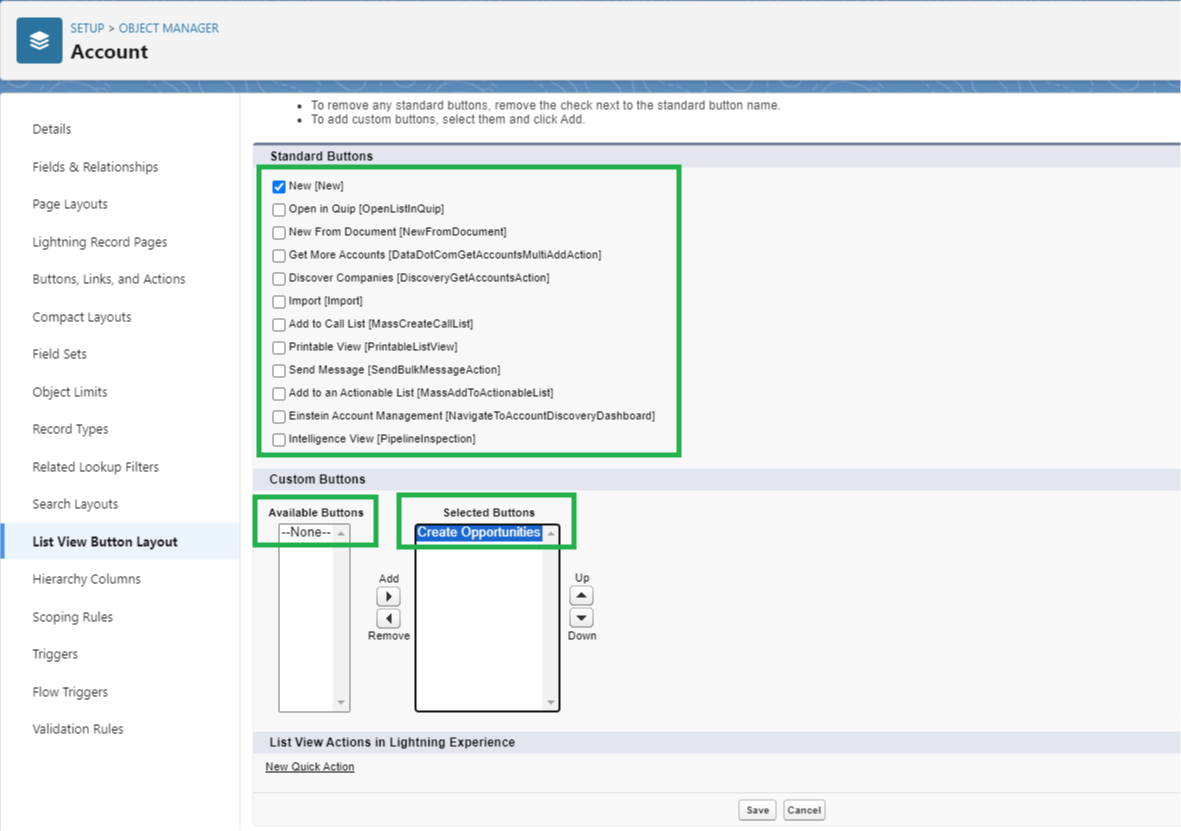
    From here, uncheck the boxes to remove Standard buttons you don't want.

    Then move the button you created in Step 6 from the Available Buttons column to the Selected Buttons column.

    Press Save.

    Whew! You're done.

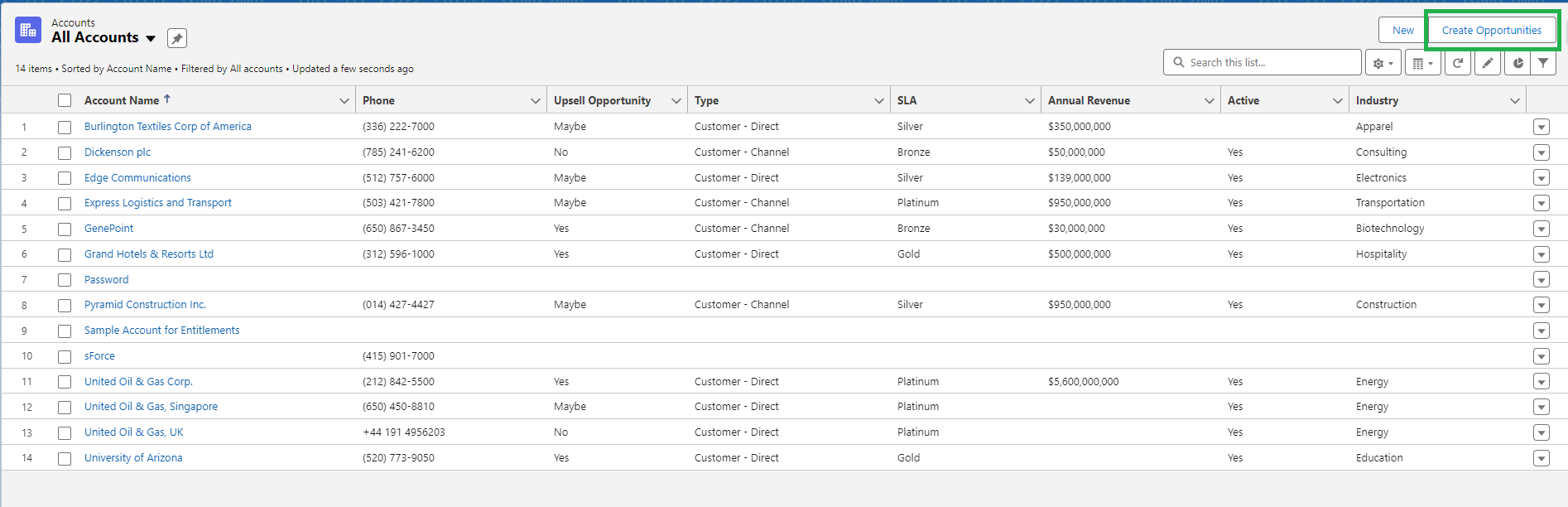
    Let's go check it out on the list view.

    Step 8: Test everything out.

    Refresh your List View page and confirm your button is visible.

    Select a few records from the list you want to run the Flow for.

    Once you check the box next to the records, click your button.

    Confirm the Flow runs as expected by spot checking some records.

    In this case the new Opportunities.

    Looks great! Everything came out as expected!

    I followed these steps for my client this week and was able to get everything working.

    Thought it might be helpful at some point for you too!


    Best,

    Nick



  • If you had a magic wand...

    If you had a magic wand...

    I'm a huge fan of books, and there's a book I read several years ago which asked an interesting question:

    "If you could wave a magic wand and become absolutely excellent in any one skill, which one skill would have the greatest impact on your earning ability?"

    I was just starting out in the Salesforce world and wasn't entirely sure what one skill that would be for me.

    The same book also recommended:

    "Look ahead three to five years and determine the new knowledge and skills you will need in order to lead your field in the future. Then, start acquiring them today."

    I looked around my company at the time and noticed they were always looking to automate things.

    They had even hired Salesforce developers to write code in the past.

    The problem was that no one else at the company knew how to write code. So if someone could learn that skill they'd become quite valuable.

    Based on the situation, I figured, coding would still be useful in 3-5 years and would have a big impact on my earning ability.

    So I set out to learn to write Apex.

    I was confused. Learning Apex was slow. And I was, well, bad at coding.

    My main learning method was watching courses on Udemy, and I had picked up another course about Flows (which were called Visual Workflows at the time).

    After one tough study session, I decided a detour into "Visual Workflow" would help me forget I was bad at Apex for at least one more day.

    I started the course and ended up watching it all the way through in one morning (it was a short course).

    To my surprise I understood it, and I was actually able to build useful automations with it.

    My company loved that!

    The more automations I built, the more valuable I became.

    Charlie Munger put it well:

    "I find it quite useful to think of a free market economy as sort of the equivalent of an ecosystem.

    Just as in an ecosystem, people who specialize can get terribly good at occupying some little niche.

    Just as animals flourish in niches, people who specialize in the business world — and get very good because they specialize — frequently find good economics that they wouldn't get in any other way."

    Without realizing it, I had stumbled into a Salesforce specialization. 

    I occupied the little niche of flow building, and I did get opportunities that I, as a former poker player and college dropout, was unlikely to get without a specialization.

    While I was lucky to have stumbled into Flows, I wouldn't have found them without asking those questions:

    • If you could wave a magic wand and become absolutely excellent in any one skill, which one skill would have the greatest impact on your earning ability?
    • What new Salesforce knowledge and skills will be useful in three to five years?

    So, I like to ask myself those questions from time-to-time on the off chance that I can get lucky once again.

    And today, my answer to those questions is AI.

    We've all heard of ChatGPT, Bard, and Large Language Models (LLMs) in recent months.

    Their power is breath-taking, and the rate of progress is fast.

    Salesforce as a company is investing heavily in this trend.

    Luckily, we won't need to build the AI tools ourselves.

    We can occupy a new niche in the Salesforce ecosystem by specializing in the tools Salesforce creates for us as admins.

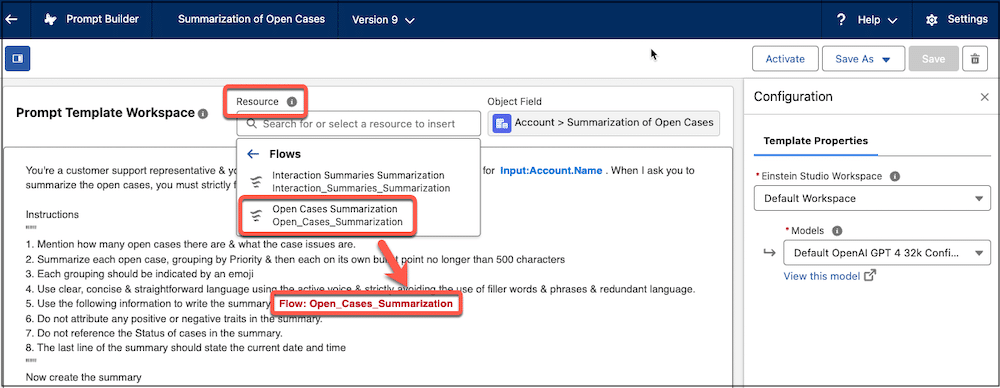
    One example is the Prompt Builder.

    I've been keeping an eye on this for the last few months, and supposedly it will be generally available shortly after the Spring '24 release.

    The vision for Prompt Builder is simple: imagine ChatGPT for your personal Salesforce environment.

    As an admin you'll be able to 

    • Create AI-based Sales Emails

    “You are a sales representative working for a solar panel manufacturer and your name is {!$sender.Name} working for {!$sender.Company}. Your client is {!$recipient.FirstName}. You need to draft up an email to improve your relationship with them and tell them about your new products that will help them achieve their sustainability goals. When I ask you to generate an email, you must strictly follow my instructions below.”

    • Populate fields on records using AI-based summaries

    “You’re a customer support representative and need to create a short summary of all open cases for {!$Input:Account.Name}. When I ask you to summarize the open cases, you must strictly follow my instructions below.

    Imagine the prompt examples above being run by your Sales and Service teams!

    Powerful stuff.

    And the person who can build these tools for a company (hopefully you!) will be in a unique position to give value.

    Super cool.

    Now, I'm not saying this is the end all be all of future Salesforce tech.

    I am saying that when we look ahead three to five years, Prompt Builder, and AI tools like it, will likely play a large role in the toolkit of a successful Salesforce professional.

    Therefore, staying up to speed on AI in the Salesforce space is an excellent idea!

    I'm sure there are other "specializations" that will be useful too.

    So tell me, what do you see as the knowledge and skills we'll need to thrive in three to five years?

    Let me know!

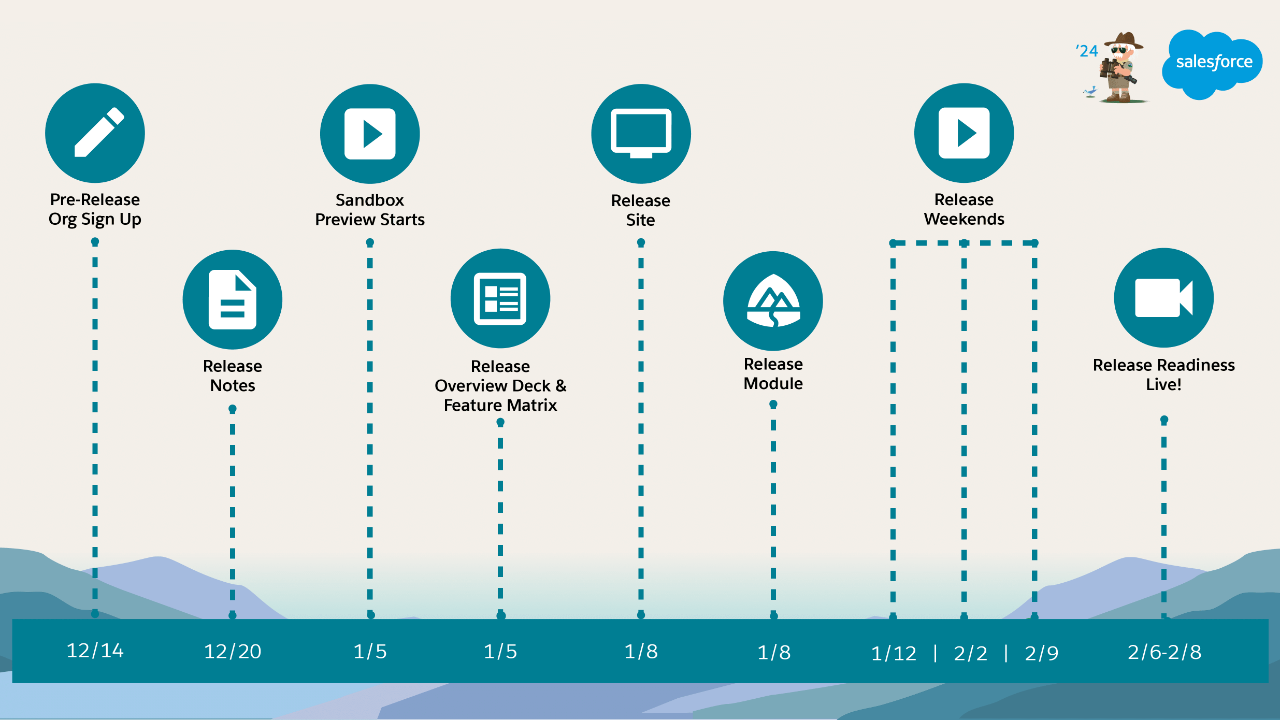
  • Spring '24 Salesforce Release is here!

    Spring '24 Salesforce Release is here!

    The Spring '24 Salesforce Release is here!

    In the theme of last week's email I spent some time perusing the release notes, and thought I'd share 10 interesting updates I noticed with you!

    1. MFA Is Turned On by Default Starting April 2024

      Starting April 8th, 2024 MFA will be turned on by Default. 

    2. Sum or Count Items in Collections More Easily with the Transform Element (Beta) 

      We've been able to see the Transform Element in Flows in Sandbox environments for a while now. Evidently one use case for these will be to work with collections.

      This seems like the first use case I've found for the element so far.

    3. Create Multiple Instances of a Set of Fields with the New Repeater Component (Beta) 

      Great to see Salesforce continue to invest in Flows. A repeater component is common with the most popular form tools (FormAssembly/Formstack) and to see them added to flows is a definite win.

    4. Add Fields from Related Objects to Dynamic Forms-Enabled Pages 

      This is a game changer. We no longer will need formula fields to display values from related object fields on record detail pages. When working with an object that contains a lookup to another object, Lightning Record Pages have been enhanced to allow navigation through that relationship, enabling the display of fields from the referenced object directly.

    5. Confirmation Message When You Select the Multi-Select Picklist Field Type 

      This one made me laugh. Salesforce now shows a warning message when creating a multi-select picklist field due to their limitations. Hint: avoid these! 

    6. Use the Null Coalescing Operator 

      A new operator available in Apex that allows for quick if/then check on null values. Seems useful.

      "The null coalescing operator is a binary operator in the form a ?? b that returns a if a isn’t null, and otherwise returns b."

    7. Salesforce for Outlook Is Being Retired in June 2024 

      Full product retirement for Salesforce for Outlook is scheduled for June 2024.

    8. Use More Components to React to Changes on the Same Screen (Generally Available) 

      Configure a Display Text component or a Long Text component to react to changes in other components on the same screen in Screen Flows.

      This has been needed for a while and is great to see. No more building a second screen to validate the input of the first screen.
       
    9. Log In to All Your Sandboxes from Setup 

      To help you manage your sandboxes, logins from the Sandboxes Setup page now use the sandbox’s My Domain login URL.

      Sweet!

    10. Track Site Updates in the New Change History Panel in Experience Builder

      Basically a change log for changes made to Experience Cloud sites. Surprising this didn't exist already, but cool that it does now!

    And that's a wrap!

    Hope you find the summary useful :)


    Best,

    Nick
     

  • Steph Curry’s 500 Shots and Salesforce Practice Rituals

    Steph Curry’s 500 Shots and Salesforce Practice Rituals

    Steph Curry is an NBA player, widely regarded as one of the best 3-point shooters to ever play basketball.

    I saw a clip on social media this week of Tony Robbins talking about Steph Curry's shooting skills.

    Tony Robbins on Practicing

    Tony describes how Steph practices.

    Its simple: He makes 500 shots every day.

    Tallied up that's 3500 shots per week. 168,000 per year. And 2.52 million shots over the 15 years Steph's been in the NBA.

    That's a lot of time shooting a basketball. And the results show up in Steph's results. He's legendary.

    Similar stories about other "greats" practicing in their field come out fairly often, like Stephen King writing for 4 hours every day.

    It's easy to think, "Well if I had money like Steph Curry or Stephen King of course I'd shoot 500 shots a day or write for four hours."

    I think that distorts cause and effect.

    Does Steph have the chance to shoot 500 shots a day because he already won all those championships?

    Or did Steph Curry win all those championships because he shoots 500 shots a day?

    The real masters in their fields practice the fundamentals relentlessly.

    And there is a lesson in there for us as Salesforce professionals.

    We need to practice.

    How can we practice the "fundamentals of Salesforce"?

    I can think of a few ways:

    1. Get Trailhead badges
    2. Take Online Salesforce Courses
    3. Skim through each season's release notes
    4. Review Salesforce Documentation
    5. Write 1 formula, or 1 piece of a code, or build 1 flow per day

    There are likely many more.

    And I have to admit, I'm writing this as a reminder for myself.

    When I look back at my previous month, I know I must do better in this area.

    The knowledge frontier is always moving forward. If we're not moving forward too, then we're being left behind.

    Which leads to a second area of practice: your multi-disciplinary knowledge.

    Beyond Salesforce knowledge, do you know the "big ideas" from different academic and professional disciplines?

    Are you learning the big mental models from other professional territories?

    We can build this knowledge through reading, watching videos, or listening to podcasts.

    • Economics - Do you know what opportunity cost is?
    • Engineering - Do you know what a margin of safety is?
    • Math - Can you calculate expected value using the basic math of permutations and combinations?
    • Psychology - Do you know some of the common psychological biases like incentive-caused bias, reciprocity tendency, and social proof tendency?

    To paraphrase Charlie Munger, if "A" is narrow professional Salesforce doctrine, and "B" are the big extra useful mental models from other professional disciplines, the possessor of A + B will surely be better off than the possessor of A alone.

    How could it be otherwise?

    Steph Curry boils it down to 500 shots a day.

    Maybe we should all set a similar goal for ourselves.

    • Get 1 Trailhead badge a day
    • 20 minutes of Salesforce reading or non-fiction reading a day
    • 1 Udemy course a month
    • 1 Certification per quarter
    • Build 1 flow per day (even if your rebuilding a flow you know how to build already)

    The key idea here is to practice your craft everyday in the way you think best for you.

    So that we can, in the words of George Clason, "cultivate your own powers, to study and become wiser, to become more skillful, to so act as to respect yourself."

    So, tell me, what did I miss?

    What are the Salesforce fundamentals you practice that have given you good results?

    Let me know!

  • How to Query Private Reports and Dashboards

    How to Query Private Reports and Dashboards

    Have you ever wondered how many private reports & dashboards exist in your Salesforce environment?

    Another consultant and I were working with a client this week, and the client was debating whether or not to provide all the users in their organization with the ability to create reports.

    On the upside, the debate went, they knew this would be a good way to empower users to ask (and answer) questions about their work inside Salesforce.

    On the downside, most users don't know Salesforce well enough to run effective reports.

    You end up with many duplicated reports.

    You get reports that don't have the right filters and so don't show all the records you think they should.

    And tons of reports get saved to the default "Private Reports" folder where they don't help other team members.

    This led to an interesting question...

    "How many reports do we have in the Private Reports folder today?"

    I used to think as System Administrators that even we couldn't access or easily count the total number of private reports.

    Turns out I was wrong!

    My colleague mentioned he was pretty sure you could query for that information.

    That got me curious, and I looked up the Object Reference table for both Reports and Dashboards.

    Serendipity!

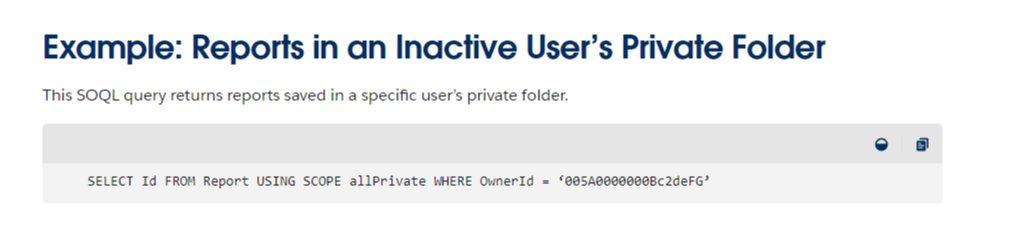
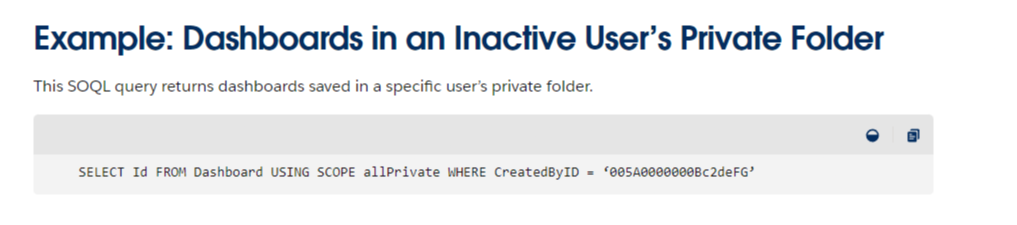
    Sure enough, down at the bottom, there were two SOQL queries that show exactly how to query for private report and dashboards.

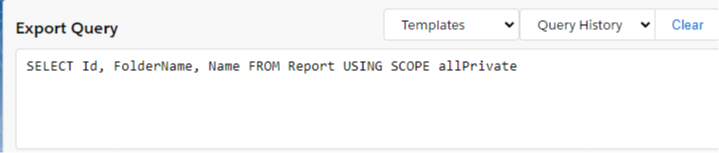
    Using a very similar syntax, I created and ran a SOQL query to generate a full list of Private Reports in the environment.

    And it worked!

    Some of my newsletter readers even found other awesome ways to query for this information. Here's one awesome one to show the count by user in descending order.

    SELECT Owner.Name, COUNT(Id) FROM Report USING SCOPE allPrivate GROUP BY Owner.Name ORDER BY COUNT(Id) DESC

    And there you have it, easy queries to find private reports & dashboards.

    With one another takeaway: the Salesforce Object Reference tables are filled with hidden gems.

    Just the type of a thing a Salesforce Admin loves to nerd out on.


    See you next week!