Category: Newsletter

  • 1️⃣ Single Responsibility Principle

    1️⃣ Single Responsibility Principle

    Today I want to talk about a simple principle that can really help you build better Flows: the Single Responsibility Principle (or SRP).

    You’ve probably heard this idea in coding contexts before, but it applies perfectly to Salesforce automation too.

    Here’s how I’d explain it to a junior Salesforce admin:

    Your Flows and automations should do one — and only one — thing.

    Now, you can define that “one thing” somewhat broadly.

    It doesn’t have to be as narrow as just sending an email or just getting records.

    But the goal is to stick all of the functionality related to a specific automation use case into one Flow.

    When you follow this principle, your Flows stay small, easy to test, easy to change, and easy to develop independently of other Flows.

    They’re also easier to turn off if needed.

    Most importantly — they reduce the cognitive load of understanding what’s going on, because everything in the Flow is clearly built for one particular purpose.

    Signs You’re Violating SRP

    I’ve definitely seen Flows that violate this principle — and I’ve built plenty myself in the past!

    One of the biggest giveaways?

    If you have to zoom way out on the Flow Builder canvas because your Flow is so massive… that’s usually a red flag. (Not always, but generally a good heuristic.)

    When you violate SRP, a lot of problems start to show up:

    • Editing becomes harder — especially if multiple people are working on it
    • You have to coordinate changes carefully across teams
    • The cognitive load of understanding the Flow increases dramatically
    • Technical debt grows — because big, behemoth Flows are slower to change
    • The surface area for bugs increases — unrelated parts of the Flow can break
    • Development speed slows down
    • The Flow often ends up being poorly thought out — it’s actually harder to build a clean small Flow than to throw everything on the canvas in one big one

    What It Feels Like to Build Flows with SRP

    When you build Flows that follow SRP, they feel very different:

    • They tend to be small
    • The names are very specific and clearly describe what they do
    • They’re easy to understand later — even months later
    • They’re easy for other admins to find and work with
    • You can build, test, and deploy them much faster

    Practical Tips

    If you want to start applying this principle, here’s my number one tip:

    It’s a guideline, not a hard rule.

    You don’t have to follow it religiously.

    Sometimes there are good reasons to opt out. But in general, if you can keep your Flows small and purpose-built, everything will be easier.

    I think about it this way: everything I build should be easy to change.

    Because the one constant in Salesforce automation is that the business will change its mind — often!

    You want your Flows to be nimble so you can adapt them quickly to whatever new needs come up.

    That’s it for today’s tip.


    Best,

    Nick

  • 📝 How to Turn Rich Text into Plain Text

    📝 How to Turn Rich Text into Plain Text


    Happy Saturday!

    This week I had a client who was building a flow to create a Task.

    The flow was populating the Task Description field using text from a rich text field on a parent object.

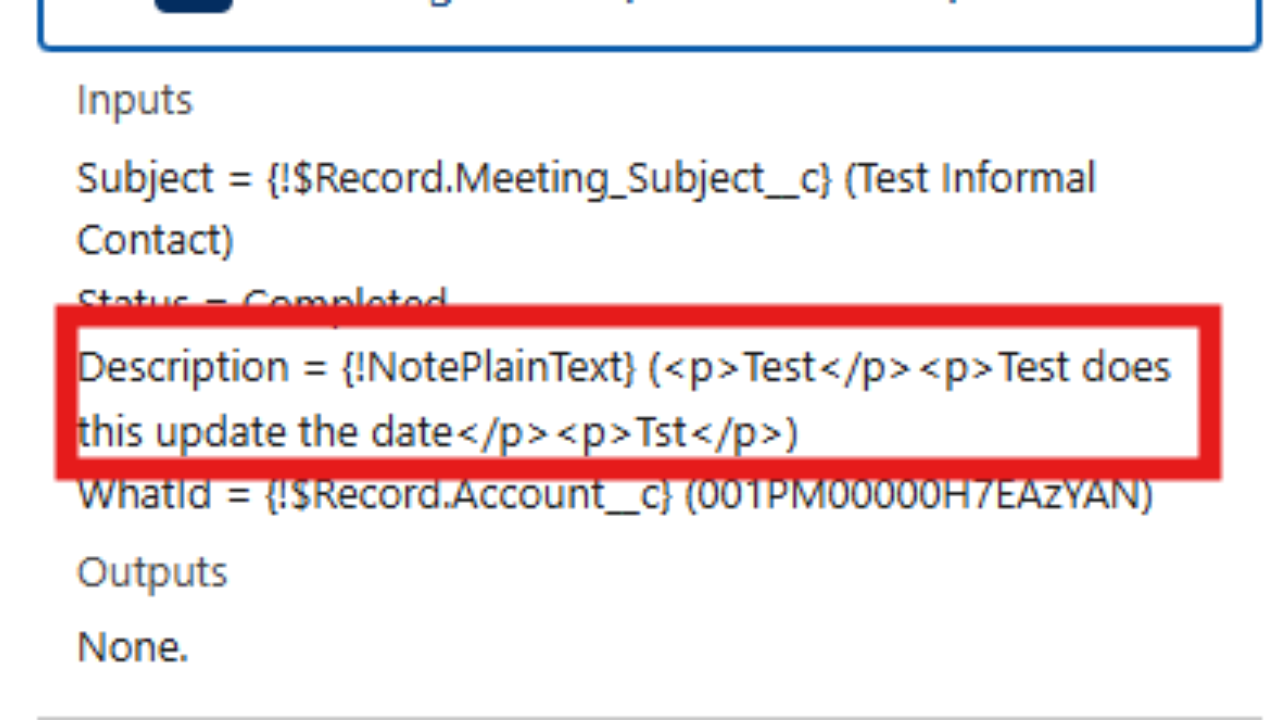
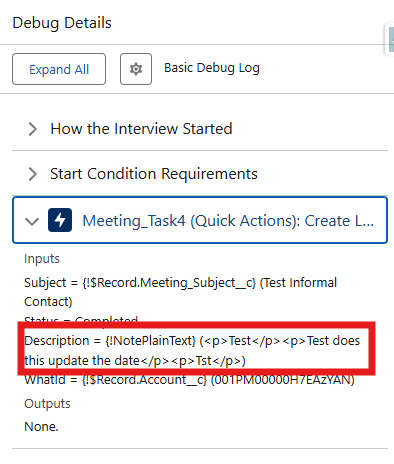
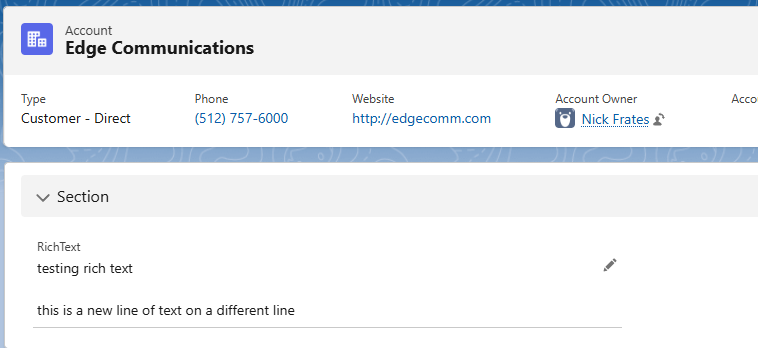
    She was running into problems though, because the new Task Description had lots of HTML tags in it from the rich text field, and these didn't look nice in the task description:


    Short of building an Apex class, she wanted to know: is there a workaround?

    I built something to solve the requirements, and I wanted share it with you!

    The steps we'll take will convert the rich text from an object field into a plain text variable in the flow.

    You can use that to update records as needed. 

    Step 1:

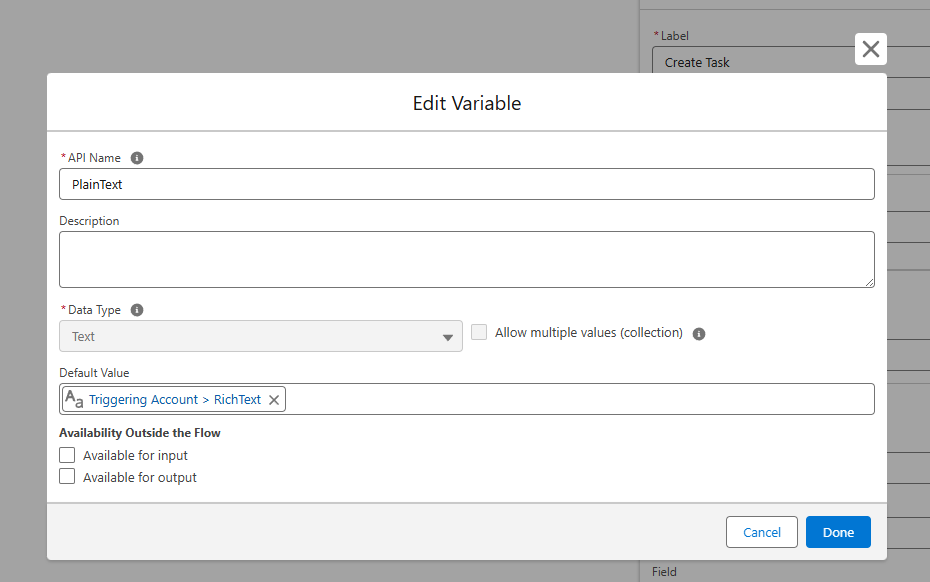
    Create a text variable in the flow. Name it something like "PlainText".

    Set the default value of the field to be the Rich Text field from the object you're working with.

    You could also set this value with an assignment element.


    Step 2:

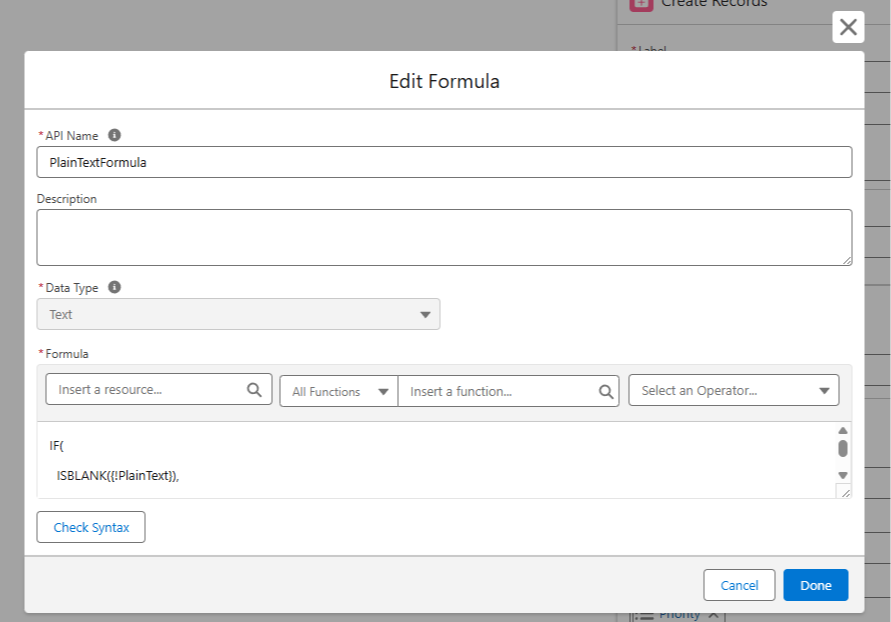
    Create a formula resource in the flow that references the PlainText variable created in Step 1.


    Copy and paste the formula below into the formula builder, making sure the reference to the text variable from Step 1 is accurate.

    IF(ISBLANK({!PlainText}), "", SUBSTITUTE(SUBSTITUTE(SUBSTITUTE(SUBSTITUTE(SUBSTITUTE({!PlainText},
    "<p dir=\"ltr\">", BR()), "<p>", BR()), "</p>", ""), "<br/>", BR()), "<br>", ""))

    The formula scans the plain text and replaces common HTML tags like <p> or <br> with nothing, or, in some cases replaces the HTML tag with a line break using the BR() formula in Salesforce. 

    Step 3:

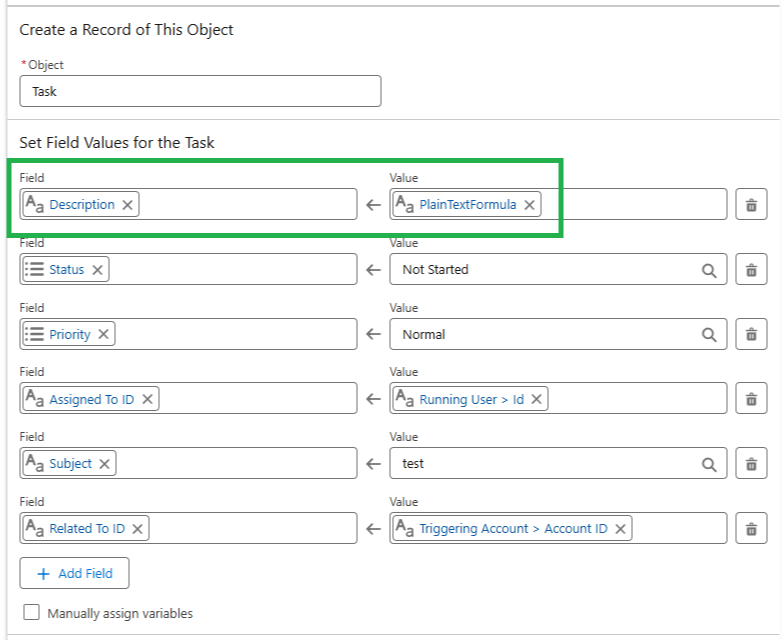
    Use the formula as the resource to set field values on the task description or elsewhere in the flow. 


    Step 4:

    Test it out in the debugger and keep an eye on the field results over time. 

    You can add new HTML tags into the formula as you come across them in order to handle them too (since we didn't handle all possible HTML tags).

    If formulas are a bit of a sticking point, you can paste the formula (and any uncaught HTML tags) into ChatGPT and ask it to rewrite the formula to exclude the new HTML tag. 

    You'll want to test any AI generated formulas since they can be hit or miss.

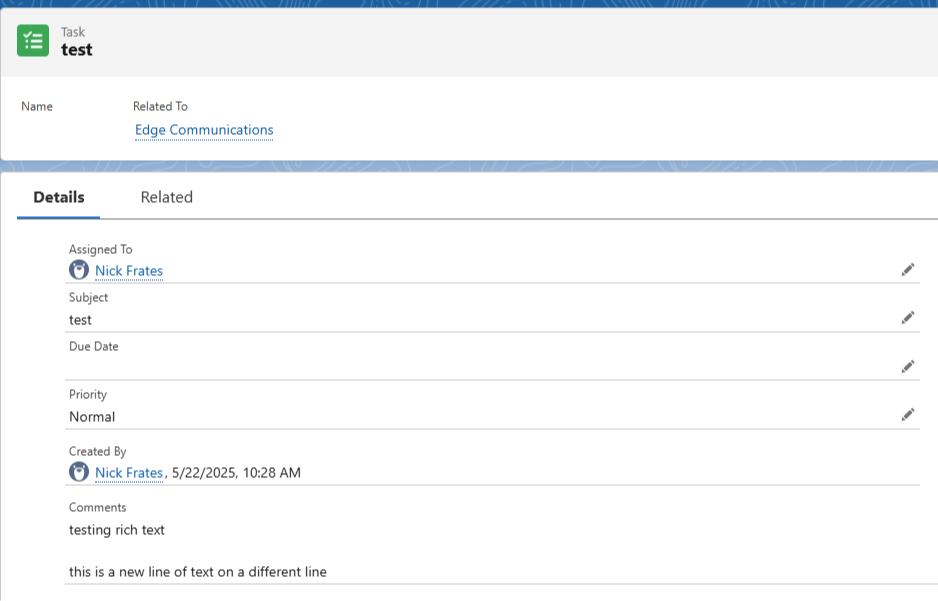
    In my sandbox this process worked to convert a rich text field into the task description:


    So to quickly recap:

    • We built a flow text variable and populated it with the Rich Text
    • Then we built a formula that removes specific HTML tags from that variable
    • We then use the formula to set the Task Description in the flow
    • This lets us "convert" rich text to plain text without using Apex


    Hopefully this helps you at some point!


    Best,

    Nick


    P.S. If you find or create a better solution for this use case, let me know!

  • The Eighth Wonder of the World 🌎

    The Eighth Wonder of the World 🌎

    "Compound interest is the eighth wonder of the world. He who understands it, earns it. He who doesn't, pays it." — Unknown

    A great quote.

    It's attributed to Einstein, although there is no credible evidence he actually said or wrote it.

    Nevertheless, compound interest sits high atop the list of mental models we must understand.

    Based on exponential math, compound interest is a process where growth builds on previous growth, creating faster and faster increases over time.

    Imagine you're given a choice:

    1. Take $100,000 right now, or...
    2. Take a single penny today and double it every day for 30 days.

    Which would you prefer?

    At first, the penny path looks like a joke.

    • Day 1: $0.01
    • Day 2: $0.02
    • Day 3: $0.04
    • Day 4: $0.08
    • Day 5: $0.16
    • Day 10: $5.12
    • Day 15: $163.84
    • Day 20: $5,242.88

    Still seems like a bad deal, right? But watch what happens:

    • Day 25: $167,772.16
    • Day 28: $1,342,177.28
    • Day 29: $2,684,354.56
    • Day 30: $5,368,709.12

    By Day 30, the doubling has exploded past the $100,000 option.

    This is the power of compounding.

    • Applied to finance, it creates wealth.
    • Applied to the body, it creates health.
    • Applied to relationships, it creates trust, connection, meaning.

    So, how does this apply to a Salesforce career?

    • Your skills compound
    • Your Salesforce network compounds
    • Your reputation compounds
    • Your problem-solving ability compounds
    • Your salary compounds
    • Your savings compound (when invested)
    • Your habits compound
    • The technical debt in your Salesforce environment compounds

    Compounding works both ways.

    I know you've seen this before but I'll show it again.

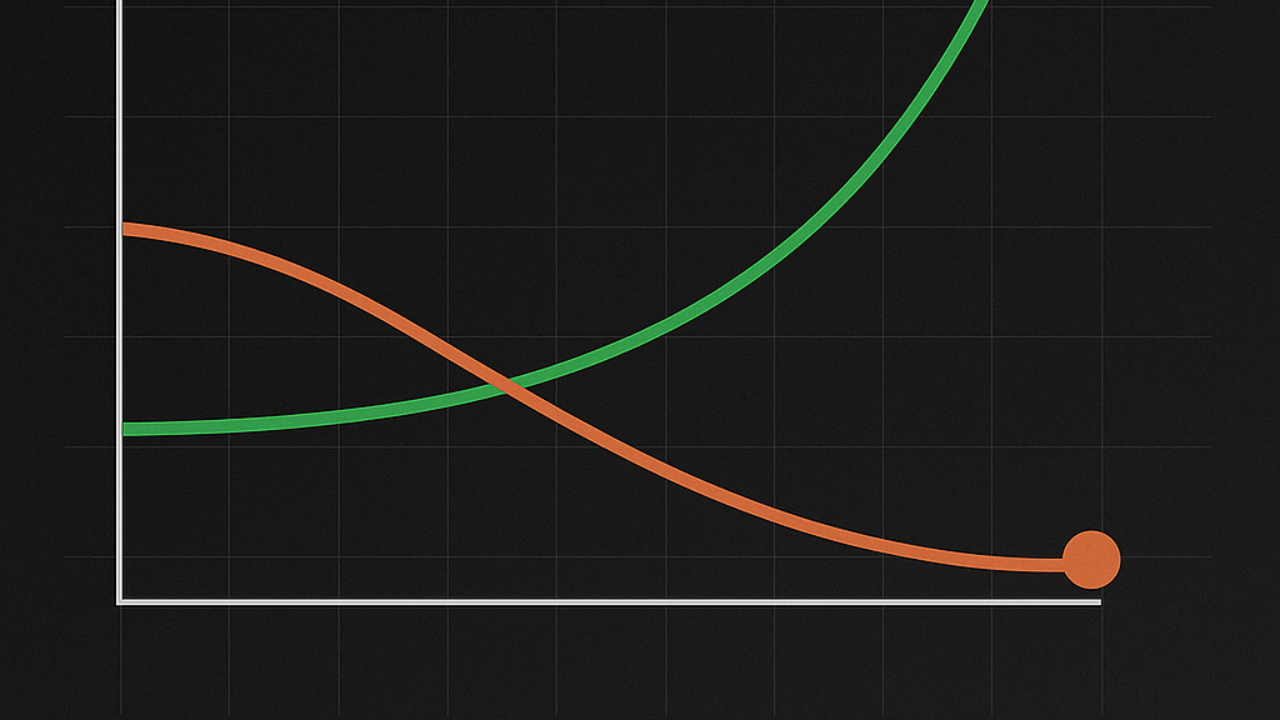
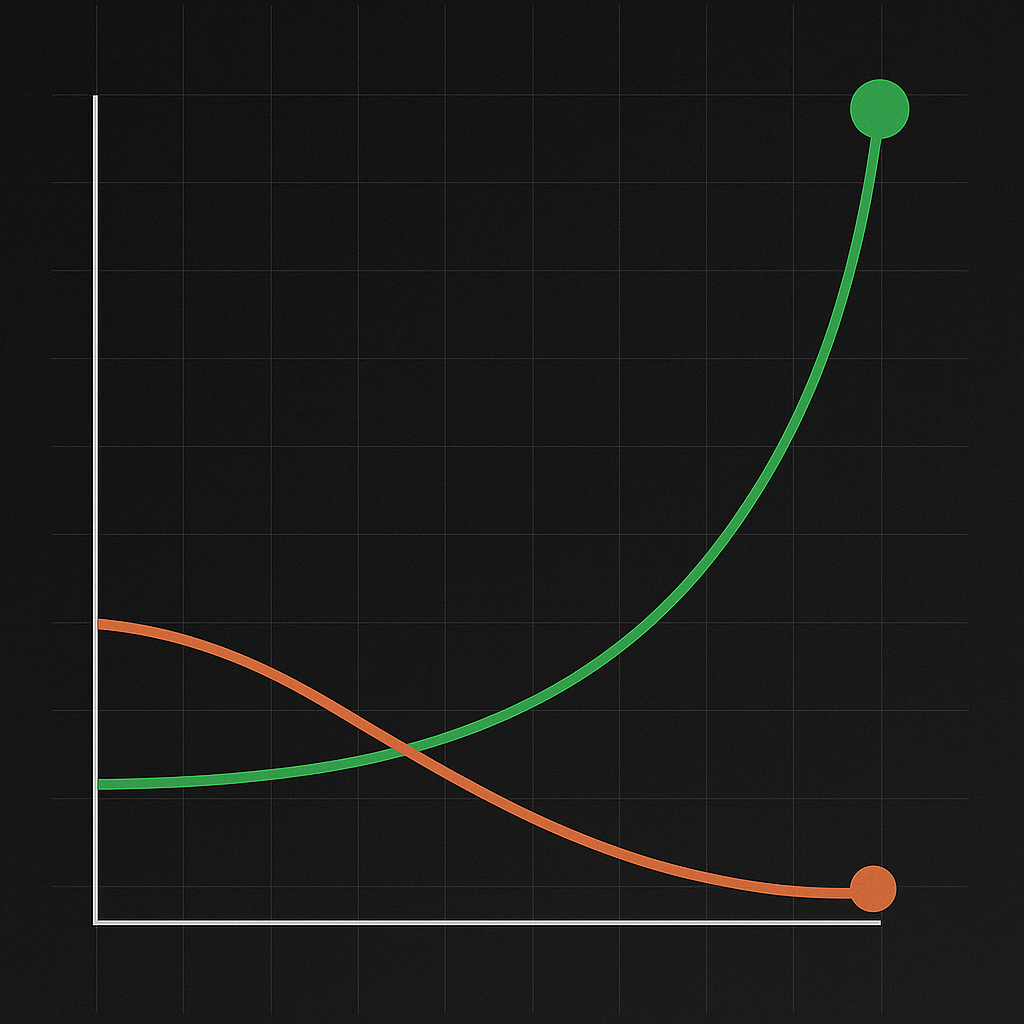
    • 1.01 ^ 365 = 37.78 
    • 0.99 ^ 365 = 0.025
    • 1% better every day for a year makes you ~38x better.
    • 1% worse every day for a year cuts you down by 98% to about ~2.5% of where you started.
           

    What's interesting is that by doing nothing — by standing still — we still get worse.

    Why? Because the world keeps moving forward.

    When the world moves forward by 2% and we stand still, on a relative basis we've moved -2%!

    So, why all this talk of compounding?

    I'm writing this newsletter to you, but really it's a reminder for myself.

    I'm just two certifications away from the Salesforce Certified System Architect credential — pretty cool!

    But I set that goal months ago, and… I’ve barely studied. Oof.

    That’s negative compounding at work—me paying interest against my own ambition.

    Whatever we do repeatedly becomes a habit. And by not studying, I've built the habit of not studying.

    Our brains conserve energy by making repeated behaviors our default. In fact, there's a whole brain region primed to build habits called the basal ganglia.

    "The chains of habit are too weak to be felt until they are too strong to be broken." — Warren Buffett

    And so I want to rebuild the Salesforce study habit.

    I'm starting small with one Focus on Force quiz a day.

    Remember, 1% every day is enough for a 38x improvement.

    Professional fitness is like physical fitness in that it needs to be ongoing.

    We wouldn't go to the gym for three days and then decide "Well, now I'm done and I'll be in shape forever."

    On the flip side, we wouldn't think, "The only way to get in shape is to spend five hours a day in the gym every day forever!"

    A balanced approach — a "middle way" of consistent 1% improvements — is likely the best.

    So let's wrap this up and make it practical for you.

    • Take a moment and rank yourself 1-10 on how well you're using compound interest in your life
    • Identify the area compounding is working the best for you. How did that happen?
    • Identify the area compounding is working against you the most. What one thing could you do today to change that?

    And that's it!

    Hope it helps.


    Best,

    Nick

  • 📚 Read faster, remember more

    📚 Read faster, remember more

    I’ve been thinking lately about how we consume books.

    With the pace of modern life—and the rise of AI—the edge belongs to those who can read smarter, not just more.

    So I started experimenting with a new way to read.

    A method that moves fast, but still extracts value.

    It’s called the 10-20-40 Method.

    It’s a form of optimal stopping—a way to extract signal without drowning in noise. You give each book a fair shot, but you don’t waste hours trying to wring meaning from fluff.

    Here’s how it works:

    • First 10 minutes – Skim the front/back cover, table of contents, conclusion, and maybe a review or two. You’re not trying to absorb it all—just get a sense of the terrain.

    • Next 20 minutes – Flip through the chapters. Look for structure. Highlight insights that jump out. You’re mapping the skeleton of the book.

    • Final 40 minutes – Choose 2–3 chapters and go deep. Take notes. Argue with the author in your head. Apply the idea to something real.

    That’s it. One book. About 70–90 minutes total.

    At first, it felt almost disrespectful—like I was cheating.

    But then something surprising happened:

    I started learning faster.

    Seeing patterns across books.

    And remembering more.

    So I ran the idea by an AI to check my thinking (as I often do), and we mapped out the pros and cons together.

    What Happens If You Do This Every Day for a Year?

    Let’s say you read just 1 book per day using 10-20-40.

    That’s 365 books a year.

    Add in a second book and you’re looking at 730 books.

    Here’s what would likely happen:

    • You'd build a mental model library faster than most people do in a lifetime.

    • You'd spot BS quicker—pattern recognition levels up fast when you're sampling hundreds of sources.

    • You'd start creating at a higher level, combining insights across disciplines.

    • You'd rewire your thinking from sheer exposure to high-quality ideas.

    • And... you'd probably start getting asked how you seem to “know something about everything.”

    Not all books are created equal.

    Most won’t survive the test of time. The Lindy effect reminds us that the longer an idea has survived, the longer it will survive.

    So I’m learning to read fast—but linger on the timeless ones.

    But of course, there are trade-offs.

    What Are the Downsides?

    • You risk shallow learning if you never slow down to reflect or apply.

    • You could burn out or start seeing reading as a chore.

    • You might hoard knowledge instead of using it—the intellectual equivalent of overpacking for a trip and never leaving the house.

    • And some books—especially the great ones—deserve to be read slowly. Felt. Lived.

    So here’s the twist I’m adding to my routine:

    A Sustainable Reading Rhythm

    • Weekdays → One book per day using 10-20-40. Write down one quote, one insight, and one possible action.

    • Weekends → One slow, deep read. No skipping. Just full immersion.

    • Monthly → A Power Synthesis Day: review your notes, revisit the biggest ideas, and translate 2–3 into action, content, or conversations.

    This blend gives you speed and depth.

    Quantity and quality.

    Knowledge and wisdom.

    It’s early days, but I’m loving the results so far.

    I’m also starting to think of books like relationships: you can only maintain so many.

    Just like Dunbar’s number suggests a limit to stable friendships, maybe you only need 150 truly great books. The kind you revisit again and again.

    Books are meant to be used—not worshipped.

    This protocol is helping me actually use them, and get through my reading backlog.

    So here's the challenge:

    Try the 10-20-40 method on one book.

    See if it works for you.

    Then take one idea and do something with it.


    Until next time,

    Nick

  • ❎ Transform Element Use Case

    ❎ Transform Element Use Case

    When new functionality shows up in the Flow Builder, I don't always use it right away.

    The transform element is one of those "newer" additions to the Flow tool kit that I haven't worked with a lot because I've always been able to build Flows without it.

    But this week I found an excellent use case for the Transform Element and thought I'd share it with you.


    Background: This week I had a client who wanted all the members of a queue to receive a notification when a record was added to the queue.

    Simple enough, just click the "Send Email to Queue Members" box on the queue and all the emails will go out right?

    Nope!

    That functionality works with all the queue objects except tasks.

    Coincidentally, tasks were the type of record we were working with!

    So a workaround was needed, and a flow made the most sense.

    I decided to create a record triggered flow to fire when a task record was assigned to this task queue.

    When the flow triggered, it would find all the queue members and email them.

    Easy.

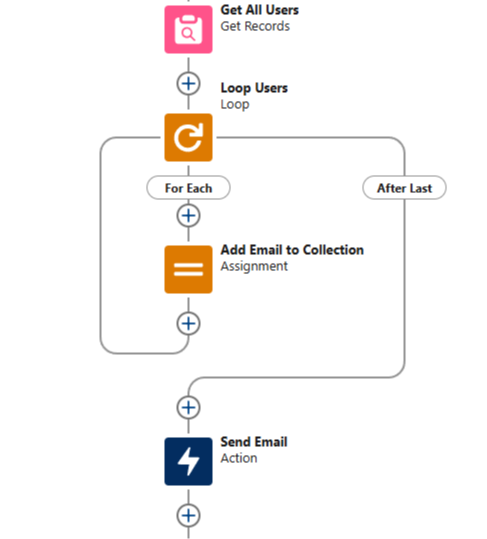
    Prior to working with the transform element, this scenario would require a different approach. I'd use a Get Records to find all the users, then loop through the users and add their emails to a collection variable.

    Then we'd use the send email action and include the collection variable of email addresses in the recipient list.

    Something like this:


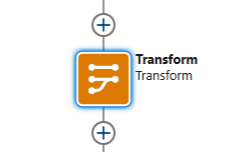
    The Transform element simplifies this dramatically.

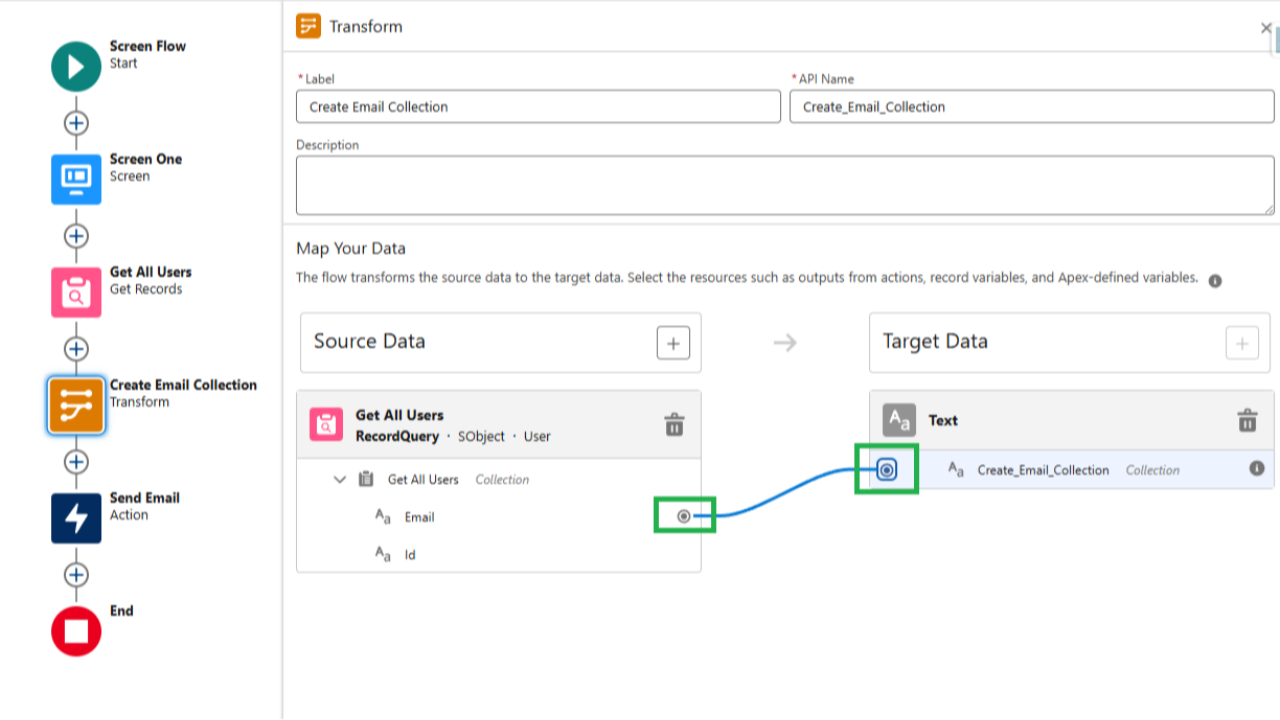
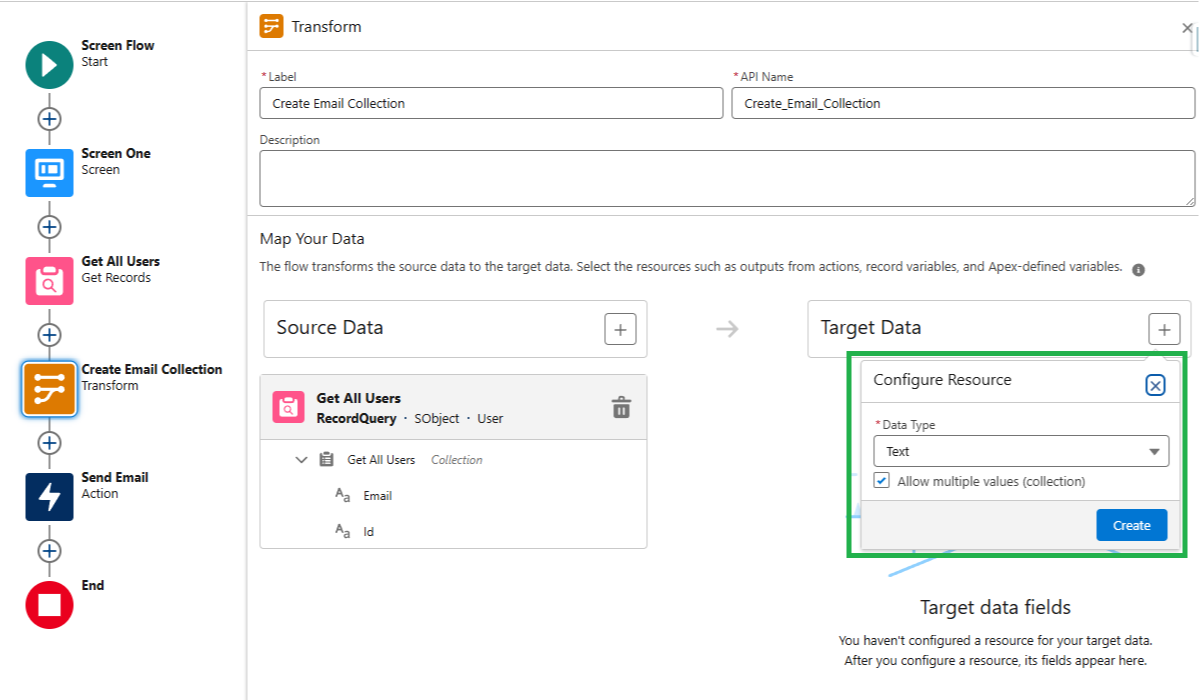
    By dropping a transform element into the flow we can specify a source data collection, in this case our Get All Users get element.

    And we're able to create a new collection variable with any data type we like.


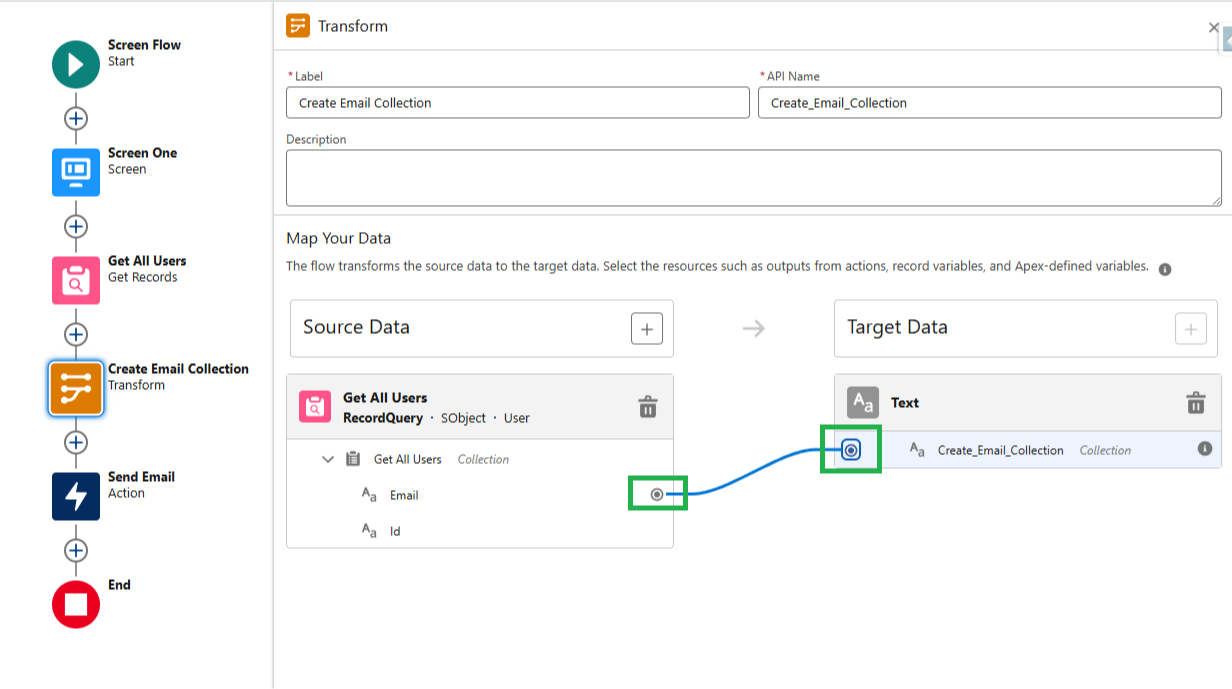
    Then we simply click one of the fields from our source collection (Email for example) and map it to the newly created collection in our Transform Element.

    When the flow runs, the Transform element will automatically take every email from the Get All Users source collection, and put it directly into the collection we just made inside the Transform Element.


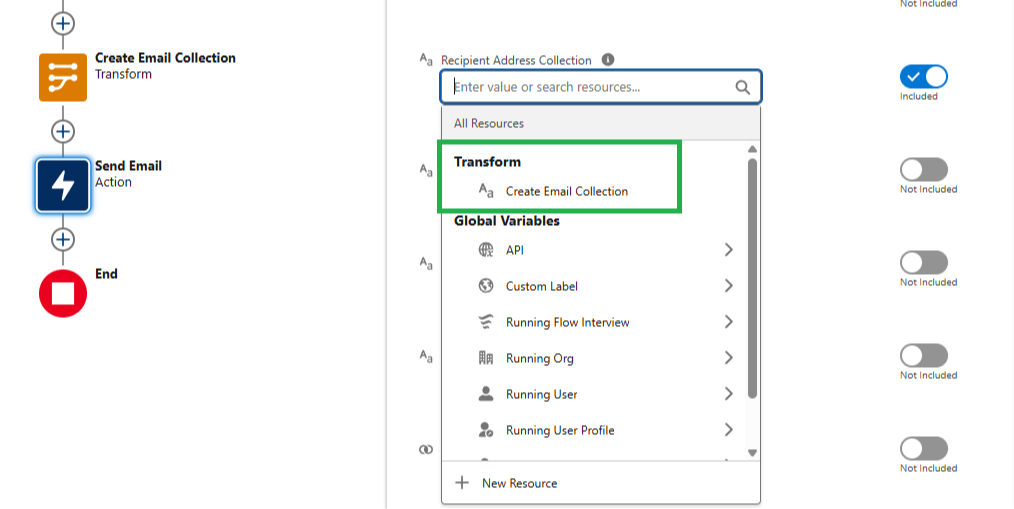
    Then, in our Send Email action, we can directly reference the collection from the Transform Element to send out the email to the right user email addresses.

    No need to create a loop, an assignment, or a collection variable — the transform element handles it all for you.

    Cool!


    And that's it for this week!


    Hope you find it helpful :)


    Best,

    Nick

  • Two Formula Tricks 👀

    Two Formula Tricks 👀

    Quick email!

    Last week we talked about quotes as compression algorithms for wisdom.

    And discussed how memorizing a few meaningful quotes helps us be better at our jobs.

    Well, here is one quote I was thinking about this week:

    "I like people admitting they were complete stupid horses’ asses. I know I’ll perform better if I rub my nose in my mistakes. This is a wonderful trick to learn."

    — Charlie Munger

    Why was this one on my mind?

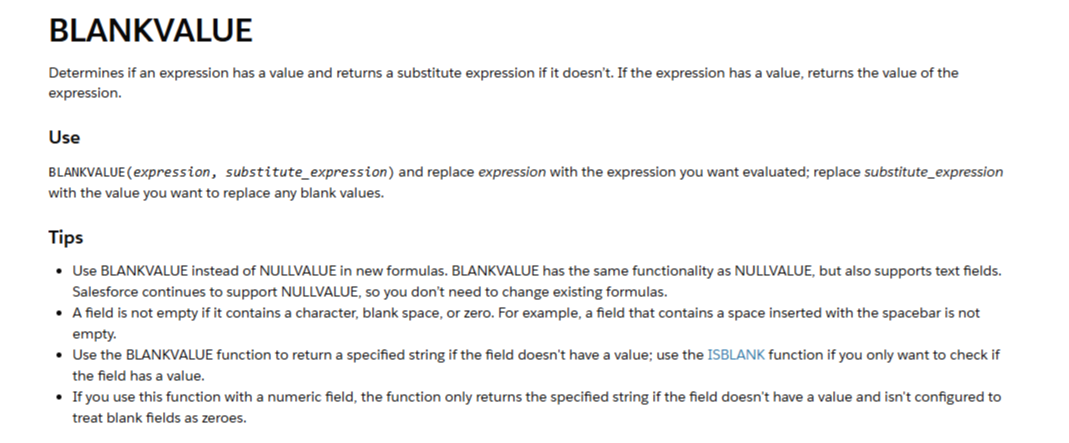
    Well, for my entire Salesforce career one of the most frequent formulas I've built into Salesforce Flows is an IF() statement to handle blank values.

    The syntax is roughly this:

    IF( ISBLANK( fieldName), value_if_blank, fieldName )

    If some field or item in the flow is blank, then return a specific value, and if it isn't blank, then use the field.

    Students of my flow course will definitely recognize this pattern.

    Turns out, there is an existing Salesforce formula that does this exact logical operation.


    For example:

    BLANKVALUE( Payment_Due_Date__c, StartDate + 5)

    This formula returns the date five days after the start date whenever Payment Due Date is blank. If Payment Due Date isn't blank, then its value is returned instead.

    How could I have missed this?! 

    Who knows... but by sharing with you that I did completely miss this one — as Charlie says "rubbing my nose in my mistake" — I'm hoping I'll improve my future performance!

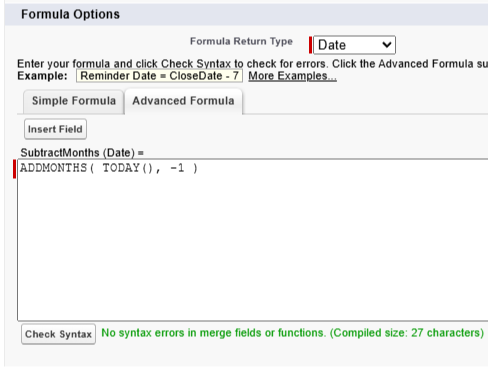
    And a second formula trick I recently learned was that the commonly used ADDMONTHS() formula accepts a negative number as a parameter.


    Screenshot: subtracting one month from today's date

    Turns out the ADDMONTHS() formula is just as useful going back in time as it is going forward.

    So to recap:

    • BLANKVALUE() is a formula function that can be used instead of an IF() statement with an ISBLANK() function
    • ADDMONTHS() lets us subtract months too

    I was so surprised that I had never used the BLANKVALUE() function before that I remembered the Charlie Munger quote and wanted to share the story with you.


    Hope one of those two tricks helps!


    Best,

    Nick

  • Compression Algorithm for Wisdom 🧙🏻

    Compression Algorithm for Wisdom 🧙🏻

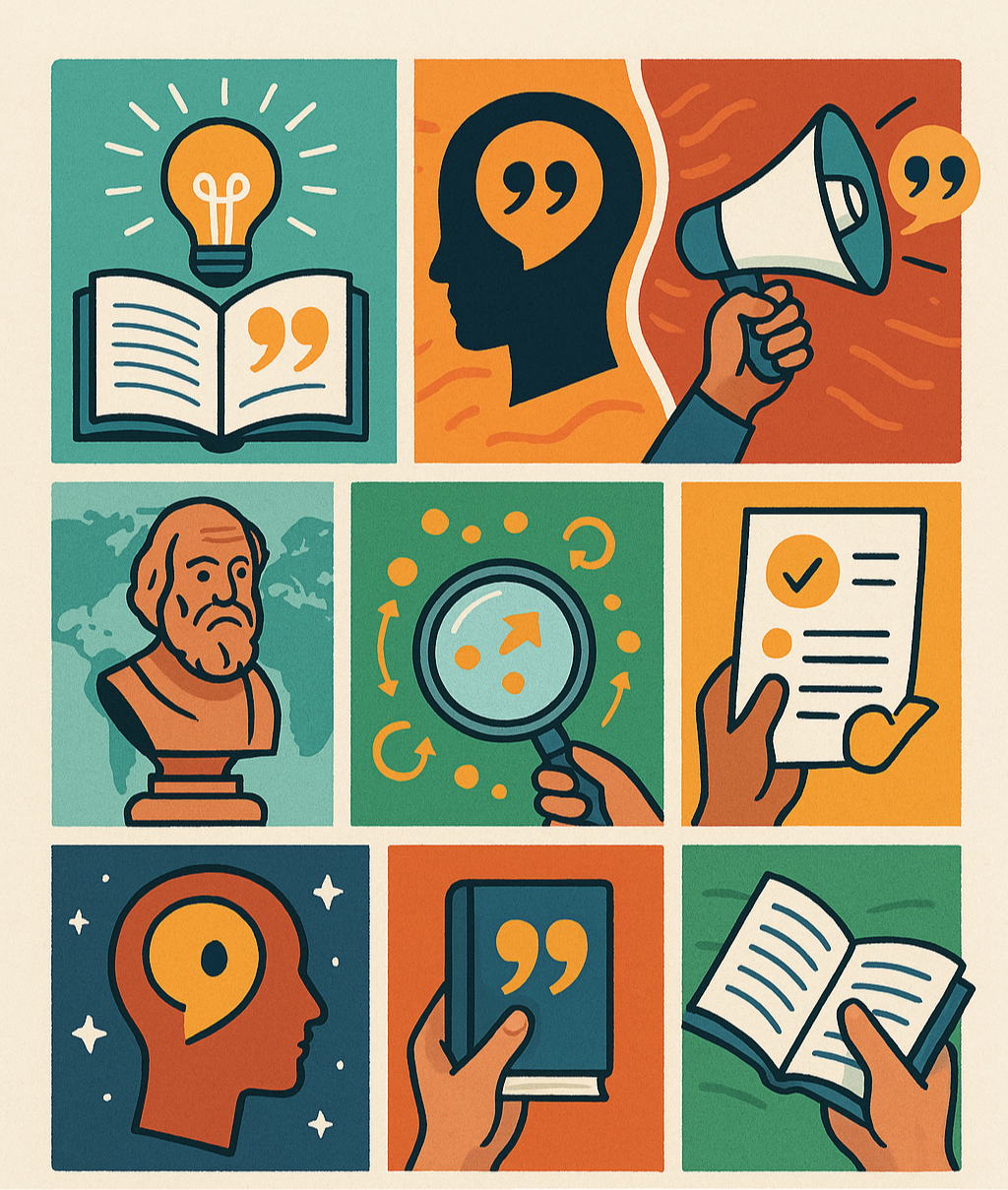
    "It is a good thing for an uneducated man to read books of quotations."
    — Sir Winston Churchill

    "The wisdom of the wise, and the experience of ages, may be preserved by quotations."
    — Isaac Disraeli


    I came across these two quotes in a book last month and they got me thinking.

    Quotes are a form of compact knowledge.

    A compression algorithm for wisdom.

    Mental models stored in an easy to use format.

    They instruct us:

    “To get what you want you have to deserve what you want. The world’s not yet a crazy enough place to reward a whole bunch of undeserving people.”
    — Charlie Munger

    They reveal truths that deep down we always knew:

    “We do not receive wisdom, we must discover it for ourselves, after a journey through the wilderness, which no one else can make for us, which no one can spare us, for our wisdom is the point of view from which we come at last to regard the world.”
    — Marcel Proust


    They challenge us:

    “Reading science, math, and philosophy, one hour per day will likely put you at the upper echelon of human success within seven years.”
    — Naval Ravikant

    They make us laugh:

    "A mathematician is a device for turning coffee into theorems."
    — Alfréd Rényi 


    When we take the time to memorize a quote, we plant a seed in our minds that will grow to serve us for the rest of our lives.

    So, this week, I started a small list of quotes in a Google doc, and added to it whenever I came across one I liked.

    Then, throughout the day, I practiced remembering one of the quotes.

    It was a good mental exercise, and I enjoyed the process.

    Whenever I try one of these "experiments" I've begun running it by an AI to see what a super-human thinks.

    And together, an AI and I came up with these benefits to studying quotes:

    The 8 Benefits of Studying Quotes

    1. Compressed wisdom – You get decades of someone’s experience distilled into a single sentence. Efficiency at its peak.
    2. Mental reprogramming – Great quotes reshape how you think, often instantly. They’re like software patches for your brain.
    3. Linguistic weaponry – Knowing the right quote at the right time makes you persuasive, sharp, and memorable in conversation or writing.
    4. Historical continuity – You feel connected to the greatest thinkers, leaders, rebels, and creators across time. You’re not alone.
    5. Pattern recognition – As you read enough quotes, you start seeing recurring themes: resilience, action, humility, timing, etc. That repetition is insight.
    6. Better decision-making – Often a quote gives you the frame you need to break a deadlock or clarify your thinking.
    7. Memorability – Unlike long books, quotes stick. One line can live rent-free in your head for life — and guide action.
    8. Portable and non-linear – You don’t need a block of time. Open a random page, read one quote, and you’re done — and better for it.
         

    So if you like the idea of learning from quotes, let this email be the inspiration to pick one and practice remembering it!


    And that's a wrap.


    Best,

    Nick


    P.S. Do you have any favorite quotes? Maybe I can add them to my list :)

  • How to Build a List Email Metric Report in Salesforce

    How to Build a List Email Metric Report in Salesforce

    A client asked me this week, "Is it possible to see what emails were delivered or bounced from a list email campaign?"

    The answer is yes!

    And the solution is way easier than you'd think.

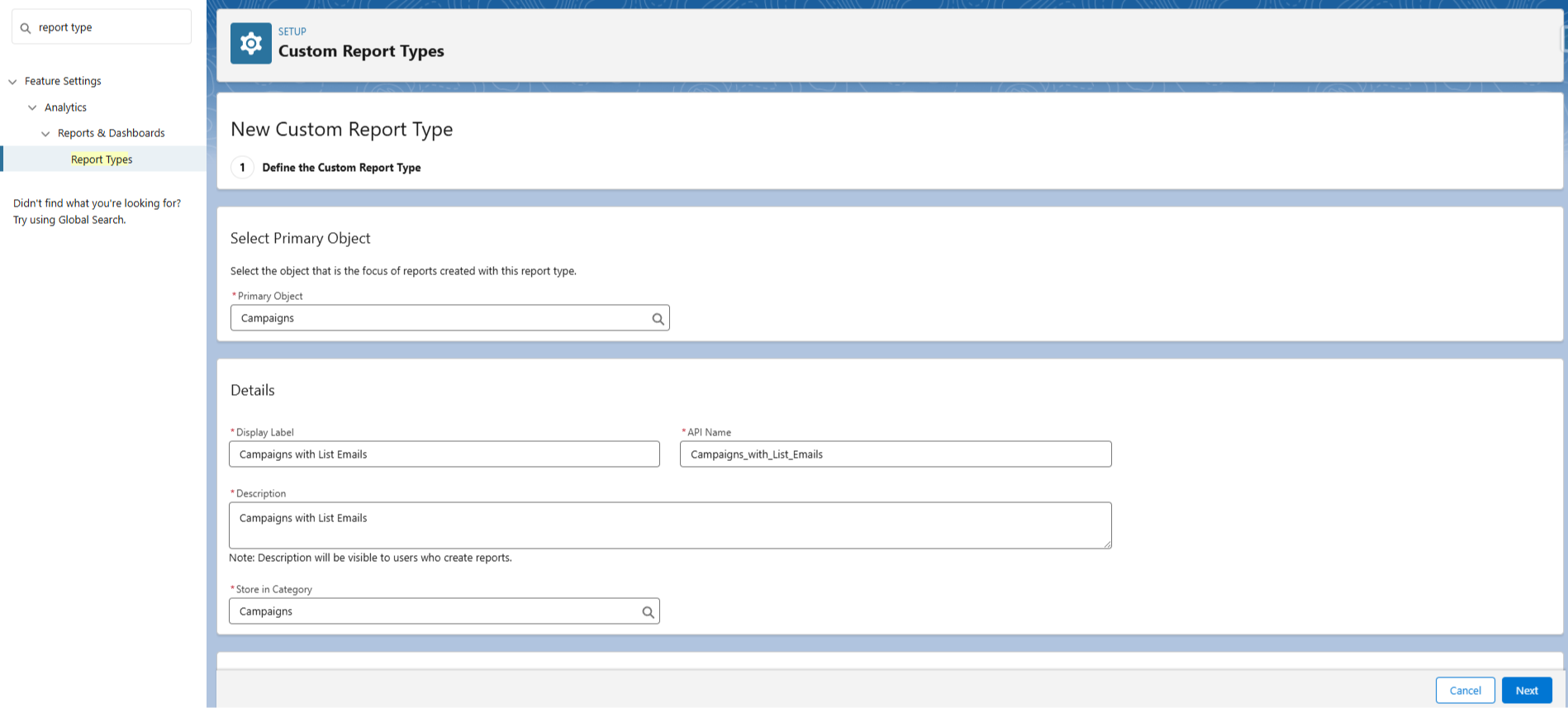
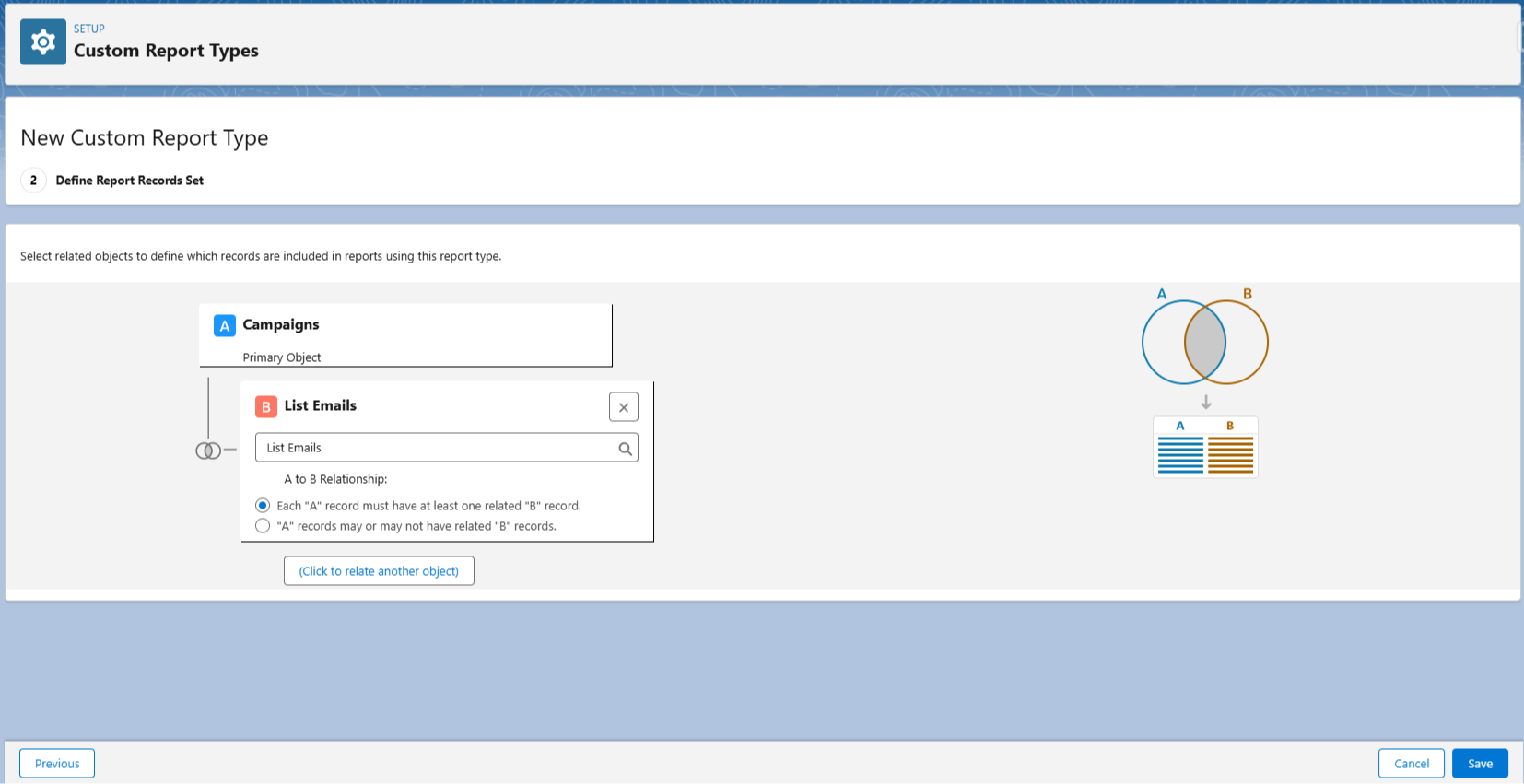
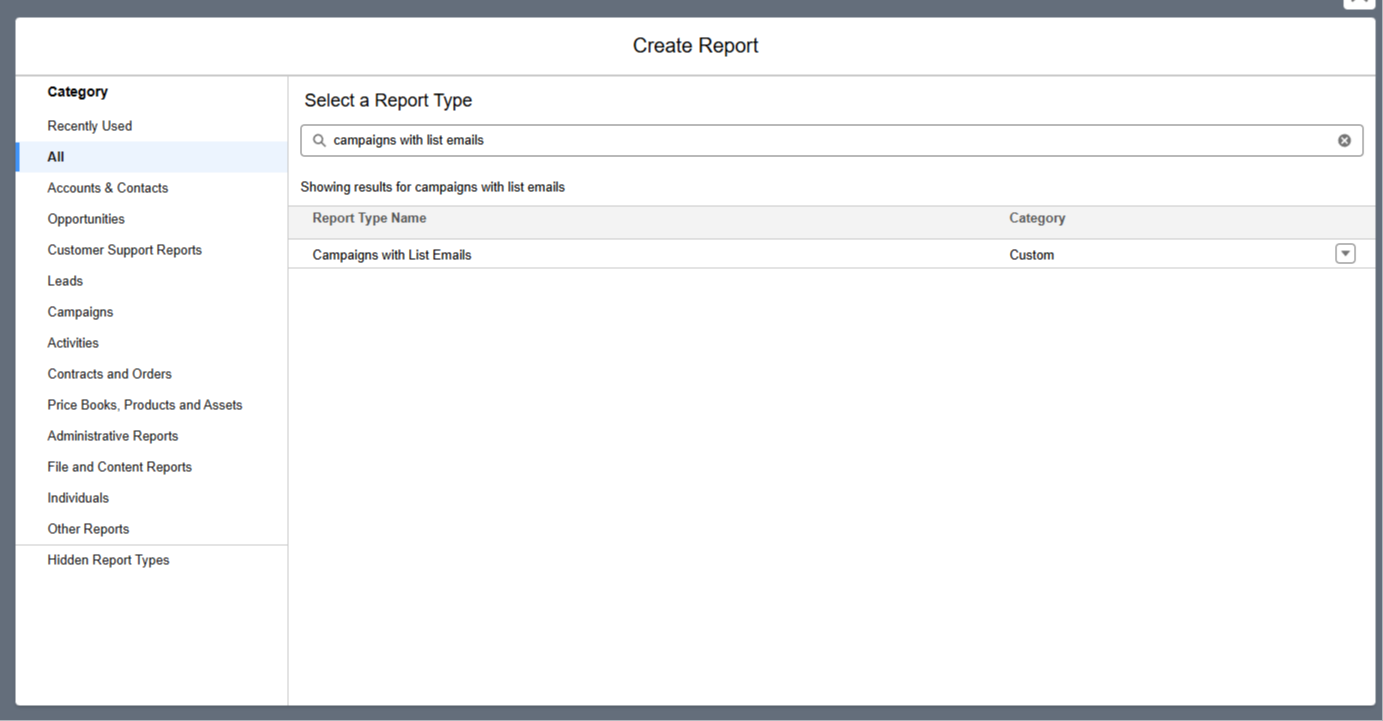
    First, we create (and save) a new report type in Salesforce using the standard Campaign and List Email objects.

    Name it something like "Campaigns with List Emails".


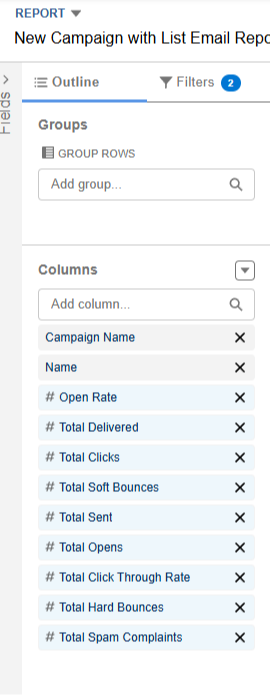
    Next, we create a report using our new report type, and add all the list email fields to the report.


    With that done, we can run our report for all our campaigns, or just choose one in specific.

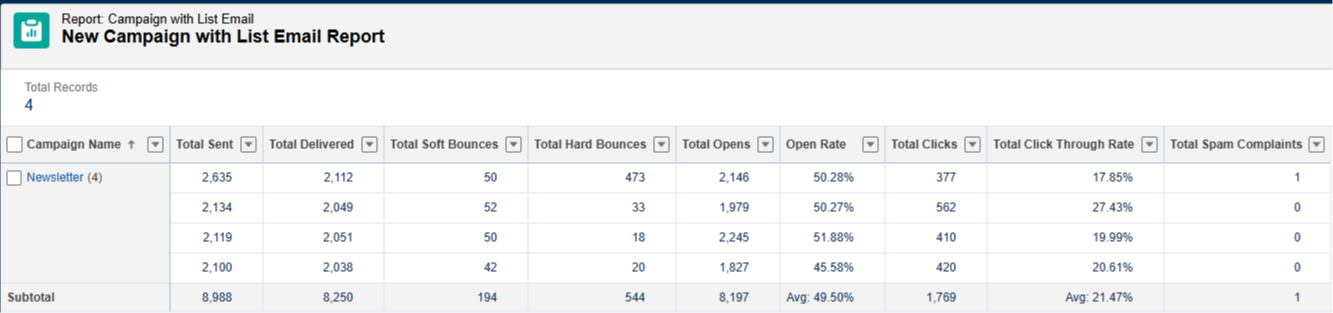
    In this screenshot we filtered to show the results of an email campaign called "Newsletter".


    As you can see, key fields like Total Sent, Total Delivered, Soft and Hard Bounces, Total Opens, Open Rate, Click Through Rate, and more are all included in this report.

    And that's it!

    Marketing metrics like this are key for gauging the success of an email send, and you now know how to quickly build this report in Salesforce!


    Hope it helps.


    Best,

    Nick

  • 🛡️Trailhead Superbadge Overhaul

    🛡️Trailhead Superbadge Overhaul

    Quick email this week!

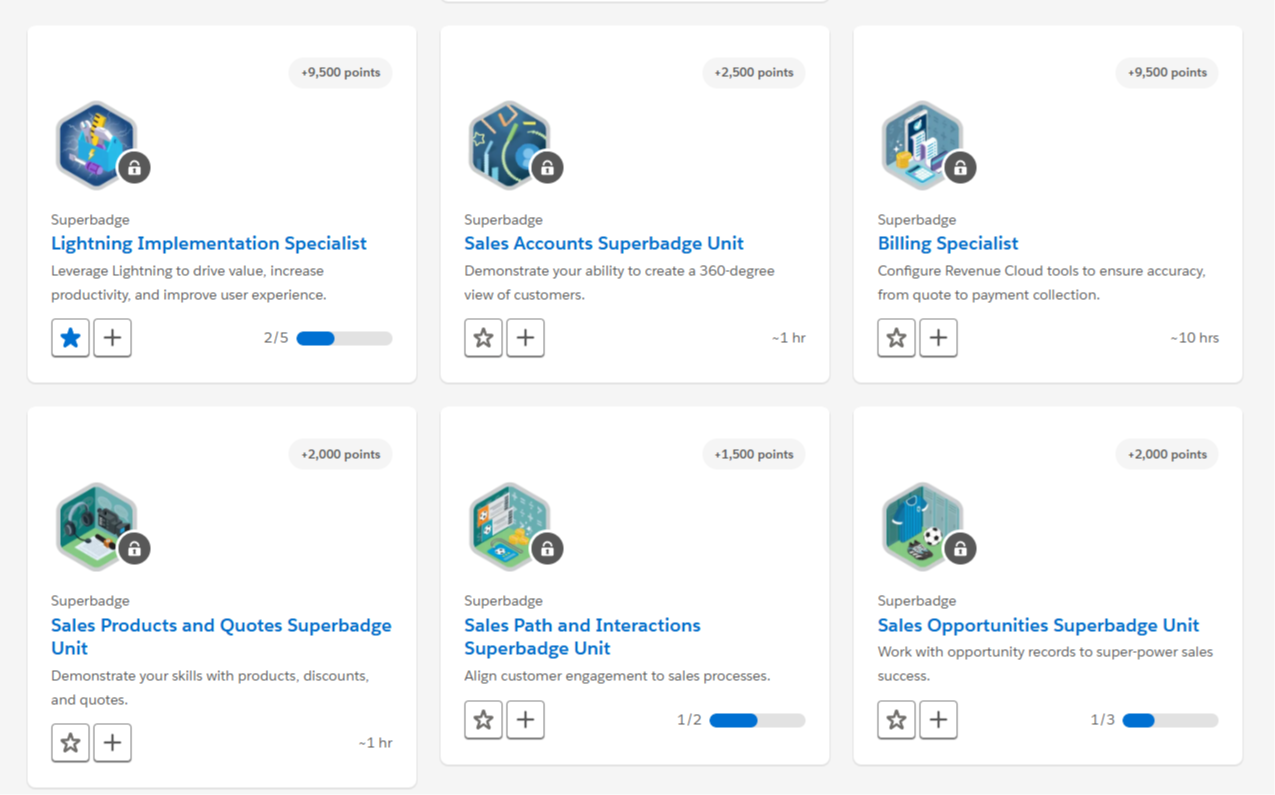
    I came across this blog post from Salesforce, and Trailhead Superbadges are getting an overhaul.

    I really liked the overall tone of the changes so I thought I'd share.


    Summary

    • Superbadges will no longer be considered credentials
    • All long-format (6+ hours) superbadges will either be retired or converted into easier superbadges, taking about 1-3 hours to complete
    • You can now collaborate to complete superbadges, for example by working with other people or looking up material online (before this wasn't allowed)
    • Prerequisites will no longer be required to unlock access to superbadges, though every superbadge will still have a list of recommended, not required, Trailhead learning

    Salesforce says these changes will be rolling out over the next few months.

    I checked today and a bunch of the badges are still locked, meaning the removal of pre-requisites hasn't happened yet.


    With that said, I'm looking forward to these updates. 

    I always learn something useful when doing the superbadges, so making these Trailhead challenges more accessible is a great for us to strategically learn new functionality. 

    And that's it!

    As promised, short and sweet.

    Hope you have a great week!


    Best, 

    Nick 

  • 📝 Creating PDFs in Salesforce

    📝 Creating PDFs in Salesforce

    We all know Salesforce has limitations.

    Sometimes you want to achieve a result that, on the surface, seems simple.

    ...and you hit a wall.

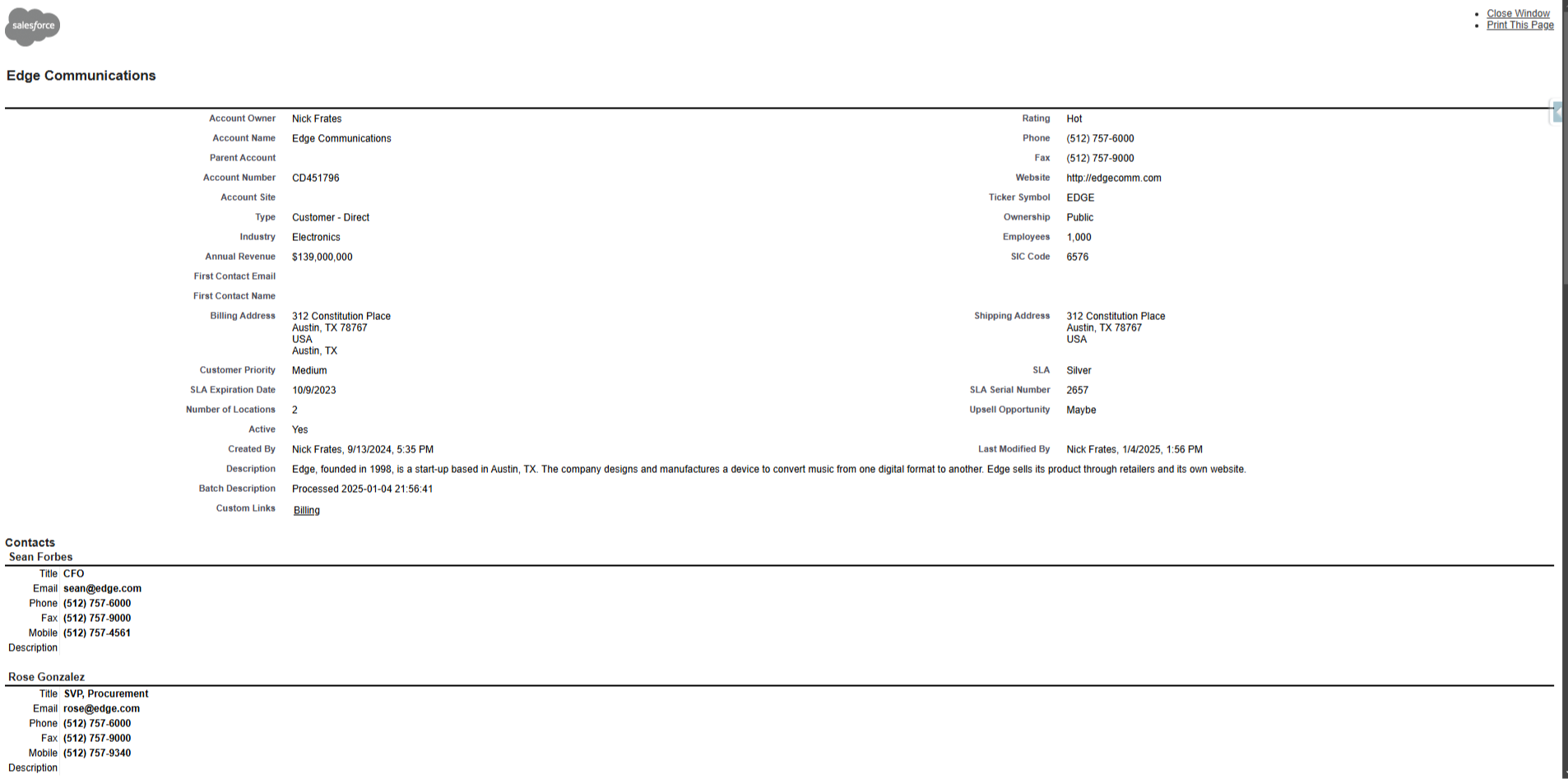
    This came up for me recently when a client asked to turn a Salesforce account into an exportable PDF, saying the out-of-the-box solution wasn't great.

    And I have to agree — the "Printable View" button provided by Salesforce leaves a lot to be desired:


    Welcome to 2007

    Fortunately, the cost of development is rapidly dropping.

    In the near future it might even be close to zero.

    Which means for most Salesforce development challenges, there's a good chance an LLM can walk you through a solution.

    In this case, I learned we can import open source libraries into Salesforce for things like PDF generation.

    Specifically, there is a library called jsPDF-AutoTable to make simple documents, like invoices and tables.

    I asked ChatGPT how to get it working inside Salesforce and the LLM had me download the source code to get started (at the bottom of this Github page if you're interested).

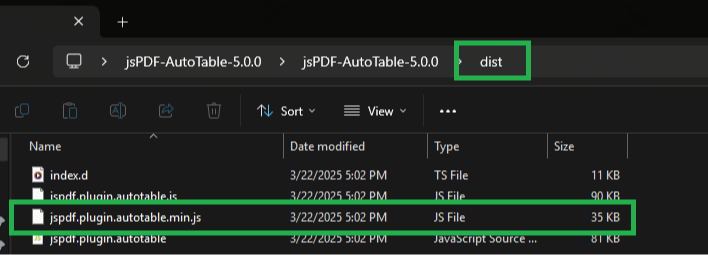
    I opened the download folder and found the "dist" folder in the directory.

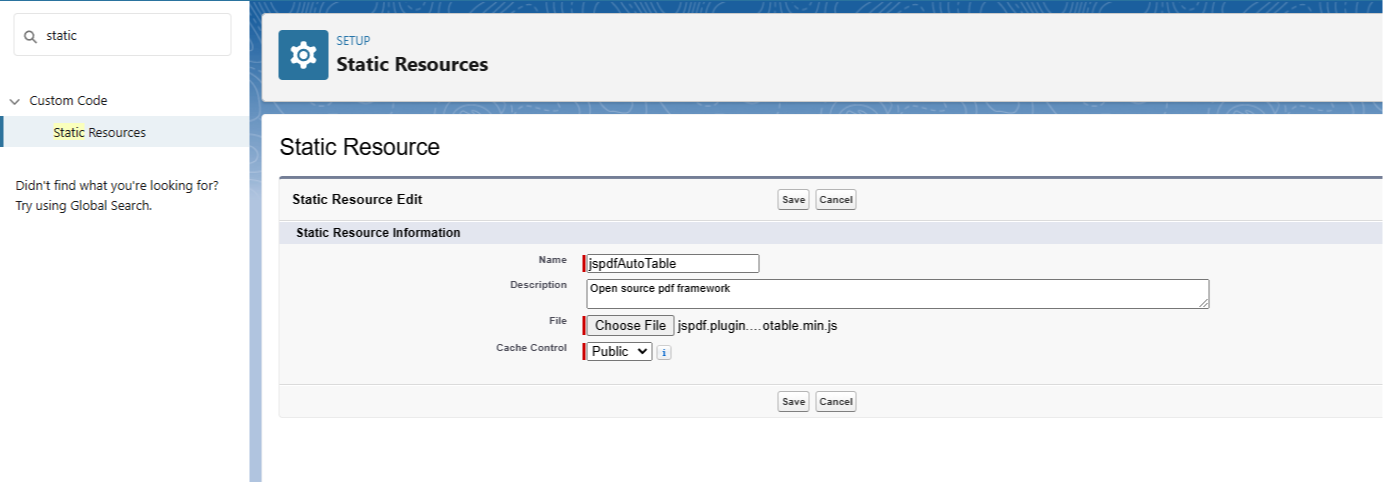
    Then I opened the dist folder, found the jspdf.plugin.autotable.min.js file, and uploaded it into Salesforce as a static resource.

    (Screenshots below in case you want to do this yourself).


    With that done, the library was inside Salesforce and ready for use.

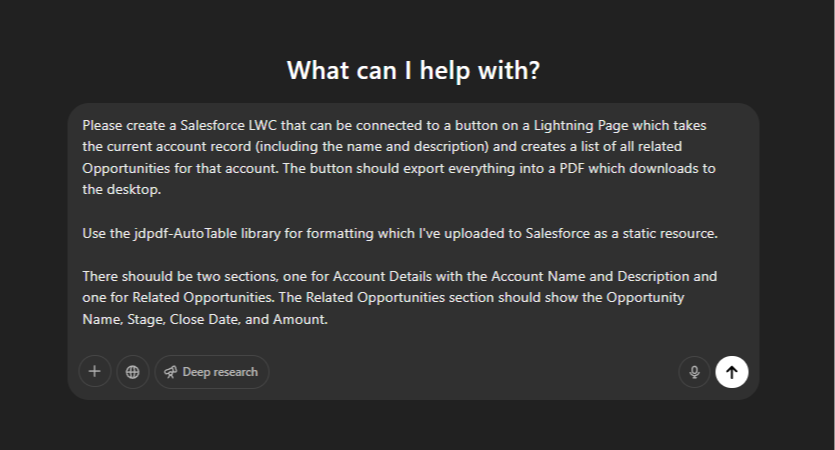
    Next, I simply confirmed with ChatGPT that I had done the upload successfully and asked it to write an LWC to export an account into PDF form with a section for Related Opportunities.

    If you want to try it, a prompt like the one in the screenshot would do just fine:


    The first attempt by ChatGPT got me 80% of the way there (the LLMs still don't one-shot most of the LWCs I ask for).

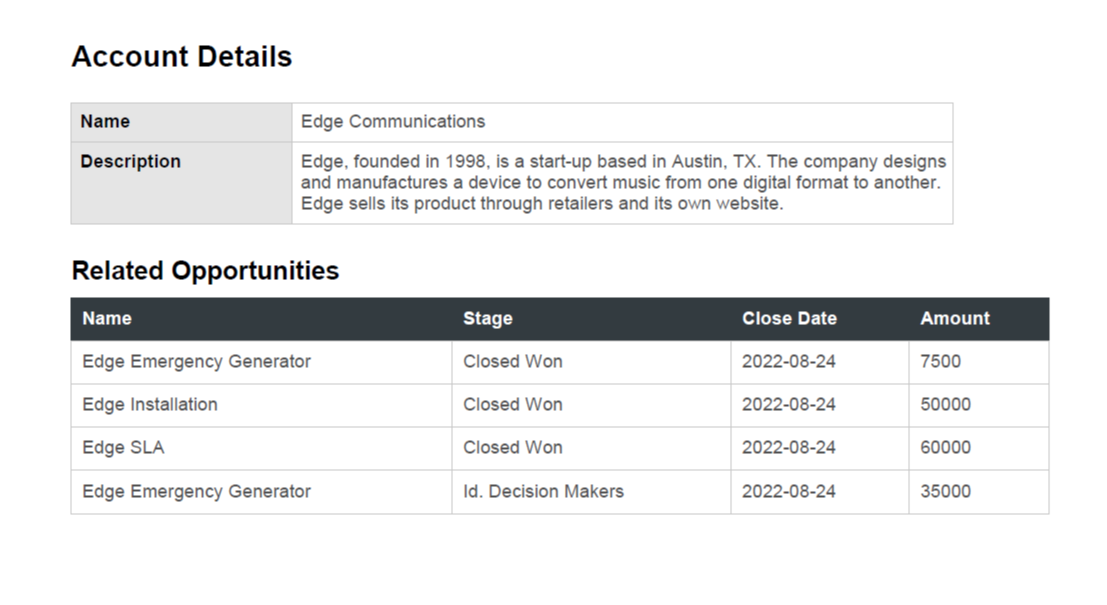
    And with some minor tweaks I got a respectable "version one" for the client.

    You can see an example of the PDF below. 


    Not bad!

    In total, it took about an hour from me never having heard of jspdf-AutoTable to sending a prototype to the client for review.

    Fun stuff!

    Some key takeaways to wrap this up:

    • We can import open source libraries into Salesforce to extend functionality, like jspdf-autotable to create PDFs
    • d3 is another example of an open source library that makes awesome visualizations and can be imported
    • As development costs drop, building bespoke solutions gets easier and cheaper
    • A little development knowledge (how to use VScode to deploy an LWC) goes a long way!

    Would quickly generating PDFs in Salesforce (for free) be useful for you?

    Then give it a shot!

    Happy Saturday :) 

    Best,

    Nick