|
Undo, Redo, and Save As with Keyboard Shortcuts
Increase your productivity with new keyboard shortcuts for undo, redo, and save as in the Flow Builder.
Create Responsive Screens with Automatically Triggered Screen Actions (Beta)
You can now run autolaunched flows automatically in the background when the input values associated with screen actions change. Previously, the only way to trigger a screen action was with the click of a button by using the Action Button component. The output can be displayed on the same screen, so your users can see the results of their actions on the same screen without clicking any buttons.
Guide Users Through Screen Flows with Built-In Visual Progress Indicators
Visually guide your users through the stages of your screen flows by using the built-in progress indicator—no more writing custom code to create your own. Your users see which stage they’re on and how many stages remain.
Access Flow Versions in Flow Builder
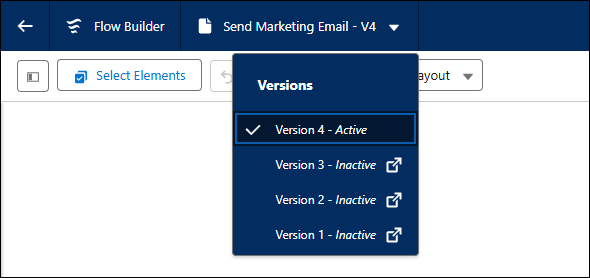
Quickly manage different versions of a flow and view the status of each version in Flow Builder. To see a flow’s versions, click the flow’s name in the Flow Builder navigation header. Clicking on a different version opens that version in Flow Builder in a new browser tab.
|