Hey there,
Your agent was built, tested, and then it failed the first time a customer used it. Often, the cause is permissions, and usually the agent’s own user.
To set up Agentforce permissions for a service agent, turn features on in order (Data 360, then Einstein generative AI, then the Trust Layer check, then Agentforce), give admins the Agentforce Service Agent Configuration permission set, and give the agent’s own user the Einstein Agent license, the Einstein Agent User profile, and access to everything its actions touch.
Everything here comes from Salesforce’s Service Agent Readiness and Setup Best Practices Guide, which covers service agents only.
What does my org need before I start?
Service agents are supported in Enterprise, Performance, Unlimited and Developer Editions, plus Foundations and Agentforce 1 Editions. Some standard actions need add-on licenses.
You also need Lightning Experience, Data 360 (formerly Data Cloud), Einstein generative AI and the Einstein Trust Layer. The Trust Layer is Salesforce’s set of safety controls for AI. If one piece is missing, setup can look fine and then fail when the agent runs.
What order do I turn things on?
- Turn on and verify Data 360.
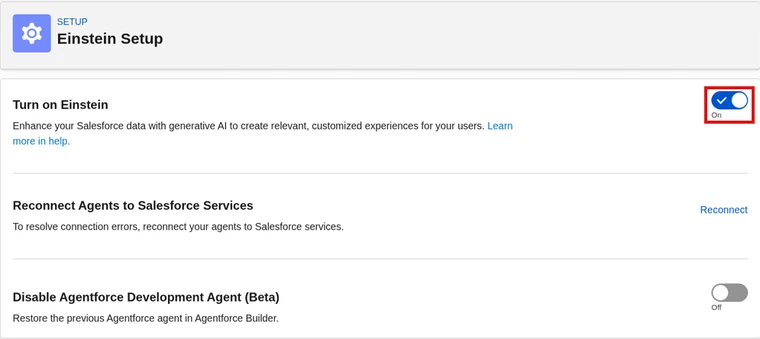
- Turn on Einstein. In Setup, open Einstein Setup and switch on Turn on Einstein.
- Check your Einstein Trust Layer settings.
- Turn on Agentforce. In Setup, open Agents and switch it on.
Provisioning can take 15 to 60 minutes. Provisioning is Salesforce setting up the feature in your org behind the scenes. So if you get odd errors right after step 1, wait before you retry.
Don’t see Agents in Setup? Refresh Setup first. If it’s still missing, check your Agentforce permission sets (Salesforce Help).
Which permissions do admins need?
Admins who build agents need Manage AI Agents, Manage Agentforce Service Agents, Customize Application, Manage Flows, and View Setup and Configuration. Add Configure Messaging if the agent goes on chat.
You don’t have to grant those one by one. Salesforce’s recommended route is the Agentforce Service Agent Configuration permission set.
A permission set license is a license that unlocks certain permission sets. These are the ones the guide lists:
| Permission set license | When you need it |
|---|---|
| Agentforce Service Agent Builder | Building service agents |
| Agentforce Service Agent User | The agent user |
| Data Cloud | Data access |
| Einstein Prompt Templates | Prompt-based actions |
| Messaging for In-App and Web | Only if you use Enhanced Chat |
How do I set up the agent user?
This is the part people miss. A service agent runs as its own user, not as you and not as the service rep. That user starts with very little access.
- License and profile: the Einstein Agent license and the Einstein Agent User profile.
- Permission sets: Agentforce Service Agent Secure Base, plus the Agentforce Service Agent User permission set group. That group includes Data Cloud User and Prompt Template User.
- Objects: Case Read and Create (add Edit or View All if the agent updates cases), Contact Read (View All is recommended), and any custom objects your flows, Apex or prompts use.
- Actions: Run Flows for flow actions, and Execute Prompt Templates for prompt actions.
- Role: one that fits what the agent does.
Every time you add a new Apex class, object or field to an action, give the agent user access too. Salesforce calls this out as a common miss (Salesforce Help).

Cert Lab by Nick Frates
Practice the setup questions
Exam-style questions on agent setup, permissions and deployment, with each answer explained, plus lessons for all six Agentforce Specialist sections.
Start the Agentforce Specialist Cert Lab for $9.99 →Why isn’t my agent working?
If an action fails, check the agent user’s access first, not your own admin access. Then use this table from the guide:
| What you see | Check first |
|---|---|
| Agentforce isn’t visible | Einstein and Data 360 are turned on |
| The New Agent button is missing | Permissions and licenses |
| The agent can’t access data | The agent user’s role and object access |
| Errors while creating an agent | Provisioning isn’t finished yet |
Once permissions are right, my Agentforce Builder walkthrough covers building the agent itself. New to all this? Start with the Agentforce guide. Studying for the exam? The Agentforce Specialist study guide and my Salesforce certification study guides are the next stop.
Cert Lab by Nick Frates
Get ready for the Agentforce Specialist exam
Lessons, practice questions and flashcards for every exam section, with each answer explained.
Start the Agentforce Specialist Cert Lab for $9.99 →Which permission tripped you up the first time? Let me know!
Hope this helps!
Best,
Nick


