Hey friends,
The first time you move a change from a sandbox to production, the buttons are easy. The order of the steps is what trips people up.
The Salesforce deployment process is: build in a sandbox, move the change to a test sandbox, validate it against production, then deploy it to production, where any Apex must have at least 75% test coverage with every test passing. You can move metadata with change sets (clicks, between orgs that share the same production org) or with the Salesforce CLI and the Metadata API (files in source control). Data never moves with either; only configuration and code do.
The Salesforce deployment process step by step
1. Build in a sandbox. Never build in production. Make the change in a Developer or Developer Pro sandbox. If you need a refresher on sandbox types, see my sandbox guide.
2. Write the tests with the code. Any Apex you deploy needs tests. Salesforce requires at least 75% of your Apex code to be covered, and all of those tests must pass.
3. Move it to a test sandbox. Promote the change to a Partial Copy or Full sandbox with realistic data, and let a tester or the business owner try it there.
4. Validate against production. Validation runs the deployment and the tests without saving anything, so you see every error before your release window.
5. Deploy. Deploy the validated change. If the validation ran in the last 10 days and all tests passed with enough coverage, you can quick deploy and skip re-running the tests.
6. Do the manual steps. Some changes can’t be deployed as metadata or need settings turned on by hand. Keep a short list of these pre- and post-deployment steps with every release.
How to deploy with change sets
Change sets are the click-based option. They only work between orgs affiliated with the same production org, so production and its sandboxes, never two unrelated orgs.
- In the target org (for example production), go to Setup > Deployment Settings, click Edit next to the sandbox, and select Allow Inbound Changes. A deployment connection alone isn’t enough; each direction must be authorized.
- In the source sandbox, go to Setup > Outbound Change Sets, click New, name it, and save.
- Click Add in Change Set Components and pick the fields, flows, classes and other components. Use View/Add Dependencies so you don’t forget a field your flow uses.
- Click Upload and pick the target org.
- In the target org, open Setup > Inbound Change Sets, select the change set, and click Validate.
- When validation passes, click Deploy (or Quick Deploy on the validation in Deployment Status).
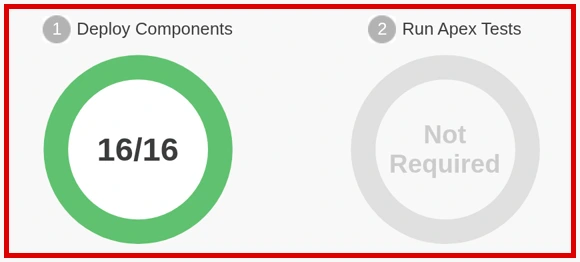
An uploaded change set can’t be edited. If you missed a component, clone the change set, add it, and upload the clone.
Cert Lab by Nick Frates
Practice release management for Admin II
Lessons, section checks, flashcards and practice questions on sandboxes, change sets and deployment scenarios.
Start the Platform Administrator II Cert Lab for $9.99 →How to deploy with the Salesforce CLI
Teams that keep metadata in Git usually deploy with the Salesforce CLI. The same rules apply: validate first, then quick deploy. Here’s the pattern with a manifest file listing the components:
project deploy validate runs the deployment and your tests without saving anything. RunLocalTests runs the tests in your org that aren’t from a managed package.
Apex tests and the 75% rule
The coverage rule is org-wide for production deployments: at least 75% across your Apex, every test passing, and every trigger with some coverage. Salesforce’s own Apex Developer Guide warns not to chase the number; cover positive, negative and bulk cases. A minimal test class looks like this:
If triggers are new to you, my before vs after triggers guide covers how to test them.
Change sets vs Salesforce CLI
| Change sets | Salesforce CLI and Metadata API | |
|---|---|---|
| Skill needed | Clicks in Setup | Command line, a manifest or source format |
| Which orgs | Only orgs that share one production org | Any org you can authenticate to |
| Version history | None | Git, if you commit it |
| Validate and quick deploy | Yes | Yes (deploy validate, then deploy quick) |
| Best for | Small admin teams, occasional releases | Teams, frequent releases, CI pipelines |
Common deployment mistakes
- Forgetting a dependency. The flow deploys, but the field it updates didn’t. Use View/Add Dependencies, then validate.
- Validating too late. Validate days before the release window, not during it. Long test runs on a busy afternoon can eat the window.
- Expecting data to move. Change sets and the CLI move metadata. Records, including most custom setting values, need a data tool.
- Deploying profiles blindly. Profile deployments only carry permissions for the components in the same deployment, which surprises people. Permission sets are easier to deploy and reason about.
- Skipping the manual-step list. Settings that aren’t in the deployment get missed on go-live night.
Release management shows up on the Platform Administrator II exam; my Platform Administrator II guide covers the rest of the exam.
Cert Lab by Nick Frates
Prep for Platform Administrator II
Lessons, section checks, flashcards and practice questions for every section of the exam guide.
Start the Platform Administrator II Cert Lab for $9.99 →FAQ
What are the steps of the Salesforce deployment process?
Build in a sandbox, test in a second sandbox, validate against production, then deploy, with at least 75% Apex test coverage and all tests passing.
Can I use a change set between two unrelated orgs?
No. Change sets only work between orgs affiliated with the same production org, and the target org must allow inbound changes from the source.
What is a quick deploy in Salesforce?
Deploying a change set or package that passed validation in the last 10 days, without running the tests again.
Can I edit a change set after uploading it?
No. Clone it, add the missing components, and upload the clone.
Hope this helps!
Best,
Nick


