Hey friends,
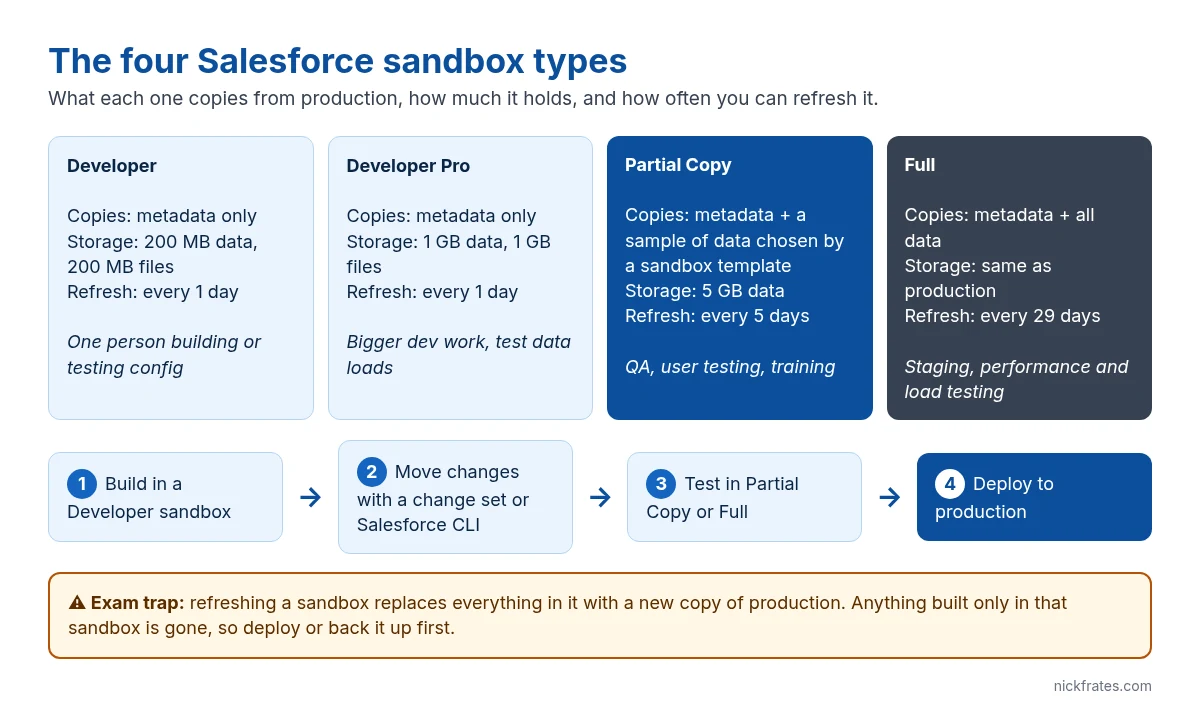
A Salesforce sandbox is a copy of your production org that lives on its own. You build and test there, and nothing you do touches real users or real data until you deploy it. There are four types, and the difference between them comes down to three things: how much data they copy, how much they hold, and how often you can refresh them.
The four types, side by side
| Type | What it copies | Storage | Refresh interval |
|---|---|---|---|
| Developer | Metadata only (config and code, no records) | 200 MB data, 200 MB files | 1 day |
| Developer Pro | Metadata only | 1 GB data, 1 GB files | 1 day |
| Partial Copy | Metadata plus a sample of records picked by a sandbox template | 5 GB data, files match production | 5 days |
| Full | Metadata plus all data | Same as production | 29 days |
Source: Salesforce Help, Sandbox Types and Templates and Sandbox Licenses and Storage Limits by Type. Which types you get depends on your edition; Full sandboxes come with Unlimited and Performance Edition or as an add-on.
Which one to use for what
- Developer: one admin or developer building a feature. Load a handful of test records by hand.
- Developer Pro: the same job when you need to load more test data, for example to test a flow against a few thousand records.
- Partial Copy: QA and user acceptance testing. Real-looking data matters here, because testers notice when the records don’t look like theirs.
- Full: final staging, performance testing and anything that depends on full data volume, like a report that times out or a sharing recalculation.
How a sandbox works day to day
You create and refresh sandboxes from Setup > Sandboxes. A sandbox has its own login URL, and usernames get the sandbox name appended, so you@company.com becomes you@company.com.uat. User email addresses get .invalid appended too, so production users don’t get automatic email from the sandbox (the admin who created or refreshed it keeps a working address). Contact and lead emails are not changed, which is why new and refreshed sandboxes default to the System email only deliverability setting.
Changes don’t flow back to production on their own. You move them with a change set (between orgs that are connected by a deployment connection), the Salesforce CLI, or DevOps Center. For change sets, the receiving org has to allow inbound changes first.
What refresh really does
Refreshing a sandbox throws away its contents and replaces them with a fresh copy of production. That’s the one thing that catches people. If you built something in a sandbox and never deployed it, a refresh deletes it. Get your work into another org or into source control first.
The refresh interval is the minimum wait between refreshes. A Full sandbox you refreshed on the 1st can’t be refreshed again until 29 days later, so plan big test cycles around that.
What the Admin exam asks
- Picking the right type for a scenario: “test with a sample of production data” is Partial Copy; “performance test with all data” is Full.
- Knowing that Developer and Developer Pro copy no records.
- Knowing that refresh replaces everything, and that intervals are 1, 1, 5 and 29 days.
Cert Lab by Nick Frates
Practice sandbox questions for free
The Admin Cert Lab is free: lessons and exam-style questions for every section of the Platform Administrator exam, including environments and deployment.
Start the free Admin Cert Lab →FAQ
Can I create a sandbox in a Developer Edition org? No. Developer Edition orgs don’t include sandboxes. Use a second free Developer Edition org or a Trailhead Playground for practice.
Does a sandbox cost extra? Developer sandboxes are included with most paid editions. Partial Copy and Full depend on edition and can be bought as add-ons.
Is a scratch org a sandbox? No. A scratch org is a short-lived org created from source with the Salesforce CLI. It isn’t a copy of production.
Hope this helps!
Best,
Nick


