If you look after more than one Salesforce org, you’ve probably answered “who has Modify All Data right now?” by opening each org one at a time.
Salesforce Security Center is an app that collects security and governance metrics from all your connected orgs into one dashboard: authentication methods, permission assignments, user counts, installed packages, Health Check scores and other configuration settings. It keeps 6 months of history, refreshes once a day (or on demand), sends alerts when a metric crosses a threshold you set, and can push security policies to the orgs you choose. It’s a paid add-on in Enterprise and Unlimited Editions and free in Developer Edition.
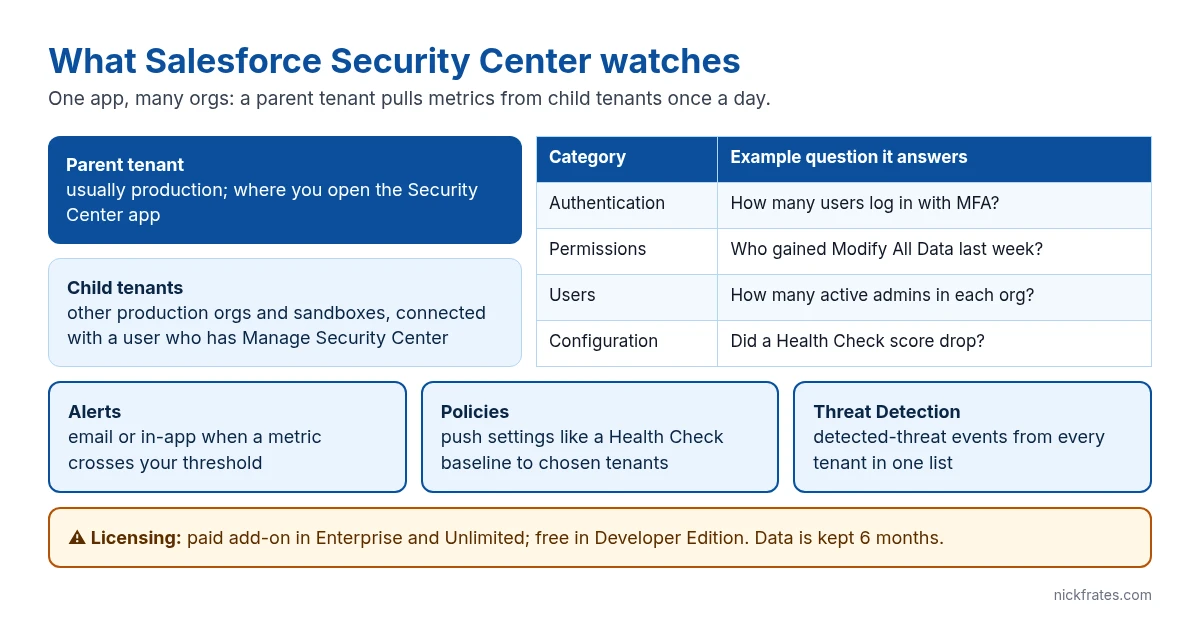
What Salesforce Security Center monitors
Salesforce groups the metrics into categories. Each category has a dashboard, and each metric has its own detail page with a trend chart and the underlying records, so you can click from “Modify All Data went up on Tuesday” to the exact users and profile that changed. Per Salesforce Help, the data is stored for 6 months.
| Category | What you see | Typical question |
|---|---|---|
| Authentication | How users log in, including MFA and single sign-on usage | Which orgs still have users logging in without MFA? |
| Permissions | Assignments of powerful permissions such as Modify All Data and View All Data | Who got Modify All Data in the last two weeks? |
| Users | Security-related user metrics across orgs, such as user counts and changes | How many active users does each org have, and what changed this week? |
| Configuration | Health Check scores and settings, installed packages | Did any org’s Health Check score drop below 90%? |
Two more parts sit on top of the metrics. Threat Detection collects detected-threat events from every connected org into one list, and policies let you define a setting once (for example a stricter Health Check baseline) and deploy it to the orgs you pick.
Security Center vs Health Check vs Event Monitoring
These three get mixed up on exams and in real projects, so here’s the short version.
| Tool | Scope | Cost | Use it to |
|---|---|---|---|
| Health Check | One org, settings only | Included | Score one org’s security settings against a baseline and fix risks |
| Security Center | Many orgs, settings + permissions + users + authentication | Paid add-on (free in Developer Edition) | Track trends and drift across orgs, alert on changes, push policies |
| Event Monitoring / Transaction Security | User activity events | Paid add-on (Shield or Event Monitoring) | See and act on what users actually do, such as report exports |
If you only have one org and no budget, start with Security Health Check. Security Center earns its cost when you have several production orgs or sandboxes full of copied production data and you need one view of all of them. If you need to stop an action as it happens, that’s transaction security policies, not Security Center.
Cert Lab by Nick Frates
Learn the security basics for free
The Admin Cert Lab covers profiles, permission sets, sharing and Health Check, the foundations Security Center reports on.
Start the free Admin Cert Lab →Free, no card, no trial.
How to set up Security Center
1. Confirm the license. In a production org, Security Center needs the add-on license. In a Developer Edition org it’s free, which is the easiest way to try it.
2. Grant the permission. Create a permission set with the Manage Security Center permission and assign it to yourself and anyone else who should see the data. You need it in every org you plan to connect.
3. Open the app and pick a parent tenant. Log in to the org you want to view everything from (usually production), open the App Launcher and select Security Center. That org becomes the parent tenant.
4. Connect child tenants. On the Connected Tenants tab, click Connect Tenant, log in to the other org with a user who has Manage Security Center, and click Allow. A production parent can connect production and sandbox children. You can connect as many as you like and disconnect any time.
Steps 3 and 4 both happen in the Security Center app. Path: App Launcher > Security Center > Connected Tenants.
5. Create alerts. Pick the metrics your security team actually cares about, such as users with Modify All Data or the Health Check score, and set a threshold. Security Center notifies you by email or in the Salesforce app when the metric crosses it.
6. Review weekly. Alerts only fire on thresholds. Open the category dashboards and detail pages regularly to catch slow drift, like permission sets that keep growing.
Common Security Center mistakes
- Expecting real-time blocking. Security Center reports and alerts. It doesn’t stop a user mid-action; transaction security policies do that.
- Forgetting the sandboxes. Full and partial copy sandboxes often hold real customer data. Connect them as child tenants so their permissions are watched too.
- Only granting the permission in the parent. The connecting user needs Manage Security Center in the child org as well, or the connection fails.
- Alerting on everything. Too many alerts get ignored. Start with the handful of permissions and scores that would really hurt if they changed.
For how Security Center fits the wider permission model, see the Salesforce security model and roles vs profiles vs permission sets. Auditing and monitoring is also its own section of the Platform Administrator II exam; my Platform Administrator II guide covers the rest.
Cert Lab by Nick Frates
Prep for Platform Administrator II
Lessons, section checks, flashcards and practice questions for security, auditing and monitoring and the rest of the exam guide.
Start the Platform Administrator II Cert Lab for $9.99 →FAQ
Is Salesforce Security Center free?
No. In Enterprise and Unlimited Editions it’s a paid add-on license. It’s free in Developer Edition orgs, which is a good place to try it.
What does Security Center monitor?
Authentication, permission, user and configuration metrics, including MFA usage, powerful permission assignments, installed packages and Health Check scores, for every connected org.
How long does Security Center keep data?
6 months. It updates once a day automatically, and you can refresh most metrics on demand.
What’s the difference between Security Center and Health Check?
Health Check scores one org’s security settings. Security Center tracks settings, permissions, users and authentication across many orgs, with alerts and policies.
What permission do I need for Security Center?
Manage Security Center, in the parent org and in each child org you connect.
The Cert Lab gives you lessons, practice questions and flashcards so prep like this goes faster.
Hope this helps!
Best,
Nick


