Hey friends,
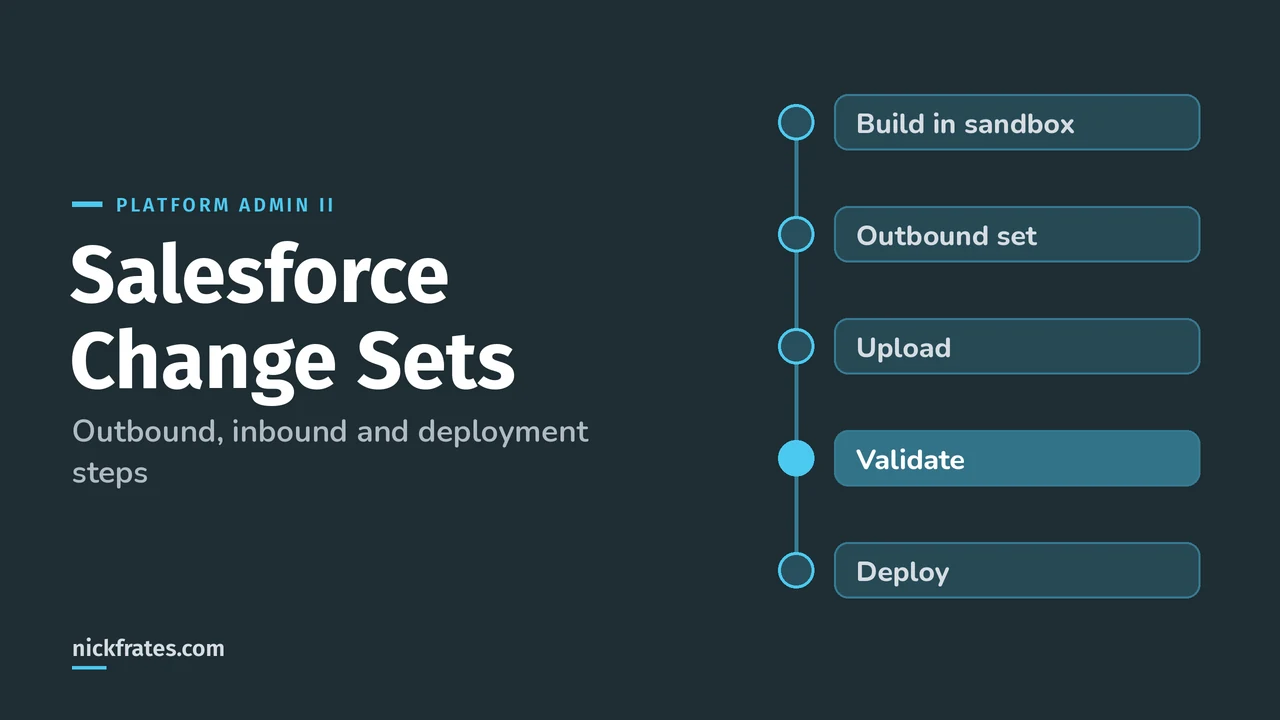
Salesforce change sets move metadata, not data, between orgs that are connected to the same production org. You build an outbound change set in the source org (usually a sandbox), upload it, and the target org sees it as an inbound change set that you validate and deploy. It all happens in Setup, no code or CLI needed.
Change sets are the core of the Environment Management and Deployment section (7%) of the Platform Administrator II exam guide, and they're what most admins use for their first real deployment. Here's the full path, straight from the Change Sets pages in Salesforce Help.
What can a change set move?
Only changes you can make through Setup: custom objects and fields, page layouts, flows, Apex, permission sets, validation rules, reports and so on. Records aren't included, so you can't use a change set to load contacts.
Change sets also can't delete or rename components, and you can't include standard objects themselves. Custom fields on standard objects are fine.
Step 1: Authorize the deployment connection
Salesforce creates deployment connections between production and all of its sandboxes, and between the sandboxes themselves. A connection alone isn't enough: the target org has to allow inbound changes from the source. From Authorize a Deployment Connection:
- In the target org, enter Deployment in Quick Find and select Deployment Settings, then click Continue.
- Click Edit next to the org that will send changes.
- Select Allow Inbound Changes and save.
This is how teams enforce a promotion path. Help's example: only the Test sandbox can upload to production, so nothing untested goes live.
Step 2: Build and upload the outbound change set
- In the source org, go to Setup, Outbound Change Sets, and click New.
- Add your components.
- Click View/Add Dependencies and add anything the target org doesn't already have (Help).
- Add profiles if you need profile settings to travel. Permission sets are added as normal components.
- Click Upload and choose the target org (Help).
You need the Create and Upload Change Sets permission for this part. Once uploaded, the change set is closed: you can't edit it or recall it. To fix something, clone it, adjust it and upload the clone. The clone picks up the latest version of each component.
Here's how I study now. Focus on Force was my favorite resource while I earned my 17 certs, and I found I learned fastest by hammering practice tests over and over instead of rereading. So Cert Lab is built to test you to success: quick rounds, every answer explained, current links and screenshots. Certs gave me a fast way to learn what matters, a credential, and leverage for interviews and raises.
Cert Lab by Nick Frates
Let the Platform Administrator II Cert Lab test you to success
Scenario questions on change sets, sandboxes, packages and the rest of the Admin II exam, with every option explained and linked to the Help page behind it.
Start the Platform Administrator II Cert Lab for $9.99 →Step 3: Validate and deploy the inbound change set
In the target org you need Deploy Change Sets and Modify Metadata Through Metadata API Functions. Then from Setup, open Inbound Change Sets:
- Click Validate to run a test deployment without saving anything (Help). Then click View Results.
- Click Deploy when you're ready (Help). It's all or nothing: you can't deploy just some components.
- Track progress on the Deployment Status page.
Quick deploy saves time. If a validation passed in the last 10 days with Apex tests passing and code coverage met, you can click Quick Deploy on the Deployment Status page and skip rerunning tests (Monitor Deployments). Any other deployment after that validation cancels its eligibility.
What are the limits?
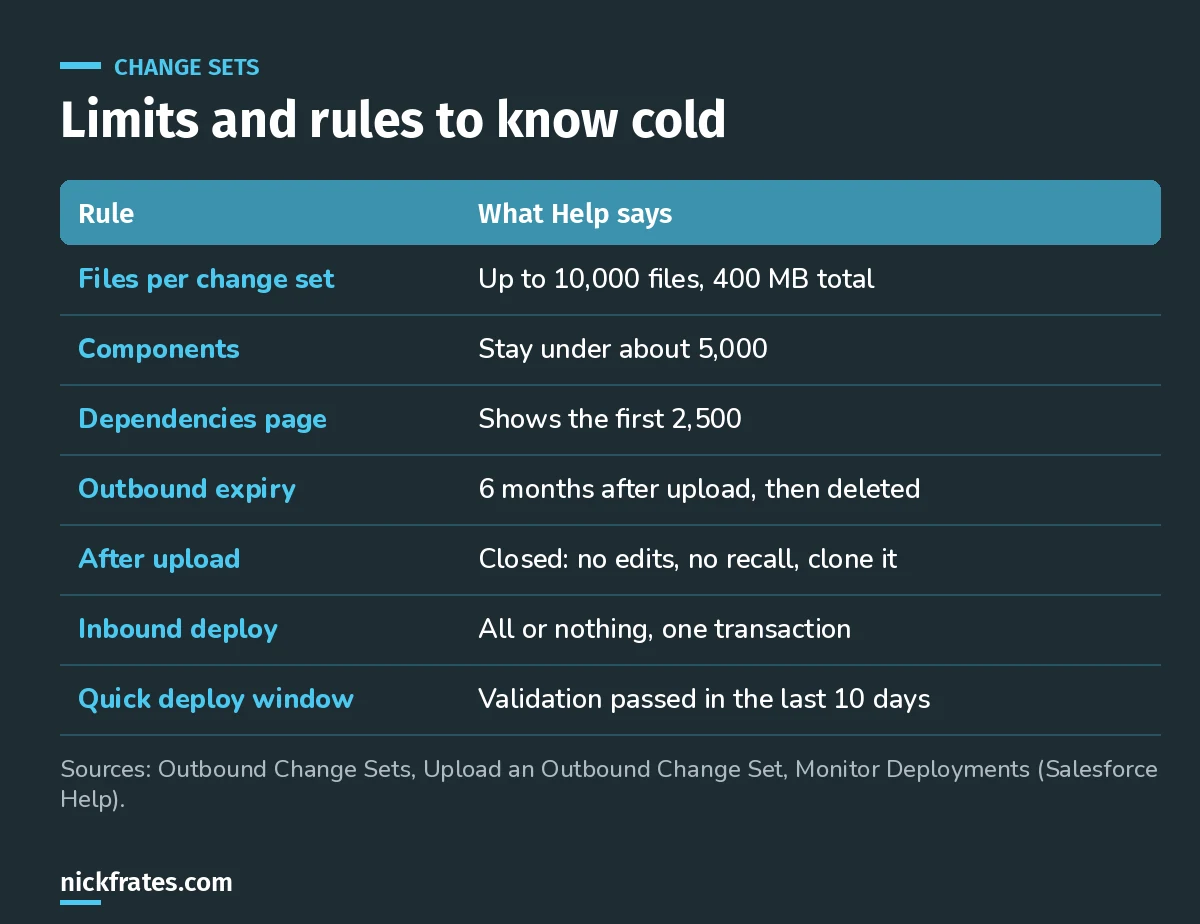
Print this one out before exam day.
When do Apex tests run?
When you deploy Apex classes or triggers to production, all local tests run by default, and production needs at least 75% code coverage. In a sandbox, tests aren't run automatically and the coverage rule isn't enforced.
What surprises people after a deployment?
- Empty objects. Adding a custom object without its fields deploys an empty object. Add every field you need.
- Flows arrive inactive. An active flow is deployed as inactive unless production has the setting to deploy a new active version turned on. Only one version of a flow travels.
- Picklist values go inactive. Target values that aren't in the change set are set to inactive. If several fields share one list, a global value set keeps their values in sync.
- Layout assignments disappear. Deploying a profile and record type without the assigned page layout removes that assignment.
- Tabs are hidden. New custom tabs are hidden for everyone unless you include profiles with tab visibility.
- List views are visible to all by default after deployment.
- Private reports don't travel. Move reports out of My Personal Custom Reports and Unfiled Public Reports first.
- The org locks. During validation or deployment you can still work with data, but setup changes are blocked.
If your deployment fails on something missing, my post on fixing missing dependencies in change sets walks through the usual causes.
Tips and tricks
- Validate during quiet hours, then quick deploy when the window opens.
- Split big change sets. Help suggests separate change sets for email templates, dashboards and reports if you hit the 10,000-file limit.
- Watch maintenance windows. You can build change sets while production is under maintenance, but you can't upload them.
- Usernames map across sandboxes. A user like user@acme.com.test is matched to user@acme.com, so email alert recipients and dashboard running users carry over.
- Field type changes can be slow. They may touch many records, so consider making the change by hand after deploying.
FAQ
Can a change set move data?
No. Change sets move metadata only. Use Data Loader or the Data Import Wizard for records.
Can you send a change set to any org?
No. Only between orgs affiliated with the same production org, like production and its sandboxes, and the target must allow inbound changes.
Can you undo a deployed change set?
No. A successful deployment is committed and can't be rolled back. A failed one rolls back completely.
How long does an uploaded change set last?
Outbound change sets expire six months after upload and are then permanently deleted.
Where should you go next?
- Platform Administrator II practice questions.
- Platform Administrator II vs Administrator.
- The Platform Administrator II study guide for the full exam map.
Cert Lab by Nick Frates
Let the Platform Administrator II Cert Lab test you to success
Lessons, flashcards, section quizzes and four 60-question practice exams for all seven Platform Administrator II sections, every answer explained.
Start the Platform Administrator II Cert Lab for $9.99 →Hope this helps!
Best,
Nick