Hey friends,
A Salesforce global value set is a reusable list of picklist values that lives on its own and can be shared by custom picklist fields on any object. Use one when the same values (like Region or Product Line) must match everywhere, because a change in the set flows to every field that uses it.
Everything here comes from Salesforce Help's Create a Global Picklist Value Set and the picklist limits page. It's also the kind of detail Platform Administrator II likes to test.
When should you use a global value set?
Use a global value set when two or more picklists must share exactly the same values and you want one place to maintain them. Classic examples:
- Region on Account, Opportunity and a custom Territory Plan object.
- Product Line on Case, Opportunity and Asset-related custom objects.
- Reason codes used by several custom objects that report together.
If only one field ever needs the values, a regular custom picklist is simpler.
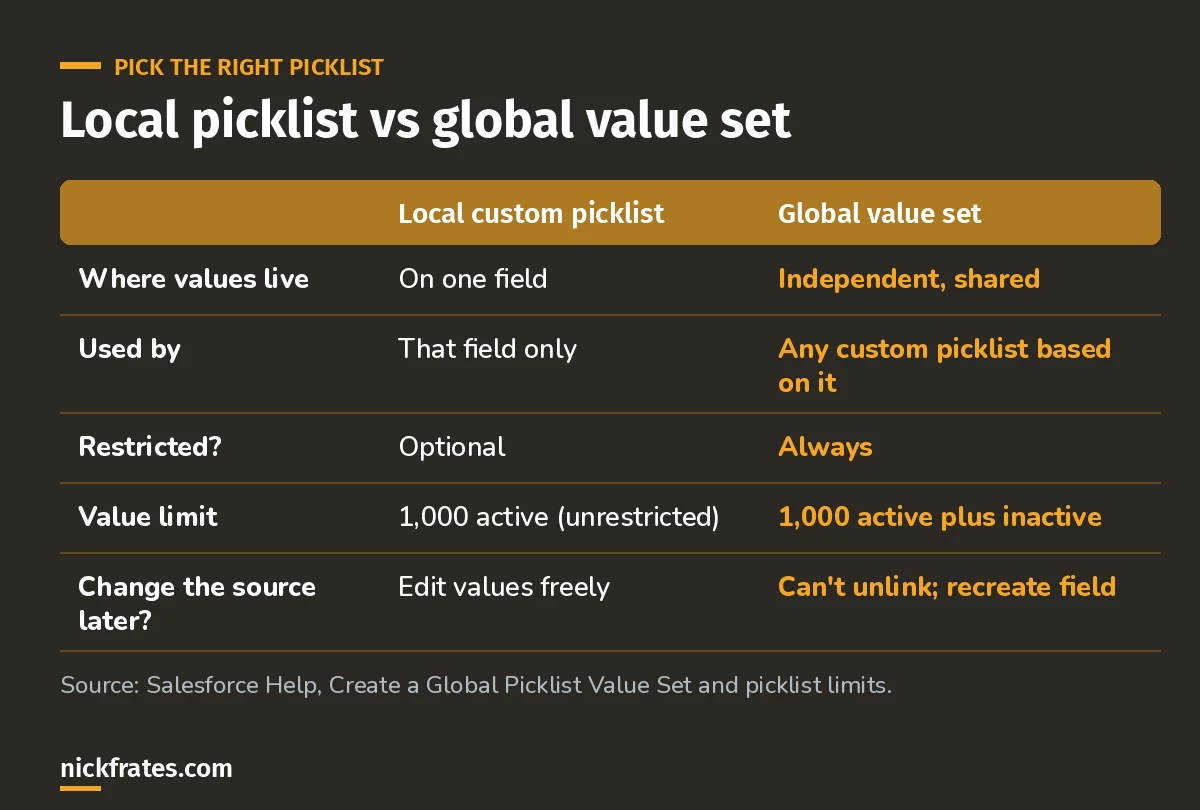
The big difference: one shared, always-restricted source of truth.
Is a global value set a restricted picklist?
Yes. A global picklist is restricted by nature. Only an admin can add or change its values, and users can't add unapproved values, even through the API. That's great for clean reporting, and it's also why integrations sometimes fail after you switch a field to a global set.
How do you create a global value set?
- From Setup, enter Picklist in Quick Find and select Picklist Value Sets.
- Next to Global Value Sets, click New.
- Enter a label and a clear description so other admins know what it's for.
- Enter the values, one per line. Optionally sort alphabetically and use the first value as the default.
- Create a custom picklist field and choose to base it on the global value set.
When you add values later, tick the option to add them to all record types that use the set. Otherwise you have to add them to each record type by hand. You can also see every field using the set under Fields Where Used.
What are the limits on global value sets?
| Limit | Value |
|---|---|
| Values per global value set | 1,000 active and inactive combined |
| Global value sets per org | 500 |
| Custom picklists using global sets | No limit |
| Used on more than 13 objects | You can deactivate values, but not replace or delete them |
A bit about how I study. I loved Focus on Force when I was earning my first certifications, and I learned fastest from rapid-fire practice tests, not from rereading. So Cert Lab is built around fast testing, with every explanation linked to current Salesforce Help pages and screenshots. Certifications got me interviews, hires, raises and moves into new domains. Experience still matters most, so pair the cert with something real you can talk about.
Cert Lab by Nick Frates
Let the Platform Administrator II Cert Lab test you to success
Objects and Applications is 19% of the exam. Practice scenario questions on picklists, record types and data quality, every answer explained.
Start the Platform Administrator II Cert Lab for $9.99 →Gotchas admins hit
- You can't undo the association. To move a field off a global value set, delete the field and create a new one. Plan before you switch.
- Integrations sending new values. Restricted means the API rejects values not in the set.
- Forgetting record types. New values don't show unless added to the record types.
- Deleting values on widely used sets. Past 13 objects you can only deactivate.
FAQ
Can standard picklist fields use a global value set?
Global value sets are used by custom picklist fields. Standard picklists keep their own values.
Can I turn an existing picklist into a global value set?
Yes. Salesforce Help has a Make Your Custom Picklist Field Values Global option that promotes a field's values to a new global value set.
How many values can a global value set hold?
1,000 values, counting active and inactive together.
Can I change a picklist from single-select to multi-select if it uses a global set?
Yes, but you can't change it to another field type like text or checkbox.
Where should you go next?
- Platform Administrator II study guide
- Advanced Admin Trailhead path
- Salesforce basics: objects, fields and records
Cert Lab by Nick Frates
Let the Platform Administrator II Cert Lab test you to success
Lessons, flashcards, section quizzes and four 60-question practice exams for all seven Platform Administrator II sections, every answer explained.
Start the Platform Administrator II Cert Lab for $9.99 →Hope this helps!
Best,
Nick


