Hey friends,
Most change set failures come from a missing dependency: a component in your change set points to something that exists in your sandbox but not in the target org, and isn't in the change set either. The fix is to add the missing piece, and the closest thing Salesforce gives you to a change set helper is the built-in View/Add Dependencies button. It catches a lot, but not everything.
This is the troubleshooting companion to my Salesforce change sets guide. Facts come from Change Sets Best Practices, View and Add Dependent Components and Special Behavior in Deployments in Salesforce Help.
Why does a missing dependency break the whole deployment?
A change set deploys in a single transaction. If one component refers to something that isn't in the target org or the change set, the deployment fails and everything rolls back. Nothing is half-deployed, which is good, but it means one missing field can block fifty good components.
How does View/Add Dependencies work?
- From Setup, open Outbound Change Sets and click your change set.
- Click View/Add Dependencies.
- Select the components the target org doesn't already have and click Add to Change Set.
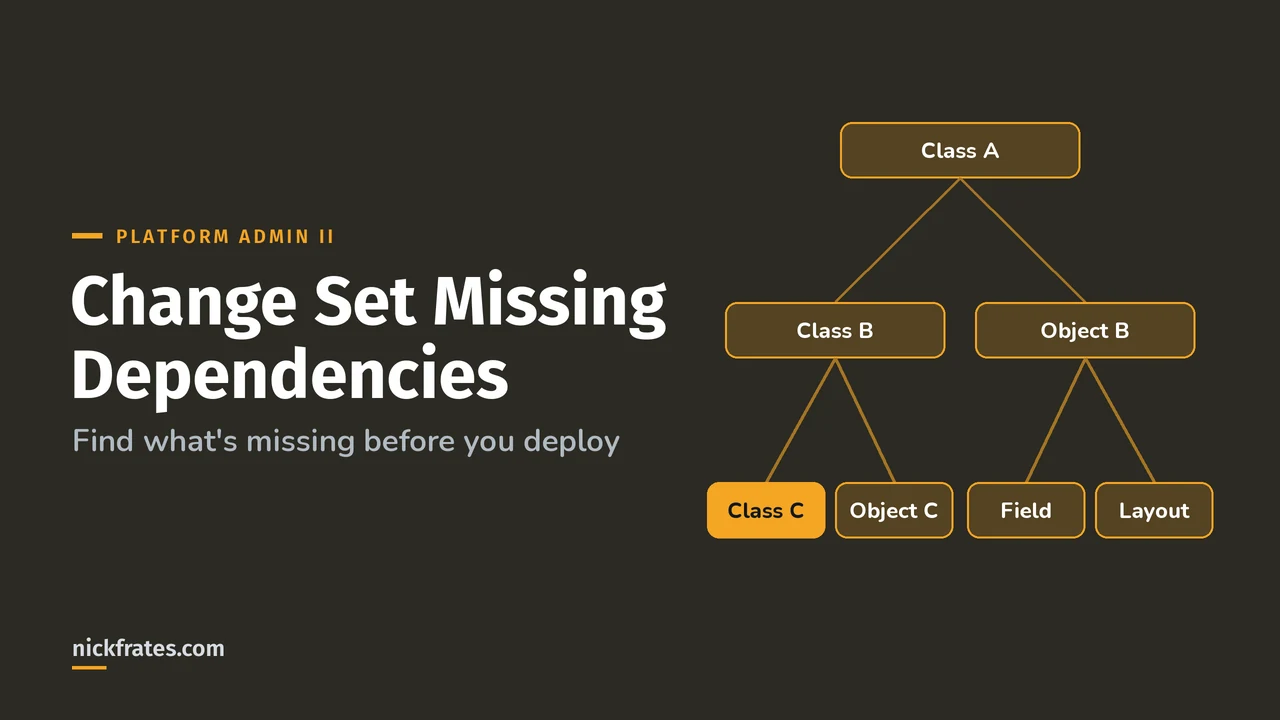
It lists direct and indirect dependencies. Help's example: Apex Class A uses Class B and Object B, and Class B uses Class C and Object C. Add Class A and all four show up, even though Class A never touches Class C directly. That's why a single custom object can bring a surprisingly long list.
Only add what's missing. Help says to add dependent components unless they already exist in every org where you'll deploy. If the page lists more than 2,500 dependencies, you only see the first 2,500, so big change sets need extra care.
What does View/Add Dependencies miss?
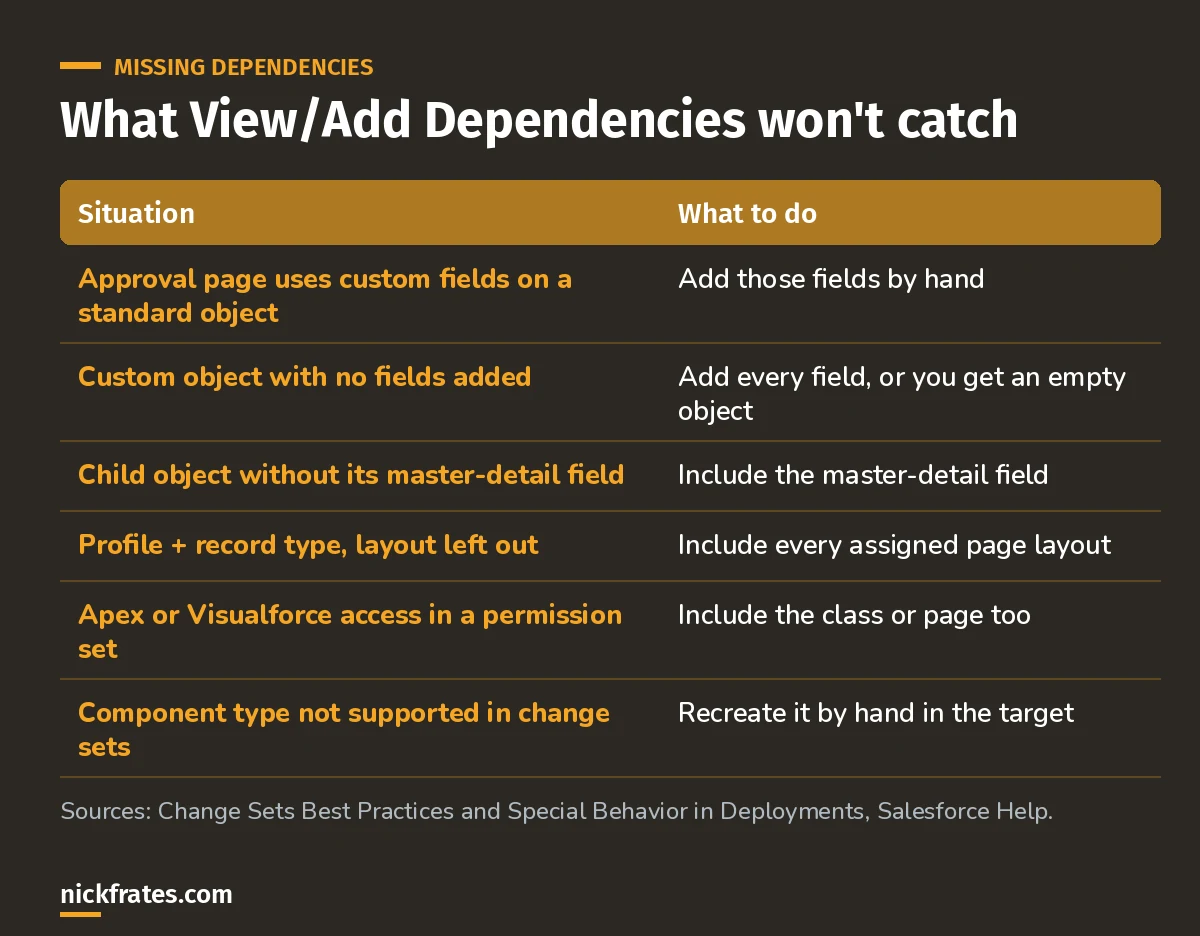
These are the cases where you have to think for yourself.
A little background. I passed 17 Salesforce certifications, and Focus on Force carried me through a lot of them. Somewhere along the way I noticed I learned faster by taking practice tests rapid-fire than by reading another chapter. That idea became Cert Lab: fast testing with up-to-date links and screenshots. For me, certs paid off in interviews, raises and knowing the platform better.
Cert Lab by Nick Frates
Let the Platform Administrator II Cert Lab test you to success
Scenario questions on change sets, deployments and the rest of the Admin II exam, with every option explained and linked to the Help page behind it.
Start the Platform Administrator II Cert Lab for $9.99 →A checklist for fixing a failed change set
- Read the error in Deployment Status. Note the component it names and what it says is missing.
- Check the target org. Does the missing component exist there? If not, it needs to be in the change set.
- Clone the change set. An uploaded change set is closed, so clone it, add the missing component and its dependencies, and upload the clone.
- Validate before you deploy. A validation shows the same errors as a real deploy without saving anything.
- Repeat until it validates clean, then deploy or quick deploy.
What about permissions and profiles?
Access settings depend on their components. From Permission Sets and Profile Settings in Change Sets: Apex class access and Visualforce page access only travel if the class or page is in the change set too. Profile settings for custom objects and fields work the same way.
Also watch the API version behavior. Since API version 40.0, a deployed permission set replaces the target's version instead of merging with it. Help's example: if your permission set leaves out Manage Roles, deploying it turns Manage Roles off in the target.
What about flows?
- Make sure the flow only references fields and components that change sets support.
- Only one version of a flow travels. If none is active, the latest inactive version is used.
- The dependencies page lists dependencies for all versions of the flow, so add only the ones your version needs.
What if a component can't go in a change set at all?
Check Components Available in Change Sets. If a type isn't on the list, repeat the change by hand in the target org. A few types, like Experience Cloud branding sets, can only travel as dependencies of something you selected. Standard objects can't be included, so an action override on a standard object can't move by change set.
Tips and tricks
- Build in the right order. Some combinations need separate deployments. For example, a new custom object, a sharing model change and a new owner-based sharing rule take three deployments.
- Resave post templates that contain custom fields before adding an approval process that uses them.
- Don't rename to fix. Change sets can't rename or delete components. Delete in the target by hand, then deploy the new one.
- Keep a list. I keep a running list of every component I touch in a sandbox. It's low-tech and beats hunting through Setup later.
FAQ
Is there an official Change Set Helper tool?
Not by that name. The built-in helper is View/Add Dependencies on the outbound change set page.
Can I add a missing component to an uploaded change set?
No. Clone the change set, add the component and upload the clone.
Why did my custom object deploy with no fields?
Adding a custom object alone deploys an empty object. Add each custom field to the change set too.
Do I need to add dependencies that already exist in production?
No. Only add dependencies that don't already exist in every org you're deploying to.
Where should you go next?
- Salesforce change sets: the full deployment steps.
- Platform Administrator II practice questions.
- The Platform Administrator II study guide for the full exam map.
Cert Lab by Nick Frates
Let the Platform Administrator II Cert Lab test you to success
Lessons, flashcards, section quizzes and four 60-question practice exams for all seven Platform Administrator II sections, every answer explained.
Start the Platform Administrator II Cert Lab for $9.99 →Hope this helps!
Best,
Nick