Hey friends,
Classic Encryption is free and encrypts only a special encrypted text custom field of up to 175 characters with 128-bit AES, masking it for anyone without the View Encrypted Data permission; Shield Platform Encryption is a paid add-on that encrypts supported standard and custom fields, files and attachments with 256-bit AES and gives you control of the keys. Classic hides a value from people in the UI. Shield protects data at rest for compliance, and doesn’t mask anything for users who already have field access.
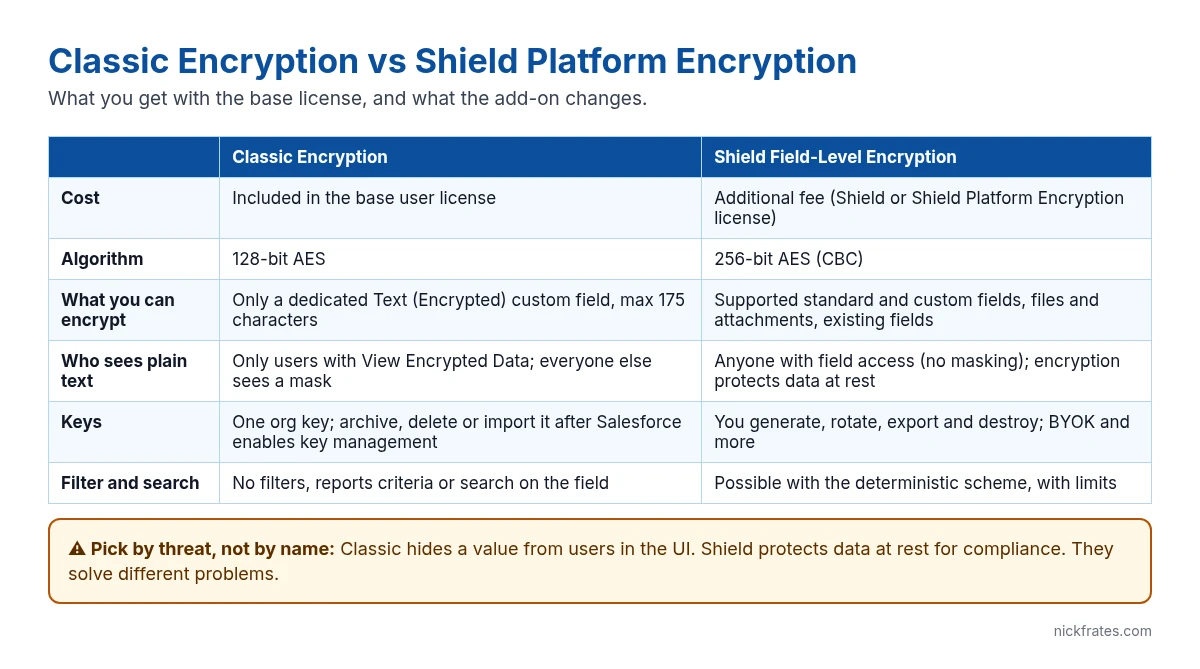
Shield Platform Encryption vs Classic Encryption side by side
Everything in the diagram comes from Salesforce’s comparison of Classic Encryption and Shield Platform Encryption and the Classic Encryption for custom fields page. The short version:
Classic Encryption is included with your license. You create a new custom field with the Text (Encrypted) type, pick a mask type and mask character, and only users with View Encrypted Data see the real value.
Shield Platform Encryption costs extra (the Salesforce Shield or Shield Platform Encryption license) and now comes in two flavors: Field-Level Encryption, where you choose fields, and Database Encryption, which encrypts the whole database, including all standard and custom fields, with 256-bit AES GCM. Both are free to try in a Developer Edition org.
What Classic Encryption can’t do
Classic Encryption has a long list of limits, and they’re the reason people outgrow it. An encrypted text field:
- Holds at most 175 characters.
- Can’t be unique, an external ID or have a default value.
- Can’t be used in list view filters, report criteria, roll-up summaries or rule filters, and isn’t searchable (it can still show in results).
- Isn’t available in formula fields, workflow criteria, the Assignment element in a flow, lead conversion, or Web-to-Lead and Web-to-Case forms.
- Isn’t available to partner and customer portal license types, even with View Encrypted Data.
- Can’t be created by converting an existing field. You export the data, create the new encrypted field, and import it back.
Also note: the field is still editable by people who can’t see it. Use field-level security, page layouts or validation rules if you need to stop edits.
How to add a Classic encrypted field
- Go to Setup > Object Manager, open the object, then Fields & Relationships > New.
- Choose the Text (Encrypted) data type, then set the length (up to 175), Mask Type (for example, show only the last four characters) and Mask Character.
- Set field-level security and add the field to page layouts.
- Give the View Encrypted Data permission, through a permission set, only to the users who need the real value.
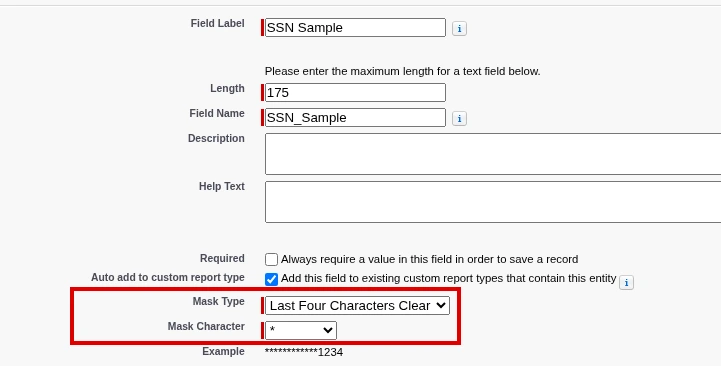
The screenshot above shows step 2, the field details page with the mask settings. That’s the part people get wrong, because Mask Type is a display mask, not input validation. Use a validation rule if the value has to match a format.
Cert Lab by Nick Frates
Practice security and data scenarios
The Platform Administrator II Cert Lab covers security and access scenarios with lessons, section checks, flashcards and practice questions.
Start the Platform Administrator II Cert Lab for $9.99 →Which one should you use?
Use Classic Encryption when you need to hide one short value (an ID number, a partial card number) from most users in the UI, and you don’t need to filter, search or report on it.
Use Shield Platform Encryption when a regulation, contract or security policy requires data to be encrypted at rest, when you need to encrypt standard fields like Contact email or phone, files or attachments, or when you must control, rotate or destroy your own keys.
Use neither when the real goal is “some users shouldn’t see this field”. That’s field-level security, and it’s free and complete. Salesforce itself recommends encrypted custom fields only when regulations require them, because of the processing and search limits.
Encryption at rest protects against unauthorized access to the stored data, not against a user who already has the right permissions. If your worry is account takeover, look at MFA, transaction security policies and field-level security first, and see the Salesforce security model for how they fit together.
Mistakes I see with encryption
- Using encryption as access control. Shield doesn’t hide anything from a user who can already see the field.
- Encrypting fields you filter on. With Shield, use the deterministic scheme only where you need filtering, and check what it breaks first.
- Forgetting integrations and automation. Classic encrypted fields drop out of formulas, workflow and Web-to-Case. Test every flow and integration that touches the field.
- Not planning key management. With Shield, destroying a key makes the data it protected unreadable. Back up keys and agree who can manage them.
Cert Lab by Nick Frates
Go deeper with Data Architect
Lessons, section checks, flashcards and practice questions on data modeling, data management and the security choices behind them.
Start the Data Architect Cert Lab for $9.99 →FAQ
Is Classic Encryption free in Salesforce?
Yes. Classic Encryption is included in the base user license and is available in Developer, Enterprise, Performance, Unlimited and Database.com Editions.
How many characters can a Classic encrypted field hold?
175 characters, because of the encryption algorithm.
Does Shield Platform Encryption mask data?
No. Users with access to the field see the plain value. Shield encrypts data at rest; Classic Encryption is the one that masks.
What encryption algorithm does each use?
Classic Encryption uses 128-bit AES. Shield Field-Level Encryption uses 256-bit AES (CBC), and Shield Database Encryption uses 256-bit AES GCM.
Can I encrypt standard fields with Classic Encryption?
No. Classic Encryption only works on its own custom field type. Encrypting standard fields needs Shield Platform Encryption.
Hope this helps!
Best,
Nick


