Hey friends,
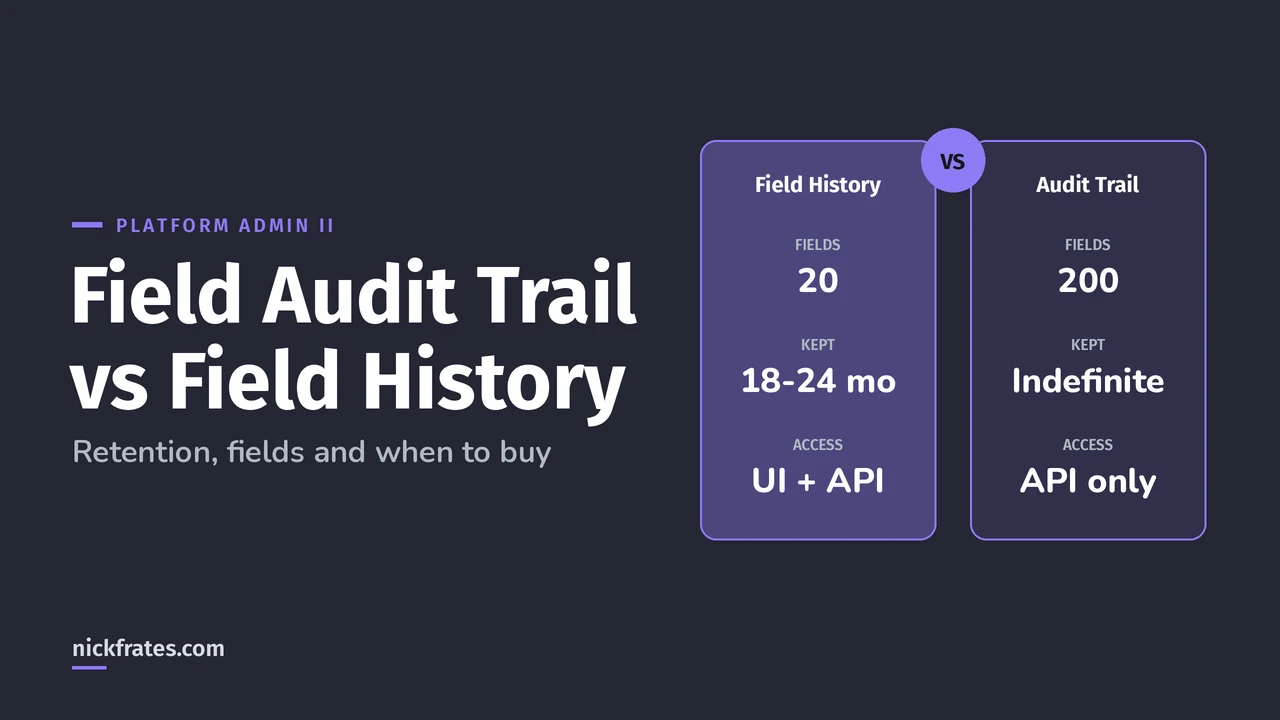
Standard Field History Tracking keeps up to 20 fields per object for 18 to 24 months; Field Audit Trail, part of Salesforce Shield, extends that to up to 200 fields per object and keeps the history until you delete it. The catch: Field Audit Trail data lives in a big object you reach through the API, not in a normal report, and it needs a paid license.
If you're an admin deciding whether to ask for budget, or studying for Platform Administrator II, this is the comparison you need. Everything here comes from the Field Audit Trail and Field History Tracking Overview pages in Salesforce Help.
Field Audit Trail vs field history: what's different?
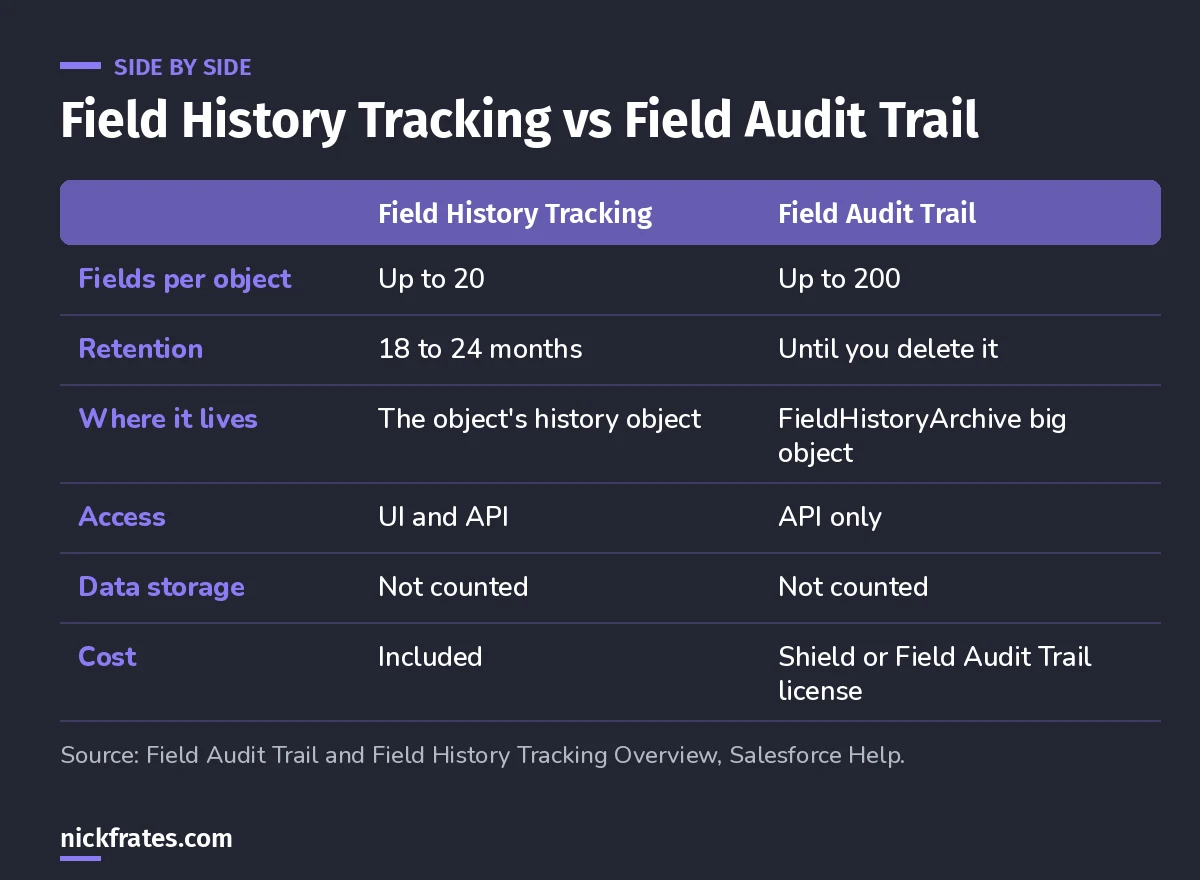
Same tracking, very different retention and access.
Field Audit Trail doesn't replace Field History Tracking. It builds on it. You still turn on tracking per field, and changes still land in the normal history object first. Then a retention policy copies them into the archive.
How does Field Audit Trail work?
- Enable Field History Tracking on the objects and fields you need.
- Get Field Audit Trail turned on. It's available in Enterprise, Performance and Unlimited Editions with Shield or Field Audit Trail licenses, and Help says to contact your Salesforce representative to enable it.
- Define a retention policy per object with Metadata API. The
historyRetentionPolicyelement setsarchiveAfterMonthsandarchiveRetentionYears. - Salesforce copies history to
FieldHistoryArchive. The first copy takes a long time. Later copies only move what changed since the last one.
If you don't set a custom policy, the default archives data after 18 months in production and after one month in sandboxes, and keeps it until you delete it. Help's examples page also notes that deploying a retention policy from sandbox to production isn't supported, so deploy it to production directly.
Small confession: I don't learn by reading. On my way to 17 Salesforce certs I loved Focus on Force, but I learned fastest by taking practice tests rapid-fire and fixing what I missed. I built Cert Lab around that, with up-to-date links and screenshots. The certs themselves paid me back with interviews, raises and a much faster path to knowing what matters.
Cert Lab by Nick Frates
Let the Platform Administrator II Cert Lab test you to success
Scenario questions on auditing, monitoring, sensitive data and the rest of the Admin II exam, with every option explained and linked to the Help page behind it.
Start the Platform Administrator II Cert Lab for $9.99 →How do you read Field Audit Trail data?
Through the API. Help's Query Batches of Archived Field History Data page shows a Bulk API 2.0 query job against FieldHistoryArchive, filtered by FieldHistoryType (the object, like Account) and a date, with results downloaded as CSV. Shield's Field Audit Trail is also available through the Shield app. Plan for this: your auditors probably want a spreadsheet, and someone has to run the query.
What surprises people?
- Some fields still can't be archived. Formula, roll-up summary and auto-number fields, Created By and Last Modified By, and Expected Revenue are out. The Field Audit Trail page also lists long text and multi-select fields.
- Deletes don't reach the archive. Deleting a production record removes its normal history, but the copy in
FieldHistoryArchivestays. Deleting archive data takes REST, SOAP or Tooling API. - Encryption isn't retroactive. If you turn on Shield Platform Encryption later, already archived history stays unencrypted until Salesforce re-archives it.
- Not every object supports a policy. Help lists the supported objects, including accounts, cases, contacts, leads, opportunities, orders, products and custom objects with tracking on.
When is Field Audit Trail worth buying?
My take, based on the limits above:
| Your situation | My pick |
|---|---|
| You need to know who changed a few key fields in the last year | Standard field history |
| Regulators or auditors need years of field-level history | Field Audit Trail |
| You need more than 20 tracked fields on one object | Field Audit Trail |
| You need history in normal reports and list views | Standard field history |
| You also need encryption or login and API event monitoring | Look at the full Shield bundle |
Shield is a suite: Data Detect, Event Monitoring, Field Audit Trail and Shield Platform Encryption, per the Salesforce Shield page. If compliance is driving the purchase, it's usually more than one of those.
How does this show up on the Platform Administrator II exam?
The Auditing and Monitoring section (10%) of the exam guide asks how to set up sensitive data to support a business, legal or compliance use case. Expect scenarios like "keep seven years of history on 40 account fields". Standard tracking can't do that. Field Audit Trail can.
FAQ
Does Field Audit Trail data count against storage?
No. Neither Field History Tracking data nor Field Audit Trail data counts against your data storage limits.
Can users see archived history in the History related list?
Field Audit Trail access is API only. The History related list shows the normal field history.
Do I still need Field History Tracking if I buy Field Audit Trail?
Yes. Field Audit Trail archives the changes that Field History Tracking captures.
Where should you go next?
- Salesforce Field History Tracking: setup and limits.
- How to Report on Field History in Salesforce.
- The Platform Administrator II study guide for the full exam map.
Cert Lab by Nick Frates
Let the Platform Administrator II Cert Lab test you to success
Lessons, flashcards, section quizzes and four 60-question practice exams for all seven Platform Administrator II sections, every answer explained.
Start the Platform Administrator II Cert Lab for $9.99 →Hope this helps!
Best,
Nick