Hey friends,
Salesforce API limits cap how many inbound API calls your whole org can make in a 24-hour period: 15,000 for Developer Edition, and 100,000 plus a per-license amount (1,000 per Salesforce license in Enterprise Edition, 5,000 in Unlimited Edition) for paid orgs, shared by every user and integration. You check usage in Setup on the System Overview page, with the /limits REST resource, or in the Sforce-Limit-Info header on every REST response.
Below is how the number is calculated, what counts against it, what happens when you hit it, and the most common mistakes to avoid.
What Salesforce API limits are
Salesforce enforces three kinds of API limits on the SOAP and REST APIs (and the APIs built on them), per the official API Request Limits and Allocations reference:
- Total API request allocation: the daily cap on inbound calls for the whole org. This is what people usually mean by “API limits”.
- Concurrent request limit: how many calls lasting 20 seconds or longer can run at once: 5 in Developer Edition and trial orgs, 25 in production orgs and sandboxes. Calls under 20 seconds have no concurrency limit.
- Timeout limit: REST and SOAP calls time out after 10 minutes, except queries, which follow SOQL limits.
The daily allocation is enforced against the total of all API calls made to the org. It isn’t per user, so one chatty integration can use up the allowance for everyone.
Daily API request limits by edition
| Edition | Calls per license (Salesforce license) | Total per 24 hours |
|---|---|---|
| Developer Edition | N/A | 15,000 |
| Enterprise Edition, Professional Edition with API access | 1,000 | 100,000 + (licenses x calls per license) + add-ons |
| Unlimited and Performance Edition | 5,000 | 100,000 + (licenses x calls per license) + add-ons |
| Full Sandbox (not from a template) | N/A | 5,000,000 |
Other license types add different amounts. For example, Salesforce Platform licenses add the same as Salesforce licenses, Lightning Platform One App and Partner Community licenses add 200 each, and Customer Community licenses add 0. The full table is in the limits reference.
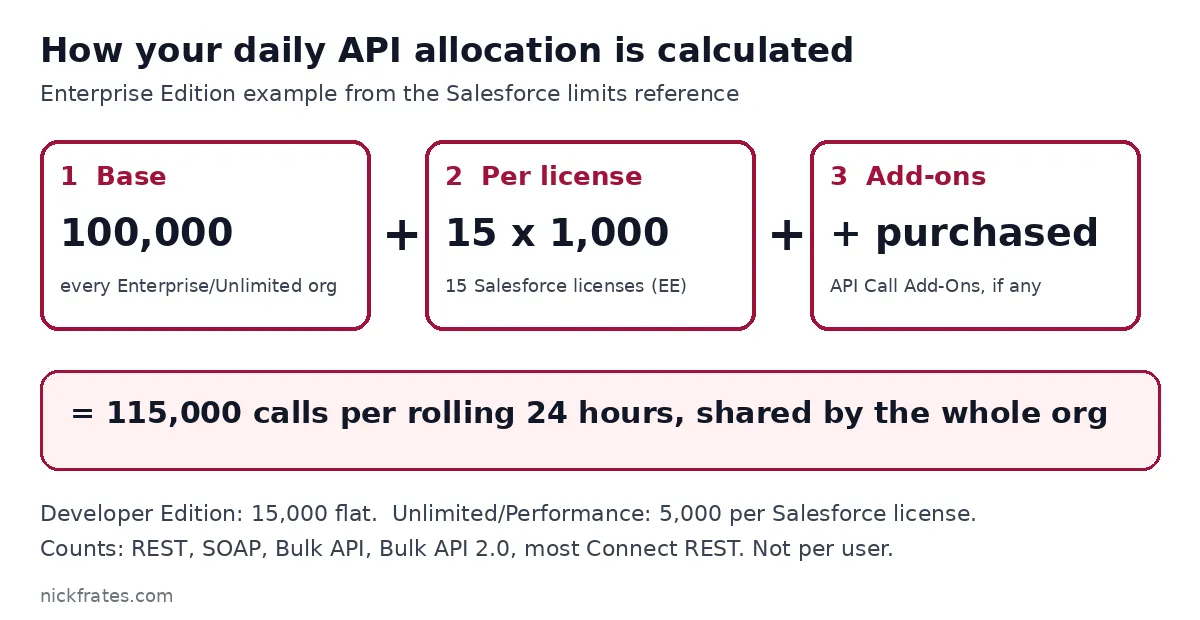
Worked example. An Enterprise Edition org with 15 Salesforce licenses gets 100,000 + (15 x 1,000) = 115,000 calls per 24 hours. That’s Salesforce’s own example.
It’s a rolling window. Salesforce’s Developer Edition example: if an org made 14,500 calls at 5:00 AM Wednesday and 499 at 11:00 PM Wednesday, only one more call can succeed until 5:00 AM Thursday. Usage drops off 24 hours after it happened, not at midnight.
What counts against your API limit (and what doesn’t)
- Counts: REST API, SOAP API, Bulk API, Bulk API 2.0 and most Connect REST APIs.
- Counts: calls made by installed managed packages. They come out of your org’s allocation, not the vendor’s.
- Doesn’t count: calls from certain Salesforce connected apps, such as the Salesforce mobile app.
- Separate bucket: calls with the
DebuggingHeaderhave their own 1,000 calls per 24 hours. - Doesn’t count: the REST Versions URI (
/), per the Limit Info Header docs.
How to check your API usage
There are four places to look. Pick the one that matches who you are.
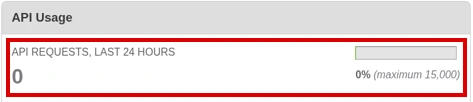
1. Setup (admins). Go to Setup and enter System Overview in Quick Find. The API Usage section and the API Requests, Last 24 Hours item show usage against the limit. The Company Information page shows the API Request Limit per Month usage-based entitlement, which totals calls over 30 days.
2. The /limits REST resource (developers). A GET to /services/data/vXX.X/ returns the max and remaining value for each limit. It needs API version 29.0 or later and the View Setup and Configuration permission, and values are accurate within about five minutes (Limits resource docs).
The part of the response you care about looks like this (trimmed; the numbers are illustrative for a Developer Edition org’s 15,000 allocation):
3. The Sforce-Limit-Info header (integrations). Every REST response (except calls to the Versions URI, /) carries a header like Sforce-Limit-Info: api-usage=10018/100000: calls used, then the org’s limit. Log it in your integration and you get usage tracking for free, with no extra call.
4. Apex. The OrgLimits class returns the same org limits inside Salesforce:
Cert Lab by Nick Frates
Studying for Platform Developer II?
Prep for the Platform Developer II exam with lessons, section checks, flashcards and study guides.
Start the Platform Developer II Cert Lab for $9.99 →Set up API usage notifications
Don’t wait for an integration to fail. In Setup, enter API Usage Notifications in Quick Find and create one. Salesforce emails a user you choose when API requests pass a percentage of the allocation that you set.
What happens when you hit the API limit
Paid orgs in active status get some leeway: Salesforce lets calls continue past the daily limit by a certain amount to absorb spikes, up to a hard cap. Salesforce says not to rely on this, and it doesn’t apply to trial orgs, Developer Edition or sandboxes.
Once you hit the cap, calls fail with an error until enough of the rolling 24 hours has passed. Long-running calls over the concurrency limit fail with REQUEST_LIMIT_EXCEEDED.
How to get more. Add user licenses (each adds calls), or buy API call add-ons through the Your Account app or your account executive. Salesforce recommends cutting usage first.
How to reduce API calls
- Batch your work: use the REST API composite resources to cut round trips between your client and Salesforce.
- Audit your packages and vendors: managed package calls count against you. Ask vendors how their product uses the API.
- Read the header: log
Sforce-Limit-Infoso you see org usage climbing before you hit the limit.
Common mistakes with Salesforce API limits
- Assuming the limit is per user. It’s org-wide, so one integration user can starve every other integration.
- Expecting a reset at midnight. It’s a rolling 24-hour period.
- Testing an integration at full volume in a Developer Edition org, which has only 15,000 calls and no overage leeway.
- Calling
/limitsin a tight loop to watch usage. The docs say to avoid rapid requests; read the response header instead. - Forgetting that a Full Sandbox created from a template takes its limits from the template, not the 5,000,000 default.
If you’re newer to the API, read Apex classes in Salesforce and choosing between Future, Queueable and Batch Apex.
The Cert Lab gives you lessons, practice questions and flashcards for Salesforce certification prep.
FAQ
What is the Salesforce daily API limit?
It’s 15,000 calls per 24 hours in Developer Edition. Enterprise and Unlimited Edition orgs get 100,000 plus a per-license amount (1,000 or 5,000 per Salesforce license) plus any purchased add-ons.
Is the Salesforce API limit per user?
No. The daily allocation applies to the total of all API calls made to the org.
How do I check my Salesforce API usage?
Open System Overview in Setup, call the /limits REST resource and read DailyApiRequests, or read the Sforce-Limit-Info header on any REST response.
When does the Salesforce API limit reset?
It’s a rolling 24-hour window, so each call stops counting 24 hours after it was made.
Does Bulk API count toward the API limit?
Yes. Bulk API and Bulk API 2.0 count, and Bulk API batches also have their own DailyBulkApiBatches limit.
What happens if I exceed the API limit?
Active paid orgs can go over by a limited amount up to a hard cap; after that calls fail until usage rolls off. Developer Edition, trials and sandboxes get no overage.
Cert Lab by Nick Frates
Ready to start Platform Developer II prep?
Prep for the Platform Developer II exam with lessons, section checks, flashcards and study guides.
Start the Platform Developer II Cert Lab for $9.99 →Hope this helps!
Best,
Nick


