Hey friends,
Salesforce transaction security policies watch user activity in real time and act on it: when an event (like a report export or a login) matches your condition, the policy can block it, require multi-factor authentication, or just notify you. You build the condition with clicks in Condition Builder or with an Apex class that implements TxnSecurity.EventCondition. The feature needs a Salesforce Shield or Event Monitoring add-on subscription, and it’s available in Enterprise, Unlimited and Developer Editions.
What transaction security policies do
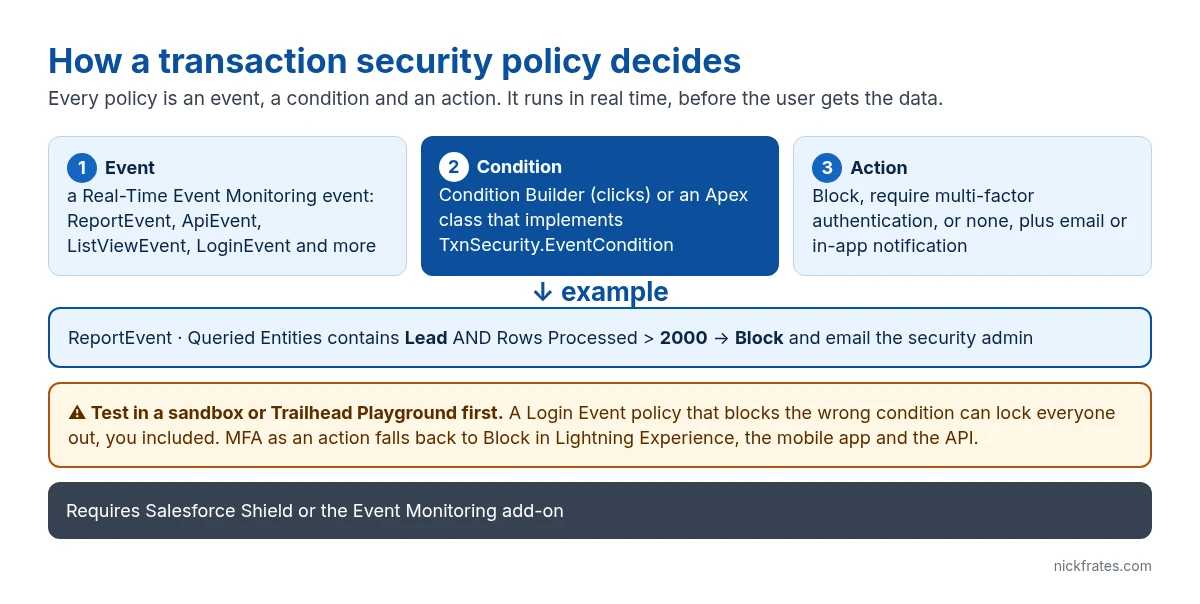
Each policy has three parts, per the Salesforce Security Guide:
Event. A Real-Time Event Monitoring event. The common ones are ReportEvent (report views and exports), ApiEvent (API queries), ListViewEvent (list view views and exports) and LoginEvent. There are also events for file downloads, Bulk API results, permission set changes, and detected threats like session hijacking and credential stuffing.
Condition. When the policy should fire. For example, Rows Processed greater than 2000 on a report that queries Lead.
Action. Block the operation, require multi-factor authentication, or take no action. Separately, you can send an email, an in-app notification, or both. The available actions depend on the event type.
One catch from the docs: the multi-factor authentication action isn’t available in the Salesforce mobile app, Lightning Experience or the API. In those cases Salesforce blocks instead. So if you pick MFA for a list view event, an API user gets blocked, not challenged.
When to use a transaction security policy
- Large data exports. Stop anyone exporting more than a set number of rows from reports or list views on sensitive objects.
- Sensitive reports. Require MFA (in Salesforce Classic) or block access to reports with confidential data in their name.
- Exports of a sensitive column. Condition Builder’s Report Event fields don’t include the column headers (the closest are Name of Columns, Name of Grouped Columns and Number of Columns), so this one is an Apex condition: it returns true when
ReportEvent.ColumnHeaderscontains the Tax ID field’s API name (for exampleContact.Tax_ID__c) andOperationstarts withReportExported, and the policy action is Block plus an email notification. Users can still run the report; they just can’t export it. Per the ReportEvent reference, ColumnHeaders lists object and field names (likeOpportunity.Name), not labels, and checking that Operation starts with ReportExported also catches the asynchronous and Excel Connector exports. - Risky logins. Block logins from specific IP ranges, countries or unsupported browsers.
- Permission changes. Get notified when someone is assigned a critical permission like Modify All Data.
If you just want to see trends across orgs, that’s Security Center. Transaction security is for stopping or flagging a specific action as it happens.
Cert Lab by Nick Frates
Practice security scenarios for Admin II
Lessons, section checks, flashcards and practice questions on security, access, auditing and monitoring.
Start the Platform Administrator II Cert Lab for $9.99 →How to create a transaction security policy with Condition Builder
You need View Real-Time Event Monitoring Data to see events, plus Customize Application and Modify Transaction Security Policy to create policies. Try this in a sandbox or Trailhead Playground first.
- From Setup, enter Transaction Security in Quick Find and select Transaction Security Policies.
- Click New, choose Condition Builder, and click Next.
- Pick the event. For the export example, choose Report Event.
- Choose the condition logic: All Conditions Are Met (AND), any condition, or Custom Condition Logic Is Met for logic like
1 AND (2 OR 3). - Add conditions. Each has a field, an operator and a value, for example Queried Entities contains Lead and Rows Processed greater than 2,000.
- Choose the action (Block) and who gets notified, and how.
- Name the policy (letters, numbers and single underscores only, starting with a letter, with no spaces and no trailing underscore), optionally enable it, and click Finish.
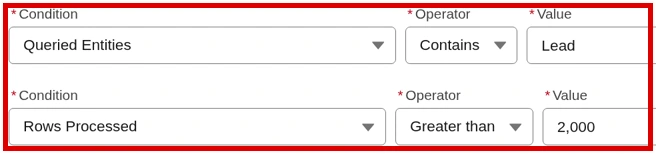
The screenshot shows the two conditions from step 5. To stop only exports, add a third condition, Operation starts with ReportExported.
When you need an Apex condition instead
Use Apex when Condition Builder can’t express the rule, for example when you need to query related data like a user’s recent login history. The class implements TxnSecurity.EventCondition, which has one method, evaluate(SObject event). Return true to trigger the policy’s action; Salesforce performs the action, not your code. This version is adapted from the official examples:
Events are sObjects, so you can test the condition like any other class. Salesforce recommends testing every policy condition, and you need the coverage to deploy it:
After you save the class, create the policy with Apex instead of Condition Builder and pick LeadExportCondition from the list.
Mistakes that cause real trouble
- Locking yourself out. A Login Event policy with Block and the wrong condition can block every login, including yours. Build and test login policies in a Playground or sandbox.
- Overlapping policies. If several policies with the same action fire on the same event, the order they run in isn’t defined. Keep policies and actions from overlapping.
- Counting on MFA in Lightning. The MFA action becomes Block in Lightning Experience, the mobile app and the API.
- Ignoring performance. Every policy condition runs on each matching event, so keep Apex conditions lean and skip queries you don’t need.
- Skipping the null checks. Event fields can be empty, so guard against nulls; Salesforce’s own examples handle null events explicitly.
For the access model these policies sit on top of, see the Salesforce security model.
Cert Lab by Nick Frates
Get ready for Platform Administrator II
Lessons, section checks, flashcards and practice questions mapped to the exam guide, including auditing and monitoring.
Start the Platform Administrator II Cert Lab for $9.99 →FAQ
Do transaction security policies cost extra?
Yes. They require a Salesforce Shield or Salesforce Event Monitoring add-on subscription, in Enterprise, Unlimited or Developer Edition.
What actions can a transaction security policy take?
Block the operation, require multi-factor authentication, or take no action, plus optional email and in-app notifications. Actions vary by event type.
Can I create a transaction security policy without code?
Yes. Condition Builder lets you pick an event, conditions and an action with clicks. Use Apex only when the logic needs more, such as querying related records.
What interface does an Apex transaction security condition implement?
TxnSecurity.EventCondition, with one method: public Boolean evaluate(SObject event). Returning true triggers the policy’s action.
Is the transaction security MFA action available in Lightning Experience?
No. In Lightning Experience, the Salesforce mobile app and the API, Salesforce uses Block instead.
Hope this helps!
Best,
Nick


